windows 7 sysprep keep asking for username

noobie7

New member
Local time
9:53 PM
Messages
4
i created an answer key with windows system image manager for windows 7 professional 64 bit. everything works fine. but when i run sysprep with it keeps asking me for a username is there a way to not ask for username during sysprep and only ask for computer name. i created a local profile on there that i want them to use. the computer is not on the domain. basically i just want it to ask for computer name and not a username to create a new acct. i have made two profiles admin and a standard user one. i don't want to create a 3rd account. i tried theitbros method it still keeps asking for it.
 

My Computer

Computer type
PC/Desktop
Computer Manufacturer/Model Number
lenovo
OS
windows 7 professional

My Computer

Computer type
Laptop
Computer Manufacturer/Model Number
HP ENVY 17-1150eg
OS
Windows 10 Pro x64 EN-GB
CPU
1.6 GHz Intel Core i7-720QM Processor
Memory
6 GB
Graphics Card(s)
ATI Mobility Radeon HD 5850 Graphics
Sound Card
Beats sound system with integrated subwoofer
Monitor(s) Displays
17" laptop display, 22" LED and 32" Full HD TV through HDMI
Screen Resolution
1600*900 (1), 1920*1080 (2&3)
Hard Drives
Internal: 2 x 500 GB SATA Hard Disk Drive 7200 rpm
External: 2TB for backups, 3TB USB3 network drive for media
Cooling
As Envy runs a bit warm, I have it on a Cooler Master pad
Keyboard
Logitech diNovo Media Desktop Laser (bluetooth)
Mouse
Logitech Performance Mouse MX
Internet Speed
50/10 Mbps VDSL
Antivirus
Windows Defender 4.3.9431.0
Browser
Maxthon 3.5.2., IE11
when i run the cmd sysprep /generalize /oobe /shutdown /unattend:unattend.xml it would shutdown it down and do OOBE and ask for username and computer name. i want to just ask for computer name and automatic login to windows without creating a acct. i enabled the hidden admin account it still does that. i will try upload the answer key later
 

My Computer

Computer type
PC/Desktop
Computer Manufacturer/Model Number
lenovo
OS
windows 7 professional
You need to create a normal administrative user account in answer file. Enabling the built-in administrator account in answer file does not count as OOBE boot needs at least one normal administrative account to be created, either automatically using an answer file or manually while finalizing installation.

Anyway, that shouldn't be an issue. Why don't you just input the initial user credentials when finalizing installation?

For what purpose are you creating the Windows image?

Kari
 

My Computer

Computer type
Laptop
Computer Manufacturer/Model Number
HP ENVY 17-1150eg
OS
Windows 10 Pro x64 EN-GB
CPU
1.6 GHz Intel Core i7-720QM Processor
Memory
6 GB
Graphics Card(s)
ATI Mobility Radeon HD 5850 Graphics
Sound Card
Beats sound system with integrated subwoofer
Monitor(s) Displays
17" laptop display, 22" LED and 32" Full HD TV through HDMI
Screen Resolution
1600*900 (1), 1920*1080 (2&3)
Hard Drives
Internal: 2 x 500 GB SATA Hard Disk Drive 7200 rpm
External: 2TB for backups, 3TB USB3 network drive for media
Cooling
As Envy runs a bit warm, I have it on a Cooler Master pad
Keyboard
Logitech diNovo Media Desktop Laser (bluetooth)
Mouse
Logitech Performance Mouse MX
Internet Speed
50/10 Mbps VDSL
Antivirus
Windows Defender 4.3.9431.0
Browser
Maxthon 3.5.2., IE11
the purpose is we purchased a bunch of laptop for emergency use in case the internet went down and can't log in to the domain. I want to create a image with a standard account called emergency on each of the laptop with all the default settings. I tried creating the account called emergency and running the sysprep. it still ask to create a new account I clicked copy profile true. on this answer key I created admin account still same thing.

<?xml version="1.0" encoding="utf-8"?>
<unattend xmlns="urn:schemas-microsoft-com:unattend">
<settings pass="generalize">
<component name="Microsoft-Windows-Security-SPP" processorArchitecture="amd64" publicKeyToken="31bf3856ad364e35" language="neutral" versionScope="nonSxS" xmlns:wcm="Error" xmlns:xsi="http://www.w3.org/2001/XMLSchema-instance">
<SkipRearm>1</SkipRearm>
</component>
</settings>
<settings pass="specialize">
<component name="Microsoft-Windows-Deployment" processorArchitecture="amd64" publicKeyToken="31bf3856ad364e35" language="neutral" versionScope="nonSxS" xmlns:wcm="Error" xmlns:xsi="http://www.w3.org/2001/XMLSchema-instance">
<RunSynchronous>
<RunSynchronousCommand wcm:action="add">
<Order>1</Order>
<Path>net user administrator /active:yes</Path>
</RunSynchronousCommand>
</RunSynchronous>
</component>
<component name="Microsoft-Windows-Security-SPP-UX" processorArchitecture="amd64" publicKeyToken="31bf3856ad364e35" language="neutral" versionScope="nonSxS" xmlns:wcm="Error" xmlns:xsi="http://www.w3.org/2001/XMLSchema-instance">
<SkipAutoActivation>true</SkipAutoActivation>
</component>
<component name="Microsoft-Windows-Shell-Setup" processorArchitecture="amd64" publicKeyToken="31bf3856ad364e35" language="neutral" versionScope="nonSxS" xmlns:wcm="Error" xmlns:xsi="http://www.w3.org/2001/XMLSchema-instance">
<CopyProfile>true</CopyProfile>
<ShowWindowsLive>false</ShowWindowsLive>
<TimeZone>Eastern Standard Time</TimeZone>
</component>
<component name="Microsoft-Windows-IE-InternetExplorer" processorArchitecture="amd64" publicKeyToken="31bf3856ad364e35" language="neutral" versionScope="nonSxS" xmlns:wcm="Error" xmlns:xsi="http://www.w3.org/2001/XMLSchema-instance">
<Home_Page>http://nybloodcenter.org</Home_Page>
</component>
</settings>
<settings pass="oobeSystem">
<component name="Microsoft-Windows-International-Core" processorArchitecture="amd64" publicKeyToken="31bf3856ad364e35" language="neutral" versionScope="nonSxS" xmlns:wcm="Error" xmlns:xsi="http://www.w3.org/2001/XMLSchema-instance">
<InputLocale>en-us</InputLocale>
<SystemLocale>en-us</SystemLocale>
<UILanguage>en-us</UILanguage>
<UserLocale>en-us</UserLocale>
</component>
<component name="Microsoft-Windows-Shell-Setup" processorArchitecture="amd64" publicKeyToken="31bf3856ad364e35" language="neutral" versionScope="nonSxS" xmlns:wcm="Error" xmlns:xsi="http://www.w3.org/2001/XMLSchema-instance">
<RegisteredOrganization>New York Blood Center</RegisteredOrganization>
<RegisteredOwner>NYBC MIS</RegisteredOwner>
<AutoLogon>
<Password>
<Value>TABUAGUANAAzADAAcABhAHMAcwB3AG8AcgBkAFAAYQBzAHMAdwBvAHIAZAA=</Value>
<PlainText>false</PlainText>
</Password>
<Enabled>true</Enabled>
<LogonCount>5</LogonCount>
<Username>administrator</Username>
</AutoLogon>
<FirstLogonCommands>
<SynchronousCommand wcm:action="add">
<CommandLine>cscript /b c:\windows\system32\slmgr.vbs /ipk XXXXX-XXXXX-XXXXX-XXXXX-XXXXX</CommandLine>
<Order>1</Order>
<RequiresUserInput>false</RequiresUserInput>
</SynchronousCommand>
<SynchronousCommand wcm:action="add">
<CommandLine> cscript /b c:\windows\system32\slmgr.vbs /ato</CommandLine>
<Order>2</Order>
<RequiresUserInput>false</RequiresUserInput>
</SynchronousCommand>
</FirstLogonCommands>
<OOBE>
<HideEULAPage>true</HideEULAPage>
<NetworkLocation>Work</NetworkLocation>
<ProtectYourPC>1</ProtectYourPC>
</OOBE>
<UserAccounts>
<AdministratorPassword>
<Value>TABUAGUANAAzADAAcABhAHMAcwB3AG8AcgBkAEEAZABtAGkAbgBpAHMAdAByAGEAdABvAHIAUABhAHMAcwB3AG8AcgBkAA==</Value>
<PlainText>false</PlainText>
</AdministratorPassword>
<LocalAccounts>
<LocalAccount wcm:action="add">
<Password>
<Value>TABUAGUANAAzADAAcABhAHMAcwB3AG8AcgBkAFAAYQBzAHMAdwBvAHIAZAA=</Value>
<PlainText>false</PlainText>
</Password>
<Description>local administrator</Description>
<DisplayName>administrator</DisplayName>
<Group>administrator</Group>
<Name>administrator</Name>
</LocalAccount>
</LocalAccounts>
</UserAccounts>
</component>
</settings>
<cpi:offlineImage cpi:source="catalog:d:/sources/install_windows 7 professional.clg" xmlns:cpi="urn:schemas-microsoft-com:cpi" />
</unattend>

 

My Computer

Computer type
PC/Desktop
Computer Manufacturer/Model Number
lenovo
OS
windows 7 professional
I think I figured it out I had to create two account admin and emergency account. now when I run the sysprep cmd all it ask for is just the computer name. is there a way to set the emergency as a standard account instead of admin.
 

My Computer

Computer type
PC/Desktop
Computer Manufacturer/Model Number
lenovo
OS
windows 7 professional
You need to start again, that answer file contains so many errors.

First, that answer file contains no information about user profile named "Emergency", so of course it's not possible for Windows to know that user should be created and logon automatically.

The answer file contains auto logon credentials for built-in administrator account but as I have earlier told you, a local administrative user must be created, OOBE boot can not finish installation without at least one local account.

At the end of the answer file you create a local administrative account named Administrator. You cannot do that as the name is reserved for built-in administrator account.

My recommendation: Make a pot of coffee, take your time and read this tutorial thoroughly through: http://www.sevenforums.com/tutorials/286053-system-preparation-tool-use-customize-windows.html.

Kari


EDIT:

Saw your last post only after posting the above. Well done.

The first account, the initial user profile created when Windows installation is finalized in OOBE boot is and must always be an administrative account. There's no way to go around that.

You might want to create two local accounts, for instance Admin (local administrator) and Emergency (local standard user), then set Emergency auto logon in answer file.
 

My Computer

Computer type
Laptop
Computer Manufacturer/Model Number
HP ENVY 17-1150eg
OS
Windows 10 Pro x64 EN-GB
CPU
1.6 GHz Intel Core i7-720QM Processor
Memory
6 GB
Graphics Card(s)
ATI Mobility Radeon HD 5850 Graphics
Sound Card
Beats sound system with integrated subwoofer
Monitor(s) Displays
17" laptop display, 22" LED and 32" Full HD TV through HDMI
Screen Resolution
1600*900 (1), 1920*1080 (2&3)
Hard Drives
Internal: 2 x 500 GB SATA Hard Disk Drive 7200 rpm
External: 2TB for backups, 3TB USB3 network drive for media
Cooling
As Envy runs a bit warm, I have it on a Cooler Master pad
Keyboard
Logitech diNovo Media Desktop Laser (bluetooth)
Mouse
Logitech Performance Mouse MX
Internet Speed
50/10 Mbps VDSL
Antivirus
Windows Defender 4.3.9431.0
Browser
Maxthon 3.5.2., IE11
I know this is a super old post but i hate to make a new post with the same subject....

Anyways, i'm creating an answer file for Windows 7 Enterprise x64 that does not prompt for the user to create a account just to Name the PC. I read that i'm suppose to create another administrator account other than the build-in administrator account are the oobeSystem section will not run. My question is, where in the answer file do i create the other administrator account and then how is it used for the oobeSystem?

If someone could post or email a answer file that enables the local administrator account and creates a second administrator account and then show how it's used in the oobesystem so the username is not asked for, i would be most appreciative.
 
Last edited:

My Computer

Computer type
PC/Desktop
Computer Manufacturer/Model Number
Dell Optiplex 740
OS
Windows 8.1 Enterprise x64
CPU
AMD Atholon 64 X2 Dual Core Processor 5600+
Motherboard
Dell
Memory
8 GB
Graphics Card(s)
ATI FirePro 2450
Hard Drives
M4-CT128 M4SSD2 SCSI
Antivirus
Vipre
Browser
IE; Firefox; Chrome
If someone could post are email a answer file that enables the local administrator account and creates a second administrator account and then show how it's used in the oobesystem so the username is not asked for, i would be most appreciative.
Hi Rkhuprus, welcome to the Seven Forums.

Below an example about how to create a local administrator account called "UserName".

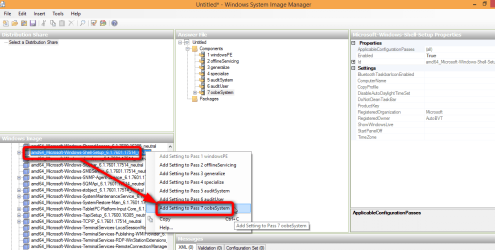
  • In Windows SIM (System Image Manager), right click component xxx_Microsoft-Windows-Shell-Setup_z.z.zzzz.zzzzz_neutral adding it to Pass 7 OobeSystem (xxx = x86 or amd64, z.z.zzzz.zzzzz = Windows build, depending on Windows image you are using):

    2015-01-13_00h46_53.png
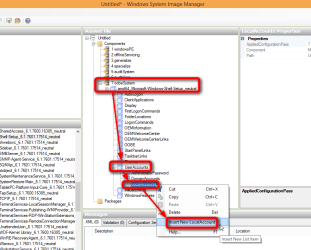
  • Expand it under Pass 7 OobeSystem in Answer File pane in the middle and you'll find UserAccounts item
  • Expand UserAccounts, right click LocalAccounts, select Insert New LocalAccount:

    2015-01-13_00h47_56.png
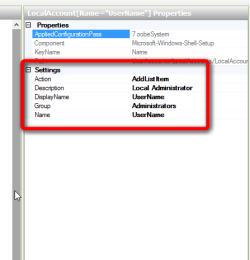
  • Add the user by filling / selecting the details in Properties in respective input fields:
    • Action > AddListItem
    • Description > Local Administrator (or any description you'd prefer)
    • DisplayName > UserName (what name you'd like to be displayed for this user)
    • Group > Administrators (must be existing Windows user group like Administrators, Users and so on)
    • Name > UserName (name of the user profile & profile folder)
    2015-01-13_00h50_13.png
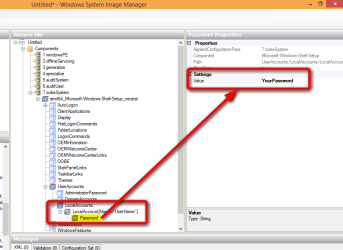
  • Expand the item LocalAccount[name=[COLOR="Blue"]"UserName"[/COLOR]], click item Password
  • In input field Value, enter your preferred password for this account:

    2015-01-13_00h50_57.png
That's it. More information on Microsoft TechNet: UserAccounts

Kari
 
Last edited:

My Computer

Computer type
Laptop
Computer Manufacturer/Model Number
HP ENVY 17-1150eg
OS
Windows 10 Pro x64 EN-GB
CPU
1.6 GHz Intel Core i7-720QM Processor
Memory
6 GB
Graphics Card(s)
ATI Mobility Radeon HD 5850 Graphics
Sound Card
Beats sound system with integrated subwoofer
Monitor(s) Displays
17" laptop display, 22" LED and 32" Full HD TV through HDMI
Screen Resolution
1600*900 (1), 1920*1080 (2&3)
Hard Drives
Internal: 2 x 500 GB SATA Hard Disk Drive 7200 rpm
External: 2TB for backups, 3TB USB3 network drive for media
Cooling
As Envy runs a bit warm, I have it on a Cooler Master pad
Keyboard
Logitech diNovo Media Desktop Laser (bluetooth)
Mouse
Logitech Performance Mouse MX
Internet Speed
50/10 Mbps VDSL
Antivirus
Windows Defender 4.3.9431.0
Browser
Maxthon 3.5.2., IE11
Thanks Kari! Just one more question, is that all that needs to be done for Windows 7 to not ask for User setup during initial installation?
 

My Computer

Computer type
PC/Desktop
Computer Manufacturer/Model Number
Dell Optiplex 740
OS
Windows 8.1 Enterprise x64
CPU
AMD Atholon 64 X2 Dual Core Processor 5600+
Motherboard
Dell
Memory
8 GB
Graphics Card(s)
ATI FirePro 2450
Hard Drives
M4-CT128 M4SSD2 SCSI
Antivirus
Vipre
Browser
IE; Firefox; Chrome
Yes.

You can create as many users as you want to following the instructions in my previous post. If the passwords are also given in answer file, they will by default (default value for variable <PlainText> is FALSE) be encrypted so even if the answer file remains with the deployed image, the passwords cannot be found out. Here's an extract from an answer file created according to instructions in my previous post, notice the encrypted password:

PHP:
<UserAccounts>
                <LocalAccounts>
                    <LocalAccount wcm:action="add">
                        <Password>
                            <Value>VABpAHQAeQBzAG8AZgB0ADEAUABhAHMAcwB3AG8AcgBkAA==</Value>
                            <PlainText>false</PlainText>
                        </Password>
                        <Description>Main user</Description>
                        <DisplayName>An Angry Old Man</DisplayName>
                        <Group>Administrators</Group>
                        <Name>Kari</Name>
                    </LocalAccount>
                </LocalAccounts>
            </UserAccounts>
More about Sysprep and Answer Files, see these two Seven Forums tutorials:

Kari
 

My Computer

Computer type
Laptop
Computer Manufacturer/Model Number
HP ENVY 17-1150eg
OS
Windows 10 Pro x64 EN-GB
CPU
1.6 GHz Intel Core i7-720QM Processor
Memory
6 GB
Graphics Card(s)
ATI Mobility Radeon HD 5850 Graphics
Sound Card
Beats sound system with integrated subwoofer
Monitor(s) Displays
17" laptop display, 22" LED and 32" Full HD TV through HDMI
Screen Resolution
1600*900 (1), 1920*1080 (2&3)
Hard Drives
Internal: 2 x 500 GB SATA Hard Disk Drive 7200 rpm
External: 2TB for backups, 3TB USB3 network drive for media
Cooling
As Envy runs a bit warm, I have it on a Cooler Master pad
Keyboard
Logitech diNovo Media Desktop Laser (bluetooth)
Mouse
Logitech Performance Mouse MX
Internet Speed
50/10 Mbps VDSL
Antivirus
Windows Defender 4.3.9431.0
Browser
Maxthon 3.5.2., IE11
Below is what i have in my Answer file for Windows 7 Enterprise x64 unattend installation

My goal was to;

Enable Hidden Administrator Account
Auto-activate Windows 7 Enterprise x64
Set the language and input locale settings for the system and the user to "en-us"
Set Registered Organization\Owner Information
Set Timezone to "Central Standard Time"
Bypass or automatic acceptance of End User License Agreement
Only ask for "Computer Name" during initial start-up/setup.


Does the below Answer file fulfill my objective? Should i do something different?

Obviously, I have removed my Product Key and Passwords for security reasons.


Code:
<?xml version="1.0" encoding="utf-8"?>
<unattend xmlns="urn:schemas-microsoft-com:unattend">
    <settings pass="generalize">
        <component name="Microsoft-Windows-Security-SPP" processorArchitecture="amd64" publicKeyToken="31bf3856ad364e35" language="neutral" versionScope="nonSxS" xmlns:wcm="http://schemas.microsoft.com/WMIConfig/2002/State" xmlns:xsi="http://www.w3.org/2001/XMLSchema-instance">
            <SkipRearm>1</SkipRearm>
        </component>
    </settings>
    <settings pass="specialize">
        <component name="Microsoft-Windows-Deployment" processorArchitecture="amd64" publicKeyToken="31bf3856ad364e35" language="neutral" versionScope="nonSxS" xmlns:wcm="http://schemas.microsoft.com/WMIConfig/2002/State" xmlns:xsi="http://www.w3.org/2001/XMLSchema-instance">
            <RunSynchronous>
                <RunSynchronousCommand wcm:action="add">
                    <Order>1</Order>
                    <Path>net user administrator /active:yes</Path>
                    <Description>Enable Hidden Administrator Account</Description>
                </RunSynchronousCommand>
            </RunSynchronous>
        </component>
        <component name="Microsoft-Windows-Shell-Setup" processorArchitecture="amd64" publicKeyToken="31bf3856ad364e35" language="neutral" versionScope="nonSxS" xmlns:wcm="http://schemas.microsoft.com/WMIConfig/2002/State" xmlns:xsi="http://www.w3.org/2001/XMLSchema-instance">
            <CopyProfile>true</CopyProfile>
            <ShowWindowsLive>false</ShowWindowsLive>
            <TimeZone>Central Standard Time</TimeZone>
        </component>
    </settings>
    <settings pass="oobeSystem">
        <component name="Microsoft-Windows-International-Core" processorArchitecture="amd64" publicKeyToken="31bf3856ad364e35" language="neutral" versionScope="nonSxS" xmlns:wcm="http://schemas.microsoft.com/WMIConfig/2002/State" xmlns:xsi="http://www.w3.org/2001/XMLSchema-instance">
            <InputLocale>en-us</InputLocale>
            <SystemLocale>en-us</SystemLocale>
            <UILanguage>en-us</UILanguage>
            <UserLocale>en-us</UserLocale>
        </component>
        <component name="Microsoft-Windows-Shell-Setup" processorArchitecture="amd64" publicKeyToken="31bf3856ad364e35" language="neutral" versionScope="nonSxS" xmlns:wcm="http://schemas.microsoft.com/WMIConfig/2002/State" xmlns:xsi="http://www.w3.org/2001/XMLSchema-instance">
            <AutoLogon>
                <Enabled>true</Enabled>
                <LogonCount>5</LogonCount>
            </AutoLogon>
            <FirstLogonCommands>
                <SynchronousCommand wcm:action="add">
                    <Order>1</Order>
                    <CommandLine>cscript //b c:\windows\system32\slmgr.vbs /ipk XXXXX-XXXXX-XXXXX-XXXXX-XXXXX</CommandLine>
                    <RequiresUserInput>false</RequiresUserInput>
                    <Description>Set Product Key</Description>
                </SynchronousCommand>
                <SynchronousCommand wcm:action="add">
                    <Order>2</Order>
                    <CommandLine>cscript //b c:\windows\system32\slmgr.vbs /ato</CommandLine>
                    <Description>Online Activation</Description>
                    <RequiresUserInput>false</RequiresUserInput>
                </SynchronousCommand>
            </FirstLogonCommands>
            <OOBE>
                <NetworkLocation>Other</NetworkLocation>
                <HideEULAPage>true</HideEULAPage>
                <ProtectYourPC>1</ProtectYourPC>
            </OOBE>
            <UserAccounts>
                <AdministratorPassword>
                    <Value>XXXXXXXXXXXXX</Value>
                    <PlainText>false</PlainText>
                </AdministratorPassword>
                <LocalAccounts>
                    <LocalAccount wcm:action="add">
                        <Password>
                            <Value>XXXXXXXXXXXXX</Value>
                            <PlainText>false</PlainText>
                        </Password>
                        <Description>Temporary Local Administrator Account</Description>
                        <Group>Administrators </Group>
                        <DisplayName>Temporary Administrator</DisplayName>
                        <Name>TempAdmin</Name>
                    </LocalAccount>
                </LocalAccounts>
            </UserAccounts>
            <RegisteredOrganization>XXXXXX Organization</RegisteredOrganization>
            <RegisteredOwner>XXXXXX Owner</RegisteredOwner>
        </component>
    </settings>
    <cpi:offlineImage cpi:source="wim:c:/sysprep/win7/install.wim#Windows 7 ENTERPRISE" xmlns:cpi="urn:schemas-microsoft-com:cpi" />
</unattend>
 

My Computer

Computer type
PC/Desktop
Computer Manufacturer/Model Number
Dell Optiplex 740
OS
Windows 8.1 Enterprise x64
CPU
AMD Atholon 64 X2 Dual Core Processor 5600+
Motherboard
Dell
Memory
8 GB
Graphics Card(s)
ATI FirePro 2450
Hard Drives
M4-CT128 M4SSD2 SCSI
Antivirus
Vipre
Browser
IE; Firefox; Chrome
A quick read through reveals no errors, also the answer file validates OK. I cannot see any issues.
 

My Computer

Computer type
Laptop
Computer Manufacturer/Model Number
HP ENVY 17-1150eg
OS
Windows 10 Pro x64 EN-GB
CPU
1.6 GHz Intel Core i7-720QM Processor
Memory
6 GB
Graphics Card(s)
ATI Mobility Radeon HD 5850 Graphics
Sound Card
Beats sound system with integrated subwoofer
Monitor(s) Displays
17" laptop display, 22" LED and 32" Full HD TV through HDMI
Screen Resolution
1600*900 (1), 1920*1080 (2&3)
Hard Drives
Internal: 2 x 500 GB SATA Hard Disk Drive 7200 rpm
External: 2TB for backups, 3TB USB3 network drive for media
Cooling
As Envy runs a bit warm, I have it on a Cooler Master pad
Keyboard
Logitech diNovo Media Desktop Laser (bluetooth)
Mouse
Logitech Performance Mouse MX
Internet Speed
50/10 Mbps VDSL
Antivirus
Windows Defender 4.3.9431.0
Browser
Maxthon 3.5.2., IE11
Back
Top