Windows 7 System restore problem no restore points

cjacktenenbaum

New member
Local time
3:03 AM
Messages
5
I have seen numerous people are having this problem but I have not been able to find a solution that works for me. I figured I would post my own problem and maybe somebody could recommend a solution.

I have been trying to use Windows System Restore on Windows 7 Home Premium. I have created several restore points on my own but when I restart and run the program, it says I have no restore points available. I have 40 gb allocated for restore points and have used less than 10 percent of my hard drive space.

does anybody know of any good process to follow that will fix this issue and make System Restore usable.

Thanks a lot.
 

My Computer

OS
Windows 7 Home Premium
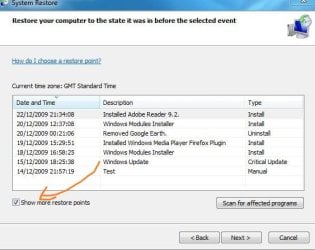
Have you tried ticking show more restore points?
 

Attachments

  • Capture.JPG
    Capture.JPG
    41.3 KB · Views: 1,337

My Computer

OS
Windows 7 Ultimate x86 SP1
I have seen numerous people are having this problem but I have not been able to find a solution that works for me. I figured I would post my own problem and maybe somebody could recommend a solution.

I have been trying to use Windows System Restore on Windows 7 Home Premium. I have created several restore points on my own but when I restart and run the program, it says I have no restore points available. I have 40 gb allocated for restore points and have used less than 10 percent of my hard drive space.

does anybody know of any good process to follow that will fix this issue and make System Restore usable.

Thanks a lot.

Go to computer icon, then check how much space is actually available to make restrore points. That drive is also for system image and back up and restore.
 

My Computer

Computer type
PC/Desktop
Computer Manufacturer/Model Number
Dell XPS 420
OS
Windows 10, Home Clean Install
CPU
Intel Core2 processsor Q8200(2.33Ghz 1333FSB) Quad Core Tech
Motherboard
Dell
Memory
6 gb
Graphics Card(s)
ATI Radeon 256MB HD3650
Sound Card
Intergrated 7.1 Channel Audio
Monitor(s) Displays
Dell SP2009W 20"
Hard Drives
640 GB Serial ATA Hard drive
Cooling
Fan
Keyboard
Dell USB Keyboard
Mouse
Dell Premium Optical USB
Internet Speed
DSL 2.85
Hi, Welcome to SF,

You could try few steps

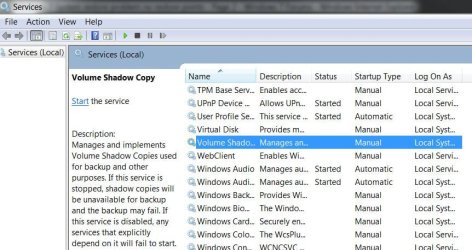
1) Type Services in Start Menu Search Box, hit Enter. Make sure that the Volume Shadow Copy Service is Running and set on Automatic. If the Status of System Restore Service is not Started, Start it. Also set it on Automatic if it is not. A reboot may be required. Reconfirm again, and now try.

2) Type eventvwr.msc /s in Start Menu Search Box & hit Enter to open the Event Viewer. Double-click on Applications & Services Logs and see if you are able to evaluate the event description or the cause of problem.

3) Reset the Repository.
Boot into Safe Mode without networking and open a command prompt as administrator.
Now Type net stop winmgmt and hit Enter. This will stop the Windows Management Instrumentation Service
Next go to C:\Windows\System32\wbem and rename the repository folder to repositoryold
Restart.
Now again open a command prompt as administrator, type net stop winmgmt and hit Enter.
Next Type winmgmt /resetRepository and hit Enter.
Restart.
Now see if you can create a System Restore Point manually.

Hope some of this helps.
 

My Computer

Computer Manufacturer/Model Number
Samsung NP550P5C-S02IN
OS
Windows 7 Ultimate - 64-bit | Windows 8 Pro - 64-bit
CPU
Intel® Core™ i7 Processor 3,610QM (2.30Hz, 6MB L3 Cach
Memory
8 GB
Graphics Card(s)
NVIDIA® GeForce® GT 650M 2GB Graphics, Optimus™ techno
Sound Card
SoundAlive™ JBL 3 Speakers (With sub-Woofer)
Monitor(s) Displays
39.62cm (15.6) SuperBright 300nit HD+ LED Display
Screen Resolution
1,600 x 900, Anti-Reflective
Hard Drives
1TB S-ATA II Hard Drive (5,400RPM)
If you've got a dual boot system with an earlier version of windows
(Microsoft Windows XP or Microsoft Windows Server 2003) then each time you start the computer by using the earlier operating system, all the restore points that were created in Windows 7 are deleted. In this case try this:
System Restore Points - Stop XP Dual Boot Delete
 

My Computer

Computer Manufacturer/Model Number
ACER 5739G
OS
Win7 & WinXP
CPU
Intel Core 2 Duo P7450
Graphics Card(s)
Nvidia GeForce GT240M
Hi, Welcome to SF,

You could try few steps

1) Type Services in Start Menu Search Box, hit Enter. Make sure that the Volume Shadow Copy Service is Running and set on Automatic. If the Status of System Restore Service is not Started, Start it. Also set it on Automatic if it is not. A reboot may be required. Reconfirm again, and now try.

2) Type eventvwr.msc /s in Start Menu Search Box & hit Enter to open the Event Viewer. Double-click on Applications & Services Logs and see if you are able to evaluate the event description or the cause of problem.

3) Reset the Repository.
Boot into Safe Mode without networking and open a command prompt as administrator.
Now Type net stop winmgmt and hit Enter. This will stop the Windows Management Instrumentation Service
Next go to C:\Windows\System32\wbem and rename the repository folder to repositoryold
Restart.
Now again open a command prompt as administrator, type net stop winmgmt and hit Enter.
Next Type winmgmt /resetRepository and hit Enter.
Restart.
Now see if you can create a System Restore Point manually.

Hope some of this helps.

Ran through these steps. restarted in normal mode and created a restore point. Disk usage showed the creation was successful. restarted the computer and checked the restore points. The point was gone and the disk usage was zero again. I am not dual booting so I dont know that that is the problem

Any suggestions? thanks for the help from everyone on this
 

My Computer

OS
Windows 7 Home Premium
Ran through these steps. restarted in normal mode and created a restore point. Disk usage showed the creation was successful. restarted the computer and checked the restore points. The point was gone and the disk usage was zero again. I am not dual booting so I dont know that that is the problem

Any suggestions? thanks for the help from everyone on this

Anything specific in Event viewer ??
 

My Computer

Computer Manufacturer/Model Number
Samsung NP550P5C-S02IN
OS
Windows 7 Ultimate - 64-bit | Windows 8 Pro - 64-bit
CPU
Intel® Core™ i7 Processor 3,610QM (2.30Hz, 6MB L3 Cach
Memory
8 GB
Graphics Card(s)
NVIDIA® GeForce® GT 650M 2GB Graphics, Optimus™ techno
Sound Card
SoundAlive™ JBL 3 Speakers (With sub-Woofer)
Monitor(s) Displays
39.62cm (15.6) SuperBright 300nit HD+ LED Display
Screen Resolution
1,600 x 900, Anti-Reflective
Hard Drives
1TB S-ATA II Hard Drive (5,400RPM)
Ran through these steps. restarted in normal mode and created a restore point. Disk usage showed the creation was successful. restarted the computer and checked the restore points. The point was gone and the disk usage was zero again. I am not dual booting so I dont know that that is the problem

Any suggestions? thanks for the help from everyone on this

Anything specific in Event viewer ??


The only thing I saw in the event viewer that appeared to be related was "Microsoft Windows Recovery/Operational
 

My Computer

OS
Windows 7 Home Premium
Ran through these steps. restarted in normal mode and created a restore point. Disk usage showed the creation was successful. restarted the computer and checked the restore points. The point was gone and the disk usage was zero again. I am not dual booting so I dont know that that is the problem

Any suggestions? thanks for the help from everyone on this

Anything specific in Event viewer ??


The only thing I saw in the event viewer that appeared to be related was "Microsoft Windows Recovery/Operational

you know we are all guessing at this point. Are all drives formatted NTFS?
 

My Computer

Computer type
PC/Desktop
Computer Manufacturer/Model Number
Dell XPS 420
OS
Windows 10, Home Clean Install
CPU
Intel Core2 processsor Q8200(2.33Ghz 1333FSB) Quad Core Tech
Motherboard
Dell
Memory
6 gb
Graphics Card(s)
ATI Radeon 256MB HD3650
Sound Card
Intergrated 7.1 Channel Audio
Monitor(s) Displays
Dell SP2009W 20"
Hard Drives
640 GB Serial ATA Hard drive
Cooling
Fan
Keyboard
Dell USB Keyboard
Mouse
Dell Premium Optical USB
Internet Speed
DSL 2.85
You can try go to Command Prompt and Run sfc /scannow

Start > cmd > Right click cmd and Run as administrator then try sfc /scannow
It will help in repairing corrupt system files
 

My Computer

Computer Manufacturer/Model Number
Samsung NP550P5C-S02IN
OS
Windows 7 Ultimate - 64-bit | Windows 8 Pro - 64-bit
CPU
Intel® Core™ i7 Processor 3,610QM (2.30Hz, 6MB L3 Cach
Memory
8 GB
Graphics Card(s)
NVIDIA® GeForce® GT 650M 2GB Graphics, Optimus™ techno
Sound Card
SoundAlive™ JBL 3 Speakers (With sub-Woofer)
Monitor(s) Displays
39.62cm (15.6) SuperBright 300nit HD+ LED Display
Screen Resolution
1,600 x 900, Anti-Reflective
Hard Drives
1TB S-ATA II Hard Drive (5,400RPM)

My Computer

Computer Manufacturer/Model Number
Samsung NP550P5C-S02IN
OS
Windows 7 Ultimate - 64-bit | Windows 8 Pro - 64-bit
CPU
Intel® Core™ i7 Processor 3,610QM (2.30Hz, 6MB L3 Cach
Memory
8 GB
Graphics Card(s)
NVIDIA® GeForce® GT 650M 2GB Graphics, Optimus™ techno
Sound Card
SoundAlive™ JBL 3 Speakers (With sub-Woofer)
Monitor(s) Displays
39.62cm (15.6) SuperBright 300nit HD+ LED Display
Screen Resolution
1,600 x 900, Anti-Reflective
Hard Drives
1TB S-ATA II Hard Drive (5,400RPM)
Ran the scan no integrity violations were found. Both drives are NFTS formatted. I am hoping microsoft addresses this problem soon as it seems to be pretty prevalent
 

My Computer

OS
Windows 7 Home Premium
Ran the scan no integrity violations were found. Both drives are NFTS formatted. I am hoping microsoft addresses this problem soon as it seems to be pretty prevalent

I really think that this might be the answer and if it is, its very simple. Turn SR off Then Turn it on again. I am fairly sure that it will work. Just go to help and support for informtion on how to turn off. I just recalled that I gave this information to another and it worked. To give it the best chance of working, shut off computer with SR off, then boot up and turn it on. Come back and tell me that it worked so that we both will feel great for Christmas.
 

My Computer

Computer type
PC/Desktop
Computer Manufacturer/Model Number
Dell XPS 420
OS
Windows 10, Home Clean Install
CPU
Intel Core2 processsor Q8200(2.33Ghz 1333FSB) Quad Core Tech
Motherboard
Dell
Memory
6 gb
Graphics Card(s)
ATI Radeon 256MB HD3650
Sound Card
Intergrated 7.1 Channel Audio
Monitor(s) Displays
Dell SP2009W 20"
Hard Drives
640 GB Serial ATA Hard drive
Cooling
Fan
Keyboard
Dell USB Keyboard
Mouse
Dell Premium Optical USB
Internet Speed
DSL 2.85
Ran the scan no integrity violations were found. Both drives are NFTS formatted. I am hoping microsoft addresses this problem soon as it seems to be pretty prevalent

I really think that this might be the answer and if it is, its very simple. Turn SR off Then Turn it on again. I am fairly sure that it will work. Just go to help and support for informtion on how to turn off. I just recalled that I gave this information to another and it worked. To give it the best chance of working, shut off computer with SR off, then boot up and turn it on. Come back and tell me that it worked so that we both will feel great for Christmas.


Been a couple days since I have been able to get on here. I hope everyone had a good Holiday. I tried turning off SR, restarting, and turning it back on. Unfortunately no luck. Really scratching my head on this one as I did a clean windows 7 installation and I have used none of my memory yet as I wanted to resolve this issue first.

If there are any other suggestions out there I would appreciate them. Thanks for all the help from everyone.
 

My Computer

OS
Windows 7 Home Premium
I have been looking into using System Restore to help me around the problems I have been having with my Spooler which I cannot seem to restart.

I have looked at the list of restore points and the only ones I can see are two recent ones from a Java update. It is apparent that somehow the System Restore tool got switched off and as a result all of my restore points have been deleted. I don't know how that happened as i would have a clue how to do it and what's more, with it now showing a couple of restore points, I don't know how it switched back on!

So how can I turn the clock back on my computer to before I had these Spooler problems?

If I had known how important it was to create these points I would have been a bit more diligent.
 

My Computer

Computer Manufacturer/Model Number
Dell Inspiron 1564
OS
Windows 7 Home Premium OEM
CPU
Intel i5
Memory
4GB
Graphics Card(s)
ATI Mobility Radion HD 4330
Hard Drives
500GB
I have been looking into using System Restore to help me around the problems I have been having with my Spooler which I cannot seem to restart.

I have looked at the list of restore points and the only ones I can see are two recent ones from a Java update. It is apparent that somehow the System Restore tool got switched off and as a result all of my restore points have been deleted. I don't know how that happened as i would have a clue how to do it and what's more, with it now showing a couple of restore points, I don't know how it switched back on!

So how can I turn the clock back on my computer to before I had these Spooler problems?

If I had known how important it was to create these points I would have been a bit more diligent.
If the restore points are gone, there is no way to retrieve them. :(

I suggest keeping an eye on your restore points. Make sure one is created each day. You can manually create a restore point if you need to.
 

My Computer

Computer Manufacturer/Model Number
Custom
OS
Windows 7 Professional x64
CPU
Intel i7 2600K OC'd @ 4620 MHz
Motherboard
Asus P8Z68-V Pro
Memory
16GB GSkill Sniper 2133 Mhz (4x4GB)
Graphics Card(s)
EVGA GeForce GTX 480 SuperClocked+
Sound Card
Realtek High Definition Audio
Monitor(s) Displays
2x Acer S273HLbmii 27"
Screen Resolution
2 x 1920x1080
Hard Drives
64GB Crucial M4 SSD

Storage: Hitachi 1TB 5400RPM, Samsung 1.5TB 5400RPM
PSU
Corsair HW Series 750w (modular)
Case
Cooler Master HAF 932 Advanced Blue Edition
Cooling
CM Hyper 212+ CPU cooler, 3x 230mm + 1x 140mm case fans
Keyboard
Logitech MK320 (wireless)
Mouse
Logitech MK320 (wireless)
Internet Speed
30 Mb/s : 2 Mb/s
I am a basic member an one of my notebooks has windows 7 Home Premium. When I try to create a system restore point..I can not create a restore point. The message says : The restore point can not be created for the following reasons..The specified object was not found (Ox80042308). Please try again.

Kindly help me.
Thanks.
 

My Computer

Computer Manufacturer/Model Number
Hp Pavilion
OS
windows 7 Home Premium (32 bit)
CPU
Intel Core @ Duo T6500 2.10GHz-2.10GHz
Memory
4GB
Hard Drives
320GB
Hello leonbakhan.


In the Windows start search box type " services " and have a look at this.


click to enlarge
Vol.JPG
 

My Computer

Computer Manufacturer/Model Number
* BFK Customs *
OS
W 7 64-bit Ultimate
CPU
Intel Q9550 Yorkfield
Motherboard
ASUS P5Q Pro
Memory
8GB Dominator 8500C5D
Graphics Card(s)
ATI : XFX 5870
Sound Card
Realtek HD Audio 7-1
Monitor(s) Displays
1x 47" LCD HDMI & 3x 26" LCD HDMI
Screen Resolution
1920x1080P & 1920x1200
Hard Drives
1x 80GB Intel X25-M G2 SSD : 1x 500GB & 1x 640GB WD Caviar Black(s)
PSU
Corsair 620HX
Case
Cooler Master RC-690
Cooling
Tuniq Tower 120, 2x 140mm and 3x 120mm case fans
Keyboard
Microsoft 500
Mouse
Razer Diamondback 3G
Internet Speed
14 Mb/s
Other Info
1x Koutech 3Gb/s SATA HDD Hot Swap Rack
I don't know if this will have any effect on this problem but if you have Norton AV or NIS you have to go into settings Miscellaneous and uncheck tamper protection or it will mess up your system restore. Got that from the Norton Forum.
 

My Computer

Computer type
PC/Desktop
Computer Manufacturer/Model Number
HP Pavilion Elite d5200t ATX PC
OS
Windows 7 Professional SP1 64 bit
CPU
Intel(R)Core(TM)2Quad procQ9550(2.83GHZ)
Motherboard
Pegatron
Memory
8 GB
Graphics Card(s)
768MB NVIDIA GEFORCE GT610
Sound Card
Creative Sound Blaster X-Fi Xtreme
Monitor(s) Displays
Samsung S24D300
Screen Resolution
1440x900
Hard Drives
640GB 7200RPM Sata 3Gb/s
PSU
HP
Case
HP
Cooling
2 Fans
Keyboard
Microsoft Internet Keyboard
Mouse
MicroSoft IntelliMouse Optical
Internet Speed
Cox Cable
Antivirus
Norton
Browser
FireFox
Help needed here too..

I have a similar problem, only thing is that my newest restore points get deleted and only the initial restore point which was created after installation and back up remains. The restore points are created automatically as well as manually and they remain there for a couple of days and then they disappear except the initial one.
My OS is win 7 home premium
intel core 2 duo with 4GB ram
about 40 GB is allocated for the restore point storage.
My anti-virus is nortan 360 premium 4.
I did sfc/scannow and there is no problem with the os.
Kindly help.
 

My Computer

Computer Manufacturer/Model Number
Hp Pavilion
OS
windows 7 Home Premium (32 bit)
CPU
Intel Core @ Duo T6500 2.10GHz-2.10GHz
Memory
4GB
Hard Drives
320GB
Back
Top