Windows 7 theme not changing

graphomet

New member
Member
VIP
Local time
10:29 AM
Messages
100
Hello to the forum.

recently I removed from my pc a program called tune up utilities.
and ever since,I cant personalise my themes. The only thing changing is the background
picture,but the task bar remains the same as well as the dialogue boxes, all looking ugly and blocky. this is how it use to be a before and after so i can give a clear understanding.

u27.jpg
[/IMG]
 

My Computer

Computer type
PC/Desktop
Computer Manufacturer/Model Number
Custom build
OS
windows 7 home premium 64bit
CPU
AMD Phenom(tm) II X4 955 Processor
Motherboard
ASRock M3A790GXH/128M
Memory
8.00 GB
Graphics Card(s)
NVIDIA GeForce GTX 650 Ti
Sound Card
(1) High Definition Audio Device (2) USB Audio Device (3
Antivirus
Avast Free
Browser
Chrome
1st
Do Option 2 of this tutorial http://www.sevenforums.com/tutorials/1538-sfc-scannow-command-system-file-checker.html it will not harm any data or programs you have installed it will try to find and repair any corrupt system files that you have.

2nd
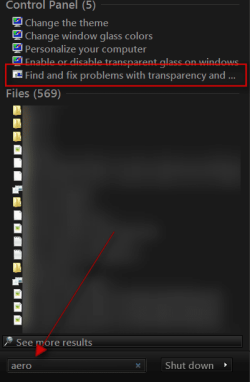
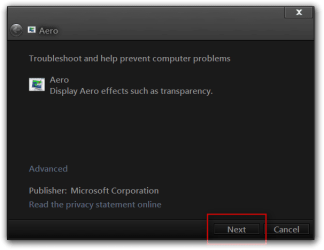
Click on start button in the search box type Aero and look for Find and fix problems with transparency and check for problems.
s.pngAero.png

3rd
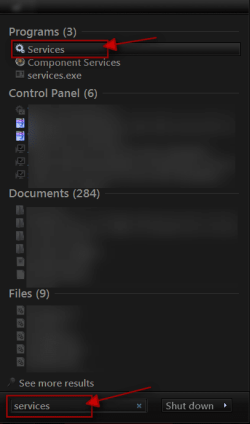
Click on the Start Button type in Services In the search box and then click on Services
1.png

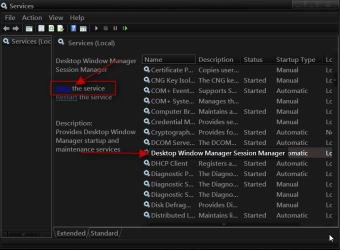
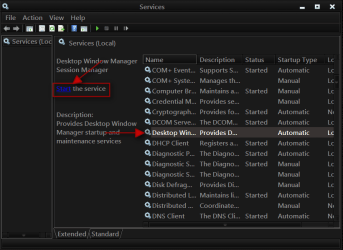
Scroll down until you see Desktop Windows Manager Sessions Manager select it in click on the Stop text and let it stop after that click on Start text and see if that works. Your screen may blink when you do this.
2.png3.png

Jerry

PS don't use tuneup utilities again
 

My Computer

Computer type
Laptop
Computer Manufacturer/Model Number
Sager NP9170
OS
Win 7 Pro x64 / Win 10 Pro
CPU
Intel(R) Core(TM) i7-3630QM CPU @ 2.40GHz
Motherboard
CLEVO P170EM
Memory
12 GB
Graphics Card(s)
(1) Intel(R) HD Graphics 4000 (2) NVIDIA GeForce GTX 675M
Sound Card
(1) Realtek High Definition Audio (2) Intel(R) Display Aud
Monitor(s) Displays
17.3
Screen Resolution
1920x1080
Hard Drives
(1) Samsung 860 EVO 500GB(OS) (1) Samsung 860 EVO 500GB(Data)
Keyboard
Backlite
Antivirus
MSE, Malwarebytes Pro
Browser
Firefox
Other Info
DESKTOP: Custom-built.
OS: Win 10 Pro x64.
CASE: Rosewill R5.
CPU: Intel I5 4670K CPU @ 3.40GHz.
CPU COOLER: Cool Master Hyper 212 EVO.
MOTHERBOARD: Asus Z87-A.
MEMORY: Kingston HyperX 2x4 GB.
GPU: Nvidia Geforce 650 TI.
PSU: Corsair TX750.
DRIVES: (1) Samsung 840 120 GB SSD (2) Western Digital blue 500 GB 7200 RPM.
Hello to the forum.

recently I removed from my pc a program called tune up utilities.
and ever since,I cant personalise my themes. The only thing changing is the background
picture,but the task bar remains the same as well as the dialogue boxes, all looking ugly and blocky. this is how it use to be a before and after so i can give a clear understanding.

u27.jpg
[/IMG]

You may be suffering from an incomplete uninstall. Try the following link for more details;

How to Uninstall TuneUp Utilities 2012 - YouTube
 

My Computer

Computer type
PC/Desktop
Computer Manufacturer/Model Number
Custom Built
OS
Windows 7 Professional x64
CPU
Intel i5 quad processor
Motherboard
DP67BG
Memory
16 GB
Graphics Card(s)
Radeon HD 5770
Sound Card
Realtek High Definition Audio
Monitor(s) Displays
Samsung SyncMaster
Screen Resolution
1920X1080
Hard Drives
WD 2TB (SATA Internal)
WD 1TB (USB External)
PSU
Corsair GS800
Case
Tower (Generic)
Cooling
3 Internal Fans
Keyboard
MS Wireless
Mouse
MS Optical Wired
Internet Speed
54 mbps
Antivirus
Emsisoft
Browser
IE-Version 9, Palemoon-Version 24.2.0
1st
Do Option 2 of this tutorial http://www.sevenforums.com/tutorials/1538-sfc-scannow-command-system-file-checker.html it will not harm any data or programs you have installed it will try to find and repair any corrupt system files that you have.

2nd
Click on start button in the search box type Aero and look for Find and fix problems with transparency and check for problems.
View attachment 239622View attachment 239623

3rd
Click on the Start Button type in Services In the search box and then click on Services
View attachment 239624

Scroll down until you see Desktop Windows Manager Sessions Manager select it in click on the Stop text and let it stop after that click on Start text and see if that works. Your screen may blink when you do this.
View attachment 239625View attachment 239626

Jerry

PS don't use tuneup utilities again
thats a very nice theme, can you please tell me what it is?

ontopic: maybe you need to reinstall tuneup and put it back to normal windows theme then uninstall again and it will probably work!
 

My Computer

OS
Windows 7 Ultimate x64

My Computer

Computer type
Laptop
Computer Manufacturer/Model Number
Sager NP9170
OS
Win 7 Pro x64 / Win 10 Pro
CPU
Intel(R) Core(TM) i7-3630QM CPU @ 2.40GHz
Motherboard
CLEVO P170EM
Memory
12 GB
Graphics Card(s)
(1) Intel(R) HD Graphics 4000 (2) NVIDIA GeForce GTX 675M
Sound Card
(1) Realtek High Definition Audio (2) Intel(R) Display Aud
Monitor(s) Displays
17.3
Screen Resolution
1920x1080
Hard Drives
(1) Samsung 860 EVO 500GB(OS) (1) Samsung 860 EVO 500GB(Data)
Keyboard
Backlite
Antivirus
MSE, Malwarebytes Pro
Browser
Firefox
Other Info
DESKTOP: Custom-built.
OS: Win 10 Pro x64.
CASE: Rosewill R5.
CPU: Intel I5 4670K CPU @ 3.40GHz.
CPU COOLER: Cool Master Hyper 212 EVO.
MOTHERBOARD: Asus Z87-A.
MEMORY: Kingston HyperX 2x4 GB.
GPU: Nvidia Geforce 650 TI.
PSU: Corsair TX750.
DRIVES: (1) Samsung 840 120 GB SSD (2) Western Digital blue 500 GB 7200 RPM.
Back
Top