Solved Windows 7 UEFI install motherboard ASUS Sabertooth Z170 Mark 1

registus

New member
Local time
7:27 PM
Messages
9
Hi all,

I have new mobo Asus Sabertooth Z170 Mark 1. I want to install Windows 7 Home in UEFI mode, but I'm still not successful.
Bios settings - SATA Mode Selection - Raid - 2 SSD disks set up in Intel RST as Raid 1
Newest Bios update from 7.1.2016
Boot settings:
Launch CSM - Enabled
Device Control - UEFI and Legacy OPROM (UEFI only can be chosen as well, but without any changes)
Boot from Storage Devices - UEFI driver first

Secure Boot:
OS Type - Windows UEFI mode

When I boot in UEFI mode I get to Win install through language settings, then Install and then it get stuck with message:

"A required CD/DVD drive device driver is missing. If you have a driver floppy disk, CD, DVD, or USB fhlash drive, please insert it now.

Note: If the Windows installation media is in the CD/DVD drive, you can safely remove it for this step."

I use original OEM DVD Win 7 Home 64-bit that is surely good as when I boot in Legacy mode everything goes well and when I change SATA mode selection to AHCI instead of RAID and UEFI is enabled it goes well, too.
When I also tried Win 8.1 in UEFI mode everything went well and system was installed correctly.

But I want RAID, UEFI, Windows 7. Probably I need to get RAID drivers into Windows 7 install, but have actually no clue how to do it.

As I was not successful with DVD (I expect the home edition is not suitable for install in UEFI mode, but I was not successful with Pro version either and that version contains efi/boot directori with bootx64.efi file) I did a USB flash drive from that DVD and also created UEFI bootable USB (e.g. as is written here - UEFI Bootable USB Flash Drive - Create in Windows)

I can boot from Flash drive, but it does the same, so I ended up with the message: "A required CD/DVD drive....."
I did't use USB 3, only USB 2 ports and more of them, but without any success.

As I mentioned, Bios is the newest, UEFI settings are probably correct (if it was not, Windows 8 will not be installed)

During the message "A required CD/DVD drive....." I have a possibility to pick something from Browse, but I only get this choice:
Computer
- BOOT ( X: )
- - Program Files
- - sources
- - Users
- - Windows

When I plug a Flash drive it is not recognized nor DVD. Firstly I thought I need RAID drivers or other drivers, but no Flash drive is able to choose in this step (that Flash drive can be seen in Bios, so the USB Flash drive is surely ok)

In Boot menu I choose "UEFI: USB Flash Drive" (before I chose UEFI: HL-DT-ST.. as DVD-ROM). Even if i choose only USB Flash Drive (without UEFI in Boot menu) the result is the same.

I also tried to download new image with built UEFI that is considered by other users as helpful, but the same result. Also tried original Windows 7 Pro OEM DVD (image written to USB flash drive) - the same issue and also tried external DVD drive - no success.

Any suggestions how to solve this? Will appreciate that.
 
Last edited:

My Computer My Computer

At a glance

Windows 7 64-bitCPU Intel Core i7-6700K (4.0GHz, 8M, LGA1151,...Kingston HyperX Savage 2x8GB 2400 MHz DDR4 CL...
Computer type
PC/Desktop
OS
Windows 7 64-bit
CPU
CPU Intel Core i7-6700K (4.0GHz, 8M, LGA1151, VGA)
Motherboard
ASUS SABERTOOTH Z170 MARK 1
Memory
Kingston HyperX Savage 2x8GB 2400 MHz DDR4 CL12 DIMM 1.35V
Hard Drives
2x Samsung SSD 2,5" 512GB 850 Pro SATA III RAID
2x WD Black, 3000GB, 3.5", 7.200RPM, SATA III, 64MB cache
PSU
Fortron AURUM S 600W 80PLUS GOLD
Case
CoolerMaster miditower series N400, ATX, USB3.0
Internet Speed
1 Gbps
Antivirus
Eset Smart Security
PM me if you want to talk, I`ll let you know how to get it done.

But, you can`t install Windows 7 through usb on a Z170

It is now a picnic to install Windows 7 on a Z170 using the 3.0 USB ports by setting up a usb installer using Asus`s EZ Installer program, but the Z170 has usb 2.0 ports, so no issue anyway.
 
Last edited:

My Computer My Computer

At a glance

Windows 10 Pro x64Intel Core i7 6700KGSkill TridentZ RGB 16GB 3600 16-16-16-36EVGA GTX 980 Ti SC x2
Computer type
PC/Desktop
Computer Manufacturer/Model Number
Skylake Special #666
OS
Windows 10 Pro x64
CPU
Intel Core i7 6700K
Motherboard
Asus Sabertooth Z170 Mark 1
Memory
GSkill TridentZ RGB 16GB 3600 16-16-16-36
Graphics Card(s)
EVGA GTX 980 Ti SC x2
Sound Card
Realtek High Definition
Monitor(s) Displays
AOC G2460PG
Screen Resolution
1920 x 1080 144Hz
Hard Drives
Samsung 860 Pro 256GB, Seagate Barracuda 4TB x2
PSU
EVGA 1000 P2, EVGA White Custom Braided Cables
Case
Corsair Vengeance C70 Gunmetal Black
Cooling
Corsair H100i v2, Corsair ML120 x2, Thermal Grizzly Kryonaut
Keyboard
Logitech G910 Orion Spectrum
Mouse
Logitech G700s
Internet Speed
Verizon Fios Quantum Gateway 75/75
Antivirus
Windows Defender, Malwarebytes Free 3.8.3
Browser
Chrome
Other Info
Corsair SP120 x4, LG Blu-ray Drive, Durabrand HT-395 100 Watt Dolby Digital Amp, Corsair H2100 Wireless 7.1 Headset
AddRAM

Thanks for posting, but I'm unable to send you PM and I don't have this possibility by default. Maybe the reason is that I'm new and administrator must enable this feature for me. Quite strange, but I can't help myself. Is there any way to contact you?


Meanwhile I tried to change Secure Boot to "Other OS", run the install process as UEFI, but no success - the same result.

I also tried Method 2 in this document: http://dlcdnet.asus.com/pub/ASUS/mb/LGA1151/Z170-K/DE164_100_Series_Windows_7_Setup_Guide_print.pdf No success again.
 
Last edited:

My Computer My Computer

At a glance

Windows 7 64-bitCPU Intel Core i7-6700K (4.0GHz, 8M, LGA1151,...Kingston HyperX Savage 2x8GB 2400 MHz DDR4 CL...
Computer type
PC/Desktop
OS
Windows 7 64-bit
CPU
CPU Intel Core i7-6700K (4.0GHz, 8M, LGA1151, VGA)
Motherboard
ASUS SABERTOOTH Z170 MARK 1
Memory
Kingston HyperX Savage 2x8GB 2400 MHz DDR4 CL12 DIMM 1.35V
Hard Drives
2x Samsung SSD 2,5" 512GB 850 Pro SATA III RAID
2x WD Black, 3000GB, 3.5", 7.200RPM, SATA III, 64MB cache
PSU
Fortron AURUM S 600W 80PLUS GOLD
Case
CoolerMaster miditower series N400, ATX, USB3.0
Internet Speed
1 Gbps
Antivirus
Eset Smart Security
Hi,
Do you have another machine to start the install on ?

FWIW you might of gotten nice easy x99 ;)

But anyway AddRam once said he didn't do anything special he must of been fibbing :/

Anyway seems you might need to start the install on another machine and when you get to the first restart just hold down the power button to shut down
Then swap out the ssd or hdd into the new rig then power up and the installer will continue where it left off ;)
 

My Computer My Computer

At a glance

Win-7-Pro64bit 7-H-Prem-64biti7-5930K 2nd i9-9940x both water blocked VRM'...Trident-z 3200C14 2nd Trident-z 3600C16EVGA 1080ti ftw3 2nd Titan Xp both water blocked
Computer type
PC/Desktop
Computer Manufacturer/Model Number
Custom assembled by me :}
OS
Win-7-Pro64bit 7-H-Prem-64bit
CPU
i7-5930K 2nd i9-9940x both water blocked VRM's too
Motherboard
ASUS SABERTOOTH X99 2nd ASUS x299 Apex
Memory
Trident-z 3200C14 2nd Trident-z 3600C16
Graphics Card(s)
EVGA 1080ti ftw3 2nd Titan Xp both water blocked
Sound Card
Built-in Realtek
Monitor(s) Displays
1-AOC G2460PG 24"G-Sync 144Hz/ 2nd 1-ASUS VG248QE 24" 144Hz
Screen Resolution
1920 x 1080 144Hz
Hard Drives
2-Samsung M.2 Evo & Evo Plus
2-Samsung 850 EVO 500GB SSD's/ 3-2.5 W.D. Black 1tb-&3-1tb/3-3.5 WD Black 1tb hdd's
PSU
EVGA SuperNOVA 1000-P2 2nd 1200-P2
Case
2-Corsair Obsidian Series 450D Black ATX Mid Tower
Cooling
Custom water loops
Keyboard
Logitech G710+/ 2nd Logitech G910
Mouse
2-RedDragon M901 Perdition 16400 dpi Gaming mouse = wired
Internet Speed
Comcast Ping 19ms 89.31mbps download speed 6.12mbps upload
Antivirus
Malwarebytes Pro/ Superantispyware Pro
Browser
FireFox & Pale moon
Other Info
2nd ASUS X299 Apex/Intel i9-9940x with Custom water loop/7H-Prem-x64/Corsair 450D case/Ram Trident-z 3600C16 4x8gb / Samsung970Evo plus 500gb SSD/Dual ssd EZ swap evo/PSU EVGA SuperNova 1200w-P2 80+Platinum/GPU Titan Xp /8-ML-140 on push-pull on 2-280GTX rads
TrashZone

Hi guys, sorry for my late reply :).

TrashZone, Thank for your advice, but I think it is the issue of motherboard and Win 7, so I'm not sure, if I install it on another machine if it will accept another UEFI BIOS settings on another machine.

But I will share results of my investigation during last days. Hopefully it may help to someone.

Note: There are 2 ways of booting - UEFI and none UEFI

USB flash
UEFI mode

If Uefi is on (Legacy off) in Bios, then UEFI boot is unable to run. If I run non UEFI boot install process of W7 continues until it comes to screen where drives are shown. In this window I'm able to load the driver (I prepared USB Boot stick with USB drivers from mobo DVD). It found following items:

Compatible: intel usb 3
and also
MTT Host Controller USB 2.0
Host Controller USB 2.0
Host Controller USB 3.0
USB Host Controller

with this driver file: iusb3hub.inf

In all cases driver loading was not succesful (USB stick was inserted into USB 2.0). If I clicked Next nothing happened.

I also loaded RAID drivers (from mobo dvd) to that USB stick in case it is needed as I want to have RAID 1

It showed compatible driver for Intel Chipset SATA Raid Controller with this driver file: iaStorAC.inf

and also other (incompatible) drivers:
Intel 100 Series / C230 Chipset Family AHCI Controller iaAHCIC.inf
Intel 6th Generation Core Processor Family Paltform I/O SATA AHCI Controller
Intel 8 Series Chipset Family SATA AHCI Controller
Intel 8 Series / C220 Chipset Family SATA AHCI Controller
Intel 9 Series Chipset Family SATA AHCI Controller


It has found the hard drive (only one size is shown, but it is probably due to RAID 1) But this drive I was not able to format and continue with install.

Following message appeared:

Windows cannot be installed to this disk. This computer's hardware may not support booting to this disk. Ensure the disk's controller is enabled in the computer's BIOS menu.

Setup was unable to create a new system partition or locate an existing system partition. See the Setup log files for more information


So the result is that I was not able to install Windows 7 under UEFI.


Legacy mode - UEFI booting is not able to launch

in non UEFI booting installation process is correct and it created 2 partitions
1. System with 100 MB total
2. Primary with 476,8 GB size (Raid 1)


If I took a look at the file C:\Windows\Panther\setupact.log

I could see BIOS under Detected boot environment

This makes sense as it was launched in Legacy mode (even if Windows UEFI mode was selected under Secure Boot option).


DVD

UEFI mode

If i run it as UEFI (not Legacy mode set up in Bios) it makes the same as USB stick did with one difference that I'm able to run the install DVD also with UEFI booting. It means I was not able to install Windows 7 in case UEFI mode was on in Bios.


Legacy mode
UEFI boot

In this case install process goes well. I came to drive screen and already have 3 partitions

1. Partition 1 100 MB System
2. Partition 2 128 MB MSR (Reserved)
3. Partition 3 476,7 GB Primary

Installation process was succesful and if I took a look at the file C:\Windows\Panther\setupact.log

I could see EFI under Detected boot environment :sarc:

This doesn't make a sense as it was launched in Legacy mode, but as UEFI boot. There was also option Windows UEFI mode under Secure Boot, but I realized that in this case it does not matter if there is Windows UEFI mode or Other OS selected.

I'm confused of this as the BIOS was set to Legacy, boot was UEFI and Windows shows that boot environment is EFI. Does it make a sense to someone? :confused:

In case I installed Windows 8 everything was set to UEFI, no Legacy and it was also EFI (setupact.log), but there is still the difference, so I'm not sure if I can be satisfied that I'm UEFI or not. In this case it is not UEFI like UEFI (in comparison W7 vs. W8)

All mentioned cases were in CSM enabled mode.


If CSM is disabled and Secure Boot is set to Windows UEFI mode DVD does not launch it always do the restart.

If CSM is disabled and Secure Boot is set to Other OS DVD with UEFI boot always froze.
If CSM is disabled and Secure Boot is set to Other OS DVD with non UEFI boot continues installation process further (but as BIOS, not EFI in setupact.log), but this was not my case as I wanted UEFI. But this also make sense.


My conclusion is that only way how to install Windows 7 UEFI was to set Legacy in BIOS and run UEFI boot (Secure Boot was Windows UEFI mode, too, but when I try to launch it as Other OS, I did not realized a difference). Original DVD is all you need. So in this case setupact.log is showing EFI Boot detected environment.

But I'm still a bit confused if this is the proper solution of Windows 7 UEFI for Sabertooth Z170 Mark 1.
Is it the only way how to get W7 UEFI in this case or am I doing something wrong?
Can anyone confirm or deny this? :geek:
 
Last edited:

My Computer My Computer

At a glance

Windows 7 64-bitCPU Intel Core i7-6700K (4.0GHz, 8M, LGA1151,...Kingston HyperX Savage 2x8GB 2400 MHz DDR4 CL...
Computer type
PC/Desktop
OS
Windows 7 64-bit
CPU
CPU Intel Core i7-6700K (4.0GHz, 8M, LGA1151, VGA)
Motherboard
ASUS SABERTOOTH Z170 MARK 1
Memory
Kingston HyperX Savage 2x8GB 2400 MHz DDR4 CL12 DIMM 1.35V
Hard Drives
2x Samsung SSD 2,5" 512GB 850 Pro SATA III RAID
2x WD Black, 3000GB, 3.5", 7.200RPM, SATA III, 64MB cache
PSU
Fortron AURUM S 600W 80PLUS GOLD
Case
CoolerMaster miditower series N400, ATX, USB3.0
Internet Speed
1 Gbps
Antivirus
Eset Smart Security
Hi,
Seems a lot easier to use a dvd install disk instead of all of that :)
 

My Computer My Computer

At a glance

Win-7-Pro64bit 7-H-Prem-64biti7-5930K 2nd i9-9940x both water blocked VRM'...Trident-z 3200C14 2nd Trident-z 3600C16EVGA 1080ti ftw3 2nd Titan Xp both water blocked
Computer type
PC/Desktop
Computer Manufacturer/Model Number
Custom assembled by me :}
OS
Win-7-Pro64bit 7-H-Prem-64bit
CPU
i7-5930K 2nd i9-9940x both water blocked VRM's too
Motherboard
ASUS SABERTOOTH X99 2nd ASUS x299 Apex
Memory
Trident-z 3200C14 2nd Trident-z 3600C16
Graphics Card(s)
EVGA 1080ti ftw3 2nd Titan Xp both water blocked
Sound Card
Built-in Realtek
Monitor(s) Displays
1-AOC G2460PG 24"G-Sync 144Hz/ 2nd 1-ASUS VG248QE 24" 144Hz
Screen Resolution
1920 x 1080 144Hz
Hard Drives
2-Samsung M.2 Evo & Evo Plus
2-Samsung 850 EVO 500GB SSD's/ 3-2.5 W.D. Black 1tb-&3-1tb/3-3.5 WD Black 1tb hdd's
PSU
EVGA SuperNOVA 1000-P2 2nd 1200-P2
Case
2-Corsair Obsidian Series 450D Black ATX Mid Tower
Cooling
Custom water loops
Keyboard
Logitech G710+/ 2nd Logitech G910
Mouse
2-RedDragon M901 Perdition 16400 dpi Gaming mouse = wired
Internet Speed
Comcast Ping 19ms 89.31mbps download speed 6.12mbps upload
Antivirus
Malwarebytes Pro/ Superantispyware Pro
Browser
FireFox & Pale moon
Other Info
2nd ASUS X299 Apex/Intel i9-9940x with Custom water loop/7H-Prem-x64/Corsair 450D case/Ram Trident-z 3600C16 4x8gb / Samsung970Evo plus 500gb SSD/Dual ssd EZ swap evo/PSU EVGA SuperNova 1200w-P2 80+Platinum/GPU Titan Xp /8-ML-140 on push-pull on 2-280GTX rads
TrashZone

That is true, but nobody wrote me the solution and answer my question. And the question is still unanswered, because I'm not sure if I'm real EFI even if I chose Legacy mode in Bios :). I'm probably UEFI, but not full UEFI, but with no chance to be fully UEFI (because of W7 or Sabertooth Z170 respectively). But still not 100 % sure about this conclusion. To find it out, I did all that investigation, so I probably answered to my question myself and help someone who will ask something about install Windows 7 on Sabertooth Z170 :geek:

Anyway I also tried to contact Asus support, but the answer was that I don't need to set up anything, but Windows 7 may be not work properly with UEFI, because UEFI is full compatible with higher versions of Windows. This is what I knew even without Asus Support :)
 

My Computer My Computer

At a glance

Windows 7 64-bitCPU Intel Core i7-6700K (4.0GHz, 8M, LGA1151,...Kingston HyperX Savage 2x8GB 2400 MHz DDR4 CL...
Computer type
PC/Desktop
OS
Windows 7 64-bit
CPU
CPU Intel Core i7-6700K (4.0GHz, 8M, LGA1151, VGA)
Motherboard
ASUS SABERTOOTH Z170 MARK 1
Memory
Kingston HyperX Savage 2x8GB 2400 MHz DDR4 CL12 DIMM 1.35V
Hard Drives
2x Samsung SSD 2,5" 512GB 850 Pro SATA III RAID
2x WD Black, 3000GB, 3.5", 7.200RPM, SATA III, 64MB cache
PSU
Fortron AURUM S 600W 80PLUS GOLD
Case
CoolerMaster miditower series N400, ATX, USB3.0
Internet Speed
1 Gbps
Antivirus
Eset Smart Security
Yea I didn't know at the time he was secretive then,
But yea dvd install was what AddRam did

I don't know why people get so freaky about uefi installs it serves little other than Bitlocker junkware

If you have a 100mb system reserved partition you have as close as it gets in win-7
I personally like it best with nothing but C drive
 

My Computer My Computer

At a glance

Win-7-Pro64bit 7-H-Prem-64biti7-5930K 2nd i9-9940x both water blocked VRM'...Trident-z 3200C14 2nd Trident-z 3600C16EVGA 1080ti ftw3 2nd Titan Xp both water blocked
Computer type
PC/Desktop
Computer Manufacturer/Model Number
Custom assembled by me :}
OS
Win-7-Pro64bit 7-H-Prem-64bit
CPU
i7-5930K 2nd i9-9940x both water blocked VRM's too
Motherboard
ASUS SABERTOOTH X99 2nd ASUS x299 Apex
Memory
Trident-z 3200C14 2nd Trident-z 3600C16
Graphics Card(s)
EVGA 1080ti ftw3 2nd Titan Xp both water blocked
Sound Card
Built-in Realtek
Monitor(s) Displays
1-AOC G2460PG 24"G-Sync 144Hz/ 2nd 1-ASUS VG248QE 24" 144Hz
Screen Resolution
1920 x 1080 144Hz
Hard Drives
2-Samsung M.2 Evo & Evo Plus
2-Samsung 850 EVO 500GB SSD's/ 3-2.5 W.D. Black 1tb-&3-1tb/3-3.5 WD Black 1tb hdd's
PSU
EVGA SuperNOVA 1000-P2 2nd 1200-P2
Case
2-Corsair Obsidian Series 450D Black ATX Mid Tower
Cooling
Custom water loops
Keyboard
Logitech G710+/ 2nd Logitech G910
Mouse
2-RedDragon M901 Perdition 16400 dpi Gaming mouse = wired
Internet Speed
Comcast Ping 19ms 89.31mbps download speed 6.12mbps upload
Antivirus
Malwarebytes Pro/ Superantispyware Pro
Browser
FireFox & Pale moon
Other Info
2nd ASUS X299 Apex/Intel i9-9940x with Custom water loop/7H-Prem-x64/Corsair 450D case/Ram Trident-z 3600C16 4x8gb / Samsung970Evo plus 500gb SSD/Dual ssd EZ swap evo/PSU EVGA SuperNova 1200w-P2 80+Platinum/GPU Titan Xp /8-ML-140 on push-pull on 2-280GTX rads
Post a shot/snip of your install drive (the entire drive) from Disk Management, we should be able to tell from there.
 

My Computer My Computer

At a glance

Windows 10 Pro x64Intel Core i7 6700KGSkill TridentZ RGB 16GB 3600 16-16-16-36EVGA GTX 980 Ti SC x2
Computer type
PC/Desktop
Computer Manufacturer/Model Number
Skylake Special #666
OS
Windows 10 Pro x64
CPU
Intel Core i7 6700K
Motherboard
Asus Sabertooth Z170 Mark 1
Memory
GSkill TridentZ RGB 16GB 3600 16-16-16-36
Graphics Card(s)
EVGA GTX 980 Ti SC x2
Sound Card
Realtek High Definition
Monitor(s) Displays
AOC G2460PG
Screen Resolution
1920 x 1080 144Hz
Hard Drives
Samsung 860 Pro 256GB, Seagate Barracuda 4TB x2
PSU
EVGA 1000 P2, EVGA White Custom Braided Cables
Case
Corsair Vengeance C70 Gunmetal Black
Cooling
Corsair H100i v2, Corsair ML120 x2, Thermal Grizzly Kryonaut
Keyboard
Logitech G910 Orion Spectrum
Mouse
Logitech G700s
Internet Speed
Verizon Fios Quantum Gateway 75/75
Antivirus
Windows Defender, Malwarebytes Free 3.8.3
Browser
Chrome
Other Info
Corsair SP120 x4, LG Blu-ray Drive, Durabrand HT-395 100 Watt Dolby Digital Amp, Corsair H2100 Wireless 7.1 Headset
Thanks, just quick reply.

I have it similar like here - http://www.easyuefi.com/wintousb/images/en_US/efi-system-partition.png
but another 10 MB unallocated. From this point of view it seems all like UEFI, my doubt is about settings in Bios, where I had to set Legacy mode in order to install W7. This was not necessary while installing W8. I would say: it is UEFI (like Windows shows), but not UEFI (like Windows 8 UEFI is) so what is it? :D
If it is UEFI (what it really shows) what is the UEFI difference between installing Windows 8 in UEFI mode with UEFI boot and installing Windows 7 in Legacy mode with UEFI Boot :geek:
 

My Computer My Computer

At a glance

Windows 7 64-bitCPU Intel Core i7-6700K (4.0GHz, 8M, LGA1151,...Kingston HyperX Savage 2x8GB 2400 MHz DDR4 CL...
Computer type
PC/Desktop
OS
Windows 7 64-bit
CPU
CPU Intel Core i7-6700K (4.0GHz, 8M, LGA1151, VGA)
Motherboard
ASUS SABERTOOTH Z170 MARK 1
Memory
Kingston HyperX Savage 2x8GB 2400 MHz DDR4 CL12 DIMM 1.35V
Hard Drives
2x Samsung SSD 2,5" 512GB 850 Pro SATA III RAID
2x WD Black, 3000GB, 3.5", 7.200RPM, SATA III, 64MB cache
PSU
Fortron AURUM S 600W 80PLUS GOLD
Case
CoolerMaster miditower series N400, ATX, USB3.0
Internet Speed
1 Gbps
Antivirus
Eset Smart Security
Well that shot of Disk Management shows you how it`s installed, you see it says EFI.

What the difference is, who knows, I see no difference installing windows either way.

As far as changes in the bios, I didn`t make any. I just think that when you bring up the boot menu manually, it gives you the option to choose a normal install or a EFI install.

Testing now.

Yep, I just see 2 choices normal and UEFI, but both choices are still my single dvd drive.

When I free up my Samsung Evo I`ll do some more experiments.
 

My Computer My Computer

At a glance

Windows 10 Pro x64Intel Core i7 6700KGSkill TridentZ RGB 16GB 3600 16-16-16-36EVGA GTX 980 Ti SC x2
Computer type
PC/Desktop
Computer Manufacturer/Model Number
Skylake Special #666
OS
Windows 10 Pro x64
CPU
Intel Core i7 6700K
Motherboard
Asus Sabertooth Z170 Mark 1
Memory
GSkill TridentZ RGB 16GB 3600 16-16-16-36
Graphics Card(s)
EVGA GTX 980 Ti SC x2
Sound Card
Realtek High Definition
Monitor(s) Displays
AOC G2460PG
Screen Resolution
1920 x 1080 144Hz
Hard Drives
Samsung 860 Pro 256GB, Seagate Barracuda 4TB x2
PSU
EVGA 1000 P2, EVGA White Custom Braided Cables
Case
Corsair Vengeance C70 Gunmetal Black
Cooling
Corsair H100i v2, Corsair ML120 x2, Thermal Grizzly Kryonaut
Keyboard
Logitech G910 Orion Spectrum
Mouse
Logitech G700s
Internet Speed
Verizon Fios Quantum Gateway 75/75
Antivirus
Windows Defender, Malwarebytes Free 3.8.3
Browser
Chrome
Other Info
Corsair SP120 x4, LG Blu-ray Drive, Durabrand HT-395 100 Watt Dolby Digital Amp, Corsair H2100 Wireless 7.1 Headset
It's a waste of 2 partitions :)
 

My Computer My Computer

At a glance

Win-7-Pro64bit 7-H-Prem-64biti7-5930K 2nd i9-9940x both water blocked VRM'...Trident-z 3200C14 2nd Trident-z 3600C16EVGA 1080ti ftw3 2nd Titan Xp both water blocked
Computer type
PC/Desktop
Computer Manufacturer/Model Number
Custom assembled by me :}
OS
Win-7-Pro64bit 7-H-Prem-64bit
CPU
i7-5930K 2nd i9-9940x both water blocked VRM's too
Motherboard
ASUS SABERTOOTH X99 2nd ASUS x299 Apex
Memory
Trident-z 3200C14 2nd Trident-z 3600C16
Graphics Card(s)
EVGA 1080ti ftw3 2nd Titan Xp both water blocked
Sound Card
Built-in Realtek
Monitor(s) Displays
1-AOC G2460PG 24"G-Sync 144Hz/ 2nd 1-ASUS VG248QE 24" 144Hz
Screen Resolution
1920 x 1080 144Hz
Hard Drives
2-Samsung M.2 Evo & Evo Plus
2-Samsung 850 EVO 500GB SSD's/ 3-2.5 W.D. Black 1tb-&3-1tb/3-3.5 WD Black 1tb hdd's
PSU
EVGA SuperNOVA 1000-P2 2nd 1200-P2
Case
2-Corsair Obsidian Series 450D Black ATX Mid Tower
Cooling
Custom water loops
Keyboard
Logitech G710+/ 2nd Logitech G910
Mouse
2-RedDragon M901 Perdition 16400 dpi Gaming mouse = wired
Internet Speed
Comcast Ping 19ms 89.31mbps download speed 6.12mbps upload
Antivirus
Malwarebytes Pro/ Superantispyware Pro
Browser
FireFox & Pale moon
Other Info
2nd ASUS X299 Apex/Intel i9-9940x with Custom water loop/7H-Prem-x64/Corsair 450D case/Ram Trident-z 3600C16 4x8gb / Samsung970Evo plus 500gb SSD/Dual ssd EZ swap evo/PSU EVGA SuperNova 1200w-P2 80+Platinum/GPU Titan Xp /8-ML-140 on push-pull on 2-280GTX rads
I was thinking/hoping you could establish Raid after windows is installed, but if you went into the bios and changed from AHCI to Raid, then windows wouldn`t boot.

Everyone here has said that Windows 7 doesn`t like Raid, or something to that affect.
 

My Computer My Computer

At a glance

Windows 10 Pro x64Intel Core i7 6700KGSkill TridentZ RGB 16GB 3600 16-16-16-36EVGA GTX 980 Ti SC x2
Computer type
PC/Desktop
Computer Manufacturer/Model Number
Skylake Special #666
OS
Windows 10 Pro x64
CPU
Intel Core i7 6700K
Motherboard
Asus Sabertooth Z170 Mark 1
Memory
GSkill TridentZ RGB 16GB 3600 16-16-16-36
Graphics Card(s)
EVGA GTX 980 Ti SC x2
Sound Card
Realtek High Definition
Monitor(s) Displays
AOC G2460PG
Screen Resolution
1920 x 1080 144Hz
Hard Drives
Samsung 860 Pro 256GB, Seagate Barracuda 4TB x2
PSU
EVGA 1000 P2, EVGA White Custom Braided Cables
Case
Corsair Vengeance C70 Gunmetal Black
Cooling
Corsair H100i v2, Corsair ML120 x2, Thermal Grizzly Kryonaut
Keyboard
Logitech G910 Orion Spectrum
Mouse
Logitech G700s
Internet Speed
Verizon Fios Quantum Gateway 75/75
Antivirus
Windows Defender, Malwarebytes Free 3.8.3
Browser
Chrome
Other Info
Corsair SP120 x4, LG Blu-ray Drive, Durabrand HT-395 100 Watt Dolby Digital Amp, Corsair H2100 Wireless 7.1 Headset
It's a waste of 2 partitions :)

I think it`s a waste of another drive, when you could be storing data and images on it instead.

But Raid does have it`s purpose in this case.
 

My Computer My Computer

At a glance

Windows 10 Pro x64Intel Core i7 6700KGSkill TridentZ RGB 16GB 3600 16-16-16-36EVGA GTX 980 Ti SC x2
Computer type
PC/Desktop
Computer Manufacturer/Model Number
Skylake Special #666
OS
Windows 10 Pro x64
CPU
Intel Core i7 6700K
Motherboard
Asus Sabertooth Z170 Mark 1
Memory
GSkill TridentZ RGB 16GB 3600 16-16-16-36
Graphics Card(s)
EVGA GTX 980 Ti SC x2
Sound Card
Realtek High Definition
Monitor(s) Displays
AOC G2460PG
Screen Resolution
1920 x 1080 144Hz
Hard Drives
Samsung 860 Pro 256GB, Seagate Barracuda 4TB x2
PSU
EVGA 1000 P2, EVGA White Custom Braided Cables
Case
Corsair Vengeance C70 Gunmetal Black
Cooling
Corsair H100i v2, Corsair ML120 x2, Thermal Grizzly Kryonaut
Keyboard
Logitech G910 Orion Spectrum
Mouse
Logitech G700s
Internet Speed
Verizon Fios Quantum Gateway 75/75
Antivirus
Windows Defender, Malwarebytes Free 3.8.3
Browser
Chrome
Other Info
Corsair SP120 x4, LG Blu-ray Drive, Durabrand HT-395 100 Watt Dolby Digital Amp, Corsair H2100 Wireless 7.1 Headset
Yea Intel rapid storage :p
I don't need it the more drives connected is more drives infected ;)
 

My Computer My Computer

At a glance

Win-7-Pro64bit 7-H-Prem-64biti7-5930K 2nd i9-9940x both water blocked VRM'...Trident-z 3200C14 2nd Trident-z 3600C16EVGA 1080ti ftw3 2nd Titan Xp both water blocked
Computer type
PC/Desktop
Computer Manufacturer/Model Number
Custom assembled by me :}
OS
Win-7-Pro64bit 7-H-Prem-64bit
CPU
i7-5930K 2nd i9-9940x both water blocked VRM's too
Motherboard
ASUS SABERTOOTH X99 2nd ASUS x299 Apex
Memory
Trident-z 3200C14 2nd Trident-z 3600C16
Graphics Card(s)
EVGA 1080ti ftw3 2nd Titan Xp both water blocked
Sound Card
Built-in Realtek
Monitor(s) Displays
1-AOC G2460PG 24"G-Sync 144Hz/ 2nd 1-ASUS VG248QE 24" 144Hz
Screen Resolution
1920 x 1080 144Hz
Hard Drives
2-Samsung M.2 Evo & Evo Plus
2-Samsung 850 EVO 500GB SSD's/ 3-2.5 W.D. Black 1tb-&3-1tb/3-3.5 WD Black 1tb hdd's
PSU
EVGA SuperNOVA 1000-P2 2nd 1200-P2
Case
2-Corsair Obsidian Series 450D Black ATX Mid Tower
Cooling
Custom water loops
Keyboard
Logitech G710+/ 2nd Logitech G910
Mouse
2-RedDragon M901 Perdition 16400 dpi Gaming mouse = wired
Internet Speed
Comcast Ping 19ms 89.31mbps download speed 6.12mbps upload
Antivirus
Malwarebytes Pro/ Superantispyware Pro
Browser
FireFox & Pale moon
Other Info
2nd ASUS X299 Apex/Intel i9-9940x with Custom water loop/7H-Prem-x64/Corsair 450D case/Ram Trident-z 3600C16 4x8gb / Samsung970Evo plus 500gb SSD/Dual ssd EZ swap evo/PSU EVGA SuperNova 1200w-P2 80+Platinum/GPU Titan Xp /8-ML-140 on push-pull on 2-280GTX rads
Feeling a little Paranoid ?
 

Attachments

  • Black_Sabbath_-_Paranoid.jpg
    Black_Sabbath_-_Paranoid.jpg
    12.1 KB · Views: 43

My Computer My Computer

At a glance

Windows 10 Pro x64Intel Core i7 6700KGSkill TridentZ RGB 16GB 3600 16-16-16-36EVGA GTX 980 Ti SC x2
Computer type
PC/Desktop
Computer Manufacturer/Model Number
Skylake Special #666
OS
Windows 10 Pro x64
CPU
Intel Core i7 6700K
Motherboard
Asus Sabertooth Z170 Mark 1
Memory
GSkill TridentZ RGB 16GB 3600 16-16-16-36
Graphics Card(s)
EVGA GTX 980 Ti SC x2
Sound Card
Realtek High Definition
Monitor(s) Displays
AOC G2460PG
Screen Resolution
1920 x 1080 144Hz
Hard Drives
Samsung 860 Pro 256GB, Seagate Barracuda 4TB x2
PSU
EVGA 1000 P2, EVGA White Custom Braided Cables
Case
Corsair Vengeance C70 Gunmetal Black
Cooling
Corsair H100i v2, Corsair ML120 x2, Thermal Grizzly Kryonaut
Keyboard
Logitech G910 Orion Spectrum
Mouse
Logitech G700s
Internet Speed
Verizon Fios Quantum Gateway 75/75
Antivirus
Windows Defender, Malwarebytes Free 3.8.3
Browser
Chrome
Other Info
Corsair SP120 x4, LG Blu-ray Drive, Durabrand HT-395 100 Watt Dolby Digital Amp, Corsair H2100 Wireless 7.1 Headset
Nope just don't need a lot of other drives
I have a 500gb ssd with a lot of room left :)
 

My Computer My Computer

At a glance

Win-7-Pro64bit 7-H-Prem-64biti7-5930K 2nd i9-9940x both water blocked VRM'...Trident-z 3200C14 2nd Trident-z 3600C16EVGA 1080ti ftw3 2nd Titan Xp both water blocked
Computer type
PC/Desktop
Computer Manufacturer/Model Number
Custom assembled by me :}
OS
Win-7-Pro64bit 7-H-Prem-64bit
CPU
i7-5930K 2nd i9-9940x both water blocked VRM's too
Motherboard
ASUS SABERTOOTH X99 2nd ASUS x299 Apex
Memory
Trident-z 3200C14 2nd Trident-z 3600C16
Graphics Card(s)
EVGA 1080ti ftw3 2nd Titan Xp both water blocked
Sound Card
Built-in Realtek
Monitor(s) Displays
1-AOC G2460PG 24"G-Sync 144Hz/ 2nd 1-ASUS VG248QE 24" 144Hz
Screen Resolution
1920 x 1080 144Hz
Hard Drives
2-Samsung M.2 Evo & Evo Plus
2-Samsung 850 EVO 500GB SSD's/ 3-2.5 W.D. Black 1tb-&3-1tb/3-3.5 WD Black 1tb hdd's
PSU
EVGA SuperNOVA 1000-P2 2nd 1200-P2
Case
2-Corsair Obsidian Series 450D Black ATX Mid Tower
Cooling
Custom water loops
Keyboard
Logitech G710+/ 2nd Logitech G910
Mouse
2-RedDragon M901 Perdition 16400 dpi Gaming mouse = wired
Internet Speed
Comcast Ping 19ms 89.31mbps download speed 6.12mbps upload
Antivirus
Malwarebytes Pro/ Superantispyware Pro
Browser
FireFox & Pale moon
Other Info
2nd ASUS X299 Apex/Intel i9-9940x with Custom water loop/7H-Prem-x64/Corsair 450D case/Ram Trident-z 3600C16 4x8gb / Samsung970Evo plus 500gb SSD/Dual ssd EZ swap evo/PSU EVGA SuperNova 1200w-P2 80+Platinum/GPU Titan Xp /8-ML-140 on push-pull on 2-280GTX rads
Registus, this won't help, but you have my heartfelt sympathy. I spent weeks trying to find out how to do a USB install onto a new Asus Z170-M Plus, and never did get it to work.

I finally gave up and used DVD.

Incidentally, this worked fine through several test installs, but I've now run into another problem - a newly created integrated ISO that's 4.9Gb. As I type, Windows Disc Burner has just finished burning the ISO to a DVD+R Dual Layer disc, but I have no idea if the new PC's DVD drive will accept an installation from a DL disc.

Registus, by all means PM me if you want to compare motherboard settings. Just be aware you're not just crying alone in the wilderness :-)
 

My Computer My Computer

At a glance

Win7 Ultimate SP1Intel Core i5 9400 Coffee Lake 14nm16G DDR4NVidia GeForce GTX 960
Computer type
PC/Desktop
Computer Manufacturer/Model Number
My build
OS
Win7 Ultimate SP1
CPU
Intel Core i5 9400 Coffee Lake 14nm
Motherboard
Asus Prime H310M-E R2.0 (LGA1151)
Memory
16G DDR4
Graphics Card(s)
NVidia GeForce GTX 960
Sound Card
Realtek High Definition Audio (mobo)
Monitor(s) Displays
Asus PA248 24" 16:10 format
Screen Resolution
1920x1200@59Hz
Hard Drives
1863GB Seagate ST2000DM
3726GB Seagate ST4000DM
1863GB Seagate ST2000DM
6TB Seagate
465GB NVMe Samsung SSD 970
PSU
750G2
Case
Tower
Cooling
Standard
Keyboard
USB
Mouse
USB
Internet Speed
920Mbs/480Mbs
Antivirus
Malwarebytes
Browser
Firefox
(click here if you have a GIGABYTE motherboard)

Intel Skylake Removes Support for USB based Windows 7 Installation - Major Platform Specs Confirmed

How to install Windows 7 64-bit in UEFI mode from USB flash drive if you have an ASUS motherboard.

https://rog.asus.com/forum/showthre...DVD-drive-device-driver-is-missing-quot/page2

First of all, you need to have a Windows 7 64-bit USB flash drive that is compatible with UEFI mode. As long as it is FAT32 formatted and has \efi\boot\bootx64.efi file, it should be UEFI bootable.

The easiest method to do this, would be to use Rufus: https://rufus.akeo.ie/

Rufus automatically creates the boot folder in the efi folder and puts the bootx64.efi in the folder.

In Rufus do this (select the Windows 7 64-bit ISO image by clicking the CD drive icon):

nDH8y7h.png

For example, ASUS Z170M-PLUS - Driver & Tools
https://www.asus.com/Motherboards/Z170M-PLUS/HelpDesk_Download/

> "Windows 7 64-bit" > "Utilities"

Download the "EZ Installer" (Windows® 7 and USB 3.0 driver installation for 100 Series and Braswell platform).

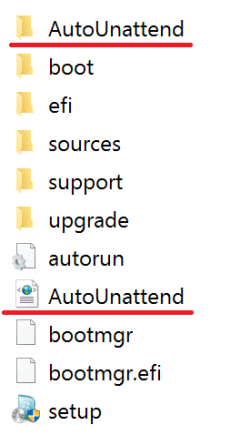
Then copy (from the OS folder) the AutoUnattend folder and AutoUnattend.xml file to the root of the USB flash drive:

y1R1zyE.png

Check the following options in the ASUS motherboard's UEFI BIOS settings before you install Windows 7.

Boot > CSM (Compatibility Support Module) > Launch CSM > Enabled (Default)
Boot > Secure Boot > OS Type > Windows UEFI mode (Default)

You must boot the installation media as a UEFI device.
- Reboot PC and enter the Boot Menu by pressing F8.
- Select the name of your USB flash drive. If you have CSM enabled in UEFI BIOS you will see it twice, but one will have a UEFI: prefix, select that.

Windows 7 64-bit USB flash drive should now boot fine in UEFI mode. The USB 3.0 driver will be loaded automatically during installation startup.

EDIT:

Windows 7 can normally be booted with the ASUS motherboard's Secure Boot feature enabled as well, but without actually using it.

But if you are dual booting Windows 7 64-bit and Windows 8/10 64-bit, then you must select the following option.

Boot > Secure Boot > OS Type > Other OS (default: Windows UEFI mode)

Or you get the following error message when you start Windows 7.

File: \Windows\system32\winload.efi
Status: 0xc0000428
Info: The digital signature for this file couldn't be verified.

EDIT:

If you have a Samsung M.2 SSD (for example, Samsung 950 PRO) then you will also need to download the Samsung NVMe drivers. You can download drivers from the link below.

Recommended AHCI/RAID and NVMe Drivers

"Samsung NVMe Drivers"
- Note: Get the pure driver files, not the installer set.
- Open your Windows 7 USB drive and create a folder named “nvme” in the root of the drive.
- Copy all of the NVME driver files you just downloaded to this folder.

Boot from the USB and “F6” the NVME drivers.
1. Click through the initial windows setup pages, selecting your language and then press “Install Now”.
2. After accepting the License Terms, under “What type of installation do you want”, select ‘Custom (advanced)’.
3. You’ll now see a list of drives and partitions on your computer. If you have a non-NVME secondary drive, it will be listed here – but since Windows 7 does not yet have drivers installed for NVME, it won’t recognize any NVME SSDs. Let’s fix that.
4. Click: ‘Load Driver’ below the list of drives.
5. Select Browse, and then expand the thumb drive (Likely labeled ‘Removable Disk’).
6. Select the ‘nvme’ folder, and press OK.
7. You should now see a Samsung NVME Controller. Select this driver and press ‘Next’. The driver will be installed.
8. Once complete, and you’ll return to the disk selection screen and should see the NVME SSD (you may have to click refresh).
 
Last edited:

My Computer My Computer

At a glance

Windows 7 Home Premium x64
Computer type
PC/Desktop
OS
Windows 7 Home Premium x64
The 'EZ Installer' you're quoting is intended for the Braswell platform, not Skylake-S, which is what I believe my Skylake Core i5 6500 to be. Please tell me if I'm wrong.
 

My Computer My Computer

At a glance

Win7 Ultimate SP1Intel Core i5 9400 Coffee Lake 14nm16G DDR4NVidia GeForce GTX 960
Computer type
PC/Desktop
Computer Manufacturer/Model Number
My build
OS
Win7 Ultimate SP1
CPU
Intel Core i5 9400 Coffee Lake 14nm
Motherboard
Asus Prime H310M-E R2.0 (LGA1151)
Memory
16G DDR4
Graphics Card(s)
NVidia GeForce GTX 960
Sound Card
Realtek High Definition Audio (mobo)
Monitor(s) Displays
Asus PA248 24" 16:10 format
Screen Resolution
1920x1200@59Hz
Hard Drives
1863GB Seagate ST2000DM
3726GB Seagate ST4000DM
1863GB Seagate ST2000DM
6TB Seagate
465GB NVMe Samsung SSD 970
PSU
750G2
Case
Tower
Cooling
Standard
Keyboard
USB
Mouse
USB
Internet Speed
920Mbs/480Mbs
Antivirus
Malwarebytes
Browser
Firefox
Back
Top