Windows 7 Ult 64bit Boot delay after splash screen.

JustWatching

New member
Member
Local time
8:01 PM
Messages
71
Recently, my computer has started to delay during boot up. The delay starts after the 'Starting windows' screen, it is a black screen with a mouse cursor, some times I can move the mouse, other times I cannot. The delay lasts for about 60 seconds. Then takes me to the log in screen (or logs me in if I have it set to automatic log on) . I am tearing my hair out trying to determine what is the cause.
I have used the instructions Trace Windows 7 boot/shutdown/hibernate/standby/resume issues - Windows 7 - MSFN Forum
to determine the issue is occurring during the SMSSinit phase of the mainboot. I have uninstalled and reinstalled drivers. I have setup custom event viewers to look at the boot and also see the delay with warnings. MbAr found no issues, Combofix found nothing significant. Avast boot time scan found nothing significant. sfc found no issues (I did have the kb3022345 issue but have uninstalled that update).
Startup repair also found no issues.

My ntbtlog shows these items not loading:
Did not load driver \SystemRoot\System32\Drivers\vga.sys
Did not load driver \SystemRoot\System32\Drivers\NDProxy.SYS
Did not load driver \SystemRoot\System32\Drivers\srv.sys

I have found lots of people with the same issue, but only thing I have found so far is that a reinstall fixes it. I am trying to avoid that, I would really like to know what the cause is. So, willing to follow whatever steps you guys suggest. I am in your hands, do with me as you will. And thank you for helping me out.
 

My Computer

Computer type
PC/Desktop
Computer Manufacturer/Model Number
Custom
OS
Windows 7 Ultimate x64
CPU
Intel Core i5-3350P Ivy Bridge Quad-Core 3.1GHzz
Motherboard
Asus P8H77-v
Memory
HyperX XMP 10th Anniversary Series 16GB
Graphics Card(s)
EVGA GeForce GTX 970 4GB
Sound Card
Onboard
Monitor(s) Displays
Acer S241HL 24", ASUS V238h 23"
Screen Resolution
1920x1080
Hard Drives
Kingston SSD 240GB
Samsung 2TB
PSU
XION AXP-700K14XE 700W ATX
Case
HEC 6C28BBX585 Black Steel ATX Mid Tower
Cooling
ZALMAN CNPS9500 AT 2 Ball CPU Cooling Fan/Heatsink
Keyboard
Logitech G710+
Mouse
Anker Wireless Vertical Mouse
Internet Speed
220/20
Antivirus
Webroot
Browser
Chrome

My Computer

Computer type
PC/Desktop
Computer Manufacturer/Model Number
Home Built - Jan 2013
OS
Windows 7 64 Bit Home Premium SP1
CPU
i7-3820
Motherboard
Asus P9X79-PRO - Bios 4608
Memory
GSkill F3-14900CL9Q - 16GB
Graphics Card(s)
EVGA GeForce GTX660 - Driver 352.86
Sound Card
On board Realtek ALC898
Monitor(s) Displays
Acer S271HL
Screen Resolution
1920 x 1080
Hard Drives
#1- Samsung 840 Pro Series
#2- Western Digital WD1002FAEX Sata3 Black
#3- Western Digital WD1002FAEX Sata3 Black
PSU
Corsair CMPSU-850TX-V2 - 850 watt (by Seasonic)
Case
Corsair Obsidian 550D
Cooling
Standard 3 120mm case fans, Cooler Master Hyper 212 EVO
Keyboard
MS KC-0405
Mouse
Intellimouse 5-button
Internet Speed
56 Mbits/Sec (on a good day)
Antivirus
Avast & Malwarebytes
Browser
Firefox
Other Info
Asus DVD - DRW-24B1ST 24X

Yes I did look through it. safe mode and diag startup all have the same delay. Don't have a nvidia card, reinstalled latest drivers. Also submitted a etl file to the MFSN thread that is the thread you linked. He said he would take look at the file and see what might be causing it. When I look at that file, it 'looks' like the RPCSS is what is causing the delay. Waiting to see what he says about it.
 

My Computer

Computer type
PC/Desktop
Computer Manufacturer/Model Number
Custom
OS
Windows 7 Ultimate x64
CPU
Intel Core i5-3350P Ivy Bridge Quad-Core 3.1GHzz
Motherboard
Asus P8H77-v
Memory
HyperX XMP 10th Anniversary Series 16GB
Graphics Card(s)
EVGA GeForce GTX 970 4GB
Sound Card
Onboard
Monitor(s) Displays
Acer S241HL 24", ASUS V238h 23"
Screen Resolution
1920x1080
Hard Drives
Kingston SSD 240GB
Samsung 2TB
PSU
XION AXP-700K14XE 700W ATX
Case
HEC 6C28BBX585 Black Steel ATX Mid Tower
Cooling
ZALMAN CNPS9500 AT 2 Ball CPU Cooling Fan/Heatsink
Keyboard
Logitech G710+
Mouse
Anker Wireless Vertical Mouse
Internet Speed
220/20
Antivirus
Webroot
Browser
Chrome
Yes, lets wait and see what "he" says. You could link me to it here.

It looks like this is a problem with the video card or the video driver starting. I might try clean installing the video driver (completely uninstalling all old drivers and the device) if "he" doesn't come up with something different first.

If it is not a problem with the driver it could also be a problem with the device.
 

My Computer

Computer type
PC/Desktop
Computer Manufacturer/Model Number
Home Built - Jan 2013
OS
Windows 7 64 Bit Home Premium SP1
CPU
i7-3820
Motherboard
Asus P9X79-PRO - Bios 4608
Memory
GSkill F3-14900CL9Q - 16GB
Graphics Card(s)
EVGA GeForce GTX660 - Driver 352.86
Sound Card
On board Realtek ALC898
Monitor(s) Displays
Acer S271HL
Screen Resolution
1920 x 1080
Hard Drives
#1- Samsung 840 Pro Series
#2- Western Digital WD1002FAEX Sata3 Black
#3- Western Digital WD1002FAEX Sata3 Black
PSU
Corsair CMPSU-850TX-V2 - 850 watt (by Seasonic)
Case
Corsair Obsidian 550D
Cooling
Standard 3 120mm case fans, Cooler Master Hyper 212 EVO
Keyboard
MS KC-0405
Mouse
Intellimouse 5-button
Internet Speed
56 Mbits/Sec (on a good day)
Antivirus
Avast & Malwarebytes
Browser
Firefox
Other Info
Asus DVD - DRW-24B1ST 24X
Yes, lets wait and see what "he" says. You could link me to it here.

It looks like this is a problem with the video card or the video driver starting. I might try clean installing the video driver (completely uninstalling all old drivers and the device) if "he" doesn't come up with something different first.

If it is not a problem with the driver it could also be a problem with the device.

Yeah no worries, found that site after I posted here but plan on updating here for sure.
Here is his reply so far, have to wait till I get off work to run the hotfix and see what happens.

MSFN Trace windows 7 boot/shutdown/hibernate issues


I have uninstalled all video drivers and reinstalled fresh, still same issue unfortunately.
 

My Computer

Computer type
PC/Desktop
Computer Manufacturer/Model Number
Custom
OS
Windows 7 Ultimate x64
CPU
Intel Core i5-3350P Ivy Bridge Quad-Core 3.1GHzz
Motherboard
Asus P8H77-v
Memory
HyperX XMP 10th Anniversary Series 16GB
Graphics Card(s)
EVGA GeForce GTX 970 4GB
Sound Card
Onboard
Monitor(s) Displays
Acer S241HL 24", ASUS V238h 23"
Screen Resolution
1920x1080
Hard Drives
Kingston SSD 240GB
Samsung 2TB
PSU
XION AXP-700K14XE 700W ATX
Case
HEC 6C28BBX585 Black Steel ATX Mid Tower
Cooling
ZALMAN CNPS9500 AT 2 Ball CPU Cooling Fan/Heatsink
Keyboard
Logitech G710+
Mouse
Anker Wireless Vertical Mouse
Internet Speed
220/20
Antivirus
Webroot
Browser
Chrome
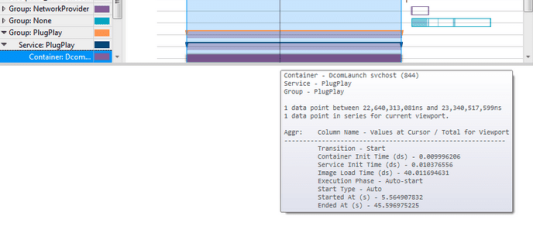
Well no luck on that front either. Unable to determine what is causing the delay.

Only thing showing on the xbootmgr command now is a dcom launch that has the delay.

ss.png
 
Last edited:

My Computer

Computer type
PC/Desktop
Computer Manufacturer/Model Number
Custom
OS
Windows 7 Ultimate x64
CPU
Intel Core i5-3350P Ivy Bridge Quad-Core 3.1GHzz
Motherboard
Asus P8H77-v
Memory
HyperX XMP 10th Anniversary Series 16GB
Graphics Card(s)
EVGA GeForce GTX 970 4GB
Sound Card
Onboard
Monitor(s) Displays
Acer S241HL 24", ASUS V238h 23"
Screen Resolution
1920x1080
Hard Drives
Kingston SSD 240GB
Samsung 2TB
PSU
XION AXP-700K14XE 700W ATX
Case
HEC 6C28BBX585 Black Steel ATX Mid Tower
Cooling
ZALMAN CNPS9500 AT 2 Ball CPU Cooling Fan/Heatsink
Keyboard
Logitech G710+
Mouse
Anker Wireless Vertical Mouse
Internet Speed
220/20
Antivirus
Webroot
Browser
Chrome
Did you post a screenshot on your last post? It doesn't show if so.
 

My Computer

Computer type
PC/Desktop
Computer Manufacturer/Model Number
Custom Build
OS
Windows 7 Ultimate x64 SP1
CPU
AMD Phenom 2 1090T
Motherboard
Gigabyte GA-890FXA-UD5
Memory
2x8GB Kingston HyperX Fury Black 1600Mhz Unganged
Graphics Card(s)
MSI GTX 970 Gaming 4G
Sound Card
Realtek On-Board HD 7.1 Audio / Logitech G35
Monitor(s) Displays
3xAcer GD245HQ
Screen Resolution
1920x1080
Hard Drives
Samsung 850 Pro 512GB SSD - OS /
WD Caviar Black SATA 3 - 1 TBx2 - Dynamic RAID 0 /
WD Caviar Green SATA 2 - 640GBx2 - Dynamic RAID 0 /
WD Caviar Green SATA 2 - 640GB - Internal Backup /
Seagate Barracude SATA 3 - 3TB - External Backup/ Sync
PSU
HighPower 1000W
Case
Cooler Master HAF 932
Cooling
Noctua NH-D14
Keyboard
Logitech G19
Mouse
Logitech G500
Internet Speed
100/4 Mbit Cable (100GB quota)
Antivirus
ZoneAlarm Extreme Security / MBAM Pro / MBAE Free / SAS Free
Browser
IE 11 - Firefox - Chrome
Other Info
Logitech F710/ G27/ G940/ Z5500 // TrackIR 5 // Nvidia 3D Surround Vision

My Computer

Computer type
PC/Desktop
Computer Manufacturer/Model Number
Custom
OS
Windows 7 Ultimate x64
CPU
Intel Core i5-3350P Ivy Bridge Quad-Core 3.1GHzz
Motherboard
Asus P8H77-v
Memory
HyperX XMP 10th Anniversary Series 16GB
Graphics Card(s)
EVGA GeForce GTX 970 4GB
Sound Card
Onboard
Monitor(s) Displays
Acer S241HL 24", ASUS V238h 23"
Screen Resolution
1920x1080
Hard Drives
Kingston SSD 240GB
Samsung 2TB
PSU
XION AXP-700K14XE 700W ATX
Case
HEC 6C28BBX585 Black Steel ATX Mid Tower
Cooling
ZALMAN CNPS9500 AT 2 Ball CPU Cooling Fan/Heatsink
Keyboard
Logitech G710+
Mouse
Anker Wireless Vertical Mouse
Internet Speed
220/20
Antivirus
Webroot
Browser
Chrome

My Computer

Computer type
PC/Desktop
Computer Manufacturer/Model Number
Custom Build
OS
Windows 7 Ultimate x64 SP1
CPU
AMD Phenom 2 1090T
Motherboard
Gigabyte GA-890FXA-UD5
Memory
2x8GB Kingston HyperX Fury Black 1600Mhz Unganged
Graphics Card(s)
MSI GTX 970 Gaming 4G
Sound Card
Realtek On-Board HD 7.1 Audio / Logitech G35
Monitor(s) Displays
3xAcer GD245HQ
Screen Resolution
1920x1080
Hard Drives
Samsung 850 Pro 512GB SSD - OS /
WD Caviar Black SATA 3 - 1 TBx2 - Dynamic RAID 0 /
WD Caviar Green SATA 2 - 640GBx2 - Dynamic RAID 0 /
WD Caviar Green SATA 2 - 640GB - Internal Backup /
Seagate Barracude SATA 3 - 3TB - External Backup/ Sync
PSU
HighPower 1000W
Case
Cooler Master HAF 932
Cooling
Noctua NH-D14
Keyboard
Logitech G19
Mouse
Logitech G500
Internet Speed
100/4 Mbit Cable (100GB quota)
Antivirus
ZoneAlarm Extreme Security / MBAM Pro / MBAE Free / SAS Free
Browser
IE 11 - Firefox - Chrome
Other Info
Logitech F710/ G27/ G940/ Z5500 // TrackIR 5 // Nvidia 3D Surround Vision
Ok, sorry about that, done.
 

My Computer

Computer type
PC/Desktop
Computer Manufacturer/Model Number
Custom
OS
Windows 7 Ultimate x64
CPU
Intel Core i5-3350P Ivy Bridge Quad-Core 3.1GHzz
Motherboard
Asus P8H77-v
Memory
HyperX XMP 10th Anniversary Series 16GB
Graphics Card(s)
EVGA GeForce GTX 970 4GB
Sound Card
Onboard
Monitor(s) Displays
Acer S241HL 24", ASUS V238h 23"
Screen Resolution
1920x1080
Hard Drives
Kingston SSD 240GB
Samsung 2TB
PSU
XION AXP-700K14XE 700W ATX
Case
HEC 6C28BBX585 Black Steel ATX Mid Tower
Cooling
ZALMAN CNPS9500 AT 2 Ball CPU Cooling Fan/Heatsink
Keyboard
Logitech G710+
Mouse
Anker Wireless Vertical Mouse
Internet Speed
220/20
Antivirus
Webroot
Browser
Chrome
Still not sure what is causing this boot delay, but now event viewer is showing me this error: Source termDD
The RDP protocol component X.224 detected an error in the protocol stream and has disconnected the client.
Keep showing up over and over, yet I am able to connect to this computer via Remote desktop
 

My Computer

Computer type
PC/Desktop
Computer Manufacturer/Model Number
Custom
OS
Windows 7 Ultimate x64
CPU
Intel Core i5-3350P Ivy Bridge Quad-Core 3.1GHzz
Motherboard
Asus P8H77-v
Memory
HyperX XMP 10th Anniversary Series 16GB
Graphics Card(s)
EVGA GeForce GTX 970 4GB
Sound Card
Onboard
Monitor(s) Displays
Acer S241HL 24", ASUS V238h 23"
Screen Resolution
1920x1080
Hard Drives
Kingston SSD 240GB
Samsung 2TB
PSU
XION AXP-700K14XE 700W ATX
Case
HEC 6C28BBX585 Black Steel ATX Mid Tower
Cooling
ZALMAN CNPS9500 AT 2 Ball CPU Cooling Fan/Heatsink
Keyboard
Logitech G710+
Mouse
Anker Wireless Vertical Mouse
Internet Speed
220/20
Antivirus
Webroot
Browser
Chrome
Back
Top