
Windows 7 Ult.x64 w/ Realtek ALC665 StereoMix NOT WORKING!

gbg2000

New member
Local time
10:20 PM
Messages
9
Location
Toronto, ON
I have updated realtek driver to v6.0.1.6662 6/2012, however updates do not seem to change anything. My lappy has an internal mic, but also an external mic plug (which can be re-purposed, but is originally a mic plug).

The internal mic is connected to ATAPI internal port, that much is clear, however the External Mic (which should be Stereo Mix as I don't see any other recording devices besides the two) show NO port in the properties. See attached image. This precludes me from using an external Mic in the Mic Jack, and I am forced to use the internal Mic which sucks for anything but Skype.

There is some trivial advice going around the web on this issue, I am just going to cover it here, to prevent repetition.

1. No recording device has "listen to" enabled
2. None of the jacks have been re-purposed
3. None of the recording devices are enabled as sound/communication devices (this repurposes them)
4. and yes, the Mics (both) are unmuted (how trivial is that?)
5. It doesn't matter which Mic I set as 'default recording device' the stereo mix never record, only the internal mic
6. enabled/set as default/recording levels, none of that is the problem, tested
7. There is a conspiracy theory going around that RIAA 'forced' Realtek to cripple StereoMix so that you can't record what you play on your computer, but that sounds too crazy (as all conspiracies do)

Finally, to underline my problem, it is not about the Stereo mix, per se, but using it (or anything else, but what?) to connect an external pro Mic (with computer plug, not XLR) to the mic jack on my lappy.

It shouldn't matter which laptop is in question, since all realtek drivers of ALC665 seem to have the same problem, but it's Alienware M11X R3.

cheers,
G2
 

Attachments
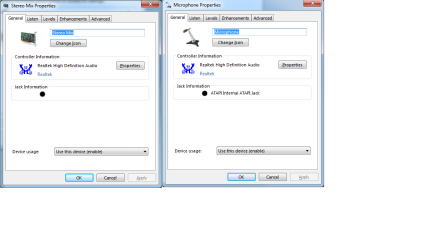
  • stereomix nojack.png
    stereomix nojack.png
    19.8 KB · Views: 21

My Computer My Computer

At a glance

Windows 7 Ultimate x64i78GB MicronNvidia 540
Computer Manufacturer/Model Number
Alienware
OS
Windows 7 Ultimate x64
CPU
i7
Motherboard
Sandy Bridge
Memory
8GB Micron
Graphics Card(s)
Nvidia 540
Sound Card
Sound Blaster X-Fi
Monitor(s) Displays
Asus ProArt 23Q
Screen Resolution
1920x1080
Hard Drives
Seagate 750GB Sata III
WD Passport 2TB
Case
M11X
Keyboard
Apple Pro
Mouse
Logitech MX Revolution
Internet Speed
20Mb/s
Other Info
Alienware M11X R3/Avid Pro Tools 10.3/ Ableton Suite 8/ Kontakt 4/ Spectrasonics Omnisphere/Trilian/StylusRMX/Native Effects
In most cases the PC Vendor's drivers are the preferred drivers. Many times the drivers are customized by the PC vendor for their hardware. I don't know about Alienware, but other Dell's, such as the XPS or Inspiron desktop lines need Dell sound drivers.

The rumor is just that, a rumor and not substantiated as many PC's with RealTek, including two desktops and one laptop that I have with RealTek all have the Stereo Mix (System Mixer).

On some Dell's, as they were delivered the Stereo Mix was disabled. But, all that had to be done was go into the Sound Panel/Recording section. RIGHT click on a blank space in that panel and then click to show disabled and disconnected devices. If Stereo Mix is there it will now be displayed and you can enable it and make it the default recording device.

If the Dell supplied driver does not have Stereo Mix, you can try the generic RealTek drivers however they have a notice to get the drivers from the PC vendor.

You could post this on the special Alienware forum section on the Dell Community and see if someone there has an answer. Dell Alienware Club
 

My Computer My Computer

At a glance

Windows 10 64 bitIntel i7 6700K16GB Corsair DominatorIntel CPU Graphics
Computer type
PC/Desktop
Computer Manufacturer/Model Number
My Own Build
OS
Windows 10 64 bit
CPU
Intel i7 6700K
Motherboard
ASUS ROG Maximus VIII Hero
Memory
16GB Corsair Dominator
Graphics Card(s)
Intel CPU Graphics
Sound Card
RealTek
Monitor(s) Displays
27" Dell S2719dgf
Screen Resolution
2560X1440
Hard Drives
1 TB Samsung 850 EVO SSD for Win 10 Pro
500GB Samsung 850 EVO SSD for Win 10 Insider
2 TB drive for backup
PSU
EVGA Supernova 750G2
Case
BeQuiet Silent Base 600
Cooling
Deepcool Captain 120EX
Keyboard
Microsoft Wireless 2000
Mouse
Microsoft wireless
Internet Speed
100 MB/sec (Cable)
Antivirus
Microsoft Defender and Malwarebytes
Browser
Edge/Firefox
Other Info
Cakewalk (Sonar) by BandLab and Studio One 4.1 Pro recording studio software. MOTU 896Mk3 Hybrid recording interface, Frontier Tranzport wireless control unit, Behringer X-Touch Control Surface.
Five USB connected optical drives for CD Audio production using Nero BurningROM
Hi, thanks, that's a good advice, generally, but not in this case. I was referring to the Realtek codec above, ALC665 which is the relevant information.

Of course I tried EVERY SINGLE driver available, be it from Dell, Alienware, Realtek or otherwise. Actually even the Realtek-direct drivers recognize Alienware and install a special set of drivers and control panels which say "Alienware Audio" everywhere.

So, thank for the effort, but no cigar :)
 

My Computer My Computer

At a glance

Windows 7 Ultimate x64i78GB MicronNvidia 540
Computer Manufacturer/Model Number
Alienware
OS
Windows 7 Ultimate x64
CPU
i7
Motherboard
Sandy Bridge
Memory
8GB Micron
Graphics Card(s)
Nvidia 540
Sound Card
Sound Blaster X-Fi
Monitor(s) Displays
Asus ProArt 23Q
Screen Resolution
1920x1080
Hard Drives
Seagate 750GB Sata III
WD Passport 2TB
Case
M11X
Keyboard
Apple Pro
Mouse
Logitech MX Revolution
Internet Speed
20Mb/s
Other Info
Alienware M11X R3/Avid Pro Tools 10.3/ Ableton Suite 8/ Kontakt 4/ Spectrasonics Omnisphere/Trilian/StylusRMX/Native Effects
And, yes, I did post the question on a few other forums. Btw, Alienware was bought by dell, but is not a division of dell, it is a separate company (not like their XPS line, Alienware are not a line of Dell, but a completely separate company). FWIW
 

My Computer My Computer

At a glance

Windows 7 Ultimate x64i78GB MicronNvidia 540
Computer Manufacturer/Model Number
Alienware
OS
Windows 7 Ultimate x64
CPU
i7
Motherboard
Sandy Bridge
Memory
8GB Micron
Graphics Card(s)
Nvidia 540
Sound Card
Sound Blaster X-Fi
Monitor(s) Displays
Asus ProArt 23Q
Screen Resolution
1920x1080
Hard Drives
Seagate 750GB Sata III
WD Passport 2TB
Case
M11X
Keyboard
Apple Pro
Mouse
Logitech MX Revolution
Internet Speed
20Mb/s
Other Info
Alienware M11X R3/Avid Pro Tools 10.3/ Ableton Suite 8/ Kontakt 4/ Spectrasonics Omnisphere/Trilian/StylusRMX/Native Effects
Alienware may still be a "separate company" but they have been folded into Dell web sites, both the Dell community and Dell support. If I go to Dell support to look for drivers for any Dell line, the Alienware is included. If I go to the Dell sales site I can buy an Alienware there, the same as other Dell PC's.

I used to do a lot of user support on the Dell forums (did it for 10 years and over 38,000 posts) so I'm well familiar with Dell and Dell products. We used to get a lot of Alienware hardware and software questions on the Dell forums but the forum moderator would always point them to the special Alienware owners forum section.

As far as the specific model PC. I'm not up on the laptops as most of my support was in the desktop and software areas, but I know there were a couple of Dell models that never had the System Mixer (Stereo Mix) support and users with desktops with "must have" were installing separate sound cards to get that. Back in the XP days there was a registry hack that would enable that, but as Vista/Win7/Win 8 handle some sound functions differently from what I remember that hack didn't work on non XP systems.
 

My Computer My Computer

At a glance

Windows 10 64 bitIntel i7 6700K16GB Corsair DominatorIntel CPU Graphics
Computer type
PC/Desktop
Computer Manufacturer/Model Number
My Own Build
OS
Windows 10 64 bit
CPU
Intel i7 6700K
Motherboard
ASUS ROG Maximus VIII Hero
Memory
16GB Corsair Dominator
Graphics Card(s)
Intel CPU Graphics
Sound Card
RealTek
Monitor(s) Displays
27" Dell S2719dgf
Screen Resolution
2560X1440
Hard Drives
1 TB Samsung 850 EVO SSD for Win 10 Pro
500GB Samsung 850 EVO SSD for Win 10 Insider
2 TB drive for backup
PSU
EVGA Supernova 750G2
Case
BeQuiet Silent Base 600
Cooling
Deepcool Captain 120EX
Keyboard
Microsoft Wireless 2000
Mouse
Microsoft wireless
Internet Speed
100 MB/sec (Cable)
Antivirus
Microsoft Defender and Malwarebytes
Browser
Edge/Firefox
Other Info
Cakewalk (Sonar) by BandLab and Studio One 4.1 Pro recording studio software. MOTU 896Mk3 Hybrid recording interface, Frontier Tranzport wireless control unit, Behringer X-Touch Control Surface.
Five USB connected optical drives for CD Audio production using Nero BurningROM
You are right on the site. Alienware's was made to forward to Dell's some time ago, but it didn't use to be that way.

This model definitely had Stereo Mix and it used to work. I've had the laptop for almost two years, and I seem to recall I tested it with an external mic in the beginning.

Maybe it is some kind of conspiracy and this feature was removed in newer drivers, while it existed in the previous incarnations? I am not sure if I can downgrade a driver without re-installing the entire system.
 

My Computer My Computer

At a glance

Windows 7 Ultimate x64i78GB MicronNvidia 540
Computer Manufacturer/Model Number
Alienware
OS
Windows 7 Ultimate x64
CPU
i7
Motherboard
Sandy Bridge
Memory
8GB Micron
Graphics Card(s)
Nvidia 540
Sound Card
Sound Blaster X-Fi
Monitor(s) Displays
Asus ProArt 23Q
Screen Resolution
1920x1080
Hard Drives
Seagate 750GB Sata III
WD Passport 2TB
Case
M11X
Keyboard
Apple Pro
Mouse
Logitech MX Revolution
Internet Speed
20Mb/s
Other Info
Alienware M11X R3/Avid Pro Tools 10.3/ Ableton Suite 8/ Kontakt 4/ Spectrasonics Omnisphere/Trilian/StylusRMX/Native Effects
If you have an older driver, go to the Device Manager, RIGHT click on the sound entry and then LEFT click "uninstall". Check the box to also uninstall the drivers. Then restart the PC and install the older driver. If you are lucky it will work.
 

My Computer My Computer

At a glance

Windows 10 64 bitIntel i7 6700K16GB Corsair DominatorIntel CPU Graphics
Computer type
PC/Desktop
Computer Manufacturer/Model Number
My Own Build
OS
Windows 10 64 bit
CPU
Intel i7 6700K
Motherboard
ASUS ROG Maximus VIII Hero
Memory
16GB Corsair Dominator
Graphics Card(s)
Intel CPU Graphics
Sound Card
RealTek
Monitor(s) Displays
27" Dell S2719dgf
Screen Resolution
2560X1440
Hard Drives
1 TB Samsung 850 EVO SSD for Win 10 Pro
500GB Samsung 850 EVO SSD for Win 10 Insider
2 TB drive for backup
PSU
EVGA Supernova 750G2
Case
BeQuiet Silent Base 600
Cooling
Deepcool Captain 120EX
Keyboard
Microsoft Wireless 2000
Mouse
Microsoft wireless
Internet Speed
100 MB/sec (Cable)
Antivirus
Microsoft Defender and Malwarebytes
Browser
Edge/Firefox
Other Info
Cakewalk (Sonar) by BandLab and Studio One 4.1 Pro recording studio software. MOTU 896Mk3 Hybrid recording interface, Frontier Tranzport wireless control unit, Behringer X-Touch Control Surface.
Five USB connected optical drives for CD Audio production using Nero BurningROM
Yes, that is the most trivial method (I'm a computer engineer), of course, but it doesn't work.. It still keeps some files somewhere and the installation succeeds but the same files are there, not overwritten. Might try with Revo to see if that happens, otherwise clean install would be the only method.
 

My Computer My Computer

At a glance

Windows 7 Ultimate x64i78GB MicronNvidia 540
Computer Manufacturer/Model Number
Alienware
OS
Windows 7 Ultimate x64
CPU
i7
Motherboard
Sandy Bridge
Memory
8GB Micron
Graphics Card(s)
Nvidia 540
Sound Card
Sound Blaster X-Fi
Monitor(s) Displays
Asus ProArt 23Q
Screen Resolution
1920x1080
Hard Drives
Seagate 750GB Sata III
WD Passport 2TB
Case
M11X
Keyboard
Apple Pro
Mouse
Logitech MX Revolution
Internet Speed
20Mb/s
Other Info
Alienware M11X R3/Avid Pro Tools 10.3/ Ableton Suite 8/ Kontakt 4/ Spectrasonics Omnisphere/Trilian/StylusRMX/Native Effects
What happens when you plug an external mic in? And no it will not be StereoMix, that is something else. Possible nothing will show up for the external mic until one is plugged in. My keyboard is the same, it has audio output via USB but its not available until I plug headphones or a mic into it.
 

My Computer My Computer

At a glance

Windows 10 Pro (x64)Intel Core i7-3930K (3.2GHz - 4.5GHz)4x Samsung 4GB PC3-12800 DDR3 (16GB 1600MHz)Nvidia Geforce GTX 690
Computer type
PC/Desktop
Computer Manufacturer/Model Number
Alienware Aurora ALX R4
OS
Windows 10 Pro (x64)
CPU
Intel Core i7-3930K (3.2GHz - 4.5GHz)
Motherboard
Alienware Aurora-R4 x79
Memory
4x Samsung 4GB PC3-12800 DDR3 (16GB 1600MHz)
Graphics Card(s)
Nvidia Geforce GTX 690
Sound Card
SteelSeries Siberia Elite
Monitor(s) Displays
Dell UltraSharp U3011
Screen Resolution
2560x1600
Hard Drives
Samsung 850 Pro 256 GB, Seagate 1TB Desktop Hybrid HDD, 2x Western Digital 4TB Green HDD
PSU
875W Some Dell PSU <.<
Case
Alienware Aurora ALX
Cooling
Custom Liquid Cooling (EK CPU & GPU blocks) dual EK 480RAD
Keyboard
Logitech G710+ Mechanical
Mouse
Logitech G700s
Internet Speed
Verizon Fios (50 mbps average)
Other Info
Server: Intel NUC D54250WYK: i5-4250U, 16GB, 256 GB mSATA, Windows Server 2012 R2
I see RealTek listed in my Revo Pro. I've never tried it but worth a try.

BTW, I'm a retired computer hardware tech and a LAN/WAN Network and Hardware Help Desk Manager.

If it worked at one time with the original factory load, then the reinstall backto the factory disc image is an option.
 

My Computer My Computer

At a glance

Windows 10 64 bitIntel i7 6700K16GB Corsair DominatorIntel CPU Graphics
Computer type
PC/Desktop
Computer Manufacturer/Model Number
My Own Build
OS
Windows 10 64 bit
CPU
Intel i7 6700K
Motherboard
ASUS ROG Maximus VIII Hero
Memory
16GB Corsair Dominator
Graphics Card(s)
Intel CPU Graphics
Sound Card
RealTek
Monitor(s) Displays
27" Dell S2719dgf
Screen Resolution
2560X1440
Hard Drives
1 TB Samsung 850 EVO SSD for Win 10 Pro
500GB Samsung 850 EVO SSD for Win 10 Insider
2 TB drive for backup
PSU
EVGA Supernova 750G2
Case
BeQuiet Silent Base 600
Cooling
Deepcool Captain 120EX
Keyboard
Microsoft Wireless 2000
Mouse
Microsoft wireless
Internet Speed
100 MB/sec (Cable)
Antivirus
Microsoft Defender and Malwarebytes
Browser
Edge/Firefox
Other Info
Cakewalk (Sonar) by BandLab and Studio One 4.1 Pro recording studio software. MOTU 896Mk3 Hybrid recording interface, Frontier Tranzport wireless control unit, Behringer X-Touch Control Surface.
Five USB connected optical drives for CD Audio production using Nero BurningROM
When I plug in the external mic I've setup Alienware Audio (basically custom Realtek drivers) to ask me what I want this jack to do, Mic, Line In or Speaker Out (repurpose). I tried with both Mic and Line-in options and nothing ever shows up anywhere.

I don't see the external Mic in device manager, in audio devices, in Pro Tools, in Ableton, in Sound Forge, in short NOWHERE .. and yet, there is an external mic jack.. and yet, the driver does ask me and offer me the option to choose the Mic/Line-in setup
 

My Computer My Computer

At a glance

Windows 7 Ultimate x64i78GB MicronNvidia 540
Computer Manufacturer/Model Number
Alienware
OS
Windows 7 Ultimate x64
CPU
i7
Motherboard
Sandy Bridge
Memory
8GB Micron
Graphics Card(s)
Nvidia 540
Sound Card
Sound Blaster X-Fi
Monitor(s) Displays
Asus ProArt 23Q
Screen Resolution
1920x1080
Hard Drives
Seagate 750GB Sata III
WD Passport 2TB
Case
M11X
Keyboard
Apple Pro
Mouse
Logitech MX Revolution
Internet Speed
20Mb/s
Other Info
Alienware M11X R3/Avid Pro Tools 10.3/ Ableton Suite 8/ Kontakt 4/ Spectrasonics Omnisphere/Trilian/StylusRMX/Native Effects
With all the stuff I got going on on this laptop (a dozen pro tools projects and more than that in ableton) a complete reainstall is not an option at this moment.. maybe when i wind down some of the projects down the line..

but this issue should not be an issue in the first place
 

My Computer My Computer

At a glance

Windows 7 Ultimate x64i78GB MicronNvidia 540
Computer Manufacturer/Model Number
Alienware
OS
Windows 7 Ultimate x64
CPU
i7
Motherboard
Sandy Bridge
Memory
8GB Micron
Graphics Card(s)
Nvidia 540
Sound Card
Sound Blaster X-Fi
Monitor(s) Displays
Asus ProArt 23Q
Screen Resolution
1920x1080
Hard Drives
Seagate 750GB Sata III
WD Passport 2TB
Case
M11X
Keyboard
Apple Pro
Mouse
Logitech MX Revolution
Internet Speed
20Mb/s
Other Info
Alienware M11X R3/Avid Pro Tools 10.3/ Ableton Suite 8/ Kontakt 4/ Spectrasonics Omnisphere/Trilian/StylusRMX/Native Effects
I have a studio and use Sonar X2 64 bit Producer version. I have Pro Tools MP9 but have never done anything other than play around with it. My primary recording interface unit is a Roland Octa-Capture. I also have an MAudio Fastrack Ultra 8R. Lots of other hardware. I also have Ozone 5 for mastering and Melodyne for pitch correction.

I built a new PC last summer for my recording machine. A Gigabyte GAZ77X UD5H motherboard, i7 3770 CPU, 16GB RAM and an Intel SSD for the OS and Sonar.
 

My Computer My Computer

At a glance

Windows 10 64 bitIntel i7 6700K16GB Corsair DominatorIntel CPU Graphics
Computer type
PC/Desktop
Computer Manufacturer/Model Number
My Own Build
OS
Windows 10 64 bit
CPU
Intel i7 6700K
Motherboard
ASUS ROG Maximus VIII Hero
Memory
16GB Corsair Dominator
Graphics Card(s)
Intel CPU Graphics
Sound Card
RealTek
Monitor(s) Displays
27" Dell S2719dgf
Screen Resolution
2560X1440
Hard Drives
1 TB Samsung 850 EVO SSD for Win 10 Pro
500GB Samsung 850 EVO SSD for Win 10 Insider
2 TB drive for backup
PSU
EVGA Supernova 750G2
Case
BeQuiet Silent Base 600
Cooling
Deepcool Captain 120EX
Keyboard
Microsoft Wireless 2000
Mouse
Microsoft wireless
Internet Speed
100 MB/sec (Cable)
Antivirus
Microsoft Defender and Malwarebytes
Browser
Edge/Firefox
Other Info
Cakewalk (Sonar) by BandLab and Studio One 4.1 Pro recording studio software. MOTU 896Mk3 Hybrid recording interface, Frontier Tranzport wireless control unit, Behringer X-Touch Control Surface.
Five USB connected optical drives for CD Audio production using Nero BurningROM
I am happy for your gear firebird, but how does that help me with my problem? :)
 

My Computer My Computer

At a glance

Windows 7 Ultimate x64i78GB MicronNvidia 540
Computer Manufacturer/Model Number
Alienware
OS
Windows 7 Ultimate x64
CPU
i7
Motherboard
Sandy Bridge
Memory
8GB Micron
Graphics Card(s)
Nvidia 540
Sound Card
Sound Blaster X-Fi
Monitor(s) Displays
Asus ProArt 23Q
Screen Resolution
1920x1080
Hard Drives
Seagate 750GB Sata III
WD Passport 2TB
Case
M11X
Keyboard
Apple Pro
Mouse
Logitech MX Revolution
Internet Speed
20Mb/s
Other Info
Alienware M11X R3/Avid Pro Tools 10.3/ Ableton Suite 8/ Kontakt 4/ Spectrasonics Omnisphere/Trilian/StylusRMX/Native Effects
You mentioned recording, and I just commented that I too have a recording studio.

I don't recall if you mentioned, but do you happen to have ASIO4ALL installed? I had major audio system/device problems with my system when I installed that to test a device - fortunately I had a System Restore point and was able to recover. ASIO4ALL from posts I've seen on several recording forums is iffy at best and has the potential to screw up things.

My last suggestion about a complete reinstall, although it can be a major hassle, still stands if nothing else fixes the problem (and it worked OK originally). You may even want to consider using a different hard drive (If you don't have a drive you can use, buy an inexpensive low capacity drive) and installing the OS and Dell/Alienware drivers to see if everything works.
 

My Computer My Computer

At a glance

Windows 10 64 bitIntel i7 6700K16GB Corsair DominatorIntel CPU Graphics
Computer type
PC/Desktop
Computer Manufacturer/Model Number
My Own Build
OS
Windows 10 64 bit
CPU
Intel i7 6700K
Motherboard
ASUS ROG Maximus VIII Hero
Memory
16GB Corsair Dominator
Graphics Card(s)
Intel CPU Graphics
Sound Card
RealTek
Monitor(s) Displays
27" Dell S2719dgf
Screen Resolution
2560X1440
Hard Drives
1 TB Samsung 850 EVO SSD for Win 10 Pro
500GB Samsung 850 EVO SSD for Win 10 Insider
2 TB drive for backup
PSU
EVGA Supernova 750G2
Case
BeQuiet Silent Base 600
Cooling
Deepcool Captain 120EX
Keyboard
Microsoft Wireless 2000
Mouse
Microsoft wireless
Internet Speed
100 MB/sec (Cable)
Antivirus
Microsoft Defender and Malwarebytes
Browser
Edge/Firefox
Other Info
Cakewalk (Sonar) by BandLab and Studio One 4.1 Pro recording studio software. MOTU 896Mk3 Hybrid recording interface, Frontier Tranzport wireless control unit, Behringer X-Touch Control Surface.
Five USB connected optical drives for CD Audio production using Nero BurningROM
Yeah, I have to have asio4all, otherwise PT won't work, I don't have Avid hardware. Asio4all has generally been behaving good and the Mic worked with it in the beginning.

I have to locate the Audio drivers from when I bought the computer and use it the next time I reinstall. Until then, I guess no external Mic.
 

My Computer My Computer

At a glance

Windows 7 Ultimate x64i78GB MicronNvidia 540
Computer Manufacturer/Model Number
Alienware
OS
Windows 7 Ultimate x64
CPU
i7
Motherboard
Sandy Bridge
Memory
8GB Micron
Graphics Card(s)
Nvidia 540
Sound Card
Sound Blaster X-Fi
Monitor(s) Displays
Asus ProArt 23Q
Screen Resolution
1920x1080
Hard Drives
Seagate 750GB Sata III
WD Passport 2TB
Case
M11X
Keyboard
Apple Pro
Mouse
Logitech MX Revolution
Internet Speed
20Mb/s
Other Info
Alienware M11X R3/Avid Pro Tools 10.3/ Ableton Suite 8/ Kontakt 4/ Spectrasonics Omnisphere/Trilian/StylusRMX/Native Effects
Back
Top