
Windows 7 Ultimate 32 bits, Hard Disk Problem

Dubai

New member
Local time
10:52 AM
Messages
3
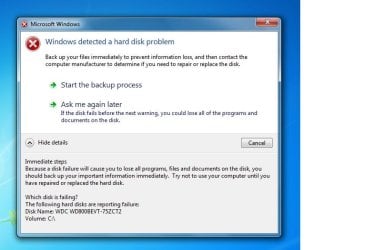
Hi, once I boot the laptop it will show the Hard disk Problem. About 20mins later it will come up again.
To prevent it, I always shutdown once I received the second warning.

Please find the attached screenshot of the problem.

The laptop is DellLatitude E6400.

Thank you.
 

Attachments
  • Hard disk problem.jpg
    Hard disk problem.jpg
    44.3 KB · Views: 1

My Computer

Computer type
Laptop
Computer Manufacturer/Model Number
Dell
OS
Windows 7 Ultimate 32 bit
Hello,
Whether you able to enter into your desktop icons and able to work with any applications or software?..
Regards
 

My Computer

Computer type
PC/Desktop
OS
Windows 7 Ultimate 64 bit
CPU
Intel pentium 3
Motherboard
MSI
Memory
2GB RAM DDR 3
Graphics Card(s)
Intel HD Graphics
Sound Card
Realtek Audio
Monitor(s) Displays
zenware
Screen Resolution
1680x1050
Hard Drives
80 GB
Case
i-Max
Cooling
Cooler Master
Keyboard
A4TECH
Mouse
edvan
Antivirus
Avast Anti virus 2015
Browser
Google chrome
Yes, I am able to enter the desktop and work with application. But the error message kept coming back after about 20mins. Thanks.
 

My Computer

Computer type
Laptop
Computer Manufacturer/Model Number
Dell
OS
Windows 7 Ultimate 32 bit

My Computer

Computer type
PC/Desktop
Computer Manufacturer/Model Number
Dell XPS 420
OS
Windows 10, Home Clean Install
CPU
Intel Core2 processsor Q8200(2.33Ghz 1333FSB) Quad Core Tech
Motherboard
Dell
Memory
6 gb
Graphics Card(s)
ATI Radeon 256MB HD3650
Sound Card
Intergrated 7.1 Channel Audio
Monitor(s) Displays
Dell SP2009W 20"
Hard Drives
640 GB Serial ATA Hard drive
Cooling
Fan
Keyboard
Dell USB Keyboard
Mouse
Dell Premium Optical USB
Internet Speed
DSL 2.85
@Richard, you may have forgotten to write the other steps. You only mention to check if dischk is working and step 4. I dont understand. Pls make it clear.

Thank you.
 

My Computer

Computer type
Laptop
Computer Manufacturer/Model Number
Dell
OS
Windows 7 Ultimate 32 bit
Open the tutorial for the chkdsk. Step 4 is in the tutorial, it shows 2 boxes. When you do it check the box
 

My Computer

Computer type
PC/Desktop
Computer Manufacturer/Model Number
Dell XPS 420
OS
Windows 10, Home Clean Install
CPU
Intel Core2 processsor Q8200(2.33Ghz 1333FSB) Quad Core Tech
Motherboard
Dell
Memory
6 gb
Graphics Card(s)
ATI Radeon 256MB HD3650
Sound Card
Intergrated 7.1 Channel Audio
Monitor(s) Displays
Dell SP2009W 20"
Hard Drives
640 GB Serial ATA Hard drive
Cooling
Fan
Keyboard
Dell USB Keyboard
Mouse
Dell Premium Optical USB
Internet Speed
DSL 2.85
Back
Top