

pcnm0430
New member
- Local time
- 2:31 AM
- Messages
- 10
Hello everyone, I was wondering if I could get some help.
I use Win7 Ultimate 64-bit, and it continually increases RAM usage. I don't my PC off very often due to me just being impatient and not wanting to wait for the reboot process, so I just leave it on. However, upon boot ram usage is at about 40% of 4GB. This is because I have a decent amount of things running in the background. After about a day and a half, RAM usage without anything but normal startup items running, increases to 70%. I have tried many things and even killing some processes still leaves the ram usage very high due to the blasted SVChost.exe process which I understand is necessary for the system to work, but angers me because it launches itself in many instances each of which uses obscene amounts of ram.
SPECS:
AMD Phenom II 1055t 3.38GHz x6
Corsair 2GB DDR2-800 RAM
ASUS M4A78 Plus Motherboard
Zotac Nvidia 9600GT Video Card
Windows 7 Ultimate 64-bit
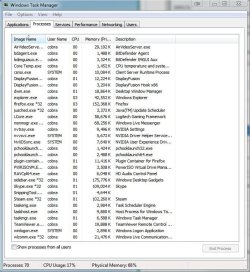
Screenshots of running processes is attached. You will notice that sidebar.exe, Skype, Steam, and Firefox are all using obscene amounts of ram. When the programs are ran upon coldboot, they use much less ram, and their ram usage just increases continually throughout the time the pc is on. Same with SVChost.exe
TL;DR - How do I decrease ram usage so it doesn't continually increase upon the PC being on?
All help is greatly appreciated!
I use Win7 Ultimate 64-bit, and it continually increases RAM usage. I don't my PC off very often due to me just being impatient and not wanting to wait for the reboot process, so I just leave it on. However, upon boot ram usage is at about 40% of 4GB. This is because I have a decent amount of things running in the background. After about a day and a half, RAM usage without anything but normal startup items running, increases to 70%. I have tried many things and even killing some processes still leaves the ram usage very high due to the blasted SVChost.exe process which I understand is necessary for the system to work, but angers me because it launches itself in many instances each of which uses obscene amounts of ram.
SPECS:
AMD Phenom II 1055t 3.38GHz x6
Corsair 2GB DDR2-800 RAM
ASUS M4A78 Plus Motherboard
Zotac Nvidia 9600GT Video Card
Windows 7 Ultimate 64-bit
Screenshots of running processes is attached. You will notice that sidebar.exe, Skype, Steam, and Firefox are all using obscene amounts of ram. When the programs are ran upon coldboot, they use much less ram, and their ram usage just increases continually throughout the time the pc is on. Same with SVChost.exe
TL;DR - How do I decrease ram usage so it doesn't continually increase upon the PC being on?
All help is greatly appreciated!
Attachments
My Computer
At a glance
Windows 7 x64AMD Phenom II 3.38GHz Hex-CoreCorsair XMS2 PC2-6400 800MHz 1GB Cards x4Zotac NVIDIA Geforce 9600 GT
- Computer Manufacturer/Model Number
- Custom Built
- OS
- Windows 7 x64
- CPU
- AMD Phenom II 3.38GHz Hex-Core
- Motherboard
- M4A78 PLUS
- Memory
- Corsair XMS2 PC2-6400 800MHz 1GB Cards x4
- Graphics Card(s)
- Zotac NVIDIA Geforce 9600 GT
- Sound Card
- Integrated with motherboard, 5.1 Surround
- Monitor(s) Displays
- Samsung SyncMaster P2770 27", and ASUS 22" Display
- Screen Resolution
- 3600x1080
- Hard Drives
- Primary: Intel 160GB SSD
Secondary: Western Digital Caviar Green 1TB
- PSU
- OCZ ModXstream 500W
- Case
- Cooler Master STORM Scout
- Cooling
- Cooler Master V8
- Keyboard
- Logitech G11 Gaming Keyboard
- Mouse
- Logitech Laser
- Internet Speed
- 12mbps down, 5mbps up
- Other Info
- Logitech G51 Speakers


