Solved Windows 7 Ultimate Does Not Start

rjordan393

New member
Local time
3:00 PM
Messages
76
Location
Levittown, Pa.
Hello,
A message appeared stating that the screen resolution was incorrect and it gave the correct resolution. So when I changed it, it still was not correct. I pick out another resolution and then after clicking apply and ok, my screen went black and a message appeared stating "Imput not supported". Now windows tries to start but fails and I get the same message.
I tried going into safe mode by clicking or holding down the F8 key when the system starts up but that does not work either.
Is there a fix that I can perform or do I need computer repair by a tech?
 

My Computer

Computer type
PC/Desktop
Computer Manufacturer/Model Number
Dell
OS
Windows 7 64 Bit
CPU
AMD Athlon II X 2 processor 245 (2.9GHz, 1M, 2C)
Memory
Up to 4 GB
Sound Card
Intergrated 7.1 Channel Audio up to Creative Soundblaster
Monitor(s) Displays
HP led monitor
Hard Drives
Up to 1000 GB SATA hard drive
Antivirus
Kaspersky Pure 3
Browser
Internet Explorer 11
Here is an MS thread that may help you:
input not supported

You can also google for input not supported to find many other articles
 

My Computer

Computer type
PC/Desktop
Computer Manufacturer/Model Number
home built
OS
Multi-Boot W7_Pro_x64 W8.1_Pro_x64 W10_Pro_x64 +Linux_VMs +Chromium_VM
CPU
AMD Athlon II x4 620
Motherboard
Gigabyte GA-MA785G-UD3H
Memory
6GB GSkill DDR2 800
Graphics Card(s)
AMD 4670 GPU + AMD 4200 IGP
Sound Card
on board Realtek ALC889A
Monitor(s) Displays
RCA 40" LCD TV, Insignia 32" LCD TV, HP 15" LCD monitor
Screen Resolution
1680 x 1050
Hard Drives
OCZ Vertex 3 120GB,
Samsung F3 1TB (3),
Several others - WD, Seagate, Hitachi, ...
PSU
Corsair 500 W
Case
Rosewill mid tower
Cooling
CM 90mm rifle
Keyboard
Gyration wireless, Logitech wireless, Dell USB wired
Mouse
Gyration wireless, Logitech wireless, V7 USB wired
Internet Speed
Spectrum - 100Mbps D / 10Mbps U
Antivirus
Avast, MBAM3, EMET, WinPatrol
Browser
Pale Moon, Firefox, IE
Other Info
2 multi-boot PC's
Mainly HTPC/Office/Gen purpose (no gaming).
Trendnet USB KVM.
LG DVD burner/Blue Ray Player.
Tray system for removable SATA backup drives.

Not currently OCd, under-volted.
I use Hybrid sleep, rarely re-boot or shutdown.

Hauppauge HD-PVR, Avermedia PCIe TV Tuner, Hauppauge PCI TV Tuner.
Thanks,
I read that MS reply and what scares me is that MS does not guarantee that changing the bios will not damage the computer. Maybe others have done it but they are most likely have a good technical ability to figure out fixes or work arounds. So I just received a call from a service man, late this afternoon and he will be here this evening to take a look at it.
 

My Computer

Computer type
PC/Desktop
Computer Manufacturer/Model Number
Dell
OS
Windows 7 64 Bit
CPU
AMD Athlon II X 2 processor 245 (2.9GHz, 1M, 2C)
Memory
Up to 4 GB
Sound Card
Intergrated 7.1 Channel Audio up to Creative Soundblaster
Monitor(s) Displays
HP led monitor
Hard Drives
Up to 1000 GB SATA hard drive
Antivirus
Kaspersky Pure 3
Browser
Internet Explorer 11
OK, i understand your concern.
If your not comfortable with changing BIOS settings, best you have a reliable tech do it for you.
Let us know how it goes with the service man.
 

My Computer

Computer type
PC/Desktop
Computer Manufacturer/Model Number
home built
OS
Multi-Boot W7_Pro_x64 W8.1_Pro_x64 W10_Pro_x64 +Linux_VMs +Chromium_VM
CPU
AMD Athlon II x4 620
Motherboard
Gigabyte GA-MA785G-UD3H
Memory
6GB GSkill DDR2 800
Graphics Card(s)
AMD 4670 GPU + AMD 4200 IGP
Sound Card
on board Realtek ALC889A
Monitor(s) Displays
RCA 40" LCD TV, Insignia 32" LCD TV, HP 15" LCD monitor
Screen Resolution
1680 x 1050
Hard Drives
OCZ Vertex 3 120GB,
Samsung F3 1TB (3),
Several others - WD, Seagate, Hitachi, ...
PSU
Corsair 500 W
Case
Rosewill mid tower
Cooling
CM 90mm rifle
Keyboard
Gyration wireless, Logitech wireless, Dell USB wired
Mouse
Gyration wireless, Logitech wireless, V7 USB wired
Internet Speed
Spectrum - 100Mbps D / 10Mbps U
Antivirus
Avast, MBAM3, EMET, WinPatrol
Browser
Pale Moon, Firefox, IE
Other Info
2 multi-boot PC's
Mainly HTPC/Office/Gen purpose (no gaming).
Trendnet USB KVM.
LG DVD burner/Blue Ray Player.
Tray system for removable SATA backup drives.

Not currently OCd, under-volted.
I use Hybrid sleep, rarely re-boot or shutdown.

Hauppauge HD-PVR, Avermedia PCIe TV Tuner, Hauppauge PCI TV Tuner.
That message is common and is normally followed within 30 seconds with the resolution changing itself back. Did you wait long enough?

One thing you can do with no real risk is to boot into System Recovery Options
to run System Restore to before the change was made. This doesn't affect your files at all.

I would wonder why you just happened to receive a call from a repair tech today. These are almost always scams. Do you know this person? Better to get help at the top tech forums on the web where repair techs come when they get stuck.
 
First I want to say I started this thread using an older computer. I recently purchased a new one and the trouble started when I tried to change the screen resolution on the new computer.
Yes, I waited much longer then 30 seconds. I could not use system recovery because nothing was working on the monitor. Windows does try to power up but fails and the message "Imput not supported" appears.
The tech who has 18 years experience brought along a used monitor manufactured in 2002. After it was wired into my new computer, then windows powered up and the monitor was fine. My monitor was manufactured in 2007.
What is strange about this is that the monitor works fine using the old computer but Windows does not power up using the newest computer and that error message appears and I cannot get anything to work. Which begs the question: Why does the tech's monitor work on my new computer but my monitor does not work now on the new computer?
 

My Computer

Computer type
PC/Desktop
Computer Manufacturer/Model Number
Dell
OS
Windows 7 64 Bit
CPU
AMD Athlon II X 2 processor 245 (2.9GHz, 1M, 2C)
Memory
Up to 4 GB
Sound Card
Intergrated 7.1 Channel Audio up to Creative Soundblaster
Monitor(s) Displays
HP led monitor
Hard Drives
Up to 1000 GB SATA hard drive
Antivirus
Kaspersky Pure 3
Browser
Internet Explorer 11
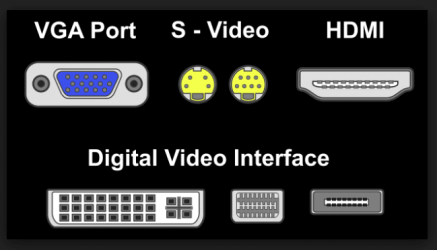
Which port is he using, and which are you using? VGA, HDMI, DVI?
 

My Computer

Computer type
PC/Desktop
Computer Manufacturer/Model Number
Golden Mk. I.4
OS
Windows 10 Pro x64 ; Xubuntu x64
CPU
Intel i7 860 @ 2.80 GHz O/C'ed to 4.0GHz
Motherboard
Gigabyte P55A-UD3R Rev.1. Award BIOS F13
Memory
16GB Corsair Vengance DDR3 @ 661 MHz Dual Channel (9-9-9-24)
Graphics Card(s)
EVGA NVidia GTX 560 1024MB
Sound Card
Realtek Integrated
Monitor(s) Displays
Dual Samsung SyncMaster 2494HS
Screen Resolution
1920*1080 and 1920*1080
Hard Drives
1*Samsung 840 EVO 120GB SSD;
1*OCZ Vertex 2 60GB SSD;
2*Samsung F3 SpinPoint 1TB in RAID0;
1*Samsung F1 SpinPoint 1TB;
2*Western Digital 1TB External USB 3.0
1*Western Digital 500GB External USB 3.0
1*Seagate 500GB External USB 2.0
PSU
Thermaltake ToughPower QFan 750W
Case
Thermaltake Element S VK60001W2Z
Cooling
Corsair H60 Water Cooling, 2*230mm and 2*80mm case fans
Keyboard
Logitech G110
Mouse
Logitech MX518
Well its not the HDMI port as it is not being used. The port being used has no letter designation but does have markings that look something like this: A square with two short vertical lines on either side of it. This I think represents the monitor connection. The business ends of the wire attached to the port is shaped similar to trapezoid. I believe that is a figure where the top dimension is shorter then the bottom dimension. Hope this description helps.
 

My Computer

Computer type
PC/Desktop
Computer Manufacturer/Model Number
Dell
OS
Windows 7 64 Bit
CPU
AMD Athlon II X 2 processor 245 (2.9GHz, 1M, 2C)
Memory
Up to 4 GB
Sound Card
Intergrated 7.1 Channel Audio up to Creative Soundblaster
Monitor(s) Displays
HP led monitor
Hard Drives
Up to 1000 GB SATA hard drive
Antivirus
Kaspersky Pure 3
Browser
Internet Explorer 11
Is the tech using the same port? Did he try his cable on your monitor? Test it with another cable. If it won't display then find another monitor to use.

You didn't say what the tech discovered about the resolution when he connected the monitor that worked.
 
Sounds like DVI...please confirm.

1.PNG

Did you and he use precisely the same connection?
 

My Computer

Computer type
PC/Desktop
Computer Manufacturer/Model Number
Golden Mk. I.4
OS
Windows 10 Pro x64 ; Xubuntu x64
CPU
Intel i7 860 @ 2.80 GHz O/C'ed to 4.0GHz
Motherboard
Gigabyte P55A-UD3R Rev.1. Award BIOS F13
Memory
16GB Corsair Vengance DDR3 @ 661 MHz Dual Channel (9-9-9-24)
Graphics Card(s)
EVGA NVidia GTX 560 1024MB
Sound Card
Realtek Integrated
Monitor(s) Displays
Dual Samsung SyncMaster 2494HS
Screen Resolution
1920*1080 and 1920*1080
Hard Drives
1*Samsung 840 EVO 120GB SSD;
1*OCZ Vertex 2 60GB SSD;
2*Samsung F3 SpinPoint 1TB in RAID0;
1*Samsung F1 SpinPoint 1TB;
2*Western Digital 1TB External USB 3.0
1*Western Digital 500GB External USB 3.0
1*Seagate 500GB External USB 2.0
PSU
Thermaltake ToughPower QFan 750W
Case
Thermaltake Element S VK60001W2Z
Cooling
Corsair H60 Water Cooling, 2*230mm and 2*80mm case fans
Keyboard
Logitech G110
Mouse
Logitech MX518
Does your monitor have a reset button ?
Or, unplug the monitor power cord for 30 seconds and see if that might reset it.
 

My Computer

Computer type
PC/Desktop
Computer Manufacturer/Model Number
home built
OS
Multi-Boot W7_Pro_x64 W8.1_Pro_x64 W10_Pro_x64 +Linux_VMs +Chromium_VM
CPU
AMD Athlon II x4 620
Motherboard
Gigabyte GA-MA785G-UD3H
Memory
6GB GSkill DDR2 800
Graphics Card(s)
AMD 4670 GPU + AMD 4200 IGP
Sound Card
on board Realtek ALC889A
Monitor(s) Displays
RCA 40" LCD TV, Insignia 32" LCD TV, HP 15" LCD monitor
Screen Resolution
1680 x 1050
Hard Drives
OCZ Vertex 3 120GB,
Samsung F3 1TB (3),
Several others - WD, Seagate, Hitachi, ...
PSU
Corsair 500 W
Case
Rosewill mid tower
Cooling
CM 90mm rifle
Keyboard
Gyration wireless, Logitech wireless, Dell USB wired
Mouse
Gyration wireless, Logitech wireless, V7 USB wired
Internet Speed
Spectrum - 100Mbps D / 10Mbps U
Antivirus
Avast, MBAM3, EMET, WinPatrol
Browser
Pale Moon, Firefox, IE
Other Info
2 multi-boot PC's
Mainly HTPC/Office/Gen purpose (no gaming).
Trendnet USB KVM.
LG DVD burner/Blue Ray Player.
Tray system for removable SATA backup drives.

Not currently OCd, under-volted.
I use Hybrid sleep, rarely re-boot or shutdown.

Hauppauge HD-PVR, Avermedia PCIe TV Tuner, Hauppauge PCI TV Tuner.
Is the tech using the same port? Did he try his cable on your monitor? Test it with another cable. If it won't display then find another monitor to use.

Yes, same port as there is no other ports available for the multi-pin connector.

You didn't say what the tech discovered about the resolution when he connected the monitor that worked.

He did not say, but his monitor (the one that worked) was manufactured in 2002 and mine was manufactured in 2007. So I am assuming his resolution is lower then my monitors resolution.
 

My Computer

Computer type
PC/Desktop
Computer Manufacturer/Model Number
Dell
OS
Windows 7 64 Bit
CPU
AMD Athlon II X 2 processor 245 (2.9GHz, 1M, 2C)
Memory
Up to 4 GB
Sound Card
Intergrated 7.1 Channel Audio up to Creative Soundblaster
Monitor(s) Displays
HP led monitor
Hard Drives
Up to 1000 GB SATA hard drive
Antivirus
Kaspersky Pure 3
Browser
Internet Explorer 11
Golden,
Its the VGA port.
 

My Computer

Computer type
PC/Desktop
Computer Manufacturer/Model Number
Dell
OS
Windows 7 64 Bit
CPU
AMD Athlon II X 2 processor 245 (2.9GHz, 1M, 2C)
Memory
Up to 4 GB
Sound Card
Intergrated 7.1 Channel Audio up to Creative Soundblaster
Monitor(s) Displays
HP led monitor
Hard Drives
Up to 1000 GB SATA hard drive
Antivirus
Kaspersky Pure 3
Browser
Internet Explorer 11
Does your monitor have a reset button ?
Or, unplug the monitor power cord for 30 seconds and see if that might reset it.

I'll give that another try. But I think the time required to remove my connection and install his connection took close to 30 seconds or more. Both wires were tested using his monitor and both worked; so we eliminated any problem with my connector. I believe the problem lies either with my new computer or my monitor and got damaged and does not recognize each other when powering up.
 

My Computer

Computer type
PC/Desktop
Computer Manufacturer/Model Number
Dell
OS
Windows 7 64 Bit
CPU
AMD Athlon II X 2 processor 245 (2.9GHz, 1M, 2C)
Memory
Up to 4 GB
Sound Card
Intergrated 7.1 Channel Audio up to Creative Soundblaster
Monitor(s) Displays
HP led monitor
Hard Drives
Up to 1000 GB SATA hard drive
Antivirus
Kaspersky Pure 3
Browser
Internet Explorer 11
Why didn't this tech change your Windows screen resolution so it would work with your monitor ?
I see something wrong with that "lack of tech help" to fix your problem by that person ???
He was on-site, in-home, saw the issue, and you still have the problem ???

If he couldn't fix the problem using your monitor, why didn't he explain why, and what you need to do to fix it ???
Or, what did he say you need to do to fix it ???

JUST saw your last post.
Can you connect your monitor to another PC to test if it works there.
This tech should have done that (imho).

Hopefully you were not told to buy an older monitor !!!
 

My Computer

Computer type
PC/Desktop
Computer Manufacturer/Model Number
home built
OS
Multi-Boot W7_Pro_x64 W8.1_Pro_x64 W10_Pro_x64 +Linux_VMs +Chromium_VM
CPU
AMD Athlon II x4 620
Motherboard
Gigabyte GA-MA785G-UD3H
Memory
6GB GSkill DDR2 800
Graphics Card(s)
AMD 4670 GPU + AMD 4200 IGP
Sound Card
on board Realtek ALC889A
Monitor(s) Displays
RCA 40" LCD TV, Insignia 32" LCD TV, HP 15" LCD monitor
Screen Resolution
1680 x 1050
Hard Drives
OCZ Vertex 3 120GB,
Samsung F3 1TB (3),
Several others - WD, Seagate, Hitachi, ...
PSU
Corsair 500 W
Case
Rosewill mid tower
Cooling
CM 90mm rifle
Keyboard
Gyration wireless, Logitech wireless, Dell USB wired
Mouse
Gyration wireless, Logitech wireless, V7 USB wired
Internet Speed
Spectrum - 100Mbps D / 10Mbps U
Antivirus
Avast, MBAM3, EMET, WinPatrol
Browser
Pale Moon, Firefox, IE
Other Info
2 multi-boot PC's
Mainly HTPC/Office/Gen purpose (no gaming).
Trendnet USB KVM.
LG DVD burner/Blue Ray Player.
Tray system for removable SATA backup drives.

Not currently OCd, under-volted.
I use Hybrid sleep, rarely re-boot or shutdown.

Hauppauge HD-PVR, Avermedia PCIe TV Tuner, Hauppauge PCI TV Tuner.
So you had an "unknown tech", walk into your home, with an old monitor, but not a new laptop, to help troubleshoot ???
:eek:
Do you know for sure what he did to your PC ?
:zip:
 

My Computer

Computer type
PC/Desktop
Computer Manufacturer/Model Number
home built
OS
Multi-Boot W7_Pro_x64 W8.1_Pro_x64 W10_Pro_x64 +Linux_VMs +Chromium_VM
CPU
AMD Athlon II x4 620
Motherboard
Gigabyte GA-MA785G-UD3H
Memory
6GB GSkill DDR2 800
Graphics Card(s)
AMD 4670 GPU + AMD 4200 IGP
Sound Card
on board Realtek ALC889A
Monitor(s) Displays
RCA 40" LCD TV, Insignia 32" LCD TV, HP 15" LCD monitor
Screen Resolution
1680 x 1050
Hard Drives
OCZ Vertex 3 120GB,
Samsung F3 1TB (3),
Several others - WD, Seagate, Hitachi, ...
PSU
Corsair 500 W
Case
Rosewill mid tower
Cooling
CM 90mm rifle
Keyboard
Gyration wireless, Logitech wireless, Dell USB wired
Mouse
Gyration wireless, Logitech wireless, V7 USB wired
Internet Speed
Spectrum - 100Mbps D / 10Mbps U
Antivirus
Avast, MBAM3, EMET, WinPatrol
Browser
Pale Moon, Firefox, IE
Other Info
2 multi-boot PC's
Mainly HTPC/Office/Gen purpose (no gaming).
Trendnet USB KVM.
LG DVD burner/Blue Ray Player.
Tray system for removable SATA backup drives.

Not currently OCd, under-volted.
I use Hybrid sleep, rarely re-boot or shutdown.

Hauppauge HD-PVR, Avermedia PCIe TV Tuner, Hauppauge PCI TV Tuner.
I suspect that a monitor setting, perhaps the refresh rate, is set too high for your monitor. Check the specifications of your HP monitor for refresh rate, resolution. You will need to get into Safe Mode to change the settings in Windows. If the computer won't go into Safe Mode or give you a System Recovery options menu after hitting F8, as you've said, you will need to first use either the Win 7 DVD or your Dell Recovery disk (assuming this is a Dell from your system specs) to get into the System Recovery menu (go into the BIOS to select your DVD drive as the first priority to boot the computer from the DVD). In the Recovery options I would probably use Startup Repair first, then System Restore if the computer will still not get you into Safe Mode.

If you can get into Safe Mode right click on the desktop, select Screen Resolution, click Detect to detect your monitor, then select Advanced Settings and select the right Screen Refresh Rate and Colors for your monitor. Reboot.
 

My Computer

Computer type
PC/Desktop
Computer Manufacturer/Model Number
Wordsworth 5000
OS
Windows 10 Pro 64 bit
CPU
Core i7 6700K Skylake 4.0GHz
Motherboard
Asus Z170 Pro
Memory
Corsair Vengeance LPX DDR4 32GB 3000MHz
Graphics Card(s)
Asus Radeon RX480 Strix 8GB
Sound Card
Asus Xonar DSX
Monitor(s) Displays
HP 2709m
Screen Resolution
1920x1080
Hard Drives
Intel 600p M.2 PCIe NVMe SSD 512GB; Intel 335 SSD 240GB ;Western Digital Caviar Black 1TB
PSU
Thermaltake Toughpower Grand Platinum 850W
Case
Lian Li PC-B70
Cooling
CPU-Noctua NH D15, GPU-Stock, Case-Noctua 2x140, 2x120
Keyboard
Microsoft Natural Ergo 4000
Mouse
Microsoft Wireless Optical 1000
Internet Speed
Cable
Other Info
HP bd 340,
HP bd 240,
Klipsch Promedia 5.1 THX
Why didn't this tech change your Windows screen resolution so it would work with your monitor ?
I see something wrong with that "lack of tech help" to fix your problem by that person ???
He was on-site, in-home, saw the issue, and you still have the problem ???

If he couldn't fix the problem using your monitor, why didn't he explain why, and what you need to do to fix it ???
Or, what did he say you need to do to fix it ???

JUST saw your last post.
Can you connect your monitor to another PC to test if it works there.
This tech should have done that (imho).

Hopefully you were not told to buy an older monitor !!!

If the monitor does not work properly, then no resolution can be attempted.
Yes, I still have the problem but only when using the new computer.
The tech feels that the problem is the monitor being as his monitor works fine when using the new computer.
The tech did suggest purchasing a new monitor. He has no explanation why his monitor works and not mine.

In Summary:
My monitor works using the old computer.
The monitor does not work using the new computer (this happen after I tried to change the resolution).
The wire connections were ruled out.
The suspicion lies somewhere between the new computer and my monitor. I do not think a virus got into the computer as I used "Kaspersky Pure" software and Speedy PC Pro as a registry cleaner.
I think I will have to go into BIOS and follow "Wordsworth" instructions provided I can get into BIOS.
 

My Computer

Computer type
PC/Desktop
Computer Manufacturer/Model Number
Dell
OS
Windows 7 64 Bit
CPU
AMD Athlon II X 2 processor 245 (2.9GHz, 1M, 2C)
Memory
Up to 4 GB
Sound Card
Intergrated 7.1 Channel Audio up to Creative Soundblaster
Monitor(s) Displays
HP led monitor
Hard Drives
Up to 1000 GB SATA hard drive
Antivirus
Kaspersky Pure 3
Browser
Internet Explorer 11
Ok, the problem is solved. Thanks to all who participated. I got up my courage and followed "Wordsworth" instructions. After going into BIOS and selecting my cd-rw drive as the first boot sequence and then saving it, I exited and then placed the windows installation disk into the drive and booted it up. Then followed his instructions by selecting startup repair and then system restore.

Now should I restore the boot sequence to the original places or leave it as it is? Will the boot sequence take longer to boot up if I leave it as it is?
 

My Computer

Computer type
PC/Desktop
Computer Manufacturer/Model Number
Dell
OS
Windows 7 64 Bit
CPU
AMD Athlon II X 2 processor 245 (2.9GHz, 1M, 2C)
Memory
Up to 4 GB
Sound Card
Intergrated 7.1 Channel Audio up to Creative Soundblaster
Monitor(s) Displays
HP led monitor
Hard Drives
Up to 1000 GB SATA hard drive
Antivirus
Kaspersky Pure 3
Browser
Internet Explorer 11
I take it you had to do the system restore to get it fixed so you could go into Safe Mode then. Your system now works properly I hope. Yes, you should make the hard drive the first drive to boot the system from again.
 

My Computer

Computer type
PC/Desktop
Computer Manufacturer/Model Number
Wordsworth 5000
OS
Windows 10 Pro 64 bit
CPU
Core i7 6700K Skylake 4.0GHz
Motherboard
Asus Z170 Pro
Memory
Corsair Vengeance LPX DDR4 32GB 3000MHz
Graphics Card(s)
Asus Radeon RX480 Strix 8GB
Sound Card
Asus Xonar DSX
Monitor(s) Displays
HP 2709m
Screen Resolution
1920x1080
Hard Drives
Intel 600p M.2 PCIe NVMe SSD 512GB; Intel 335 SSD 240GB ;Western Digital Caviar Black 1TB
PSU
Thermaltake Toughpower Grand Platinum 850W
Case
Lian Li PC-B70
Cooling
CPU-Noctua NH D15, GPU-Stock, Case-Noctua 2x140, 2x120
Keyboard
Microsoft Natural Ergo 4000
Mouse
Microsoft Wireless Optical 1000
Internet Speed
Cable
Other Info
HP bd 340,
HP bd 240,
Klipsch Promedia 5.1 THX
Back
Top