Solved Windows 7 Ultimate still wrong language in Computer Management

Damstas

New member
Local time
5:22 AM
Messages
3
I reinstalled Windows 7 64-bit Ultimate today as Finnish, but I decided to try out English language, so I downloaded it through Windows Update. Everything else is fine, but in computer management Local users and groups and inside files are still in Finnish. I wouldn't like to reinstall whole OS again to keep English in everything. What could be the issue?

- Damstas
 

My Computer

Computer type
PC/Desktop
Computer Manufacturer/Model Number
Custom Build
OS
Windows 7 Ultimate x64
CPU
Intel Core i5-3570k
Motherboard
Asus P8Z77-V Pro
Memory
Corsair 8GB
Graphics Card(s)
-
Hard Drives
Intel 330 SSD 120 GB
Antivirus
Avast
Browser
Mozilla Firefox
Finland_Orb_Transparent.png

Hei Damstas, tervetuloa Seiska foorumille.

Kielipaketti muuttaa Windowsin näyttökielen lähestulkoon täydellisesti mutta jotkut käyttiksen syvälle haudatut osat jäävät aina alkuperäiselle kielelle.

Tämän voi kiertää pikku kikkailulla. Tässä oppaassa kerrotaan kuinka oletus käyttäjäprofiilia muokataan Windowsin asennuksen yhteydessä Windowsin niin sanotussa Audit Modessa järjestelmän valmistelutyökalulla, System Preparation Toolilla.

Asenna Englannin kielipaketti Windowsin asennusvaiheessa Windowsin ollessa Audit Modessa ja seuraa mainitun oppaan ohjeita kopioidaksesi asetukset ns. oletus käyttäjäprofiiliin. Kun nyt poistut Audit Modesta ja viimeistelet Windowsin asennuksen, se kysyy millä kielellä haluat asentaa Windowsin, suomeksi vai englanniksi. Valitse enlannin kieli ja nyt Windows asentuu täysin englanniksi.



UK_US.png

Hi Damstas, welcome to the Seven Forums.

A language pack converts Windows almost totally to selected language although some settings and variables hidden deep in system always remain in original language.

There's a workaround for this. This tutorial shows you how to change settings of Windows 7 default user profile in Audit Mode during the installation of Windows, using Windows System Preparation Tool.

Install English language pack during Windows installation in Audit Mode and follow the instructions in the tutorial I mentioned to copy settings to the Windows default user profile. When you now exit Audit Mode to finalize Windows installation it asks in which language you want to install Windows, in Finnish or in English. Select English and now Windows will be installed completely in English.

Kari

 

My Computer

Computer type
Laptop
Computer Manufacturer/Model Number
HP ENVY 17-1150eg
OS
Windows 10 Pro x64 EN-GB
CPU
1.6 GHz Intel Core i7-720QM Processor
Memory
6 GB
Graphics Card(s)
ATI Mobility Radeon HD 5850 Graphics
Sound Card
Beats sound system with integrated subwoofer
Monitor(s) Displays
17" laptop display, 22" LED and 32" Full HD TV through HDMI
Screen Resolution
1600*900 (1), 1920*1080 (2&3)
Hard Drives
Internal: 2 x 500 GB SATA Hard Disk Drive 7200 rpm
External: 2TB for backups, 3TB USB3 network drive for media
Cooling
As Envy runs a bit warm, I have it on a Cooler Master pad
Keyboard
Logitech diNovo Media Desktop Laser (bluetooth)
Mouse
Logitech Performance Mouse MX
Internet Speed
50/10 Mbps VDSL
Antivirus
Windows Defender 4.3.9431.0
Browser
Maxthon 3.5.2., IE11
Damstas
have you try these steps to change the language

- Open Control Panel,
- Select Clock, Language, and Region,
- From Region and Language select English from the Format: list.
- Click OK.
 

My Computer

Computer type
PC/Desktop
OS
microsoft window7 Ultimate x64
Britny, changing formats has nothing to do with some core functions and names in Windows remaining in original language. The only thing where language is changed according to selected formats is the name of the weekdays used by system. For example an English Windows using Finnish formats shows today as Tiistai which is Tuesday in Finnish.

Anyway, talking about formats, I recommend that Damstas selects English (United Kingdom) formats and system location as United Kingdom. This way the date and number formats are the same than in Finland, you only need to change the currency symbol from £ to €.

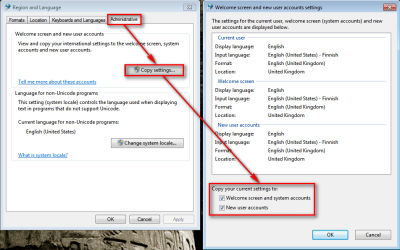
Also if you want the language change being as complete as possible select the two options shown in the screenshot below (bottom right) to copy your selected display language to Welcome Screen and to all future user accounts:

2013-05-28_112336.png

(Tutorial: http://www.sevenforums.com/tutorial...e-settings-copy-new-users-welcome-screen.html)

Kari
 

My Computer

Computer type
Laptop
Computer Manufacturer/Model Number
HP ENVY 17-1150eg
OS
Windows 10 Pro x64 EN-GB
CPU
1.6 GHz Intel Core i7-720QM Processor
Memory
6 GB
Graphics Card(s)
ATI Mobility Radeon HD 5850 Graphics
Sound Card
Beats sound system with integrated subwoofer
Monitor(s) Displays
17" laptop display, 22" LED and 32" Full HD TV through HDMI
Screen Resolution
1600*900 (1), 1920*1080 (2&3)
Hard Drives
Internal: 2 x 500 GB SATA Hard Disk Drive 7200 rpm
External: 2TB for backups, 3TB USB3 network drive for media
Cooling
As Envy runs a bit warm, I have it on a Cooler Master pad
Keyboard
Logitech diNovo Media Desktop Laser (bluetooth)
Mouse
Logitech Performance Mouse MX
Internet Speed
50/10 Mbps VDSL
Antivirus
Windows Defender 4.3.9431.0
Browser
Maxthon 3.5.2., IE11
Ok, kiitos Kari avustasi. :)

Thanks for the assistance.
 

My Computer

Computer type
PC/Desktop
Computer Manufacturer/Model Number
Custom Build
OS
Windows 7 Ultimate x64
CPU
Intel Core i5-3570k
Motherboard
Asus P8Z77-V Pro
Memory
Corsair 8GB
Graphics Card(s)
-
Hard Drives
Intel 330 SSD 120 GB
Antivirus
Avast
Browser
Mozilla Firefox
Back
Top