Windows 7 Ultimate x64 mouse randomly freezes

Rikky

New member
Local time
3:37 AM
Messages
8
Hello,

i have an annoying problem with my mouse Logitech G5. After SP1 install it randomly freezes for 5 seconds then the windows (unplugged device) sound is played and it works again. I tryed many solutions (change USB port, reinstall drivers...) but non have worked till now. Has anyone got any tips how can i solve this?

Thank you.
 

My Computer My Computer

OS
Windows 7 Ultimate x64
CPU
i7 950 stock speed
Motherboard
ASUS P6T SE
Memory
Corsair Vengeance 12gb 2t
Graphics Card(s)
ASUS 570 GTX
Sound Card
X-Fi Platinum Fatality Champion series
Monitor(s) Displays
2x Dell 2407
Hard Drives
OS Drive: RevoDrive OCZ 120gb ssd
and 3 SATA HDDs for storage
PSU
Enermax Infinity 650w
Case
Kandalf
Cooling
CPU noctuna, fans
Hi Rikky, you may try updating the USB drivers if you haven't. You may also try running System file checker to see if there are file corruptions.
 

My Computer My Computer

Computer type
PC/Desktop
Computer Manufacturer/Model Number
Home Built Desktop By DataTech
OS
Windows 7 Ultimate X64 SP1
CPU
Intel i5-2550K, Differing ~4.4-4.8GHz No built in GPU
Motherboard
ASUS P8Z68-V PRO/GEN3
Memory
16GB G.Skill Sniper 1866MHz @ 2133MHz 2x8GB
Graphics Card(s)
ASUS GTX650TIB-DC2OC-2GD5, (650TI Boost)
Sound Card
Onboard Realtek 5-1
Monitor(s) Displays
Samsung P2570HD
Screen Resolution
1920x1080
Hard Drives
Samsung 840 Pro 256GB SSD for OS, 500GB Seagate Constellation (Enterprise drive) for Data
PSU
Corsair HX650W
Case
Inwin Dragon Rider
Cooling
Hyper 212 EVO w/two Noctua fans, push-pull, @1300 RPM
Keyboard
E-Z Eyes, bright yellow keys with large characters
Mouse
steelseries SENSEI Laser Pro Gaming
Internet Speed
48-51Mbs Mbs down, 11 Mbs up Xfinity Cable
Antivirus
Norton Internet Security 2013
Browser
IE 10, Opera, Pale Moon if needed
Other Info
4 case fans, LG BluRay-RE, ASUS DVD-RW, Mr. Fusion power supply, 1.21 gigawatts.
Could you link tell me how to update USB drivers ?:o
I haven't done that yet.

The SFC did not found any errors on my system.
 

My Computer My Computer

OS
Windows 7 Ultimate x64
CPU
i7 950 stock speed
Motherboard
ASUS P6T SE
Memory
Corsair Vengeance 12gb 2t
Graphics Card(s)
ASUS 570 GTX
Sound Card
X-Fi Platinum Fatality Champion series
Monitor(s) Displays
2x Dell 2407
Hard Drives
OS Drive: RevoDrive OCZ 120gb ssd
and 3 SATA HDDs for storage
PSU
Enermax Infinity 650w
Case
Kandalf
Cooling
CPU noctuna, fans
I googled as much as possible, seems like this is a common problem, but i havent found a way to fix it. I tryed to reinstall all my system drivers possible, still the same freezes (maybe the mouse does not freeze for 5 seconds anymore, only for 3).

Please if there is anyone that knows anything, i'll be more then greatfull to you.
 

My Computer My Computer

OS
Windows 7 Ultimate x64
CPU
i7 950 stock speed
Motherboard
ASUS P6T SE
Memory
Corsair Vengeance 12gb 2t
Graphics Card(s)
ASUS 570 GTX
Sound Card
X-Fi Platinum Fatality Champion series
Monitor(s) Displays
2x Dell 2407
Hard Drives
OS Drive: RevoDrive OCZ 120gb ssd
and 3 SATA HDDs for storage
PSU
Enermax Infinity 650w
Case
Kandalf
Cooling
CPU noctuna, fans
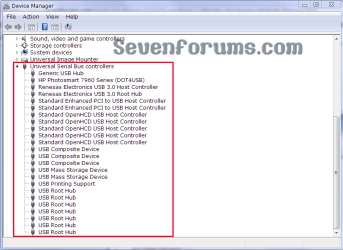
Go to Start/Control Panel/Device Manager and scroll to USB devices and expand them by clicking the small arrow there. Right-click on exh USB entry, a menu will popup, choose Update Driver, Search Automatically. Many will say you have the best driver, but do this for each one and see if it helps.
devmsc.PNG
 

My Computer My Computer

Computer type
PC/Desktop
Computer Manufacturer/Model Number
Home Built Desktop By DataTech
OS
Windows 7 Ultimate X64 SP1
CPU
Intel i5-2550K, Differing ~4.4-4.8GHz No built in GPU
Motherboard
ASUS P8Z68-V PRO/GEN3
Memory
16GB G.Skill Sniper 1866MHz @ 2133MHz 2x8GB
Graphics Card(s)
ASUS GTX650TIB-DC2OC-2GD5, (650TI Boost)
Sound Card
Onboard Realtek 5-1
Monitor(s) Displays
Samsung P2570HD
Screen Resolution
1920x1080
Hard Drives
Samsung 840 Pro 256GB SSD for OS, 500GB Seagate Constellation (Enterprise drive) for Data
PSU
Corsair HX650W
Case
Inwin Dragon Rider
Cooling
Hyper 212 EVO w/two Noctua fans, push-pull, @1300 RPM
Keyboard
E-Z Eyes, bright yellow keys with large characters
Mouse
steelseries SENSEI Laser Pro Gaming
Internet Speed
48-51Mbs Mbs down, 11 Mbs up Xfinity Cable
Antivirus
Norton Internet Security 2013
Browser
IE 10, Opera, Pale Moon if needed
Other Info
4 case fans, LG BluRay-RE, ASUS DVD-RW, Mr. Fusion power supply, 1.21 gigawatts.
Hey, i have tryed to update what you said, seems like everything is ok. Tryed to update some other stuff to, all was fine. The mouse still blocks randomly, for 3 secs then revives. Any other suggestions (beside formating the windows)?

Thank you
 

My Computer My Computer

OS
Windows 7 Ultimate x64
CPU
i7 950 stock speed
Motherboard
ASUS P6T SE
Memory
Corsair Vengeance 12gb 2t
Graphics Card(s)
ASUS 570 GTX
Sound Card
X-Fi Platinum Fatality Champion series
Monitor(s) Displays
2x Dell 2407
Hard Drives
OS Drive: RevoDrive OCZ 120gb ssd
and 3 SATA HDDs for storage
PSU
Enermax Infinity 650w
Case
Kandalf
Cooling
CPU noctuna, fans
Darn! Go to the G5 Laser Mouse page and download the latest mouse software. Of interest to me you'll see a Firmware update too, you might read through that and see if new firmware might help.
This may seem simplistic, but use a rubbing alcohol-soaked cotton swab and clean the lens on the mouse.
 

My Computer My Computer

Computer type
PC/Desktop
Computer Manufacturer/Model Number
Home Built Desktop By DataTech
OS
Windows 7 Ultimate X64 SP1
CPU
Intel i5-2550K, Differing ~4.4-4.8GHz No built in GPU
Motherboard
ASUS P8Z68-V PRO/GEN3
Memory
16GB G.Skill Sniper 1866MHz @ 2133MHz 2x8GB
Graphics Card(s)
ASUS GTX650TIB-DC2OC-2GD5, (650TI Boost)
Sound Card
Onboard Realtek 5-1
Monitor(s) Displays
Samsung P2570HD
Screen Resolution
1920x1080
Hard Drives
Samsung 840 Pro 256GB SSD for OS, 500GB Seagate Constellation (Enterprise drive) for Data
PSU
Corsair HX650W
Case
Inwin Dragon Rider
Cooling
Hyper 212 EVO w/two Noctua fans, push-pull, @1300 RPM
Keyboard
E-Z Eyes, bright yellow keys with large characters
Mouse
steelseries SENSEI Laser Pro Gaming
Internet Speed
48-51Mbs Mbs down, 11 Mbs up Xfinity Cable
Antivirus
Norton Internet Security 2013
Browser
IE 10, Opera, Pale Moon if needed
Other Info
4 case fans, LG BluRay-RE, ASUS DVD-RW, Mr. Fusion power supply, 1.21 gigawatts.
I had the same problem with a standard Logitech mouse on a USB port of an ASUS board with Windows 7 running.
This problem with USB mice seems to be very frequent, because I found many reports about that in many forums.
I tried all the software solutions poposed in these forums but to absolutely no avail. On the contrary, the mouse freezing for some seconds with the "USB device connect/disconnect" sounds happened more and more frequently.

Finally I found the very simple solution:
It is a simple hardware problem and had nothing to do with software:

The Logitech mice (and their various similarly constructed clones) have an extremely cheap cable connection. The relative thin and cheap cable has no antikink device at all. The only strain relief is an S-shaped channel through which the cable is lead into mouse case. Obviously the isolations of the wires inside the cable are chafed in the kinks of the S-shaped channel after longer use so thin, that tottering short circuits happen between the wires in the cable, which appear to the system like connecting and disconnecting the USB device.

I screwed the mouse encasement open and took the cable out of the S-shaped channel and bend it straight thus removing all kinks in it. Then I shoved the cable one inch into the case. so that I could lay a "fresh" (= unkinked before) section of the cable into the S-shaped channel.

I did that 2 weeks ago. I had no problems since then anymore.

Werner

P.S.: Be careful opening the mouse case:
Remove the single screw which holds the case closed.
Then lay the mouse on a table while you take off the cover of the case and keep it lying on the table while you do the above described operations with cable and close the case again before you lift it off the table.

By this you prevent that the mouse wheel falls out of its position, cause it is a lot of enervating hustle to put the wheel and the 2 spring wires holding it back into correct position, if you don't know how to do it. So better keep it untouched in its position while you do the cable operations.
 

My Computer My Computer

OS
Windows 7 ultimate 64bit
CPU
Intel i7
Motherboard
Asus
Memory
8 GB
Graphics Card(s)
Intel on MB
Sound Card
Realtek on MB
Monitor(s) Displays
NEC
Back
Top