Windows 7 Update Error - Has not updated for 90 Days!

WinningWith7

New member
Local time
4:00 AM
Messages
25
I just found out windows has not updated since November 2017

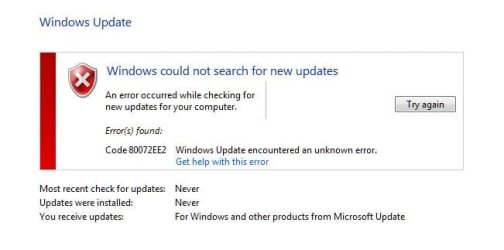
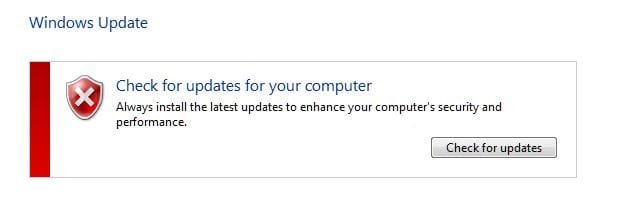
When i manually searched for updates these windows appeared

I have tried uninstall software around that date, including Intel RST drivers for my Samsung SSD which i heard could cause update issues, ran disk check, Automatically fix file system errors, Scan for and detect recovery of bad sectors, cleared everything expect thumbs in Disk Cleanup, cold booted, ran Window Experience Index and have done full virus scans with Avast, Malwerebytes and Super anti spyware but still get the same issue; what should i do next and how do i figure out what caused this (particularly if its something malicious) thanks
 

Attachments
  • 1.JPG
    1.JPG
    17 KB · Views: 60
  • 2.JPG
    2.JPG
    17.9 KB · Views: 60

My Computer My Computer

Computer type
PC/Desktop
Computer Manufacturer/Model Number
Custom Build
OS
Windows 7 Ultimate x64
CPU
Intel Quad Core Q6600
Motherboard
Asus P5Q pro turbo
Memory
OCZ Reaper 1066
Graphics Card(s)
Asus GTX 460

My Computer My Computer

Computer type
PC/Desktop
Computer Manufacturer/Model Number
medionl/Aspire 6930G/acer x55a
OS
W7 home premium 32bit/W7HP 64bit/w10 tp insider ring
CPU
E5300 dual core
Motherboard
medion MS7366
Memory
3gb
Graphics Card(s)
Nvidia Geforce 7100 Nforce 630i
Monitor(s) Displays
avixc
Internet Speed
n (isp resticted to 72)
Antivirus
mse/pands
Browser
palemoon
Other Info
Belkin Fd7050 n USB using Railink RT2870 drivers, more upto date
Here's another trick which might fix it for you:

Rename the SoftwareDistribution folder to something else. It is located in C:\Windows

Give it any name you like; the point is to make it unavailable to Windows, so that Windows will have to create it again. For example, you could rename it to SoftwareDistribution1

By renaming the folder rather than deleting it, you can easily restore it by fixing the name. I don't know if you will ever need to restore it, but my habit is to simply rename a folder rather than delete it.

Apparently the contents of that folder track your Windows updates, and they may be corrupted.
 

My Computer My Computer

Computer type
PC/Desktop
Computer Manufacturer/Model Number
Dell
OS
Linux Mint 18.2 xfce 64-bit (VMWare host) / Windows 8.1 Pro 32-bit (VMWare guest)
CPU
Haswell
Memory
4 GB
Monitor(s) Displays
Acer 23"
Screen Resolution
1920 x 1080
Hard Drives
Two hard drives, 1TB each: One for Linux, one for my data.
Keyboard
IBM Model M
Antivirus
Sophos (Linux), Trend Micro (Windows)
Browser
Firefox, Opera
Other Info
I use Samba to share my data drive with the other computers at my house and with my guest session in VMWare Workstation Player.

My Computer My Computer

Computer type
PC/Desktop
Computer Manufacturer/Model Number
Custom Build
OS
Windows 7 Ultimate x64
CPU
Intel Quad Core Q6600
Motherboard
Asus P5Q pro turbo
Memory
OCZ Reaper 1066
Graphics Card(s)
Asus GTX 460
Here's another trick which might fix it for you:

Rename the SoftwareDistribution folder to something else. It is located in C:\Windows

Give it any name you like; the point is to make it unavailable to Windows, so that Windows will have to create it again. For example, you could rename it to SoftwareDistribution1

By renaming the folder rather than deleting it, you can easily restore it by fixing the name. I don't know if you will ever need to restore it, but my habit is to simply rename a folder rather than delete it.

Apparently the contents of that folder track your Windows updates, and they may be corrupted.

I renamed the file and tried to get updates but got this error message so what should i do next please?
 

Attachments

  • Capture.JPG
    Capture.JPG
    25.9 KB · Views: 48

My Computer My Computer

Computer type
PC/Desktop
Computer Manufacturer/Model Number
Custom Build
OS
Windows 7 Ultimate x64
CPU
Intel Quad Core Q6600
Motherboard
Asus P5Q pro turbo
Memory
OCZ Reaper 1066
Graphics Card(s)
Asus GTX 460
Hi WinningWith7,

Can you post the log from here please,
C >> Windows >> logs >> CBS ... cbs (the top one)


Roy
 

My Computer My Computer

Computer type
PC/Desktop
Computer Manufacturer/Model Number
medionl/Aspire 6930G/acer x55a
OS
W7 home premium 32bit/W7HP 64bit/w10 tp insider ring
CPU
E5300 dual core
Motherboard
medion MS7366
Memory
3gb
Graphics Card(s)
Nvidia Geforce 7100 Nforce 630i
Monitor(s) Displays
avixc
Internet Speed
n (isp resticted to 72)
Antivirus
mse/pands
Browser
palemoon
Other Info
Belkin Fd7050 n USB using Railink RT2870 drivers, more upto date
Sorry had issues uploading the file so have split it into two...

As it stands i have two of the software distribution folders with one of them renamed "1" at the end
 

Attachments

My Computer My Computer

Computer type
PC/Desktop
Computer Manufacturer/Model Number
Custom Build
OS
Windows 7 Ultimate x64
CPU
Intel Quad Core Q6600
Motherboard
Asus P5Q pro turbo
Memory
OCZ Reaper 1066
Graphics Card(s)
Asus GTX 460
Hi Winningwith7,

can you use the buit in zip creator please.

Roy
 

My Computer My Computer

Computer type
PC/Desktop
Computer Manufacturer/Model Number
medionl/Aspire 6930G/acer x55a
OS
W7 home premium 32bit/W7HP 64bit/w10 tp insider ring
CPU
E5300 dual core
Motherboard
medion MS7366
Memory
3gb
Graphics Card(s)
Nvidia Geforce 7100 Nforce 630i
Monitor(s) Displays
avixc
Internet Speed
n (isp resticted to 72)
Antivirus
mse/pands
Browser
palemoon
Other Info
Belkin Fd7050 n USB using Railink RT2870 drivers, more upto date
I hope this is what you meant; if not please provide me with details on how to do it; thanks
 

My Computer My Computer

Computer type
PC/Desktop
Computer Manufacturer/Model Number
Custom Build
OS
Windows 7 Ultimate x64
CPU
Intel Quad Core Q6600
Motherboard
Asus P5Q pro turbo
Memory
OCZ Reaper 1066
Graphics Card(s)
Asus GTX 460

My Computer My Computer

Computer type
PC/Desktop
Computer Manufacturer/Model Number
medionl/Aspire 6930G/acer x55a
OS
W7 home premium 32bit/W7HP 64bit/w10 tp insider ring
CPU
E5300 dual core
Motherboard
medion MS7366
Memory
3gb
Graphics Card(s)
Nvidia Geforce 7100 Nforce 630i
Monitor(s) Displays
avixc
Internet Speed
n (isp resticted to 72)
Antivirus
mse/pands
Browser
palemoon
Other Info
Belkin Fd7050 n USB using Railink RT2870 drivers, more upto date
Done...
 

Attachments

  • 03.JPG
    03.JPG
    21.1 KB · Views: 37
  • 02.JPG
    02.JPG
    31.5 KB · Views: 0
  • 01.JPG
    01.JPG
    13.1 KB · Views: 0
  • 04.zip
    04.zip
    4.5 MB · Views: 2

My Computer My Computer

Computer type
PC/Desktop
Computer Manufacturer/Model Number
Custom Build
OS
Windows 7 Ultimate x64
CPU
Intel Quad Core Q6600
Motherboard
Asus P5Q pro turbo
Memory
OCZ Reaper 1066
Graphics Card(s)
Asus GTX 460
please advise...
 

My Computer My Computer

Computer type
PC/Desktop
Computer Manufacturer/Model Number
Custom Build
OS
Windows 7 Ultimate x64
CPU
Intel Quad Core Q6600
Motherboard
Asus P5Q pro turbo
Memory
OCZ Reaper 1066
Graphics Card(s)
Asus GTX 460
Torch you asked for the files and i have uploaded them... is there anything that can be done?

Would a repair install do the trick or would you recommend a reformat (which i really want to avoid). Thanks
 

My Computer My Computer

Computer type
PC/Desktop
Computer Manufacturer/Model Number
Custom Build
OS
Windows 7 Ultimate x64
CPU
Intel Quad Core Q6600
Motherboard
Asus P5Q pro turbo
Memory
OCZ Reaper 1066
Graphics Card(s)
Asus GTX 460

My Computer My Computer

Computer type
PC/Desktop
Computer Manufacturer/Model Number
HP Desktop & Compaq Laptop
OS
Win 10 x64, Linux Lite, Win 7 x64, BlackArch, & Kali
Hard Drives
Samsung 850 Pro 256Gb,
Hitachi HDD 1Tb,
Crucial MX SSD 250Gb
Segate 3Tb USB 3.0 Ext. Backup HDD
Internet Speed
150Mbps dn, 20Mbps up
Antivirus
Avast Free, Malwarebytes Anti-Exploit & Anti-Ransomware
Browser
Firefox, Chrome, Opera, & VPN
Hi
I have the exact problem as the OP. I found this thread, and it says there is a fix at post #9. That post is from the OP. How can he post his own fix? I know nothing about computers. Just an end-user. The last post (#10) is a link to a MS site which says it is for IT pros only. It's all Greek to me. Can someone help? I notice that the OP has not posted that his/her issue is solved.

I'm attaching pictures to show what I have encountered. I have restarted several times, no change. :(

Thanks for any suggestions.
P.S. My Windows Update History is blank. How can that be?
 

Attachments

  • Windows Update.jpg
    Windows Update.jpg
    40.2 KB · Views: 0
  • Windows Update 2.jpg
    Windows Update 2.jpg
    37.4 KB · Views: 0

My Computer My Computer

Computer type
PC/Desktop
Computer Manufacturer/Model Number
custom build
OS
Win 7 Home Premium 64
CPU
Intel Core i5 3570K @ 3.40GHZ 3.80 GHZ
Motherboard
Gigabyte GA-B75M-HD3
Memory
16GB
Graphics Card(s)
EVGA Nvidia GeForce GTX 750Ti
Sound Card
Creative Sound Blaster Audigy FX
Monitor(s) Displays
Dell 2407WFP-HC
Screen Resolution
1920 x 1200
Hard Drives
1TB Toshiba DT01ACA100 ATA Device
PSU
Inland Silver Series ILS 500R2
Case
Thermaltake V3 Black
Cooling
some fans that are inside :)
Keyboard
ONN wireless
Mouse
Logitech wireless laser
Internet Speed
4.89 avg dl speed 3.67 avg ul speed
Antivirus
Microsoft Security Essentials
Browser
Mozilla
Hi therealsimpsons. The Thread you are referring to with the reference to Post #9 was located elsewhere. However, that Post was mine & below is the method that has been used to fix the problem you are having. Read it carefully & follow the directions.

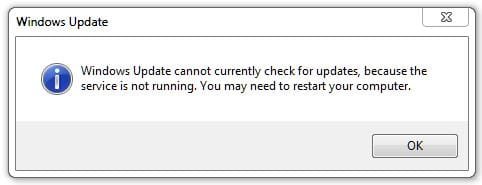
"Windows update cannot currently check for updates, because the service is not running, You may need to restart your computer".

This is exactly the message you get when the AuthCab has expired. Doing the following seems to fix it:

The date on the computer has to be reset & to do that follow this:

To reset the date on the computer Right Click on the Clock at bottom RH corner of the screen, select Change Date & Time Settings, when that opens click on the Internet Time tab, Then select Change Settings, then untick Synchronise with Internet Time Server, be sure to tick OK, then select the Date & Time tab, Then select Change Date & Time & set the date back to 3 Dec.

Then reboot the computer & then run Check for Updates in Windows Update, it should update to the 3 Dec. In some cases you may need to try an earlier date if the 2nd doesn't work.

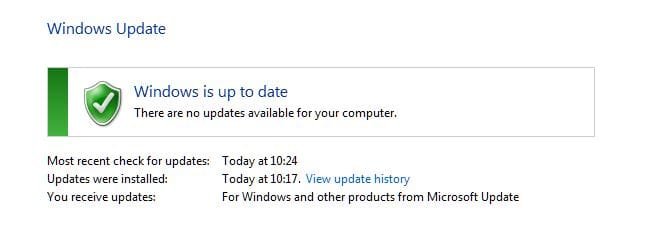
Then reboot, reset Internet time Synch, change computer date to today's date, re run Check for Updates in Windows Update & it should check for Updates & came back with Windows is up to date, with the latest updates installed.

This method should retain all your Update History as well.


The reason for this procedure, is that Windows accesses an AuthCab during the start-up procedure that Authorises access to the Windows Update download site. This authorisation expired on 3 Dec for a lot of users & access get blocked to the Windows Update site.

By running the repair I listed above, resetting the computer date & rebooting provides access to Update site at which MS have now reset the expiry of that AuthCab which gets installed on your computer, so it can now download & install Updates. Of course it is then necessary to reset the date on the computer & re run Check for Updates to bring it completely up to date.
 

My Computer My Computer

Computer type
PC/Desktop
Computer Manufacturer/Model Number
Self built using existing case
OS
Windows 7 Home Premium 64 bit sp1
CPU
Intel i5 3570 3.4Ghz Ivy Bridge SKT 1155 quad core
Motherboard
Gigabyte Z77-HD3 SKT 1155 2xSata 3, 4x USB 3.0
Memory
G-Skill Rip Jaws 16Gb (8x2) DDR3 -1600 PC3 12800 CL 10 red
Graphics Card(s)
Gigabyte NVIDIA GT610 1Gb DDR3 810/1200 PCI-E 2.0 Silent
Sound Card
NVIDIA High Definition & Realtech High Definition Audio
Monitor(s) Displays
2 x Philips 226V4L 16:9 aspect ratio
Screen Resolution
1920 x 1080 HD
Hard Drives
Samsung 840 Pro 256gb SSD, SATA 3.
Hitachi Touro Portable 1tb, USB 3.0 HDD used for image b/ups.
PSU
Corsair VS450
Case
Codeng
Cooling
PSU fan & CPU fan
Keyboard
Logitech
Mouse
Logitech Wireless trackball M570
Internet Speed
Wireless 3G. 3mg down & 550kb up.
Antivirus
Bitdefender Internet Security 2020
Browser
Opera (Current Version) & Firefox
Other Info
MS Office 2013 Pro. Davis weather station software. MGE Nova 600 avr UPS.
Perfect, Ranger4! I had to set the date back to November 28, the day after the last updates were installed, but as of this moment Windows has downloaded and is installing 13 important updates that were discovered 15 minutes ago.

Thank you so much. I can't mark this thread resolved, as I am not the OP. But my issue certainly seems to be.

:D
 

My Computer My Computer

Computer type
PC/Desktop
Computer Manufacturer/Model Number
custom build
OS
Win 7 Home Premium 64
CPU
Intel Core i5 3570K @ 3.40GHZ 3.80 GHZ
Motherboard
Gigabyte GA-B75M-HD3
Memory
16GB
Graphics Card(s)
EVGA Nvidia GeForce GTX 750Ti
Sound Card
Creative Sound Blaster Audigy FX
Monitor(s) Displays
Dell 2407WFP-HC
Screen Resolution
1920 x 1200
Hard Drives
1TB Toshiba DT01ACA100 ATA Device
PSU
Inland Silver Series ILS 500R2
Case
Thermaltake V3 Black
Cooling
some fans that are inside :)
Keyboard
ONN wireless
Mouse
Logitech wireless laser
Internet Speed
4.89 avg dl speed 3.67 avg ul speed
Antivirus
Microsoft Security Essentials
Browser
Mozilla
You are welcome & thanks for getting back. Glad to hear it's working again now.
 

My Computer My Computer

Computer type
PC/Desktop
Computer Manufacturer/Model Number
Self built using existing case
OS
Windows 7 Home Premium 64 bit sp1
CPU
Intel i5 3570 3.4Ghz Ivy Bridge SKT 1155 quad core
Motherboard
Gigabyte Z77-HD3 SKT 1155 2xSata 3, 4x USB 3.0
Memory
G-Skill Rip Jaws 16Gb (8x2) DDR3 -1600 PC3 12800 CL 10 red
Graphics Card(s)
Gigabyte NVIDIA GT610 1Gb DDR3 810/1200 PCI-E 2.0 Silent
Sound Card
NVIDIA High Definition & Realtech High Definition Audio
Monitor(s) Displays
2 x Philips 226V4L 16:9 aspect ratio
Screen Resolution
1920 x 1080 HD
Hard Drives
Samsung 840 Pro 256gb SSD, SATA 3.
Hitachi Touro Portable 1tb, USB 3.0 HDD used for image b/ups.
PSU
Corsair VS450
Case
Codeng
Cooling
PSU fan & CPU fan
Keyboard
Logitech
Mouse
Logitech Wireless trackball M570
Internet Speed
Wireless 3G. 3mg down & 550kb up.
Antivirus
Bitdefender Internet Security 2020
Browser
Opera (Current Version) & Firefox
Other Info
MS Office 2013 Pro. Davis weather station software. MGE Nova 600 avr UPS.
Back
Top