Solved Windows 7 update not updating after a week

opz

New member
Local time
8:57 PM
Messages
3
I had to purchase a new HDD as my old one went bad. Doing so I had reinstalled windows 7 to which over a week now trying to get updates which to no avail has not worked.

Steps I have taken:

1. Downloaded Surt which it just searches for updates for over 2 hours with nothing happening.

2. ran sfc /scannow 4x times with nothing being found.

3. Ran the sfc /scannow boot with nothing found.

4. ran chkdisk with nothing found

5. changed my network to 8.8.8.8 and 8.8.4.4 been running for an hour now with nothing found.

6. tried downloading and running https://support.microsoft.com/en-us/kb/3112343 to which also just searches for updates through standalone with nothing happening.

I am clueless at this point.... attached is a copy of the cbs, thanks!
 

My Computer My Computer

Computer type
PC/Desktop
Computer Manufacturer/Model Number
Custome
OS
windows 7 home premium 64 bit
CPU
amd fx 6100
Graphics Card(s)
970 gtx nvidia
Hard Drives
1 tb black WD
Antivirus
avast
Browser
firefox
I actually found a fix reading around the forums that worked perfectly that I bet alot of people never seen or have tried and I added an extra step to doing it.

Vickyv had posted this below
This has worked for me every time:

The solution:

Stop the Windows Update Service (wuauserv).
Download and install KB3050265
reboot
Download and install KB3102810
Reboot and check for updates again. All of our machines found their required updates in less than 5 minutes.


Now these steps didn't exactly work as the standalone would just be searching for updates without nothing happening for hours. So if this is happening to anyone else please follows these steps.

1. Go into Task manager and make sure to stop the Windows Update Service (wuauserv).

2. Now in task manager go to services tab, then bottom right corner open "services". Should bring you into a pop up. Scroll down to the windows update service wuauserv and right click hit restart.

3. download patch one specified above and double click to install, it should actually open standalone and take 30 seconds to install the patch. restart should pop up asking to do so, click restart.

4. download the patch two specified above and double click to install, same as last patch. then restart.

5. rerun your normal windows updater for a while and you should finally see updates being found.
 

My Computer My Computer

Computer type
PC/Desktop
Computer Manufacturer/Model Number
Custome
OS
windows 7 home premium 64 bit
CPU
amd fx 6100
Graphics Card(s)
970 gtx nvidia
Hard Drives
1 tb black WD
Antivirus
avast
Browser
firefox
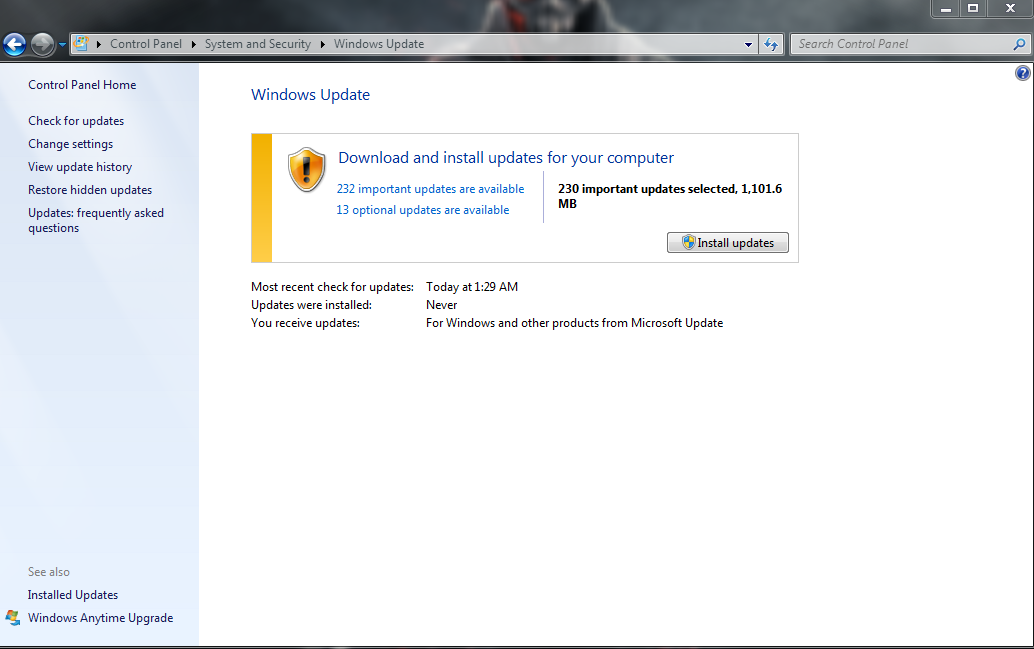
Well, that proves it, I just did the same thing on a second pc (labtop) running windows 7 and it worked perfect as well, here is a screenshot minutes after running windows update.
F0vOuy0.png
 

My Computer My Computer

Computer type
PC/Desktop
Computer Manufacturer/Model Number
Custome
OS
windows 7 home premium 64 bit
CPU
amd fx 6100
Graphics Card(s)
970 gtx nvidia
Hard Drives
1 tb black WD
Antivirus
avast
Browser
firefox
Brilliant!
Instructions clear, precise, and no BS.
Worked a treat.
 

My Computer My Computer

Computer type
PC/Desktop
OS
Win7 Ultimate x64
Great info with clear instructions. Worked like a champ.:D
 

My Computer My Computer

Computer type
PC/Desktop
Computer Manufacturer/Model Number
HP
OS
Windows 7 Home 64 bit
CPU
Intel duo
Memory
8 GB
I installed ALL patches/updates but my PC has been saying checking for updates for over 10 hours now, should i keep waiting or try something else?
 

My Computer My Computer

Computer type
PC/Desktop
OS
Windows 7 Home Premium 64 bit.
Back
Top