Solved Windows 7: update reboot loop 2016

Bas 2016

New member
Local time
5:21 PM
Messages
6
Hi all,

I've been having a problem with Windows updates on my (Win7) pc for some time now.

Downloading the updates usually doesn't pose a problem, but after rebooting it says "error configuring Windows updates reverting changes". That's when the loop starts: my system reboots and tries to configure the updates again, fails and reboots etc. The only way to get out of this is to press F8 and use system recovery. After this happened today I checked Windows update. All of the updates failed except for one(?).

- So far, I downloaded (and ran) the System Update Readiness Tool.

- I ran the SFC scan. It identified a number of problems, but it was unable to fix all of them.

- I can't include Windows update error codes in this post, because they do not appear (anymore). Therefor I check the update history instead.

Please see the log collection attached to this post.

Any help would be much appreciated.

Kind regards,
Bas
 
Last edited:

My Computer

Computer type
PC/Desktop
Computer Manufacturer/Model Number
Acer Aspire X3200
OS
Windows 7 Home Premium 32bit
CPU
AMD Athlon(tm) 7450 Dual-Core Processor 2,40 GHz
Memory
4096MB RAM
Graphics Card(s)
NVIDIA GeForce 9200
Antivirus
Panda Internet Security
Browser
Internet Explorer 11
Hello Bas,
The report is showing a problem with KB3150220.
Please change your WU settings to Let Me Decide,
Run the updater then Hide it, let the others run.
see if the rest work.

Roy

note Checksur is indicating multiple AV's, or remnents, prior to Panda what did you use.
 
Last edited:

My Computer

Computer type
PC/Desktop
Computer Manufacturer/Model Number
medionl/Aspire 6930G/acer x55a
OS
W7 home premium 32bit/W7HP 64bit/w10 tp insider ring
CPU
E5300 dual core
Motherboard
medion MS7366
Memory
3gb
Graphics Card(s)
Nvidia Geforce 7100 Nforce 630i
Monitor(s) Displays
avixc
Internet Speed
n (isp resticted to 72)
Antivirus
mse/pands
Browser
palemoon
Other Info
Belkin Fd7050 n USB using Railink RT2870 drivers, more upto date
Hello Roy,
Thanks very much for your reply. I feel better already!:D

So I ran the updater and I hid KB3150220 (WU settings were already on Let Me Decide). Then I let the others run. When it finished, windows update indicated that all the updates were completed except for one (error code 800F0902). Then I rebooted to complete the updates. When configuring updates was about 96% I got the same message: "error configuring Windows updates reverting changes". At this point I was back in the update reboot loop. I used system recovery to get out of the loop. Then I checked my update history and it shows all updates failed except for one (KB890830). Just like last time.
I have attached the log collection here.
Any ideas on what I should do?

Kind regards,
Bas

PS. Prior to Panda I used Norton Internet security. I'm not sure, but it's possible that I've been having this problem since the moment I switched to Panda(?).
 

My Computer

Computer type
PC/Desktop
Computer Manufacturer/Model Number
Acer Aspire X3200
OS
Windows 7 Home Premium 32bit
CPU
AMD Athlon(tm) 7450 Dual-Core Processor 2,40 GHz
Memory
4096MB RAM
Graphics Card(s)
NVIDIA GeForce 9200
Antivirus
Panda Internet Security
Browser
Internet Explorer 11
Hi Bas,

Error 800f0902 is a transient error - it means that Trusted Installer is busy processing requests from another client, and cannot be interrupted. It should not cause any problems other than the need to retry. What happened in your case is that the updates that failed, were replaced by newer updates, making the old updates "not applicable,"
In this case >> KB316923 <<

If you really want to install them (which means they will just be taking up space in winsxs, and will be subject to removal by "Windows Update cleanup"), you could expand the .msu using expand.exe from an elevated cmd prompt, and using dism /add-package on the .cab file that you extracted using expand.

MSU files are installed by wusa.exe, which first applies WU applicability logic, and if that says it is applicable it asks trustedinstaller if the package is applicable. If TrustedInstaller says it is applicable, then WU installs the package. If you use dism to install the internal cab file instead, you skip the WU applicability check, and dism tells TrustedInstaller to install it regardless of applicability.

Short answer though, is you don't need those updates.

your first log was not showing this error, and im wondering if there is something else or another update, masking the real problem, follow the AV instruction below and then try installing the updates individually, i know its a pain.

AV's can cause update hick-ups, did you use the Norton removal tool , or just uninstall it.
link
https://www.google.co.uk/url?sa=t&rct=j&q=&esrc=s&source=web&cd=4&cad=rja&uact=8&ved=0ahUKEwibzruFrdrMAhXGwxQKHWOcAOUQFggrMAM&url=https%3A%2F%2Fsupport.norton.com%2Fsp%2Fen%2Fuk%2Fhome%2Fcurrent%2Fsolutions%2Fkb20080710133834EN_EndUserProfile_en_us&usg=AFQjCNHpdTJglnW_ID_LjgruxEViKfetOA
please run the tool.
You could also look at Panda's log, see if its quarentined anything.

Roy
 
Last edited:

My Computer

Computer type
PC/Desktop
Computer Manufacturer/Model Number
medionl/Aspire 6930G/acer x55a
OS
W7 home premium 32bit/W7HP 64bit/w10 tp insider ring
CPU
E5300 dual core
Motherboard
medion MS7366
Memory
3gb
Graphics Card(s)
Nvidia Geforce 7100 Nforce 630i
Monitor(s) Displays
avixc
Internet Speed
n (isp resticted to 72)
Antivirus
mse/pands
Browser
palemoon
Other Info
Belkin Fd7050 n USB using Railink RT2870 drivers, more upto date

My Computer

Computer type
PC/Desktop
Computer Manufacturer/Model Number
Home made Desktop
OS
Windows 10 Pro. 64/ version 1709 Windows 7 Pro/64
CPU
Intel i7-6800K @ 4.3
Motherboard
ASUS X-99 Deluxe II
Memory
Corsair Platinum 16 gig @2400
Graphics Card(s)
EVGA GTX 1070 OC
Monitor(s) Displays
Asus 27" LED LCD/VE278Q
Screen Resolution
1920-1080 or 1280-720 HDMI
Hard Drives
INTEL SSD 730-240 Gb Sata 3.0/
PSU
EVGA Platium 1200W
Case
Phanteks Luxe Tempered Glass 8 fans/ one radiator
Cooling
XSPC/ Water Cooled CPU
Keyboard
Das 4 Professional
Mouse
Logitech M705/MX Anywhere 2-S
Internet Speed
100 mbits
Antivirus
Microsoft Security Essentials/ Malwarebytes Premium 3.0/ SAS
Browser
I.E. 11 default/Firefox/ ISP Time Warner Cable/Spectrum
Other Info
LG BluRay Burner/
Sound system-KLipsch-THX/
Icy Dock ssd Hot Swap bays.
Windows 7: update reboot loop

Hello Roy,
I ran the Norton removal tool (twice). After that I tried installing the updates individually, like you suggested. Doing so, I was able to install the smaller updates. The bigger updates still failed resulting in an update reboot loop.
I have attached the log collection to this post.

Then I tried following the steps in this video:

https://www.youtube.com/watch?v=NpT05nwk57w

Windows update seems to be working a little better now. However I'm still not able to install the updates that failed before. I have created a restore point just in case, so I am able to go back to the situation as it was before I executed the steps in the video.

Any thoughts on what I could do at this point?

Kind regards,
Bas


My Computer

Computer type
PC/Desktop
Computer Manufacturer/Model Number
Acer Aspire X3200
OS
Windows 7 Home Premium 32bit
CPU
AMD Athlon(tm) 7450 Dual-Core Processor 2,40 GHz
Memory
4096MB RAM
Graphics Card(s)
NVIDIA GeForce 9200
Antivirus
Panda Internet Security
Browser
Internet Explorer 11

My Computer

Computer type
PC/Desktop
Computer Manufacturer/Model Number
medionl/Aspire 6930G/acer x55a
OS
W7 home premium 32bit/W7HP 64bit/w10 tp insider ring
CPU
E5300 dual core
Motherboard
medion MS7366
Memory
3gb
Graphics Card(s)
Nvidia Geforce 7100 Nforce 630i
Monitor(s) Displays
avixc
Internet Speed
n (isp resticted to 72)
Antivirus
mse/pands
Browser
palemoon
Other Info
Belkin Fd7050 n USB using Railink RT2870 drivers, more upto date
Windows 7: update reboot loop

Hello Roy,
Thanks again for your reply.
I ran the Microsoft Fix it tool. After that I tried to install one update (KB3154070). It failed and then I got stuck in the update reboot loop.
I'm pretty sure I don't have any additional language packs installed. (Where can I see?)
I have attached the log collection here.

At this point we've tried so many things that I'm actually considering upgrading to Windows 10. I'm reluctant to try upgrading to Windows 10, because my system is relatively old (purchased in 2009). It originally had Windows Vista. Do you think upgrading my (Acer Aspire X3200) system to Windows 10 will work?

My preferred solution would be to get Windows update to work again, so I can stick with Windows 7. But we've tried so much already.
Is there anything else we could try?

Kind regards,
Bas
 

My Computer

Computer type
PC/Desktop
Computer Manufacturer/Model Number
Acer Aspire X3200
OS
Windows 7 Home Premium 32bit
CPU
AMD Athlon(tm) 7450 Dual-Core Processor 2,40 GHz
Memory
4096MB RAM
Graphics Card(s)
NVIDIA GeForce 9200
Antivirus
Panda Internet Security
Browser
Internet Explorer 11

Attachments

  • bascr1.PNG
    bascr1.PNG
    30.8 KB · Views: 1
  • bascr2.PNG
    bascr2.PNG
    29.9 KB · Views: 0
  • bascr3.PNG
    bascr3.PNG
    33.1 KB · Views: 1

My Computer

Computer type
PC/Desktop
Computer Manufacturer/Model Number
medionl/Aspire 6930G/acer x55a
OS
W7 home premium 32bit/W7HP 64bit/w10 tp insider ring
CPU
E5300 dual core
Motherboard
medion MS7366
Memory
3gb
Graphics Card(s)
Nvidia Geforce 7100 Nforce 630i
Monitor(s) Displays
avixc
Internet Speed
n (isp resticted to 72)
Antivirus
mse/pands
Browser
palemoon
Other Info
Belkin Fd7050 n USB using Railink RT2870 drivers, more upto date
Windows 7: update reboot loop

Hello Roy,
I tried following the instructions on the blog you linked to.
I'm not sure what to do exactly when it says:

"To fix the problem, export the key from the known good system and import it on the machine experiencing the problem."

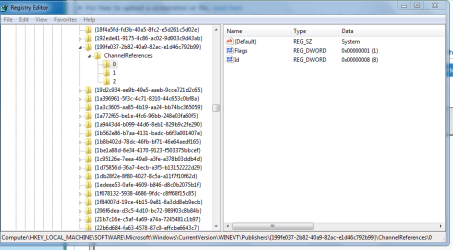
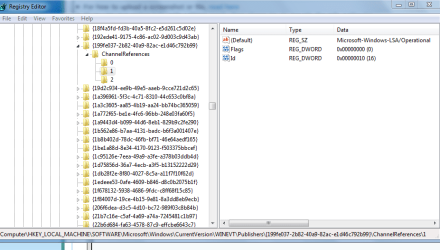
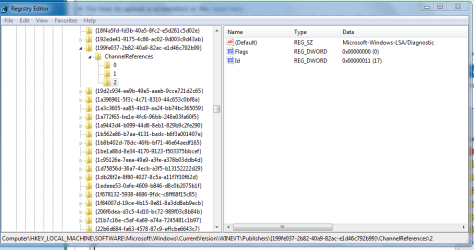
I've included a screenshot of my ChannelReferences folder. I've noticed that there is no set value for the default icon. And when I doubleclick the Count icon it says value "3" (hexadecimal).

Would it be possible to get specific instructions on how I could make my ChannelReferences folder look like yours?

Many thanks.

Kind regards,
Bas


Attachments

  • Screenshot ChannelReferences.png
    Screenshot ChannelReferences.png
    32.3 KB · Views: 0

My Computer

Computer type
PC/Desktop
Computer Manufacturer/Model Number
Acer Aspire X3200
OS
Windows 7 Home Premium 32bit
CPU
AMD Athlon(tm) 7450 Dual-Core Processor 2,40 GHz
Memory
4096MB RAM
Graphics Card(s)
NVIDIA GeForce 9200
Antivirus
Panda Internet Security
Browser
Internet Explorer 11
Hi Bas,
managed to get a copy of the required entries
in attached
THIS FILE IS FOR THE USER ONLY
IF YOU COPY OR IMPORT IT TO YOUR COMP
IT COULD CAUSE SERIOUS PROBLEMS

Save the attachment to your desktop>> open it with RIGHT click now
Open regedit scroll to the entry in HKLM etc .....>>> RIGHT click >> box will open >> select merge.
note it MAY be slightly different from my above screenshots coz these are 32 bit entries

REBOOT


Roy
 

Attachments

My Computer

Computer type
PC/Desktop
Computer Manufacturer/Model Number
medionl/Aspire 6930G/acer x55a
OS
W7 home premium 32bit/W7HP 64bit/w10 tp insider ring
CPU
E5300 dual core
Motherboard
medion MS7366
Memory
3gb
Graphics Card(s)
Nvidia Geforce 7100 Nforce 630i
Monitor(s) Displays
avixc
Internet Speed
n (isp resticted to 72)
Antivirus
mse/pands
Browser
palemoon
Other Info
Belkin Fd7050 n USB using Railink RT2870 drivers, more upto date
Windows 7: update reboot loop

Hello Roy,
It has been a while, but thanks for your reply.
Since I am not familiar with the registry editor I wasn't quite sure what to do. So I decided to look for somebody who could help me with that.
So this morning an employee from a student service came to my house and fixed the problem. I showed him your replies and based on your last reply he was able to solve the problem.
Just now I was able to install all the necessary updates.
Big thanks for all the help!! I really appreciate it!

Kind regards (and much respect) from Holland,
Bas
 

My Computer

Computer type
PC/Desktop
Computer Manufacturer/Model Number
Acer Aspire X3200
OS
Windows 7 Home Premium 32bit
CPU
AMD Athlon(tm) 7450 Dual-Core Processor 2,40 GHz
Memory
4096MB RAM
Graphics Card(s)
NVIDIA GeForce 9200
Antivirus
Panda Internet Security
Browser
Internet Explorer 11
Back
Top