Windows 7 Updates destroy MBR

Soter

New member
Local time
2:17 AM
Messages
3
After a lot of tests it is obvious that at least one of the latest following Windows 7 updates destroys the MBR of the Hard Drive. It is up to Microsoft to help make explanations and to withdraw it.
KB890830
KB915597
KB3013455
KB3023562
KB2952664
KB3004394
KB3006137
KB3021917
 

My Computer

Computer type
PC/Desktop
OS
Windows 7 32 bit
None of the updates are designed to affect the MBR so far as I know - and the only one that may do so is KB890830 - the MSRT, which may attempt to remove MBR malware if it finds any present. KB915597 are simply Defender updates - but are also involved in removing malware

There was an issue with the original release version of KB3004394 - which was withdrawn within 24 hours, and has since been updated and re-released. However, there was no mention of MBR problems in any of the dozens/hundreds of reports I have read.
 

My Computer

Computer type
Laptop
Computer Manufacturer/Model Number
Asus K52F or Lenovo B51-80
OS
Win 7 x64 Home Premium (and x86 VirtualBox VM)/Win10
CPU
i3 370M/i7 6500U
Motherboard
Asus/Lenovo
Memory
8GB - finally :)/8GB
Graphics Card(s)
it's an i3, dude!/dual Intel&nVidia
Sound Card
onboard
Monitor(s) Displays
15.6" built-in
Screen Resolution
1366x768/1920x1080
Hard Drives
750GB Seagate internal
Sundry external drives attached to other computers on the local network
1TB SSD on the Lenovo
PSU
n/a
Internet Speed
as much as I can get - usually on a dongle/phone, so <1MB/s
Antivirus
MSE/Defender
Browser
IE11/12/Edge/Chrome/FF(if I must)
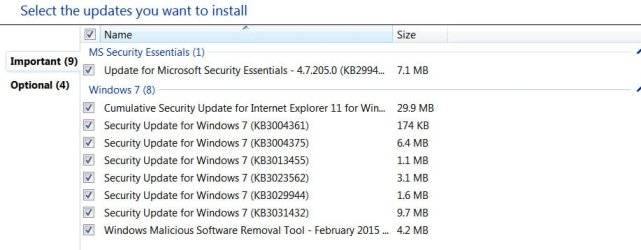
My wife updated her Windows 7 Home Premium 32bit on her Zotac Mini-PC about a week back. I updated my Windows 7 Ultimate 32bit just now.

The following Important and optional updates were available.

28-02-2015 18-29-15.jpg

28-02-2015 18-30-24.jpg

Everything went on well and nothing untoward happened.
 

My Computer

OS
Windows 7 Home Premium 32 bit
None of the updates are designed to affect the MBR so far as I know - and the only one that may do so is KB890830 - the MSRT, which may attempt to remove MBR malware if it finds any present. KB915597 are simply Defender updates - but are also involved in removing malware

There was an issue with the original release version of KB3004394 - which was withdrawn within 24 hours, and has since been updated and re-released. However, there was no mention of MBR problems in any of the dozens/hundreds of reports I have read.
That's why I just said one of them. As a matter of fact my MBR destroyed after the installation of the above updates as a whole. I'm glad to hear that the "KB890830" most probably did the dirty job.
In any case, thank you for your help.
 

My Computer

Computer type
PC/Desktop
OS
Windows 7 32 bit
If indeed the MSRT is responsible, it's ONLY because the machine was already infected with MBR malware.
You should chec it our thoroughly with a variety of virus/malware scanners.
 

My Computer

Computer type
Laptop
Computer Manufacturer/Model Number
Asus K52F or Lenovo B51-80
OS
Win 7 x64 Home Premium (and x86 VirtualBox VM)/Win10
CPU
i3 370M/i7 6500U
Motherboard
Asus/Lenovo
Memory
8GB - finally :)/8GB
Graphics Card(s)
it's an i3, dude!/dual Intel&nVidia
Sound Card
onboard
Monitor(s) Displays
15.6" built-in
Screen Resolution
1366x768/1920x1080
Hard Drives
750GB Seagate internal
Sundry external drives attached to other computers on the local network
1TB SSD on the Lenovo
PSU
n/a
Internet Speed
as much as I can get - usually on a dongle/phone, so <1MB/s
Antivirus
MSE/Defender
Browser
IE11/12/Edge/Chrome/FF(if I must)
If indeed the MSRT is responsible, it's ONLY because the machine was already infected with MBR malware.
You should chec it our thoroughly with a variety of virus/malware scanners.
I had already checked it with Kaspersky I.S.
Thank you
 

My Computer

Computer type
PC/Desktop
OS
Windows 7 32 bit
One app is never enough in these circumstances.
 

My Computer

Computer type
Laptop
Computer Manufacturer/Model Number
Asus K52F or Lenovo B51-80
OS
Win 7 x64 Home Premium (and x86 VirtualBox VM)/Win10
CPU
i3 370M/i7 6500U
Motherboard
Asus/Lenovo
Memory
8GB - finally :)/8GB
Graphics Card(s)
it's an i3, dude!/dual Intel&nVidia
Sound Card
onboard
Monitor(s) Displays
15.6" built-in
Screen Resolution
1366x768/1920x1080
Hard Drives
750GB Seagate internal
Sundry external drives attached to other computers on the local network
1TB SSD on the Lenovo
PSU
n/a
Internet Speed
as much as I can get - usually on a dongle/phone, so <1MB/s
Antivirus
MSE/Defender
Browser
IE11/12/Edge/Chrome/FF(if I must)
Back
Top