Windows 7 Updates - Why?

Wendoz

New member
Local time
9:55 AM
Messages
5
Since Microsoft no longer supports Win7, why am I seeing updates? The most recent one, disabled my anti-virus software. Nothing I did could reactivate it except a system restore. But I fear that update will show up again when shutdown my computer as it did yesterday. I don't want any updates because we're not supposed to be getting any.


I've had my existing version of Windows on this same computer for 10+ years and mainly trouble-free. It only barfed when I did something stupid. Like installed a 3rd-party registry cleaner that messed up access to some programs about 4 years ago. And most recently, when a vendor's software stopped working, and they told me to clear out my TMP files. That also caused me to be unable to access some of my other software programs. System Restore corrected that issue, plus removing the non-working program itself. So basically, Win7 has been very nice to me. Now this unwanted update is forcing itself on me. Why? If Microsoft no longer maintains the OS, they should leave us alone.
 

My Computer

Computer type
PC/Desktop
Computer Manufacturer/Model Number
ASUS
OS
Windows 7 Ultimate x64
CPU
i7
Motherboard
ASUS
Memory
24GB
Graphics Card(s)
nVidia GTX 3GB
Hard Drives
Two SSD (Crucial)
Antivirus
Vipre
Browser
Firefox
Why not? Updates for vista were were available until a few months ago. Cant recall when updates for xp stopped, but it was many years after the official eos. MS normally do this. A lot of people using win7, perhaps 15-20% of windows users.
In addition, new updates for microsoft security essentials will continue till 2023

Now this unwanted update is forcing itself on me.

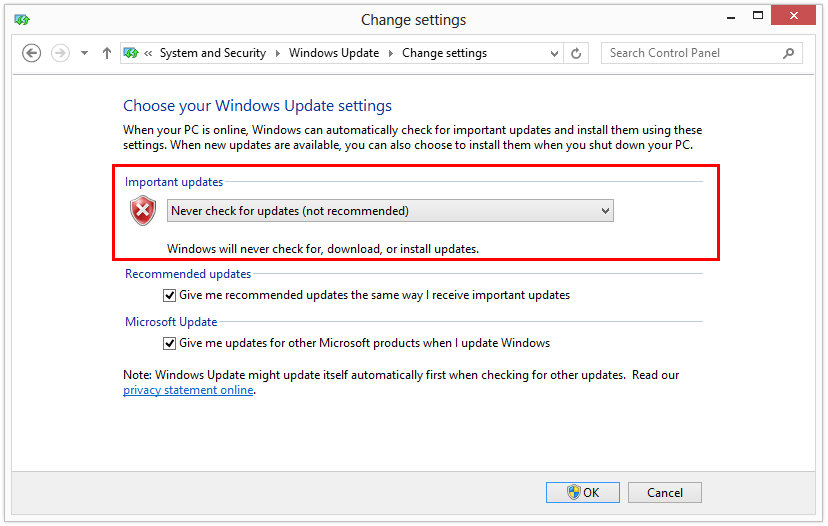
If you believe one of them is causing an issue on your system, you can hide it. Are you aware you can go to windows update and there are options for the user? You can even turn it off, if you like. WindowsUpdate>change settings>never check for updates.
 

My Computers

System One System Two

  • Computer type
    PC/Desktop
    OS
    7 X64
    CPU
    i5 8400
    Motherboard
    gigabyte b365m ds3h
    Memory
    2x8gb 3200mhz
    Hard Drives
    various
    PSU
    pure power 11 400w cm
    Case
    Coolermaster
    Cooling
    cryorig m9i
  • Computer type
    PC/Desktop
    OS
    7x64
    CPU
    g5400
    Motherboard
    ga b365m ds3h
    Memory
    8gb ddr4 2400
    PSU
    xfx pro 450w
SWI2, I'm aware I can manipulate updates. Here's the problem in my case, the update occurs when I shutoff the computer. Nothing shows up until I do that. BUT just now, the Windows Malicious Software Removal Tool (KB890830) showed up. Just as I was typing this message. I went and unchecked the box. I also changed the setting to download but let me decide whether to install. BUT, the update remains when I push the START button, so I probably will have this forced on me again. I don't want nor need this update because VIPRE takes care of that and is quite aggressive in doing so. Once again, this update shuts down my anti-verse software and disallows my reactivating it. This is why I steer clear of Win10 On my wife's computer, Win10 has an intrusive habit or ignoring my custom preferences and reactivating things I deactivated. I don't want this interference on my Win7 machine.
 

My Computer

Computer type
PC/Desktop
Computer Manufacturer/Model Number
ASUS
OS
Windows 7 Ultimate x64
CPU
i7
Motherboard
ASUS
Memory
24GB
Graphics Card(s)
nVidia GTX 3GB
Hard Drives
Two SSD (Crucial)
Antivirus
Vipre
Browser
Firefox
It isn't being pushed onto me, so not sure why you are getting it.
 

My Computers

System One System Two

  • Computer type
    PC/Desktop
    OS
    7 X64
    CPU
    i5 8400
    Motherboard
    gigabyte b365m ds3h
    Memory
    2x8gb 3200mhz
    Hard Drives
    various
    PSU
    pure power 11 400w cm
    Case
    Coolermaster
    Cooling
    cryorig m9i
  • Computer type
    PC/Desktop
    OS
    7x64
    CPU
    g5400
    Motherboard
    ga b365m ds3h
    Memory
    8gb ddr4 2400
    PSU
    xfx pro 450w
Back when MS was pushing W10, I installed SecurityXploded Windows Updater Disabler/Enabler which was set to keep disabled WU. I used to activate a BATchfile right after the Desktop finally populated. I think there is a free version for Windows 10 also.
 

My Computer

Computer type
PC/Desktop
Computer Manufacturer/Model Number
Antec desktop; Acer Aspire laptops
OS
Windows 7 Professional 64-bit
CPU
Desktop i5; Acers i5 & i7
Memory
desktop 16GB; 1 Acer 8GB & 1 Acer 16GB
Hard Drives
1TB split into 2 equal partitions [OS and data] usable by RJS
Internet Speed
AT&T DSL
Browser
FF, GChrome, msIE
Other Info
Windows 7 Firewall, Emsisoft AM/AV, MSE [scan-only], SpywareBlaster, Ruiware/BillP combine
Sure enough, despite taking the actions suggested by SWI2, the update reestablished itself. I genuinely resent being forced to accept something I don't want, and which messes up my anti-virus protection to boot. I've now downloaded an update disabler from Major Geeks. I will let you folks know tomorrow if it worked. I have to scoot for now.
 

My Computer

Computer type
PC/Desktop
Computer Manufacturer/Model Number
ASUS
OS
Windows 7 Ultimate x64
CPU
i7
Motherboard
ASUS
Memory
24GB
Graphics Card(s)
nVidia GTX 3GB
Hard Drives
Two SSD (Crucial)
Antivirus
Vipre
Browser
Firefox
You don't need a Windows update disable program or anything like that. You can do this withen Windows in one of two ways or both ways.

The first is via group policy if your Windows version is Pro of higher.

Enter gpedit.msc in the Windows search box.

Go to Computer Configuration > Administrative Templates > Windows Components > Windows Update

On the right hand side find Configure Automatic Updates and set it to Disabled.

Turn off updates via services.

Type in services.msc in the Windows search box. Scroll down the list of services and find the Windows Update service. Double click it and hit Stop and disable the service. I've made a batch file attached here that'll do this automatically for the service.

Note that if you need to install an update manually the Windows Update service will have to be temporally turned on and active.

Addendum:

Most updates coming down the pipe now for Windows 7 will in large part be crap or telemetry crap. So I'd just shut the service or group policy down at this point with Windows 7 EOL.

Related:

Use at your own risk and know what you're doing.

Remove telemetry updates for Windows 7 and 8.1 . GitHub

Blocking Telemetry in Windows 7 and 8.1 - gHacks Tech News

For the Windows 10 crowd, strip the crap with NTlite and look here: Comparison of Windows 10 Privacy tools - gHacks Tech News

Batch file may or may not work in Windows 10. I tried it in Windows 7.
 

Attachments

My Computer

Computer type
PC/Desktop
OS
Windows 7 Ultimate x64
"OMG KB890830 is taking over my system".

This update has been around for ages. It used to be re-released on a monthly basis, which has been reduced to every three months lately.

A registry tweak exists to keep it from being offered: https://www.sevenforums.com/news/40...removal-tool-5-45-released-2.html#post3320471

Also it's obvious you're inviting Windows Updates by not setting them to "Never check for updates (not recommended)".

Never-check-for-updates.jpg


How to turn off Windows Automatic Updates - Botcrawl
 

My Computer

Computer type
PC/Desktop
OS
Windows 7 Home Premium
F22 (Raptor, right?) - I've captured your message to PDF for future reference. However, at the moment, I'm leaving things as they are because the disabler I installed worked. It peeves me that I instructed Win7 to disable update and checked DOWNLOAD BUT LET ME DECIDE TO INSTALL box. Yet it unchecked those same boxes and reinstalled itself. AND turning off my Vipre Internet Security/Antivirus protection. Basically cramming the update down my throat whether I liked it or not. This is the type of behavior I see on my wife's Win10 computer. It's also why I opted to stay with Win7. And also why I'm using a third computer to test out LINUX Mint to see if I will switch to that OS. I'd buy a foreign car if my favorite USA automaker (GMC) behaved this way. I buy the car, it's mine, and they presume to show up and remove my General brand tires (my favorites) tires and replace them with the Chaoyang tires brand they want to foist on me. Nope! That doesn't retain loyal customers.


Volume Z, just saw your message. If theupdate gets by my disabler, I will be sure to implement your solution. For now, I will leave well enough alone. Thank You.
 

My Computer

Computer type
PC/Desktop
Computer Manufacturer/Model Number
ASUS
OS
Windows 7 Ultimate x64
CPU
i7
Motherboard
ASUS
Memory
24GB
Graphics Card(s)
nVidia GTX 3GB
Hard Drives
Two SSD (Crucial)
Antivirus
Vipre
Browser
Firefox
Let me know if you ever find and use SecurityXploded's Windows 10 WU Disabler utility, I want to know if that works for W10.
 

My Computer

Computer type
PC/Desktop
Computer Manufacturer/Model Number
Antec desktop; Acer Aspire laptops
OS
Windows 7 Professional 64-bit
CPU
Desktop i5; Acers i5 & i7
Memory
desktop 16GB; 1 Acer 8GB & 1 Acer 16GB
Hard Drives
1TB split into 2 equal partitions [OS and data] usable by RJS
Internet Speed
AT&T DSL
Browser
FF, GChrome, msIE
Other Info
Windows 7 Firewall, Emsisoft AM/AV, MSE [scan-only], SpywareBlaster, Ruiware/BillP combine
Let me know if you ever find and use SecurityXploded's Windows 10 WU Disabler utility, I want to know if that works for W10.


Hi, Roland. I don't use Win10, and if I have my way, never will. I just don't like how it behaves on my wife's computer. But if I come by a friend or other acquaintance who uses Win10 and employs SecurityXploded, I'll certainly let you know their experience.
 

My Computer

Computer type
PC/Desktop
Computer Manufacturer/Model Number
ASUS
OS
Windows 7 Ultimate x64
CPU
i7
Motherboard
ASUS
Memory
24GB
Graphics Card(s)
nVidia GTX 3GB
Hard Drives
Two SSD (Crucial)
Antivirus
Vipre
Browser
Firefox
Back
Top