Windows 7 USB/DVD Download Tool

How to Get and Use the Windows 7 USB/DVD Download Tool


Introduction
   Information
If you would like to burn your downloaded or converted .iso image to a DVD or create a bootable USB flash drive, this free Microsoft utility is for you.

In very little time this can be accomplished by even a novice, and in this tutorial I'm gonna show you how. I have seperated this tutorial into 2 sections: Part 1 covers how to burn a bootable DVD and Part 2 is on creating a bootable flash drive.

This is primarily going to be useful to XP and Vista users who do not have .iso burning software installed on their current HDD and wish to perform a clean install.
   Note
The Windows 7 USB/DVD Download Tool does not support using Windows XP .iso files.

If you do not have a Windows 7 with SP1 ISO, then you can download the latest official Windows 7 with SP1 ISO file here:

:ar: Microsoft Software Recovery

:ar: Microsoft: Windows 7 Direct Download Links


   Warning
The Windows 7 USB/DVD Download Tool does not work with UEFI.

To create a 64-bit Windows 7 or Windows 8 UEFI USB flash drive, see:

How to Create a Bootable UEFI USB Flash Drive for Installing Windows 7 and Windows 8


Here's How:

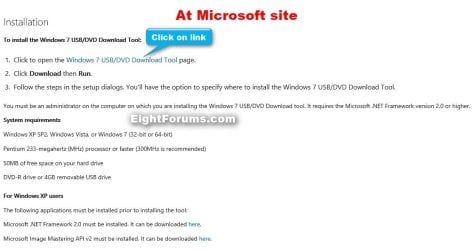
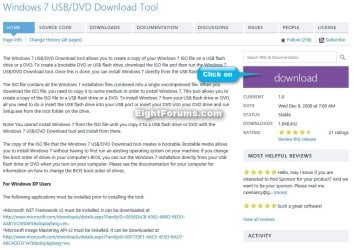
First visit the MS Store Website to download and install the Windows 7 USB/DVD download tool.

   Note
If the download links are broken at the sites below, then you can click on the blue Download button below to directly download an official copy of the Windows7-USB-DVD-tool.exe file below from here instead.


Download


USB-DVD_Download_Tool_Site.jpg

USB-DVD_Download_Tool_Site-2.jpg
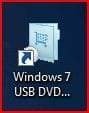
After you have successfully downloaded and installed the Windows 7 USB/DVD Download Tool, you should see its icon on your desktop. Double click to start the program.USB icon.JPG
PART 1 - How to Burn a bootable Windows 7 DVD

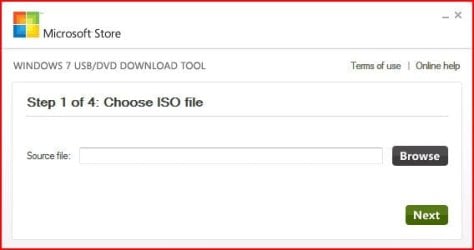
1) After you run the Windows 7 USB/DVD download tool, you will see the Step 1 of 4 dialog box. Here you will navigate to the location of your .iso file by clicking the Browse button. Once you have successfully located your iso file click Next to continue to step 2.USB DVD DL TOOL_1.JPG
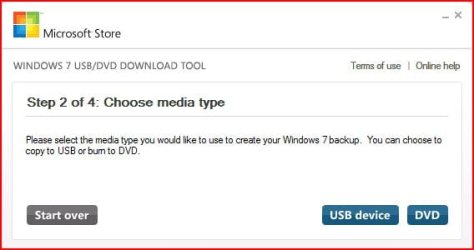
2) In step 2 of 4 you are given the choice of making a bootable DVD or a bootable USB flash. In this first section of my tutorial I show you how to burn a bootable DVD. So click DVD if that is what you want.USB DVD DL TOOL_2.JPG
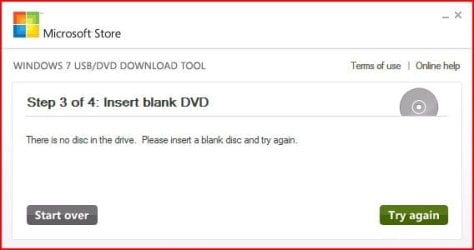
3) Make sure you have a blank DVD in your optical drive, or you may see this message.USB DVD DL TOOL_3.JPG
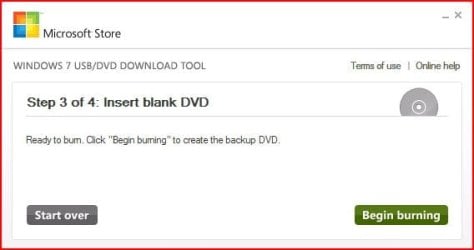
4) Once you have inserted a blank DVD you will see the folowing screen, click Begin burning to continue.USB DVD DL TOOL_4.JPG
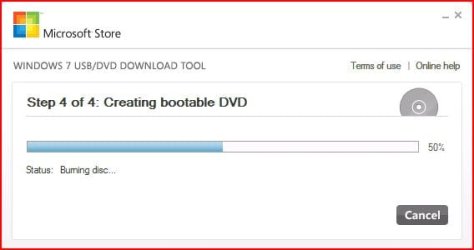
5) Once the burn starts, you should see the progress bar here at Step 4 of 4. Remember the amount of time it takes to complete the burn depends on many factors... be patient.USB DVD DL TOOL_5.JPG
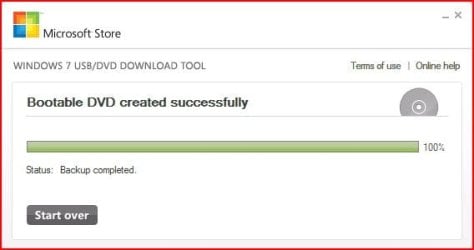
6) If all you wanted was a bootable DVD, you are finished when you see the image below, close the program or start over if you wish to make a 2nd copy.USB DVD DL TOOL_6.JPG
PART 2 - How to create a bootable Windows 7 USB Flash Drive


   Warning
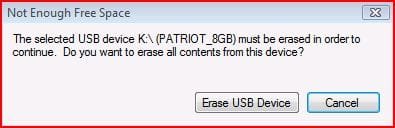
You need a USB flash drive with at least 4GB of free space, and the flash drive will be formattted to NTFS! So backup your data before creating this bootable USB, or you will lose all your data!


Follow the instructions in the Introduction at the beginning of tutorial and download and install the tool. The installation will add the program shortcut to your desktop, just double click to start.

1) After you launch the app, you will see the Step 1 of 4 dialog box. Here you will navigate to the location of your .iso file by clicking the Browse button. Once you have successfully located your iso file click Next to continue to step 2.USB DVD DL TOOL_1.JPG
2) In step 2 of 4 you are given the choice of making a bootable DVD or a bootable USB flash. Here in Part 2 of my tutorial I show you how to create a bootable USB Flash Drive. So click USB device if that is what you want.USB DVD DL TOOL_2.JPG
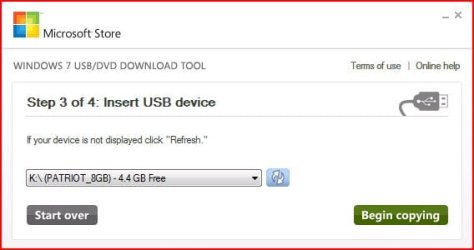
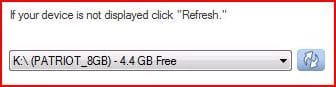
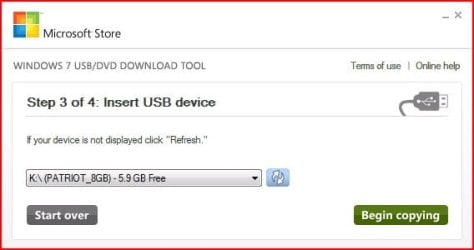
3) Here in step 3 of 4 you will select the USB flash drive of your choice by using the drop down list arrow. Once you have chosen the correct Drive, click the Begin copying button.USB DVD DL TOOL_USB1.JPG

USB DVD DL TOOL_USB4a.JPG
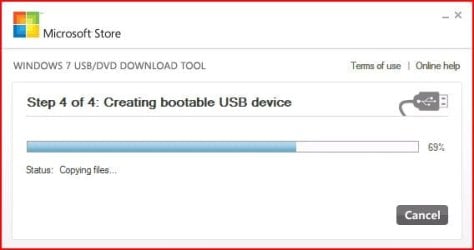
4) Here in step 4 of 4: Creating bootable USB device, you should see the progress bar move across the screen. As always your speed depends on many factors, have patience!USB DVD DL TOOL_USB4.JPG
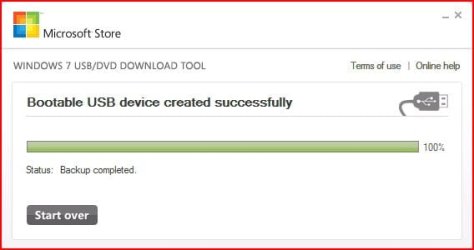
5) Once completed you should see the following dialog box.USB DVD DL TOOL_USB5.JPG
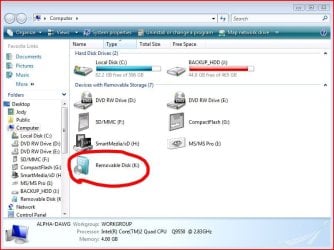
I found it interesting that the USB device icon in "Computer" now looks identical to that of the DVD!USB DVD DL TOOL_USB6.JPG
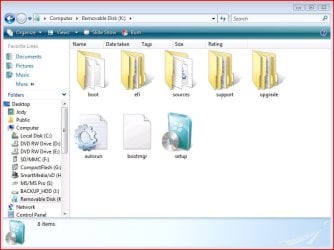
Here are the contents of the USB device after completion...USB DVD DL TOOL_USB_Contents.JPG
I hope this helps out some of you who are "stuck" when it comes to burning an iso to DVD or creating a bootable USB device.

Thanks!


Attachments

  • USB DVD DL TOOL_USB2.JPG
    USB DVD DL TOOL_USB2.JPG
    16.6 KB · Views: 134
  • USB DVD DL TOOL_USB3.JPG
    USB DVD DL TOOL_USB3.JPG
    24.4 KB · Views: 123
  • Windows7-USB-DVD-tool.zip
    Windows7-USB-DVD-tool.zip
    2.5 MB · Views: 61,475
Last edited by a moderator:
lol i know how to make a DVD, its that i fancied making an ISO so that i could use the Microsoft program on this thread to make a USB boot WIndows 7 installation disk. Its not a big deal as i already have the dvd and files on hard disk. Just wondered why it didnt work for me that all.
Blue:

Please re-read my post... The 2 apps I linked to are for creating an iso from the CD or DVD!


I'm sorry Darryl, I don't see where I can create an .iso file in this?

It's fine, I have it all sorted out now :geek:
 
Last edited:

My Computer My Computer

At a glance

Windows 7 Ultimate X64 SP1Intel i5-2550K, Differing ~4.4-4.8GHz No buil...16GB G.Skill Sniper 1866MHz @ 2133MHz 2x8GBASUS GTX650TIB-DC2OC-2GD5, (650TI Boost)
Computer type
PC/Desktop
Computer Manufacturer/Model Number
Home Built Desktop By DataTech
OS
Windows 7 Ultimate X64 SP1
CPU
Intel i5-2550K, Differing ~4.4-4.8GHz No built in GPU
Motherboard
ASUS P8Z68-V PRO/GEN3
Memory
16GB G.Skill Sniper 1866MHz @ 2133MHz 2x8GB
Graphics Card(s)
ASUS GTX650TIB-DC2OC-2GD5, (650TI Boost)
Sound Card
Onboard Realtek 5-1
Monitor(s) Displays
Samsung P2570HD
Screen Resolution
1920x1080
Hard Drives
Samsung 840 Pro 256GB SSD for OS, 500GB Seagate Constellation (Enterprise drive) for Data
PSU
Corsair HX650W
Case
Inwin Dragon Rider
Cooling
Hyper 212 EVO w/two Noctua fans, push-pull, @1300 RPM
Keyboard
E-Z Eyes, bright yellow keys with large characters
Mouse
steelseries SENSEI Laser Pro Gaming
Internet Speed
48-51Mbs Mbs down, 11 Mbs up Xfinity Cable
Antivirus
Norton Internet Security 2013
Browser
IE 10, Opera, Pale Moon if needed
Other Info
4 case fans, LG BluRay-RE, ASUS DVD-RW, Mr. Fusion power supply, 1.21 gigawatts.
just left it, no point, ultraiso will burn any ISO to a USB, much easier
 

My Computer My Computer

At a glance

Windows 7 Ultimate N 64-bitAMD Black Edition - AMD Phenom X4 2.5 GHz Pro...8GB DDR2 800MHZ BRANDEDPalti NVIDIA GeForce GTX 460
Computer Manufacturer/Model Number
Windows 7 Ultimate 64-bit
OS
Windows 7 Ultimate N 64-bit
CPU
AMD Black Edition - AMD Phenom X4 2.5 GHz Processor
Motherboard
Bio Star
Memory
8GB DDR2 800MHZ BRANDED
Graphics Card(s)
Palti NVIDIA GeForce GTX 460
Monitor(s) Displays
3D 23.6" & 22"
Screen Resolution
1920x1080@120Hz
Hard Drives
313GB SAMSUNG SAMSUNG HD321KJ
PSU
OCZ 600W StealthXStream PSU, PowerWhisper, Active PFC
Internet Speed
22793
Windows 7 usb/dvd Tool

I want to make a bootable usb thumb drive containing the files from a bootable Win 7 64 bit System repair cd disk.

I have used a number of different programs to make an iso file, Nero, Magic Iso, Folder 2Iso, Power Iso and Ultra Iso.

None of the files are acceptable by Windows 7 usb/dvd Download Tool."Not a valid Iso file" is the message.

Any help would be appreciated
 

My Computer My Computer

At a glance

Win 7 Ultimate 64 and 32 bit
OS
Win 7 Ultimate 64 and 32 bit

My Computers My Computers

  • At a glance

    7 X64i5 84002x8gb 3200mhz
    Computer type
    PC/Desktop
    OS
    7 X64
    CPU
    i5 8400
    Motherboard
    gigabyte b365m ds3h
    Memory
    2x8gb 3200mhz
    Hard Drives
    various
    PSU
    pure power 11 400w cm
    Case
    Coolermaster
    Cooling
    cryorig m9i
  • At a glance

    7x64g54008gb ddr4 2400
    Computer type
    PC/Desktop
    OS
    7x64
    CPU
    g5400
    Motherboard
    ga b365m ds3h
    Memory
    8gb ddr4 2400
    PSU
    xfx pro 450w
Thanks SWI2, that did the trick. Tried and tested, works like magic.

The strange thing is that the iso file is taken from a Win7 64 bit system repair disk which will not boot, and yet it works on the usb.

I have two copys of the system repair disk both bootable. My computer has two CD Rom drives and even though the boot system was is to boot first from the CD, neither of these disks will boot.

I have a number boot CD disks and the only one that will boot on my computer is the Ultimate boot disk.

Thanks again
 

My Computer My Computer

At a glance

Win 7 Ultimate 64 and 32 bit
OS
Win 7 Ultimate 64 and 32 bit
Creating USB Drive Failed

I completed the final step and all the folders are in the drive as shown but got this error message: "Files copied successfully. However, we were unable to run bootsect to make the USB device bootable. If you need assistance with the bootsect, please click the "Online Help" link." Started on a formatted empty thumbdrive.


I did this and found the below. The problem is I don't have an MS store account and no purchase history. What do I do now?


WHEN CREATING A BOOTABLE USB DEVICE,I AM GETTING AN ERROR ABOUT BOOTSECT

To make the USB device bootable, you need to run a tool named bootsect.exe. In some cases, this tool needs to be downloaded from your Microsoft Store account. This may happen if you're trying to create a 64-bit bootable USB device from a 32-bit version of Windows. To download bootsect:

  1. Login to your Microsoft Store account to view your purchase history
  2. Look for your Windows 7 purchase.
  3. Next to Windows 7, there is an "Additional download options" drop-down menu.
  4. In the drop-down menu, select "32-bit ISO."
  5. Right-click the link, and then save the bootsect.exe file to the location where you installed the Windows 7 USB/DVD Download Tool (e.g. C:\Users\username\AppData\Local\Apps\Windows 7 USB DVD Download Tool).
  6. Once the file has been saved, go back to the Windows 7 USB/DVD Download tool to create your bootable USB device.
 

My Computer My Computer

At a glance

W7U 32
OS
W7U 32
very :thumbsup: tutorial :)
 

My Computer My Computer

At a glance

Windows 10 Home 64BitIntel Core i5 10400 @ 2.90GHz8.00GB Single-Channel Unknown @ 1329MHz (16-2...
Computer type
PC/Desktop
Computer Manufacturer/Model Number
Self assembled
OS
Windows 10 Home 64Bit
CPU
Intel Core i5 10400 @ 2.90GHz
Motherboard
Intel Corporation DG41WV (PROCESSOR)
Memory
8.00GB Single-Channel Unknown @ 1329MHz (16-20-20-38)
Sound Card
Realtek High Definition Audio
Monitor(s) Displays
DELL E170S
Screen Resolution
1280x1024 pixels
Hard Drives
931GB TOSHIBA DT01ACA100 (SATA)
238GB TEAM TM8PS7256G (SATA SSD)
Case
Nothing Fancy
Cooling
Fans
Keyboard
A4 Tech Co LTD
Mouse
A4 Tech Co Ltd/Logitech
Internet Speed
25 Mbps

My Computer My Computer

At a glance

Windows 7 Ultimate 64 bit Steve Ballmer Signa...Intel Core 2 Quad - Q9550 - 2.83GHz stock - O...4GB DDR2 800MHz (PC6400) OCZ ReaperNvidia GE Force 8800 GTS
Computer Manufacturer/Model Number
Homebrew PC - "Alpha_Dawg"
OS
Windows 7 Ultimate 64 bit Steve Ballmer Signature Edition
CPU
Intel Core 2 Quad - Q9550 - 2.83GHz stock - OC'd to 3.6GHz
Motherboard
Gigabyte EP45-UD3P
Memory
4GB DDR2 800MHz (PC6400) OCZ Reaper
Graphics Card(s)
Nvidia GE Force 8800 GTS
Sound Card
Asus Xonar DX
Monitor(s) Displays
Samsung SyncMaster 2333HD
Screen Resolution
1920 x 1080
Hard Drives
WD Caviar Black 750GB - 7200RPM - 32MB cache
WD Caviar Green 1.5TB - 5400RPM - 64MB cache
WD Caviar Green 2.0TB - 5400RPM - 64MB cache
PSU
PC Power & Cooling Silencer 750
Case
Gigabyte 3D Aurora
Cooling
Case is Air - 5ea. 120mm fans (mix of Arctic and Xigmatec)
Keyboard
MS Natural Wireless KB
Mouse
MS Wireless Mouse
Internet Speed
50 mbps down/5 mbps up
Other Info
AVerMedia - AVerTVHD G2 Dual Tuner Card
great tutorial :party: :dinesh:
once again ;)
 

My Computer My Computer

At a glance

Windows 10 Home 64BitIntel Core i5 10400 @ 2.90GHz8.00GB Single-Channel Unknown @ 1329MHz (16-2...
Computer type
PC/Desktop
Computer Manufacturer/Model Number
Self assembled
OS
Windows 10 Home 64Bit
CPU
Intel Core i5 10400 @ 2.90GHz
Motherboard
Intel Corporation DG41WV (PROCESSOR)
Memory
8.00GB Single-Channel Unknown @ 1329MHz (16-20-20-38)
Sound Card
Realtek High Definition Audio
Monitor(s) Displays
DELL E170S
Screen Resolution
1280x1024 pixels
Hard Drives
931GB TOSHIBA DT01ACA100 (SATA)
238GB TEAM TM8PS7256G (SATA SSD)
Case
Nothing Fancy
Cooling
Fans
Keyboard
A4 Tech Co LTD
Mouse
A4 Tech Co Ltd/Logitech
Internet Speed
25 Mbps
Now I know I am dumb but it keeps asking me to repair it when I run that tool?

So any advice please??
 

My Computer My Computer

At a glance

Desk1 7 Home Prem / Desk2 10 Pro / Main lap A...Desk1 i5 3750K / Laptop i7 GTX 860M / Desk2 i...Desk1 8GB (1866) / Desk2 16GB (1333) / Laptop...Desk 1& 2NVidia GTX 650 & Laptops on board Intel
Computer type
PC/Desktop
Computer Manufacturer/Model Number
Own build (new) Desk1 / Asus ROG Win 7 / Desk2 1st build
OS
Desk1 7 Home Prem / Desk2 10 Pro / Main lap Asus ROG 10 Pro 2 laptop Toshiba 7 Pro Asus P2520 7 & 10
CPU
Desk1 i5 3750K / Laptop i7 GTX 860M / Desk2 i5 2500
Motherboard
Desk1 Asus P877-V / Desk2 Gigabyte H67 UD3H / Laptop ?
Memory
Desk1 8GB (1866) / Desk2 16GB (1333) / Laptop 8Gb DDR3
Graphics Card(s)
Desk 1& 2NVidia GTX 650 & Laptops on board Intel
Sound Card
Desk 1 & 2 -XONAR DG Realtek High Def audio Laptop
Monitor(s) Displays
Desk 1 Benq HD 2450 / Desk2 Philips 24" / Laptop 17.5"
Screen Resolution
1920x1080 D1 & D2 & Laptop 1
Hard Drives
Desk1 Samsung 120GB 830 SSD
Asus ROG 256GB 850 Pro SSD
Desk2 Samsung 840 256 SSD
Toshiba 120GB EVO
PSU
Desk 1 Corsair HX 1050/ Laptop ? / Desk 2 Corsair HX 650
Case
Desk 1 Cooler HAF XM ? Toshiba laptop / Desk2 Coolermaster
Cooling
Fans on all Desk1 -2 Desk2 - all Coolermasters 5 Laptop ?
Keyboard
Desk 1 MS Sidewinder X6 Desk 2 MS Sidewinder X 4
Mouse
Desk 1&2 - Gigabyte MS 900 gamer - laptop - Logitec wireless
Internet Speed
ADSL2+
Other Info
One other Desktop (tester) and spare Toshba laptop both with SSD's
Running Kaspersky 2016 ISS on all machines config'd identically
Logitec audio stereo systems on each machine (x3)
Canon MG5250MFC
Router/modem TP-Link running WPA2SK
At what point are you asked to repair? What does it think needs repaired?

You might give Power Iso from SIW2's post above.
 

My Computer My Computer

At a glance

Windows 7 Ultimate X64 SP1Intel i5-2550K, Differing ~4.4-4.8GHz No buil...16GB G.Skill Sniper 1866MHz @ 2133MHz 2x8GBASUS GTX650TIB-DC2OC-2GD5, (650TI Boost)
Computer type
PC/Desktop
Computer Manufacturer/Model Number
Home Built Desktop By DataTech
OS
Windows 7 Ultimate X64 SP1
CPU
Intel i5-2550K, Differing ~4.4-4.8GHz No built in GPU
Motherboard
ASUS P8Z68-V PRO/GEN3
Memory
16GB G.Skill Sniper 1866MHz @ 2133MHz 2x8GB
Graphics Card(s)
ASUS GTX650TIB-DC2OC-2GD5, (650TI Boost)
Sound Card
Onboard Realtek 5-1
Monitor(s) Displays
Samsung P2570HD
Screen Resolution
1920x1080
Hard Drives
Samsung 840 Pro 256GB SSD for OS, 500GB Seagate Constellation (Enterprise drive) for Data
PSU
Corsair HX650W
Case
Inwin Dragon Rider
Cooling
Hyper 212 EVO w/two Noctua fans, push-pull, @1300 RPM
Keyboard
E-Z Eyes, bright yellow keys with large characters
Mouse
steelseries SENSEI Laser Pro Gaming
Internet Speed
48-51Mbs Mbs down, 11 Mbs up Xfinity Cable
Antivirus
Norton Internet Security 2013
Browser
IE 10, Opera, Pale Moon if needed
Other Info
4 case fans, LG BluRay-RE, ASUS DVD-RW, Mr. Fusion power supply, 1.21 gigawatts.
Now I know I am dumb but it keeps asking me to repair it when I run that tool?

So any advice please??

Sounds like you are running the installer instead of the exe

Where are you launching the program from?
 

My Computer My Computer

At a glance

Win 10 Pro x64Intel I5-2500K @3.3GHz16GB G.Skill Ripjaws X (4x4GB)EVGA GeForce 750 Ti SC 2GB
Computer type
PC/Desktop
Computer Manufacturer/Model Number
Self Built
OS
Win 10 Pro x64
CPU
Intel I5-2500K @3.3GHz
Motherboard
Asrock P67 Extreme4
Memory
16GB G.Skill Ripjaws X (4x4GB)
Graphics Card(s)
EVGA GeForce 750 Ti SC 2GB
Sound Card
ASUS Xonar DG 5.1 Channels 24-bit 96KHz PCI Interface Sound
Monitor(s) Displays
auria eq2367
Screen Resolution
1920 x 1080
Hard Drives
250GB Samsung 850 EVO SSD
1TB WD Blue
1TB Hitachi
PSU
SeaSonic X 650W 80 Plus Gold
Case
Corsair Obsidian 750D
Cooling
Corsair H60, Three 140mm case fans
Keyboard
Logitech Wireless Keyboard K520
Mouse
Logitech Wireless Mouse M310
Internet Speed
Wave Broadband ~ 100 dn 5 up
Antivirus
Windows Defender, Malwarebytes Premium
Browser
Edge, IE11, Chrome
Other Info
Laptop specs: HP g7-1365dx /
CPU: AMD A6-3420M APU with Radeon(tm) HD Graphics /
RAM: Crucial 8Gb (2x4Gb) /
SSD: Crucial M4-CT128M4SSD2 ATA Device/ FW 000F /
GFX: AMD Radeon HD 6520G /
OS: Windows 10 Pro x64
Well I double click on the desktop tool like it says to do but it just keeps saying repair.

So I am trying Brinks one instead but am not sure if the ISO will work on a board I am sending to a young bloke who has 7 on the old board using that activation code for the old one?
 

My Computer My Computer

At a glance

Desk1 7 Home Prem / Desk2 10 Pro / Main lap A...Desk1 i5 3750K / Laptop i7 GTX 860M / Desk2 i...Desk1 8GB (1866) / Desk2 16GB (1333) / Laptop...Desk 1& 2NVidia GTX 650 & Laptops on board Intel
Computer type
PC/Desktop
Computer Manufacturer/Model Number
Own build (new) Desk1 / Asus ROG Win 7 / Desk2 1st build
OS
Desk1 7 Home Prem / Desk2 10 Pro / Main lap Asus ROG 10 Pro 2 laptop Toshiba 7 Pro Asus P2520 7 & 10
CPU
Desk1 i5 3750K / Laptop i7 GTX 860M / Desk2 i5 2500
Motherboard
Desk1 Asus P877-V / Desk2 Gigabyte H67 UD3H / Laptop ?
Memory
Desk1 8GB (1866) / Desk2 16GB (1333) / Laptop 8Gb DDR3
Graphics Card(s)
Desk 1& 2NVidia GTX 650 & Laptops on board Intel
Sound Card
Desk 1 & 2 -XONAR DG Realtek High Def audio Laptop
Monitor(s) Displays
Desk 1 Benq HD 2450 / Desk2 Philips 24" / Laptop 17.5"
Screen Resolution
1920x1080 D1 & D2 & Laptop 1
Hard Drives
Desk1 Samsung 120GB 830 SSD
Asus ROG 256GB 850 Pro SSD
Desk2 Samsung 840 256 SSD
Toshiba 120GB EVO
PSU
Desk 1 Corsair HX 1050/ Laptop ? / Desk 2 Corsair HX 650
Case
Desk 1 Cooler HAF XM ? Toshiba laptop / Desk2 Coolermaster
Cooling
Fans on all Desk1 -2 Desk2 - all Coolermasters 5 Laptop ?
Keyboard
Desk 1 MS Sidewinder X6 Desk 2 MS Sidewinder X 4
Mouse
Desk 1&2 - Gigabyte MS 900 gamer - laptop - Logitec wireless
Internet Speed
ADSL2+
Other Info
One other Desktop (tester) and spare Toshba laptop both with SSD's
Running Kaspersky 2016 ISS on all machines config'd identically
Logitec audio stereo systems on each machine (x3)
Canon MG5250MFC
Router/modem TP-Link running WPA2SK
Well I double click on the desktop tool like it says to do but it just keeps saying repair.

So I am trying Brinks one instead but am not sure if the ISO will work on a board I am sending to a young bloke who has 7 on the old board using that activation code for the old one?

Yeah, my desktop shortcut works for me.

The exe is located at C:\Users\Derek\AppData\Local\Apps\Windows 7 USB DVD Download Tool for me.

I'm sure the other one works fine too.

I can't really answer your other question about the ISO.
 

My Computer My Computer

At a glance

Win 10 Pro x64Intel I5-2500K @3.3GHz16GB G.Skill Ripjaws X (4x4GB)EVGA GeForce 750 Ti SC 2GB
Computer type
PC/Desktop
Computer Manufacturer/Model Number
Self Built
OS
Win 10 Pro x64
CPU
Intel I5-2500K @3.3GHz
Motherboard
Asrock P67 Extreme4
Memory
16GB G.Skill Ripjaws X (4x4GB)
Graphics Card(s)
EVGA GeForce 750 Ti SC 2GB
Sound Card
ASUS Xonar DG 5.1 Channels 24-bit 96KHz PCI Interface Sound
Monitor(s) Displays
auria eq2367
Screen Resolution
1920 x 1080
Hard Drives
250GB Samsung 850 EVO SSD
1TB WD Blue
1TB Hitachi
PSU
SeaSonic X 650W 80 Plus Gold
Case
Corsair Obsidian 750D
Cooling
Corsair H60, Three 140mm case fans
Keyboard
Logitech Wireless Keyboard K520
Mouse
Logitech Wireless Mouse M310
Internet Speed
Wave Broadband ~ 100 dn 5 up
Antivirus
Windows Defender, Malwarebytes Premium
Browser
Edge, IE11, Chrome
Other Info
Laptop specs: HP g7-1365dx /
CPU: AMD A6-3420M APU with Radeon(tm) HD Graphics /
RAM: Crucial 8Gb (2x4Gb) /
SSD: Crucial M4-CT128M4SSD2 ATA Device/ FW 000F /
GFX: AMD Radeon HD 6520G /
OS: Windows 10 Pro x64
Thanks Derekimo I'll try from there then:)

OK mate that worked had to dig one more layer LOL!! but hit the spot ok!! :D
 
Last edited:

My Computer My Computer

At a glance

Desk1 7 Home Prem / Desk2 10 Pro / Main lap A...Desk1 i5 3750K / Laptop i7 GTX 860M / Desk2 i...Desk1 8GB (1866) / Desk2 16GB (1333) / Laptop...Desk 1& 2NVidia GTX 650 & Laptops on board Intel
Computer type
PC/Desktop
Computer Manufacturer/Model Number
Own build (new) Desk1 / Asus ROG Win 7 / Desk2 1st build
OS
Desk1 7 Home Prem / Desk2 10 Pro / Main lap Asus ROG 10 Pro 2 laptop Toshiba 7 Pro Asus P2520 7 & 10
CPU
Desk1 i5 3750K / Laptop i7 GTX 860M / Desk2 i5 2500
Motherboard
Desk1 Asus P877-V / Desk2 Gigabyte H67 UD3H / Laptop ?
Memory
Desk1 8GB (1866) / Desk2 16GB (1333) / Laptop 8Gb DDR3
Graphics Card(s)
Desk 1& 2NVidia GTX 650 & Laptops on board Intel
Sound Card
Desk 1 & 2 -XONAR DG Realtek High Def audio Laptop
Monitor(s) Displays
Desk 1 Benq HD 2450 / Desk2 Philips 24" / Laptop 17.5"
Screen Resolution
1920x1080 D1 & D2 & Laptop 1
Hard Drives
Desk1 Samsung 120GB 830 SSD
Asus ROG 256GB 850 Pro SSD
Desk2 Samsung 840 256 SSD
Toshiba 120GB EVO
PSU
Desk 1 Corsair HX 1050/ Laptop ? / Desk 2 Corsair HX 650
Case
Desk 1 Cooler HAF XM ? Toshiba laptop / Desk2 Coolermaster
Cooling
Fans on all Desk1 -2 Desk2 - all Coolermasters 5 Laptop ?
Keyboard
Desk 1 MS Sidewinder X6 Desk 2 MS Sidewinder X 4
Mouse
Desk 1&2 - Gigabyte MS 900 gamer - laptop - Logitec wireless
Internet Speed
ADSL2+
Other Info
One other Desktop (tester) and spare Toshba laptop both with SSD's
Running Kaspersky 2016 ISS on all machines config'd identically
Logitec audio stereo systems on each machine (x3)
Canon MG5250MFC
Router/modem TP-Link running WPA2SK
You're welcome John. :)
 

My Computer My Computer

At a glance

Win 10 Pro x64Intel I5-2500K @3.3GHz16GB G.Skill Ripjaws X (4x4GB)EVGA GeForce 750 Ti SC 2GB
Computer type
PC/Desktop
Computer Manufacturer/Model Number
Self Built
OS
Win 10 Pro x64
CPU
Intel I5-2500K @3.3GHz
Motherboard
Asrock P67 Extreme4
Memory
16GB G.Skill Ripjaws X (4x4GB)
Graphics Card(s)
EVGA GeForce 750 Ti SC 2GB
Sound Card
ASUS Xonar DG 5.1 Channels 24-bit 96KHz PCI Interface Sound
Monitor(s) Displays
auria eq2367
Screen Resolution
1920 x 1080
Hard Drives
250GB Samsung 850 EVO SSD
1TB WD Blue
1TB Hitachi
PSU
SeaSonic X 650W 80 Plus Gold
Case
Corsair Obsidian 750D
Cooling
Corsair H60, Three 140mm case fans
Keyboard
Logitech Wireless Keyboard K520
Mouse
Logitech Wireless Mouse M310
Internet Speed
Wave Broadband ~ 100 dn 5 up
Antivirus
Windows Defender, Malwarebytes Premium
Browser
Edge, IE11, Chrome
Other Info
Laptop specs: HP g7-1365dx /
CPU: AMD A6-3420M APU with Radeon(tm) HD Graphics /
RAM: Crucial 8Gb (2x4Gb) /
SSD: Crucial M4-CT128M4SSD2 ATA Device/ FW 000F /
GFX: AMD Radeon HD 6520G /
OS: Windows 10 Pro x64
THANK YOU!

Over 6 hours of trying everything under the sun to do a clean install of windows on my new laptop. Driver error, error 80070071, syslinux error using unetbootin, cant copy file error using WDUT...

But your guide was a HUGE help. So I signed up just to say THANK YOU!

PS If anyone gets the "can't copy file" error, this worked for me: Windows 7 USB/DVD download tool unable to copy files - now from home
 

My Computer My Computer

At a glance

win 7 home
OS
win 7 home
THANK YOU!

Over 6 hours of trying everything under the sun to do a clean install of windows on my new laptop. Driver error, error 80070071, syslinux error using unetbootin, cant copy file error using WDUT...

But your guide was a HUGE help. So I signed up just to say THANK YOU!

PS If anyone gets the "can't copy file" error, this worked for me: Windows 7 USB/DVD download tool unable to copy files - now from home
Hiyya and welcome unopostwonder I hope you keep on in SF as there is stacks more my friend and well you might even be able to help out others as well as there is always room for input from anywhere:)
 

My Computer My Computer

At a glance

Desk1 7 Home Prem / Desk2 10 Pro / Main lap A...Desk1 i5 3750K / Laptop i7 GTX 860M / Desk2 i...Desk1 8GB (1866) / Desk2 16GB (1333) / Laptop...Desk 1& 2NVidia GTX 650 & Laptops on board Intel
Computer type
PC/Desktop
Computer Manufacturer/Model Number
Own build (new) Desk1 / Asus ROG Win 7 / Desk2 1st build
OS
Desk1 7 Home Prem / Desk2 10 Pro / Main lap Asus ROG 10 Pro 2 laptop Toshiba 7 Pro Asus P2520 7 & 10
CPU
Desk1 i5 3750K / Laptop i7 GTX 860M / Desk2 i5 2500
Motherboard
Desk1 Asus P877-V / Desk2 Gigabyte H67 UD3H / Laptop ?
Memory
Desk1 8GB (1866) / Desk2 16GB (1333) / Laptop 8Gb DDR3
Graphics Card(s)
Desk 1& 2NVidia GTX 650 & Laptops on board Intel
Sound Card
Desk 1 & 2 -XONAR DG Realtek High Def audio Laptop
Monitor(s) Displays
Desk 1 Benq HD 2450 / Desk2 Philips 24" / Laptop 17.5"
Screen Resolution
1920x1080 D1 & D2 & Laptop 1
Hard Drives
Desk1 Samsung 120GB 830 SSD
Asus ROG 256GB 850 Pro SSD
Desk2 Samsung 840 256 SSD
Toshiba 120GB EVO
PSU
Desk 1 Corsair HX 1050/ Laptop ? / Desk 2 Corsair HX 650
Case
Desk 1 Cooler HAF XM ? Toshiba laptop / Desk2 Coolermaster
Cooling
Fans on all Desk1 -2 Desk2 - all Coolermasters 5 Laptop ?
Keyboard
Desk 1 MS Sidewinder X6 Desk 2 MS Sidewinder X 4
Mouse
Desk 1&2 - Gigabyte MS 900 gamer - laptop - Logitec wireless
Internet Speed
ADSL2+
Other Info
One other Desktop (tester) and spare Toshba laptop both with SSD's
Running Kaspersky 2016 ISS on all machines config'd identically
Logitec audio stereo systems on each machine (x3)
Canon MG5250MFC
Router/modem TP-Link running WPA2SK
Hello folks i recently was able to download and install Windows 7 USB/DVD Download Tool :D : i am happy as now i am able to make a bootable Win7 into a pendrive ready for booting and installing.

Although my primary OS is Win7 Home Edition , i am trying to install Winxp in my second partition , i have some partition to spare .
My question is does this tool make a bootable Winxp from an ISO file of Winxp, i want to install an OEM version .

Any suggestion to this would be greatful, although i know and have some tool that can make a bootable Winxp in a pendrive, i was wondering if this particular tool can do it too.


My Computer My Computer

At a glance

Dual boot: Win Xp and Win7 ProIntel2GBNvidia Geforece 210
Computer type
PC/Desktop
Computer Manufacturer/Model Number
ECS: G31T-M7
OS
Dual boot: Win Xp and Win7 Pro
CPU
Intel
Motherboard
EliteGroup
Memory
2GB
Graphics Card(s)
Nvidia Geforece 210
Sound Card
Advik 6-Channel
Hard Drives
WD-320GB
Back
Top