windows 7 using too much RAM on enabling auto update

Moin95

New member
Local time
2:51 AM
Messages
4
I am using windows 7 Home premium 64 bit. It started using a lot of RAM around 3.5 GB and sometimes 3.85 GB out of 4 GB on enabling automatic updates, but when I disable updates the RAM usage drop downs to 1.3 GB. Why is that?
 

My Computer

Computer type
Laptop
Computer Manufacturer/Model Number
HP
OS
Windows 7 Home Premium 64 bit
CPU
Core i5, 520M, 2.4GHz
Motherboard
Elitebook 8440P
Memory
4GB
Graphics Card(s)
NVS 3100M
Hard Drives
SATA 160GB
Antivirus
Avast Free Antivirus
Browser
Google Chrome
Maybe try using your Resource Monitor and see if the upgrade is the culprit or something causing the
memory leak. You could also look into the Task Manager for extended usage. :cool:
 

My Computer

Computer type
Laptop
OS
Windows 7
You should never enable auto update.
 

My Computer

Computer type
PC/Desktop
Computer Manufacturer/Model Number
Skylake Special #666
OS
Windows 10 Pro x64
CPU
Intel Core i7 6700K
Motherboard
Asus Sabertooth Z170 Mark 1
Memory
GSkill TridentZ RGB 16GB 3600 16-16-16-36
Graphics Card(s)
EVGA GTX 980 Ti SC x2
Sound Card
Realtek High Definition
Monitor(s) Displays
AOC G2460PG
Screen Resolution
1920 x 1080 144Hz
Hard Drives
Samsung 860 Pro 256GB, Seagate Barracuda 4TB x2
PSU
EVGA 1000 P2, EVGA White Custom Braided Cables
Case
Corsair Vengeance C70 Gunmetal Black
Cooling
Corsair H100i v2, Corsair ML120 x2, Thermal Grizzly Kryonaut
Keyboard
Logitech G910 Orion Spectrum
Mouse
Logitech G700s
Internet Speed
Verizon Fios Quantum Gateway 75/75
Antivirus
Windows Defender, Malwarebytes Free 3.8.3
Browser
Chrome
Other Info
Corsair SP120 x4, LG Blu-ray Drive, Durabrand HT-395 100 Watt Dolby Digital Amp, Corsair H2100 Wireless 7.1 Headset
What are your intentions - do you want to save your RAM for a rainy day. If I were you, I would be happy if all the RAM that I paid a lot of money for is being used.
 

My Computer

Computer Manufacturer/Model Number
HP, Dell, Gateway, Toshiba - 4 laptops and 2 desktops
OS
Vista, Windows7, Mint Mate, Zorin, Windows 8
CPU
from 1.6GHz Duo to i7
Monitor(s) Displays
2x HP w2207
Hard Drives
5x HDD, 7x SSD, 12x Externals
Keyboard
with trackball - no mices
Mouse
Trackball mice
Internet Speed
DSL 6000
I am using windows 7 Home premium 64 bit. It started using a lot of RAM around 3.5 GB and sometimes 3.85 GB out of 4 GB on enabling automatic updates, but when I disable updates the RAM usage drop downs to 1.3 GB. Why is that?
Its using as much RAM as possible because that's the fastest way of completing the updates in the shortest time possible.
 

My Computer

Computer type
PC/Desktop
Computer Manufacturer/Model Number
Golden Mk. I.4
OS
Windows 10 Pro x64 ; Xubuntu x64
CPU
Intel i7 860 @ 2.80 GHz O/C'ed to 4.0GHz
Motherboard
Gigabyte P55A-UD3R Rev.1. Award BIOS F13
Memory
16GB Corsair Vengance DDR3 @ 661 MHz Dual Channel (9-9-9-24)
Graphics Card(s)
EVGA NVidia GTX 560 1024MB
Sound Card
Realtek Integrated
Monitor(s) Displays
Dual Samsung SyncMaster 2494HS
Screen Resolution
1920*1080 and 1920*1080
Hard Drives
1*Samsung 840 EVO 120GB SSD;
1*OCZ Vertex 2 60GB SSD;
2*Samsung F3 SpinPoint 1TB in RAID0;
1*Samsung F1 SpinPoint 1TB;
2*Western Digital 1TB External USB 3.0
1*Western Digital 500GB External USB 3.0
1*Seagate 500GB External USB 2.0
PSU
Thermaltake ToughPower QFan 750W
Case
Thermaltake Element S VK60001W2Z
Cooling
Corsair H60 Water Cooling, 2*230mm and 2*80mm case fans
Keyboard
Logitech G110
Mouse
Logitech MX518
Maybe try using your Resource Monitor and see if the upgrade is the culprit or something causing the
memory leak. You could also look into the Task Manager for extended usage. :cool:

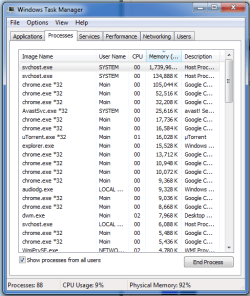
process named svchost.exe is taking most of the RAM.
 

My Computer

Computer type
Laptop
Computer Manufacturer/Model Number
HP
OS
Windows 7 Home Premium 64 bit
CPU
Core i5, 520M, 2.4GHz
Motherboard
Elitebook 8440P
Memory
4GB
Graphics Card(s)
NVS 3100M
Hard Drives
SATA 160GB
Antivirus
Avast Free Antivirus
Browser
Google Chrome
Thats completely normal.
 

My Computer

Computer type
PC/Desktop
Computer Manufacturer/Model Number
Golden Mk. I.4
OS
Windows 10 Pro x64 ; Xubuntu x64
CPU
Intel i7 860 @ 2.80 GHz O/C'ed to 4.0GHz
Motherboard
Gigabyte P55A-UD3R Rev.1. Award BIOS F13
Memory
16GB Corsair Vengance DDR3 @ 661 MHz Dual Channel (9-9-9-24)
Graphics Card(s)
EVGA NVidia GTX 560 1024MB
Sound Card
Realtek Integrated
Monitor(s) Displays
Dual Samsung SyncMaster 2494HS
Screen Resolution
1920*1080 and 1920*1080
Hard Drives
1*Samsung 840 EVO 120GB SSD;
1*OCZ Vertex 2 60GB SSD;
2*Samsung F3 SpinPoint 1TB in RAID0;
1*Samsung F1 SpinPoint 1TB;
2*Western Digital 1TB External USB 3.0
1*Western Digital 500GB External USB 3.0
1*Seagate 500GB External USB 2.0
PSU
Thermaltake ToughPower QFan 750W
Case
Thermaltake Element S VK60001W2Z
Cooling
Corsair H60 Water Cooling, 2*230mm and 2*80mm case fans
Keyboard
Logitech G110
Mouse
Logitech MX518
That process is 90% of the OS
 

My Computer

Computer Manufacturer/Model Number
HP, Dell, Gateway, Toshiba - 4 laptops and 2 desktops
OS
Vista, Windows7, Mint Mate, Zorin, Windows 8
CPU
from 1.6GHz Duo to i7
Monitor(s) Displays
2x HP w2207
Hard Drives
5x HDD, 7x SSD, 12x Externals
Keyboard
with trackball - no mices
Mouse
Trackball mice
Internet Speed
DSL 6000
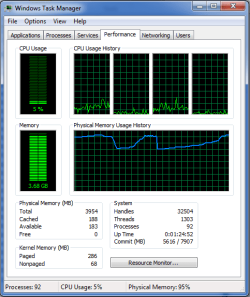
look at this!
 

Attachments

  • Untitled.png
    Untitled.png
    50.1 KB · Views: 31
  • Untitled1.png
    Untitled1.png
    44.6 KB · Views: 31

My Computer

Computer type
Laptop
Computer Manufacturer/Model Number
HP
OS
Windows 7 Home Premium 64 bit
CPU
Core i5, 520M, 2.4GHz
Motherboard
Elitebook 8440P
Memory
4GB
Graphics Card(s)
NVS 3100M
Hard Drives
SATA 160GB
Antivirus
Avast Free Antivirus
Browser
Google Chrome
When you enable auto update, do upates start downloading ?

or is windows fully updated already ?

If it`s downloading updates, it will use memory.
 

My Computer

Computer type
PC/Desktop
Computer Manufacturer/Model Number
Skylake Special #666
OS
Windows 10 Pro x64
CPU
Intel Core i7 6700K
Motherboard
Asus Sabertooth Z170 Mark 1
Memory
GSkill TridentZ RGB 16GB 3600 16-16-16-36
Graphics Card(s)
EVGA GTX 980 Ti SC x2
Sound Card
Realtek High Definition
Monitor(s) Displays
AOC G2460PG
Screen Resolution
1920 x 1080 144Hz
Hard Drives
Samsung 860 Pro 256GB, Seagate Barracuda 4TB x2
PSU
EVGA 1000 P2, EVGA White Custom Braided Cables
Case
Corsair Vengeance C70 Gunmetal Black
Cooling
Corsair H100i v2, Corsair ML120 x2, Thermal Grizzly Kryonaut
Keyboard
Logitech G910 Orion Spectrum
Mouse
Logitech G700s
Internet Speed
Verizon Fios Quantum Gateway 75/75
Antivirus
Windows Defender, Malwarebytes Free 3.8.3
Browser
Chrome
Other Info
Corsair SP120 x4, LG Blu-ray Drive, Durabrand HT-395 100 Watt Dolby Digital Amp, Corsair H2100 Wireless 7.1 Headset
It's Chrome that kills you.
 

My Computer

Computer Manufacturer/Model Number
HP, Dell, Gateway, Toshiba - 4 laptops and 2 desktops
OS
Vista, Windows7, Mint Mate, Zorin, Windows 8
CPU
from 1.6GHz Duo to i7
Monitor(s) Displays
2x HP w2207
Hard Drives
5x HDD, 7x SSD, 12x Externals
Keyboard
with trackball - no mices
Mouse
Trackball mice
Internet Speed
DSL 6000

My Computer

Computer type
Laptop
Computer Manufacturer/Model Number
ASUS
OS
Microsoft Windows 7 Home Premium 64-bit 7601 Multiprocessor Free Service Pack 1
CPU
AMD C-60 APU with Radeon(tm) HD Graphics
Motherboard
ASUSTeK COMPUTER INC. X501U
Memory
4.00 GB
Graphics Card(s)
AMD Radeon HD 6290 Graphics
Sound Card
(1) AMD High Definition Audio Device (2) Realtek High Defi
Screen Resolution
1366 x 768 x 32 bits (4294967296 colors) @ 60 Hz
Hard Drives
Hitachi HTS545050A7E380 SATA Disk Device
Antivirus
Comodo CIS & FW, SecureAplus App Whitelisting, Threatfire
Browser
Cyberfox 64bit, Opera 64bit, Airfox
Other Info
Spy-The-Spy, HitmanPro.Alert, Norton Connect Safe, MJRegWatcher, BitDefender TrafficLight, Voodoo Shield, Zemana AntiMalware
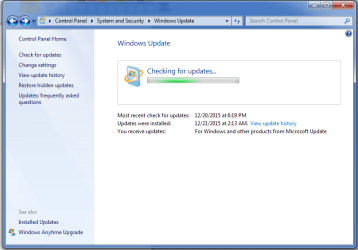
No it stuck on check for updates, and the windows is not fully updated.
 

Attachments

  • Untitled3.png
    Untitled3.png
    81.7 KB · Views: 0

My Computer

Computer type
Laptop
Computer Manufacturer/Model Number
HP
OS
Windows 7 Home Premium 64 bit
CPU
Core i5, 520M, 2.4GHz
Motherboard
Elitebook 8440P
Memory
4GB
Graphics Card(s)
NVS 3100M
Hard Drives
SATA 160GB
Antivirus
Avast Free Antivirus
Browser
Google Chrome
Leave it overnight or however long it takes and let it update.
 

My Computer

Computer type
Laptop
Computer Manufacturer/Model Number
ASUS
OS
Microsoft Windows 7 Home Premium 64-bit 7601 Multiprocessor Free Service Pack 1
CPU
AMD C-60 APU with Radeon(tm) HD Graphics
Motherboard
ASUSTeK COMPUTER INC. X501U
Memory
4.00 GB
Graphics Card(s)
AMD Radeon HD 6290 Graphics
Sound Card
(1) AMD High Definition Audio Device (2) Realtek High Defi
Screen Resolution
1366 x 768 x 32 bits (4294967296 colors) @ 60 Hz
Hard Drives
Hitachi HTS545050A7E380 SATA Disk Device
Antivirus
Comodo CIS & FW, SecureAplus App Whitelisting, Threatfire
Browser
Cyberfox 64bit, Opera 64bit, Airfox
Other Info
Spy-The-Spy, HitmanPro.Alert, Norton Connect Safe, MJRegWatcher, BitDefender TrafficLight, Voodoo Shield, Zemana AntiMalware
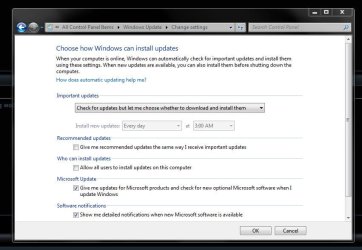
Ya, you have to have your machine updated, you can`t leave it up to auto update to do it.

It should be set like this and you should be doing updates manually.

The only day with multiple updates will be Tuesday.

The rest of the week there should only be Microsoft Security Essential updates, usually 1 or 2 a day.
 

Attachments

  • WUS.JPG
    WUS.JPG
    81.6 KB · Views: 0

My Computer

Computer type
PC/Desktop
Computer Manufacturer/Model Number
Skylake Special #666
OS
Windows 10 Pro x64
CPU
Intel Core i7 6700K
Motherboard
Asus Sabertooth Z170 Mark 1
Memory
GSkill TridentZ RGB 16GB 3600 16-16-16-36
Graphics Card(s)
EVGA GTX 980 Ti SC x2
Sound Card
Realtek High Definition
Monitor(s) Displays
AOC G2460PG
Screen Resolution
1920 x 1080 144Hz
Hard Drives
Samsung 860 Pro 256GB, Seagate Barracuda 4TB x2
PSU
EVGA 1000 P2, EVGA White Custom Braided Cables
Case
Corsair Vengeance C70 Gunmetal Black
Cooling
Corsair H100i v2, Corsair ML120 x2, Thermal Grizzly Kryonaut
Keyboard
Logitech G910 Orion Spectrum
Mouse
Logitech G700s
Internet Speed
Verizon Fios Quantum Gateway 75/75
Antivirus
Windows Defender, Malwarebytes Free 3.8.3
Browser
Chrome
Other Info
Corsair SP120 x4, LG Blu-ray Drive, Durabrand HT-395 100 Watt Dolby Digital Amp, Corsair H2100 Wireless 7.1 Headset
Hi,

Have a look at this update KB3102810. Might solve your problem. There is some good info over the way this update helps on the forum.

Put it in the search box right-hand corner on the top of this page.
 

My Computer

Computer type
Laptop
Computer Manufacturer/Model Number
HP Presario CQ70
OS
windows 7 professional 64 bit
CPU
CPU Genuine Intel (R) CPU [email protected]
Motherboard
APCI x 64 - based PC
Memory
RAM 3 GB
Graphics Card(s)
Toshiba MK2555 GSX ATA
Sound Card
Conexant High Def Smart Audio 221,
Monitor(s) Displays
monitor Generic PnP.
Screen Resolution
?
Hard Drives
HDAUDIO Soft Data Fax Modern with smart CP
PSU
?
Keyboard
Standard PS/2 keyboard
Mouse
PS/2 Compatible mouse
Antivirus
Hyjackthis and Superanti spyware, Mamb Ccleaner
Browser
Google Chrome
Back
Top