Firefox 6.0.2 using too much RAM

TD7BA

New member
Local time
11:26 PM
Messages
28
Location
America
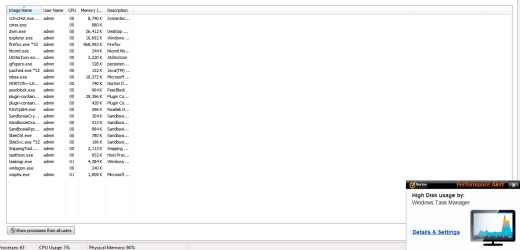
I have 2GB RAM on this computer – but I’m going to upgrade soon to 4GB. But this is beside the point. I have noticed Firefox is using much more memory than it used to. I have attached several photos to help you determine what the issue might be.


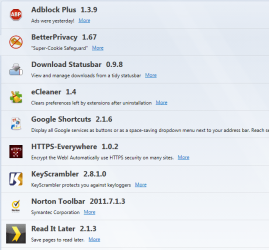
In one picture, you will notice that Firefox 6.0.2 is using up almost 900,000K in memory! Then in another picture you can see how much dropped after closing both Firefox & Sandboxie. Further to this, in a third photo, you will see a list of my Firefox extensions, which could also be another issue. I wouldn't mind knowing how much RAM each extension is using - however - I don't know whether this is even possible? I know it is possible with Chrome though. In the picture with the extensions I couldn't fit them all in - so the last two are WOT and Symantec IPS 3.1.


In addition to the above, before going to bed each night I will close my browser > clean the browser with CCleaner and turn the computer off. Thus - I'm dumping all the crap out of the browser often enough to keep it healthy.


Can anyone figure out what the problem might be, and what needs to be done to fix this? I know FF7.0 comes out this week and they say it should improve memory usage from around 20 - 50%, but the amount of RAM my browser using now means either my Firefox is corrupt (or my system), or its my extensions.
 

Attachments

  • After Close FF nd Sandboxie.PNG
    After Close FF nd Sandboxie.PNG
    2.1 KB · Views: 12
  • Capture1.PNG
    Capture1.PNG
    63.6 KB · Views: 14
  • Capture23.PNG
    Capture23.PNG
    22.4 KB · Views: 63

My Computer

Computer Manufacturer/Model Number
xxxxxxx
OS
xxxxxxxxxxxxxxxxxxxxxxx
CPU
xxxxxxxxxxxxxxxxxx
Motherboard
xxxxxxxxxxx
Memory
xxxxxxxxxxx
Your addons are probably to be blamed, run Firefox with Addons disabled and check the RAM usage

Untitled.png
 

My Computer

Computer type
PC/Desktop
Computer Manufacturer/Model Number
Custom Build
OS
Windows 10 Pro x64, Arch Linux
CPU
Intel Core 2 Quad Q8200 OC'd 3.08GHz
Motherboard
Asus Rampage formula LGA775
Memory
8GB DDR2 900Mhz
Graphics Card(s)
MSI GT730 2GB GDDR5 (Kepler)
Sound Card
Supreme FX2
Monitor(s) Displays
Samsung LS22F350 LED
Screen Resolution
1080P
Hard Drives
Kingston SSDNow UV400 120GB, 500GB Hitachi, 2TB Samsung, 500GB Seagate FreeAgent, 640GB Samsung, 160GB Toshiba (Arch)
PSU
AeroCool 500W Bronze
Cooling
Cooler Master V6 + 3X fans
Keyboard
Prolink keyboard
Mouse
Logitech M705
Internet Speed
1MiB/s
Browser
Chrome Beta
are you getting any errors from the larger memory useage? any crashes, bsods? if so, you may have a problem & addons are a good place to start. disable them one at a time & see what happens. i'd check keyscrambler 1st, it caused problems for me & i no longer use it (my x64 firefox uses 268mb at the time of posting, but i'm on v7.)

if not don't worry about it. too many people base their memory worries on the old pre windows xp memory management which could create problems with resources. win7 doesn't.

win7 leaves memory allocated to apps alone until some other program needs it. deallocating it to inflate the so-called 'free' memory number is a fool's paradise. the pc just wastes time re-allocating it later.

it might look good, but unused memory is just that, unused, wasted. if you really want to save memory, physically take out a gig rather than upping it to 8. you can then look at the memory chips in your spares drawer secure in the knowledge it is indeed 'free'.

and, if you have any of those third party utilities 'guaranteed' to speed up your pc by 'freeing' up allocated memory, ditch it. they do not work in win7 and actually make matters worse.
 

My Computer

Computer type
PC/Desktop
Computer Manufacturer/Model Number
Custom build Nanu by 3SX
OS
Win 7 ultimate x64 sp1
CPU
Intel i7 4 core 3770k ivy bridge o/c to 4.2ghz
Motherboard
Asus p8z77-i Deluxe
Memory
16 GB
Graphics Card(s)
Nvidia geforce GTX650
Sound Card
Realtek on mb
Monitor(s) Displays
24in. lcd/led
Screen Resolution
1920x1080
Hard Drives
128GB Kingston SSD
500GB seagate maximus xt hybrid
500GB hitachi HD
500GB external WD Passport usb3
PSU
Silverstone 450 watt
Case
Silverstone FT03 Black Fortress
Cooling
Water cooler
Keyboard
Logitech wireless kbd/mouse mk300
Mouse
Logitech wireless kbd/mouse mk300
Internet Speed
8mb adsl (actuall speed is around 6mb)
Other Info
Asus DSL-N55U wireless router
SONY BC-5850H 6X BLURAY writer
OUTPOST Security Suite
Thanks everyone. In regards to Kronchew's question - it's causing Firefox to crash. I also got a BSOD about a month ago, but that was once off and I doubt it was related to Firefox. I tried restarting Firefox with add-ons disabled, but it still seems to use large amounts of RAM. But in the end, I've decided to remove the extension "Read it later" because it doesn't work with Sandboxie. I have also disabled eCleaner and can be enabled on a "as needed" basis. I also checked the add-ons, and I disabled "Google Update" - not sure what that is. I now have Firefox opened again and the RAM seems to be around 250 thousand K. It seems to be growing larger very quick and I have three tabs open.
 

My Computer

Computer Manufacturer/Model Number
xxxxxxx
OS
xxxxxxxxxxxxxxxxxxxxxxx
CPU
xxxxxxxxxxxxxxxxxx
Motherboard
xxxxxxxxxxx
Memory
xxxxxxxxxxx
There is a tiny chance that your memory consumption is caused by a corrupt profile.
Simply create a new profile after this tut Managing profiles | How to | Firefox Help
If that doesn't improve things you can always go back to the old profile

-DG
 

My Computer

Computer Manufacturer/Model Number
HP m8000n
OS
Windows 7 Ultimate x86
CPU
DualCore AMD Athlon 64 X2, 2600 MHz 5200+
Motherboard
Asus M2N68-LA (Narra)
Memory
Samsung 2GB DDR2
Graphics Card(s)
Onboard NVIDIA GeForce 6150SE nForce 430
Sound Card
Onboard nVIDIA nForce 6100-430 (MCP61P)
Monitor(s) Displays
Westinghouse 19" LED
Screen Resolution
1280x1024
Hard Drives
SATA II Seagate Barracuda 500GB
USB II WD Elements 500GB
USB II WD My Book 1TB
USB II WD My Book 2TB
PSU
Stock (HP)
Case
Stock (HP)
Cooling
Stock
Keyboard
Logitech Classic KB 200
Mouse
Standard HP opticle USB mouse
Back
Top