G gumboman New member Member Local time 2:19 PM Messages 51 May 18, 2017 #1 Where do I look to see what version of Win7 I am running (32bit or 64bit)? Thanks My Computer My Computer At a glance Windows 7 Home PremuimComputer Manufacturer/Model NumberDell Inspiron E1505OSWindows 7 Home Premuim
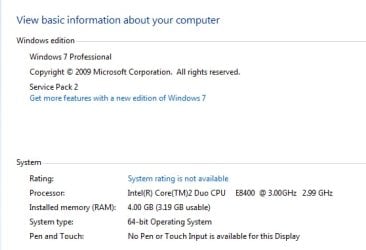
Brink Administrator Staff member Local time 4:19 PM Messages 74,973 Location Oklahoma May 18, 2017 #2 Hello gumboman, The tutorial below can help show you how to tell if your Windows 7 is 32-bit or 64-bit. System Type - 32-bit (x86) or 64-bit (x64) - Windows 7 Help Forums My Computer My Computer At a glance 64-bit Windows 11 Pro for WorkstationsIntel i7-8700K OC'd to 5 GHz64 GB (4x16GB) G.SKILL TridentZ RGB DDR4 3600...ASUS ROG-STRIX-GTX1080TI-O11G-GAMINGComputer typePC/DesktopComputer Manufacturer/Model NumberSelf built customOS64-bit Windows 11 Pro for WorkstationsCPUIntel i7-8700K OC'd to 5 GHzMotherboardASUS ROG Maximus XI Formula Z390Memory64 GB (4x16GB) G.SKILL TridentZ RGB DDR4 3600 MHzGraphics Card(s)ASUS ROG-STRIX-GTX1080TI-O11G-GAMINGSound CardIntegratedMonitor(s) Displays2 x Samsung Odyssey G7 27"Screen Resolution2560x1440Hard Drives1TB Samsung 990 PRO M.2, 4TB Samsung 990 PRO PRO M.2, TerraMaster F8 SSD Plus NASPSUSeasonic Prime Titanium 850WCaseThermaltake Core P3CoolingCorsair Hydro H115iKeyboardLogitech wireless K800MouseLogitech MX Master 4Internet Speed2 Gb/s Download and 100 Mb/s UploadAntivirusMalwarebyte Anti-Malware PremiumBrowserGoogle ChromeOther InfoLogitech Z625 speaker system, Logitech BRIO 4K Pro webcam, HP Color LaserJet Pro MFP M477fdn, APC SMART-UPS RT 1000 XL - SURT1000XLI, Galaxy S23 Plus phone
Hello gumboman, The tutorial below can help show you how to tell if your Windows 7 is 32-bit or 64-bit. System Type - 32-bit (x86) or 64-bit (x64) - Windows 7 Help Forums
SIW2 YTS GEEK Guru Gold Member SF Team Local time 10:19 PM Messages 16,797 May 18, 2017 #3 Press windows key and pause/break keys together. The system window will pop up. Or you can follow the tutorials posted by Shawn. My Computers My Computers System One System Two At a glance 7 X64i5 84002x8gb 3200mhz Computer typePC/DesktopOS7 X64CPUi5 8400Motherboardgigabyte b365m ds3hMemory2x8gb 3200mhzHard DrivesvariousPSUpure power 11 400w cmCaseCoolermasterCoolingcryorig m9i At a glance 7x64g54008gb ddr4 2400 Computer typePC/DesktopOS7x64CPUg5400Motherboardga b365m ds3hMemory8gb ddr4 2400PSUxfx pro 450w
Press windows key and pause/break keys together. The system window will pop up. Or you can follow the tutorials posted by Shawn.
J JanisS New member Local time 2:19 PM Messages 4 May 18, 2017 #4 https://support.microsoft.com/en-us/help/827218/how-to-determine-whether-a-computer-is-running-a-32-bit-version-or-64-bit-version-of-the-windows-operating-system This is quite simple to follow and find the answer. My Computer My Computer At a glance windows7Computer typePC/DesktopComputer Manufacturer/Model NumberAsusOSwindows7
https://support.microsoft.com/en-us/help/827218/how-to-determine-whether-a-computer-is-running-a-32-bit-version-or-64-bit-version-of-the-windows-operating-system This is quite simple to follow and find the answer.
G gumboman New member Member Thread Starter Local time 2:19 PM Messages 51 May 19, 2017 #5 Thanks All - got it! Charlie My Computer My Computer At a glance Windows 7 Home PremuimComputer Manufacturer/Model NumberDell Inspiron E1505OSWindows 7 Home Premuim