Windows 7 virtual pc

sportflyer

New member
Member
Local time
9:03 AM
Messages
71
Can I use Win7 Virtual PC to run Fedora 12 or should I use a third party VM machine ?
 

My Computer My Computer

At a glance

Vista 32bitIntel Core 2 duo Conroe E66002G Ram pc 5300Bfg Tech GF 8800gts
Computer Manufacturer/Model Number
Custom Build
OS
Vista 32bit
CPU
Intel Core 2 duo Conroe E6600
Motherboard
MSi 7241
Memory
2G Ram pc 5300
Graphics Card(s)
Bfg Tech GF 8800gts
Sound Card
internal
Monitor(s) Displays
Samsung 2253
Hard Drives
400G SATA
1000G SATA
PSU
700W
Cooling
Air
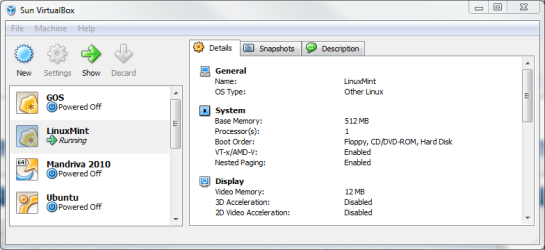
I like Virtual PC and like to run my Windows based virtual machines on it. However, for Linux I rather use VirtualBox.

A Linux virtual machine is a lot easier to setup and maintain on VirtualBox than on VPC. I'm currently running 4 Linux distros on VirtualBox (GOS, Mint, Mandriva & Ubuntu), and I have nothing to complain.

Kari
 

Attachments

  • vbox_linux_machines.PNG
    vbox_linux_machines.PNG
    22.6 KB · Views: 67

My Computer My Computer

At a glance

Windows 10 Pro x64 EN-GB1.6 GHz Intel Core i7-720QM Processor6 GBATI Mobility Radeon HD 5850 Graphics
Computer type
Laptop
Computer Manufacturer/Model Number
HP ENVY 17-1150eg
OS
Windows 10 Pro x64 EN-GB
CPU
1.6 GHz Intel Core i7-720QM Processor
Memory
6 GB
Graphics Card(s)
ATI Mobility Radeon HD 5850 Graphics
Sound Card
Beats sound system with integrated subwoofer
Monitor(s) Displays
17" laptop display, 22" LED and 32" Full HD TV through HDMI
Screen Resolution
1600*900 (1), 1920*1080 (2&3)
Hard Drives
Internal: 2 x 500 GB SATA Hard Disk Drive 7200 rpm
External: 2TB for backups, 3TB USB3 network drive for media
Cooling
As Envy runs a bit warm, I have it on a Cooler Master pad
Keyboard
Logitech diNovo Media Desktop Laser (bluetooth)
Mouse
Logitech Performance Mouse MX
Internet Speed
50/10 Mbps VDSL
Antivirus
Windows Defender 4.3.9431.0
Browser
Maxthon 3.5.2., IE11
OK. I will use Virtualbox. I suppose I can use the Live Cd version of Fedora to install? Tks
 

My Computer My Computer

At a glance

Vista 32bitIntel Core 2 duo Conroe E66002G Ram pc 5300Bfg Tech GF 8800gts
Computer Manufacturer/Model Number
Custom Build
OS
Vista 32bit
CPU
Intel Core 2 duo Conroe E6600
Motherboard
MSi 7241
Memory
2G Ram pc 5300
Graphics Card(s)
Bfg Tech GF 8800gts
Sound Card
internal
Monitor(s) Displays
Samsung 2253
Hard Drives
400G SATA
1000G SATA
PSU
700W
Cooling
Air

My Computer My Computer

At a glance

Windows 10 Pro x64 EN-GB1.6 GHz Intel Core i7-720QM Processor6 GBATI Mobility Radeon HD 5850 Graphics
Computer type
Laptop
Computer Manufacturer/Model Number
HP ENVY 17-1150eg
OS
Windows 10 Pro x64 EN-GB
CPU
1.6 GHz Intel Core i7-720QM Processor
Memory
6 GB
Graphics Card(s)
ATI Mobility Radeon HD 5850 Graphics
Sound Card
Beats sound system with integrated subwoofer
Monitor(s) Displays
17" laptop display, 22" LED and 32" Full HD TV through HDMI
Screen Resolution
1600*900 (1), 1920*1080 (2&3)
Hard Drives
Internal: 2 x 500 GB SATA Hard Disk Drive 7200 rpm
External: 2TB for backups, 3TB USB3 network drive for media
Cooling
As Envy runs a bit warm, I have it on a Cooler Master pad
Keyboard
Logitech diNovo Media Desktop Laser (bluetooth)
Mouse
Logitech Performance Mouse MX
Internet Speed
50/10 Mbps VDSL
Antivirus
Windows Defender 4.3.9431.0
Browser
Maxthon 3.5.2., IE11

My Computer My Computer

At a glance

Vista 32bitIntel Core 2 duo Conroe E66002G Ram pc 5300Bfg Tech GF 8800gts
Computer Manufacturer/Model Number
Custom Build
OS
Vista 32bit
CPU
Intel Core 2 duo Conroe E6600
Motherboard
MSi 7241
Memory
2G Ram pc 5300
Graphics Card(s)
Bfg Tech GF 8800gts
Sound Card
internal
Monitor(s) Displays
Samsung 2253
Hard Drives
400G SATA
1000G SATA
PSU
700W
Cooling
Air
On the phone, I'll put detailed instructions here within 30 minutes.

Kari
 

My Computer My Computer

At a glance

Windows 10 Pro x64 EN-GB1.6 GHz Intel Core i7-720QM Processor6 GBATI Mobility Radeon HD 5850 Graphics
Computer type
Laptop
Computer Manufacturer/Model Number
HP ENVY 17-1150eg
OS
Windows 10 Pro x64 EN-GB
CPU
1.6 GHz Intel Core i7-720QM Processor
Memory
6 GB
Graphics Card(s)
ATI Mobility Radeon HD 5850 Graphics
Sound Card
Beats sound system with integrated subwoofer
Monitor(s) Displays
17" laptop display, 22" LED and 32" Full HD TV through HDMI
Screen Resolution
1600*900 (1), 1920*1080 (2&3)
Hard Drives
Internal: 2 x 500 GB SATA Hard Disk Drive 7200 rpm
External: 2TB for backups, 3TB USB3 network drive for media
Cooling
As Envy runs a bit warm, I have it on a Cooler Master pad
Keyboard
Logitech diNovo Media Desktop Laser (bluetooth)
Mouse
Logitech Performance Mouse MX
Internet Speed
50/10 Mbps VDSL
Antivirus
Windows Defender 4.3.9431.0
Browser
Maxthon 3.5.2., IE11
On the phone, I'll put detailed instructions here within 30 minutes.

Kari

Maybe I'll piggy back and watch this thread for tips. I used to do some virtual stuff in Linux so I could use the Windows browser media plugins(gasp! I think they were for Netscape back then!) under Linux to play web stuff. But I have only dabbled with doing virtual on Windows.
 

My Computer My Computer

At a glance

Windows 7 32 bitAMD 5200+ dual core2 GBNVidia GeForce 6150SE 128 MB
Computer Manufacturer/Model Number
HP Media Center
OS
Windows 7 32 bit
CPU
AMD 5200+ dual core
Memory
2 GB
Graphics Card(s)
NVidia GeForce 6150SE 128 MB
Monitor(s) Displays
CRT
Screen Resolution
1280x1024
Hard Drives
500 GB Sata internal :

SIIG USB 3.0 docking stations w/WD Caviar Black 6 Gb/s drives
Keyboard
PS/2
Mouse
PS/2 Wheel Mouse
Other Info
SIIG USB 3.0 PCIexpress card.
Ok. It was a long call, over an hour but here it finally is.

First, if you already have Fedora 12 Live CD, use it instead of that alpha torrent link I gave you earlier. Live CD is a final edition.


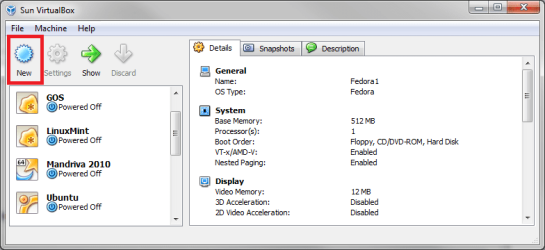
When you have installed VBox, run it. And then:
  • Click New
    vbox1.png
    .
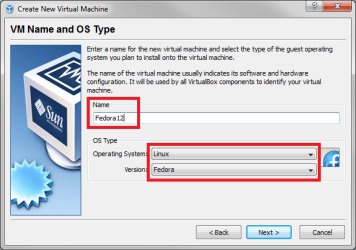
  • Follow the instructions, until it asks VM name and OS type. Give a name to your vm, choose Linux and Fedora from respective drop down lists:
    vbox2.png
    .
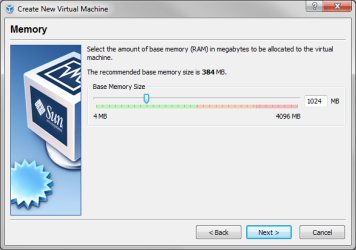
  • Assign the RAM you want to give to vm when asked:
    vbox3.PNG
    .
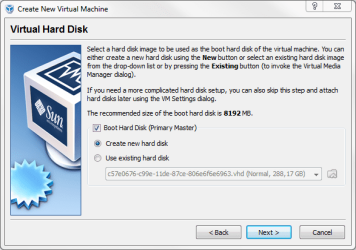
  • When asked, choose Create new hard disk:
    vbox4.PNG
    .
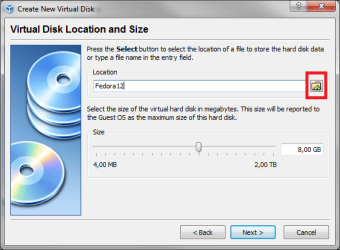
  • Name the hard disk and choose where you want it to be stored. Default location is C:\Users\Your_Username\.VirtualBox:
    vbox5.png
    .
  • Click Next a couple times until setup is finished
  • Click Settings (next to New button, see first image)
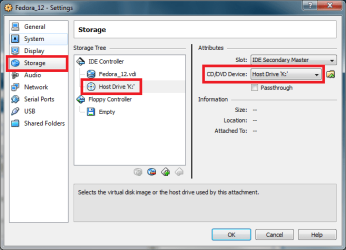
  • Choose Storage, choose CD/DVD, choose the drive containing your Fedora Live CD from drop down list:
    new4.png
    .
  • Run the virtual machine you created
  • Login to Fedora as Live User
  • Double click Install to hard disk on Fedora desktop
  • Follow the Fedora installation instructions (I assume you know what to do)
  • After installation is completed, shut down Fedora. Do not restart
  • Remove the Fedora Live CD from drive
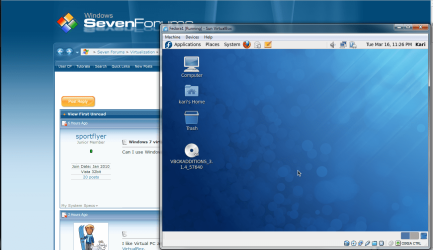
  • Run your Fedora virtual machine on Windows 7 desktop:
    vbox8.png

Notice, please: clicking inside a VBox virtual machine window captures the mouse, you can only move it inside the vm-window. To switch mouse back to host system (Windows), you have to press the VBox Host button. By default it is the right CTRL.

Kari
 
Last edited:

My Computer My Computer

At a glance

Windows 10 Pro x64 EN-GB1.6 GHz Intel Core i7-720QM Processor6 GBATI Mobility Radeon HD 5850 Graphics
Computer type
Laptop
Computer Manufacturer/Model Number
HP ENVY 17-1150eg
OS
Windows 10 Pro x64 EN-GB
CPU
1.6 GHz Intel Core i7-720QM Processor
Memory
6 GB
Graphics Card(s)
ATI Mobility Radeon HD 5850 Graphics
Sound Card
Beats sound system with integrated subwoofer
Monitor(s) Displays
17" laptop display, 22" LED and 32" Full HD TV through HDMI
Screen Resolution
1600*900 (1), 1920*1080 (2&3)
Hard Drives
Internal: 2 x 500 GB SATA Hard Disk Drive 7200 rpm
External: 2TB for backups, 3TB USB3 network drive for media
Cooling
As Envy runs a bit warm, I have it on a Cooler Master pad
Keyboard
Logitech diNovo Media Desktop Laser (bluetooth)
Mouse
Logitech Performance Mouse MX
Internet Speed
50/10 Mbps VDSL
Antivirus
Windows Defender 4.3.9431.0
Browser
Maxthon 3.5.2., IE11
Thanks for the step by step instructions: Is there a choice of running it from an iso image so I save a step of burning the iso to a CD? Tks
 

My Computer My Computer

At a glance

Vista 32bitIntel Core 2 duo Conroe E66002G Ram pc 5300Bfg Tech GF 8800gts
Computer Manufacturer/Model Number
Custom Build
OS
Vista 32bit
CPU
Intel Core 2 duo Conroe E6600
Motherboard
MSi 7241
Memory
2G Ram pc 5300
Graphics Card(s)
Bfg Tech GF 8800gts
Sound Card
internal
Monitor(s) Displays
Samsung 2253
Hard Drives
400G SATA
1000G SATA
PSU
700W
Cooling
Air
Thanks for the step by step instructions: Is there a choice of running it from an iso image so I save a step of burning the iso to a CD? Tks

I would guess you'd have to mount the image using one of those virtual cd programs like MagicISO.
 

My Computer My Computer

At a glance

Windows 7 32 bitAMD 5200+ dual core2 GBNVidia GeForce 6150SE 128 MB
Computer Manufacturer/Model Number
HP Media Center
OS
Windows 7 32 bit
CPU
AMD 5200+ dual core
Memory
2 GB
Graphics Card(s)
NVidia GeForce 6150SE 128 MB
Monitor(s) Displays
CRT
Screen Resolution
1280x1024
Hard Drives
500 GB Sata internal :

SIIG USB 3.0 docking stations w/WD Caviar Black 6 Gb/s drives
Keyboard
PS/2
Mouse
PS/2 Wheel Mouse
Other Info
SIIG USB 3.0 PCIexpress card.
Yes there is.

Do this:
  • Choose your new, empty virtual machine.
  • Click Settings
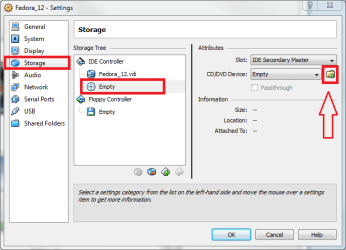
  • Choose Storage, CD/DVD (Empty), click the small browse button:
    iso_1.png
    .
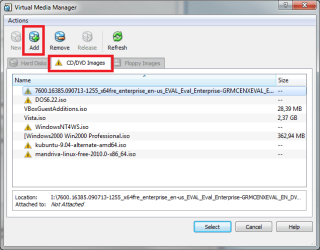
  • Choose CD/DVD Images tab, click Add:
    iso_2.png
    .
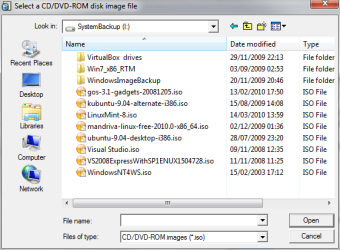
  • Browse to your ISO, click Open:
    iso_3.PNG
    .
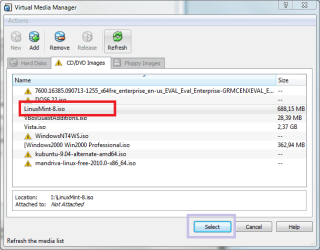
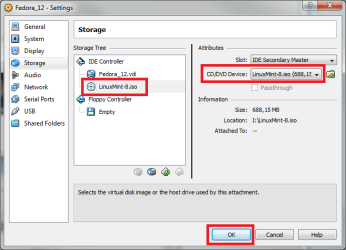
  • Choose your ISO, click Select (I used here the LinuxMint ISO, don't have Fedora ISO):
    iso_4.png
    .
  • Click OK, run the virtual machine. If ISO is bootable, the vm is booted from it and installation begins
    iso_5.png

Kari
 

My Computer My Computer

At a glance

Windows 10 Pro x64 EN-GB1.6 GHz Intel Core i7-720QM Processor6 GBATI Mobility Radeon HD 5850 Graphics
Computer type
Laptop
Computer Manufacturer/Model Number
HP ENVY 17-1150eg
OS
Windows 10 Pro x64 EN-GB
CPU
1.6 GHz Intel Core i7-720QM Processor
Memory
6 GB
Graphics Card(s)
ATI Mobility Radeon HD 5850 Graphics
Sound Card
Beats sound system with integrated subwoofer
Monitor(s) Displays
17" laptop display, 22" LED and 32" Full HD TV through HDMI
Screen Resolution
1600*900 (1), 1920*1080 (2&3)
Hard Drives
Internal: 2 x 500 GB SATA Hard Disk Drive 7200 rpm
External: 2TB for backups, 3TB USB3 network drive for media
Cooling
As Envy runs a bit warm, I have it on a Cooler Master pad
Keyboard
Logitech diNovo Media Desktop Laser (bluetooth)
Mouse
Logitech Performance Mouse MX
Internet Speed
50/10 Mbps VDSL
Antivirus
Windows Defender 4.3.9431.0
Browser
Maxthon 3.5.2., IE11
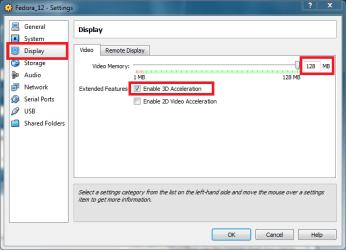
By the way, when you have installed Fedora, or any other OS to a VBox virtual machine, it's got only 12MB video memory by default. It's worth to increase it to maximum, 128 MB.

Kari
 

Attachments

  • VBOX_display.png
    VBOX_display.png
    17.3 KB · Views: 4

My Computer My Computer

At a glance

Windows 10 Pro x64 EN-GB1.6 GHz Intel Core i7-720QM Processor6 GBATI Mobility Radeon HD 5850 Graphics
Computer type
Laptop
Computer Manufacturer/Model Number
HP ENVY 17-1150eg
OS
Windows 10 Pro x64 EN-GB
CPU
1.6 GHz Intel Core i7-720QM Processor
Memory
6 GB
Graphics Card(s)
ATI Mobility Radeon HD 5850 Graphics
Sound Card
Beats sound system with integrated subwoofer
Monitor(s) Displays
17" laptop display, 22" LED and 32" Full HD TV through HDMI
Screen Resolution
1600*900 (1), 1920*1080 (2&3)
Hard Drives
Internal: 2 x 500 GB SATA Hard Disk Drive 7200 rpm
External: 2TB for backups, 3TB USB3 network drive for media
Cooling
As Envy runs a bit warm, I have it on a Cooler Master pad
Keyboard
Logitech diNovo Media Desktop Laser (bluetooth)
Mouse
Logitech Performance Mouse MX
Internet Speed
50/10 Mbps VDSL
Antivirus
Windows Defender 4.3.9431.0
Browser
Maxthon 3.5.2., IE11
Kari, Thanks so much for the step by step instructions . Great tutorial !

I forgot to ask whether there are any advantages to storing the iso files and the virtual machine HD folder in the default Virtualbox locations ? To conserve my total C drive capacity of 80G , I was thinking of storing both the iso files and the virtual HD drive in another partition D with a lot more unused capacity.

Tks
 
Last edited:

My Computer My Computer

At a glance

Vista 32bitIntel Core 2 duo Conroe E66002G Ram pc 5300Bfg Tech GF 8800gts
Computer Manufacturer/Model Number
Custom Build
OS
Vista 32bit
CPU
Intel Core 2 duo Conroe E6600
Motherboard
MSi 7241
Memory
2G Ram pc 5300
Graphics Card(s)
Bfg Tech GF 8800gts
Sound Card
internal
Monitor(s) Displays
Samsung 2253
Hard Drives
400G SATA
1000G SATA
PSU
700W
Cooling
Air
You are welcome!

My .VirtualBox folder is empty, I keep my virtual hard disk files on another disk to avoid filling C: too soon.

Kari
 

My Computer My Computer

At a glance

Windows 10 Pro x64 EN-GB1.6 GHz Intel Core i7-720QM Processor6 GBATI Mobility Radeon HD 5850 Graphics
Computer type
Laptop
Computer Manufacturer/Model Number
HP ENVY 17-1150eg
OS
Windows 10 Pro x64 EN-GB
CPU
1.6 GHz Intel Core i7-720QM Processor
Memory
6 GB
Graphics Card(s)
ATI Mobility Radeon HD 5850 Graphics
Sound Card
Beats sound system with integrated subwoofer
Monitor(s) Displays
17" laptop display, 22" LED and 32" Full HD TV through HDMI
Screen Resolution
1600*900 (1), 1920*1080 (2&3)
Hard Drives
Internal: 2 x 500 GB SATA Hard Disk Drive 7200 rpm
External: 2TB for backups, 3TB USB3 network drive for media
Cooling
As Envy runs a bit warm, I have it on a Cooler Master pad
Keyboard
Logitech diNovo Media Desktop Laser (bluetooth)
Mouse
Logitech Performance Mouse MX
Internet Speed
50/10 Mbps VDSL
Antivirus
Windows Defender 4.3.9431.0
Browser
Maxthon 3.5.2., IE11
OK..TKs When I started to install Virtualbox, I notice two components Bridge Networking and Host networking , install both ? There is a warning about temporary network disconnection ...anything to worry about? Tks
 

My Computer My Computer

At a glance

Vista 32bitIntel Core 2 duo Conroe E66002G Ram pc 5300Bfg Tech GF 8800gts
Computer Manufacturer/Model Number
Custom Build
OS
Vista 32bit
CPU
Intel Core 2 duo Conroe E6600
Motherboard
MSi 7241
Memory
2G Ram pc 5300
Graphics Card(s)
Bfg Tech GF 8800gts
Sound Card
internal
Monitor(s) Displays
Samsung 2253
Hard Drives
400G SATA
1000G SATA
PSU
700W
Cooling
Air
Yes, install both. It cuts your connection for a couple of seconds. Nothing to worry.

The default network connection type for a new vm is NAT, but for instance if you want your vm to join your host computer's network, you need a bridged connection.

Kari
 

My Computer My Computer

At a glance

Windows 10 Pro x64 EN-GB1.6 GHz Intel Core i7-720QM Processor6 GBATI Mobility Radeon HD 5850 Graphics
Computer type
Laptop
Computer Manufacturer/Model Number
HP ENVY 17-1150eg
OS
Windows 10 Pro x64 EN-GB
CPU
1.6 GHz Intel Core i7-720QM Processor
Memory
6 GB
Graphics Card(s)
ATI Mobility Radeon HD 5850 Graphics
Sound Card
Beats sound system with integrated subwoofer
Monitor(s) Displays
17" laptop display, 22" LED and 32" Full HD TV through HDMI
Screen Resolution
1600*900 (1), 1920*1080 (2&3)
Hard Drives
Internal: 2 x 500 GB SATA Hard Disk Drive 7200 rpm
External: 2TB for backups, 3TB USB3 network drive for media
Cooling
As Envy runs a bit warm, I have it on a Cooler Master pad
Keyboard
Logitech diNovo Media Desktop Laser (bluetooth)
Mouse
Logitech Performance Mouse MX
Internet Speed
50/10 Mbps VDSL
Antivirus
Windows Defender 4.3.9431.0
Browser
Maxthon 3.5.2., IE11
I think I will do the bridge connection after everything is running. Tks Again
 

My Computer My Computer

At a glance

Vista 32bitIntel Core 2 duo Conroe E66002G Ram pc 5300Bfg Tech GF 8800gts
Computer Manufacturer/Model Number
Custom Build
OS
Vista 32bit
CPU
Intel Core 2 duo Conroe E6600
Motherboard
MSi 7241
Memory
2G Ram pc 5300
Graphics Card(s)
Bfg Tech GF 8800gts
Sound Card
internal
Monitor(s) Displays
Samsung 2253
Hard Drives
400G SATA
1000G SATA
PSU
700W
Cooling
Air
After installation of Fedora , do I have to do anything with the ISO image that was added Virtual box? Tks
 

My Computer My Computer

At a glance

Vista 32bitIntel Core 2 duo Conroe E66002G Ram pc 5300Bfg Tech GF 8800gts
Computer Manufacturer/Model Number
Custom Build
OS
Vista 32bit
CPU
Intel Core 2 duo Conroe E6600
Motherboard
MSi 7241
Memory
2G Ram pc 5300
Graphics Card(s)
Bfg Tech GF 8800gts
Sound Card
internal
Monitor(s) Displays
Samsung 2253
Hard Drives
400G SATA
1000G SATA
PSU
700W
Cooling
Air
No. A VBox virtual machine can only boot from ISO when there's no previous OS installed.

You can go to settings and choose Empty for CD/DVD drive, or you can mount one of the host system's drives to be used.

Kari

EDIT: To get most of your VBox Fedora virtual machine, you should install VirtualBox Guest Additions. It is normally a straight forward procedure, easily done with other Linux distros, but for reasons unknown to me, it's a bit more complicated in Fedora.

Follow this link to learn how to install Guest Additions on Fedora: http://www.kombitz.com/2009/12/01/fedora-12-and-virtualbox-3-guest-additions/
 

My Computer My Computer

At a glance

Windows 10 Pro x64 EN-GB1.6 GHz Intel Core i7-720QM Processor6 GBATI Mobility Radeon HD 5850 Graphics
Computer type
Laptop
Computer Manufacturer/Model Number
HP ENVY 17-1150eg
OS
Windows 10 Pro x64 EN-GB
CPU
1.6 GHz Intel Core i7-720QM Processor
Memory
6 GB
Graphics Card(s)
ATI Mobility Radeon HD 5850 Graphics
Sound Card
Beats sound system with integrated subwoofer
Monitor(s) Displays
17" laptop display, 22" LED and 32" Full HD TV through HDMI
Screen Resolution
1600*900 (1), 1920*1080 (2&3)
Hard Drives
Internal: 2 x 500 GB SATA Hard Disk Drive 7200 rpm
External: 2TB for backups, 3TB USB3 network drive for media
Cooling
As Envy runs a bit warm, I have it on a Cooler Master pad
Keyboard
Logitech diNovo Media Desktop Laser (bluetooth)
Mouse
Logitech Performance Mouse MX
Internet Speed
50/10 Mbps VDSL
Antivirus
Windows Defender 4.3.9431.0
Browser
Maxthon 3.5.2., IE11
I finally got it installed in the Virtual HDD and Linux is running.

a) I cant seem to get a larger display. Max display resolution is 800X600 under display properties.

b) It seems that I can only boot as live user ? Any other options?

c) What will happen I chose Empty in CD/DVD ?

Tks
 

My Computer My Computer

At a glance

Vista 32bitIntel Core 2 duo Conroe E66002G Ram pc 5300Bfg Tech GF 8800gts
Computer Manufacturer/Model Number
Custom Build
OS
Vista 32bit
CPU
Intel Core 2 duo Conroe E6600
Motherboard
MSi 7241
Memory
2G Ram pc 5300
Graphics Card(s)
Bfg Tech GF 8800gts
Sound Card
internal
Monitor(s) Displays
Samsung 2253
Hard Drives
400G SATA
1000G SATA
PSU
700W
Cooling
Air
Back
Top