you need to use the group policy editor - it won't password protect, but will make it difficult to change by somebody with limited skills.
type gpedit.msc into the search-box at the bottom of the start-menu.
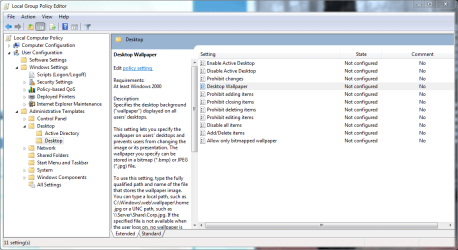
this should bring up the group policy editor, and look at attached picture below.
you need to use the group policy editor - it won't password protect, but will make it difficult to change by somebody with limited skills.
type gpedit.msc into the search-box at the bottom of the start-menu.
this should bring up the group policy editor, and look at attached picture below.
There is no gpedit.msc in HP and lower. Think it is only in Professional and higher versions.
you need to use the group policy editor - it won't password protect, but will make it difficult to change by somebody with limited skills.
type gpedit.msc into the search-box at the bottom of the start-menu.
this should bring up the group policy editor, and look at attached picture below.
There is no gpedit.msc in HP and lower. Think it is only in Professional and higher versions.