Windows 7 Will not shut down + other issues

techhnyne

New member
Local time
8:37 PM
Messages
2
i have been searching the forums and google for a solution.

Win 7 Ult x64 when i click shutdown/restart it logs off then site on the shutting down screen. I even tried a CLEAN BOOT and it is still having this problem.
also when i am using windows and i am on a window that scrolls randomly my window will automatically start to scroll without touching anything, it scrolls and then stops after like 60-90 seconds then my computer is fine to use again until it starts to do that again. it does it at random times.

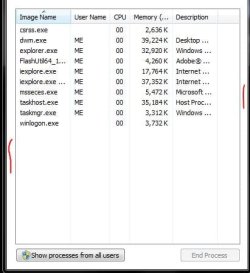
when i click run my task manager it opens up with the content part of the window but the title bar, menu bar and tool bar are missing. meaning the only thing showing is the white area with the list of things running. can anyone please help me out with these issues?!
thank you!!
 

My Computer My Computer

Computer type
PC/Desktop
OS
Windows 7 Ultimate x64

My Computer My Computer

Computer Manufacturer/Model Number
Put together
OS
Win7 Pro-64 Bit
CPU
i7-2600-3.4GHz
Motherboard
ASRock Z68M
Memory
8 GIG DDR3
Graphics Card(s)
onboard
Sound Card
onboard
Hard Drives
Seagate 1TB 7200RPM
PSU
680 W
Case
black
Cooling
stock fans
Keyboard
Microsoft
Mouse
Microsoft optical
For the task manager, open him up and double click where I have marked the pic in red, either side it dont matter.
View attachment 290593

I would also try running this, if there are any problems run 3 times rebooting before each.

http://www.sevenforums.com/tutorials/1538-sfc-scannow-command-system-file-checker.html


thank you the task manager worked but i ran that scan earlier today and it did not find any issues.. have malwarebytes and they did not find any virus/malware

any other ideas?
 

My Computer My Computer

Computer type
PC/Desktop
OS
Windows 7 Ultimate x64
It could be a virus or malware.
Do you run any real-time Anti-Virus and/or Anti-Malware programs?
Have you scanned with any programs other than Malwarebytes?
There is no one program that will find/fix/prevent all viruses and malware.

It could be hardware related.
You can use this tutorial to help update your System Specs in SF.
http://www.sevenforums.com/tutorials/180324-system-info-see-your-system-specs.html

Did you buy a PC with Win 7 Ultimate preinstalled, or did you install it?

Here is a troubleshooting tutorial you can work through.
http://www.sevenforums.com/tutorials/220165-troubleshooting-steps-windows-7-a.html
 

My Computer My Computer

Computer type
PC/Desktop
Computer Manufacturer/Model Number
home built
OS
Multi-Boot W7_Pro_x64 W8.1_Pro_x64 W10_Pro_x64 +Linux_VMs +Chromium_VM
CPU
AMD Athlon II x4 620
Motherboard
Gigabyte GA-MA785G-UD3H
Memory
6GB GSkill DDR2 800
Graphics Card(s)
AMD 4670 GPU + AMD 4200 IGP
Sound Card
on board Realtek ALC889A
Monitor(s) Displays
RCA 40" LCD TV, Insignia 32" LCD TV, HP 15" LCD monitor
Screen Resolution
1680 x 1050
Hard Drives
OCZ Vertex 3 120GB,
Samsung F3 1TB (3),
Several others - WD, Seagate, Hitachi, ...
PSU
Corsair 500 W
Case
Rosewill mid tower
Cooling
CM 90mm rifle
Keyboard
Gyration wireless, Logitech wireless, Dell USB wired
Mouse
Gyration wireless, Logitech wireless, V7 USB wired
Internet Speed
Spectrum - 100Mbps D / 10Mbps U
Antivirus
Avast, MBAM3, EMET, WinPatrol
Browser
Pale Moon, Firefox, IE
Other Info
2 multi-boot PC's
Mainly HTPC/Office/Gen purpose (no gaming).
Trendnet USB KVM.
LG DVD burner/Blue Ray Player.
Tray system for removable SATA backup drives.

Not currently OCd, under-volted.
I use Hybrid sleep, rarely re-boot or shutdown.

Hauppauge HD-PVR, Avermedia PCIe TV Tuner, Hauppauge PCI TV Tuner.
Back
Top