Windows 7 Windows Explorer Filter Drop Down Lists

Balmforthk

New member
Local time
3:26 PM
Messages
8
Hi,

I am testing Windows 7 for my own use and don't like the default Explorer window very much. I'm using the Windows Classic Theme and in the right hand pane of Windows Explorer, next to the column headings, there are what's best described as Filter drop down lists, with items such as A - H, I- P, Q - Z.

Is there any way to get rid of these filters please?

Also, in XP, in the right hand pane of Windows Explorer, the "Name" column had a slightly darker background than the other columns, making it more obvious. Is there any way to do that with Windows 7 Explorer please?

Thanks,
 

My Computer

Computer type
PC/Desktop
Computer Manufacturer/Model Number
HP
OS
Windows 7 Professional
CPU
Pentium 4
Memory
2GB
Antivirus
Symantec Endpoint Protection
Browser
IE8
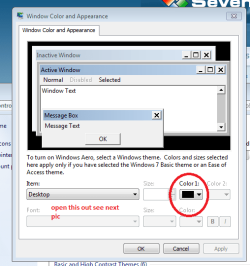
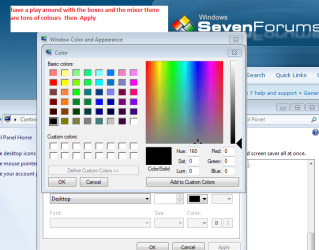
Hello and welcome Balm just a few suggestions follow my pics and see what you can do with them and you can default if you need to.

Oops that last pic is the second one
 

Attachments

  • WE1.PNG
    WE1.PNG
    102.1 KB · Views: 0
  • WE2.PNG
    WE2.PNG
    38.6 KB · Views: 24
  • WE3.PNG
    WE3.PNG
    77.6 KB · Views: 1

My Computer

Computer type
PC/Desktop
Computer Manufacturer/Model Number
Own build (new) Desk1 / Asus ROG Win 7 / Desk2 1st build
OS
Desk1 7 Home Prem / Desk2 10 Pro / Main lap Asus ROG 10 Pro 2 laptop Toshiba 7 Pro Asus P2520 7 & 10
CPU
Desk1 i5 3750K / Laptop i7 GTX 860M / Desk2 i5 2500
Motherboard
Desk1 Asus P877-V / Desk2 Gigabyte H67 UD3H / Laptop ?
Memory
Desk1 8GB (1866) / Desk2 16GB (1333) / Laptop 8Gb DDR3
Graphics Card(s)
Desk 1& 2NVidia GTX 650 & Laptops on board Intel
Sound Card
Desk 1 & 2 -XONAR DG Realtek High Def audio Laptop
Monitor(s) Displays
Desk 1 Benq HD 2450 / Desk2 Philips 24" / Laptop 17.5"
Screen Resolution
1920x1080 D1 & D2 & Laptop 1
Hard Drives
Desk1 Samsung 120GB 830 SSD
Asus ROG 256GB 850 Pro SSD
Desk2 Samsung 840 256 SSD
Toshiba 120GB EVO
PSU
Desk 1 Corsair HX 1050/ Laptop ? / Desk 2 Corsair HX 650
Case
Desk 1 Cooler HAF XM ? Toshiba laptop / Desk2 Coolermaster
Cooling
Fans on all Desk1 -2 Desk2 - all Coolermasters 5 Laptop ?
Keyboard
Desk 1 MS Sidewinder X6 Desk 2 MS Sidewinder X 4
Mouse
Desk 1&2 - Gigabyte MS 900 gamer - laptop - Logitec wireless
Internet Speed
ADSL2+
Other Info
One other Desktop (tester) and spare Toshba laptop both with SSD's
Running Kaspersky 2016 ISS on all machines config'd identically
Logitec audio stereo systems on each machine (x3)
Canon MG5250MFC
Router/modem TP-Link running WPA2SK
Hello and welcome Balm just a few suggestions follow my pics and see what you can do with them and you can default if you need to.

Oops that last pic is the second one

Hi,

Thanks for your suggestions. I'll have a look and see what I can do.

I think that might help with the colours but not the filter drop down lists.

Does anyone else have any ideas about the filter drop down lists please?

Thanks,
 

My Computer

Computer type
PC/Desktop
Computer Manufacturer/Model Number
HP
OS
Windows 7 Professional
CPU
Pentium 4
Memory
2GB
Antivirus
Symantec Endpoint Protection
Browser
IE8
Ok Balm mate I have had a a look around and to be honest I am having a job to see what it is that you want to get rid of. After a few Googles I came up with this List of features removed in Windows 7 - Wikipedia, the free encyclopedia now I cannot for the life of me see what it is you are seeing here.

Do you mean when you do a search in Explorer say in doc you get a drop down list? I do but it is headed Authors Type Date modified Size - see my pic and if possible could you send back a pic of what it is you see on your machine
 

Attachments

  • SEARCH.PNG
    SEARCH.PNG
    57.1 KB · Views: 0

My Computer

Computer type
PC/Desktop
Computer Manufacturer/Model Number
Own build (new) Desk1 / Asus ROG Win 7 / Desk2 1st build
OS
Desk1 7 Home Prem / Desk2 10 Pro / Main lap Asus ROG 10 Pro 2 laptop Toshiba 7 Pro Asus P2520 7 & 10
CPU
Desk1 i5 3750K / Laptop i7 GTX 860M / Desk2 i5 2500
Motherboard
Desk1 Asus P877-V / Desk2 Gigabyte H67 UD3H / Laptop ?
Memory
Desk1 8GB (1866) / Desk2 16GB (1333) / Laptop 8Gb DDR3
Graphics Card(s)
Desk 1& 2NVidia GTX 650 & Laptops on board Intel
Sound Card
Desk 1 & 2 -XONAR DG Realtek High Def audio Laptop
Monitor(s) Displays
Desk 1 Benq HD 2450 / Desk2 Philips 24" / Laptop 17.5"
Screen Resolution
1920x1080 D1 & D2 & Laptop 1
Hard Drives
Desk1 Samsung 120GB 830 SSD
Asus ROG 256GB 850 Pro SSD
Desk2 Samsung 840 256 SSD
Toshiba 120GB EVO
PSU
Desk 1 Corsair HX 1050/ Laptop ? / Desk 2 Corsair HX 650
Case
Desk 1 Cooler HAF XM ? Toshiba laptop / Desk2 Coolermaster
Cooling
Fans on all Desk1 -2 Desk2 - all Coolermasters 5 Laptop ?
Keyboard
Desk 1 MS Sidewinder X6 Desk 2 MS Sidewinder X 4
Mouse
Desk 1&2 - Gigabyte MS 900 gamer - laptop - Logitec wireless
Internet Speed
ADSL2+
Other Info
One other Desktop (tester) and spare Toshba laptop both with SSD's
Running Kaspersky 2016 ISS on all machines config'd identically
Logitec audio stereo systems on each machine (x3)
Canon MG5250MFC
Router/modem TP-Link running WPA2SK
Ok Balm mate I have had a a look around and to be honest I am having a job to see what it is that you want to get rid of. After a few Googles I came up with this List of features removed in Windows 7 - Wikipedia, the free encyclopedia now I cannot for the life of me see what it is you are seeing here.

Do you mean when you do a search in Explorer say in doc you get a drop down list? I do but it is headed Authors Type Date modified Size - see my pic and if possible could you send back a pic of what it is you see on your machine

Hi,

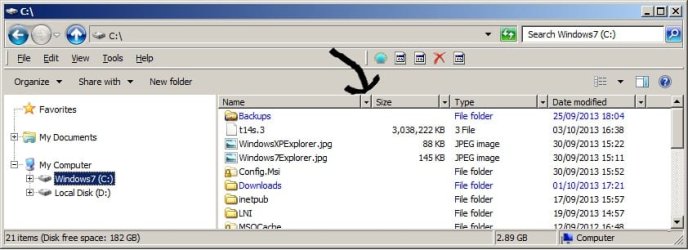
It's the filter drop down lists, an example of which is pointed to by the arrow in the picture. I want to get rid of them to make Windows Explorer look more like the classic Explorer. Does this help :) ??

Thanks,
 

Attachments

  • Windows7Explorer.jpg
    Windows7Explorer.jpg
    92.6 KB · Views: 0

My Computer

Computer type
PC/Desktop
Computer Manufacturer/Model Number
HP
OS
Windows 7 Professional
CPU
Pentium 4
Memory
2GB
Antivirus
Symantec Endpoint Protection
Browser
IE8
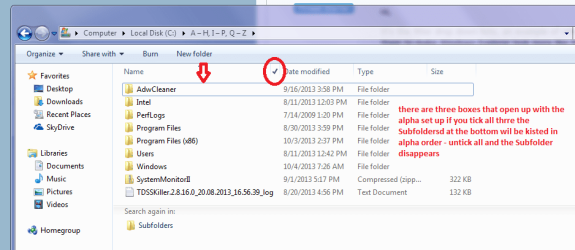
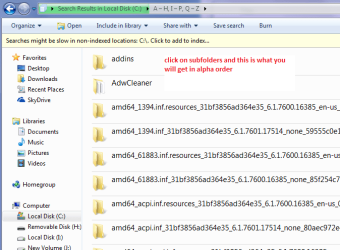
I think I see what you mean now on mine I click on that down arrow and just make sure the filters are all switched to on .
If you click on the Subfolders at the bottom ALL files will be listed in alpha order. When you shut - or at least mine does - that Explorer window the filter listings clear them selves.

Those files in your picture I don't think there is any way to arrange them other than what Windows will do for you - again mine don't.

For a tip if you want to add arrows and stuff to pics snip the screen save to a file say desktop and then right click on the pic and Paint will appear use what colours and symbols you like:)
http://www.sevenforums.com/tutorials/9717-screenshot-paint.html
 

Attachments

  • FILTER.PNG
    FILTER.PNG
    82 KB · Views: 0
  • FILTER2.PNG
    FILTER2.PNG
    73 KB · Views: 20

My Computer

Computer type
PC/Desktop
Computer Manufacturer/Model Number
Own build (new) Desk1 / Asus ROG Win 7 / Desk2 1st build
OS
Desk1 7 Home Prem / Desk2 10 Pro / Main lap Asus ROG 10 Pro 2 laptop Toshiba 7 Pro Asus P2520 7 & 10
CPU
Desk1 i5 3750K / Laptop i7 GTX 860M / Desk2 i5 2500
Motherboard
Desk1 Asus P877-V / Desk2 Gigabyte H67 UD3H / Laptop ?
Memory
Desk1 8GB (1866) / Desk2 16GB (1333) / Laptop 8Gb DDR3
Graphics Card(s)
Desk 1& 2NVidia GTX 650 & Laptops on board Intel
Sound Card
Desk 1 & 2 -XONAR DG Realtek High Def audio Laptop
Monitor(s) Displays
Desk 1 Benq HD 2450 / Desk2 Philips 24" / Laptop 17.5"
Screen Resolution
1920x1080 D1 & D2 & Laptop 1
Hard Drives
Desk1 Samsung 120GB 830 SSD
Asus ROG 256GB 850 Pro SSD
Desk2 Samsung 840 256 SSD
Toshiba 120GB EVO
PSU
Desk 1 Corsair HX 1050/ Laptop ? / Desk 2 Corsair HX 650
Case
Desk 1 Cooler HAF XM ? Toshiba laptop / Desk2 Coolermaster
Cooling
Fans on all Desk1 -2 Desk2 - all Coolermasters 5 Laptop ?
Keyboard
Desk 1 MS Sidewinder X6 Desk 2 MS Sidewinder X 4
Mouse
Desk 1&2 - Gigabyte MS 900 gamer - laptop - Logitec wireless
Internet Speed
ADSL2+
Other Info
One other Desktop (tester) and spare Toshba laptop both with SSD's
Running Kaspersky 2016 ISS on all machines config'd identically
Logitec audio stereo systems on each machine (x3)
Canon MG5250MFC
Router/modem TP-Link running WPA2SK
Hi,

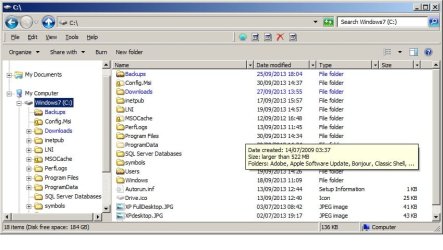
I think I'm not explaining myself very well. I've added two pictures to this post. The first is Windows Explorer in XP, the second is Windows Explorer in Windows 7.

As you can see, the XP Explorer doesn't have the filter drop down lists and the Windows 7 Explorer does. Also the XP Explorer has a darker background in the "Name" column.

I'd like to change the Windows 7 Explorer to have no filter drop down lists and have a darker background in the "Name" column, like XP does.

Thanks for your help,
 

Attachments

  • WindowsXPExplorer.jpg
    WindowsXPExplorer.jpg
    87.3 KB · Views: 0
  • Windows7Explorer.jpg
    Windows7Explorer.jpg
    144.4 KB · Views: 0
Last edited:

My Computer

Computer type
PC/Desktop
Computer Manufacturer/Model Number
HP
OS
Windows 7 Professional
CPU
Pentium 4
Memory
2GB
Antivirus
Symantec Endpoint Protection
Browser
IE8
Forgive me for jumping in here but I have just opened WE in XP and Win 7 to view the problem. I think you will need to edit a system file to "get rid" of that arrow head so why don't you just ignore it if you don't want to use the facility that it offers. Remember if you will, Windows XP was XP but this is Windows 7.
 

My Computer

Computer type
PC/Desktop
OS
Microsoft Windows 7 Home Premium 64-bit 7601 Multiprocessor Free Service Pack 1
CPU
Intel(R) Core(TM) i7-3770 CPU @ 3.40GHz
Motherboard
ASUSTeK COMPUTER INC. P8H77-M
Memory
8.00 GB
Graphics Card(s)
Intel(R) HD Graphics 4000
Sound Card
On Board
Monitor(s) Displays
Dell 24"
Screen Resolution
1920 x 1080
Hard Drives
(1) INTEL SSDSC2CT180A3 ATA Device (2) ST500DM002-1BD142 ATA Device (3) WDC WD3200AAKS-75L9A0 ATA Device (4) Generic- Compact Flash USB Device (5) Generic- MS/MS-Pro USB Device (6) Generic- SD/MMC USB Device (7) Generic- SM/xD-Picture USB
PSU
500w Corsair
Case
Cooler Master
Cooling
3 Fans
Keyboard
Logitech MK300
Mouse
Logitech WOM
Internet Speed
75Mb
Antivirus
Norton 360
Browser
Firefox, Opera, IE
Forgive me for jumping in here but I have just opened WE in XP and Win 7 to view the problem. I think you will need to edit a system file to "get rid" of that arrow head so why don't you just ignore it if you don't want to use the facility that it offers. Remember if you will, Windows XP was XP but this is Windows 7.
Hi,

Thanks for your suggestion. I was hoping that the Windows Classic theme would be just that, a Classic theme in all aspects, but it doesn't quite seem to be so with regard to Windows Explorer.

I was just trying to get WE to look like the Classic Explorer, but I appreciate there are limits to what can be done.

Regards,
 

My Computer

Computer type
PC/Desktop
Computer Manufacturer/Model Number
HP
OS
Windows 7 Professional
CPU
Pentium 4
Memory
2GB
Antivirus
Symantec Endpoint Protection
Browser
IE8
Forgive me for jumping in here but I have just opened WE in XP and Win 7 to view the problem. I think you will need to edit a system file to "get rid" of that arrow head so why don't you just ignore it if you don't want to use the facility that it offers. Remember if you will, Windows XP was XP but this is Windows 7.
Hi,

Thanks for your suggestion. I was hoping that the Windows Classic theme would be just that, a Classic theme in all aspects, but it doesn't quite seem to be so with regard to Windows Explorer.

I was just trying to get WE to look like the Classic Explorer, but I appreciate there are limits to what can be done.

Regards,
I apprecate your point of view but I have a certain sympathy for those who might suggest that getting Win 7 to be more like XP would be a retrograde step. Just my thoughts, you understand!
 

My Computer

Computer type
PC/Desktop
OS
Microsoft Windows 7 Home Premium 64-bit 7601 Multiprocessor Free Service Pack 1
CPU
Intel(R) Core(TM) i7-3770 CPU @ 3.40GHz
Motherboard
ASUSTeK COMPUTER INC. P8H77-M
Memory
8.00 GB
Graphics Card(s)
Intel(R) HD Graphics 4000
Sound Card
On Board
Monitor(s) Displays
Dell 24"
Screen Resolution
1920 x 1080
Hard Drives
(1) INTEL SSDSC2CT180A3 ATA Device (2) ST500DM002-1BD142 ATA Device (3) WDC WD3200AAKS-75L9A0 ATA Device (4) Generic- Compact Flash USB Device (5) Generic- MS/MS-Pro USB Device (6) Generic- SD/MMC USB Device (7) Generic- SM/xD-Picture USB
PSU
500w Corsair
Case
Cooler Master
Cooling
3 Fans
Keyboard
Logitech MK300
Mouse
Logitech WOM
Internet Speed
75Mb
Antivirus
Norton 360
Browser
Firefox, Opera, IE
I apprecate your point of view but I have a certain sympathy for those who might suggest that getting Win 7 to be more like XP would be a retrograde step. Just my thoughts, you understand!

Hi,

Likewise, I also appreciate your point of view. Many people prefer Windows 7. I, and many others it would seem, prefer the classic UI and, thinking about it, it's probably the Windows 2000 UI I'm after. Now that's really retrograde :):).

I have nothing against Windows 7, with regard to the entire Operating System, indeed I think it probably works quite well compared to early pre-SP3 versions of XP and it probably the best Windows OS so far. It's just the UI, especially the Windows Explorer I don't like. Which is why I'm trying to change it. I use it a lot and I'd like to be comfortable with it.

Regards,
 

My Computer

Computer type
PC/Desktop
Computer Manufacturer/Model Number
HP
OS
Windows 7 Professional
CPU
Pentium 4
Memory
2GB
Antivirus
Symantec Endpoint Protection
Browser
IE8
Back
Top