
Windows 7 won't boot after format and clean install

DextrousDave

New member
Member
VIP
Local time
3:04 PM
Messages
135
Hi All

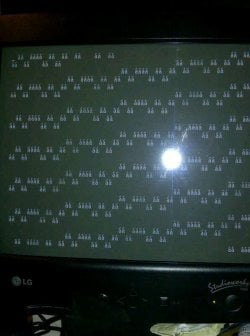
Another one...I just formatted my C-Drive and installed a fresh copy of windows 7 ultimate on it. After restart, I got the following screen - See image attached. Now Windows can't boot at all. I tried using a system repair disk but it doesn't work. I doubt if it is a hardware problem, since I can access the boot menu and its options, but as I said, running the repair disk fails, I keep on getting that screen when it restarts.

Any ideas? Can it be my MBR that is screwed? What options do I have available?

Thank you very much!
 

Attachments
  • IMG_0604.JPG
    IMG_0604.JPG
    52.9 KB · Views: 53

My Computer My Computer

Computer Manufacturer/Model Number
MSI
OS
Windows 7 Ultimate x32
CPU
Intel Core 2 Quad Q9400 @ 2.66GHz
Motherboard
MSI
Memory
2048MB
Graphics Card(s)
NVIDIA GeForce GTX 275
Monitor(s) Displays
Generic PnP Monitor
Hard Drives
2x HDD Drives (ATA Devices) 140GB and 368GB
Cooling
Fans
Hi Dave,

Is this an OEM or Retail Windows 7? Have you tried rebooting a few times? Do any BIOS POST messages display during bootup, or does it proceed direcdtly to these characters?

Regards,
Golden
 

My Computer My Computer

Computer type
PC/Desktop
Computer Manufacturer/Model Number
Golden Mk. I.4
OS
Windows 10 Pro x64 ; Xubuntu x64
CPU
Intel i7 860 @ 2.80 GHz O/C'ed to 4.0GHz
Motherboard
Gigabyte P55A-UD3R Rev.1. Award BIOS F13
Memory
16GB Corsair Vengance DDR3 @ 661 MHz Dual Channel (9-9-9-24)
Graphics Card(s)
EVGA NVidia GTX 560 1024MB
Sound Card
Realtek Integrated
Monitor(s) Displays
Dual Samsung SyncMaster 2494HS
Screen Resolution
1920*1080 and 1920*1080
Hard Drives
1*Samsung 840 EVO 120GB SSD;
1*OCZ Vertex 2 60GB SSD;
2*Samsung F3 SpinPoint 1TB in RAID0;
1*Samsung F1 SpinPoint 1TB;
2*Western Digital 1TB External USB 3.0
1*Western Digital 500GB External USB 3.0
1*Seagate 500GB External USB 2.0
PSU
Thermaltake ToughPower QFan 750W
Case
Thermaltake Element S VK60001W2Z
Cooling
Corsair H60 Water Cooling, 2*230mm and 2*80mm case fans
Keyboard
Logitech G110
Mouse
Logitech MX518
Hi Golden. Thank for the answer. It is retail windows 7. Nope, no messages displayed. It boots up normally, no POST issues and just before the windows loading screen, it displays that pretty matrix reloaded screen.
 

My Computer My Computer

Computer Manufacturer/Model Number
MSI
OS
Windows 7 Ultimate x32
CPU
Intel Core 2 Quad Q9400 @ 2.66GHz
Motherboard
MSI
Memory
2048MB
Graphics Card(s)
NVIDIA GeForce GTX 275
Monitor(s) Displays
Generic PnP Monitor
Hard Drives
2x HDD Drives (ATA Devices) 140GB and 368GB
Cooling
Fans
Mmm. Has to be asked mate, sorry : is the source of the Windows 7 DVD trustworthy?

Regards,
Golden
 

My Computer My Computer

Computer type
PC/Desktop
Computer Manufacturer/Model Number
Golden Mk. I.4
OS
Windows 10 Pro x64 ; Xubuntu x64
CPU
Intel i7 860 @ 2.80 GHz O/C'ed to 4.0GHz
Motherboard
Gigabyte P55A-UD3R Rev.1. Award BIOS F13
Memory
16GB Corsair Vengance DDR3 @ 661 MHz Dual Channel (9-9-9-24)
Graphics Card(s)
EVGA NVidia GTX 560 1024MB
Sound Card
Realtek Integrated
Monitor(s) Displays
Dual Samsung SyncMaster 2494HS
Screen Resolution
1920*1080 and 1920*1080
Hard Drives
1*Samsung 840 EVO 120GB SSD;
1*OCZ Vertex 2 60GB SSD;
2*Samsung F3 SpinPoint 1TB in RAID0;
1*Samsung F1 SpinPoint 1TB;
2*Western Digital 1TB External USB 3.0
1*Western Digital 500GB External USB 3.0
1*Seagate 500GB External USB 2.0
PSU
Thermaltake ToughPower QFan 750W
Case
Thermaltake Element S VK60001W2Z
Cooling
Corsair H60 Water Cooling, 2*230mm and 2*80mm case fans
Keyboard
Logitech G110
Mouse
Logitech MX518
Yes, well it is not mine, it's my friend's disc, but it is a geniune windows cd. Why do you ask? Doe this happen with cracked versions of windows or what?
 

My Computer My Computer

Computer Manufacturer/Model Number
MSI
OS
Windows 7 Ultimate x32
CPU
Intel Core 2 Quad Q9400 @ 2.66GHz
Motherboard
MSI
Memory
2048MB
Graphics Card(s)
NVIDIA GeForce GTX 275
Monitor(s) Displays
Generic PnP Monitor
Hard Drives
2x HDD Drives (ATA Devices) 140GB and 368GB
Cooling
Fans
Hi,

Its just a hunch - that behaviour I haven't seen before, although it could be for other reasons too. It shouldn't matter if its a friends disk, as long as its completely, 100% trustworthy (ie. not a downalod from a warez site, or a torrent). What matters is that the key you plan to activate with is genuine.

Try and do a fresh install, and see if the problem still occurs.

Regards,
Golden
 

My Computer My Computer

Computer type
PC/Desktop
Computer Manufacturer/Model Number
Golden Mk. I.4
OS
Windows 10 Pro x64 ; Xubuntu x64
CPU
Intel i7 860 @ 2.80 GHz O/C'ed to 4.0GHz
Motherboard
Gigabyte P55A-UD3R Rev.1. Award BIOS F13
Memory
16GB Corsair Vengance DDR3 @ 661 MHz Dual Channel (9-9-9-24)
Graphics Card(s)
EVGA NVidia GTX 560 1024MB
Sound Card
Realtek Integrated
Monitor(s) Displays
Dual Samsung SyncMaster 2494HS
Screen Resolution
1920*1080 and 1920*1080
Hard Drives
1*Samsung 840 EVO 120GB SSD;
1*OCZ Vertex 2 60GB SSD;
2*Samsung F3 SpinPoint 1TB in RAID0;
1*Samsung F1 SpinPoint 1TB;
2*Western Digital 1TB External USB 3.0
1*Western Digital 500GB External USB 3.0
1*Seagate 500GB External USB 2.0
PSU
Thermaltake ToughPower QFan 750W
Case
Thermaltake Element S VK60001W2Z
Cooling
Corsair H60 Water Cooling, 2*230mm and 2*80mm case fans
Keyboard
Logitech G110
Mouse
Logitech MX518
Ok thanks, will try that and let you know.
 

My Computer My Computer

Computer Manufacturer/Model Number
MSI
OS
Windows 7 Ultimate x32
CPU
Intel Core 2 Quad Q9400 @ 2.66GHz
Motherboard
MSI
Memory
2048MB
Graphics Card(s)
NVIDIA GeForce GTX 275
Monitor(s) Displays
Generic PnP Monitor
Hard Drives
2x HDD Drives (ATA Devices) 140GB and 368GB
Cooling
Fans
Try repairing the Boot Config Data, I had same problem with my desktop, was defo not a disk issue. Sometimes if you've changed the BIOS settings or made a hardware change the BCD becomes corrupt, regardless of trying boot partition recovery and fresh install nothing worked.

Put in the install DVD, open up a command prompt from "Control, Shift + F10" Then run:

Bootrec /fixMBR
then
Bootrec /fixboot

or, if that doesn't work, also run
then
Bootrec /rebuildbcd

hope this helps
 

My Computer My Computer

Computer Manufacturer/Model Number
Dell
OS
Windows 7 Professional x64
CPU
i5
Memory
4GB DDR3 1330
Hard Drives
240GB SATA 3/Gbps HDD
All of the repair commands along with many other needed tests and fixes are automated in Win7 Startup Repair.

Work though these steps for Troubleshooting Windows 7 Failure to Boot.

You can't overlook the possiblity of infection although it seems possible it is an untrustworthy installer.

How are you activating Win7? If this is factory preinstalled Win7 I would use the latest official installer to Clean Reinstall - Factory OEM Windows 7 although the same steps will also give you a perfect reinstall for retail, too.
 
All of the repair commands along with many other needed tests and fixes are automated in Win7 Startup Repair.

They are indeed kind sir, BUT, they did not work for my system, if the OS, Boot partition or both are corrupt, startup repair does not always function correctly and is either unable to resolve the issue (in which it notifies you) or it does not fix it, event though it states it has. I find startup repair to be most useful when you have created the repair disk itself and ran from that as it has OS specific information.
 

My Computer My Computer

Computer Manufacturer/Model Number
Dell
OS
Windows 7 Professional x64
CPU
i5
Memory
4GB DDR3 1330
Hard Drives
240GB SATA 3/Gbps HDD
Correct, always run Startup Repair from the DVD or System Repair Disk so it doesn't depend on possibly infected or corrupt System files.

Bootrec commands may also be needed if an installation is not shown to repair when booting into WinRE, to jumpstart it to appear.

Always run Startup Repair - Run 3 Separate Times no matter what it reports.
 
Back
Top