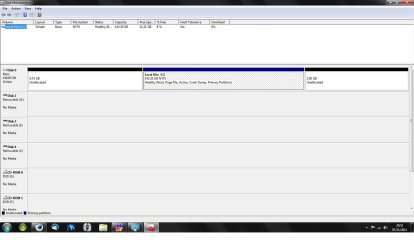
I have a 1.5tb external USB drive. I was installing files to the drive when it stopped working. this is a regular occurance with the drive, and the solution is usually to trun it off and back on again... which I tried and got this error...

so I rebooted in the hope that it would sort itself out, but no joy. I have tried it on my dads pc and got the same error (we're both running the same build of Windows 7 Ultimate.
I have looked in the device manager and the drive is present. so I tried to re-install drivers, nothing happened. then I tried to re-enable it, nothing happened...

this drive contains around 1tb of files. music, pictures, games, videos... none of which I can get again and the last thing I want to do is format.
please tell me there is a solution to this... :banghead:
so I rebooted in the hope that it would sort itself out, but no joy. I have tried it on my dads pc and got the same error (we're both running the same build of Windows 7 Ultimate.
I have looked in the device manager and the drive is present. so I tried to re-install drivers, nothing happened. then I tried to re-enable it, nothing happened...
this drive contains around 1tb of files. music, pictures, games, videos... none of which I can get again and the last thing I want to do is format.
please tell me there is a solution to this... :banghead:
My Computer
- Computer Manufacturer/Model Number
- Medion PC MT 7
- OS
- Windows 7 Ultimate 32 bit
- CPU
- Intel® Core™2 Duo Processor E6750
- Memory
- 2gb
- Graphics Card(s)
- NVIDIA GeForce 850 GT
- Sound Card
- Terratec Aureon Universe 7.1 Surround
- Monitor(s) Displays
- HP 2009 Series Wide LCD Monitor
- Screen Resolution
- 1600x900