Windows 7 / XP Dual boot PC not booting into Windows 7

Malydee

New member
Local time
2:35 PM
Messages
17
System crashed 12 Oct 11 after completing an on-line form when an unrequested email form appeared which was looping with a continuous production of letters & figures.
Unable to stop the process, system shut down. When re-started, the system booted up but refused to display BIOS or operating system.
After checking system, graphics card found to be faulty which was replaced 25 Oct 11.
System re-booted but refused to open in W7.
Launched system restore with W7 O/S to attempt system repair.
Initial error message stated NTLDR missing or corrupt.
Internet search suggested problem with XP. Launched XP & system booted OK. XP updated & now launches normally but W7 did not.
Re-booted, NTLDR message no longer displayed but after completing repair process, W7 did not boot.

SUMMARY OF SESSION DETAILS
Start-up Repair – Diagnostic & Repair Details
Last successful boot time 12 Oct 11 @ 13:53 GMT
Number of repair attempts – 11
Session Details List of Checks Total 46 some of which some are repeated include:-

Check for updates,
System Disk test,
Disk failure diagnosis
Disk metadata test

Target O/S test,
Volume content test
Boot manager test
System boot diagnosis
Event log diagnosis
Internal state check
Disk failure diagnosis
System boot log diagnosis
Boot status test
Set up state check
Registry hives test
Windows boot log diagnosis
Bug check analysis
Access control test
Files system test
Software installation log
Fall back diagnosis

Route cause found - 4 Messages

  • Start up repair tried several times but still cannot determine cause of problem (3 times)
  • Unspecified changes to system configuration might have caused problem,. Repair action – system files integrity, check & repair. Result – failed, error code 0x490, time taken 675827 ms
There are several suggestions on the internet to carry out changes to the registry. Although I have experience of doing this I would prefer a clean fix
Hope someone can help.


System details -
Asus P5N32-SLI Premium board
Pentium 4 processor
Gigabyte NVIDIA GeForce 6600 graphics card
4 Gb DDR2 ram
2 x 160 Gb Seagate Sata 2 hrad drives


Malydee
 

My Computer My Computer

At a glance

Windows 7 Home premium 64 bit3.00 gigahertz Intel Pentium 43072 Megabytes Usable Installed MemoryNVIDIA GeForce 6200 TurboCache(TM)
Computer Manufacturer/Model Number
Home build, ASUS motherboard
OS
Windows 7 Home premium 64 bit
CPU
3.00 gigahertz Intel Pentium 4
Motherboard
ASUSTeK Computer INC. P5N32-SLI PREMIUM 1.XX
Memory
3072 Megabytes Usable Installed Memory
Graphics Card(s)
NVIDIA GeForce 6200 TurboCache(TM)
Sound Card
Integrated High Definition Audio Device
Monitor(s) Displays
Beliea 19" LCD
Hard Drives
1 x 1 Terabyte Hitachi Sata
PSU
Inbilt ASUS
Case
ASUS
Cooling
1 case fan + CPU fan
Keyboard
Logitech wireless
Mouse
Logitech M195
Please post back a screenshot of your maximized Disk Management drive map with listings showing all columns, using Snipping Tool in Start Menu. Label what's on all partitions. We will give you the steps to recover Win7 and/or your Dual Boot - do you wish to keep it?

Is this factory preinstalled Win7, with XP added to another partition as a Dual Boot? Do you have Recovery Disks, a Win7 Reinstallation DVD (or access to any Win7 installer), and your XP CD or a backup image of either OS?
 
I am not able to get into W7 so I cannot use the snipping tool.
As requested I am enclosing a word document providing screen shots of Disks 1 & 2 from Partition Magic (Not compatible with W7) & Mini Tool Partition which I used on a Net book but not used on my W7 system.
For W7, I used Spotmau which has been acquired by another company & no longer recognises my log in ID.
I suspect Spotmau has incorrectly reset the partitions and status, moving the order which was not requested..
The word document provides details of what is on each disk.
Win 7 is not factory pre-installed. I set up a dual boot arrangement using Partition Magic and added Win 7 Win7, naming the new partition "New Simple Volume" as instructed by Windows.
I have done a Recovery Disk with Paragon Backup which does not have the green recovery console so does not work as intended. The screen shot actually displays in the Win 7 recovery system when carrying out the memory check.
I do have the Win 7 installation and the XP CD.
I do have copies of the various drives on external Hard Drives but not completely up to date.
I have uploaded the word document
Thanks for your help
Malydee
 

My Computer My Computer

At a glance

Windows 7 Home premium 64 bit3.00 gigahertz Intel Pentium 43072 Megabytes Usable Installed MemoryNVIDIA GeForce 6200 TurboCache(TM)
Computer Manufacturer/Model Number
Home build, ASUS motherboard
OS
Windows 7 Home premium 64 bit
CPU
3.00 gigahertz Intel Pentium 4
Motherboard
ASUSTeK Computer INC. P5N32-SLI PREMIUM 1.XX
Memory
3072 Megabytes Usable Installed Memory
Graphics Card(s)
NVIDIA GeForce 6200 TurboCache(TM)
Sound Card
Integrated High Definition Audio Device
Monitor(s) Displays
Beliea 19" LCD
Hard Drives
1 x 1 Terabyte Hitachi Sata
PSU
Inbilt ASUS
Case
ASUS
Cooling
1 case fan + CPU fan
Keyboard
Logitech wireless
Mouse
Logitech M195
My original word doc was to large for your system. As I am in XP and not win 7 I cannot access Paint so am sending 2 word doc files.
One was again too large so I have sent them again.
Thanks
Malydee
 

Attachments

My Computer My Computer

At a glance

Windows 7 Home premium 64 bit3.00 gigahertz Intel Pentium 43072 Megabytes Usable Installed MemoryNVIDIA GeForce 6200 TurboCache(TM)
Computer Manufacturer/Model Number
Home build, ASUS motherboard
OS
Windows 7 Home premium 64 bit
CPU
3.00 gigahertz Intel Pentium 4
Motherboard
ASUSTeK Computer INC. P5N32-SLI PREMIUM 1.XX
Memory
3072 Megabytes Usable Installed Memory
Graphics Card(s)
NVIDIA GeForce 6200 TurboCache(TM)
Sound Card
Integrated High Definition Audio Device
Monitor(s) Displays
Beliea 19" LCD
Hard Drives
1 x 1 Terabyte Hitachi Sata
PSU
Inbilt ASUS
Case
ASUS
Cooling
1 case fan + CPU fan
Keyboard
Logitech wireless
Mouse
Logitech M195
The screenshot does not show your Disk Management drive map and listings. Go Start, then rightclick Computer, select Manage, then from the menu Disk management. Maximize and grab screenshot.

I have no idea what Spotmau is but it isn't recommended by anyone here, and Partition Magic is not even compatible with Win7. You may be best advised to boot the Win7 installation DVD to clean reinstall following these steps to get a perfect reinstall: Reinstalling Windows 7. You can copy out your files first from XP.

Other than that best option you can try entering System Recovery Options to run Startup Repair on Win7 installation, which should automate System Restore. If not and you have a Restore point before your log-in program blocked you, I would try that manually from the Options list at boot.
 
I am enclosing the screen shot as requested.
I will try your suggestions and let yo know the outcome.
Thanks
Malydee
 

Attachments

My Computer My Computer

At a glance

Windows 7 Home premium 64 bit3.00 gigahertz Intel Pentium 43072 Megabytes Usable Installed MemoryNVIDIA GeForce 6200 TurboCache(TM)
Computer Manufacturer/Model Number
Home build, ASUS motherboard
OS
Windows 7 Home premium 64 bit
CPU
3.00 gigahertz Intel Pentium 4
Motherboard
ASUSTeK Computer INC. P5N32-SLI PREMIUM 1.XX
Memory
3072 Megabytes Usable Installed Memory
Graphics Card(s)
NVIDIA GeForce 6200 TurboCache(TM)
Sound Card
Integrated High Definition Audio Device
Monitor(s) Displays
Beliea 19" LCD
Hard Drives
1 x 1 Terabyte Hitachi Sata
PSU
Inbilt ASUS
Case
ASUS
Cooling
1 case fan + CPU fan
Keyboard
Logitech wireless
Mouse
Logitech M195
If you want to attempt to repair Win7, then mark it Active in XP DIsk mgmt, reboot into DVD Repair console or Repair CD to run Startup Repair - Run 3 Separate Times until Win7 starts on its own.

This will place the System boot files on Win7 partition which should now be marked System Active.

To add XP, install EasyBCD to Win7 to add XP from its Add OS Entry tab, Save, reboot to Dual Boot menu. Earlier versions of EasyBCD are still free.

If you want XP to remain holding the Win7 System boot files as it does now, then it needs to be marked Active when running Win7 Startup Repair from DVD Repair console or Repair CD, to see if Win7 will repair itself while saving the dual boot. Partition - Mark as Active It is less likely to succeed this way, so you may be better off marking Win7 active to let http://www.sevenforums.com/tutorials/71432-partition-mark-active.html it reclaim its own boot files and repair itself, then add XP to Dual Boot from Win7 desktop using EasyBCD.

If you have complications with a log-in program that is blocking your log in you may want to consider reinstalling Win7 to its partition, which should autoconfigure the Dual Boot during install - if not install Easy to Win7 to add XP as given.
 
Thanks for your help.
I did the checks as suggested, results were :-
In XP disk manager –
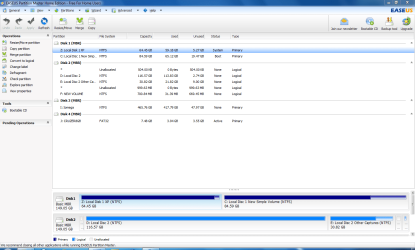
Disk 0 - Local Disk 1 XP (D) was Healthy (System, Page file, active, primary partition).Local Disk New Simple Volume (E) Healthy (Logical drive).
Disk1 – Local disk 2 (C) was Healthy (Boot Crash Dump, logical drive), Local Disk 2 Other Captures (F) was Healthy (logical drive)

Disc manager did not allow me to set any partition changes, so Using Easeus Partition Master the information for Disk O was confirmed & after backing up my system changed “Local disk, simple volume” to primary & active & re-booted system.
Repair console was run 3 times and I ended up with error “NTLDR missing” message (as after original crash).
Rebooted with the O/S disk twice, before system booted into windows repair.
Widows 7 loaded (apparently in(C) local Disk 1 XP) and all looked OK although as expected with my programmes.
I then tried to boot from “Earlier Version of Widows” (XP) which failed.
8/11/11 transferred back up files & folders and up to 12/11/1. have updated about 75% of them
Windows requested Re-activation of win 7, 14/11/11 successfully completed.
16/11/11 successful boot into windows XP without using Easy BCD, suggesting I have a dual boot system again.
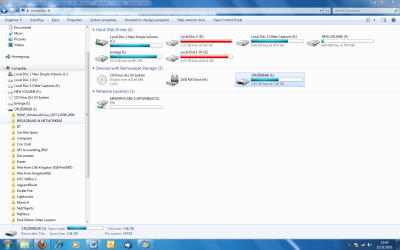
Re-booting into Win7, Viewing the partition map I note that Disk 1MBR Local Disk 1 XP is now disk “Z”,I have enclosed the screen shots.
Now that I can now use Win7 & XP normally, Could you advise me how to change Disk 1 XP from z to c ?
Windows Boot Manager –
On Start up I have 4 Windows Boot Manager “Start Up” Boot instructions –

1. Earlier Version of Widows (XP) 2. Windows 7 (fails to boot & goes back to boot manager)
3. Windows 7 Home Premium (recovered) currently used
4. Windows Vista (TM) Home Premium Recovered which I do not use

How can I remove the 2 unwanted boot instructions at 2 and 4 ?
How can I set disk number 1 MBR Local disk 1 XP to the same label - “C” in Win 7 & XP?
Can I merge the partitions marked * with “F” New Volume?
Once I have completed the clean up, what would be the best way to transfer Disk 1MBR to a new 1 TB HDD?
Once again, thanks for your help, much appreciated
Malydee
 

Attachments

My Computer My Computer

At a glance

Windows 7 Home premium 64 bit3.00 gigahertz Intel Pentium 43072 Megabytes Usable Installed MemoryNVIDIA GeForce 6200 TurboCache(TM)
Computer Manufacturer/Model Number
Home build, ASUS motherboard
OS
Windows 7 Home premium 64 bit
CPU
3.00 gigahertz Intel Pentium 4
Motherboard
ASUSTeK Computer INC. P5N32-SLI PREMIUM 1.XX
Memory
3072 Megabytes Usable Installed Memory
Graphics Card(s)
NVIDIA GeForce 6200 TurboCache(TM)
Sound Card
Integrated High Definition Audio Device
Monitor(s) Displays
Beliea 19" LCD
Hard Drives
1 x 1 Terabyte Hitachi Sata
PSU
Inbilt ASUS
Case
ASUS
Cooling
1 case fan + CPU fan
Keyboard
Logitech wireless
Mouse
Logitech M195
Why are the screenshots requested appearing in .doc format so those without Office can't read them for you?

If you use the Snipping tool in Start Menu and save the file in its default jpeg format, it attaches to your reply post perfectly without creating the extra layer of trouble.

You cannot mark Active to write the System boot files to Win7 so that it boots on its own without using the XP bootloader because it is Logical. Use free Partition Wizard bootable CD to rightclick>convert Win7 partition to Primary, then rightclick Win7 to Modify>Set it Active, highlight it's HD then from the Disk tab select Rebuild MBR, Apply all steps, reboot to see if that suffices to boot Win7 on its own. If not, boot into the DVD Repair console or Repair CD to run Startup Repair up to 3 separate times with reboots.

I would unplug the XP HD to do these repairs, swapping it's cable to Win7 so that it is in Disk0 slot, making sure it remains set to boot first in BIOS setup.

Once WIn7 starts on its own and is flagged System Active, plug back in XP and boot it using the one-time BIOS Boot Menu key when needed. If it renders a BOot Menu, use EasyBCD 2.0 to Edit BOot Menu, deleting all but the XP choice.

This keeps the HD's independent booted via the BIOS so they can come and go as you please, reduces complications to nil, and avoids having to do surgery if you want to remove one HD later.
 
Windows XP & Win7 are on the same HD (LocalDisk 1) but in different partitions. Pulling the cable from Disk 2 would not allow me to boot into 7 on it's own..
 

Attachments

  • Partition Capture.PNG
    Partition Capture.PNG
    51.2 KB · Views: 18
  • PC Capture.PNG
    PC Capture.PNG
    82.6 KB · Views: 9
Last edited:

My Computer My Computer

At a glance

Windows 7 Home premium 64 bit3.00 gigahertz Intel Pentium 43072 Megabytes Usable Installed MemoryNVIDIA GeForce 6200 TurboCache(TM)
Computer Manufacturer/Model Number
Home build, ASUS motherboard
OS
Windows 7 Home premium 64 bit
CPU
3.00 gigahertz Intel Pentium 4
Motherboard
ASUSTeK Computer INC. P5N32-SLI PREMIUM 1.XX
Memory
3072 Megabytes Usable Installed Memory
Graphics Card(s)
NVIDIA GeForce 6200 TurboCache(TM)
Sound Card
Integrated High Definition Audio Device
Monitor(s) Displays
Beliea 19" LCD
Hard Drives
1 x 1 Terabyte Hitachi Sata
PSU
Inbilt ASUS
Case
ASUS
Cooling
1 case fan + CPU fan
Keyboard
Logitech wireless
Mouse
Logitech M195
Win7/XP dual boot, not booting into windows

I thought that I had partly resolved this problem with your help.
Unfortunately I had a similar situation today where I booted as normal into Windows 7 (recovered), checked some emails & shut down. However 2 hours later when I rebooted Win 7 the PC only got past the BIOS boot then when the OS started loading it froze with the logo stationary.
I then went int XP & worked normally. When I went into XP later and the same problem occurred, (("No Signal", check signal cable message)
I have replaced the signal cable but same problem exists.
Would appreciate further help.
Thanks
Malydee
 

My Computer My Computer

At a glance

Windows 7 Home premium 64 bit3.00 gigahertz Intel Pentium 43072 Megabytes Usable Installed MemoryNVIDIA GeForce 6200 TurboCache(TM)
Computer Manufacturer/Model Number
Home build, ASUS motherboard
OS
Windows 7 Home premium 64 bit
CPU
3.00 gigahertz Intel Pentium 4
Motherboard
ASUSTeK Computer INC. P5N32-SLI PREMIUM 1.XX
Memory
3072 Megabytes Usable Installed Memory
Graphics Card(s)
NVIDIA GeForce 6200 TurboCache(TM)
Sound Card
Integrated High Definition Audio Device
Monitor(s) Displays
Beliea 19" LCD
Hard Drives
1 x 1 Terabyte Hitachi Sata
PSU
Inbilt ASUS
Case
ASUS
Cooling
1 case fan + CPU fan
Keyboard
Logitech wireless
Mouse
Logitech M195
We don't use Easeus here as it can fail. Use free Partition Wizard bootable CD which cannot fail.

What I would do is mark Win7 partition Active, reboot into DVD Repair console or Repair CD to run Startup Repair 3 times to write the System boot files to Win7. Then add XP using EasyBCD from Win7.

Even better with separate HD's is to reinstall Win7 to another HD plugged into DIsk0 with all others unplugged. After install plug XP into Disk1 slot, boot it when needed using BIOS one-time Boot Menu key. This keeps OS HD's independent to come and go as you please.
 
Back
Top