Windows 8.1: WD My Passport Essential Not Detected

blackbox

New member
Local time
3:19 AM
Messages
4
Hi,

I have a 2TB My Passport Essential External HD that used to work about a month ago, but today when I plug it in, it does not get detected.

To my knowledge, it has not been dropped or removed while in the process of transferring files.

This is what it looks like in disk management (I have a SSD main drive and a HD for my secondary drive, the external should be 'Disk 2':
YtzLwpy.png


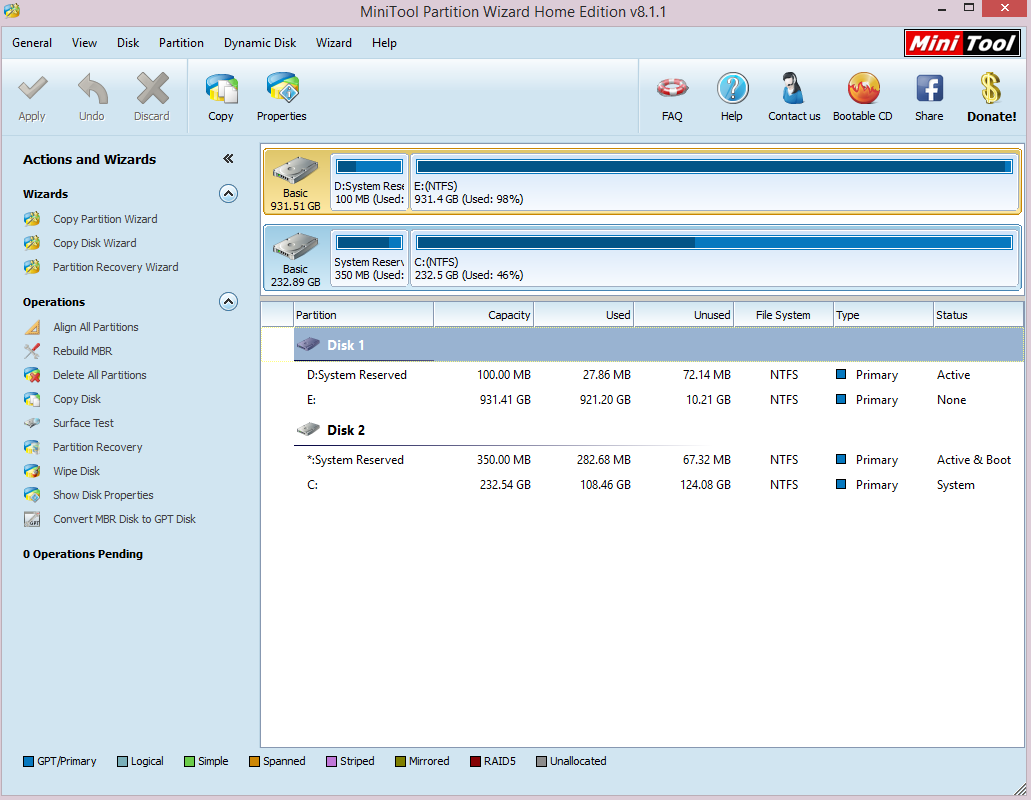
And this is what it looks like in Partition Wizard:
AG7ynem.png


Any help would be appreciated, thanks.
 

My Computer My Computer

At a glance

Windows 8.1
Computer type
PC/Desktop
OS
Windows 8.1
In Disk Management the notation of "Not initialized" might mean the drive has no partition or the partition has not been formatted. Could also be the USB port is not seeing the drive correctly. First thing I'd do is shut the computer down and unplug the power cord. Wait a few seconds and, with the drive unplugged both power and USB, start putting everything back, boot the computer first. Sometimes an 'inconsistency' with power and data can be corrected that way. I find it frequently happens with keyboards and mice and carpeted floors/cloth chairs.
 

My Computer My Computer

At a glance

Windows 7 Ultimate 64-bit, Windows 8.1 64-bit...
Computer type
PC/Desktop
Computer Manufacturer/Model Number
Customs, Dell, Gateway, HP, Toshiba, Acer, ASUS
OS
Windows 7 Ultimate 64-bit, Windows 8.1 64-bit, Mac OS X 10.10, Linux Mint 17, Windows 10 Pro TP
Keyboard
Microsoft
Mouse
Microsoft
I restarted my computer and unplugged the external, even changing the outlet and USB port, and still get the same issue.

Before this happened, the external had two partitions, don't know if that is important though.
 

My Computer My Computer

At a glance

Windows 8.1
Computer type
PC/Desktop
OS
Windows 8.1
Hi there.

You can try using another USB cable or another PC to verify if the problem continues, also be sure to connect the USB cable directly to the PC USB port. If the problem continues, you can download the Data Lifeguard Diagnostics tool from here:

WD Support / Downloads / Other Products / Data Lifeguard Diagnostic for Windows

and run an extended test to see if any errors will be detected by the software and post what the results were.

Let me know how it went. :)
 

My Computer My Computer

At a glance

Windows 7
Computer type
PC/Desktop
OS
Windows 7
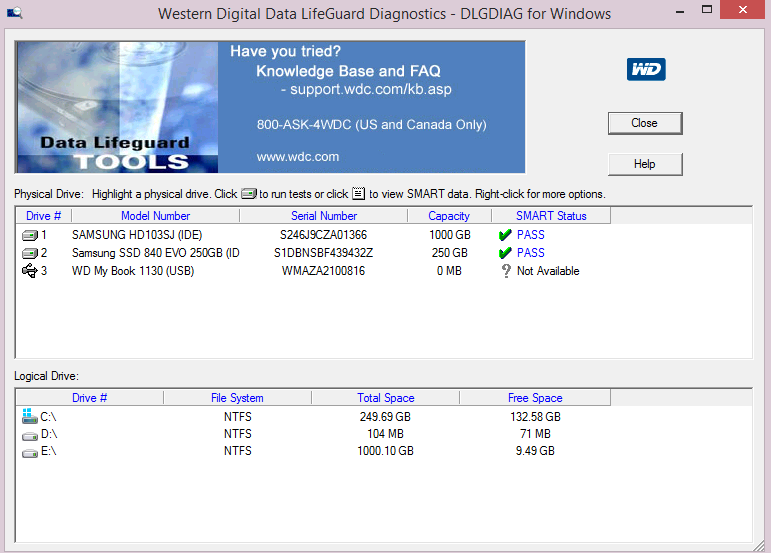
Data Lifeguard seems to indicate that there is no capacity and so all the tests pass fast (Except for 'write zeros,' did not run that one)
F8XmSRY.png


I have a bad feeling about this..
 

My Computer My Computer

At a glance

Windows 8.1
Computer type
PC/Desktop
OS
Windows 8.1
OK, in this case try running chkdsk from the cmd. Click on Start, type cmd, and in window that will open type chkdsk x: /r (where x is the letter of the drive), and then press Enter. This command will try to repair errors, locate bad sectors, and recover readable information.

In case it fails as well, you can contact our phone support for further assistance:
Support Answers

Also, if the drive is still under warranty you can arrange to RMA of the external device:
Support Answers

Best of luck! :)
 

My Computer My Computer

At a glance

Windows 7
Computer type
PC/Desktop
OS
Windows 7
Well since it isn't detected by the computer, there is no drive.

It is definitely out of warranty.

Thanks for the help so far, is there anything else I can do or should I just declare it dead?
 

My Computer My Computer

At a glance

Windows 8.1
Computer type
PC/Desktop
OS
Windows 8.1
In my opinion it's best to test the drive on another system. If the drive is recognized there, than something is likely wrong with either the power supply, or the data port (or BUS) that the drive is being connected to. If the drive still is not recognized, than it is most likely damaged and needs to be replaced and if you have some valuable data on the drive, then consult a data recovery company in order to retrieve it.
 

My Computer My Computer

At a glance

Windows 7
Computer type
PC/Desktop
OS
Windows 7
Back
Top