WD My Passport not working

Gobyerno2012

New member
Local time
3:15 AM
Messages
18
Hi everyone... I have a WD My Passport WD5000BMVW
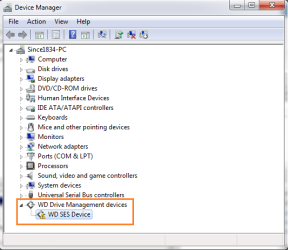
I plugged it in the computer but it does show up in my computer explorer, the hard drive lights up and you can hear the disk spin but the computer does not read it. If you go to device manage its listed I tried to uninstall it and scan for hardware changes but still won't work...

It is visible in Disk Management but when i try to initialize it, it has a pop up window " The request could not be performed because of an I/O device error" it says...

I tried PW9 but it cannot detect my External HD... I tried different cable and also plugged it to different computer but still not working....

HELP PLEASE!!... thank you....
 

Attachments
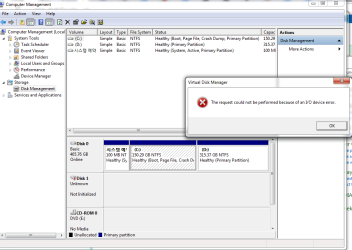
  • IO error.png
    IO error.png
    32.6 KB · Views: 1
  • Device Manager.png
    Device Manager.png
    16.5 KB · Views: 32

My Computer My Computer

At a glance

Windows 7 Ultimate x64
Computer type
PC/Desktop
Computer Manufacturer/Model Number
Asus
OS
Windows 7 Ultimate x64
here are some possible causes of this error:
Causes of an IO Device Error

I/O error issues might occur for any of the following reasons:

Causes of an IO Device Error

I/O error issues might occur for any of the following reasons:

Windows is trying to use a transfer mode that the hardware device cannot use.
The hardware device that you are trying to access is damaged or defective.
The hardware drivers are damaged or incompatible.
There is a connection problem, such as a bad cable.
The CD or DVD disk that you are trying to access is dirty or damaged.

since it didn't work on another computer i'm thinking that the drive is faulty and needs replacing.
 

My Computer My Computer

At a glance

Windows 7 Enterprise x64Intel i5 Dual Core
Computer type
Laptop
Computer Manufacturer/Model Number
Dell
OS
Windows 7 Enterprise x64
CPU
Intel i5 Dual Core
Screen Resolution
1366x768
Keyboard
built in Keyboard
Antivirus
System Centre Endpoint Protection
Browser
Google Chrome, Firefox and Internet Explorer
OMG!!!....
I really need the files inside it... any possible way for me to even revive it or for me to be able to get my files in it?...
thank you....
 

My Computer My Computer

At a glance

Windows 7 Ultimate x64
Computer type
PC/Desktop
Computer Manufacturer/Model Number
Asus
OS
Windows 7 Ultimate x64

My Computer My Computer

At a glance

Windows 7 Enterprise x64Intel i5 Dual Core
Computer type
Laptop
Computer Manufacturer/Model Number
Dell
OS
Windows 7 Enterprise x64
CPU
Intel i5 Dual Core
Screen Resolution
1366x768
Keyboard
built in Keyboard
Antivirus
System Centre Endpoint Protection
Browser
Google Chrome, Firefox and Internet Explorer
Thank you Hacb... yeah.. I am really feeling down right now... anyway thanks... will definitely check out the link... thank you....
 

My Computer My Computer

At a glance

Windows 7 Ultimate x64
Computer type
PC/Desktop
Computer Manufacturer/Model Number
Asus
OS
Windows 7 Ultimate x64
That drive should have encyrption so removing the drive won't help I believe.
 

My Computer My Computer

At a glance

Windows 7 Ultimate x64 SP1AMD Phenom 2 1090T2x8GB Kingston HyperX Fury Black 1600Mhz Unga...MSI GTX 970 Gaming 4G
Computer type
PC/Desktop
Computer Manufacturer/Model Number
Custom Build
OS
Windows 7 Ultimate x64 SP1
CPU
AMD Phenom 2 1090T
Motherboard
Gigabyte GA-890FXA-UD5
Memory
2x8GB Kingston HyperX Fury Black 1600Mhz Unganged
Graphics Card(s)
MSI GTX 970 Gaming 4G
Sound Card
Realtek On-Board HD 7.1 Audio / Logitech G35
Monitor(s) Displays
3xAcer GD245HQ
Screen Resolution
1920x1080
Hard Drives
Samsung 850 Pro 512GB SSD - OS /
WD Caviar Black SATA 3 - 1 TBx2 - Dynamic RAID 0 /
WD Caviar Green SATA 2 - 640GBx2 - Dynamic RAID 0 /
WD Caviar Green SATA 2 - 640GB - Internal Backup /
Seagate Barracude SATA 3 - 3TB - External Backup/ Sync
PSU
HighPower 1000W
Case
Cooler Master HAF 932
Cooling
Noctua NH-D14
Keyboard
Logitech G19
Mouse
Logitech G500
Internet Speed
100/4 Mbit Cable (100GB quota)
Antivirus
ZoneAlarm Extreme Security / MBAM Pro / MBAE Free / SAS Free
Browser
IE 11 - Firefox - Chrome
Other Info
Logitech F710/ G27/ G940/ Z5500 // TrackIR 5 // Nvidia 3D Surround Vision
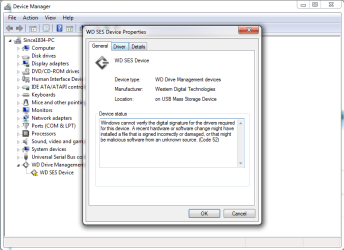
I don't think your drive is dead - atleast not yet. The Device Manager shows there is some problem with the SES driver ( as indicated by the exclamation mark). Just right click on it and check the properties to get to know the problem. Post a screenshot. Your attempt should be to install the SES driver properly, I presume and then check whether you are out of the woods.. Since I don't know much about the WD drive's SES driver, wait for CKWD, the WD man here, to check on it and advise you.

Also indicate whether you have installed Smartware and how you have configured it. Password protected? CKWD also may require more information on it and whether the drive was functioning OK before.

Just for your info: What is the SES driver, why is it needed, and how to get the driver popup to stop

Don't do anything yourself on your own until CKWD sees the screenshot and advises you.

( If he doesn't come in within the next 24 hours, I shall send a pm to him to look into this.)
 

My Computer My Computer

At a glance

Windows 7 Home Premium 32 bit
OS
Windows 7 Home Premium 32 bit
Hello Gobyerno2012!

This is too bad that has happened. :/

First of all, I would suspect this is the My Passport Essential, is this so? Please post the exact model (this is partial you have given), also – the capacity. Additionally, please post a screenshot of Device Manager's Disk drives submenu. How long have you been using this drive with Windows 7? What occurred as actions prior to the drive disappearing?

Do as Jumanji proposed, see if you can update the driver from the Device Manager, if not check out this article from the WD KB which is about downloading and installing the WD SES driver for both x32 and x64 systems, do it manually.

WD SES driver download and instructions for recovering the WD SmartWare installer
Support Answers


Additionally, this WD KB article explains on how to update drivers for a WD product, and below there is even a link to an article from the Support page of Microsoft, on how to install updates with drivers.

Where to find a driver for a WD product or the operating system (OS) fails to recognize a WD drive
Support Answers

This article may also help you.

What is the SES driver, why is it needed, and how to get the driver popup to stop:
Support Answers

If you can't update, reinstall this driver by clicking Uninstall and then install it manually. (use the links, read them carefully!)

Then do the usual, by changing the cable, the port and trying on another PC. Post back! :)

CK_WD
 

My Computer My Computer

At a glance

Windows 7 Home Premium x64
Computer type
PC/Desktop
OS
Windows 7 Home Premium x64
@CKWD:

The links don't work for me, neither with IE nor Firefox (with ZenMate - browser VPN). I get a blank page.
Something on my end?
 

My Computer My Computer

At a glance

Windows 7 Ultimate x64 SP1AMD Phenom 2 1090T2x8GB Kingston HyperX Fury Black 1600Mhz Unga...MSI GTX 970 Gaming 4G
Computer type
PC/Desktop
Computer Manufacturer/Model Number
Custom Build
OS
Windows 7 Ultimate x64 SP1
CPU
AMD Phenom 2 1090T
Motherboard
Gigabyte GA-890FXA-UD5
Memory
2x8GB Kingston HyperX Fury Black 1600Mhz Unganged
Graphics Card(s)
MSI GTX 970 Gaming 4G
Sound Card
Realtek On-Board HD 7.1 Audio / Logitech G35
Monitor(s) Displays
3xAcer GD245HQ
Screen Resolution
1920x1080
Hard Drives
Samsung 850 Pro 512GB SSD - OS /
WD Caviar Black SATA 3 - 1 TBx2 - Dynamic RAID 0 /
WD Caviar Green SATA 2 - 640GBx2 - Dynamic RAID 0 /
WD Caviar Green SATA 2 - 640GB - Internal Backup /
Seagate Barracude SATA 3 - 3TB - External Backup/ Sync
PSU
HighPower 1000W
Case
Cooler Master HAF 932
Cooling
Noctua NH-D14
Keyboard
Logitech G19
Mouse
Logitech G500
Internet Speed
100/4 Mbit Cable (100GB quota)
Antivirus
ZoneAlarm Extreme Security / MBAM Pro / MBAE Free / SAS Free
Browser
IE 11 - Firefox - Chrome
Other Info
Logitech F710/ G27/ G940/ Z5500 // TrackIR 5 // Nvidia 3D Surround Vision
The three links CKWD has given in post #8 are valid. The actual URLs and the topics below. (as accessed by the links in CKWD's post)

WD SES driver download and instructions for recovering the WD SmartWare installer WD SES driver download and instructions for recovering the WD SmartWare installer

Where to find a driver for a WD product or the operating system (OS) fails to recognize a WD drive Where to find a driver for a WD product or the operating system (OS) fails to recognize a WD drive

What is the SES driver, why is it needed, and how to get the driver popup to stop What is the SES driver, why is it needed, and how to get the driver popup to stop

Good work by CKWD.Let me take a backseat again.
 
Last edited:

My Computer My Computer

At a glance

Windows 7 Home Premium 32 bit
OS
Windows 7 Home Premium 32 bit
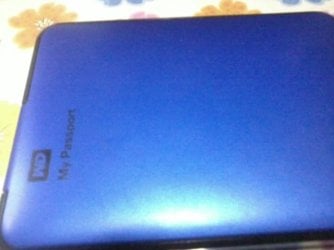
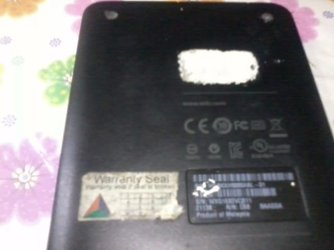
Hello everybody... so i attached some pictures with the device manager and the model...
I will go over the links that you have suggested... thank you once again....
 

Attachments

  • 2015-07-28 10.37.02.jpg
    2015-07-28 10.37.02.jpg
    31.2 KB · Views: 13
  • dmprop.png
    dmprop.png
    25.1 KB · Views: 1
  • dmprop1.png
    dmprop1.png
    34 KB · Views: 1
  • 2015-07-28 10.37.20.jpg
    2015-07-28 10.37.20.jpg
    28.1 KB · Views: 13
  • 2015-07-28 10.37.31.jpg
    2015-07-28 10.37.31.jpg
    31.3 KB · Views: 13

My Computer My Computer

At a glance

Windows 7 Ultimate x64
Computer type
PC/Desktop
Computer Manufacturer/Model Number
Asus
OS
Windows 7 Ultimate x64
Thank you Jumanji! :) The links work by us as well.

Gobyerno2012, yes, do go over very thoroughly through the links and try updating the SES drivers, although they are not that needed to help your system recognize the drive, for this you need Answer ID 1708 from WD KB (second link). But do update and let's see what happens. :)

Also, I was hoping you'd open the Disk Drives falling menu, on the same window of Device Manager but on the top. Take a screenshot of that.

Please also fully answer the questions from my previous post #8 about how long has the drive been use din Windows 7 and what occurred as actions prior to the issue. Additionally, how is the drive formatted and its capacity, and the usual troubleshooting - changing the cable, the port and trying on another PC. ;)

CK_WD
 

My Computer My Computer

At a glance

Windows 7 Home Premium x64
Computer type
PC/Desktop
OS
Windows 7 Home Premium x64
First post

I tried PW9 but it cannot detect my External HD... I tried different cable and also plugged it to different computer but still not working....

Does the drive has a special little portion that holds the drivers or something? Maybe that got corrupted?
 

My Computer My Computer

At a glance

Windows 7 Ultimate x64 SP1AMD Phenom 2 1090T2x8GB Kingston HyperX Fury Black 1600Mhz Unga...MSI GTX 970 Gaming 4G
Computer type
PC/Desktop
Computer Manufacturer/Model Number
Custom Build
OS
Windows 7 Ultimate x64 SP1
CPU
AMD Phenom 2 1090T
Motherboard
Gigabyte GA-890FXA-UD5
Memory
2x8GB Kingston HyperX Fury Black 1600Mhz Unganged
Graphics Card(s)
MSI GTX 970 Gaming 4G
Sound Card
Realtek On-Board HD 7.1 Audio / Logitech G35
Monitor(s) Displays
3xAcer GD245HQ
Screen Resolution
1920x1080
Hard Drives
Samsung 850 Pro 512GB SSD - OS /
WD Caviar Black SATA 3 - 1 TBx2 - Dynamic RAID 0 /
WD Caviar Green SATA 2 - 640GBx2 - Dynamic RAID 0 /
WD Caviar Green SATA 2 - 640GB - Internal Backup /
Seagate Barracude SATA 3 - 3TB - External Backup/ Sync
PSU
HighPower 1000W
Case
Cooler Master HAF 932
Cooling
Noctua NH-D14
Keyboard
Logitech G19
Mouse
Logitech G500
Internet Speed
100/4 Mbit Cable (100GB quota)
Antivirus
ZoneAlarm Extreme Security / MBAM Pro / MBAE Free / SAS Free
Browser
IE 11 - Firefox - Chrome
Other Info
Logitech F710/ G27/ G940/ Z5500 // TrackIR 5 // Nvidia 3D Surround Vision
Back
Top