Windows 8 Dev release

oooo I cant wait

I read about a lot of the things that are going to be in Win8 in MaximumPC while I was traveling and it looks pretty neat.
 

My Computer

Computer type
Laptop
Computer Manufacturer/Model Number
ASUS G60-RBBX05
OS
Win7 Home Premium 64x
CPU
Intel Core 2 Duo P7450 / 2.13 GHz (2.29 with Extreme Turbo)
Memory
4 GB PC-6400 Hyundai (2X2) at 800Mhz
Graphics Card(s)
NVIDIA GeForce GTX 260M 1GB DDR3 VRAM
Monitor(s) Displays
16" LED Backlit
Screen Resolution
1366 x 768 on laptop 1600x1050 max res on 22" external mon
Hard Drives
OCZ Agility 3 60GB SSD / 320 GB - Serial ATA-150 - 7200 rpm
PSU
6-cell Lithium ion { lasts 1.5 hours }
Case
ASUS G60 Laptop
Keyboard
Chicklet type back-lit (white light) keyboard
Mouse
Logitech G9 Laser Mouse 3200dpi and 1000 reports per minute
Internet Speed
Comcast 8.60mb/s up - 3.11mb/s down
Antivirus
MSE
Browser
Firefox
Other Info
General mid-budget gaming Comp. Low batterylife - High FrameRates - currently overheating problems :(

2nd Rig: Case: Rosewill BLACKHAWK Gaming ATX Mid Tower Computer Case

Mobo: GIGABYTE GA-990FXA-UD3
CPU: AMD FX-6200 Zambezi 3.8GHz (4.1GHz Turbo)
Heatsink: COOLER MASTER V8 CPU Cooler
RAM: Patriot Viper 3 8GB (2 x 4GB) 240-Pin DDR3 SDRAM 1866 (PC3 15000)
GPU: SAPPHIRE Radeon HD 6850 1GB 2

My Computer

Computer type
PC/Desktop
Computer Manufacturer/Model Number
Airbot 2.0
OS
Windows 7 Ultimate x64 SP1
CPU
Core i7 920 (D0) @ 4Ghz, *26c idle *65c full load on air
Motherboard
Asus P6X58D Premium - Sata 6Gb/s - USB 3.0
Memory
12GB DDR3 Corsair Dominator -CMD12GX3M6A1600C8 at 1600MHz
Graphics Card(s)
Zotac Geforce GTX 770
Sound Card
ASUS Xonar D2X
Monitor(s) Displays
1 LG 24" Flatron W2453V-PF 1 Samsung 24" P2450H both 2ms RT
Screen Resolution
1920x1080@60hz
Hard Drives
1 Samsung 250GB 840 Evo SSD
1 OCZ Vertex2 180GB SSD
1 TB Samsung Spinpoint F1 7200RPM 32MB cache
2 500GB WD Caviar Blacks 7200RPM 32MB cache (WD5001AALS)

Pioneer DVD Burner DVR-S18M
PSU
Corsair HX1000W
Case
Cooler Master HAF 932
Cooling
Case Fans *3 230mm, *1 140mm/CPU - *Tuniq Tower 120 Extreme
Keyboard
Logitech Wireless MK700
Mouse
Logitech Wireless MK700
Internet Speed
DL 15 Mbps UL 0.98 Mbps
Antivirus
None
Browser
Firefox Nightly
Other Info
Processor-7.7 *RAM- 7.9 *Graphics-7.9 *Gaming Graphics- 7.9 *SSD- 7.8 W.E.I final score= 7.7
*Phone- LG Nexus 5

My Computer

Computer Manufacturer/Model Number
Dell Inspiron 1520 (Laptop)/ Home (Desktop)
OS
Windows 7 x64 / Same
CPU
Intel Core 2 Duo T7250 / Intel Core i7 930
Motherboard
Intel 945 / Asus P6X58D-E
Memory
4GB / 6GB
Graphics Card(s)
NVIDIA GeForce 8400M GS / ASUS 1GB
Sound Card
Whatever Dell gave me :-( / Onboard
Monitor(s) Displays
15.4" LCD / Crappy CRT
Hard Drives
Seagate 500GB SATA; 7200 RPM / Seagate 1TB SATA; 7200 RPM
PSU
N/A / OCZ Fatal1ty 550W Modular
Case
N/A / Antec 900
Cooling
Air
Mouse
Microsoft Presenter (Bluetooth)
Complete noob here, will it install in VMware Player?

ETA: Got my answer...I think? (quote below) TY Cluberti

The Win8 build they're releasing (the dev preview build) includes the Win8 OS, samples, SDKs, and Visual Studio. You do all of your dev and testing on that machine, either physical (if you install it on a real machine) or virtual (if you install it into a VM). Obviously to do touch testing and such you'd need a touch-capable machine, but the rest could probably be done either in a physical or virtual machine.
 
Last edited:

My Computer

Computer type
Laptop
Computer Manufacturer/Model Number
MSI PE60 6QE
OS
Win 10 Pro x64, Win 7 Pro x64
CPU
Intel Core i7-6700HQ Skylake
Motherboard
MSI MS-16J5
Memory
16gb Crucial DDR4
Graphics Card(s)
NVIDIA GeForce GTX 960M 2 GB
Screen Resolution
1920 x 1080
Hard Drives
Samsung 850 EVO 250 GB M.2 SSD (MZ-N5E250BW)
HGST 1TB @7200 RPM HTS721010A9E630
Case
Plastic
Keyboard
Got one...
Mouse
Yep, one of those too.
Internet Speed
FIOS 75/75
Antivirus
Defender
Browser
Chrome/FFox/Ex-PLODE-r/(L)Edge
Other Info
Defender, Custom Hosts, uBlock, regular backups w/ Macrium (Free)
Installed.

Edit:

Already has updates!

win8updates.jpg
 

My Computer

Computer Manufacturer/Model Number
Dell Inspiron 1520 (Laptop)/ Home (Desktop)
OS
Windows 7 x64 / Same
CPU
Intel Core 2 Duo T7250 / Intel Core i7 930
Motherboard
Intel 945 / Asus P6X58D-E
Memory
4GB / 6GB
Graphics Card(s)
NVIDIA GeForce 8400M GS / ASUS 1GB
Sound Card
Whatever Dell gave me :-( / Onboard
Monitor(s) Displays
15.4" LCD / Crappy CRT
Hard Drives
Seagate 500GB SATA; 7200 RPM / Seagate 1TB SATA; 7200 RPM
PSU
N/A / OCZ Fatal1ty 550W Modular
Case
N/A / Antec 900
Cooling
Air
Mouse
Microsoft Presenter (Bluetooth)

My Computer

Computer type
Laptop
Computer Manufacturer/Model Number
MSI PE60 6QE
OS
Win 10 Pro x64, Win 7 Pro x64
CPU
Intel Core i7-6700HQ Skylake
Motherboard
MSI MS-16J5
Memory
16gb Crucial DDR4
Graphics Card(s)
NVIDIA GeForce GTX 960M 2 GB
Screen Resolution
1920 x 1080
Hard Drives
Samsung 850 EVO 250 GB M.2 SSD (MZ-N5E250BW)
HGST 1TB @7200 RPM HTS721010A9E630
Case
Plastic
Keyboard
Got one...
Mouse
Yep, one of those too.
Internet Speed
FIOS 75/75
Antivirus
Defender
Browser
Chrome/FFox/Ex-PLODE-r/(L)Edge
Other Info
Defender, Custom Hosts, uBlock, regular backups w/ Macrium (Free)
So what is the easiest way to do this? create a Virtual Drive? burn ISO to disk and install there? I have not done this with Win7 before and dont have access to a VMware

Now at 20% Downloaded and I have a new Virtual Drive ( W: ) @ 28GB I am hoping that is enough. I will burn the ISO tomorrow, and I understand in the least I could boot into it (I think) but would like to be able to run in a window as a virtual machine.


Am I going about this the wrong way or am I on track. I haven't done this outside of a corporate environment where everything was already set up.
 
Last edited:

My Computer

Computer type
Laptop
Computer Manufacturer/Model Number
ASUS G60-RBBX05
OS
Win7 Home Premium 64x
CPU
Intel Core 2 Duo P7450 / 2.13 GHz (2.29 with Extreme Turbo)
Memory
4 GB PC-6400 Hyundai (2X2) at 800Mhz
Graphics Card(s)
NVIDIA GeForce GTX 260M 1GB DDR3 VRAM
Monitor(s) Displays
16" LED Backlit
Screen Resolution
1366 x 768 on laptop 1600x1050 max res on 22" external mon
Hard Drives
OCZ Agility 3 60GB SSD / 320 GB - Serial ATA-150 - 7200 rpm
PSU
6-cell Lithium ion { lasts 1.5 hours }
Case
ASUS G60 Laptop
Keyboard
Chicklet type back-lit (white light) keyboard
Mouse
Logitech G9 Laser Mouse 3200dpi and 1000 reports per minute
Internet Speed
Comcast 8.60mb/s up - 3.11mb/s down
Antivirus
MSE
Browser
Firefox
Other Info
General mid-budget gaming Comp. Low batterylife - High FrameRates - currently overheating problems :(

2nd Rig: Case: Rosewill BLACKHAWK Gaming ATX Mid Tower Computer Case

Mobo: GIGABYTE GA-990FXA-UD3
CPU: AMD FX-6200 Zambezi 3.8GHz (4.1GHz Turbo)
Heatsink: COOLER MASTER V8 CPU Cooler
RAM: Patriot Viper 3 8GB (2 x 4GB) 240-Pin DDR3 SDRAM 1866 (PC3 15000)
GPU: SAPPHIRE Radeon HD 6850 1GB 2
I watched the keynote last night. It lasted over two hours, but I felt my jaw slacking more and more each minute. Saying "I'm impressed" would be the understatement of the century! My mind is, quite literally, blown away! Memory usage, boot speed, performance, the Task Manager overhaul, search feature inside Metro, IE10PP3, Hyper-V... Julie's weird looking doll, too xD

I was beyond skeptical about Metro and the "easy" process of developing, until I actually saw the keynote. It made me wish I paid more attention to my C++ and VB sessions in high-school, lol

A big coincidence, I'm starting a new English language-based blog, and have set it up last night right before the keynote video was made available, a few hours before the dev preview was released for downloading. I can't really figure out what to write next here, but I'm hoping that, after I install this and actually start using it, I stop drooling and pipe down my fanboyism in order to write a decent blog post about... well, to be honest? The way Windows has changed forever, and improved on so many different levels.
 

My Computer

Computer type
Laptop
Computer Manufacturer/Model Number
Custom
OS
Windows 7 Home Premium x64
CPU
Intel Core i5 2500K
Motherboard
MSI MS-7750
Memory
8GB DDR3
Graphics Card(s)
nVidia GeForce GTX650 Ti BOOST
Sound Card
Realtek
Monitor(s) Displays
21' Philips
Screen Resolution
Full HD
Hard Drives
1TB
PSU
500W
Yes I agree. I like the footprint! It is so sleek it can run on ARM. It does look very square, but I am sure as people start developing apps for it, that will change.

I would love to write something for it but it has been so long, I dont know where I would start. I feel I might be out of my league, but I will still check out the SDK and other tools
I also like the task manager finally having the features of Process explorer and autoruns right in the window instead of having to go around your ass to get to your elbow to disable something....

oh yeah update: 85% downloaded now
 
Last edited:

My Computer

Computer type
Laptop
Computer Manufacturer/Model Number
ASUS G60-RBBX05
OS
Win7 Home Premium 64x
CPU
Intel Core 2 Duo P7450 / 2.13 GHz (2.29 with Extreme Turbo)
Memory
4 GB PC-6400 Hyundai (2X2) at 800Mhz
Graphics Card(s)
NVIDIA GeForce GTX 260M 1GB DDR3 VRAM
Monitor(s) Displays
16" LED Backlit
Screen Resolution
1366 x 768 on laptop 1600x1050 max res on 22" external mon
Hard Drives
OCZ Agility 3 60GB SSD / 320 GB - Serial ATA-150 - 7200 rpm
PSU
6-cell Lithium ion { lasts 1.5 hours }
Case
ASUS G60 Laptop
Keyboard
Chicklet type back-lit (white light) keyboard
Mouse
Logitech G9 Laser Mouse 3200dpi and 1000 reports per minute
Internet Speed
Comcast 8.60mb/s up - 3.11mb/s down
Antivirus
MSE
Browser
Firefox
Other Info
General mid-budget gaming Comp. Low batterylife - High FrameRates - currently overheating problems :(

2nd Rig: Case: Rosewill BLACKHAWK Gaming ATX Mid Tower Computer Case

Mobo: GIGABYTE GA-990FXA-UD3
CPU: AMD FX-6200 Zambezi 3.8GHz (4.1GHz Turbo)
Heatsink: COOLER MASTER V8 CPU Cooler
RAM: Patriot Viper 3 8GB (2 x 4GB) 240-Pin DDR3 SDRAM 1866 (PC3 15000)
GPU: SAPPHIRE Radeon HD 6850 1GB 2
I'm having issues when creating new projects in the included Visual Studio 2011. When I create new projects there is an error in the designer.
 

My Computer

Computer Manufacturer/Model Number
Dell Inspiron 1520 (Laptop)/ Home (Desktop)
OS
Windows 7 x64 / Same
CPU
Intel Core 2 Duo T7250 / Intel Core i7 930
Motherboard
Intel 945 / Asus P6X58D-E
Memory
4GB / 6GB
Graphics Card(s)
NVIDIA GeForce 8400M GS / ASUS 1GB
Sound Card
Whatever Dell gave me :-( / Onboard
Monitor(s) Displays
15.4" LCD / Crappy CRT
Hard Drives
Seagate 500GB SATA; 7200 RPM / Seagate 1TB SATA; 7200 RPM
PSU
N/A / OCZ Fatal1ty 550W Modular
Case
N/A / Antec 900
Cooling
Air
Mouse
Microsoft Presenter (Bluetooth)
Ok this is going to sound silly but please remember I'm a Welshman living in a cave in the hills.
How do you get this preview to work, never done anything like this before, if downloaded will my win 7 stop working et al or is it best to forget about it?????

iechyd da
 

My Computer

Computer type
PC/Desktop
Computer Manufacturer/Model Number
Advent & Acer
OS
Win 8.1 Ultimate and Home Premium x64 bit
You'll want to either install it in a Virtual Machine (VM) like with VirtualBox, or install it on a test machine. Not sure if it will let you dual boot with this dev preview (I think one member said he set a dual boot up just fine). Visit eightforums and you can find different options posted there.
 

My Computer

Computer type
PC/Desktop
Computer Manufacturer/Model Number
Airbot 2.0
OS
Windows 7 Ultimate x64 SP1
CPU
Core i7 920 (D0) @ 4Ghz, *26c idle *65c full load on air
Motherboard
Asus P6X58D Premium - Sata 6Gb/s - USB 3.0
Memory
12GB DDR3 Corsair Dominator -CMD12GX3M6A1600C8 at 1600MHz
Graphics Card(s)
Zotac Geforce GTX 770
Sound Card
ASUS Xonar D2X
Monitor(s) Displays
1 LG 24" Flatron W2453V-PF 1 Samsung 24" P2450H both 2ms RT
Screen Resolution
1920x1080@60hz
Hard Drives
1 Samsung 250GB 840 Evo SSD
1 OCZ Vertex2 180GB SSD
1 TB Samsung Spinpoint F1 7200RPM 32MB cache
2 500GB WD Caviar Blacks 7200RPM 32MB cache (WD5001AALS)

Pioneer DVD Burner DVR-S18M
PSU
Corsair HX1000W
Case
Cooler Master HAF 932
Cooling
Case Fans *3 230mm, *1 140mm/CPU - *Tuniq Tower 120 Extreme
Keyboard
Logitech Wireless MK700
Mouse
Logitech Wireless MK700
Internet Speed
DL 15 Mbps UL 0.98 Mbps
Antivirus
None
Browser
Firefox Nightly
Other Info
Processor-7.7 *RAM- 7.9 *Graphics-7.9 *Gaming Graphics- 7.9 *SSD- 7.8 W.E.I final score= 7.7
*Phone- LG Nexus 5
Ok this is going to sound silly but please remember I'm a Welshman living in a cave in the hills.
How do you get this preview to work, never done anything like this before, if downloaded will my win 7 stop working et al or is it best to forget about it?????

iechyd da


LOL. See if Merlin has a view on the subject.
Seriously. Pop over to the eight forum.The hints are already pouring in.
 

My Computer

Computer Manufacturer/Model Number
Three desktops and one laptop with good specs..
OS
Vista and now 7 in 32 and 64 bit.
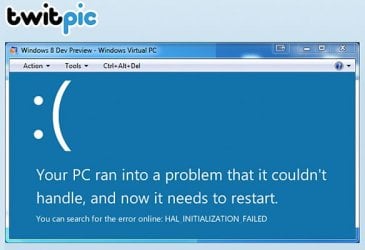
Even the BSOD has been reimagined.
 

Attachments

  • 0914-twitpic.jpg
    0914-twitpic.jpg
    27.1 KB · Views: 29

My Computer

Computer Manufacturer/Model Number
Dell Inspiron 1520 (Laptop)/ Home (Desktop)
OS
Windows 7 x64 / Same
CPU
Intel Core 2 Duo T7250 / Intel Core i7 930
Motherboard
Intel 945 / Asus P6X58D-E
Memory
4GB / 6GB
Graphics Card(s)
NVIDIA GeForce 8400M GS / ASUS 1GB
Sound Card
Whatever Dell gave me :-( / Onboard
Monitor(s) Displays
15.4" LCD / Crappy CRT
Hard Drives
Seagate 500GB SATA; 7200 RPM / Seagate 1TB SATA; 7200 RPM
PSU
N/A / OCZ Fatal1ty 550W Modular
Case
N/A / Antec 900
Cooling
Air
Mouse
Microsoft Presenter (Bluetooth)
I tried to use VMware Player but had to up grade to VMware Workstation 8 to get the ISO to run but now all is good what a difference in some areas with the new interface 15 minutes to install like the dots going around in a circle.
 

My Computer

Computer Manufacturer/Model Number
Custom Build
OS
Window's 7 Ultimate 64bit
CPU
E8400 Lapped
Motherboard
P5Q Pro Turbo Asus
Memory
Kingston 4 gig
Graphics Card(s)
2=ATI 5670Video Crossfire / HVR2250 TV Tuner Card
Sound Card
HDMI sound
Monitor(s) Displays
Sony 46"
Screen Resolution
1280x720
Hard Drives
1 WD 160gig YS, 1 Black Edition 320gig and one 250gig WD YS Model plus external Caviar Black 640gig Drives
PSU
Antec 550 Modular
Case
Antec Custom 180B
Cooling
X-1283 Lapped Artic Silver 5
Keyboard
Wave Combo Logitech
Mouse
Logitech LX-8
Internet Speed
5mb down 768 up
Other Info
Custom side fan in case, plus moved middle lower fan to the front of hard drives , also installed a second intake fan in lower two optical drive slots. Rear fans are controlled by Fan mate controllers. temps inside case are monitored by probe and temps coming out the top exhaust are also monitored, temps as of right now 20c inside and 22.7 out the exhaust. Front intake fans are controlled by Asu
Yeah, the cheerio finally isn't so ugly. I'm pretty happy with the build so far, although the IE browser doesn't like going from one resolution to another over RDP (the window gets cut off at the resolution from the first device to open the browser). If you don't open the browser before making an RDP connection (or close and re-open the one outside the desktop view), it does work properly at any res. I'll file it, but it's definitely an easy workaround.

I installed Office 2010 to see how it worked for touch, and the ribbon really does work well. I've started seeing how much I can get used to it on Explorer too, but regular old apps appear to at least work.
 

My Computer

Computer type
PC/Desktop
Computer Manufacturer/Model Number
Custom
OS
Windows 10 Pro x64
CPU
Intel Core i7 4790K @ 4.5GHz
Motherboard
Asus Maximus Hero VII
Memory
32GB DDR3
Graphics Card(s)
Nvidia GeForce GTX970
Sound Card
Realtek HD Audio
Screen Resolution
1920x1200
Hard Drives
1x Samsung 250GB SSD
4x WD RE 2TB (RAIDZ)
PSU
Corsair AX760i
Case
Fractal Design Define R4
Cooling
Noctua NH-D15
I am using FF with it did you do the 64 bit office I was just going to try and install the 64 bit version like the 8 so far real neat features like the apps and ribbons.
 

My Computer

Computer Manufacturer/Model Number
Custom Build
OS
Window's 7 Ultimate 64bit
CPU
E8400 Lapped
Motherboard
P5Q Pro Turbo Asus
Memory
Kingston 4 gig
Graphics Card(s)
2=ATI 5670Video Crossfire / HVR2250 TV Tuner Card
Sound Card
HDMI sound
Monitor(s) Displays
Sony 46"
Screen Resolution
1280x720
Hard Drives
1 WD 160gig YS, 1 Black Edition 320gig and one 250gig WD YS Model plus external Caviar Black 640gig Drives
PSU
Antec 550 Modular
Case
Antec Custom 180B
Cooling
X-1283 Lapped Artic Silver 5
Keyboard
Wave Combo Logitech
Mouse
Logitech LX-8
Internet Speed
5mb down 768 up
Other Info
Custom side fan in case, plus moved middle lower fan to the front of hard drives , also installed a second intake fan in lower two optical drive slots. Rear fans are controlled by Fan mate controllers. temps inside case are monitored by probe and temps coming out the top exhaust are also monitored, temps as of right now 20c inside and 22.7 out the exhaust. Front intake fans are controlled by Asu
Important to note that, Only the 64bit 4GB One has the developer tools integrated, the other 64bit and 32bit download is just an OS preview.
 

My Computer

OS
Windows 7 32bit RTM
VMware Player is free.

So what is the easiest way to do this? create a Virtual Drive? burn ISO to disk and install there? I have not done this with Win7 before and dont have access to a VMware

VMware Player is free.
https://www.vmware.com/products/player/

I don't know if Windows 8 will run in a virtual machine though.
Still waiting for the downloads (32 & 64 bit) to finish.
 

My Computer

Computer type
PC/Desktop
Computer Manufacturer/Model Number
n/a
OS
W7 Ultimate SP1, LM19.2 MATE, W10 Home 1703, W10 Pro 1703 VM, #All 64 bit
CPU
AMD Phenom II x6 1100T, 3.3 GHz
Motherboard
ASUS M4A88T-M/USB3 (AM3)
Memory
12GB DDR3 1333 G-Skill (4GB x 2), G-Skill (2GB x 2)
Graphics Card(s)
NVIDIA GeForce GTX 660
Sound Card
Realtek?
Monitor(s) Displays
Samsung S23B350
Screen Resolution
1920x1080
Hard Drives
WD Green 2TB (SATA), WD Green 3TB (SATA), WD Blue 4TB (SATA), WD Blue 6TB (SATA)
PSU
Cooler Master
Case
Antec GX300 Tower
Cooling
3x Antec TRICOOL 120mm Fans
Mouse
Wired Optical
Internet Speed
DSL
Antivirus
Avast
Browser
Pale Moon (64 bit)
Other Info
2018-12-27 Upgraded HDDs
2015-12-10 Upgraded case, graphics card, storage
2015-08-15 Upgraded motherboard & RAM
2015-07-15 Upgraded LM17.1 to LM17.2
Works in Virtualbox, not sure about VMware. Don't think it does.

Again, probably best to head over to eightforums and ask the specific Windows 8 questions.

A lot more user posts relating to it there...
 

My Computer

Computer type
PC/Desktop
Computer Manufacturer/Model Number
Airbot 2.0
OS
Windows 7 Ultimate x64 SP1
CPU
Core i7 920 (D0) @ 4Ghz, *26c idle *65c full load on air
Motherboard
Asus P6X58D Premium - Sata 6Gb/s - USB 3.0
Memory
12GB DDR3 Corsair Dominator -CMD12GX3M6A1600C8 at 1600MHz
Graphics Card(s)
Zotac Geforce GTX 770
Sound Card
ASUS Xonar D2X
Monitor(s) Displays
1 LG 24" Flatron W2453V-PF 1 Samsung 24" P2450H both 2ms RT
Screen Resolution
1920x1080@60hz
Hard Drives
1 Samsung 250GB 840 Evo SSD
1 OCZ Vertex2 180GB SSD
1 TB Samsung Spinpoint F1 7200RPM 32MB cache
2 500GB WD Caviar Blacks 7200RPM 32MB cache (WD5001AALS)

Pioneer DVD Burner DVR-S18M
PSU
Corsair HX1000W
Case
Cooler Master HAF 932
Cooling
Case Fans *3 230mm, *1 140mm/CPU - *Tuniq Tower 120 Extreme
Keyboard
Logitech Wireless MK700
Mouse
Logitech Wireless MK700
Internet Speed
DL 15 Mbps UL 0.98 Mbps
Antivirus
None
Browser
Firefox Nightly
Other Info
Processor-7.7 *RAM- 7.9 *Graphics-7.9 *Gaming Graphics- 7.9 *SSD- 7.8 W.E.I final score= 7.7
*Phone- LG Nexus 5
Back
Top