
I Reinstalled windows on my brother's laptop, and now i tried to insert the key i am getting this error.
I tried to use Change Product Key from MyComputer->RightClick->Properties Window. and i always get this error.
How to fix the problem please can anyone help me out here.
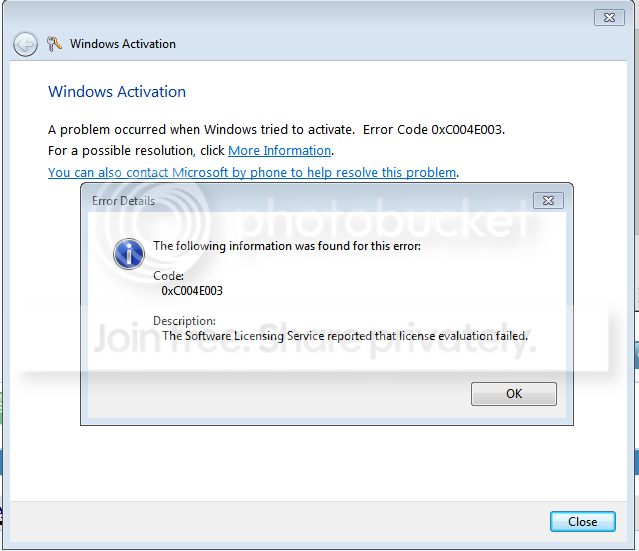
Here is the Details from MGADT
Regards,
Syed Haider Hassan.
Code:
---------------------------
Error Details
---------------------------
The following information was found for this error:


Code:

   0xC004E003


Description:

   The Software Licensing Service reported that license evaluation failed.
I tried to use Change Product Key from MyComputer->RightClick->Properties Window. and i always get this error.
How to fix the problem please can anyone help me out here.
Here is the Details from MGADT
Code:
Diagnostic Report (1.9.0027.0):
-----------------------------------------
Windows Validation Data-->

Validation Code: 0
Cached Online Validation Code: N/A, hr = 0xc004f012
Windows Product Key: *****-*****-GK4PY-FDWYH-7TP9F
Windows Product Key Hash: u3xU6PnmumgYLgUpnmbqEw9Q2OA=
Windows Product ID: 00371-OEM-8992671-00004
Windows Product ID Type: 2
Windows License Type: OEM SLP
Windows OS version: 6.1.7601.2.00010100.1.0.048
ID: {D417A606-F925-47AE-BA5B-3CAA0E477C69}(3)
Is Admin: Yes
TestCab: 0x0
LegitcheckControl ActiveX: N/A, hr = 0x80070002
Signed By: N/A, hr = 0x80070002
Product Name: Windows 7 Professional
Architecture: 0x00000009
Build lab: 7601.win7sp1_rtm.101119-1850
TTS Error:
Validation Diagnostic:
Resolution Status: N/A

Vista WgaER Data-->
ThreatID(s): N/A, hr = 0x80070002
Version: N/A, hr = 0x80070002

Windows XP Notifications Data-->
Cached Result: N/A, hr = 0x80070002
File Exists: No
Version: N/A, hr = 0x80070002
WgaTray.exe Signed By: N/A, hr = 0x80070002
WgaLogon.dll Signed By: N/A, hr = 0x80070002

OGA Notifications Data-->
Cached Result: N/A, hr = 0x80070002
Version: N/A, hr = 0x80070002
OGAExec.exe Signed By: N/A, hr = 0x80070002
OGAAddin.dll Signed By: N/A, hr = 0x80070002

OGA Data-->
Office Status: 109 N/A
OGA Version: N/A, 0x80070002
Signed By: N/A, hr = 0x80070002
Office Diagnostics: 025D1FF3-364-80041010_025D1FF3-229-80041010_025D1FF3-230-1_025D1FF3-517-80040154_025D1FF3-237-80040154_025D1FF3-238-2_025D1FF3-244-80070002_025D1FF3-258-3

Browser Data-->
Proxy settings: N/A
User Agent: Mozilla/4.0 (compatible; MSIE 8.0; Win32)
Default Browser: C:\Program Files (x86)\Google\Chrome\Application\chrome.exe
Download signed ActiveX controls: Prompt
Download unsigned ActiveX controls: Disabled
Run ActiveX controls and plug-ins: Allowed
Initialize and script ActiveX controls not marked as safe: Disabled
Allow scripting of Internet Explorer Webbrowser control: Disabled
Active scripting: Allowed
Script ActiveX controls marked as safe for scripting: Allowed

File Scan Data-->
File Mismatch: C:\Windows\system32\wat\watadminsvc.exe[Hr = 0x80070003]
File Mismatch: C:\Windows\system32\wat\npwatweb.dll[Hr = 0x80070003]
File Mismatch: C:\Windows\system32\wat\watux.exe[Hr = 0x80070003]
File Mismatch: C:\Windows\system32\wat\watweb.dll[Hr = 0x80070003]

Other data-->
Office Details: <GenuineResults><MachineData><UGUID>{D417A606-F925-47AE-BA5B-3CAA0E477C69}</UGUID><Version>1.9.0027.0</Version><OS>6.1.7601.2.00010100.1.0.048</OS><Architecture>x64</Architecture><PKey>*****-*****-*****-*****-7TP9F</PKey><PID>00371-OEM-8992671-00004</PID><PIDType>2</PIDType><SID>S-1-5-21-3401898818-447937977-2598551462</SID><SYSTEM><Manufacturer>Sony Corporation</Manufacturer><Model>VPCEA38EC</Model></SYSTEM><BIOS><Manufacturer>American Megatrends Inc.</Manufacturer><Version>R1090Y8</Version><SMBIOSVersion major="2" minor="6"/><Date>20100720000000.000000+000</Date></BIOS><HWID>5B613E07018400FC</HWID><UserLCID>0409</UserLCID><SystemLCID>0409</SystemLCID><TimeZone>Pakistan Standard Time(GMT+05:00)</TimeZone><iJoin>0</iJoin><SBID><stat>3</stat><msppid></msppid><name></name><model></model></SBID><OEM><OEMID>Sony</OEMID><OEMTableID>VAIO</OEMTableID></OEM><GANotification/></MachineData><Software><Office><Result>109</Result><Products/><Applications/></Office></Software></GenuineResults>

Spsys.log Content: 0x80070002

Licensing Data-->
Software licensing service version: 6.1.7601.17514

Name: Windows(R) 7, Professional edition
Description: Windows Operating System - Windows(R) 7, OEM_SLP channel
Activation ID: 50e329f7-a5fa-46b2-85fd-f224e5da7764
Application ID: 55c92734-d682-4d71-983e-d6ec3f16059f
Extended PID: 00371-00178-926-700004-02-1033-7601.0000-2692014
Installation ID: 005213341122307911717484906300792951832666758683274433
Processor Certificate URL: [url]http://go.microsoft.com/fwlink/?LinkID=88338[/url]
Machine Certificate URL: [url]http://go.microsoft.com/fwlink/?LinkID=88339[/url]
Use License URL: [url]http://go.microsoft.com/fwlink/?LinkID=88341[/url]
Product Key Certificate URL: [url]http://go.microsoft.com/fwlink/?LinkID=88340[/url]
Partial Product Key: 7TP9F
License Status: Initial grace period
Time remaining: 43140 minute(s) (29 day(s))
Remaining Windows rearm count: 3
Trusted time: 9/26/2014 11:06:33 AM

Windows Activation Technologies-->
HrOffline: 0x00000000
HrOnline: N/A
HealthStatus: 0x0000000000000000
Event Time Stamp: N/A
ActiveX: Not Registered - 0x80040154
Admin Service: Not Registered - 0x80040154
HealthStatus Bitmask Output:


HWID Data-->
HWID Hash Current: MAAAAAEAAgABAAEAAAACAAAAAgABAAEA6GGm8oyTUseaUQLcYNo2F1hLDuVCFlxd

OEM Activation 1.0 Data-->
N/A

OEM Activation 2.0 Data-->
BIOS valid for OA 2.0: yes
Windows marker version: 0x20001
OEMID and OEMTableID Consistent: yes
BIOS Information:
  ACPI Table Name	OEMID Value	OEMTableID Value
  APIC			Sony		VAIO
  FACP			Sony		VAIO
  HPET			Sony		VAIO
  MCFG			Sony		VAIO
  SLIC			Sony		VAIO
  SSDT			Sony		VAIO
  SSDT			Sony		VAIO
Regards,
Syed Haider Hassan.
My Computer
- OS
- Windows 8.1 pro x64 for my pc and x86 for my Laptop
- CPU
- Core i7 970 3.20 Ghz in my PC
- Motherboard
- ASUS Rampage II Extreme LGA 1366
- Memory
- 6GB DDR3
- Graphics Card(s)
- Club 3D GTX 660
- Sound Card
- On MotherBoard Default
- Monitor(s) Displays
- DELL 24" LED
- Hard Drives
- 128GB SSD
320GB SATA
- PSU
- Cooler Master 500Watts
- Antivirus
- AVG Free

