
Windows Aero not working properly

Andarthiel

New member
Member
Local time
6:18 PM
Messages
37
Location
Melbourne VIC
Hi

I have Windows 7 Ultimate 32-bit and yesterday it decided to revert to Windows basic after I launched a game and didn't go back to Aero after I quit. After a bit of digging around I managed to get the effects working again by restarting WDM and Themes services but I still get that horrible basic window colour and appearance in Firefox and other windows(ie. no colours, black and white lines, layout and font incorrect) so it's only done half the job. Looking up the personalization settings, it's telling me that Aero is on so I don't know why it still looks like that. Even the Aero trobleshooter isn't giving me any errors. I've attached an example of how Google looks at the moment(I don't even get so much as a logo).
Is there a way to fix it back to the way it was?
 

Attachments
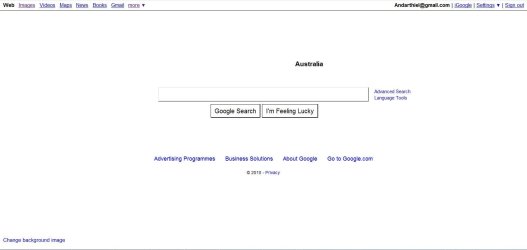
  • Capture.JPG
    Capture.JPG
    41.5 KB · Views: 38

My Computer My Computer

Computer type
PC/Desktop
Computer Manufacturer/Model Number
Gigabyte
OS
Windows 7 Ultimate 64-bit
CPU
AMD Athlon FX 4100 ~3.6GHZ
Motherboard
Gigabyte 970A-D3
Memory
16GB DDR3
Graphics Card(s)
Gigabyte 4GB GeForce GTX 760
Sound Card
Asus Xonar DG
Monitor(s) Displays
BenQ GL2230
Screen Resolution
1920x1080
Hard Drives
1x Western Digital 80GB
1x Western Digital 500GB
1x Western Digital 1TB Caviar Green
PSU
Antec 900W High Current Gaming
Case
Thermaltake Level 10 GTS(Black)
Cooling
Corsair Hydro Series H55 Water Cooler
Keyboard
Razer Deathstalker
Mouse
Razer DeathAdder
Internet Speed
4G
Browser
Google Chrome
Check your video card driver. Make sure it didn't revert to basic vga driver. Upgrade your video card. You have plenty of memory and a good card, so those are not issues.

If this fails, also look at your Device Manager to see if you have any yellow warnings with your card.
 

My Computer My Computer

Computer Manufacturer/Model Number
Dell and Custom
OS
Systems 1 and 2: Windows 7 Enterprise x64, Win 8 Developer
CPU
System 1: i7 [email protected], System 2: AMD FX-4100 Zambezi 3.6G
Motherboard
System 1:Dell 06NWYK System 2: ASUS M5A97 AM3+
Memory
System 1: 8GB System 2: 8GB
Graphics Card(s)
System 1: ATI FirePro V4800 System 2: Radeon HD 6850
Sound Card
System 1: onboard System 2: onboard
Monitor(s) Displays
System1: Viewsonic HDMI 24"
Screen Resolution
System 1: 1920x1080 System 2: 1920x1080
Hard Drives
System 1: Mirrored .5B drives System 2: Seagate Barracuda ST1000DM003 1TB 7200 RPM 64MB Cache SATA 6.0Gb/s
Case
System 1: Dell System 2: Cooler Master
Internet Speed
10 MBPS
It's not using the default VGA driver and my driver is up to date(258.96). I checked Device manager and there were no problems with it(no exclamation mark). I even tried uninstalling and reinstalling the drivers but that didn't help.
 

My Computer My Computer

Computer type
PC/Desktop
Computer Manufacturer/Model Number
Gigabyte
OS
Windows 7 Ultimate 64-bit
CPU
AMD Athlon FX 4100 ~3.6GHZ
Motherboard
Gigabyte 970A-D3
Memory
16GB DDR3
Graphics Card(s)
Gigabyte 4GB GeForce GTX 760
Sound Card
Asus Xonar DG
Monitor(s) Displays
BenQ GL2230
Screen Resolution
1920x1080
Hard Drives
1x Western Digital 80GB
1x Western Digital 500GB
1x Western Digital 1TB Caviar Green
PSU
Antec 900W High Current Gaming
Case
Thermaltake Level 10 GTS(Black)
Cooling
Corsair Hydro Series H55 Water Cooler
Keyboard
Razer Deathstalker
Mouse
Razer DeathAdder
Internet Speed
4G
Browser
Google Chrome
Okay, let's restore the system to a date prior to when you launched the game.
 

My Computer My Computer

Computer Manufacturer/Model Number
Dell and Custom
OS
Systems 1 and 2: Windows 7 Enterprise x64, Win 8 Developer
CPU
System 1: i7 [email protected], System 2: AMD FX-4100 Zambezi 3.6G
Motherboard
System 1:Dell 06NWYK System 2: ASUS M5A97 AM3+
Memory
System 1: 8GB System 2: 8GB
Graphics Card(s)
System 1: ATI FirePro V4800 System 2: Radeon HD 6850
Sound Card
System 1: onboard System 2: onboard
Monitor(s) Displays
System1: Viewsonic HDMI 24"
Screen Resolution
System 1: 1920x1080 System 2: 1920x1080
Hard Drives
System 1: Mirrored .5B drives System 2: Seagate Barracuda ST1000DM003 1TB 7200 RPM 64MB Cache SATA 6.0Gb/s
Case
System 1: Dell System 2: Cooler Master
Internet Speed
10 MBPS
I ran System Restore but for some reason there was only one restore point after the Aero stopped working.
 

My Computer My Computer

Computer type
PC/Desktop
Computer Manufacturer/Model Number
Gigabyte
OS
Windows 7 Ultimate 64-bit
CPU
AMD Athlon FX 4100 ~3.6GHZ
Motherboard
Gigabyte 970A-D3
Memory
16GB DDR3
Graphics Card(s)
Gigabyte 4GB GeForce GTX 760
Sound Card
Asus Xonar DG
Monitor(s) Displays
BenQ GL2230
Screen Resolution
1920x1080
Hard Drives
1x Western Digital 80GB
1x Western Digital 500GB
1x Western Digital 1TB Caviar Green
PSU
Antec 900W High Current Gaming
Case
Thermaltake Level 10 GTS(Black)
Cooling
Corsair Hydro Series H55 Water Cooler
Keyboard
Razer Deathstalker
Mouse
Razer DeathAdder
Internet Speed
4G
Browser
Google Chrome
Have you done anything to do with custom theme patchers?

I'll assume at this point uve restarted your PC several times.

Possibly something's corrupted..somehow.

Maybe a system scan will find something.

Open CMD as administrator and type "SFC /scannow" without quotes.

Post back the results.
 

My Computer My Computer

Computer Manufacturer/Model Number
Custom Build
OS
W7 RTM Ultimate x64
CPU
Intel Q8400 @ 2.66GHZ
Motherboard
Gigabyte GA-EG45M-UD2H
Memory
4GB DDR2-800
Graphics Card(s)
Gainward GTS 450 GLH 1GB Edition
Sound Card
Integrated 8 Channel
Monitor(s) Displays
AOC 23.6 Inch Widescreen LCD
Screen Resolution
1920x1080
Hard Drives
Seagate 500GB Internal
Western Digital 1TB Internal

Hitachi 1TB External
PSU
Apevia Java Power 500W
Case
Cooler Master HAF 922 Black
Cooling
Stock Intel CPU Fan
Keyboard
HP SK-2960 Multimedia Keyboard
Mouse
Logitech M350 Wireless Gaming Mouse
Internet Speed
1.5MB
I haven't used any custom patchers. I use WindowBlinds 7 but I had for quite a while and Aero still worked with it.
Well I did the scan and it said that it didn't find any integrity violations which I guess means that it didn't find anything wrong with the system files.
 

My Computer My Computer

Computer type
PC/Desktop
Computer Manufacturer/Model Number
Gigabyte
OS
Windows 7 Ultimate 64-bit
CPU
AMD Athlon FX 4100 ~3.6GHZ
Motherboard
Gigabyte 970A-D3
Memory
16GB DDR3
Graphics Card(s)
Gigabyte 4GB GeForce GTX 760
Sound Card
Asus Xonar DG
Monitor(s) Displays
BenQ GL2230
Screen Resolution
1920x1080
Hard Drives
1x Western Digital 80GB
1x Western Digital 500GB
1x Western Digital 1TB Caviar Green
PSU
Antec 900W High Current Gaming
Case
Thermaltake Level 10 GTS(Black)
Cooling
Corsair Hydro Series H55 Water Cooler
Keyboard
Razer Deathstalker
Mouse
Razer DeathAdder
Internet Speed
4G
Browser
Google Chrome
WindowBlinds is the culprit here. Just get rid of it, there are many third party themes you can use without having such a horrible piece of software on your PC. You can find themes on deviantART and most of them can work without making changes to the system files. As far as my knowledge goes, WindowBlinds doesn't rely on Aero but users produce their own "glass effects", that's probably the reason Aero doesn't work anymore.
 

My Computer My Computer

Computer type
Laptop
Computer Manufacturer/Model Number
Custom
OS
Windows 7 Home Premium x64
CPU
Intel Core i5 2500K
Motherboard
MSI MS-7750
Memory
8GB DDR3
Graphics Card(s)
nVidia GeForce GTX650 Ti BOOST
Sound Card
Realtek
Monitor(s) Displays
21' Philips
Screen Resolution
Full HD
Hard Drives
1TB
PSU
500W
Thanks, Gornot.
That was the problem it seems. It's working now.
Even found an awesome theme on DA :)
 

My Computer My Computer

Computer type
PC/Desktop
Computer Manufacturer/Model Number
Gigabyte
OS
Windows 7 Ultimate 64-bit
CPU
AMD Athlon FX 4100 ~3.6GHZ
Motherboard
Gigabyte 970A-D3
Memory
16GB DDR3
Graphics Card(s)
Gigabyte 4GB GeForce GTX 760
Sound Card
Asus Xonar DG
Monitor(s) Displays
BenQ GL2230
Screen Resolution
1920x1080
Hard Drives
1x Western Digital 80GB
1x Western Digital 500GB
1x Western Digital 1TB Caviar Green
PSU
Antec 900W High Current Gaming
Case
Thermaltake Level 10 GTS(Black)
Cooling
Corsair Hydro Series H55 Water Cooler
Keyboard
Razer Deathstalker
Mouse
Razer DeathAdder
Internet Speed
4G
Browser
Google Chrome
good good :)
 

My Computer My Computer

Computer Manufacturer/Model Number
Custom Build
OS
W7 RTM Ultimate x64
CPU
Intel Q8400 @ 2.66GHZ
Motherboard
Gigabyte GA-EG45M-UD2H
Memory
4GB DDR2-800
Graphics Card(s)
Gainward GTS 450 GLH 1GB Edition
Sound Card
Integrated 8 Channel
Monitor(s) Displays
AOC 23.6 Inch Widescreen LCD
Screen Resolution
1920x1080
Hard Drives
Seagate 500GB Internal
Western Digital 1TB Internal

Hitachi 1TB External
PSU
Apevia Java Power 500W
Case
Cooler Master HAF 922 Black
Cooling
Stock Intel CPU Fan
Keyboard
HP SK-2960 Multimedia Keyboard
Mouse
Logitech M350 Wireless Gaming Mouse
Internet Speed
1.5MB

My Computer My Computer

Computer type
Laptop
Computer Manufacturer/Model Number
Custom
OS
Windows 7 Home Premium x64
CPU
Intel Core i5 2500K
Motherboard
MSI MS-7750
Memory
8GB DDR3
Graphics Card(s)
nVidia GeForce GTX650 Ti BOOST
Sound Card
Realtek
Monitor(s) Displays
21' Philips
Screen Resolution
Full HD
Hard Drives
1TB
PSU
500W
Windows 7 Aero Problems

Hi.

I have recently installed Windows 7 on my pc. I downloaded all the needed drivers for my hardware, but all of a sudden my windows theme starts contantly changing. (look at the pics attached) The theme is the Windows 7 theme, but the top of all my windows that I open (Internet Explorer, Windows Explorer, administrator permission window etc...) it looks like the standard windows theme and my desktop color changes to black. Do you have any suggestions on how to fix this? (and notice how the bottom right notification area is messed up)


:(

View attachment 111970
View attachment 111971
 

My Computer My Computer

Computer Manufacturer/Model Number
N/A
OS
Windows 7 Home Premium 64 bit
CPU
Core 2 Quad
Motherboard
Asus P5N-T Deluxe
Memory
Corsair Dominator 2 gig's
Graphics Card(s)
evga gtx 260
Sound Card
N/A
Monitor(s) Displays
Westinghouse
Hard Drives
Western Digital
PSU
Ultra X4
Case
Coolermaster HAF 922
Cooling
Cooler Master CPU cooler
Back
Top