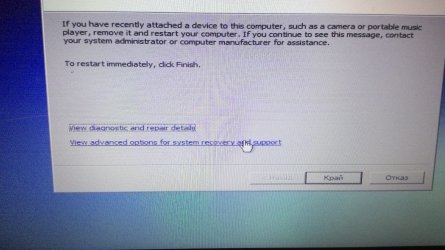
Windows always but to startup repair

cjik

New member
Local time
7:35 PM
Messages
1
HI, last night I experience sudden power loss(before that my computar was on sleep mode) .And after that i left computar switch to the power and decide to turn it on after a few hours.My laptop is Toshiba Satelaite L650-10D.When I boot the laptop i select launch startup repair option but the startup repair didn't fix the problem.And when i try to selct view advanced opitions it only shows startup repair.I shut down the computar again and select start windows normally but again leads to startup repair.Then i press F8 and try to select safe mode and this leads me again to startup repair .After that i try to choose boot frrom last known good config but then computar shuts down.My windows is 7 32-bit version.
P.S. SOrry if there are mistakes but my first language is not englsh i hope you understands and hopes you can help me :o
 

Attachments

  • WIN_20150326_053827.JPG
    WIN_20150326_053827.JPG
    404.5 KB · Views: 0
  • WIN_20150326_053838.JPG
    WIN_20150326_053838.JPG
    389 KB · Views: 0

My Computer My Computer

At a glance

windows 7 32 bit
Computer type
Laptop
Computer Manufacturer/Model Number
Toshiba
OS
windows 7 32 bit
Do you have a Windows 7 32 bit install dvd, if you did you could run system restore by booting from the dvd.
 

My Computer My Computer

At a glance

Windows 10 Pro x64Intel Core i7 6700KGSkill TridentZ RGB 16GB 3600 16-16-16-36EVGA GTX 980 Ti SC x2
Computer type
PC/Desktop
Computer Manufacturer/Model Number
Skylake Special #666
OS
Windows 10 Pro x64
CPU
Intel Core i7 6700K
Motherboard
Asus Sabertooth Z170 Mark 1
Memory
GSkill TridentZ RGB 16GB 3600 16-16-16-36
Graphics Card(s)
EVGA GTX 980 Ti SC x2
Sound Card
Realtek High Definition
Monitor(s) Displays
AOC G2460PG
Screen Resolution
1920 x 1080 144Hz
Hard Drives
Samsung 860 Pro 256GB, Seagate Barracuda 4TB x2
PSU
EVGA 1000 P2, EVGA White Custom Braided Cables
Case
Corsair Vengeance C70 Gunmetal Black
Cooling
Corsair H100i v2, Corsair ML120 x2, Thermal Grizzly Kryonaut
Keyboard
Logitech G910 Orion Spectrum
Mouse
Logitech G700s
Internet Speed
Verizon Fios Quantum Gateway 75/75
Antivirus
Windows Defender, Malwarebytes Free 3.8.3
Browser
Chrome
Other Info
Corsair SP120 x4, LG Blu-ray Drive, Durabrand HT-395 100 Watt Dolby Digital Amp, Corsair H2100 Wireless 7.1 Headset
Unplug A/C/ power and battery, hold power button down 30 seconds to drain residual power.

Replace battey and A/C power, try powering up.

If it still wont boot, tap the F8 key to access System Recovery Options to try to System Restore working backward as far as necessary.

If this fails, everything possible is here for Troubleshooting Windows 7 Failure to Start leading up to if necessary rescuiing your files to run Toshiba factory recovery (google how it is done for your model) or doing the superior Clean Reinstall Windows 7

To access the recovery partition do the following:
Power off the laptop.
Hold down the 0 (zero) key and turn the laptop on. Keep holding down the zero key until the TOSHIBA logo appears.
Start tapping the zero key repeatedly at this point.
Stop if the unit beeps or when the TOSHIBA logo disappears.
The screen should flash HDD RECOVERY MODE for a second and then it will load the Toshiba recovery program right from the hard drive.
Note that this erases all data, and reloads all factory default software.
 
Back
Top