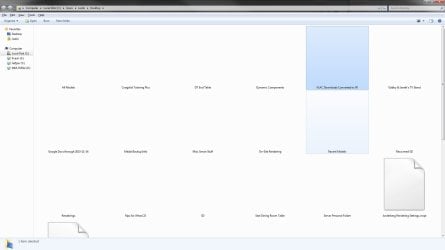
Windows and Icons white/blank

martinlest

New member
Power User
VIP
Local time
5:50 PM
Messages
661
I know I am not alone with this problem, but haven't been able to find a solution online - last encountered it some months back, but today it is back again. Folders 'show' as white squares (invisible) and many files lose their default icons and go blank as well. It's not just the icon picture - a whole batch of bmp files have been affected: if I right-click on them and choose Properties, the information tells me they are 1x1 pixel (they are not), or on others I am told that the bmp file is a folder containing 100s of MBs of files. (Wrong!).

Clearly Explorer has had (another) nervous breakdown. This occurred today as I was working as usual - no new programmes or alterations to the system. Last time a System restore fixed it, but has anyone sorted out what the problem is here?

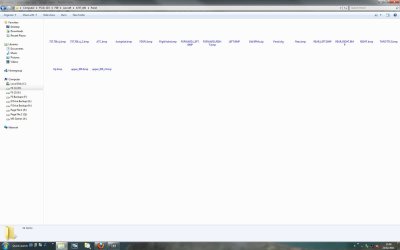
1.jpg2.jpg


System restore didn't help this time - same thing. Even worse, my bmp files are being destroyed as I open the folder. For a split second they show as they should when I open the containing folder, then they go white and register as 1kb in size. If I choose to overwrite the folder with a backed up copy, without opening it, the replace files dialogue shows all files as being their original size however (i.e - no instance of do I want to overwrite the 'corrupt' 1kb file with the proper 2MB file, or whatever. The sizes and dates of the files show as being all the same.

Thanks,

Martin
 
Last edited by a moderator:

My Computer My Computer

Computer type
PC/Desktop
Computer Manufacturer/Model Number
Custom Build
OS
Windows 7 Home Premium SP1 64-bit
CPU
Intel Core i7-4790K CPU @ 4.5GHz
Motherboard
Asus H97I-PLUS
Memory
16GB KINGSTON HYPER-X FURY DUAL-DDR3 1600MHz
Graphics Card(s)
8GB NVIDIA GEFORCE GTX 1070
Monitor(s) Displays
HannsG 28" & Dell 24"
Screen Resolution
1920x1200
Hard Drives
1 x 2TB Samsung Evo 860 SSD
2 x 500GB Samsung Evo 850 SSD
PSU
CORSAIR 650W CS SERIES
Case
Thermaltake Core V1 Mini ITX Cube
Cooling
NOCTUA NH-L12
Browser
Firefox
Other Info
Custom PC used for X-Plane 11
.. and now I can't undo the Restore as System restore no longer shows any option to undo it. Beginning to get really fed up with this!
 

My Computer My Computer

Computer type
PC/Desktop
Computer Manufacturer/Model Number
Custom Build
OS
Windows 7 Home Premium SP1 64-bit
CPU
Intel Core i7-4790K CPU @ 4.5GHz
Motherboard
Asus H97I-PLUS
Memory
16GB KINGSTON HYPER-X FURY DUAL-DDR3 1600MHz
Graphics Card(s)
8GB NVIDIA GEFORCE GTX 1070
Monitor(s) Displays
HannsG 28" & Dell 24"
Screen Resolution
1920x1200
Hard Drives
1 x 2TB Samsung Evo 860 SSD
2 x 500GB Samsung Evo 850 SSD
PSU
CORSAIR 650W CS SERIES
Case
Thermaltake Core V1 Mini ITX Cube
Cooling
NOCTUA NH-L12
Browser
Firefox
Other Info
Custom PC used for X-Plane 11
First thought is a virus! Is your A/V up to date and running?
 

My Computer My Computer

Computer type
PC/Desktop
OS
Microsoft Windows 7 Home Premium 64-bit 7601 Multiprocessor Free Service Pack 1
CPU
Intel(R) Core(TM) i7-3770 CPU @ 3.40GHz
Motherboard
ASUSTeK COMPUTER INC. P8H77-M
Memory
8.00 GB
Graphics Card(s)
Intel(R) HD Graphics 4000
Sound Card
On Board
Monitor(s) Displays
Dell 24"
Screen Resolution
1920 x 1080
Hard Drives
(1) INTEL SSDSC2CT180A3 ATA Device (2) ST500DM002-1BD142 ATA Device (3) WDC WD3200AAKS-75L9A0 ATA Device (4) Generic- Compact Flash USB Device (5) Generic- MS/MS-Pro USB Device (6) Generic- SD/MMC USB Device (7) Generic- SM/xD-Picture USB
PSU
500w Corsair
Case
Cooler Master
Cooling
3 Fans
Keyboard
Logitech MK300
Mouse
Logitech WOM
Internet Speed
75Mb
Antivirus
Norton 360
Browser
Firefox, Opera, IE
Yes, I wondered that but 'Microsoft Security Essentials' reports no problems and is up to date.

M.
 

My Computer My Computer

Computer type
PC/Desktop
Computer Manufacturer/Model Number
Custom Build
OS
Windows 7 Home Premium SP1 64-bit
CPU
Intel Core i7-4790K CPU @ 4.5GHz
Motherboard
Asus H97I-PLUS
Memory
16GB KINGSTON HYPER-X FURY DUAL-DDR3 1600MHz
Graphics Card(s)
8GB NVIDIA GEFORCE GTX 1070
Monitor(s) Displays
HannsG 28" & Dell 24"
Screen Resolution
1920x1200
Hard Drives
1 x 2TB Samsung Evo 860 SSD
2 x 500GB Samsung Evo 850 SSD
PSU
CORSAIR 650W CS SERIES
Case
Thermaltake Core V1 Mini ITX Cube
Cooling
NOCTUA NH-L12
Browser
Firefox
Other Info
Custom PC used for X-Plane 11
Perhaps try running Malwarebytes and CCleaner. You could also try a sfc /scannow, that can do no harm.
 

My Computer My Computer

Computer type
PC/Desktop
OS
Microsoft Windows 7 Home Premium 64-bit 7601 Multiprocessor Free Service Pack 1
CPU
Intel(R) Core(TM) i7-3770 CPU @ 3.40GHz
Motherboard
ASUSTeK COMPUTER INC. P8H77-M
Memory
8.00 GB
Graphics Card(s)
Intel(R) HD Graphics 4000
Sound Card
On Board
Monitor(s) Displays
Dell 24"
Screen Resolution
1920 x 1080
Hard Drives
(1) INTEL SSDSC2CT180A3 ATA Device (2) ST500DM002-1BD142 ATA Device (3) WDC WD3200AAKS-75L9A0 ATA Device (4) Generic- Compact Flash USB Device (5) Generic- MS/MS-Pro USB Device (6) Generic- SD/MMC USB Device (7) Generic- SM/xD-Picture USB
PSU
500w Corsair
Case
Cooler Master
Cooling
3 Fans
Keyboard
Logitech MK300
Mouse
Logitech WOM
Internet Speed
75Mb
Antivirus
Norton 360
Browser
Firefox, Opera, IE
Nothing helped - I also ran a full virus scan overnight (it scanned almost 8,000,000 items) - nothing found at all, all clear.

Luckily I make images of the C drive at least once a month, using the Win7 utility, and I had one 10 days old. So I restored the C drive using the backed up image - it only took about 3 minutes to complete (33GBs of data) and now the problem has gone. But I have no doubt it will reappear yet again at some stage, so I will make sure I make regular images of my C drive & registry..

How does one get Microsoft to look into this (my Win7 came from the people who made the PC and they are not interested in such matters) - as I say, I am not the only one who has suffered from this by any means?

Martin
 

My Computer My Computer

Computer type
PC/Desktop
Computer Manufacturer/Model Number
Custom Build
OS
Windows 7 Home Premium SP1 64-bit
CPU
Intel Core i7-4790K CPU @ 4.5GHz
Motherboard
Asus H97I-PLUS
Memory
16GB KINGSTON HYPER-X FURY DUAL-DDR3 1600MHz
Graphics Card(s)
8GB NVIDIA GEFORCE GTX 1070
Monitor(s) Displays
HannsG 28" & Dell 24"
Screen Resolution
1920x1200
Hard Drives
1 x 2TB Samsung Evo 860 SSD
2 x 500GB Samsung Evo 850 SSD
PSU
CORSAIR 650W CS SERIES
Case
Thermaltake Core V1 Mini ITX Cube
Cooling
NOCTUA NH-L12
Browser
Firefox
Other Info
Custom PC used for X-Plane 11

My Computer My Computer

Computer Manufacturer/Model Number
Compaq Desktop
OS
Windows 7 Ultimate x64
CPU
AMD Sempron Dual Core
Memory
3GB
Graphics Card(s)
NVIDIA GeForce 6150SE nForce 430
Screen Resolution
1024x768
Hard Drives
150GB Sata
Hi, thanks. I did try the icon cache rebuild last time this happened, to no end. Doubt there'll be anything recorded, but worth a look next time..

M
 

My Computer My Computer

Computer type
PC/Desktop
Computer Manufacturer/Model Number
Custom Build
OS
Windows 7 Home Premium SP1 64-bit
CPU
Intel Core i7-4790K CPU @ 4.5GHz
Motherboard
Asus H97I-PLUS
Memory
16GB KINGSTON HYPER-X FURY DUAL-DDR3 1600MHz
Graphics Card(s)
8GB NVIDIA GEFORCE GTX 1070
Monitor(s) Displays
HannsG 28" & Dell 24"
Screen Resolution
1920x1200
Hard Drives
1 x 2TB Samsung Evo 860 SSD
2 x 500GB Samsung Evo 850 SSD
PSU
CORSAIR 650W CS SERIES
Case
Thermaltake Core V1 Mini ITX Cube
Cooling
NOCTUA NH-L12
Browser
Firefox
Other Info
Custom PC used for X-Plane 11
Sorry to resurrect an old thread, but I am having this EXACT same problem. I've found other people with semi-similar problems, where only thumbnails are broken, or where icons have permanently broken, but this is unique.

A bit more detail: This only happens in the open/close/save file browser window, never in actual Explorer windows. Also, it only happens once every ~10-12 times I go to browse for a file. Most of the time, everything works as normal. I've found that, when it does happen, I can just hit "cancel", then try again, and it will come up perfectly fine.

This is getting really frustrating, and I mostly have to browse for images to open or attach, and when this happens, it obviously doesn't show thumbnails (or icons of any kind).

I'll post a screenshot next time it happens.

Any ideas?? :(
 

My Computer My Computer

Computer type
Laptop
Computer Manufacturer/Model Number
Lenovo
OS
Windows 7 Ultimate x64
CPU
Intel Core i7-3630 QM @ 2.4 GHz
Memory
16 GB Corsair Vengeance
Graphics Card(s)
NVIDIA GeForce GTX660M 2 GB
Hard Drives
500 GB Samsung 850 EVO SATA III SSD
Antivirus
Microsoft Security Essentials
Browser
Google Chrome
Well, crap! This time it did happen in a regular Explorer window.

As soon as I selected "Extra Large Icons" (default is "List" mode), I got the blank icons. I hit F5 to refresh, and then it gave me a couple of the blank, white page icons, but that's it. Screenshot attached.
 

Attachments

  • Screenshot.jpg
    Screenshot.jpg
    74.6 KB · Views: 1

My Computer My Computer

Computer type
Laptop
Computer Manufacturer/Model Number
Lenovo
OS
Windows 7 Ultimate x64
CPU
Intel Core i7-3630 QM @ 2.4 GHz
Memory
16 GB Corsair Vengeance
Graphics Card(s)
NVIDIA GeForce GTX660M 2 GB
Hard Drives
500 GB Samsung 850 EVO SATA III SSD
Antivirus
Microsoft Security Essentials
Browser
Google Chrome
Back
Top