Solved Windows Backup Error

Oscar53

New member
Member
Local time
2:28 PM
Messages
40
Location
Canada
I keep getting these Event Logs in Event Viewer

Warning Source volsnap Event ID 24
There was insufficient disk space on volume D: to grow the shadow copy storage for shadow copies of D:. As a result of this failure all shadow copies of volume D: are at risk of being deleted.

Error Source volsnap Event ID 35
The shadow copies of volume D: were aborted because the shadow copy storage failed to grow.

As well as this error when backup completes;

-Windows Backup did not complete successfully
-The backup completed but some files were skipped.
-Open the Backup and Restore Control Panel to view settings

I have plenty of space available on my D: Drive and I have checked Microsoft's support pages with no positive results.

I also read that Norton Internet Security 2011 could be the culprit causing the failure, so I disabled it. Nothing is helping I can't create a full backup.

Does anyone have any suggestions. I'm stumped. :confused:
 

My Computer

OS
Windows 7 Ultimate 64Bit SP1
CPU
Intel Core 2 Quad Q9650 3GHZ
Motherboard
ASUS P5Q-E
Memory
Corsair Dominator Twin CM2X2048 DDR2 1066 MHZ 6GB
Graphics Card(s)
Asus NVIDIA GTX 560 Ti DirectCU II
Sound Card
Creative Sound Blaster X-Fi Titanium Fatal1ty Pro
Monitor(s) Displays
LG Flatron W2353V LCD HDMI Monitor
Screen Resolution
1920x1080
Hard Drives
Seagate ST1000DM003-1ER162 (Z4Y6GDCA) 1TB SATAIII
PSU
Cooler Master Extreme 700 Watt (RS700-PCAAE3-US)
Case
Thermaltake Soprano DX
Cooling
Zalman CNPS9500A LED
Keyboard
Logitech Cordless Desktop® MX™ 5500 Revolution
Mouse
Logitech® Bluetooth® MX™ Revolution Laser Mouse
Internet Speed
Cable Modem 30MB
I keep getting these Event Logs in Event Viewer

Warning Source volsnap Event ID 24
There was insufficient disk space on volume D: to grow the shadow copy storage for shadow copies of D:. As a result of this failure all shadow copies of volume D: are at risk of being deleted.

Error Source volsnap Event ID 35
The shadow copies of volume D: were aborted because the shadow copy storage failed to grow.

As well as this error when backup completes;

-Windows Backup did not complete successfully
-The backup completed but some files were skipped.
-Open the Backup and Restore Control Panel to view settings

I have plenty of space available on my D: Drive and I have checked Microsoft's support pages with no positive results.

I also read that Norton Internet Security 2011 could be the culprit causing the failure, so I disabled it. Nothing is helping I can't create a full backup.

Does anyone have any suggestions. I'm stumped. :confused:


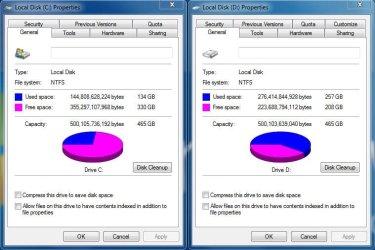
Can we get a picture of your disk management control panel uploaded?

How big is the "D" partition, and how big is "C"?
 

My Computer

Computer Manufacturer/Model Number
HP Pavillion dv-7 1005 Tx
OS
Win 8 Release candidate 8400
CPU
[email protected]
Memory
4 gigs
Graphics Card(s)
Nvidia 9600M
Sound Card
HD built-in
Monitor(s) Displays
17" Wxga
Screen Resolution
1440x900
Cooling
none
Internet Speed
45Mb down 5Mb up
Some screenshots

Here is the screenshot you asked for as well as a screenshot of the Properties for both hard drives.
 

Attachments

  • Capture.JPG
    Capture.JPG
    86.8 KB · Views: 33
  • Capture2.JPG
    Capture2.JPG
    65.6 KB · Views: 30

My Computer

OS
Windows 7 Ultimate 64Bit SP1
CPU
Intel Core 2 Quad Q9650 3GHZ
Motherboard
ASUS P5Q-E
Memory
Corsair Dominator Twin CM2X2048 DDR2 1066 MHZ 6GB
Graphics Card(s)
Asus NVIDIA GTX 560 Ti DirectCU II
Sound Card
Creative Sound Blaster X-Fi Titanium Fatal1ty Pro
Monitor(s) Displays
LG Flatron W2353V LCD HDMI Monitor
Screen Resolution
1920x1080
Hard Drives
Seagate ST1000DM003-1ER162 (Z4Y6GDCA) 1TB SATAIII
PSU
Cooler Master Extreme 700 Watt (RS700-PCAAE3-US)
Case
Thermaltake Soprano DX
Cooling
Zalman CNPS9500A LED
Keyboard
Logitech Cordless Desktop® MX™ 5500 Revolution
Mouse
Logitech® Bluetooth® MX™ Revolution Laser Mouse
Internet Speed
Cable Modem 30MB
Oscar,
Which drive are you trying to back up to where?

In other words, what is the source drive and what is the destination drive?
 

My Computer

Computer Manufacturer/Model Number
Toshiba Satellite S875D-S7239 laptop
OS
MS Windows 7 Ultimate SP1 64-bit
CPU
AMD A10-4600M
Motherboard
AMD Pumori (Socket FT1)
Memory
6.00 GB Dual-Channel DDR3 @ 798MHz (11-11-12-28)
Graphics Card(s)
AMD Radeon HD 7660G
Sound Card
High Definition Audio Device
Monitor(s) Displays
Generic PnP Monitor (1600x900@60Hz)
Screen Resolution
1600x900@60Hz
Hard Drives
SSD 119GB Corsair CSSD-V128GB2 ATA Device
Keyboard
Standard PS/2 Keyboard
Mouse
HP Wireless Optical Mobile Mouse Model FHA-3410
Internet Speed
What the local pub, local coffee shop offers.
Other Info
Optical Drive:MATSHITA BD-CMB UJ160B ATA Device


Also have an Asus ha1002xp netbook with Win 7 Ultimate installed.
Windows Backup

I'm backing up the C: drive to the D: drive.
 

My Computer

OS
Windows 7 Ultimate 64Bit SP1
CPU
Intel Core 2 Quad Q9650 3GHZ
Motherboard
ASUS P5Q-E
Memory
Corsair Dominator Twin CM2X2048 DDR2 1066 MHZ 6GB
Graphics Card(s)
Asus NVIDIA GTX 560 Ti DirectCU II
Sound Card
Creative Sound Blaster X-Fi Titanium Fatal1ty Pro
Monitor(s) Displays
LG Flatron W2353V LCD HDMI Monitor
Screen Resolution
1920x1080
Hard Drives
Seagate ST1000DM003-1ER162 (Z4Y6GDCA) 1TB SATAIII
PSU
Cooler Master Extreme 700 Watt (RS700-PCAAE3-US)
Case
Thermaltake Soprano DX
Cooling
Zalman CNPS9500A LED
Keyboard
Logitech Cordless Desktop® MX™ 5500 Revolution
Mouse
Logitech® Bluetooth® MX™ Revolution Laser Mouse
Internet Speed
Cable Modem 30MB
Put your page file back on the C and you will have no problem.
 

My Computer

Computer Manufacturer/Model Number
Toshiba Satellite S875D-S7239 laptop
OS
MS Windows 7 Ultimate SP1 64-bit
CPU
AMD A10-4600M
Motherboard
AMD Pumori (Socket FT1)
Memory
6.00 GB Dual-Channel DDR3 @ 798MHz (11-11-12-28)
Graphics Card(s)
AMD Radeon HD 7660G
Sound Card
High Definition Audio Device
Monitor(s) Displays
Generic PnP Monitor (1600x900@60Hz)
Screen Resolution
1600x900@60Hz
Hard Drives
SSD 119GB Corsair CSSD-V128GB2 ATA Device
Keyboard
Standard PS/2 Keyboard
Mouse
HP Wireless Optical Mobile Mouse Model FHA-3410
Internet Speed
What the local pub, local coffee shop offers.
Other Info
Optical Drive:MATSHITA BD-CMB UJ160B ATA Device


Also have an Asus ha1002xp netbook with Win 7 Ultimate installed.
Windows Backup

Just tried putting the pagefile back on C: rebooted, checked the pagefile (back to Default). Ran Backup and got the exact same error. Thanks for the suggestion though.
 

My Computer

OS
Windows 7 Ultimate 64Bit SP1
CPU
Intel Core 2 Quad Q9650 3GHZ
Motherboard
ASUS P5Q-E
Memory
Corsair Dominator Twin CM2X2048 DDR2 1066 MHZ 6GB
Graphics Card(s)
Asus NVIDIA GTX 560 Ti DirectCU II
Sound Card
Creative Sound Blaster X-Fi Titanium Fatal1ty Pro
Monitor(s) Displays
LG Flatron W2353V LCD HDMI Monitor
Screen Resolution
1920x1080
Hard Drives
Seagate ST1000DM003-1ER162 (Z4Y6GDCA) 1TB SATAIII
PSU
Cooler Master Extreme 700 Watt (RS700-PCAAE3-US)
Case
Thermaltake Soprano DX
Cooling
Zalman CNPS9500A LED
Keyboard
Logitech Cordless Desktop® MX™ 5500 Revolution
Mouse
Logitech® Bluetooth® MX™ Revolution Laser Mouse
Internet Speed
Cable Modem 30MB
Oscar,
Run CCleaner.

Run cleanmgr.exe.
For this one, see:
http://www.sevenforums.com/tutorials/818-disk-cleanup-open-use.html


Also attach the startup.txt file generated by following to your next post:
LIST OF STARTUP PROGRAMS USING CCLEANER


CCleaner | Tasks icon | Startup tab | click on Save to text file button (bottom right side)

Using the PAPER CLIP icon in the top panel of a Message Reply window, attach the .txt file generated by CCleaner.
 

My Computer

Computer Manufacturer/Model Number
Toshiba Satellite S875D-S7239 laptop
OS
MS Windows 7 Ultimate SP1 64-bit
CPU
AMD A10-4600M
Motherboard
AMD Pumori (Socket FT1)
Memory
6.00 GB Dual-Channel DDR3 @ 798MHz (11-11-12-28)
Graphics Card(s)
AMD Radeon HD 7660G
Sound Card
High Definition Audio Device
Monitor(s) Displays
Generic PnP Monitor (1600x900@60Hz)
Screen Resolution
1600x900@60Hz
Hard Drives
SSD 119GB Corsair CSSD-V128GB2 ATA Device
Keyboard
Standard PS/2 Keyboard
Mouse
HP Wireless Optical Mobile Mouse Model FHA-3410
Internet Speed
What the local pub, local coffee shop offers.
Other Info
Optical Drive:MATSHITA BD-CMB UJ160B ATA Device


Also have an Asus ha1002xp netbook with Win 7 Ultimate installed.
Windows Backup

Ok I've followed your instructions and ran the Disk Cleanup and CCleaner and here's the startup attachment.
I'll try the Backup again and see what happens.
 

Attachments

My Computer

OS
Windows 7 Ultimate 64Bit SP1
CPU
Intel Core 2 Quad Q9650 3GHZ
Motherboard
ASUS P5Q-E
Memory
Corsair Dominator Twin CM2X2048 DDR2 1066 MHZ 6GB
Graphics Card(s)
Asus NVIDIA GTX 560 Ti DirectCU II
Sound Card
Creative Sound Blaster X-Fi Titanium Fatal1ty Pro
Monitor(s) Displays
LG Flatron W2353V LCD HDMI Monitor
Screen Resolution
1920x1080
Hard Drives
Seagate ST1000DM003-1ER162 (Z4Y6GDCA) 1TB SATAIII
PSU
Cooler Master Extreme 700 Watt (RS700-PCAAE3-US)
Case
Thermaltake Soprano DX
Cooling
Zalman CNPS9500A LED
Keyboard
Logitech Cordless Desktop® MX™ 5500 Revolution
Mouse
Logitech® Bluetooth® MX™ Revolution Laser Mouse
Internet Speed
Cable Modem 30MB
Oscar,
:orb: | type MSCONFIG | ENTER | STARTUP tab | uncheck everything | RESTART your computer.

This does not delete or disable those progams, but rather tells Win 7 to not run them at startup time.

What antivirus are you using?

What firewall are you using?
 

My Computer

Computer Manufacturer/Model Number
Toshiba Satellite S875D-S7239 laptop
OS
MS Windows 7 Ultimate SP1 64-bit
CPU
AMD A10-4600M
Motherboard
AMD Pumori (Socket FT1)
Memory
6.00 GB Dual-Channel DDR3 @ 798MHz (11-11-12-28)
Graphics Card(s)
AMD Radeon HD 7660G
Sound Card
High Definition Audio Device
Monitor(s) Displays
Generic PnP Monitor (1600x900@60Hz)
Screen Resolution
1600x900@60Hz
Hard Drives
SSD 119GB Corsair CSSD-V128GB2 ATA Device
Keyboard
Standard PS/2 Keyboard
Mouse
HP Wireless Optical Mobile Mouse Model FHA-3410
Internet Speed
What the local pub, local coffee shop offers.
Other Info
Optical Drive:MATSHITA BD-CMB UJ160B ATA Device


Also have an Asus ha1002xp netbook with Win 7 Ultimate installed.
I'm using Norton Internet Security 2011. I already tried clearing the startup and I ran Disk Cleanup nothing seems to help. It still comes up with "The backup completed but some files were skipped" error when I run the Backup.
 

My Computer

OS
Windows 7 Ultimate 64Bit SP1
CPU
Intel Core 2 Quad Q9650 3GHZ
Motherboard
ASUS P5Q-E
Memory
Corsair Dominator Twin CM2X2048 DDR2 1066 MHZ 6GB
Graphics Card(s)
Asus NVIDIA GTX 560 Ti DirectCU II
Sound Card
Creative Sound Blaster X-Fi Titanium Fatal1ty Pro
Monitor(s) Displays
LG Flatron W2353V LCD HDMI Monitor
Screen Resolution
1920x1080
Hard Drives
Seagate ST1000DM003-1ER162 (Z4Y6GDCA) 1TB SATAIII
PSU
Cooler Master Extreme 700 Watt (RS700-PCAAE3-US)
Case
Thermaltake Soprano DX
Cooling
Zalman CNPS9500A LED
Keyboard
Logitech Cordless Desktop® MX™ 5500 Revolution
Mouse
Logitech® Bluetooth® MX™ Revolution Laser Mouse
Internet Speed
Cable Modem 30MB
Is your startup list NOW completely cleared?

Disable Norton 100%. Norton has been known to interfere with backups.

Problem gone?

If yes, then you can reenable Norton.
 

My Computer

Computer Manufacturer/Model Number
Toshiba Satellite S875D-S7239 laptop
OS
MS Windows 7 Ultimate SP1 64-bit
CPU
AMD A10-4600M
Motherboard
AMD Pumori (Socket FT1)
Memory
6.00 GB Dual-Channel DDR3 @ 798MHz (11-11-12-28)
Graphics Card(s)
AMD Radeon HD 7660G
Sound Card
High Definition Audio Device
Monitor(s) Displays
Generic PnP Monitor (1600x900@60Hz)
Screen Resolution
1600x900@60Hz
Hard Drives
SSD 119GB Corsair CSSD-V128GB2 ATA Device
Keyboard
Standard PS/2 Keyboard
Mouse
HP Wireless Optical Mobile Mouse Model FHA-3410
Internet Speed
What the local pub, local coffee shop offers.
Other Info
Optical Drive:MATSHITA BD-CMB UJ160B ATA Device


Also have an Asus ha1002xp netbook with Win 7 Ultimate installed.
That's the first thing I tried disabled Norton and the Norton Product Tamper Protection. It looks hopeless, the thing is I can create a Restore Ponit no problem, but I can't restore the sysyem back to an earlier point either. This all seems to be tied in somehow. This is also not unique to this install, I've re-installed a few times since I've had Windows 7 and this problem with restoring and backups has been there from the beginning with Windows 7 and Norton installed. With Vista if I disabled Norton both backups and restores were successful. What do you do. :mad:
 

My Computer

OS
Windows 7 Ultimate 64Bit SP1
CPU
Intel Core 2 Quad Q9650 3GHZ
Motherboard
ASUS P5Q-E
Memory
Corsair Dominator Twin CM2X2048 DDR2 1066 MHZ 6GB
Graphics Card(s)
Asus NVIDIA GTX 560 Ti DirectCU II
Sound Card
Creative Sound Blaster X-Fi Titanium Fatal1ty Pro
Monitor(s) Displays
LG Flatron W2353V LCD HDMI Monitor
Screen Resolution
1920x1080
Hard Drives
Seagate ST1000DM003-1ER162 (Z4Y6GDCA) 1TB SATAIII
PSU
Cooler Master Extreme 700 Watt (RS700-PCAAE3-US)
Case
Thermaltake Soprano DX
Cooling
Zalman CNPS9500A LED
Keyboard
Logitech Cordless Desktop® MX™ 5500 Revolution
Mouse
Logitech® Bluetooth® MX™ Revolution Laser Mouse
Internet Speed
Cable Modem 30MB
Oscar,

One solution would be to throw away Norton,
Reinstall Win 7
Use Microsoft Security Essentials.

I use Microsoft Security Essentials and am extremely pleased.

Assuming that's not what you want then go to the Norton site and ask them about your problem. I say that because you are not the first person who has encountered this problem. There might be some people lurking around who know the procedure that Norton will give you.

There are many reasons why I use MSE. You've hit upon one of them.

Important to me is a problem that I've not seen in Win 7 but saw very frequently with Vista and that is of not being able to restore to an old restore point.

Is your Win 7 100% uptodate? All Critical, All Important, and All Optional (except for those possible 34 language updates) installed?

AFter updating, keeping norton turned off and better 100% removed, then run SFC /SCANNOW. If you don't get a msg to the effect that all passed verification (I always forget the wording) then run once more.

After that use the procedure in following link to generate sfcdetails.txt and attach sfcdetails.txt to your next post.

http://www.sevenforums.com/tutorials/1538-sfc-scannow-command-system-file-checker.html
 

My Computer

Computer Manufacturer/Model Number
Toshiba Satellite S875D-S7239 laptop
OS
MS Windows 7 Ultimate SP1 64-bit
CPU
AMD A10-4600M
Motherboard
AMD Pumori (Socket FT1)
Memory
6.00 GB Dual-Channel DDR3 @ 798MHz (11-11-12-28)
Graphics Card(s)
AMD Radeon HD 7660G
Sound Card
High Definition Audio Device
Monitor(s) Displays
Generic PnP Monitor (1600x900@60Hz)
Screen Resolution
1600x900@60Hz
Hard Drives
SSD 119GB Corsair CSSD-V128GB2 ATA Device
Keyboard
Standard PS/2 Keyboard
Mouse
HP Wireless Optical Mobile Mouse Model FHA-3410
Internet Speed
What the local pub, local coffee shop offers.
Other Info
Optical Drive:MATSHITA BD-CMB UJ160B ATA Device


Also have an Asus ha1002xp netbook with Win 7 Ultimate installed.

My Computer

Computer Manufacturer/Model Number
HP Pavilion Elite 495UK
OS
Windows 7 Ultimate SP1 64-Bit
CPU
Intel Core i7 870 @ 2.93GHz
Motherboard
MSI 2A9C (CPU1)
Memory
8Gb Dual-Channel DDR3 @ 664MHz
Graphics Card(s)
nVidia GeForce GTX 460 1024MB dedicated RAM
Sound Card
Realtek HD Audio
Monitor(s) Displays
HP2310i
Screen Resolution
1920 x 1080
Hard Drives
1x1954GB Hitachi HDS22020ALA 330 (RAID), 1x1954GB Hitachi External for backup and storage
PSU
460W
Case
HP Elite
Cooling
Air cooled
Keyboard
Logitech K750 solar-powered keyboard
Mouse
Logitech Wireless M180 mouse
Internet Speed
2Mb
Other Info
Pure Avanti Flow Internet Radio with iPod Dock, 64Gb iPod, HP USB Speakers, Sony MDR-V500 Headphones, Sony Vaio F-Series Laptop
SeaVixen,

Thanks for supplying the link.
 

My Computer

Computer Manufacturer/Model Number
Toshiba Satellite S875D-S7239 laptop
OS
MS Windows 7 Ultimate SP1 64-bit
CPU
AMD A10-4600M
Motherboard
AMD Pumori (Socket FT1)
Memory
6.00 GB Dual-Channel DDR3 @ 798MHz (11-11-12-28)
Graphics Card(s)
AMD Radeon HD 7660G
Sound Card
High Definition Audio Device
Monitor(s) Displays
Generic PnP Monitor (1600x900@60Hz)
Screen Resolution
1600x900@60Hz
Hard Drives
SSD 119GB Corsair CSSD-V128GB2 ATA Device
Keyboard
Standard PS/2 Keyboard
Mouse
HP Wireless Optical Mobile Mouse Model FHA-3410
Internet Speed
What the local pub, local coffee shop offers.
Other Info
Optical Drive:MATSHITA BD-CMB UJ160B ATA Device


Also have an Asus ha1002xp netbook with Win 7 Ultimate installed.
Cheers Karl, you're very welcome.
 

My Computer

Computer Manufacturer/Model Number
HP Pavilion Elite 495UK
OS
Windows 7 Ultimate SP1 64-Bit
CPU
Intel Core i7 870 @ 2.93GHz
Motherboard
MSI 2A9C (CPU1)
Memory
8Gb Dual-Channel DDR3 @ 664MHz
Graphics Card(s)
nVidia GeForce GTX 460 1024MB dedicated RAM
Sound Card
Realtek HD Audio
Monitor(s) Displays
HP2310i
Screen Resolution
1920 x 1080
Hard Drives
1x1954GB Hitachi HDS22020ALA 330 (RAID), 1x1954GB Hitachi External for backup and storage
PSU
460W
Case
HP Elite
Cooling
Air cooled
Keyboard
Logitech K750 solar-powered keyboard
Mouse
Logitech Wireless M180 mouse
Internet Speed
2Mb
Other Info
Pure Avanti Flow Internet Radio with iPod Dock, 64Gb iPod, HP USB Speakers, Sony MDR-V500 Headphones, Sony Vaio F-Series Laptop
That's the first thing I tried disabled Norton and the Norton Product Tamper Protection.
If you turn Tamper Protection off then you can kill the Symantec ccsvchst.exe processes. If you did this then you should have totally disabled Norton.

If the volsnap problem persists then I can't see how Norton is the problem.

I get this error sometimes but it doesn't stop me making images. However, I only make single images and don't rely on Shadow copy storage for difference imaging.
I think it may have more to do with volume shadow copy parameters.
 

My Computer

Computer type
PC/Desktop
Computer Manufacturer/Model Number
Own build
OS
Windows 7x64 Home Premium SP1
CPU
Intel i7 2600k
Motherboard
ASUS P8Z68 Deluxe
Memory
G.Skill Ripjaws (DDR3-1600) 2x4GB
Graphics Card(s)
Nvidia GeForce GTS 450; Intel HD Graphics 3000(GT2+)
Monitor(s) Displays
Dell Ultrasharp IPS panel U2311H, Samsung SyncMaster P2350
Screen Resolution
1920x1080
Hard Drives
Samsung 850 Pro SSD 256GB, Samsung SSD 840 120GB, Seagates 1TB Barracuda ST31000528AS x2
PSU
Seasonic M12II 520W
Case
Lian Li Lancool PC-K60
Cooling
Case: 1x120mm, 3x140mm CPU: Hyper 212+
Keyboard
Logitech MK520 (wireless)
Mouse
Logitech MK520
Internet Speed
6-7 Mbps
Antivirus
Norton Security Premium, Malwarebytes on 2 (MSE on 3rd PC)
Browser
FireFox
Other Info
Audio: Logitech Z523 2.1
Back
Top