windows backup taking 20 hrs so far.

Chip Phillips

New member
Local time
1:58 AM
Messages
2
I have been backing up with Windows 7 Backup and am at 39% and it's been about 20 hrs. I am backing up 450 gigs onto a WD Elements 2 TB external drive. I backed up this info the other day (drag and drop) and it took 6 hrs. Why is it taking so long with Windows Backup? At this rate it will take 2 days to backup my system. Chip
 

My Computer My Computer

Computer Manufacturer/Model Number
Dell Xps 8000
OS
Windows 7 Home Premium 64-bit
Memory
8 gigs
Graphics Card(s)
Nvidia Gforce 1 gig
Hard Drives
1 TB
Can you give some idea what your data is ... number, size of individual files etc.
But anyway 450GB is a LOT of data and I find Windows file/folder backup (not imaging) slow at the best of times.
For that amount of data I'd be looking for some other backup utility. Someone else may have specific software suggestions.
 

My Computer My Computer

Computer type
PC/Desktop
Computer Manufacturer/Model Number
Own build
OS
Windows 7x64 Home Premium SP1
CPU
Intel i7 2600k
Motherboard
ASUS P8Z68 Deluxe
Memory
G.Skill Ripjaws (DDR3-1600) 2x4GB
Graphics Card(s)
Nvidia GeForce GTS 450; Intel HD Graphics 3000(GT2+)
Monitor(s) Displays
Dell Ultrasharp IPS panel U2311H, Samsung SyncMaster P2350
Screen Resolution
1920x1080
Hard Drives
Samsung 850 Pro SSD 256GB, Samsung SSD 840 120GB, Seagates 1TB Barracuda ST31000528AS x2
PSU
Seasonic M12II 520W
Case
Lian Li Lancool PC-K60
Cooling
Case: 1x120mm, 3x140mm CPU: Hyper 212+
Keyboard
Logitech MK520 (wireless)
Mouse
Logitech MK520
Internet Speed
6-7 Mbps
Antivirus
Norton Security Premium, Malwarebytes on 2 (MSE on 3rd PC)
Browser
FireFox
Other Info
Audio: Logitech Z523 2.1
Thanks for the response mjf. Most of my data is image files (CR2, PSD, and Tiff), and some are 1 gig each or more. Any suggestions on what utility might be good for this?
 

My Computer My Computer

Computer Manufacturer/Model Number
Dell Xps 8000
OS
Windows 7 Home Premium 64-bit
Memory
8 gigs
Graphics Card(s)
Nvidia Gforce 1 gig
Hard Drives
1 TB
The CR2 raws I would have expected to be say 15MB. The psd and Tiffs I would expect to be a lot bigger depending on number of layers. But 1GB ???
Do you want your backups to be synchronized with the likes of Adobe Lightroom, photoshop ? Some on the forum use SyncToy but I cannot comment on it's suitability speedwise.

If are wanting more archive style backup then I'd be looking at creating a number of images. A bit of a guess but I'd say about 4hours total to image 450GB.
Incremental imaging could be worthwhile. "Acronis" may be worth a look.

I would have thought the photo forums would have suggestions more aligned to your specific need?
 

My Computer My Computer

Computer type
PC/Desktop
Computer Manufacturer/Model Number
Own build
OS
Windows 7x64 Home Premium SP1
CPU
Intel i7 2600k
Motherboard
ASUS P8Z68 Deluxe
Memory
G.Skill Ripjaws (DDR3-1600) 2x4GB
Graphics Card(s)
Nvidia GeForce GTS 450; Intel HD Graphics 3000(GT2+)
Monitor(s) Displays
Dell Ultrasharp IPS panel U2311H, Samsung SyncMaster P2350
Screen Resolution
1920x1080
Hard Drives
Samsung 850 Pro SSD 256GB, Samsung SSD 840 120GB, Seagates 1TB Barracuda ST31000528AS x2
PSU
Seasonic M12II 520W
Case
Lian Li Lancool PC-K60
Cooling
Case: 1x120mm, 3x140mm CPU: Hyper 212+
Keyboard
Logitech MK520 (wireless)
Mouse
Logitech MK520
Internet Speed
6-7 Mbps
Antivirus
Norton Security Premium, Malwarebytes on 2 (MSE on 3rd PC)
Browser
FireFox
Other Info
Audio: Logitech Z523 2.1
I also recommend Acronis image backup. I have used it on 400-500 gig drives and it does take a bit
of time but still works great. If your a user group member, the ugr.com store will give you a good discount
on it. I don't have any financial interest but just like the prices and the products.

Rich
 

My Computer My Computer

Computer type
Laptop
Computer Manufacturer/Model Number
Toshiba Laptop Qosimo X870
OS
Windows 7 Pro x64 SP1
CPU
Intel Core I7
Motherboard
Toshiba Qosmio
Memory
16 Gigs
Graphics Card(s)
NVIDIA GeForce GTX 670M
Monitor(s) Displays
17.7" laptop
Screen Resolution
1600 x 900
Hard Drives
256 Gig SanDisk SSD for C
256 Gig Intel SSD for D
Internet Speed
50/25 FIOS
Antivirus
Vipre (all you can eat for 10 machines)
Browser
IE and FF
Other Info
I have dos 6.22, wfwg 3.11, win98, 2000 and xp VHD's available for testing. MS's Virtual PC works great.
Try separating your media and personal files from windows first. Most problems which would require restoring from a backup involve the system partition, so keeping any valuable files on the same HDD as windows means risking a total loss in the event of a HDD failure. I have over 4TB of files I can't afford to lose, but the time it would take windows to compress all that into a backup file would not be worth it. Window backup (and just about everything else in windows) works better if you separate your media and personal files from windows and your programs by saving everything to a different partition or hard drive, and then only backup the system partition. Backing up an operating system and 25GB worth of programs takes me about a half hour, and restoring them takes even less time.
 
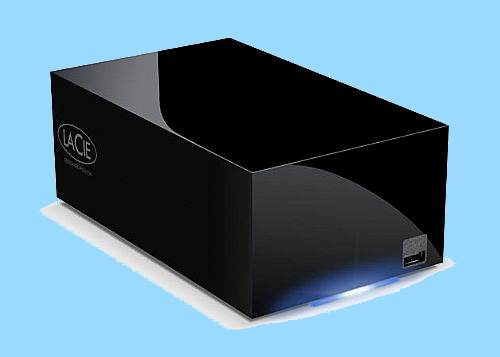
Chip- Never underestimate the ability of a USB backup drive to slow file backups way down. I have two 1 TB Western Digital drives I use for backpup and neither one can muster a transfer rate of over much over 25 MBps over the USB interface! This is one of the main reasons why for just $40 more than the WD dirve cost I recently purchased a LaCie Hard Disk MAX 2TB Quadra eSATA Raid 0 Drive...

LaCie-1.png


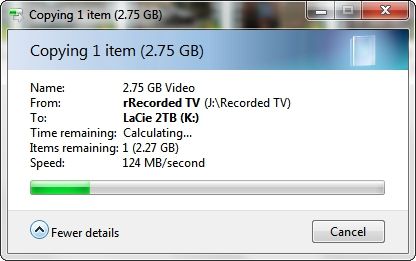
Using the eSATA interface backups now take a fraction of the time that they used to at transfer speeds in excess of 100 MBps...

124MBps.jpg


~Maxx~

LacieLogo_55.png
 

My Computer My Computer

Computer Manufacturer/Model Number
HP HPE 270f
OS
Windows 7 x64 Home Premium
CPU
Intel Core i7 930 @ 2.8 Ghz Socket 1366 LGA
Motherboard
Pegatron Truckee v1.04E41
Memory
8 GB 1366 Mhz DDR3 (PC3-10700) RAM
Graphics Card(s)
ATI Radeon 5770 1 GB DDR5 RAM
Sound Card
Realtech High Definition
Monitor(s) Displays
32" Sony Bravia
Screen Resolution
1366 X 768
Hard Drives
Intel 25nm 120 GB Series 320 SSD HD Tune- 265 MBps Read/ 130 MBps Write

LaCie 1TB + 1TB RAID 0 eSATA Drive HD Tune- 160 MBps Read/ 90 MBps Write
Keyboard
Logitech Illuminated
Mouse
Logitech MX Revolution
Internet Speed
36.4 Mbps Maximum on a 37 Mbps Motorola SB501 Modem
As an amateur photographer I've been thinking a little more about this type of "backup" problem.
A lot depends on your photographic workflow. But I feel a two pronged solution may be called for. This is how I might do it:
(1) For mass archive backup. Break your photographic data into logical components' maybe date based. Keep more than one image on more than one HDD. I'd also be looking at incremental imaging.
(2) For work in progress I could use synchonised backup. If your a pro photographer you would be spending hours maybe editing image layers in Photoshop. Synchronization and very regular (more than once a day) backing up would be a good idea. For a wedding assignment, a bride hates bad news. Once the assignment is complete it can be added to the image archive. Have a look at SyncToy.
 
Last edited:

My Computer My Computer

Computer type
PC/Desktop
Computer Manufacturer/Model Number
Own build
OS
Windows 7x64 Home Premium SP1
CPU
Intel i7 2600k
Motherboard
ASUS P8Z68 Deluxe
Memory
G.Skill Ripjaws (DDR3-1600) 2x4GB
Graphics Card(s)
Nvidia GeForce GTS 450; Intel HD Graphics 3000(GT2+)
Monitor(s) Displays
Dell Ultrasharp IPS panel U2311H, Samsung SyncMaster P2350
Screen Resolution
1920x1080
Hard Drives
Samsung 850 Pro SSD 256GB, Samsung SSD 840 120GB, Seagates 1TB Barracuda ST31000528AS x2
PSU
Seasonic M12II 520W
Case
Lian Li Lancool PC-K60
Cooling
Case: 1x120mm, 3x140mm CPU: Hyper 212+
Keyboard
Logitech MK520 (wireless)
Mouse
Logitech MK520
Internet Speed
6-7 Mbps
Antivirus
Norton Security Premium, Malwarebytes on 2 (MSE on 3rd PC)
Browser
FireFox
Other Info
Audio: Logitech Z523 2.1
Back
Top