windows backup

indecisi0n

New member
Local time
2:56 PM
Messages
18
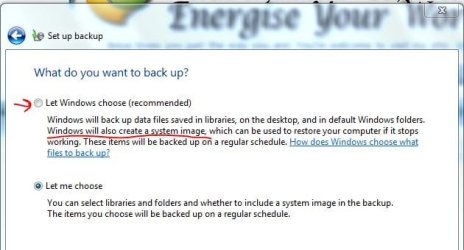
Just curious. When windows does it scheduled backup does it also update (recapture) a new system image each time?
 

My Computer My Computer

At a glance

Windows 7 64 ProfessionalIntel i7-930 4Ghz 1.23V / Corsair H-70 push/pull
OS
Windows 7 64 Professional
CPU
Intel i7-930 4Ghz 1.23V / Corsair H-70 push/pull
Motherboard
Gigabyte X58A-UD3R rev2.0
Hello mate.


You may have better success using Macrium and be sure to create the Macrium boot disk.


My Computer My Computer

At a glance

W 7 64-bit UltimateIntel Q9550 Yorkfield8GB Dominator 8500C5DATI : XFX 5870
Computer Manufacturer/Model Number
* BFK Customs *
OS
W 7 64-bit Ultimate
CPU
Intel Q9550 Yorkfield
Motherboard
ASUS P5Q Pro
Memory
8GB Dominator 8500C5D
Graphics Card(s)
ATI : XFX 5870
Sound Card
Realtek HD Audio 7-1
Monitor(s) Displays
1x 47" LCD HDMI & 3x 26" LCD HDMI
Screen Resolution
1920x1080P & 1920x1200
Hard Drives
1x 80GB Intel X25-M G2 SSD : 1x 500GB & 1x 640GB WD Caviar Black(s)
PSU
Corsair 620HX
Case
Cooler Master RC-690
Cooling
Tuniq Tower 120, 2x 140mm and 3x 120mm case fans
Keyboard
Microsoft 500
Mouse
Razer Diamondback 3G
Internet Speed
14 Mb/s
Other Info
1x Koutech 3Gb/s SATA HDD Hot Swap Rack
I have always used win7 backup and never had an issue. I have restored it a few times with great success. I was just curious if it updated the image when it does the "backup" of my files.
 

My Computer My Computer

At a glance

Windows 7 64 ProfessionalIntel i7-930 4Ghz 1.23V / Corsair H-70 push/pull
OS
Windows 7 64 Professional
CPU
Intel i7-930 4Ghz 1.23V / Corsair H-70 push/pull
Motherboard
Gigabyte X58A-UD3R rev2.0
Hello Indecici0n,

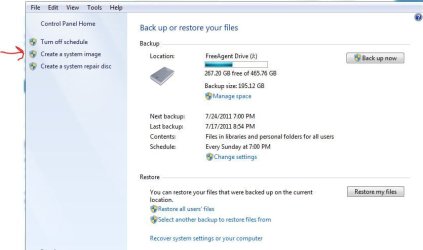
If you only created a system image, then it will not run on a schedule. Instead you will have to manually create a new image when you want to have an updated one.

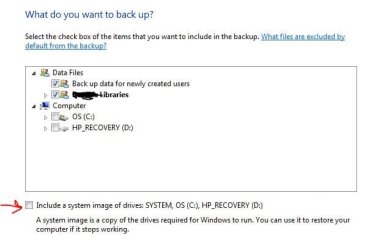
To have a system image created on a schedule along with a separate backup of your files, then you would need to create a backup using the tutorial below with the option to include a system image (step 9) and the schedule set (steps 12-13) to how often you want them created.

http://www.sevenforums.com/tutorials/615-backup-user-system-files.html

Hope this helps,
Shawn
 

My Computer My Computer

At a glance

64-bit Windows 11 Pro for WorkstationsIntel i7-8700K OC'd to 5 GHz64 GB (4x16GB) G.SKILL TridentZ RGB DDR4 3600...ASUS ROG-STRIX-GTX1080TI-O11G-GAMING
Computer type
PC/Desktop
Computer Manufacturer/Model Number
Self built custom
OS
64-bit Windows 11 Pro for Workstations
CPU
Intel i7-8700K OC'd to 5 GHz
Motherboard
ASUS ROG Maximus XI Formula Z390
Memory
64 GB (4x16GB) G.SKILL TridentZ RGB DDR4 3600 MHz
Graphics Card(s)
ASUS ROG-STRIX-GTX1080TI-O11G-GAMING
Sound Card
Integrated
Monitor(s) Displays
2 x Samsung Odyssey G7 27"
Screen Resolution
2560x1440
Hard Drives
1TB Samsung 990 PRO M.2,
4TB Samsung 990 PRO PRO M.2,
TerraMaster F8 SSD Plus NAS
PSU
Seasonic Prime Titanium 850W
Case
Thermaltake Core P3
Cooling
Corsair Hydro H115i
Keyboard
Logitech wireless K800
Mouse
Logitech MX Master 4
Internet Speed
2 Gb/s Download and 100 Mb/s Upload
Antivirus
Malwarebyte Anti-Malware Premium
Browser
Google Chrome
Other Info
Logitech Z625 speaker system,
Logitech BRIO 4K Pro webcam,
HP Color LaserJet Pro MFP M477fdn,
APC SMART-UPS RT 1000 XL - SURT1000XLI,
Galaxy S23 Plus phone
I have always used win7 backup and never had an issue. I have restored it a few times with great success. I was just curious if it updated the image when it does the "backup" of my files.

Depends on how you have it set. If you are using the default setting yes it should be creating a system image. If you have it set custom it may not. For Sys Image I chose not to to have it set to automatic. I manually do it when necessary.
 

Attachments

  • br1.JPG
    br1.JPG
    34.5 KB · Views: 4
  • br2.JPG
    br2.JPG
    29.5 KB · Views: 2
  • br3.JPG
    br3.JPG
    41.5 KB · Views: 3

My Computer My Computer

At a glance

Win 7 Home Premium x64Intel Core i3-540 3.07 GHz4 GB (2 X 2) Dual-Channel PC-10600 DDR3 @ 665...Integrated Intel H57
Computer Manufacturer/Model Number
HP p6608f
OS
Win 7 Home Premium x64
CPU
Intel Core i3-540 3.07 GHz
Motherboard
MS-7613 (Iona-GL8E)
Memory
4 GB (2 X 2) Dual-Channel PC-10600 DDR3 @ 665MHz (9-9-9-24)
Graphics Card(s)
Integrated Intel H57
Sound Card
Integrated Realtek ALC888S Audio
Monitor(s) Displays
17" SDM-HS73 (a vestige from my old computer)
Screen Resolution
1280 X 1024
Hard Drives
750GB SATA 7200 RPM
PSU
250W
Keyboard
HP USB keyboard
Mouse
HP USB optical mouse
Internet Speed
15Mbps/1Mbps
Back
Top