
Windows Boot Manager on Startup

Stryde

New member
Local time
4:34 PM
Messages
10
Hey everyone,

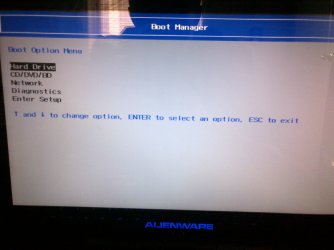
So this has always happened with my laptop, but only recently started getting annoying, whenever i boot up my computer, before anything loads, the "windows boot manager" opens up. And its not the black one, its the one that is White, Grey, and Blue. That goes like this.
Hardrive
Windows diagnostics
cd drive
Network
And so on, so i enter on hardrive, then a loud beeping sound starts to go off (doesnt always happen, usually not when i use my computer on a daily basis, but if i dont for a bit then it will) and the screen becomes black with a blinking white hyphon at the top right corner, as if it was loading something, then once the really loud, annoying beeping stops, the windows startup screen opens,
Windows 7
Windows setup
and so on, I recently fixed that, and now i only have the original blue/grey one that opens on startup. But still after i click hardrive, the sound goes off automatically now, and its really annoying and embarrassing to use in public. Usually what i do is i either wait for it to stop and load, or if it has been going on for a long time then i restart the computer. Anyways, i have my specs filled in, and i would really appreciate some help. when i first got my laptop, Alienware replaced my motherboard because it had something messed up. But this problem has been happenening before and after the replacement.

Thanks in advance. -Stryde

Edit: So that is the screen i get when i first turn on my computer after the "loading" part of the computer, which only takes a few seconds, and the second one is of the settings in the setup, if that helps.
 

Attachments
  • IMG-20130918-00743.jpg
    IMG-20130918-00743.jpg
    428.5 KB · Views: 0
  • IMG-20130918-00744.jpg
    IMG-20130918-00744.jpg
    399.3 KB · Views: 0
Last edited:

My Computer

Computer type
Laptop
Computer Manufacturer/Model Number
Alienware
OS
Microsoft Windows 7 Home Premium 64-bit 7601 Multiprocessor Free Service Pack 1
CPU
Intel(R) Core(TM) i7-2760QM CPU @ 2.40GHz
Motherboard
Alienware M14xR1
Memory
Total: 8.00 GB Usable: 7.95 GB
Graphics Card(s)
(1) NVIDIA GeForce GT 555M (2) Intel(R) HD Graphics 300
Sound Card
(1) High Definition Audio Device (2) Intel(R) Display Audi
Screen Resolution
1600 x 900 x 32bits
Antivirus
Microsoft Essentials
Browser
Google Chrome

My Computer

Computer type
PC/Desktop
Computer Manufacturer/Model Number
Home Built Desktop By DataTech
OS
Windows 7 Ultimate X64 SP1
CPU
Intel i5-2550K, Differing ~4.4-4.8GHz No built in GPU
Motherboard
ASUS P8Z68-V PRO/GEN3
Memory
16GB G.Skill Sniper 1866MHz @ 2133MHz 2x8GB
Graphics Card(s)
ASUS GTX650TIB-DC2OC-2GD5, (650TI Boost)
Sound Card
Onboard Realtek 5-1
Monitor(s) Displays
Samsung P2570HD
Screen Resolution
1920x1080
Hard Drives
Samsung 840 Pro 256GB SSD for OS, 500GB Seagate Constellation (Enterprise drive) for Data
PSU
Corsair HX650W
Case
Inwin Dragon Rider
Cooling
Hyper 212 EVO w/two Noctua fans, push-pull, @1300 RPM
Keyboard
E-Z Eyes, bright yellow keys with large characters
Mouse
steelseries SENSEI Laser Pro Gaming
Internet Speed
48-51Mbs Mbs down, 11 Mbs up Xfinity Cable
Antivirus
Norton Internet Security 2013
Browser
IE 10, Opera, Pale Moon if needed
Other Info
4 case fans, LG BluRay-RE, ASUS DVD-RW, Mr. Fusion power supply, 1.21 gigawatts.
Enter BIOS setup to reset to Defaults, taking note of the SATA controller setting: Clear CMOS - 3 Ways to Clear the CMOS - Reset BIOS.

If the beeping continues, you'll need to look up the mobo to search for the meaning of it's beep codes. It should not beep except when giving dire warnings about RAM, mobo or other failure.

Finally, is this the original Dell factory preinstall as that is the worst possible install one can have, which is why most tech enthusiasts would never run such an install but instead choose to Clean Reinstall - Factory OEM Windows 7.

Just be sure to reset the BIOS to defaults beforehand. And if this is an EFI BIOS, you'll need the special steps in UEFI (Unified Extensible Firmware Interface) - Install Windows 7 with - Windows 7 Forums or to Bypass UEFI to Install WIn7
 
No offense, but if it has had the issue since new and after a repair attempt, why not take it back for a new machine?
Can you take a pic of the blue and gray screen you speak of?

This is the preferred, best way to upload an image to a post.
http://www.sevenforums.com/tutorials/9733-screenshots-files-upload-post-seven-forums.html#post93869
You may also upload a photo or image as you would a file, without using the Snipping tool.

I would have asked for a new one, although i bought this laptop manufacturer refurbished off of ebay.
 

My Computer

Computer type
Laptop
Computer Manufacturer/Model Number
Alienware
OS
Microsoft Windows 7 Home Premium 64-bit 7601 Multiprocessor Free Service Pack 1
CPU
Intel(R) Core(TM) i7-2760QM CPU @ 2.40GHz
Motherboard
Alienware M14xR1
Memory
Total: 8.00 GB Usable: 7.95 GB
Graphics Card(s)
(1) NVIDIA GeForce GT 555M (2) Intel(R) HD Graphics 300
Sound Card
(1) High Definition Audio Device (2) Intel(R) Display Audi
Screen Resolution
1600 x 900 x 32bits
Antivirus
Microsoft Essentials
Browser
Google Chrome
Enter BIOS setup to reset to Defaults, taking note of the SATA controller setting: Clear CMOS - 3 Ways to Clear the CMOS - Reset BIOS.

If the beeping continues, you'll need to look up the mobo to search for the meaning of it's beep codes. It should not beep except when giving dire warnings about RAM, mobo or other failure.

Finally, is this the original Dell factory preinstall as that is the worst possible install one can have, which is why most tech enthusiasts would never run such an install but instead choose to Clean Reinstall - Factory OEM Windows 7.

Just be sure to reset the BIOS to defaults beforehand. And if this is an EFI BIOS, you'll need the special steps in UEFI (Unified Extensible Firmware Interface) - Install Windows 7 with - Windows 7 Forums or to Bypass UEFI to Install WIn7

Thanks alot for the reply, and i have tried to reset to defaults already, and still no change, although I dont really understand the 2nd and third part very well because i am not very tech savvy as you can imagine i am only 15.
 

My Computer

Computer type
Laptop
Computer Manufacturer/Model Number
Alienware
OS
Microsoft Windows 7 Home Premium 64-bit 7601 Multiprocessor Free Service Pack 1
CPU
Intel(R) Core(TM) i7-2760QM CPU @ 2.40GHz
Motherboard
Alienware M14xR1
Memory
Total: 8.00 GB Usable: 7.95 GB
Graphics Card(s)
(1) NVIDIA GeForce GT 555M (2) Intel(R) HD Graphics 300
Sound Card
(1) High Definition Audio Device (2) Intel(R) Display Audi
Screen Resolution
1600 x 900 x 32bits
Antivirus
Microsoft Essentials
Browser
Google Chrome
How are you doing on the pic requested by Gary (Britton30) of this Windows Boot Manager you describe? He showed you how to attach pics after saving : Screenshots and Files - Upload and Post in Seven Forums

There may be a setting in BIOS setup to hide that menu which sounds like a BIOS popup at boot. It might be under Quick Boot. Post back a camera snap of those choices too, or you can type them out for us, including each sub-choice when you choose the setting.
 
How are you doing on the pic requested by Gary (Britton30) of this Windows Boot Manager you describe? He showed you how to attach pics after saving : Screenshots and Files - Upload and Post in Seven Forums

There may be a setting in BIOS setup to hide that menu which sounds like a BIOS popup at boot. It might be under Quick Boot. Post back a camera snap of those choices too, or you can type them out for us, including each sub-choice when you choose the setting.

on it
 

My Computer

Computer type
Laptop
Computer Manufacturer/Model Number
Alienware
OS
Microsoft Windows 7 Home Premium 64-bit 7601 Multiprocessor Free Service Pack 1
CPU
Intel(R) Core(TM) i7-2760QM CPU @ 2.40GHz
Motherboard
Alienware M14xR1
Memory
Total: 8.00 GB Usable: 7.95 GB
Graphics Card(s)
(1) NVIDIA GeForce GT 555M (2) Intel(R) HD Graphics 300
Sound Card
(1) High Definition Audio Device (2) Intel(R) Display Audi
Screen Resolution
1600 x 900 x 32bits
Antivirus
Microsoft Essentials
Browser
Google Chrome
I understand you bought the PC off of eBay but you told Gary that Alienware replaced your mobo, meaning they have warranteed it to some extent, and that the result of this is the loud beeping when you boot the HD. This is something that they would be expected under all circumstances to correct and make good. So I would first contact them to explain what has resulted for you from their "repairs."

We have a top Dell representative in residence here SanDeep so I'll have him check in so we can help get them on it for you.
 
Thanks so much, but I checked and my warranty has now expired, I know it was a really stupid thing of me to do, and I should have done it earlier, but I was busy with school and all, anyways i really appreciate the help so im happy to keep cracking at it.
 

My Computer

Computer type
Laptop
Computer Manufacturer/Model Number
Alienware
OS
Microsoft Windows 7 Home Premium 64-bit 7601 Multiprocessor Free Service Pack 1
CPU
Intel(R) Core(TM) i7-2760QM CPU @ 2.40GHz
Motherboard
Alienware M14xR1
Memory
Total: 8.00 GB Usable: 7.95 GB
Graphics Card(s)
(1) NVIDIA GeForce GT 555M (2) Intel(R) HD Graphics 300
Sound Card
(1) High Definition Audio Device (2) Intel(R) Display Audi
Screen Resolution
1600 x 900 x 32bits
Antivirus
Microsoft Essentials
Browser
Google Chrome
Thanks so much, but I checked and my warranty has now expired, I know it was a really stupid thing of me to do, and I should have done it earlier, but I was busy with school and all, anyways i really appreciate the help so im happy to keep cracking at it.


Hi Stryde,

Greg asked me to check in this post. Apologies for missing this post earlier. First things first system should not go to boot manager prior to windows load untill and unless you press F12 key on the keyboard.

So please check if F12 key is stuck or keep getting pressed on the system. You can check your keyboard by simply checking this easy and useful tester:

Keyboard Tester

If you still wish to isolate then disconnect the keyboard from the system and try to boot the system. Check this manual link below for the same:

Manual

Lastly, if keyboard is fine and system still playing up you should try updating the BIOS from the link below:

BIOS

Keep us posted with the results so we can advise you further.
 

My Computer

Computer type
PC/Desktop
OS
Winndows 7 32 bit
I understand you bought the PC off of eBay but you told Gary that Alienware replaced your mobo, meaning they have warranteed it to some extent, and that the result of this is the loud beeping when you boot the HD. This is something that they would be expected under all circumstances to correct and make good. So I would first contact them to explain what has resulted for you from their "repairs."

We have a top Dell representative in residence here SanDeep so I'll have him check in so we can help get them on it for you.

Hi Greg,

Thanks for your kind words. I am really honored. And yes we do provide atleast 1 year of warranty on all the systems whether they are new or refurbished.

I wish OP would have contacted us within warranty we would have surely dealt with it without much hassles for him.
 

My Computer

Computer type
PC/Desktop
OS
Winndows 7 32 bit
Thanks so much, but I checked and my warranty has now expired, I know it was a really stupid thing of me to do, and I should have done it earlier, but I was busy with school and all, anyways i really appreciate the help so im happy to keep cracking at it.


Hi Stryde,

Greg asked me to check in this post. Apologies for missing this post earlier. First things first system should not go to boot manager prior to windows load untill and unless you press F12 key on the keyboard.

So please check if F12 key is stuck or keep getting pressed on the system. You can check your keyboard by simply checking this easy and useful tester:

Keyboard Tester

If you still wish to isolate then disconnect the keyboard from the system and try to boot the system. Check this manual link below for the same:

Manual

Lastly, if keyboard is fine and system still playing up you should try updating the BIOS from the link below:

BIOS

Keep us posted with the results so we can advise you further.

Thanks alot, So i checked my keyboard, and no matter how many times i press f12, it does not go, since i have an alienware, the f12 key still lights up, and there are no obvious signs of it being broken. I currently have an m11x laptop. Thanks, wait a minute, this is really weird, I am looking at the parts and they say alienware m14x, but the little metal plate on the underneath of my laptop says m11x. Weird.
 

My Computer

Computer type
Laptop
Computer Manufacturer/Model Number
Alienware
OS
Microsoft Windows 7 Home Premium 64-bit 7601 Multiprocessor Free Service Pack 1
CPU
Intel(R) Core(TM) i7-2760QM CPU @ 2.40GHz
Motherboard
Alienware M14xR1
Memory
Total: 8.00 GB Usable: 7.95 GB
Graphics Card(s)
(1) NVIDIA GeForce GT 555M (2) Intel(R) HD Graphics 300
Sound Card
(1) High Definition Audio Device (2) Intel(R) Display Audi
Screen Resolution
1600 x 900 x 32bits
Antivirus
Microsoft Essentials
Browser
Google Chrome
What exactly happens when you choose in BIOS setup to Reset to Defaults? Check the SATA controller setting first to make note of it.

I'd also asked you to check for a Quick Boot setting in BIOS. If you did not find this, please post back some snaps of all of your BIOS tabs showing their choices. The popup is clearly a BIOS Boot menu so there should be a way to suppress it in a setting or by resetting to defaults. Clear CMOS - 3 Ways to Clear the CMOS - Reset BIOS

Run Belarc Advisor to find out your mobo model so we can search for the beep codes. Compare the BIOS version it shows to the latest on the Dell Support Downloads webpage for your tag number.

Have you tested your RAM yet? I'd do that next booting memtest CD for 5-6 passes or overnight. RAM - Test with Memtest86+
 
Thanks so much, but I checked and my warranty has now expired, I know it was a really stupid thing of me to do, and I should have done it earlier, but I was busy with school and all, anyways i really appreciate the help so im happy to keep cracking at it.


Hi Stryde,

Greg asked me to check in this post. Apologies for missing this post earlier. First things first system should not go to boot manager prior to windows load untill and unless you press F12 key on the keyboard.

So please check if F12 key is stuck or keep getting pressed on the system. You can check your keyboard by simply checking this easy and useful tester:

Keyboard Tester

If you still wish to isolate then disconnect the keyboard from the system and try to boot the system. Check this manual link below for the same:

Manual

Lastly, if keyboard is fine and system still playing up you should try updating the BIOS from the link below:

BIOS

Keep us posted with the results so we can advise you further.

Thanks alot, So i checked my keyboard, and no matter how many times i press f12, it does not go, since i have an alienware, the f12 key still lights up, and there are no obvious signs of it being broken. I currently have an m11x laptop. Thanks, wait a minute, this is really weird, I am looking at the parts and they say alienware m14x, but the little metal plate on the underneath of my laptop says m11x. Weird.


Hi Stryde,

Thanks for your reply. It would be a M14x as I checked there is no boot manager option in the M11x. However, in both the systems if you press F12 it should take you to the one time boot menu/boot manager.

It seem to me an issue with the keyboard which is taking you to the boot manager. However, before disconnecting the keyboard you should first update the BIOS from the link below:

BIOS update

Also, did you manage to check the keyboard test as advised in the first post.

Greg: Just check there are no quick boot setting under this BIOS.

Keep us posted with the results so we can advise you further.
 

My Computer

Computer type
PC/Desktop
OS
Winndows 7 32 bit
sorry for the late reply, i have been very busy lately with school and all, but i have tried updating my bios, and it is already up to date, although since i have a laptop, i do not know how to "unplug" the keyboard. And for the keyboard tester, every button works, but i would have to press f12 atleast a couple extra times significantly harder then the others, which is why i think it is broken, again sorry if you have lost interest in this case, i understand, thanks.
 

My Computer

Computer type
Laptop
Computer Manufacturer/Model Number
Alienware
OS
Microsoft Windows 7 Home Premium 64-bit 7601 Multiprocessor Free Service Pack 1
CPU
Intel(R) Core(TM) i7-2760QM CPU @ 2.40GHz
Motherboard
Alienware M14xR1
Memory
Total: 8.00 GB Usable: 7.95 GB
Graphics Card(s)
(1) NVIDIA GeForce GT 555M (2) Intel(R) HD Graphics 300
Sound Card
(1) High Definition Audio Device (2) Intel(R) Display Audi
Screen Resolution
1600 x 900 x 32bits
Antivirus
Microsoft Essentials
Browser
Google Chrome
sorry for the late reply, i have been very busy lately with school and all, but i have tried updating my bios, and it is already up to date, although since i have a laptop, i do not know how to "unplug" the keyboard. And for the keyboard tester, every button works, but i would have to press f12 atleast a couple extra times significantly harder then the others, which is why i think it is broken, again sorry if you have lost interest in this case, i understand, thanks.

Hi Stryde,

Thanks for your reply. Great to hear we found out that F12 key is what should be the most probable cause of this issue.

It would be better we go ahead and replace the keyboard to check and resolve this issue. If the system is under warranty then please contact me through a private message and provide me your service tag and contact information so I may access your system records.

And, if the system is out of warranty then you contact our Expired Warranty Support at the link below:

http://dell.to/12LmNBq

If you have any further queries please feel free to contact us.
 

My Computer

Computer type
PC/Desktop
OS
Winndows 7 32 bit
Back
Top