Solved Windows (C) does not show as System ???

BuckSkin

New member
Power User
VIP
Local time
4:33 PM
Messages
521
I am following this tutorial:

Dual Boot - Windows 7 and Linux - Windows 7 Help Forums

I have successfully used EasyBCD a few times before; however, this time I hit a snag.

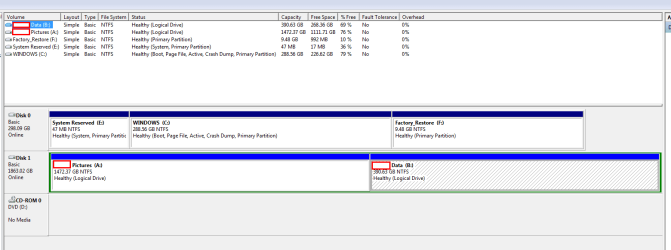
I could not say for certain whether it was like this prior to using EasyBCD, but this is what shows in disk management now:

47 MB System Reserved (E) (System, Primary Partition)

WINDOWS (C) (Boot, Page File, Active, Crash Dump, Primary Partition)

Also, I had to manually mark WINDOWS as Active after EasyBCD.

I am afraid to proceed farther until I have this resolved.

Should I use EasyBCD to revert back to where I started and then try again ?

How do I make the Windows partition show as System ?

Thanks for reading.
 

My Computer

Computer type
PC/Desktop
Computer Manufacturer/Model Number
Dell Optiplex 780m "mini-tower"
OS
Windows 7 Pro x64
CPU
Intel Core Two Duo E8600 3.33 ghz
Motherboard
Whatever DELL put in it
Memory
8GB
Graphics Card(s)
Gigabyte Radeon R7 240
Monitor(s) Displays
HP 2159m
PSU
750 Watt Corsair CX750
Keyboard
Logitech Wireless
Mouse
Logitech Wireless
Browser
Chrome, Firefox, IE
On OEM computers, the 47 MB System Reserved partition has the boot loader and the program to do the Factory restore, so it normally is set to Active. Why it has a letter on it (E: )?

I didn't understand your problem? Did you successfully installed a Linux?
When you install Linux on a MBR disk, it will transfer the boot sequence to a Master boot loader (Grub) that will have an option to boot Windows.
Please explain the problems you're having.
I would like to see a full screen - and not a truncated - Windows Disk Management as per this tutorial Disk Management - Post a Screen Capture Image - Windows 7 Help Forums
 

My Computers

System One System Two

  • Computer type
    PC/Desktop
    Computer Manufacturer/Model Number
    custom build
    OS
    Windows 7 HP 64
    CPU
    i5 6600K - 800MHz to 4200MHz
    Motherboard
    GA-Z170-HD3P
    Memory
    4+4G GSkill DDR4 3000
    Graphics Card(s)
    IG - Intel 530
    Monitor(s) Displays
    Samsung 226BW
    Screen Resolution
    1680x1050
    Hard Drives
    (1) -1 SM951 – 128GB M.2 AHCI PCIe SSD drive for Windows 7 and Lubuntu
    (2) -1 WD SATA 3 - 1T for Data
    (3) -1 WD SATA 3 - 1T for backup
    PSU
    Thermaltake 450W TR2 gold
    Keyboard
    Old and good Chicony mechanical keyboard
    Mouse
    Logitech mX performance - 9 buttons (had to disable some)
    Internet Speed
    500Mb/s
    Browser
    Firefox 64
    Other Info
    TinyWall firewall
  • Computer type
    Laptop
    System Manufacturer/Model Number
    Asus Q550LF
    OS
    Windows 7 Pro
    CPU
    i7-4500U 800MHz to 3.0GHz
    Motherboard
    Asus Q550LF
    Memory
    (4+4)G DDR3 1600
    Graphics Card(s)
    IG intel 4400 + NVIDIA GeForce GT 745M
    Sound Card
    Realtek
    Monitor(s) Displays
    LG Display LP156WF4-SPH1
    Screen Resolution
    1920 x 1080
    Hard Drives
    BX500 120G SSD for Windows and programs +
    1T HDD for data
    Internet Speed
    500 Mb/s
    Browser
    Firefox
    Other Info
    TinyWall firewall
On OEM computers, the 47 MB System Reserved partition has the boot loader and the program to do the Factory restore, so it normally is set to Active. Why it has a letter on it (E: )?

I didn't understand your problem? Did you successfully installed a Linux?
When you install Linux on a MBR disk, it will transfer the boot sequence to a Master boot loader (Grub) that will have an option to boot Windows.
Please explain the problems you're having.
I would like to see a full screen - and not a truncated - Windows Disk Management as per this tutorial Disk Management - Post a Screen Capture Image - Windows 7 Help Forums


I have not gotten to the step where I install Zorin OS.

Following the tutorial I linked to, one of the earliest steps is to use EasyBCD to relocate the Boot to the WINDOWS (C) partition, and, once it is safely there and reads like shown --- WINDOWS (C) (System, Boot, Page File, Active, Crash Dump,Primary Partition), then you proceed to the next step.

C-DELL_DscMgmt_05-Dec-2017.png

When I investigated disk management after the EasyBCD operation, instead of things looking like they should, I have System Reserved (E) labeled as (System, Primary Partition) and the Windows partition IS NOT labeled as System.
Neither was it labeled as Active until I manually changed it to Active.

As for the System Reserved being Drive (E), I do not know why; there are four Windows 7 machines sitting here, two HPs and two Dells, and all four of them have System Reserved (E) Drive.

I did not wish to proceed farther until I got the Windows partition labeled as System like it should be.

I am afraid if I try a restart that it may not boot in this condition.


I have read probably fifty articles on dual-booting Windows and Zorin OS and no two of them follow the same procedure.

Thanks for helping.
 

My Computer

Computer type
PC/Desktop
Computer Manufacturer/Model Number
Dell Optiplex 780m "mini-tower"
OS
Windows 7 Pro x64
CPU
Intel Core Two Duo E8600 3.33 ghz
Motherboard
Whatever DELL put in it
Memory
8GB
Graphics Card(s)
Gigabyte Radeon R7 240
Monitor(s) Displays
HP 2159m
PSU
750 Watt Corsair CX750
Keyboard
Logitech Wireless
Mouse
Logitech Wireless
Browser
Chrome, Firefox, IE
As I wrote on previous post, the boot loader is on System Reserved partition and is Set as System correctly. I'm not sure but I think is should also be set as active. Was E: active before you set it to C:?
 

My Computers

System One System Two

  • Computer type
    PC/Desktop
    Computer Manufacturer/Model Number
    custom build
    OS
    Windows 7 HP 64
    CPU
    i5 6600K - 800MHz to 4200MHz
    Motherboard
    GA-Z170-HD3P
    Memory
    4+4G GSkill DDR4 3000
    Graphics Card(s)
    IG - Intel 530
    Monitor(s) Displays
    Samsung 226BW
    Screen Resolution
    1680x1050
    Hard Drives
    (1) -1 SM951 – 128GB M.2 AHCI PCIe SSD drive for Windows 7 and Lubuntu
    (2) -1 WD SATA 3 - 1T for Data
    (3) -1 WD SATA 3 - 1T for backup
    PSU
    Thermaltake 450W TR2 gold
    Keyboard
    Old and good Chicony mechanical keyboard
    Mouse
    Logitech mX performance - 9 buttons (had to disable some)
    Internet Speed
    500Mb/s
    Browser
    Firefox 64
    Other Info
    TinyWall firewall
  • Computer type
    Laptop
    System Manufacturer/Model Number
    Asus Q550LF
    OS
    Windows 7 Pro
    CPU
    i7-4500U 800MHz to 3.0GHz
    Motherboard
    Asus Q550LF
    Memory
    (4+4)G DDR3 1600
    Graphics Card(s)
    IG intel 4400 + NVIDIA GeForce GT 745M
    Sound Card
    Realtek
    Monitor(s) Displays
    LG Display LP156WF4-SPH1
    Screen Resolution
    1920 x 1080
    Hard Drives
    BX500 120G SSD for Windows and programs +
    1T HDD for data
    Internet Speed
    500 Mb/s
    Browser
    Firefox
    Other Info
    TinyWall firewall
As I wrote on previous post, the boot loader is on System Reserved partition and is Set as System correctly. I'm not sure but I think is should also be set as active. Was E: active before you set it to C:?

I think so.

Here is a screen shot of what EasyBCD says:

C-DELL_EasyBCD_05-Dec-2017.png
 

My Computer

Computer type
PC/Desktop
Computer Manufacturer/Model Number
Dell Optiplex 780m "mini-tower"
OS
Windows 7 Pro x64
CPU
Intel Core Two Duo E8600 3.33 ghz
Motherboard
Whatever DELL put in it
Memory
8GB
Graphics Card(s)
Gigabyte Radeon R7 240
Monitor(s) Displays
HP 2159m
PSU
750 Watt Corsair CX750
Keyboard
Logitech Wireless
Mouse
Logitech Wireless
Browser
Chrome, Firefox, IE
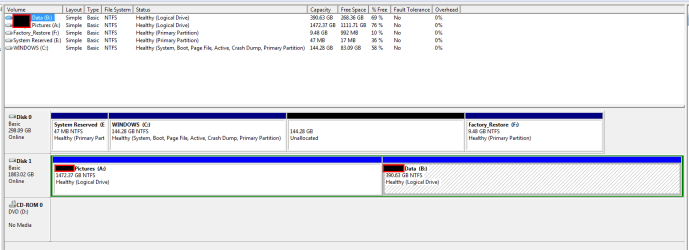
I was getting hung before I got to the hill; I decided I wasn't getting anywhere and I had this HDD backed up a dozen different ways, so I just went ahead and used EaseUS Partition Master to split the WINDOWS partition in half.
When EaseUS was finished rebooting and whatnot, a look in Disk Management showed me just what I was wanting to see.

C-DELL_DscMgmt_05-Dec-2017_02.png

I guess a restart was what was needed to put things to rights, but I was afraid if things weren't right that I would be swapping horses in the middle of the creek again.

I am not now so confused as I was; but don't rest too easy as I may be in trouble again several more times before bedtime.


I honestly appreciate how patient and understanding you guys always are with me; a couple years ago, I could barely make an Amazon purchase without help so I am slowly getting there.

Thanks so much for helping.
 

My Computer

Computer type
PC/Desktop
Computer Manufacturer/Model Number
Dell Optiplex 780m "mini-tower"
OS
Windows 7 Pro x64
CPU
Intel Core Two Duo E8600 3.33 ghz
Motherboard
Whatever DELL put in it
Memory
8GB
Graphics Card(s)
Gigabyte Radeon R7 240
Monitor(s) Displays
HP 2159m
PSU
750 Watt Corsair CX750
Keyboard
Logitech Wireless
Mouse
Logitech Wireless
Browser
Chrome, Firefox, IE
Did you successfully installed a Linux?


! ! ! I HAVE NOW ! ! !

I am posting from it at this very moment; ZorinOS 12.2 Core.

I had been wanting to do this for a long time and here I am !

Thanks everyone.
 

My Computer

Computer type
PC/Desktop
Computer Manufacturer/Model Number
Dell Optiplex 780m "mini-tower"
OS
Windows 7 Pro x64
CPU
Intel Core Two Duo E8600 3.33 ghz
Motherboard
Whatever DELL put in it
Memory
8GB
Graphics Card(s)
Gigabyte Radeon R7 240
Monitor(s) Displays
HP 2159m
PSU
750 Watt Corsair CX750
Keyboard
Logitech Wireless
Mouse
Logitech Wireless
Browser
Chrome, Firefox, IE
Back
Top