Solved "Windows can not automatically detect this network's proxy settings"

Korva

New member
Member
Local time
6:14 PM
Messages
32
"Windows can not automatically detect this network's proxy settings"

Problem description: Basically, I woke up this evening to a computer that could not access the internet. The diagnose tool came up with nothing, (despite the exclamation point over my connection in the toolbar) so I went into device manager and discovered a whole host of errors. 3 Microsoft ISATAP adapters and 8 WAN miniport devices along with my realtek card were under error 31 with a yellow exclamation point. I did an avast scan which found and deleted 2 bitcoin mining viruses, which was weird as I hadn't noticed anything untoward when I went to bed. After the attempted fixes below, (mostly the reinstal of my lan drivers) my realtek says it's working fine in device manager (the other 12 things are still under errors) but now when I diagnose my connection it says windows can't automatically detect my proxy settings. I did not set up any proxies.

Attempted fixes: Full system scan of avast, netsh commands in cmd, flushdns, reinstalling lan drivers, reinstalling chipset drivers, looked in both firefox and windows network/internet options to make sure that no proxies are enabled. None are. Can't do a system restore either as I seem to have only one restore point that doesn't work. In the properties of my adapter ICP 4 & 6 both have have obtain IP and DNS address automatically checked, in the advanced tab DHCP is enabled and automatic metric is checked.

Recent changes: No hardware changes recently.

--

Operating system: Windows 7 home premium 64 bit.

System specs: My motherboard is a MSI ZH77A-G43 with a Realtek lan.

I am at my wits end, please help. :(
 

My Computer My Computer

Computer type
PC/Desktop
Computer Manufacturer/Model Number
Custom
OS
Windows 7 Home Premium 64 bit
CPU
Intel I5
Motherboard
MSI ZH77A-G43
Memory
8 Gigs DDR3
Graphics Card(s)
nvidia 660ti
Hard Drives
60g SSD
500g vanilla
Antivirus
avast
Browser
firefox
Are the driver issue now resolved?

Have you reset the router?

Shutdown PC
Switch off router
Wait 10mins for cooling
Switch on Router
Wait 5mins for connecting ISP side
Switch on PC
 

My Computer My Computer

Computer type
PC/Desktop
Computer Manufacturer/Model Number
Self Build
OS
Windows 7 Ultimate x64
CPU
Intel Core2 Quad Q8300 2.5Ghz
Motherboard
Asus P5QD Turbo
Memory
Kingston HyperX 4x1GB DDR2 1066Mhz
Graphics Card(s)
Asus/Nvidia 9500GT 1GB
Sound Card
On-Board HD
Monitor(s) Displays
22" Widescreen TFT
Screen Resolution
1920x1080
Hard Drives
2x 320Gb Seagate SATAII RAID 0
2x 80Gb Seagate SATAII RAID 0
1x 1tb hybrid (8gb ssd)
PSU
650w
Case
ATX
Cooling
140mm front, 120mm Rear, 80mm Chipset + stock CPU and GPU
Keyboard
Plastic one
Mouse
Plastic one
Internet Speed
4Mbps
Other Info
Laptop: HP Elitebook 2560p
i5 @2.7Ghz 4GB DDR3
Sorry, I forgot to mention that I had reset the router as well like you mentioned. I still cannot access the internet, as my connection still has the exclmation point and says "Windows can not automatically detect this network's proxy settings" when I diagnose.
 

My Computer My Computer

Computer type
PC/Desktop
Computer Manufacturer/Model Number
Custom
OS
Windows 7 Home Premium 64 bit
CPU
Intel I5
Motherboard
MSI ZH77A-G43
Memory
8 Gigs DDR3
Graphics Card(s)
nvidia 660ti
Hard Drives
60g SSD
500g vanilla
Antivirus
avast
Browser
firefox
Are the hardware devices ok in the device manager?
 

My Computer My Computer

Computer type
PC/Desktop
Computer Manufacturer/Model Number
Self Build
OS
Windows 7 Ultimate x64
CPU
Intel Core2 Quad Q8300 2.5Ghz
Motherboard
Asus P5QD Turbo
Memory
Kingston HyperX 4x1GB DDR2 1066Mhz
Graphics Card(s)
Asus/Nvidia 9500GT 1GB
Sound Card
On-Board HD
Monitor(s) Displays
22" Widescreen TFT
Screen Resolution
1920x1080
Hard Drives
2x 320Gb Seagate SATAII RAID 0
2x 80Gb Seagate SATAII RAID 0
1x 1tb hybrid (8gb ssd)
PSU
650w
Case
ATX
Cooling
140mm front, 120mm Rear, 80mm Chipset + stock CPU and GPU
Keyboard
Plastic one
Mouse
Plastic one
Internet Speed
4Mbps
Other Info
Laptop: HP Elitebook 2560p
i5 @2.7Ghz 4GB DDR3
My realtek pcie gbe family controller shows up as having no issues (ie; device is working properly according to the device manager). I do however have several devices that show up with error code 31. These are the 8 WAN Miniport adapters (these are followed by a descriptor in brackets like IPV4 etc) and Microsoft ISATAP adapters 1-3.
 

My Computer My Computer

Computer type
PC/Desktop
Computer Manufacturer/Model Number
Custom
OS
Windows 7 Home Premium 64 bit
CPU
Intel I5
Motherboard
MSI ZH77A-G43
Memory
8 Gigs DDR3
Graphics Card(s)
nvidia 660ti
Hard Drives
60g SSD
500g vanilla
Antivirus
avast
Browser
firefox
Disable them (not un-install or they will just re-appear), they sound like viral drivers that have been added, I guess the system still is not clean.

Try Running MSE and MBAM (Microsoft Security Essentials and MalwareBytes anti Malware)

In "Internet Options" there is a checkbox for "Automatically detect network settings", Disable this and try again.
 

My Computer My Computer

Computer type
PC/Desktop
Computer Manufacturer/Model Number
Self Build
OS
Windows 7 Ultimate x64
CPU
Intel Core2 Quad Q8300 2.5Ghz
Motherboard
Asus P5QD Turbo
Memory
Kingston HyperX 4x1GB DDR2 1066Mhz
Graphics Card(s)
Asus/Nvidia 9500GT 1GB
Sound Card
On-Board HD
Monitor(s) Displays
22" Widescreen TFT
Screen Resolution
1920x1080
Hard Drives
2x 320Gb Seagate SATAII RAID 0
2x 80Gb Seagate SATAII RAID 0
1x 1tb hybrid (8gb ssd)
PSU
650w
Case
ATX
Cooling
140mm front, 120mm Rear, 80mm Chipset + stock CPU and GPU
Keyboard
Plastic one
Mouse
Plastic one
Internet Speed
4Mbps
Other Info
Laptop: HP Elitebook 2560p
i5 @2.7Ghz 4GB DDR3
Oh geez, I didn't even think that they'd be part of the virus that avast missed. I did disable them as I actually can't uninstall them anyways (it just does nothing it seems) but I will try Malwarebytes and have Microsoft securit essentials ready to go. I'll scan once I'm not stuck here at work and report back, thanks for the help and hopefully it works.
 

My Computer My Computer

Computer type
PC/Desktop
Computer Manufacturer/Model Number
Custom
OS
Windows 7 Home Premium 64 bit
CPU
Intel I5
Motherboard
MSI ZH77A-G43
Memory
8 Gigs DDR3
Graphics Card(s)
nvidia 660ti
Hard Drives
60g SSD
500g vanilla
Antivirus
avast
Browser
firefox
Well, Malwarebytes caught nothing and Microsoft security essentials found an (what appeared to be) and unrelated trojan which I promptly deleted. I also tried a couple of other things, TDSSKiller found the Sinowal rootkit which it took care of. I also tried the Malwarebytes anti rootkit and it found nothing.

Unchecking the Automatically detect network settings box stopped me from getting my proxy error when I diagnose, but I still can't access the internet in anyway. (diagnose says that troubleshooting couldn't identify the problem) My internet is otherwise fine, as I'm on the wireless right now with my laptop.
 

My Computer My Computer

Computer type
PC/Desktop
Computer Manufacturer/Model Number
Custom
OS
Windows 7 Home Premium 64 bit
CPU
Intel I5
Motherboard
MSI ZH77A-G43
Memory
8 Gigs DDR3
Graphics Card(s)
nvidia 660ti
Hard Drives
60g SSD
500g vanilla
Antivirus
avast
Browser
firefox
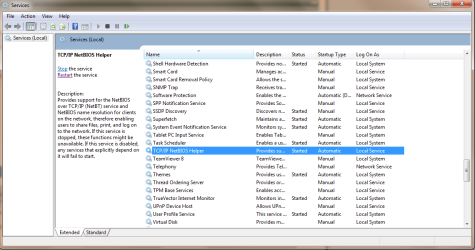
Double check this is a wired network?

run "Services.msc" (type into start menu)

Make sure the following are enabled as shown:

DHCP Client
DNS Client
IP Helper
Network Connections
Network List Service
Network Location Awareness
SSDP Discovery
TCPIP NetBIOS Helper
services.png
 

My Computer My Computer

Computer type
PC/Desktop
Computer Manufacturer/Model Number
Self Build
OS
Windows 7 Ultimate x64
CPU
Intel Core2 Quad Q8300 2.5Ghz
Motherboard
Asus P5QD Turbo
Memory
Kingston HyperX 4x1GB DDR2 1066Mhz
Graphics Card(s)
Asus/Nvidia 9500GT 1GB
Sound Card
On-Board HD
Monitor(s) Displays
22" Widescreen TFT
Screen Resolution
1920x1080
Hard Drives
2x 320Gb Seagate SATAII RAID 0
2x 80Gb Seagate SATAII RAID 0
1x 1tb hybrid (8gb ssd)
PSU
650w
Case
ATX
Cooling
140mm front, 120mm Rear, 80mm Chipset + stock CPU and GPU
Keyboard
Plastic one
Mouse
Plastic one
Internet Speed
4Mbps
Other Info
Laptop: HP Elitebook 2560p
i5 @2.7Ghz 4GB DDR3
RogueKiller for 32bit <==== Download Link

RogueKiller for 64bit <==== Download Link

:ar: Click on one of the links above that goes with your Windows 7 bit versions

:ar: Save to the Desktop.

:ar: Close all windows and browsers

:ar: Right click on
332trud.png
and choose
mawket.jpg


:ar: Press: SCAN

:ar: provide the RKreport.txt (Mode: Scan) in your reply.


2ytpm5u.png
Farbar Service Scanner

Click here :ar: Farbar Service Scanner to DOWNLOAD

Place file into your desktop

Place a check mark next to the following options

  • ⬜ Internet Services
  • ⬜ Windows Firewall
  • ⬜ System Restore
  • ⬜ Security Center
  • ⬜ Windows Update
  • ⬜ Windows Defender
Press the Scan button

Farbar Service Scanner will create a log, called FSS.txt, on the Desktop. Upload the FSS.txt with your reply
 

My Computer My Computer

Computer Manufacturer/Model Number
Custom Built
OS
Windows 7 Ultimate 32-Bit & Windows 7 Ultimate 64-Bit
CPU
Intel Core i7 CPU 950 @ 3.07GHz
Motherboard
ASUS P6T DELUXE V2
Memory
OCZ 6GB (3 x 2GB) 240-Pin DDR3 SDRAM DDR3 1600 OCZ3X1600R2
Graphics Card(s)
ATI Radeon HD 5700 Series
Sound Card
OnBoard
Hard Drives
WD6400AACS-00M3B0 (640GB SATA )
PSU
CORSAIR 850w
Case
NZXT LEXA
Cooling
Intel Stock Heatsink Fan
Keyboard
Microsoft Wireless Laser Keyboard 7000
Mouse
Microsoft Wireless Laser Mouse 7000
Sub Styler, all those services are stared and on automatic, and yes it is a wireless connection.

Vista King, here are the reports.

RogueKiller V8.6.3 _x64_ [Jul 17 2013] by Tigzy
mail : tigzyRK<at>gmail<dot>com
Feedback : Forum
Website : RogueKiller download
Blog : tigzy-RK

Operating System : Windows 7 (6.1.7601 Service Pack 1) 64 bits version
Started in : Normal mode
User : Valued Customer [Admin rights]
Mode : Scan -- Date : 07/23/2013 20:07:25
| ARK || FAK || MBR |

¤¤¤ Bad processes : 0 ¤¤¤

¤¤¤ Registry Entries : 7 ¤¤¤
[HJ POL] HKCU\[...]\System : DisableRegistryTools (0) -> FOUND
[HJ POL] HKLM\[...]\System : ConsentPromptBehaviorAdmin (0) -> FOUND
[HJ POL] HKLM\[...]\System : EnableLUA (0) -> FOUND
[HJ POL] HKLM\[...]\Wow6432Node\[...]\System : ConsentPromptBehaviorAdmin (0) -> FOUND
[HJ POL] HKLM\[...]\Wow6432Node\[...]\System : EnableLUA (0) -> FOUND
[HJ DESK] HKLM\[...]\NewStartPanel : {59031a47-3f72-44a7-89c5-5595fe6b30ee} (1) -> FOUND
[HJ DESK] HKLM\[...]\NewStartPanel : {20D04FE0-3AEA-1069-A2D8-08002B30309D} (1) -> FOUND

¤¤¤ Scheduled tasks : 0 ¤¤¤

¤¤¤ Startup Entries : 0 ¤¤¤

¤¤¤ Web browsers : 0 ¤¤¤

¤¤¤ Particular Files / Folders: ¤¤¤

¤¤¤ Driver : [NOT LOADED 0x0] ¤¤¤

¤¤¤ External Hives: ¤¤¤
-> D:\windows\system32\config\SYSTEM
C:\WINDOWS\system32
C:\Documents and Settings\admin\Start Menu\Programs\Startup
-> D:\windows\system32\config\SOFTWARE
C:\WINDOWS\system32
C:\Documents and Settings\admin\Start Menu\Programs\Startup
-> D:\windows\system32\config\SECURITY
C:\WINDOWS\system32
C:\Documents and Settings\admin\Start Menu\Programs\Startup
-> D:\windows\system32\config\SAM
C:\WINDOWS\system32
C:\Documents and Settings\admin\Start Menu\Programs\Startup
-> D:\windows\system32\config\DEFAULT
C:\WINDOWS\system32
C:\Documents and Settings\admin\Start Menu\Programs\Startup
-> D:\Documents and Settings\admin\NTUSER.DAT
C:\WINDOWS\system32
C:\Documents and Settings\admin\Start Menu\Programs\Startup
-> D:\Documents and Settings\Default User\NTUSER.DAT
C:\WINDOWS\system32
C:\Documents and Settings\Default User\Start Menu\Programs\Startup
-> D:\Documents and Settings\LocalService\NTUSER.DAT
C:\WINDOWS\system32
C:\Documents and Settings\LocalService\Start Menu\Programs\Startup
-> D:\Documents and Settings\NetworkService\NTUSER.DAT
C:\WINDOWS\system32
C:\Documents and Settings\NetworkService\Start Menu\Programs\Startup

¤¤¤ Infection : ¤¤¤

¤¤¤ HOSTS File: ¤¤¤
-->


¤¤¤ MBR Check: ¤¤¤

+++++ PhysicalDrive0: WDC WD5000AACS-00ZUB0 ATA Device +++++
--- User ---
[MBR] cd01f429b1a2a97a19156ebd24b54e47
[BSP] 74f95ecd75d6134fa92b92501358e137 : Windows XP MBR Code
Partition table:
0 - [ACTIVE] NTFS (0x07) [VISIBLE] Offset (sectors): 63 | Size: 476929 Mo
User = LL1 ... OK!
User = LL2 ... OK!

+++++ PhysicalDrive1: WDC WD5000AACS-00ZUB0 ATA Device +++++
--- User ---
[MBR] d50818d3848495abb9f986a95572b046
[BSP] f6e0f72e6d3cdee5da45a2d50cd7e7b7 : Windows 7/8 MBR Code
Partition table:
0 - [ACTIVE] NTFS (0x07) [VISIBLE] Offset (sectors): 2048 | Size: 100 Mo
1 - [XXXXXX] NTFS (0x07) [VISIBLE] Offset (sectors): 206848 | Size: 57139 Mo
User = LL1 ... OK!
User = LL2 ... OK!

+++++ PhysicalDrive2: WDC WD5000AACS-00ZUB0 ATA Device +++++
--- User ---
[MBR] 9fa41364d4d4cd075a2a57843612e7fe
[BSP] 2b7b47ab5581a2cc3d7072269d740597 : Windows 7/8 MBR Code
Partition table:
0 - [ACTIVE] NTFS (0x07) [VISIBLE] Offset (sectors): 2760 | Size: 29924 Mo
User = LL1 ... OK!
Error reading LL2 MBR!

Finished : << RKreport[0]_S_07232013_200725.txt >>


Farbar Service Scanner Version: 13-07-2013
Ran by Valued Customer (administrator) on 23-07-2013 at 20:09:28
Running from "E:\Storage"
Microsoft Windows 7 Home Premium Service Pack 1 (X64)
Boot Mode: Normal
****************************************************************

Internet Services:
============

Connection Status:
==============
Attempt to access Local Host IP returned error: Localhost is blocked: Other errors
LAN connected.
Attempt to access Google IP returned error. Other errors
Attempt to access Google.com returned error: Other errors
Attempt to access Yahoo.com returned error: Other errors


Windows Firewall:
=============

Firewall Disabled Policy:
==================
[HKEY_LOCAL_MACHINE\SYSTEM\CurrentControlSet\Services\SharedAccess\Parameters\FirewallPolicy\StandardProfile]
"EnableFirewall"=DWORD:0


System Restore:
============

System Restore Disabled Policy:
========================


Action Center:
============


Windows Update:
============

Windows Autoupdate Disabled Policy:
============================


Windows Defender:
==============
WinDefend Service is not running. Checking service configuration:
The start type of WinDefend service is set to Demand. The default start type is Auto.
The ImagePath of WinDefend service is OK.
The ServiceDll of WinDefend service is OK.


Windows Defender Disabled Policy:
==========================
[HKEY_LOCAL_MACHINE\SOFTWARE\Microsoft\Windows Defender]
"DisableAntiSpyware"=DWORD:1


Other Services:
==============


File Check:
========
C:\Windows\System32\nsisvc.dll => MD5 is legit
C:\Windows\System32\drivers\nsiproxy.sys => MD5 is legit
C:\Windows\System32\dhcpcore.dll => MD5 is legit
C:\Windows\System32\drivers\afd.sys => MD5 is legit
C:\Windows\System32\drivers\tdx.sys => MD5 is legit
C:\Windows\System32\Drivers\tcpip.sys => MD5 is legit
C:\Windows\System32\dnsrslvr.dll => MD5 is legit
C:\Windows\System32\mpssvc.dll => MD5 is legit
C:\Windows\System32\bfe.dll => MD5 is legit
C:\Windows\System32\drivers\mpsdrv.sys => MD5 is legit
C:\Windows\System32\SDRSVC.dll => MD5 is legit
C:\Windows\System32\vssvc.exe => MD5 is legit
C:\Windows\System32\wscsvc.dll => MD5 is legit
C:\Windows\System32\wbem\WMIsvc.dll => MD5 is legit
C:\Windows\System32\wuaueng.dll => MD5 is legit
C:\Windows\System32\qmgr.dll => MD5 is legit
C:\Windows\System32\es.dll => MD5 is legit
C:\Windows\System32\cryptsvc.dll => MD5 is legit
C:\Program Files\Windows Defender\MpSvc.dll => MD5 is legit
C:\Windows\System32\svchost.exe => MD5 is legit
C:\Windows\System32\rpcss.dll => MD5 is legit


**** End of log ****
 

My Computer My Computer

Computer type
PC/Desktop
Computer Manufacturer/Model Number
Custom
OS
Windows 7 Home Premium 64 bit
CPU
Intel I5
Motherboard
MSI ZH77A-G43
Memory
8 Gigs DDR3
Graphics Card(s)
nvidia 660ti
Hard Drives
60g SSD
500g vanilla
Antivirus
avast
Browser
firefox
Rerun RogueKiller and click on the Delete button .

Then

Copy and paste the code below into Notepad. To open Notepad, click on :orb: . Inside
2nqbqes.png
type notepad and then press <ENTER> button .

Code:
@Echo off
pushd\windows\system32\drivers\etc
attrib -h -s -r hosts
echo 127.0.0.1 localhost>HOSTS
attrib +r +h +s hosts
popd
ipconfig /release
ipconfig /renew
ipconfig /flushdns
netsh winsock reset all
netsh int ip reset all
cls
echo Script finished.
pause
del %0

In Notepad, click File and then Save. Type reset.bat inside file name section . Change Save as Type to All Files, and then save the file to your desktop. After the file is saved, right click on the RESET.bat choose
mawket.jpg
. Once it's finished running, restart your computer. Check to see if your Internet connection is restored.
 

My Computer My Computer

Computer Manufacturer/Model Number
Custom Built
OS
Windows 7 Ultimate 32-Bit & Windows 7 Ultimate 64-Bit
CPU
Intel Core i7 CPU 950 @ 3.07GHz
Motherboard
ASUS P6T DELUXE V2
Memory
OCZ 6GB (3 x 2GB) 240-Pin DDR3 SDRAM DDR3 1600 OCZ3X1600R2
Graphics Card(s)
ATI Radeon HD 5700 Series
Sound Card
OnBoard
Hard Drives
WD6400AACS-00M3B0 (640GB SATA )
PSU
CORSAIR 850w
Case
NZXT LEXA
Cooling
Intel Stock Heatsink Fan
Keyboard
Microsoft Wireless Laser Keyboard 7000
Mouse
Microsoft Wireless Laser Mouse 7000
Did both of those, still nothing. Not a scrap of internet to be had.
 

My Computer My Computer

Computer type
PC/Desktop
Computer Manufacturer/Model Number
Custom
OS
Windows 7 Home Premium 64 bit
CPU
Intel I5
Motherboard
MSI ZH77A-G43
Memory
8 Gigs DDR3
Graphics Card(s)
nvidia 660ti
Hard Drives
60g SSD
500g vanilla
Antivirus
avast
Browser
firefox
Try MiniToolBox

Click here :ar:MiniToolBox

Save to the Desktop

Right click on MiniToolBox.exe select
mawket.jpg


Select

  • Report IE proxy settings
  • List content of Hosts
  • List IP configuration
  • List Winsock entries
  • Devices > Only Problems

Click
fkz81u.jpg
button

Upload the Result.txt file
 

My Computer My Computer

Computer Manufacturer/Model Number
Custom Built
OS
Windows 7 Ultimate 32-Bit & Windows 7 Ultimate 64-Bit
CPU
Intel Core i7 CPU 950 @ 3.07GHz
Motherboard
ASUS P6T DELUXE V2
Memory
OCZ 6GB (3 x 2GB) 240-Pin DDR3 SDRAM DDR3 1600 OCZ3X1600R2
Graphics Card(s)
ATI Radeon HD 5700 Series
Sound Card
OnBoard
Hard Drives
WD6400AACS-00M3B0 (640GB SATA )
PSU
CORSAIR 850w
Case
NZXT LEXA
Cooling
Intel Stock Heatsink Fan
Keyboard
Microsoft Wireless Laser Keyboard 7000
Mouse
Microsoft Wireless Laser Mouse 7000
Report is as follows, and btw those WAN miniports you see are the ones that come up with error code 31 if they are enabled.

MiniToolBox by Farbar Version: 13-07-2013
Ran by Valued Customer (administrator) on 23-07-2013 at 22:26:53
Running from "C:\Users\Valued Customer\Desktop"
Microsoft Windows 7 Home Premium Service Pack 1 (X64)
Boot Mode: Normal
***************************************************************************

========================= IE Proxy Settings: ==============================

Proxy is not enabled.
No Proxy Server is set.
========================= Hosts content: =================================

127.0.0.1 localhost

========================= IP Configuration: ================================

Realtek PCIe GBE Family Controller = Local Area Connection (Connected)


# ----------------------------------
# IPv4 Configuration
# ----------------------------------
pushd interface ipv4

reset


popd
# End of IPv4 configuration


Windows IP Configuration

Host Name . . . . . . . . . . . . : CORYCE
Primary Dns Suffix . . . . . . . :
Node Type . . . . . . . . . . . . : Hybrid
IP Routing Enabled. . . . . . . . : No
WINS Proxy Enabled. . . . . . . . : No
DNS Suffix Search List. . . . . . : platinum.ca

Ethernet adapter Local Area Connection:

Connection-specific DNS Suffix . : platinum.ca
Description . . . . . . . . . . . : Realtek PCIe GBE Family Controller
Physical Address. . . . . . . . . : D4-3D-7E-48-D6-6B
DHCP Enabled. . . . . . . . . . . : Yes
Autoconfiguration Enabled . . . . : Yes
Link-local IPv6 Address . . . . . : fe80::c9e7:683f:1cc1:c81e%3(Preferred)
IPv4 Address. . . . . . . . . . . : 192.168.1.100(Preferred)
Subnet Mask . . . . . . . . . . . : 255.255.255.0
Lease Obtained. . . . . . . . . . : Tuesday, July 23, 2013 10:23:51 PM
Lease Expires . . . . . . . . . . : Wednesday, July 24, 2013 10:23:51 PM
Default Gateway . . . . . . . . . : 192.168.1.1
DHCP Server . . . . . . . . . . . : 192.168.1.1
DHCPv6 IAID . . . . . . . . . . . : 64241022
DHCPv6 Client DUID. . . . . . . . : 00-01-00-01-18-77-FE-0A-D4-3D-7E-48-D6-6B
DNS Servers . . . . . . . . . . . : 69.31.192.12
69.31.192.11
NetBIOS over Tcpip. . . . . . . . : Enabled

Tunnel adapter isatap.platinum.ca:

Media State . . . . . . . . . . . : Media disconnected
Connection-specific DNS Suffix . : platinum.ca
Description . . . . . . . . . . . : Microsoft ISATAP Adapter #4
Physical Address. . . . . . . . . : 00-00-00-00-00-00-00-E0
DHCP Enabled. . . . . . . . . . . : No
Autoconfiguration Enabled . . . . : Yes
Server: ns2.platinumcommunications.net
Address: 69.31.192.12

Name: google.com
Addresses: 2607:f8b0:400a:801::1009
184.150.182.172
184.150.182.173
184.150.182.177
184.150.182.178
184.150.182.182
184.150.182.183
184.150.182.187
184.150.182.148
184.150.182.152
184.150.182.153
184.150.182.157
184.150.182.158
184.150.182.162
184.150.182.163
184.150.182.167
184.150.182.168

Ping request could not find host google.com. Please check the name and try again.
Server: ns2.platinumcommunications.net
Address: 69.31.192.12

Name: yahoo.com
Addresses: 98.139.183.24
206.190.36.45
98.138.253.109

Ping request could not find host yahoo.com. Please check the name and try again.

Pinging 127.0.0.1 with 32 bytes of data:
Reply from 127.0.0.1: bytes=32 time=3ms TTL=128
Reply from 127.0.0.1: bytes=32 time=2ms TTL=128

Ping statistics for 127.0.0.1:
Packets: Sent = 2, Received = 2, Lost = 0 (0% loss),
Approximate round trip times in milli-seconds:
Minimum = 2ms, Maximum = 3ms, Average = 2ms
===========================================================================
Interface List
3...d4 3d 7e 48 d6 6b ......Realtek PCIe GBE Family Controller
1...........................Software Loopback Interface 1
2...00 00 00 00 00 00 00 e0 Microsoft ISATAP Adapter #4
===========================================================================

IPv4 Route Table
===========================================================================
Active Routes:
Network Destination Netmask Gateway Interface Metric
0.0.0.0 0.0.0.0 192.168.1.1 192.168.1.100 20
127.0.0.0 255.0.0.0 On-link 127.0.0.1 306
127.0.0.1 255.255.255.255 On-link 127.0.0.1 306
127.255.255.255 255.255.255.255 On-link 127.0.0.1 306
192.168.1.0 255.255.255.0 On-link 192.168.1.100 276
192.168.1.100 255.255.255.255 On-link 192.168.1.100 276
192.168.1.255 255.255.255.255 On-link 192.168.1.100 276
224.0.0.0 240.0.0.0 On-link 127.0.0.1 306
224.0.0.0 240.0.0.0 On-link 192.168.1.100 276
255.255.255.255 255.255.255.255 On-link 127.0.0.1 306
255.255.255.255 255.255.255.255 On-link 192.168.1.100 276
===========================================================================
Persistent Routes:
None

IPv6 Route Table
===========================================================================
Active Routes:
If Metric Network Destination Gateway
1 306 ::1/128 On-link
3 276 fe80::/64 On-link
3 276 fe80::c9e7:683f:1cc1:c81e/128
On-link
1 306 ff00::/8 On-link
3 276 ff00::/8 On-link
===========================================================================
Persistent Routes:
None
========================= Winsock entries =====================================

Catalog5 01 C:\Windows\SysWOW64\NLAapi.dll [52224] (Microsoft Corporation)
Catalog5 02 C:\Windows\SysWOW64\napinsp.dll [52224] (Microsoft Corporation)
Catalog5 03 C:\Windows\SysWOW64\pnrpnsp.dll [65024] (Microsoft Corporation)
Catalog5 04 C:\Windows\SysWOW64\pnrpnsp.dll [65024] (Microsoft Corporation)
Catalog5 05 C:\Windows\SysWOW64\mswsock.dll [232448] (Microsoft Corporation)
Catalog5 06 C:\Windows\SysWOW64\winrnr.dll [20992] (Microsoft Corporation)
Catalog5 07 C:\Program Files (x86)\Common Files\Microsoft Shared\Windows Live\WLIDNSP.DLL [134528] (Microsoft Corporation)
Catalog5 08 C:\Program Files (x86)\Common Files\Microsoft Shared\Windows Live\WLIDNSP.DLL [134528] (Microsoft Corporation)
Catalog9 01 C:\Windows\SysWOW64\mswsock.dll [232448] (Microsoft Corporation)
Catalog9 02 C:\Windows\SysWOW64\mswsock.dll [232448] (Microsoft Corporation)
Catalog9 03 C:\Windows\SysWOW64\mswsock.dll [232448] (Microsoft Corporation)
Catalog9 04 C:\Windows\SysWOW64\mswsock.dll [232448] (Microsoft Corporation)
Catalog9 05 C:\Windows\SysWOW64\mswsock.dll [232448] (Microsoft Corporation)
Catalog9 06 C:\Windows\SysWOW64\mswsock.dll [232448] (Microsoft Corporation)
Catalog9 07 C:\Windows\SysWOW64\mswsock.dll [232448] (Microsoft Corporation)
Catalog9 08 C:\Windows\SysWOW64\mswsock.dll [232448] (Microsoft Corporation)
Catalog9 09 C:\Windows\SysWOW64\mswsock.dll [232448] (Microsoft Corporation)
Catalog9 10 C:\Windows\SysWOW64\mswsock.dll [232448] (Microsoft Corporation)
Catalog9 11 C:\Windows\SysWOW64\mswsock.dll [232448] (Microsoft Corporation)
Catalog9 12 C:\Windows\SysWOW64\mswsock.dll [232448] (Microsoft Corporation)
x64-Catalog5 01 C:\Windows\System32\NLAapi.dll [70656] (Microsoft Corporation)
x64-Catalog5 02 C:\Windows\System32\napinsp.dll [68096] (Microsoft Corporation)
x64-Catalog5 03 C:\Windows\System32\pnrpnsp.dll [86016] (Microsoft Corporation)
x64-Catalog5 04 C:\Windows\System32\pnrpnsp.dll [86016] (Microsoft Corporation)
x64-Catalog5 05 C:\Windows\System32\mswsock.dll [326144] (Microsoft Corporation)
x64-Catalog5 06 C:\Windows\System32\winrnr.dll [28672] (Microsoft Corporation)
x64-Catalog5 07 C:\Program Files\Common Files\Microsoft Shared\Windows Live\WLIDNSP.DLL [168304] (Microsoft Corporation)
x64-Catalog5 08 C:\Program Files\Common Files\Microsoft Shared\Windows Live\WLIDNSP.DLL [168304] (Microsoft Corporation)
x64-Catalog9 01 C:\Windows\System32\mswsock.dll [326144] (Microsoft Corporation)
x64-Catalog9 02 C:\Windows\System32\mswsock.dll [326144] (Microsoft Corporation)
x64-Catalog9 03 C:\Windows\System32\mswsock.dll [326144] (Microsoft Corporation)
x64-Catalog9 04 C:\Windows\System32\mswsock.dll [326144] (Microsoft Corporation)
x64-Catalog9 05 C:\Windows\System32\mswsock.dll [326144] (Microsoft Corporation)
x64-Catalog9 06 C:\Windows\System32\mswsock.dll [326144] (Microsoft Corporation)
x64-Catalog9 07 C:\Windows\System32\mswsock.dll [326144] (Microsoft Corporation)
x64-Catalog9 08 C:\Windows\System32\mswsock.dll [326144] (Microsoft Corporation)
x64-Catalog9 09 C:\Windows\System32\mswsock.dll [326144] (Microsoft Corporation)
x64-Catalog9 10 C:\Windows\System32\mswsock.dll [326144] (Microsoft Corporation)
x64-Catalog9 11 C:\Windows\System32\mswsock.dll [326144] (Microsoft Corporation)
x64-Catalog9 12 C:\Windows\System32\mswsock.dll [326144] (Microsoft Corporation)

========================= Devices: ================================

Name:
Description:
Class Guid:
Manufacturer:
Service:
Problem: : This device is disabled. (Code 22)
Resolution: In Device Manager, click "Action", and then click "Enable Device". This starts the Enable Device wizard. Follow the instructions.

Name: WAN Miniport (IKEv2)
Description: WAN Miniport (IKEv2)
Class Guid: {4d36e972-e325-11ce-bfc1-08002be10318}
Manufacturer: Microsoft
Service: RasAgileVpn
Problem: : This device is disabled. (Code 22)
Resolution: In Device Manager, click "Action", and then click "Enable Device". This starts the Enable Device wizard. Follow the instructions.

Name: WAN Miniport (L2TP)
Description: WAN Miniport (L2TP)
Class Guid: {4d36e972-e325-11ce-bfc1-08002be10318}
Manufacturer: Microsoft
Service: Rasl2tp
Problem: : This device is disabled. (Code 22)
Resolution: In Device Manager, click "Action", and then click "Enable Device". This starts the Enable Device wizard. Follow the instructions.

Name: WAN Miniport (Network Monitor)
Description: WAN Miniport (Network Monitor)
Class Guid: {4d36e972-e325-11ce-bfc1-08002be10318}
Manufacturer: Microsoft
Service: NdisWan
Problem: : This device is disabled. (Code 22)
Resolution: In Device Manager, click "Action", and then click "Enable Device". This starts the Enable Device wizard. Follow the instructions.

Name: WAN Miniport (IP)
Description: WAN Miniport (IP)
Class Guid: {4d36e972-e325-11ce-bfc1-08002be10318}
Manufacturer: Microsoft
Service: NdisWan
Problem: : This device is disabled. (Code 22)
Resolution: In Device Manager, click "Action", and then click "Enable Device". This starts the Enable Device wizard. Follow the instructions.

Name: WAN Miniport (IPv6)
Description: WAN Miniport (IPv6)
Class Guid: {4d36e972-e325-11ce-bfc1-08002be10318}
Manufacturer: Microsoft
Service: NdisWan
Problem: : This device is disabled. (Code 22)
Resolution: In Device Manager, click "Action", and then click "Enable Device". This starts the Enable Device wizard. Follow the instructions.

Name: Microsoft ISATAP Adapter
Description: Microsoft ISATAP Adapter
Class Guid: {4d36e972-e325-11ce-bfc1-08002be10318}
Manufacturer: Microsoft
Service: tunnel
Problem: : This device is disabled. (Code 22)
Resolution: In Device Manager, click "Action", and then click "Enable Device". This starts the Enable Device wizard. Follow the instructions.

Name: WAN Miniport (PPPOE)
Description: WAN Miniport (PPPOE)
Class Guid: {4d36e972-e325-11ce-bfc1-08002be10318}
Manufacturer: Microsoft
Service: RasPppoe
Problem: : This device is disabled. (Code 22)
Resolution: In Device Manager, click "Action", and then click "Enable Device". This starts the Enable Device wizard. Follow the instructions.

Name: Microsoft ISATAP Adapter #2
Description: Microsoft ISATAP Adapter
Class Guid: {4d36e972-e325-11ce-bfc1-08002be10318}
Manufacturer: Microsoft
Service: tunnel
Problem: : This device is disabled. (Code 22)
Resolution: In Device Manager, click "Action", and then click "Enable Device". This starts the Enable Device wizard. Follow the instructions.

Name: WAN Miniport (PPTP)
Description: WAN Miniport (PPTP)
Class Guid: {4d36e972-e325-11ce-bfc1-08002be10318}
Manufacturer: Microsoft
Service: PptpMiniport
Problem: : This device is disabled. (Code 22)
Resolution: In Device Manager, click "Action", and then click "Enable Device". This starts the Enable Device wizard. Follow the instructions.

Name: Microsoft ISATAP Adapter #3
Description: Microsoft ISATAP Adapter
Class Guid: {4d36e972-e325-11ce-bfc1-08002be10318}
Manufacturer: Microsoft
Service: tunnel
Problem: : This device is disabled. (Code 22)
Resolution: In Device Manager, click "Action", and then click "Enable Device". This starts the Enable Device wizard. Follow the instructions.

Name: WAN Miniport (SSTP)
Description: WAN Miniport (SSTP)
Class Guid: {4d36e972-e325-11ce-bfc1-08002be10318}
Manufacturer: Microsoft
Service: RasSstp
Problem: : This device is disabled. (Code 22)
Resolution: In Device Manager, click "Action", and then click "Enable Device". This starts the Enable Device wizard. Follow the instructions.

Name: Teredo Tunneling Pseudo-Interface
Description: Microsoft Teredo Tunneling Adapter
Class Guid: {4d36e972-e325-11ce-bfc1-08002be10318}
Manufacturer: Microsoft
Service: tunnel
Problem: : This device is disabled. (Code 22)
Resolution: In Device Manager, click "Action", and then click "Enable Device". This starts the Enable Device wizard. Follow the instructions.


**** End of log ****
 

My Computer My Computer

Computer type
PC/Desktop
Computer Manufacturer/Model Number
Custom
OS
Windows 7 Home Premium 64 bit
CPU
Intel I5
Motherboard
MSI ZH77A-G43
Memory
8 Gigs DDR3
Graphics Card(s)
nvidia 660ti
Hard Drives
60g SSD
500g vanilla
Antivirus
avast
Browser
firefox
Lets try this

Download Complete Internet Repair to your desktop.

Download Link ====> Complete Internet Repair

Extract the .zip file to your Desktop

Inside the folder locate CIntRep.exe right click and select
mawket.jpg


Inside Complete Internet Repair

Place a check next to the following

  • Reset Internet Protocol (TCP/IP)
  • Repair Winsock (Reset Catalog)
  • Renew Internet Connection
  • Flush DNS Resolver Cache
  • Repair SSL / HTTPS / Cryptography
  • Reset Windows Firewall Configuration
  • Restore the default hosts file

Click on Go! button. When complete restart the PC . Upload CIntRep.log

Then rerun FSS.txt
 

My Computer My Computer

Computer Manufacturer/Model Number
Custom Built
OS
Windows 7 Ultimate 32-Bit & Windows 7 Ultimate 64-Bit
CPU
Intel Core i7 CPU 950 @ 3.07GHz
Motherboard
ASUS P6T DELUXE V2
Memory
OCZ 6GB (3 x 2GB) 240-Pin DDR3 SDRAM DDR3 1600 OCZ3X1600R2
Graphics Card(s)
ATI Radeon HD 5700 Series
Sound Card
OnBoard
Hard Drives
WD6400AACS-00M3B0 (640GB SATA )
PSU
CORSAIR 850w
Case
NZXT LEXA
Cooling
Intel Stock Heatsink Fan
Keyboard
Microsoft Wireless Laser Keyboard 7000
Mouse
Microsoft Wireless Laser Mouse 7000
i'm thinking firewall issue, what firewall if any are you running?

Are you sure you have installed the correct driver for your network devices, check the MFR website again.

support.asus.com/downloads
 

My Computer My Computer

Computer type
PC/Desktop
Computer Manufacturer/Model Number
Self Build
OS
Windows 7 Ultimate x64
CPU
Intel Core2 Quad Q8300 2.5Ghz
Motherboard
Asus P5QD Turbo
Memory
Kingston HyperX 4x1GB DDR2 1066Mhz
Graphics Card(s)
Asus/Nvidia 9500GT 1GB
Sound Card
On-Board HD
Monitor(s) Displays
22" Widescreen TFT
Screen Resolution
1920x1080
Hard Drives
2x 320Gb Seagate SATAII RAID 0
2x 80Gb Seagate SATAII RAID 0
1x 1tb hybrid (8gb ssd)
PSU
650w
Case
ATX
Cooling
140mm front, 120mm Rear, 80mm Chipset + stock CPU and GPU
Keyboard
Plastic one
Mouse
Plastic one
Internet Speed
4Mbps
Other Info
Laptop: HP Elitebook 2560p
i5 @2.7Ghz 4GB DDR3
VistaKing, I'm at work right now but I will try that when I get home thanks.

SubStyler, I am not running any firewalls that I know of. Windows Firewall is disabled, I tried disabling sheilds and uninstalling avast, and microsoft security essentials also has real time protection turned off and nada. Is there anything else I could have missed? Also, if I was behind a firewall wouldn't at least have some access? I've heard that even the diagnose tool will recognize limited connectivity in-regards to firewalls. All it tells me that is troubleshooting is unable to find a problem.

edit: I am have also downloaded the latest lan drivers for my board from both MSI's driver page (for my MSI ZH77A-G43) and Realtek's site as well. Device Manager also says it's working fine and I have no driver issues.
 
Last edited:

My Computer My Computer

Computer type
PC/Desktop
Computer Manufacturer/Model Number
Custom
OS
Windows 7 Home Premium 64 bit
CPU
Intel I5
Motherboard
MSI ZH77A-G43
Memory
8 Gigs DDR3
Graphics Card(s)
nvidia 660ti
Hard Drives
60g SSD
500g vanilla
Antivirus
avast
Browser
firefox
Vista King, here are the reports. Btw, I tried to see if I could share files across the LAN from my laptop to my desktop that's having these issues, but it doesn't work and the diagnose on my latop says "Your computer appears to be correctly configured, but the device or resource (computer name etc) is not responding if that helps any.


[28/05/2012 08:50:51] Resetting all TCP/IP Interfaces, Please wait.....
-----------------------------------------------------------------------------------------
[28/05/2012 08:50:53] TCP/IP interfaces reset successful.
[28/05/2012 08:50:54] TCP/IP v6 interfaces reset successful.
[28/05/2012 08:50:54] You may need to restart your computer for the settings to take effect.
[28/05/2012 08:50:54] Finished resetting the Internet Protocol (TCP/IP).

-----------------------------------------------------------------------------------------
[28/05/2012 08:50:54] Attempting to reset Winsock catalog, Please wait.....
-----------------------------------------------------------------------------------------
[28/05/2012 08:50:55] Successfully reset the Winsock Catalog.
[28/05/2012 08:50:55] Finished repairing Winsock

-----------------------------------------------------------------------------------------
[28/05/2012 08:50:55] Releasing TCP/IP connections, Please wait.....
-----------------------------------------------------------------------------------------
[28/05/2012 08:50:55] Successfully released TCP/IP connections.

-----------------------------------------------------------------------------------------
[28/05/2012 08:50:55] Renewing TCP/IP connections, Please wait.....
-----------------------------------------------------------------------------------------
[28/05/2012 08:51:00] Successfully renewed TCP/IP adapters.

-----------------------------------------------------------------------------------------
[28/05/2012 08:51:00] Configuring the Windows Event Log Service, Please wait.....
-----------------------------------------------------------------------------------------
[28/05/2012 08:51:15] Windows Event Log Service Configured.
[28/05/2012 08:51:15] Starting the Windows Event Log Service.....
[28/05/2012 08:51:15] Windows Event Log Service Started Successfully.

-----------------------------------------------------------------------------------------
[28/05/2012 08:51:15] Flushing DNS Resolver Cache, Please wait.....
-----------------------------------------------------------------------------------------
[28/05/2012 08:51:15] Successfully flushed DNS Resolver Cache.
[28/05/2012 08:51:15] Refreshing all DHCP leases and re-registering DNS names, Please wait.....
[28/05/2012 08:51:19] Registration of the DNS resource records has been initiated.
[28/05/2012 08:51:19] Note: Any errors will be reported in the 'Event Viewer' in about 15 minutes.
[28/05/2012 08:51:19] Note: Click on 'File' and then 'Event Viewer...' to open the Event Viewer.

-----------------------------------------------------------------------------------------
[28/05/2012 08:51:19] Repairing Internet Explorer 9.0.8112, Please wait.....
-----------------------------------------------------------------------------------------
[28/05/2012 08:51:20] RegSvr32.exe: 'actxprxy.dll' registration succeeded.
[28/05/2012 08:51:20] RegSvr32.exe: 'asctrls.ocx' Specified module not found
[28/05/2012 08:51:20] RegSvr32.exe: 'browseui.dll' Module loaded but entry-point DllRegisterServer was not found.
[28/05/2012 08:51:20] RegSvr32.exe: 'cdfview.dll' Specified module not found
[28/05/2012 08:51:20] RegSvr32.exe: 'comcat.dll' registration succeeded.
[28/05/2012 08:51:20] RegSvr32.exe: 'comctl32.dll' registration succeeded.
[28/05/2012 08:51:20] RegSvr32.exe: 'corpol.dll' Specified module not found
[28/05/2012 08:51:20] RegSvr32.exe: 'cryptdlg.dll' registration succeeded.
[28/05/2012 08:51:21] RegSvr32.exe: '"C:\Program Files\Internet Explorer\custsat.dll"' Specified module not found
[28/05/2012 08:51:21] RegSvr32.exe: 'digest.dll' Specified module not found
[28/05/2012 08:51:21] RegSvr32.exe: 'dispex.dll' registration succeeded.
[28/05/2012 08:51:21] RegSvr32.exe: 'dxtmsft.dll' registration succeeded.
[28/05/2012 08:51:21] RegSvr32.exe: 'dxtrans.dll' registration succeeded.
[28/05/2012 08:51:21] RegSvr32.exe: 'extmgr.dll' Specified module not found
[28/05/2012 08:51:21] RegSvr32.exe: '"C:\Program Files\Internet Explorer\hmmapi.dll"' Specified module not found
[28/05/2012 08:51:21] RegSvr32.exe: 'hlink.dll' registration succeeded.
[28/05/2012 08:51:22] RegSvr32.exe: 'ieaksie.dll' registration succeeded.
[28/05/2012 08:51:22] RegSvr32.exe: 'ieapfltr.dll' Error number: 0x80070005
[28/05/2012 08:51:22] RegSvr32.exe: 'iedkcs32.dll' registration succeeded.
[28/05/2012 08:51:22] RegSvr32.exe: '"C:\Program Files\Internet Explorer\iedvtool.dll"' registration succeeded.
[28/05/2012 08:51:22] RegSvr32.exe: 'iedvtool.dll' Specified module not found
[28/05/2012 08:51:23] RegSvr32.exe: 'ieframe.dll' registration succeeded.
[28/05/2012 08:51:23] RegSvr32.exe: 'iepeers.dll' registration succeeded.
[28/05/2012 08:51:25] RegSvr32.exe: '"C:\Program Files\Internet Explorer\ieproxy.dll"' registration succeeded.
[28/05/2012 08:51:25] RegSvr32.exe: 'ieproxy.dll' Specified module not found
[28/05/2012 08:51:25] RegSvr32.exe: 'iesetup.dll' Module loaded but entry-point DllRegisterServer was not found.
[28/05/2012 08:51:25] RegSvr32.exe: 'imgutil.dll' Module loaded but entry-point DllRegisterServer was not found.
[28/05/2012 08:51:25] RegSvr32.exe: 'inetcpl.cpl' Module loaded but entry-point DllRegisterServer was not found.
[28/05/2012 08:51:25] RegSvr32.exe: 'inetcpl.cpl' registration succeeded.
[28/05/2012 08:51:25] RegSvr32.exe: 'initpki.dll' Specified module not found
[28/05/2012 08:51:26] RegSvr32.exe: 'inseng.dll' Module loaded but entry-point DllRegisterServer was not found.
[28/05/2012 08:51:26] RegSvr32.exe: 'jscript.dll' registration succeeded.
[28/05/2012 08:51:26] RegSvr32.exe: 'licmgr10.dll' registration succeeded.
[28/05/2012 08:51:26] RegSvr32.exe: 'mlang.dll' Module loaded but entry-point DllRegisterServer was not found.
[28/05/2012 08:51:26] RegSvr32.exe: 'mobsync.dll' Specified module not found
[28/05/2012 08:51:27] RegSvr32.exe: 'msapsspc.dll' Specified module not found
[28/05/2012 08:51:27] RegSvr32.exe: 'mscoree.dll' registration succeeded.
[28/05/2012 08:51:27] RegSvr32.exe: 'mscorier.dll' Module loaded but entry-point DllRegisterServer was not found.
[28/05/2012 08:51:27] RegSvr32.exe: 'mscories.dll' Module loaded but entry-point DllRegisterServer was not found.
[28/05/2012 08:51:27] RegSvr32.exe: 'msdbg2.dll' Specified module not found
[28/05/2012 08:51:27] RegSvr32.exe: 'mshta.exe' Module loaded but entry-point DllRegisterServer was not found.
[28/05/2012 08:51:27] RegSvr32.exe: 'mshtml.dll' Module loaded but entry-point DllRegisterServer was not found.
[28/05/2012 08:51:27] RegSvr32.exe: 'mshtmled.dll' registration succeeded.
[28/05/2012 08:51:27] RegSvr32.exe: 'msident.dll' Module loaded but entry-point DllRegisterServer was not found.
[28/05/2012 08:51:28] RegSvr32.exe: 'msieftp.dll' Module loaded but entry-point DllRegisterServer was not found.
[28/05/2012 08:51:28] RegSvr32.exe: 'msnsspc.dll' Specified module not found
[28/05/2012 08:51:28] RegSvr32.exe: 'msr2c.dll' Specified module not found
[28/05/2012 08:51:28] RegSvr32.exe: 'msrating.dll' Module loaded but entry-point DllRegisterServer was not found.
[28/05/2012 08:51:28] RegSvr32.exe: 'mstime.dll' Specified module not found
[28/05/2012 08:51:28] RegSvr32.exe: 'msxml.dll' Specified module not found
[28/05/2012 08:51:28] RegSvr32.exe: 'ole32.dll' registration succeeded.
[28/05/2012 08:51:28] RegSvr32.exe: 'oleacc.dll' registration succeeded.
[28/05/2012 08:51:28] RegSvr32.exe: 'occache.dll' Module loaded but entry-point DllRegisterServer was not found.
[28/05/2012 08:51:29] RegSvr32.exe: 'oleaut32.dll' registration succeeded.
[28/05/2012 08:51:29] RegSvr32.exe: '"C:\Program Files\Internet Explorer\pdm.dll"' registration succeeded.
[28/05/2012 08:51:29] RegSvr32.exe: 'plugin.ocx' Specified module not found
[28/05/2012 08:51:29] RegSvr32.exe: 'pngfilt.dll' Module loaded but entry-point DllRegisterServer was not found.
[28/05/2012 08:51:29] RegSvr32.exe: 'proctexe.ocx' Specified module not found
[28/05/2012 08:51:29] RegSvr32.exe: 'scrobj.dll' Error number: 0x80070005
[28/05/2012 08:51:29] RegSvr32.exe: 'sendmail.dll' Module loaded but entry-point DllRegisterServer was not found.
[28/05/2012 08:51:29] RegSvr32.exe: 'setupwbv.dll' Specified module not found
[28/05/2012 08:51:29] RegSvr32.exe: 'shdocvw.dll' Module loaded but entry-point DllRegisterServer was not found.
[28/05/2012 08:51:29] RegSvr32.exe: 'tdc.ocx' registration succeeded.
[28/05/2012 08:51:29] RegSvr32.exe: 'url.dll' Module loaded but entry-point DllRegisterServer was not found.
[28/05/2012 08:51:31] RegSvr32.exe: 'urlmon.dll' registration succeeded.
[28/05/2012 08:51:31] RegSvr32.exe: 'urlmon.dll,NI,HKLM' Specified module not found
[28/05/2012 08:51:31] RegSvr32.exe: 'vbscript.dll' registration succeeded.
[28/05/2012 08:51:31] RegSvr32.exe: '"C:\Program Files\microsoft shared\vgx\vgx.dll"' Specified module not found
[28/05/2012 08:51:31] RegSvr32.exe: 'webcheck.dll' Module loaded but entry-point DllRegisterServer was not found.
[28/05/2012 08:51:31] Finished repairing Internet Explorer 9.0.8112
 

My Computer My Computer

Computer type
PC/Desktop
Computer Manufacturer/Model Number
Custom
OS
Windows 7 Home Premium 64 bit
CPU
Intel I5
Motherboard
MSI ZH77A-G43
Memory
8 Gigs DDR3
Graphics Card(s)
nvidia 660ti
Hard Drives
60g SSD
500g vanilla
Antivirus
avast
Browser
firefox
Can you ping 192.168.1.1?
Can you ping 8.8.8.8?
Can you ping google.se?
 

My Computer My Computer

Computer type
PC/Desktop
Computer Manufacturer/Model Number
Custom build
OS
Windows 7 Professional 64bit
CPU
Intel core i7 950 stock
Motherboard
AsRock x58 Extreme 3
Memory
6x2GB corsair @ 1600 Mhz
Graphics Card(s)
Nvidia GeForce GTX 460 1GB
Sound Card
Integrated VIA chip
Monitor(s) Displays
BenQ G2420HDB
Screen Resolution
1920x1080
Hard Drives
Corsair Force F60 SSD (C:)
WD black 750GB & Segate Baracuda 1TB (Raid 0)
PSU
Corsair VX 550W
Case
Cooler Master Haf X
Cooling
Corsair H100
Keyboard
Microsoft Sidewinder X4
Mouse
Razer Deathadder
Internet Speed
20 Down 2 Up ADSL Telia
Antivirus
Microsoft security essentials
Browser
Firefox
Back
Top