
The Marionette
New member
- Local time
- 11:23 AM
- Messages
- 5
Hello guys.
So,I had windows 7 Home Premium 32bit on my Lenovo G780.
The laptop was seriously overheating,and I realised I needed to change the thermal paste.
I changed it,and as usual,disconnected my hard drive to check for dust.
It was clean,and I carefully returned it to its slot(there is only 1 slot for hard drives on my laptop).
Then I decided to install Windows 8.1,to make a clean start,and since it was the most stable OS to me(Windows 7 would go to hell 3 days after installation,Windows 10 would throw poop at me from the start...)
The whole procedure was painfully slow,but I actually managed to select Custom Install,but instead of saying "There is already another Windows,do you want to move those files into windows.old?" it just started the installation and froze at 0%.
I canceled the installation,it said it restored previous settings,and I rebooted.
However,it didn't want to boot into the OS.
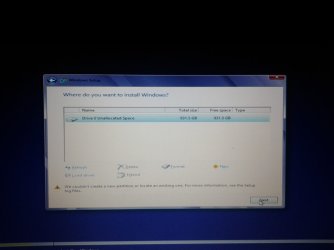
So I popped the windows installation disk back in,and this time everything was faster,but when I chose Custom install,all the partitions were gone,and there was only 1,"Drive 0 Unallocated space"
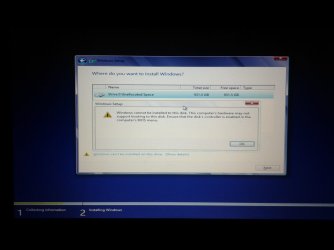
I selected it,but I got the "windows cannot be installed to this disk ensure that the disk's controller is enabled" and said that I needed to check the BIOS controller,come thing like that.
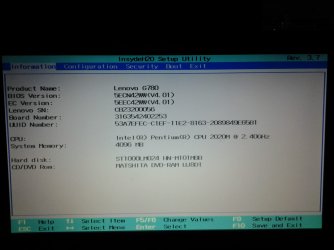
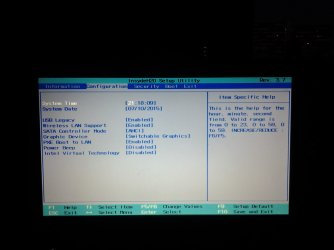
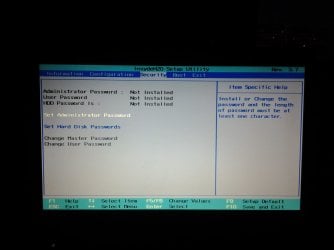
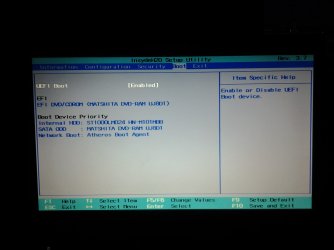
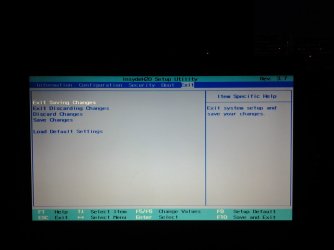
I wentninto BIOS,and here are the pictures of what I see in it.
I did try Restoring Settings to default too.
Also,here is the exact error I get when trying to install any windows.
So,I had windows 7 Home Premium 32bit on my Lenovo G780.
The laptop was seriously overheating,and I realised I needed to change the thermal paste.
I changed it,and as usual,disconnected my hard drive to check for dust.
It was clean,and I carefully returned it to its slot(there is only 1 slot for hard drives on my laptop).
Then I decided to install Windows 8.1,to make a clean start,and since it was the most stable OS to me(Windows 7 would go to hell 3 days after installation,Windows 10 would throw poop at me from the start...)
The whole procedure was painfully slow,but I actually managed to select Custom Install,but instead of saying "There is already another Windows,do you want to move those files into windows.old?" it just started the installation and froze at 0%.
I canceled the installation,it said it restored previous settings,and I rebooted.
However,it didn't want to boot into the OS.
So I popped the windows installation disk back in,and this time everything was faster,but when I chose Custom install,all the partitions were gone,and there was only 1,"Drive 0 Unallocated space"
I selected it,but I got the "windows cannot be installed to this disk ensure that the disk's controller is enabled" and said that I needed to check the BIOS controller,come thing like that.
I wentninto BIOS,and here are the pictures of what I see in it.
I did try Restoring Settings to default too.
Also,here is the exact error I get when trying to install any windows.
Attachments
-
 14365558510101957482162.jpg165.3 KB · Views: 0
 -
 1436555868945820449995.jpg155.2 KB · Views: 0
 -
 1436555896285-1897547878.jpg146.9 KB · Views: 0
 -
 1436555915363767831423.jpg151.6 KB · Views: 0
 -
 1436555935519-1677535253.jpg130 KB · Views: 0
 -
 1436556217861569077965.jpg149.7 KB · Views: 2
 -
 1436556260907672274807.jpg150.3 KB · Views: 0
My Computer
- Computer type
- Laptop
- Computer Manufacturer/Model Number
- Lenovo
- OS
- Windows 7 Home Premium 32bit
- CPU
- Intel Pentium 2020M
- Memory
- 4GB
- Graphics Card(s)
- Nvidia GT635M


