Windows cannot be installed to this disk...

The Marionette

New member
Local time
4:18 PM
Messages
5
Hello guys.

So,I had windows 7 Home Premium 32bit on my Lenovo G780.
The laptop was seriously overheating,and I realised I needed to change the thermal paste.
I changed it,and as usual,disconnected my hard drive to check for dust.
It was clean,and I carefully returned it to its slot(there is only 1 slot for hard drives on my laptop).


Then I decided to install Windows 8.1,to make a clean start,and since it was the most stable OS to me(Windows 7 would go to hell 3 days after installation,Windows 10 would throw poop at me from the start...)

The whole procedure was painfully slow,but I actually managed to select Custom Install,but instead of saying "There is already another Windows,do you want to move those files into windows.old?" it just started the installation and froze at 0%.

I canceled the installation,it said it restored previous settings,and I rebooted.

However,it didn't want to boot into the OS.

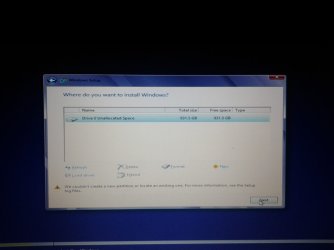
So I popped the windows installation disk back in,and this time everything was faster,but when I chose Custom install,all the partitions were gone,and there was only 1,"Drive 0 Unallocated space"

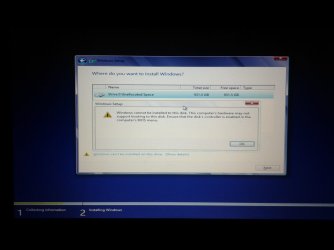
I selected it,but I got the "windows cannot be installed to this disk ensure that the disk's controller is enabled" and said that I needed to check the BIOS controller,come thing like that.

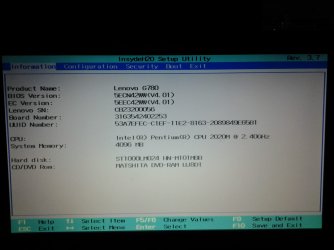
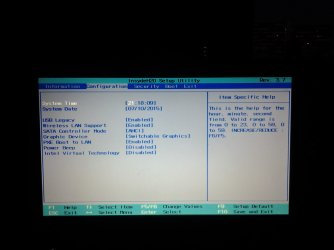
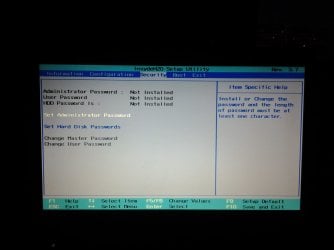
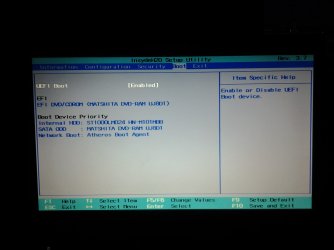
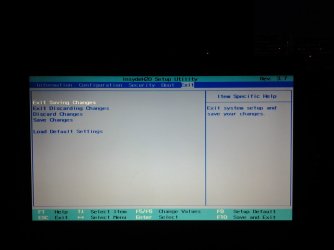
I wentninto BIOS,and here are the pictures of what I see in it.

I did try Restoring Settings to default too.

Also,here is the exact error I get when trying to install any windows.
 

Attachments

  • 14365558510101957482162.jpg
    14365558510101957482162.jpg
    165.3 KB · Views: 0
  • 1436555868945820449995.jpg
    1436555868945820449995.jpg
    155.2 KB · Views: 0
  • 1436555896285-1897547878.jpg
    1436555896285-1897547878.jpg
    146.9 KB · Views: 0
  • 1436555915363767831423.jpg
    1436555915363767831423.jpg
    151.6 KB · Views: 0
  • 1436555935519-1677535253.jpg
    1436555935519-1677535253.jpg
    130 KB · Views: 0
  • 1436556217861569077965.jpg
    1436556217861569077965.jpg
    149.7 KB · Views: 2
  • 1436556260907672274807.jpg
    1436556260907672274807.jpg
    150.3 KB · Views: 0

My Computer

Computer type
Laptop
Computer Manufacturer/Model Number
Lenovo
OS
Windows 7 Home Premium 32bit
CPU
Intel Pentium 2020M
Memory
4GB
Graphics Card(s)
Nvidia GT635M
You have UEFI boot enabled. I'll bet your hard drive is not formatted for GPT (GUID Partition Table) or lost partition table during your first install attempt, but if you want to use UEFI you must use a GPT formatted drive.

Try disabling UEFI and see if Windows will install Or create a UEFI bootable install disk (USB stick) for Windows8.1. See this UEFI Bootable USB Flash Drive - Create in Windows
 

My Computer

OS
Windows 7 Home Premium
CPU
i3 2100T
Motherboard
ASRock H67M-ITX
Disable uefi boot and try again.
 

My Computer

Computer type
PC/Desktop
Computer Manufacturer/Model Number
Skylake Special #666
OS
Windows 10 Pro x64
CPU
Intel Core i7 6700K
Motherboard
Asus Sabertooth Z170 Mark 1
Memory
GSkill TridentZ RGB 16GB 3600 16-16-16-36
Graphics Card(s)
EVGA GTX 980 Ti SC x2
Sound Card
Realtek High Definition
Monitor(s) Displays
AOC G2460PG
Screen Resolution
1920 x 1080 144Hz
Hard Drives
Samsung 860 Pro 256GB, Seagate Barracuda 4TB x2
PSU
EVGA 1000 P2, EVGA White Custom Braided Cables
Case
Corsair Vengeance C70 Gunmetal Black
Cooling
Corsair H100i v2, Corsair ML120 x2, Thermal Grizzly Kryonaut
Keyboard
Logitech G910 Orion Spectrum
Mouse
Logitech G700s
Internet Speed
Verizon Fios Quantum Gateway 75/75
Antivirus
Windows Defender, Malwarebytes Free 3.8.3
Browser
Chrome
Other Info
Corsair SP120 x4, LG Blu-ray Drive, Durabrand HT-395 100 Watt Dolby Digital Amp, Corsair H2100 Wireless 7.1 Headset
You have UEFI boot enabled. I'll bet your hard drive is not formatted for GPT (GUID Partition Table) or lost partition table during your first install attempt, but if you want to use UEFI you must use a GPT formatted drive.

Try disabling UEFI and see if Windows will install Or create a UEFI bootable install disk for Windows8.1. See this UEFI Bootable USB Flash Drive - Create in Windows

I don't have a USB at the moment,but can I try to disable UEFI and try to install Windows with the CD?

EDIT

Disabled UEFI,but I got the same error while trying to install windows...
 

My Computer

Computer type
Laptop
Computer Manufacturer/Model Number
Lenovo
OS
Windows 7 Home Premium 32bit
CPU
Intel Pentium 2020M
Memory
4GB
Graphics Card(s)
Nvidia GT635M
Did your Lenovo G780 come with Windows 8 and you downgraded to Windows 7? Otherwise it would not be a UEFI system I would think.

Is everything backup up so you won't lose any data if you do a Clean install, with format?

Where did you get the Windows 8.1 DVD? Did you download the iso from Microsoft and burn your own DVD or what?
 

My Computer

Computer type
PC/Desktop
Computer Manufacturer/Model Number
Lenovo IdeaCenter 450
OS
Windows 10 Pro X64
CPU
Intel Quad Core i7-4770 @ 3.4Ghz
Memory
16.0GB PC3-12800 DDR3 SDRAM 1600 MHz
Graphics Card(s)
Intel Integrated HD Graphics
Sound Card
Realtek HD Audio
Monitor(s) Displays
HP 22" LCD
Screen Resolution
1680 x 1050
Hard Drives
250GB Samsung EVO SATA-3 SSD
2TB Seagate ST2000DM001 SATA-2
1.5TB Seagate ST3150041AS SATA
Keyboard
Dell USB
Mouse
Lenovo USB
Internet Speed
Cable via Road Runner 3MB Upload, 30MB Download
Antivirus
Windows Defender, MBAM Pro, MBAE
Browser
Seamonkey
Other Info
UEFI/GPT
PLDS DVD-RW DH16AERSH
Did your Lenovo G780 come with Windows 8 and you downgraded to Windows 7? Otherwise it would not be a UEFI system I would think.

Is everything backup up so you won't lose any data if you do a Clean install, with format?

Where did you get the Windows 8.1 DVD? Did you download the iso from Microsoft and burn your own DVD or what?

My Lenovo g780 came with no OS,I had to install it.

Previously,I used Windows 10,then windows 7,then windows 8.1. I use windows 7 home premium most of the time. I did have windows 8.1 when this problem occurred,but I was going to go back to windows 7 after I reinstalled the windows8.1(because that was the only OS I had at the moment),then I would download and burn the Windows 7 Home premium to a disk and install it.


I burned an ISO to a dvd-RW,and I had installed many OS with it. I thought that it may have worn off,so I tried a fresh DVD,but the same result was achieved.

I do not care about data,I am used to losing data on both my phone and PC when changing OS.

I just want my laptop alive again...

I managed to get my hands on a 16GB USB,and will download an iso and try to make the USB UEFI bootable.

Also,I asked my friend to check if he could help.
 
Last edited:

My Computer

Computer type
Laptop
Computer Manufacturer/Model Number
Lenovo
OS
Windows 7 Home Premium 32bit
CPU
Intel Pentium 2020M
Memory
4GB
Graphics Card(s)
Nvidia GT635M
If you want to install Windows 8, ask at Windows 8 Forums.


If you want to install Windows 7 follow these steps to Troubleshoot Windows 7 Installation Failures - Windows 7 Help Forums.

You do not want to disable UEFI which has replaced the old BIOS' and offers useful features. But you must boot the DVD as a UEFI DVD device in order to install correctly. See here: UEFI (Unified Extensible Firmware Interface) - Install Windows 7 with - Windows 7 Forums

If these fail then where did you get the Win7 ISO, and how is it burned to DVD? Confirm the ISO and use the tools given in Step 1 of Clean Reinstall Windows 7. Then follow that tutorial to get and keep a perfect install.
 
I enabled UEFI boot ,connected the USB on which Windows 7 Home Premium 64 bit was(I followed the UEFI bootable USB instructions),make the USB boot,got to the screen where it said on the bottom of the screen "Windows is Loading Files" and then got this screen


EDIT

I tried pressing ENTER,then it would ask me to choose OS-Windows Setup [EMS Enabled]
I would select it,and I would get back to the same screen
 

Attachments

  • 14366511060011207816267.jpg
    14366511060011207816267.jpg
    295.1 KB · Views: 0

My Computer

Computer type
Laptop
Computer Manufacturer/Model Number
Lenovo
OS
Windows 7 Home Premium 32bit
CPU
Intel Pentium 2020M
Memory
4GB
Graphics Card(s)
Nvidia GT635M
Likely bad installation media. Confirm it from suggestions in my previous post and answer the questions I specifically asked you.
 
Last edited:
May I suggest something.

What ever operating system you choose make sure you have the proper COA activation key before you start the install.
 

My Computer

Computer type
PC/Desktop
Computer Manufacturer/Model Number
Home made Desktop
OS
Windows 10 Pro. 64/ version 1709 Windows 7 Pro/64
CPU
Intel i7-6800K @ 4.3
Motherboard
ASUS X-99 Deluxe II
Memory
Corsair Platinum 16 gig @2400
Graphics Card(s)
EVGA GTX 1070 OC
Monitor(s) Displays
Asus 27" LED LCD/VE278Q
Screen Resolution
1920-1080 or 1280-720 HDMI
Hard Drives
INTEL SSD 730-240 Gb Sata 3.0/
PSU
EVGA Platium 1200W
Case
Phanteks Luxe Tempered Glass 8 fans/ one radiator
Cooling
XSPC/ Water Cooled CPU
Keyboard
Das 4 Professional
Mouse
Logitech M705/MX Anywhere 2-S
Internet Speed
100 mbits
Antivirus
Microsoft Security Essentials/ Malwarebytes Premium 3.0/ SAS
Browser
I.E. 11 default/Firefox/ ISP Time Warner Cable/Spectrum
Other Info
LG BluRay Burner/
Sound system-KLipsch-THX/
Icy Dock ssd Hot Swap bays.
Likely bad installation media. Confirm it from suggestions in my previous post and answer the questions I specifically asked you.

I looked at Your suggestions.

I did follow the UEFI BOOTABLE USB instructions using Rufus.
I guess the ISO was broken. Will download another one,and this time I will try the Ultimate instead of Home Premium.


EDIT

The new bootable USB booted into the Installation,and when I selected "New" on the Drive 0 Unallocated space,it said that other partitions would be also made.I accepted,but it hasn't finished making the partition after an hour(the loading cursor still runs in circle)

I will let it go on,hopefully it will make the partitions


EDIT #2

It finished loading,and the drive was gone.
I selected refresh and the Disk 0 Unallocated space appeared again...
 
Last edited:

My Computer

Computer type
Laptop
Computer Manufacturer/Model Number
Lenovo
OS
Windows 7 Home Premium 32bit
CPU
Intel Pentium 2020M
Memory
4GB
Graphics Card(s)
Nvidia GT635M
Which version do you actually own? That is the only one you should be downloading.

All versions of WIn7 are exactly the same OS with just a few extra expensive features unlocked in the higher versions.
 
Back
Top