Windows cannot detect any Wireless network interfaces

lakoffjo

New member
Local time
6:41 AM
Messages
4
1 week ago, my HP desktop decided that it couldn't find the wireless connection anymore. I didn't install anything new. I may have defragmented the system around that time. I did the trouble shoot and the wired connection works fine with the ethernet cable. Also other computers in the house can connect to the wireless router no problem.
Under Manage wireless networks, when I try to add a network it tells me "windows cannot detect any wireless network interfaces"
Not sure what else to try.
Under Network adaptors, I see Realtek PCIe FE Family Controller, it says the device is working properly and I have also updated the driver. Any other thoughts on why it shut off suddenly? Did I somehow delete the wireless adaptor or is the Realtek adaptor for wireless as well.
Thank you.
 

My Computer

Computer Manufacturer/Model Number
HP
OS
Windows 7 Home Premium 64 bit
Welcome to Seven Forums,

Can you please post your Device Manager, expand Network Adapters so that we can see if you have the Wi-Fi Adapter? Here's a general Tutorial on how you may access Device Manager?

If your Wi-Fi adapter is missing, you may download the driver from HP site. The link that I gave you will also give you a step by step guide on how to install the driver.

An update will be appreciated.
 

My Computer

Computer Manufacturer/Model Number
Lenovo Desktop/Samsung Laptop
OS
Win7 & Win8 64bit
CPU
Intel i5
Internet Speed
Charter-20 Mbps
Antivirus
Avast
Browser
FF, IE9 and Chrome
Device manager
 

Attachments

  • Device manager.jpg
    Device manager.jpg
    141.8 KB · Views: 34

My Computer

Computer Manufacturer/Model Number
HP
OS
Windows 7 Home Premium 64 bit
lakoffjo - Let's try a System Restore, this process might save you plenty of time troubleshooting. Follow this Tutorial and select a restore point(date) before the issue occurred.

If that didn't work at all, please visit HP Support site and download your Wi-Fi driver.
 

My Computer

Computer Manufacturer/Model Number
Lenovo Desktop/Samsung Laptop
OS
Win7 & Win8 64bit
CPU
Intel i5
Internet Speed
Charter-20 Mbps
Antivirus
Avast
Browser
FF, IE9 and Chrome
I'm a little hesitant to try the system restore. I went ahead with downloading the driver. " Original Ralink Wireless Networking Controller Driver". When I tried to install it, it said, "system does not meet the minimum requirement". I did the update with the "Original Realtek Networking Controller Drive" This time it worked but this did not solve the problem. Not sure why the first one didn't work.
If I do the system restore, I'll first back up my info/pics just in case.
 

My Computer

Computer Manufacturer/Model Number
HP
OS
Windows 7 Home Premium 64 bit
Hi there,

You won't be doing a factory restore only back date it where all is well or worry free. All files will be saved, any programs and Windows Updates that you installed will have to be re-installed.
If I do the system restore, I'll first back up my info/pics just in case.
 

My Computer

Computer Manufacturer/Model Number
Lenovo Desktop/Samsung Laptop
OS
Win7 & Win8 64bit
CPU
Intel i5
Internet Speed
Charter-20 Mbps
Antivirus
Avast
Browser
FF, IE9 and Chrome
I did manage to get the Original Ralink Wireless Networking Controller Driver to install but that didn't fix the problem. I then did do the system restore to Feb 5 and this did not fix the problem. I'm fairly certain the problem wasn't going on at that time. It didn't give me an option to go back any further. Not sure what to try now. Thanks for your patience.
 

My Computer

Computer Manufacturer/Model Number
HP
OS
Windows 7 Home Premium 64 bit
It could be a hardware problem. Your card might be broken. Have you considered buying a Wireless Network USB adapter? They aren't expensive, and it fixed my problem.
Just a suggestion. Ask a friend if they can lend you one for a while. If that works, you'll know what the problem is.
Do buy one with an antenna, it works better. Especially if there is a distance to overcome.
Example:300Mbps 300M USB Wireless Adapter WiFi LAN Network Card IEEE 802 11b G N Antenna | eBay
 

My Computer

Computer type
PC/Desktop
OS
Windows 7 pro 64bit
I have been experiencing the same exact problem. The driver which the link tell you to download did not work for me either. I noticed that on the back of my desktop, it says (Ralink RT3090) so I downloaded that driver instead. No change. My wifi worked perfectly up until about 5 months ago. I'm just now digging deep trying to fix it. I took the computer apart and had hands on the 802.11 PCI E card. It doesn't look damaged, but I'm thinking it may be the culprit. I've seen them as cheap as $9 online. Other than that, I've updated all drivers, tried to install new ones, and have been reading forums such as this one just trying to find some answers. So far, this thread seems to be the most fitting. Any other suggestions?
Here is my IPConfig printout:

Windows IP Configuration

Host Name . . . . . . . . . . . . : hpallinone
Primary Dns Suffix . . . . . . . :
Node Type . . . . . . . . . . . . : Hybrid
IP Routing Enabled. . . . . . . . : No
WINS Proxy Enabled. . . . . . . . : No
DNS Suffix Search List. . . . . . : home

Ethernet adapter Local Area Connection:

Connection-specific DNS Suffix . : home
Description . . . . . . . . . . . : Realtek PCIe GBE Family Controller
Physical Address. . . . . . . . . : C8-0A-A9-F8-8A-06
DHCP Enabled. . . . . . . . . . . : Yes
Autoconfiguration Enabled . . . . : Yes
Link-local IPv6 Address . . . . . : fe80::6c87:8030:ce9b:87fc%11(Preferred)
IPv4 Address. . . . . . . . . . . : 192.168.1.4(Preferred)
Subnet Mask . . . . . . . . . . . : 255.255.255.0
Lease Obtained. . . . . . . . . . : Sunday, December 29, 2013 11:48:14 AM
Lease Expires . . . . . . . . . . : Monday, December 30, 2013 11:48:13 AM
Default Gateway . . . . . . . . . : 192.168.1.1
DHCP Server . . . . . . . . . . . : 192.168.1.1
DHCPv6 IAID . . . . . . . . . . . : 264768169
DHCPv6 Client DUID. . . . . . . . : 00-01-00-01-18-37-52-B9-C8-0A-A9-F8-8A-06
DNS Servers . . . . . . . . . . . : 192.168.1.1
NetBIOS over Tcpip. . . . . . . . : Enabled

Tunnel adapter Reusable ISATAP Interface {F15D0A7C-D368-4DDE-894B-4BD04701B542}:

Media State . . . . . . . . . . . : Media disconnected
Connection-specific DNS Suffix . :
Description . . . . . . . . . . . : Microsoft ISATAP Adapter
Physical Address. . . . . . . . . : 00-00-00-00-00-00-00-E0
DHCP Enabled. . . . . . . . . . . : No
Autoconfiguration Enabled . . . . : Yes

Tunnel adapter Local Area Connection* 9:

Connection-specific DNS Suffix . :
Description . . . . . . . . . . . : Microsoft Teredo Tunneling Adapter
Physical Address. . . . . . . . . : 00-00-00-00-00-00-00-E0
DHCP Enabled. . . . . . . . . . . : No
Autoconfiguration Enabled . . . . : Yes

IPv6 Address. . . . . . . . . . . : 2001:0:9d38:6abd:2cc0:2ad6:9d59:ff20(Preferred)
Link-local IPv6 Address . . . . . : fe80::2cc0:2ad6:9d59:ff20%10(Preferred)
Default Gateway . . . . . . . . . : ::
NetBIOS over Tcpip. . . . . . . . : Disabled

Tunnel adapter isatap.{6763B675-5367-4D48-93A7-B009330272A9}:

Media State . . . . . . . . . . . : Media disconnected
Connection-specific DNS Suffix . :
Description . . . . . . . . . . . : Microsoft ISATAP Adapter #2
Physical Address. . . . . . . . . : 00-00-00-00-00-00-00-E0
DHCP Enabled. . . . . . . . . . . : No
Autoconfiguration Enabled . . . . : Yes
Tunnel adapter isatap.home:

Media State . . . . . . . . . . . : Media disconnected
Connection-specific DNS Suffix . : home
Description . . . . . . . . . . . : Microsoft ISATAP Adapter #3
Physical Address. . . . . . . . . : 00-00-00-00-00-00-00-E0
DHCP Enabled. . . . . . . . . . . : No
Autoconfiguration Enabled . . . . : Yes
 
Last edited:

My Computer

Computer type
PC/Desktop
Computer Manufacturer/Model Number
HP
OS
Windows 7 Home Premium 64 bit
CPU
Pentium Dual-Core E5500 @2.8GHz
Memory
4.00 GB
Hard Drives
WDC WD7501AAES-60Z2A0 ATA Device
Antivirus
Norton 360
Browser
Google Chrome
Welcome to the Seven Forums.

Does your Device Manager window show a device that needs drivers?

Does your Device Manager window show your wireless network interface adapter?
 

My Computer

Computer type
Laptop
Computer Manufacturer/Model Number
Employer provided Dell Latitude
OS
W7 Pro SP1 64bit
CPU
i7
Memory
8GB
Graphics Card(s)
Intel HD Graphics
Hard Drives
crappy SSD
Antivirus
Employer mandated Symantec Endpoint Protection
Browser
Pale Moon 64bit, IE11 64bit & Chrome 64bit
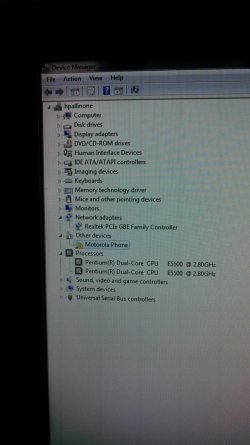
Here's a shot of what Device Manager is telling me:
 

Attachments

  • 2014-01-01 09.31.44.jpg
    2014-01-01 09.31.44.jpg
    776.3 KB · Views: 4

My Computer

Computer type
PC/Desktop
Computer Manufacturer/Model Number
HP
OS
Windows 7 Home Premium 64 bit
CPU
Pentium Dual-Core E5500 @2.8GHz
Memory
4.00 GB
Hard Drives
WDC WD7501AAES-60Z2A0 ATA Device
Antivirus
Norton 360
Browser
Google Chrome
It does not look like Windows is seeing the wireless network adapter - so there is no reason to try and install drivers for same. It might be best to buy a new wireless network adapter.
 

My Computer

Computer type
Laptop
Computer Manufacturer/Model Number
Employer provided Dell Latitude
OS
W7 Pro SP1 64bit
CPU
i7
Memory
8GB
Graphics Card(s)
Intel HD Graphics
Hard Drives
crappy SSD
Antivirus
Employer mandated Symantec Endpoint Protection
Browser
Pale Moon 64bit, IE11 64bit & Chrome 64bit
I've already purchased one. Should be here in a day or two. I'll keep you posted after I install it. Thanks for your advice thus far.
 

My Computer

Computer type
PC/Desktop
Computer Manufacturer/Model Number
HP
OS
Windows 7 Home Premium 64 bit
CPU
Pentium Dual-Core E5500 @2.8GHz
Memory
4.00 GB
Hard Drives
WDC WD7501AAES-60Z2A0 ATA Device
Antivirus
Norton 360
Browser
Google Chrome
Did it work?

Hi,

I am having exactly the same problem and just replaced the WIFI adapter with no luck. I was wondering if you had any.

I read in another forum someone saw this when he had forgotten to connect the antenna. My antenna is connected, but might this be an antenna issue?

Best Regards, Sander
 

My Computer

Computer type
Laptop
Computer Manufacturer/Model Number
HP dv7
OS
Windows 7 Home Premium 64 bit
It does not look like Windows is seeing the wireless network adapter - so there is no reason to try and install drivers for same. It might be best to buy a new wireless network adapter.

UsernameIssues,
I replaced the Wireless Network Adapter Card (a little bigger than a postage stamp) That did the trick. Restarted the machine and it automatically downloaded required drivers. Good to go now. Thanks for your advice.
 

My Computer

Computer type
PC/Desktop
Computer Manufacturer/Model Number
HP
OS
Windows 7 Home Premium 64 bit
CPU
Pentium Dual-Core E5500 @2.8GHz
Memory
4.00 GB
Hard Drives
WDC WD7501AAES-60Z2A0 ATA Device
Antivirus
Norton 360
Browser
Google Chrome
Hi,

I am having exactly the same problem and just replaced the WIFI adapter with no luck. I was wondering if you had any.

I read in another forum someone saw this when he had forgotten to connect the antenna. My antenna is connected, but might this be an antenna issue?

Best Regards, Sander

Sander,
Once you replaced the network adapter card, did your machine automatically download required driver software?
-dannyrinaldi
 

My Computer

Computer type
PC/Desktop
Computer Manufacturer/Model Number
HP
OS
Windows 7 Home Premium 64 bit
CPU
Pentium Dual-Core E5500 @2.8GHz
Memory
4.00 GB
Hard Drives
WDC WD7501AAES-60Z2A0 ATA Device
Antivirus
Norton 360
Browser
Google Chrome
It does not look like Windows is seeing the wireless network adapter - so there is no reason to try and install drivers for same. It might be best to buy a new wireless network adapter.

UsernameIssues,
I replaced the Wireless Network Adapter Card (a little bigger than a postage stamp) That did the trick. Restarted the machine and it automatically downloaded required drivers. Good to go now. Thanks for your advice.
You are welcome. Thanks for letting us know what solved it for you.
 

My Computer

Computer type
Laptop
Computer Manufacturer/Model Number
Employer provided Dell Latitude
OS
W7 Pro SP1 64bit
CPU
i7
Memory
8GB
Graphics Card(s)
Intel HD Graphics
Hard Drives
crappy SSD
Antivirus
Employer mandated Symantec Endpoint Protection
Browser
Pale Moon 64bit, IE11 64bit & Chrome 64bit
Hi there - I have experienced exactly the same problem as above, I would be interested if anybody can suggest a solution.
 

My Computer

Computer type
PC/Desktop
OS
Windows Home Premium
Back
Top