Solved Windows could not detect any wireless network interface

Dini Ratnadewi

New member
Local time
4:47 AM
Messages
5
Hi, I have problem with my wireless connection. when I go to device manager, apparently there are missing devices and I get the HARDWARE IDS : PCI\VEN_168C&DEV_0032&SUBSYS_662711AD&REV_01

where I could get a suitable driver wireless ?
PLEASE HELP ME..!!! :cry::cry:
 

My Computer

Computer type
Laptop
Computer Manufacturer/Model Number
Asus
OS
Windows 7 Professional x32
CPU
AMD C-60
Memory
2048 Mb
Graphics Card(s)
Radeon Graphics HD 6290
Browser
Google Chrome
Hi from Sevenforums,

Could you please post a screenshot of device manager with network adapters open and your wireless adapter open under general?
 

My Computer

Computer Manufacturer/Model Number
HP Compaq 6715B
OS
Windows 7 Ultimate x64
CPU
AMD turion 64x2 TL-64 2.2Ghz
Motherboard
HC030
Memory
Sodimm DDR2 4GB
Graphics Card(s)
ATI Radeon 1250 128MB IGP
Hard Drives
Fujitsu Siemens 500GB sata 3.0 Gb/s
Untitled.png

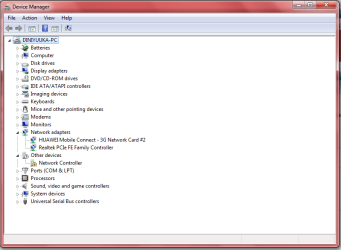
here is my screenshot, could you help me..please
 

My Computer

Computer type
Laptop
Computer Manufacturer/Model Number
Asus
OS
Windows 7 Professional x32
CPU
AMD C-60
Memory
2048 Mb
Graphics Card(s)
Radeon Graphics HD 6290
Browser
Google Chrome
You have an exclamation mark next to network controller, install the driver please.

Give me make and model of computer please?
 

My Computer

Computer Manufacturer/Model Number
HP Compaq 6715B
OS
Windows 7 Ultimate x64
CPU
AMD turion 64x2 TL-64 2.2Ghz
Motherboard
HC030
Memory
Sodimm DDR2 4GB
Graphics Card(s)
ATI Radeon 1250 128MB IGP
Hard Drives
Fujitsu Siemens 500GB sata 3.0 Gb/s
I believe that is supposed to be the Atheros AR5B125, although the hardware ID isn't easy to decipher.

Both the 32 and 64 bit driver version 10.0.0.274 at the bottom of the page in the link.

Drivers for Atheros AR5B125 and Windows 7
 

My Computer

Computer type
PC/Desktop
Computer Manufacturer/Model Number
Home built
OS
Windows 7 Ult, Windows 8.1 Pro,
CPU
Q9650-4.275GHz, E8600 4.5GHz, E6750-3.8GHz
Motherboard
Evga 780i FTW
Memory
G.Skill PC2 9600 1200Mhz 5 5 5 15 2T
Graphics Card(s)
GTX480
Sound Card
Asus Xonar D2
Monitor(s) Displays
HannsG
Screen Resolution
1680X1050
Hard Drives
GSkill Phoenix Pro 120GB SSD
PSU
ThermalTake Toughpower 1000Watt modular
Case
ThermalTake XaserV
Cooling
Xigmatek S1283
Keyboard
Logitech G15
Mouse
Logitech G9
Internet Speed
T1
1.png

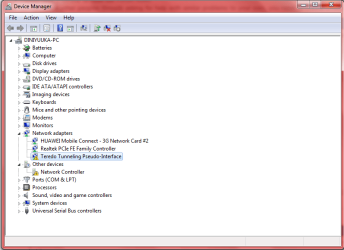
By the way, when I come back to check the device manager there is an exclamation mark also on Teredo Tunneling Pseudo-Interface.

What is Teredo Tunneling Pseudo-Interface?

2.png
 

My Computer

Computer type
Laptop
Computer Manufacturer/Model Number
Asus
OS
Windows 7 Professional x32
CPU
AMD C-60
Memory
2048 Mb
Graphics Card(s)
Radeon Graphics HD 6290
Browser
Google Chrome
Are you asking me? Basically it's a tunneling protocol that allows IPv4 to IPv6 communication.

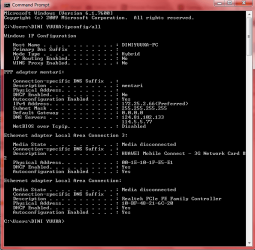
With Teredo showing errors this means the network stack is corrupted. I have some files to fix the Teredo problem but I'd have to see a screen shot of the ipconfig/all from this machine first. Just past the code into an elevated command prompt and use the snipping tool to save the screen shot.

Code:
ipconfig/all
 

My Computer

Computer type
PC/Desktop
Computer Manufacturer/Model Number
Home built
OS
Windows 7 Ult, Windows 8.1 Pro,
CPU
Q9650-4.275GHz, E8600 4.5GHz, E6750-3.8GHz
Motherboard
Evga 780i FTW
Memory
G.Skill PC2 9600 1200Mhz 5 5 5 15 2T
Graphics Card(s)
GTX480
Sound Card
Asus Xonar D2
Monitor(s) Displays
HannsG
Screen Resolution
1680X1050
Hard Drives
GSkill Phoenix Pro 120GB SSD
PSU
ThermalTake Toughpower 1000Watt modular
Case
ThermalTake XaserV
Cooling
Xigmatek S1283
Keyboard
Logitech G15
Mouse
Logitech G9
Internet Speed
T1
@chev65 here is my screenshot
 

Attachments

  • Capture.PNG
    Capture.PNG
    19.9 KB · Views: 8
Last edited:

My Computer

Computer type
Laptop
Computer Manufacturer/Model Number
Asus
OS
Windows 7 Professional x32
CPU
AMD C-60
Memory
2048 Mb
Graphics Card(s)
Radeon Graphics HD 6290
Browser
Google Chrome
Is there a reason that DHCP is disabled for the PPP adaptor?

I'm still not sure if you are running the Atheros AR5B125 wireless adaptor? I did post a link to that driver but not completely sure if the Atheros is the right one.

From what I'm seeing here the static settings probably aren't entered correctly with the default gateway showing up as 0.0.0.0, so going back to using DHCP may straighten that out.

It also looks like the 3G network card is trying to connect through the Ethernet for some reason?

I'm not sure how you are trying to connect or which NIC you are trying to use?
 

My Computer

Computer type
PC/Desktop
Computer Manufacturer/Model Number
Home built
OS
Windows 7 Ult, Windows 8.1 Pro,
CPU
Q9650-4.275GHz, E8600 4.5GHz, E6750-3.8GHz
Motherboard
Evga 780i FTW
Memory
G.Skill PC2 9600 1200Mhz 5 5 5 15 2T
Graphics Card(s)
GTX480
Sound Card
Asus Xonar D2
Monitor(s) Displays
HannsG
Screen Resolution
1680X1050
Hard Drives
GSkill Phoenix Pro 120GB SSD
PSU
ThermalTake Toughpower 1000Watt modular
Case
ThermalTake XaserV
Cooling
Xigmatek S1283
Keyboard
Logitech G15
Mouse
Logitech G9
Internet Speed
T1
When I took the picture, I did not install AR5B125 Atheros wireless adapter.
After installing AR5B125 Atheros wireless adapter and setting up my wireless network, all the problems have been solved :party:.

Thank You All :D
 

My Computer

Computer type
Laptop
Computer Manufacturer/Model Number
Asus
OS
Windows 7 Professional x32
CPU
AMD C-60
Memory
2048 Mb
Graphics Card(s)
Radeon Graphics HD 6290
Browser
Google Chrome
When I took the picture, I did not install AR5B125 Atheros wireless adapter.
After installing AR5B125 Atheros wireless adapter and setting up my wireless network, all the problems have been solved :party:.

Thank You All :D

Yes I believe I was a little ahead of the entire deal which is why I posted a link to that driver first and then asked if you had installed it yet. ;)


Thanks for letting me know the driver worked because I wasn't sure of that ID number.
 

My Computer

Computer type
PC/Desktop
Computer Manufacturer/Model Number
Home built
OS
Windows 7 Ult, Windows 8.1 Pro,
CPU
Q9650-4.275GHz, E8600 4.5GHz, E6750-3.8GHz
Motherboard
Evga 780i FTW
Memory
G.Skill PC2 9600 1200Mhz 5 5 5 15 2T
Graphics Card(s)
GTX480
Sound Card
Asus Xonar D2
Monitor(s) Displays
HannsG
Screen Resolution
1680X1050
Hard Drives
GSkill Phoenix Pro 120GB SSD
PSU
ThermalTake Toughpower 1000Watt modular
Case
ThermalTake XaserV
Cooling
Xigmatek S1283
Keyboard
Logitech G15
Mouse
Logitech G9
Internet Speed
T1
Back
Top