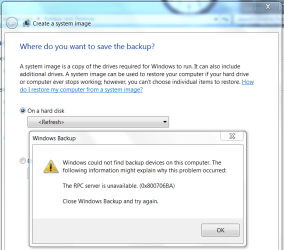
Windows could not find backup devices on this computer

gregrocker

New member
Guru
Local time
3:42 PM
Messages
50,634
Does anyone know what this is about? Google goes nowhere (yet).

Capture.PNG

Both RPC services and dependencies are turned on.
 
Hi,

Found some info Here

Hope you find it useful
 

My Computer My Computer

Computer Manufacturer/Model Number
Compaq Desktop
OS
Windows 7 Ultimate x64
CPU
AMD Sempron Dual Core
Memory
3GB
Graphics Card(s)
NVIDIA GeForce 6150SE nForce 430
Screen Resolution
1024x768
Hard Drives
150GB Sata
Seems weird but is DHCP Service started?

Check services.msc and see if DHCP is started, and or restart the service.

I'll update if I find anything else..

Ryan

UPDATE: If you are trying to backup to the same drive were your operating system is stored it cannot be done. You can only back up to CD,DVD,or a different hard disk in which your OS is not stored.
 

My Computer My Computer

Computer Manufacturer/Model Number
HP Pavilion dv5 Notebook PC
OS
Windows Seven x64
CPU
2.2 GHz Dual Core
Motherboard
Quanta 3600
Memory
4GB
Graphics Card(s)
ATI Mobility RADEON HD 3470
Sound Card
ATI
Monitor(s) Displays
Laptop
Hard Drives
ATA Hitachi HTS543215 (5400RPM)
Case
Laptop
Cooling
Fan
Internet Speed
Basic DSL 1.5 up and Down
Trying to back up to external. DHCP is started. Thanks Ryan.
 
Try turning off the firewall or other security apps. Also make sure make "DHCP Client", "RPC Endpoint Mapper" "Remote Procedure Call (RPC) Locator" and "Remote Procedure Call (RPC)" services are all running and set to automatic.

Just to eliminate, reboot the computer once, then try backing up.

Also, you should have these registry entries:

HKEY_LOCAL_MACHINE\SYSTEM\CurrentControlSet\services\RpcSs

HKEY_LOCAL_MACHINE\SYSTEM\CurrentControlSet\services\RpcLocator
 

My Computer My Computer

Computer Manufacturer/Model Number
Too many to describe...
OS
Windows 7 x64 pro/ Windows 7 x86 Pro/ XP SP3 x86
Maybe a stupid question, but is your external HD showing up in Windows Explorer? I had that problem last week, for some reason the external wasn't showing up. Had to turn it off and back on again.

Just a thought.
 

My Computer My Computer

Computer type
PC/Desktop
Computer Manufacturer/Model Number
Self build
OS
Windows 10 Home
CPU
Intel Core i5 3550
Motherboard
ASUS P8Z77-V LX (LGA1155)
Memory
Corsair Vengeance DDR3 16GB
Graphics Card(s)
Nvidia GEForce GTX 970 SSC
Monitor(s) Displays
Hanns-G 23.6", Acer 17"
Screen Resolution
1920x1080, 1440x900
Hard Drives
Sandisk SSD 256 GB
WD500GB
WD640GB
Seagage Ultra + 1TB ext.
BWD 800GB
WD 1TB ext
PSU
Antec 650w
Case
Cooler Master Centurion 534
Cooling
COOLER MASTER GeminII S524, 3 120 mm case fans.
Keyboard
Logitech MK300
Mouse
Logitech MK300
Internet Speed
Cable
Antivirus
MSSE, Malwarebytes
Browser
IE 10, Chrome
The RPC service must be started, also the dependencies, DCOM Server Process Launcher and RPC Endpoint Mapper. A Guy
 

My Computer My Computer

Computer type
PC/Desktop
OS
Windows 10 Home x64
CPU
INTEL Core i5-750 Quad-Core 3.37GHz
Motherboard
ASUS P7P55D
Memory
HyperX Fury Black Series 8GB (2 x 4GB) 1866Mhz
Graphics Card(s)
EVGA GeForce GTX 750 Superclocked 1GB 128-Bit GDDR5
Monitor(s) Displays
LG 32MA68HY 32" IPS
Screen Resolution
1920 x 1080
Hard Drives
Samsung 840 Evo 120GB, SEAGATE 500GB Barracuda® 7200.12, SATA 3 Gb/s, 7200 RPM, 16MB cache
PSU
ANTEC TruePower New TP-550, 80 PLUS, 550W
Case
ANTEC Three Hundred Illusion
Cooling
COOLER MASTER Hyper 212 Plus, 4 x 120mm 1 x 140mm Noctua's
Internet Speed
85 + Mbps
Antivirus
Avast
Browser
Vivaldi
Back
Top