Windows crashing while playing Wolfenstein Enemy Territory

gazz

New member
Local time
12:35 PM
Messages
4
Hi... Can some one tell me what to do to repair the following errrors . It only happens when pb is enabled...on Enemy territory...it's crashing Windows, When the crash occurs the screen freezes and nothing works no Task manager no nothing, Have to hard reboot to get PC going again...

I can play Counterstrike global offence without any problems, while Enemy Territory is a way older game
 
Last edited:

My Computer My Computer

Computer type
PC/Desktop
OS
Microsoft Windows 7 Home Premium 64-bits
CPU
Intel(R) Core(TM)2 Quad CPU Q9550 @ 2.83GHz
Motherboard
ASUSTeK Computer INC. P5QL PRO
Memory
4,00 GB
Graphics Card(s)
NVIDIA GeForce GTS 250
Sound Card
High Definition Audio-apparaat
Monitor(s) Displays
SyncMaster P2270HD
Screen Resolution
1920 x 1080 x 32 bits (4294967296 colors) @ 60 Hz
Stop 0x116 is a display/graphics failure.

Update the display driver to the latest. Drivers - Download NVIDIA Drivers

When done, stress test the Graphics Card using Furmark. Take a screenshot of the furmark window before closing it. Upload the screenshot for us.

Let us know the results.
___________________________________
Code:
*******************************************************************************
*                                                                             *
*                        Bugcheck Analysis                                    *
*                                                                             *
*******************************************************************************

Use !analyze -v to get detailed debugging information.

BugCheck 116, {fffffa8007ce84e0, fffff8800f1dc93c, 0, 2}

Unable to load image \SystemRoot\system32\DRIVERS\nvlddmkm.sys, Win32 error 0n2
*** WARNING: Unable to verify timestamp for nvlddmkm.sys
*** ERROR: Module load completed but symbols could not be loaded for nvlddmkm.sys
Probably caused by : nvlddmkm.sys ( nvlddmkm+15393c )

Followup: MachineOwner
---------

2: kd> !analyze -v
*******************************************************************************
*                                                                             *
*                        Bugcheck Analysis                                    *
*                                                                             *
*******************************************************************************

VIDEO_TDR_FAILURE (116)
Attempt to reset the display driver and recover from timeout failed.
Arguments:
Arg1: fffffa8007ce84e0, Optional pointer to internal TDR recovery context (TDR_RECOVERY_CONTEXT).
Arg2: fffff8800f1dc93c, The pointer into responsible device driver module (e.g. owner tag).
Arg3: 0000000000000000, Optional error code (NTSTATUS) of the last failed operation.
Arg4: 0000000000000002, Optional internal context dependent data.

Debugging Details:
------------------


FAULTING_IP: 
nvlddmkm+15393c
fffff880`0f1dc93c 48ff256d6d7200  jmp     qword ptr [nvlddmkm+0x87a6b0 (fffff880`0f9036b0)]

DEFAULT_BUCKET_ID:  GRAPHICS_DRIVER_TDR_FAULT

CUSTOMER_CRASH_COUNT:  1

BUGCHECK_STR:  0x116

PROCESS_NAME:  System

CURRENT_IRQL:  0

ANALYSIS_VERSION: 6.3.9600.17237 (debuggers(dbg).140716-0327) amd64fre

STACK_TEXT:  
fffff880`03508988 fffff880`03f59134 : 00000000`00000116 fffffa80`07ce84e0 fffff880`0f1dc93c 00000000`00000000 : nt!KeBugCheckEx
fffff880`03508990 fffff880`03f58e3e : fffff880`0f1dc93c fffffa80`07ce84e0 fffffa80`05826b20 fffffa80`04cd1010 : dxgkrnl!TdrBugcheckOnTimeout+0xec
fffff880`035089d0 fffff880`03e0ff13 : fffffa80`07ce84e0 00000000`00000000 fffffa80`05826b20 fffffa80`04cd1010 : dxgkrnl!TdrIsRecoveryRequired+0x1a2
fffff880`03508a00 fffff880`03e39cf1 : 00000000`ffffffff 00000000`0004287e 00000000`00000000 00000000`00000002 : dxgmms1!VidSchiReportHwHang+0x40b
fffff880`03508ae0 fffff880`03e38437 : 00000000`00000102 00000000`00000000 00000000`0004287e 00000000`00000000 : dxgmms1!VidSchiCheckHwProgress+0x71
fffff880`03508b10 fffff880`03e0b2d2 : ffffffff`ff676980 fffffa80`04cd1010 00000000`00000000 00000000`00000000 : dxgmms1!VidSchiWaitForSchedulerEvents+0x1fb
fffff880`03508bb0 fffff880`03e37ff6 : 00000000`00000000 fffffa80`05cf6010 00000000`00000080 fffffa80`04cd1010 : dxgmms1!VidSchiScheduleCommandToRun+0x1da
fffff880`03508cc0 fffff800`02d1a14a : 00000000`fffffc32 fffffa80`0582eb50 fffffa80`0396d740 fffffa80`0582eb50 : dxgmms1!VidSchiWorkerThread+0xba
fffff880`03508d00 fffff800`02a6dbc6 : fffff800`02bf9e80 fffffa80`0582eb50 fffff800`02c07cc0 fffff880`012e8af5 : nt!PspSystemThreadStartup+0x5a
fffff880`03508d40 00000000`00000000 : 00000000`00000000 00000000`00000000 00000000`00000000 00000000`00000000 : nt!KxStartSystemThread+0x16


STACK_COMMAND:  .bugcheck ; kb

FOLLOWUP_IP: 
nvlddmkm+15393c
fffff880`0f1dc93c 48ff256d6d7200  jmp     qword ptr [nvlddmkm+0x87a6b0 (fffff880`0f9036b0)]

SYMBOL_NAME:  nvlddmkm+15393c

FOLLOWUP_NAME:  MachineOwner

MODULE_NAME: nvlddmkm

IMAGE_NAME:  nvlddmkm.sys

DEBUG_FLR_IMAGE_TIMESTAMP:  53b4446a

FAILURE_BUCKET_ID:  X64_0x116_IMAGE_nvlddmkm.sys

BUCKET_ID:  X64_0x116_IMAGE_nvlddmkm.sys

ANALYSIS_SOURCE:  KM

FAILURE_ID_HASH_STRING:  km:x64_0x116_image_nvlddmkm.sys

FAILURE_ID_HASH:  {1f9e0448-3238-5868-3678-c8e526bb1edc}

Followup: MachineOwner
---------

2: kd> lmvm nvlddmkm
start             end                 module name
fffff880`0f089000 fffff880`0fd17000   nvlddmkm T (no symbols)           
    Loaded symbol image file: nvlddmkm.sys
    Image path: \SystemRoot\system32\DRIVERS\nvlddmkm.sys
    Image name: nvlddmkm.sys
    Timestamp:        Wed Jul 02 23:12:02 2014 (53B4446A)
    CheckSum:         00C4C7C9
    ImageSize:        00C8E000
    Translations:     0000.04b0 0000.04e4 0409.04b0 0409.04e4
 

My Computer My Computer

Computer type
PC/Desktop
Computer Manufacturer/Model Number
Self Assembled
OS
Microsoft Windows 10 Pro Insider Preview 64-bit
CPU
Intel(R) Core(TM) i3-4130 CPU @ 3.40GHz
Motherboard
Gigabyte Technology Co., Ltd. B85M-D3H
Memory
Corsair Vengence 4GB x2 (8.00GB Dual-Channel DDR3 @ 798MHz)
Graphics Card(s)
2047MB GeForce GTS 450 (ZOTAC International)
Sound Card
Onboard (Realtek High Definition Audio)
Monitor(s) Displays
LG Flatron E2040T
Screen Resolution
1600x900
Hard Drives
Western Digital 1 TB
Seagate 500 GB
PSU
Corsair VS550
Case
Cooler Master K380
Cooling
Cooler Master Seidon 120V Plus
Keyboard
Logitech MK260r
Mouse
Logitech MK260r
Internet Speed
PMPL Broadband
Antivirus
Windows Defender + MBAM
Browser
Firefox
Other Info
Dell Studio 15" Laptop
Stop 0x116 is a display/graphics failure.

Update the display driver to the latest. Drivers - Download NVIDIA Drivers

When done, stress test the Graphics Card using Furmark. Take a screenshot of the furmark window before closing it. Upload the screenshot for us.

Let us know the results.
___________________________________
Code:
*******************************************************************************
*                                                                             *
*                        Bugcheck Analysis                                    *
*                                                                             *
*******************************************************************************

Use !analyze -v to get detailed debugging information.

BugCheck 116, {fffffa8007ce84e0, fffff8800f1dc93c, 0, 2}

Unable to load image \SystemRoot\system32\DRIVERS\nvlddmkm.sys, Win32 error 0n2
*** WARNING: Unable to verify timestamp for nvlddmkm.sys
*** ERROR: Module load completed but symbols could not be loaded for nvlddmkm.sys
Probably caused by : nvlddmkm.sys ( nvlddmkm+15393c )

Followup: MachineOwner
---------

2: kd> !analyze -v
*******************************************************************************
*                                                                             *
*                        Bugcheck Analysis                                    *
*                                                                             *
*******************************************************************************

VIDEO_TDR_FAILURE (116)
Attempt to reset the display driver and recover from timeout failed.
Arguments:
Arg1: fffffa8007ce84e0, Optional pointer to internal TDR recovery context (TDR_RECOVERY_CONTEXT).
Arg2: fffff8800f1dc93c, The pointer into responsible device driver module (e.g. owner tag).
Arg3: 0000000000000000, Optional error code (NTSTATUS) of the last failed operation.
Arg4: 0000000000000002, Optional internal context dependent data.

Debugging Details:
------------------


FAULTING_IP: 
nvlddmkm+15393c
fffff880`0f1dc93c 48ff256d6d7200  jmp     qword ptr [nvlddmkm+0x87a6b0 (fffff880`0f9036b0)]

DEFAULT_BUCKET_ID:  GRAPHICS_DRIVER_TDR_FAULT

CUSTOMER_CRASH_COUNT:  1

BUGCHECK_STR:  0x116

PROCESS_NAME:  System

CURRENT_IRQL:  0

ANALYSIS_VERSION: 6.3.9600.17237 (debuggers(dbg).140716-0327) amd64fre

STACK_TEXT:  
fffff880`03508988 fffff880`03f59134 : 00000000`00000116 fffffa80`07ce84e0 fffff880`0f1dc93c 00000000`00000000 : nt!KeBugCheckEx
fffff880`03508990 fffff880`03f58e3e : fffff880`0f1dc93c fffffa80`07ce84e0 fffffa80`05826b20 fffffa80`04cd1010 : dxgkrnl!TdrBugcheckOnTimeout+0xec
fffff880`035089d0 fffff880`03e0ff13 : fffffa80`07ce84e0 00000000`00000000 fffffa80`05826b20 fffffa80`04cd1010 : dxgkrnl!TdrIsRecoveryRequired+0x1a2
fffff880`03508a00 fffff880`03e39cf1 : 00000000`ffffffff 00000000`0004287e 00000000`00000000 00000000`00000002 : dxgmms1!VidSchiReportHwHang+0x40b
fffff880`03508ae0 fffff880`03e38437 : 00000000`00000102 00000000`00000000 00000000`0004287e 00000000`00000000 : dxgmms1!VidSchiCheckHwProgress+0x71
fffff880`03508b10 fffff880`03e0b2d2 : ffffffff`ff676980 fffffa80`04cd1010 00000000`00000000 00000000`00000000 : dxgmms1!VidSchiWaitForSchedulerEvents+0x1fb
fffff880`03508bb0 fffff880`03e37ff6 : 00000000`00000000 fffffa80`05cf6010 00000000`00000080 fffffa80`04cd1010 : dxgmms1!VidSchiScheduleCommandToRun+0x1da
fffff880`03508cc0 fffff800`02d1a14a : 00000000`fffffc32 fffffa80`0582eb50 fffffa80`0396d740 fffffa80`0582eb50 : dxgmms1!VidSchiWorkerThread+0xba
fffff880`03508d00 fffff800`02a6dbc6 : fffff800`02bf9e80 fffffa80`0582eb50 fffff800`02c07cc0 fffff880`012e8af5 : nt!PspSystemThreadStartup+0x5a
fffff880`03508d40 00000000`00000000 : 00000000`00000000 00000000`00000000 00000000`00000000 00000000`00000000 : nt!KxStartSystemThread+0x16


STACK_COMMAND:  .bugcheck ; kb

FOLLOWUP_IP: 
nvlddmkm+15393c
fffff880`0f1dc93c 48ff256d6d7200  jmp     qword ptr [nvlddmkm+0x87a6b0 (fffff880`0f9036b0)]

SYMBOL_NAME:  nvlddmkm+15393c

FOLLOWUP_NAME:  MachineOwner

MODULE_NAME: nvlddmkm

IMAGE_NAME:  nvlddmkm.sys

DEBUG_FLR_IMAGE_TIMESTAMP:  53b4446a

FAILURE_BUCKET_ID:  X64_0x116_IMAGE_nvlddmkm.sys

BUCKET_ID:  X64_0x116_IMAGE_nvlddmkm.sys

ANALYSIS_SOURCE:  KM

FAILURE_ID_HASH_STRING:  km:x64_0x116_image_nvlddmkm.sys

FAILURE_ID_HASH:  {1f9e0448-3238-5868-3678-c8e526bb1edc}

Followup: MachineOwner
---------

2: kd> lmvm nvlddmkm
start             end                 module name
fffff880`0f089000 fffff880`0fd17000   nvlddmkm T (no symbols)           
    Loaded symbol image file: nvlddmkm.sys
    Image path: \SystemRoot\system32\DRIVERS\nvlddmkm.sys
    Image name: nvlddmkm.sys
    Timestamp:        Wed Jul 02 23:12:02 2014 (53B4446A)
    CheckSum:         00C4C7C9
    ImageSize:        00C8E000
    Translations:     0000.04b0 0000.04e4 0409.04b0 0409.04e4


What is stop 0x116 is a display/graphics failure? Do i have to delete something or what do you mean?

Update the display driver to the latest. Drivers - Download NVIDIA Drivers

I dont know what i should fill in at Product Series :s

I think i got GeForce GTS 250, so thats serie 200????

and then just download and install? or should i first delete or?


Edit: I just played with my sound disabled at Device manager.. I can play then normally but only without sounds.. Maybe any solutions about this?
 
Last edited:

My Computer My Computer

Computer type
PC/Desktop
OS
Microsoft Windows 7 Home Premium 64-bits
CPU
Intel(R) Core(TM)2 Quad CPU Q9550 @ 2.83GHz
Motherboard
ASUSTeK Computer INC. P5QL PRO
Memory
4,00 GB
Graphics Card(s)
NVIDIA GeForce GTS 250
Sound Card
High Definition Audio-apparaat
Monitor(s) Displays
SyncMaster P2270HD
Screen Resolution
1920 x 1080 x 32 bits (4294967296 colors) @ 60 Hz
Yes, Series 200.

No, delete not. Download the driver, double click on it to install it. There is no delete.

And what do me mean? Have I said anything about deleting anything till now?
 

My Computer My Computer

Computer type
PC/Desktop
Computer Manufacturer/Model Number
Self Assembled
OS
Microsoft Windows 10 Pro Insider Preview 64-bit
CPU
Intel(R) Core(TM) i3-4130 CPU @ 3.40GHz
Motherboard
Gigabyte Technology Co., Ltd. B85M-D3H
Memory
Corsair Vengence 4GB x2 (8.00GB Dual-Channel DDR3 @ 798MHz)
Graphics Card(s)
2047MB GeForce GTS 450 (ZOTAC International)
Sound Card
Onboard (Realtek High Definition Audio)
Monitor(s) Displays
LG Flatron E2040T
Screen Resolution
1600x900
Hard Drives
Western Digital 1 TB
Seagate 500 GB
PSU
Corsair VS550
Case
Cooler Master K380
Cooling
Cooler Master Seidon 120V Plus
Keyboard
Logitech MK260r
Mouse
Logitech MK260r
Internet Speed
PMPL Broadband
Antivirus
Windows Defender + MBAM
Browser
Firefox
Other Info
Dell Studio 15" Laptop
You might want to try installing the latest punkbuster client PunkBuster Online Countermeasures , also enemy territory is very old i'm not sure pb even supports it anymore are you seeing servers refusing you access because you don't have it enabled, perhaps your version is too new compared to the server your trying to get on.

Also as arc suggested just download and run this as well it's the latest at the moment. Drivers | GeForce
 

My Computer My Computer

Computer type
PC/Desktop
Computer Manufacturer/Model Number
Custom
OS
10 Pro x64
CPU
Ryzen 9 3900X
Motherboard
Asrock x370 Tachi
Memory
64GB(4x16GB) DDR4
Graphics Card(s)
EVGA 1080ti FTW3
Sound Card
ASUS Xonar Essence STX (V4 Bursons), ODAC rev B, NFB-11, O2
Monitor(s) Displays
3xASUS PB278Q/R, Optoma HD142X
Screen Resolution
3x1440p, 1080p
Hard Drives
512GB 850 EVO(OS, Programs)
4TB (Movies)
3TB (Downloads)
3TB (Programs)
1TB HDD (Games)
2x6TB R1 (videos)
PSU
AX760
Case
Fractal Define R5
Cooling
NH-D15S
Keyboard
Massdrop Ctrl with Box Navy's
Mouse
G903, Alioth XXL Mat
Internet Speed
280/40
Antivirus
MBAM, ESET
Browser
Canary 64 Bit
Other Info
I also own a Thinkpad P50 Xeon 4K, X220T, X1C5

My Computer My Computer

Computer type
PC/Desktop
Computer Manufacturer/Model Number
Own build (new) Desk1 / Asus ROG Win 7 / Desk2 1st build
OS
Desk1 7 Home Prem / Desk2 10 Pro / Main lap Asus ROG 10 Pro 2 laptop Toshiba 7 Pro Asus P2520 7 & 10
CPU
Desk1 i5 3750K / Laptop i7 GTX 860M / Desk2 i5 2500
Motherboard
Desk1 Asus P877-V / Desk2 Gigabyte H67 UD3H / Laptop ?
Memory
Desk1 8GB (1866) / Desk2 16GB (1333) / Laptop 8Gb DDR3
Graphics Card(s)
Desk 1& 2NVidia GTX 650 & Laptops on board Intel
Sound Card
Desk 1 & 2 -XONAR DG Realtek High Def audio Laptop
Monitor(s) Displays
Desk 1 Benq HD 2450 / Desk2 Philips 24" / Laptop 17.5"
Screen Resolution
1920x1080 D1 & D2 & Laptop 1
Hard Drives
Desk1 Samsung 120GB 830 SSD
Asus ROG 256GB 850 Pro SSD
Desk2 Samsung 840 256 SSD
Toshiba 120GB EVO
PSU
Desk 1 Corsair HX 1050/ Laptop ? / Desk 2 Corsair HX 650
Case
Desk 1 Cooler HAF XM ? Toshiba laptop / Desk2 Coolermaster
Cooling
Fans on all Desk1 -2 Desk2 - all Coolermasters 5 Laptop ?
Keyboard
Desk 1 MS Sidewinder X6 Desk 2 MS Sidewinder X 4
Mouse
Desk 1&2 - Gigabyte MS 900 gamer - laptop - Logitec wireless
Internet Speed
ADSL2+
Other Info
One other Desktop (tester) and spare Toshba laptop both with SSD's
Running Kaspersky 2016 ISS on all machines config'd identically
Logitec audio stereo systems on each machine (x3)
Canon MG5250MFC
Router/modem TP-Link running WPA2SK
STOP 0x00000116: VIDEO_TDR_ERROR (go to top of page)

Usual causes: Video driver, overheating, bad video card, ?BIOS, ?Power to card (see Significant Posts section below)

Source: STOP 0x00000116: VIDEO_TDR_ERROR | BSOD Index
Notice the second cause, overheating.

When was, the last time you cleaned out the case?

To wit:
These are all stop 0x116 VIDEO_TDR_FAILURE conditions.

It's not a true crash, in the sense that the bluescreen was initiated only because the combination of video driver and video hardware was being unresponsive, and not because of any synchronous processing exception.

Since Vista, the "Timeout Detection and Recovery" (TDR) components of the OS video subsystem have been capable of doing some truly impressive things to try to recover from issues which would have caused earlier OSs like XP to crash. As a last resort, the TDR subsystem sends the video driver a "please restart yourself now!" command and waits a few seconds. If there's no response, the OS concludes that the video driver/hardware combo has truly collapsed in a heap, and it fires off that stop 0x116 BSOD.

If playing with video driver versions hasn't helped, make sure the box is not overheating. Try removing a side panel and aiming a big mains fan straight at the motherboard and GPU. Run it like that for a few hours or days - long enough to ascertain whether cooler temperatures make a difference. If so, it might be as simple as dust buildup and subsequently inadequate cooling.

Source, and also located at the corrona link in the first quote: http://www.sevenforums.com/bsod-help-support/25912-bsod-post280172.html#post280172
The overheating and checking the power supply unit as ICIT2LOL has suggested "I am wondering if the problem might lie elsewhere" are the two easiest areas to check before checking the Video driver, bad video card, or BIOS.
 

My Computer My Computer

Computer type
PC/Desktop
Computer Manufacturer/Model Number
Gateway DX4831-01e (Mid-Tower Desktop)
OS
Originally Win 7 Hm Prem x64 Ver 6.1.7600 Build 7601-SP1 | Upgraded to Windows 10 December 14, 2019
CPU
Intel i3 530 2.93GHz, 2933MHz 2 Cores 4 Logical Processors
Motherboard
Gateway H57M01 133 megahertz
Memory
6GB of 1,333MHz DDR3 SDRAM
Graphics Card(s)
32MB Intel Graphics Media Accelerator HD IGChip
Sound Card
Realtek High Definition Audio
Monitor(s) Displays
Gateway HX2000 20inch TFT active matrix TN
Screen Resolution
1600 x 900 x 59 hertz
Hard Drives
WDC WD10EADS-00M2B0 [HDD] (1000.20 GB) -- drive 0,
HL-DT-ST DVDRAM GH41N [CD-ROM dr]
Four card readers, and Four USB 2.0
PSU
300watts.
Case
Mid-Tower Desktop
Cooling
Stock from Gateway
Keyboard
Natural Ergonomic Keyboard 4000, see Other Info
Mouse
Orig. Gateway wore out now using Insignia USB wired optical
Internet Speed
Vz FIOS 10ms png 57.64Mbps down 65.53Mbps up Speedtest.org
Antivirus
Zamana Anti-logger with Anti-malware, MSE, Windows Firewall,
Browser
IE11.0.9600.19399-Upd ver11.0.135, Firefox 68.0.1 x64
Other Info
System Specs by Belarc.

BIOS: American Megatrends Inc. P01-A0 11/17/2009

Replaced the MS 'Natural' Standard PS/2 Enhanced 101-102 Keyboard with a new Natural Ergonomic Keyboard 4000 on August 1st 2014.

Canon Pixma MG3222 Printer.

Updated to IE11 on 12102015 | Fios Quantum Router g1100

Additional AV: SpywareBlaster, manual Mbam, SAS
Stop 0x116 is a display/graphics failure.

Update the display driver to the latest. Drivers - Download NVIDIA Drivers

When done, stress test the Graphics Card using Furmark. Take a screenshot of the furmark window before closing it. Upload the screenshot for us.

Let us know the results.
___________________________________
Code:
*******************************************************************************
*                                                                             *
*                        Bugcheck Analysis                                    *
*                                                                             *
*******************************************************************************

Use !analyze -v to get detailed debugging information.

BugCheck 116, {fffffa8007ce84e0, fffff8800f1dc93c, 0, 2}

Unable to load image \SystemRoot\system32\DRIVERS\nvlddmkm.sys, Win32 error 0n2
*** WARNING: Unable to verify timestamp for nvlddmkm.sys
*** ERROR: Module load completed but symbols could not be loaded for nvlddmkm.sys
Probably caused by : nvlddmkm.sys ( nvlddmkm+15393c )

Followup: MachineOwner
---------

2: kd> !analyze -v
*******************************************************************************
*                                                                             *
*                        Bugcheck Analysis                                    *
*                                                                             *
*******************************************************************************

VIDEO_TDR_FAILURE (116)
Attempt to reset the display driver and recover from timeout failed.
Arguments:
Arg1: fffffa8007ce84e0, Optional pointer to internal TDR recovery context (TDR_RECOVERY_CONTEXT).
Arg2: fffff8800f1dc93c, The pointer into responsible device driver module (e.g. owner tag).
Arg3: 0000000000000000, Optional error code (NTSTATUS) of the last failed operation.
Arg4: 0000000000000002, Optional internal context dependent data.

Debugging Details:
------------------


FAULTING_IP: 
nvlddmkm+15393c
fffff880`0f1dc93c 48ff256d6d7200  jmp     qword ptr [nvlddmkm+0x87a6b0 (fffff880`0f9036b0)]

DEFAULT_BUCKET_ID:  GRAPHICS_DRIVER_TDR_FAULT

CUSTOMER_CRASH_COUNT:  1

BUGCHECK_STR:  0x116

PROCESS_NAME:  System

CURRENT_IRQL:  0

ANALYSIS_VERSION: 6.3.9600.17237 (debuggers(dbg).140716-0327) amd64fre

STACK_TEXT:  
fffff880`03508988 fffff880`03f59134 : 00000000`00000116 fffffa80`07ce84e0 fffff880`0f1dc93c 00000000`00000000 : nt!KeBugCheckEx
fffff880`03508990 fffff880`03f58e3e : fffff880`0f1dc93c fffffa80`07ce84e0 fffffa80`05826b20 fffffa80`04cd1010 : dxgkrnl!TdrBugcheckOnTimeout+0xec
fffff880`035089d0 fffff880`03e0ff13 : fffffa80`07ce84e0 00000000`00000000 fffffa80`05826b20 fffffa80`04cd1010 : dxgkrnl!TdrIsRecoveryRequired+0x1a2
fffff880`03508a00 fffff880`03e39cf1 : 00000000`ffffffff 00000000`0004287e 00000000`00000000 00000000`00000002 : dxgmms1!VidSchiReportHwHang+0x40b
fffff880`03508ae0 fffff880`03e38437 : 00000000`00000102 00000000`00000000 00000000`0004287e 00000000`00000000 : dxgmms1!VidSchiCheckHwProgress+0x71
fffff880`03508b10 fffff880`03e0b2d2 : ffffffff`ff676980 fffffa80`04cd1010 00000000`00000000 00000000`00000000 : dxgmms1!VidSchiWaitForSchedulerEvents+0x1fb
fffff880`03508bb0 fffff880`03e37ff6 : 00000000`00000000 fffffa80`05cf6010 00000000`00000080 fffffa80`04cd1010 : dxgmms1!VidSchiScheduleCommandToRun+0x1da
fffff880`03508cc0 fffff800`02d1a14a : 00000000`fffffc32 fffffa80`0582eb50 fffffa80`0396d740 fffffa80`0582eb50 : dxgmms1!VidSchiWorkerThread+0xba
fffff880`03508d00 fffff800`02a6dbc6 : fffff800`02bf9e80 fffffa80`0582eb50 fffff800`02c07cc0 fffff880`012e8af5 : nt!PspSystemThreadStartup+0x5a
fffff880`03508d40 00000000`00000000 : 00000000`00000000 00000000`00000000 00000000`00000000 00000000`00000000 : nt!KxStartSystemThread+0x16


STACK_COMMAND:  .bugcheck ; kb

FOLLOWUP_IP: 
nvlddmkm+15393c
fffff880`0f1dc93c 48ff256d6d7200  jmp     qword ptr [nvlddmkm+0x87a6b0 (fffff880`0f9036b0)]

SYMBOL_NAME:  nvlddmkm+15393c

FOLLOWUP_NAME:  MachineOwner

MODULE_NAME: nvlddmkm

IMAGE_NAME:  nvlddmkm.sys

DEBUG_FLR_IMAGE_TIMESTAMP:  53b4446a

FAILURE_BUCKET_ID:  X64_0x116_IMAGE_nvlddmkm.sys

BUCKET_ID:  X64_0x116_IMAGE_nvlddmkm.sys

ANALYSIS_SOURCE:  KM

FAILURE_ID_HASH_STRING:  km:x64_0x116_image_nvlddmkm.sys

FAILURE_ID_HASH:  {1f9e0448-3238-5868-3678-c8e526bb1edc}

Followup: MachineOwner
---------

2: kd> lmvm nvlddmkm
start             end                 module name
fffff880`0f089000 fffff880`0fd17000   nvlddmkm T (no symbols)           
    Loaded symbol image file: nvlddmkm.sys
    Image path: \SystemRoot\system32\DRIVERS\nvlddmkm.sys
    Image name: nvlddmkm.sys
    Timestamp:        Wed Jul 02 23:12:02 2014 (53B4446A)
    CheckSum:         00C4C7C9
    ImageSize:        00C8E000
    Translations:     0000.04b0 0000.04e4 0409.04b0 0409.04e4


So i downloaded ur TweakBit Driver Updated..

I have to do some updates, but then i need to register and buy the full version.. Is there no other way to update?

I downloaded nvidia drivers at this website Drivers | GeForce
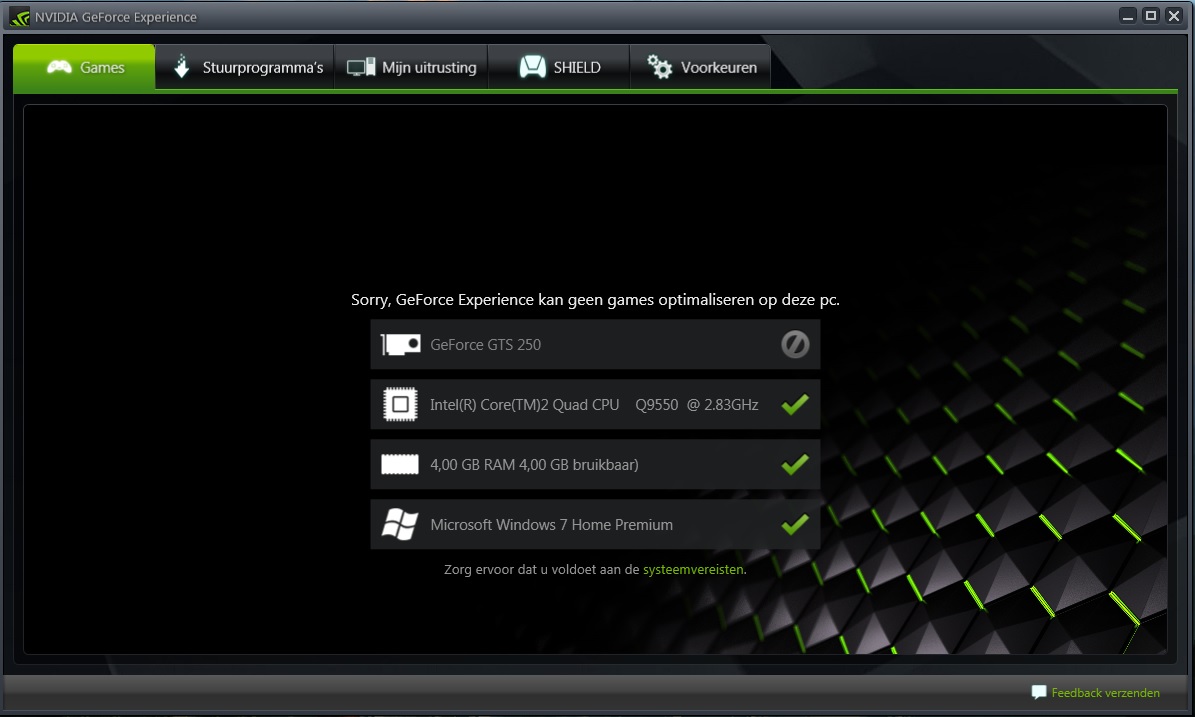
after that i updated it.. when i open NVIDIA GeForce Experience i get this view:

lVX41YV.jpg
 
Last edited:

My Computer My Computer

Computer type
PC/Desktop
OS
Microsoft Windows 7 Home Premium 64-bits
CPU
Intel(R) Core(TM)2 Quad CPU Q9550 @ 2.83GHz
Motherboard
ASUSTeK Computer INC. P5QL PRO
Memory
4,00 GB
Graphics Card(s)
NVIDIA GeForce GTS 250
Sound Card
High Definition Audio-apparaat
Monitor(s) Displays
SyncMaster P2270HD
Screen Resolution
1920 x 1080 x 32 bits (4294967296 colors) @ 60 Hz
Sorry, I don't read Dutch, is it? or German.

Have you tried the suggestions here in post #5, by rvcjew?

You're going to have to forget about games and punkbuster (pb) for a while until you stabilize your system, add at least another 2GB of RAM, oh, and what type of antivirus/malware do you use?

Once your stable, then you can add those game managers and games back until you have problems. Then you know what's causing the problems and proceed with a fix to run them, we're only shooting in the dark until you do.
 

My Computer My Computer

Computer type
PC/Desktop
Computer Manufacturer/Model Number
Gateway DX4831-01e (Mid-Tower Desktop)
OS
Originally Win 7 Hm Prem x64 Ver 6.1.7600 Build 7601-SP1 | Upgraded to Windows 10 December 14, 2019
CPU
Intel i3 530 2.93GHz, 2933MHz 2 Cores 4 Logical Processors
Motherboard
Gateway H57M01 133 megahertz
Memory
6GB of 1,333MHz DDR3 SDRAM
Graphics Card(s)
32MB Intel Graphics Media Accelerator HD IGChip
Sound Card
Realtek High Definition Audio
Monitor(s) Displays
Gateway HX2000 20inch TFT active matrix TN
Screen Resolution
1600 x 900 x 59 hertz
Hard Drives
WDC WD10EADS-00M2B0 [HDD] (1000.20 GB) -- drive 0,
HL-DT-ST DVDRAM GH41N [CD-ROM dr]
Four card readers, and Four USB 2.0
PSU
300watts.
Case
Mid-Tower Desktop
Cooling
Stock from Gateway
Keyboard
Natural Ergonomic Keyboard 4000, see Other Info
Mouse
Orig. Gateway wore out now using Insignia USB wired optical
Internet Speed
Vz FIOS 10ms png 57.64Mbps down 65.53Mbps up Speedtest.org
Antivirus
Zamana Anti-logger with Anti-malware, MSE, Windows Firewall,
Browser
IE11.0.9600.19399-Upd ver11.0.135, Firefox 68.0.1 x64
Other Info
System Specs by Belarc.

BIOS: American Megatrends Inc. P01-A0 11/17/2009

Replaced the MS 'Natural' Standard PS/2 Enhanced 101-102 Keyboard with a new Natural Ergonomic Keyboard 4000 on August 1st 2014.

Canon Pixma MG3222 Printer.

Updated to IE11 on 12102015 | Fios Quantum Router g1100

Additional AV: SpywareBlaster, manual Mbam, SAS
Sorry, I don't read Dutch, is it? or German.

Have you tried the suggestions here in post #5, by rvcjew?

You're going to have to forget about games and punkbuster (pb) for a while until you stabilize your system, add at least another 2GB of RAM, oh, and what type of antivirus/malware do you use?

Once your stable, then you can add those game managers and games back until you have problems. Then you know what's causing the problems and proceed with a fix to run them, we're only shooting in the dark until you do.

Yes its Dutch, it says :Sorry, GeForce can not optimize games on this computer.

Well the fact is that Punkbuster does not support Wolfenstein Enemy Territory anymore, so there are no uodates available.

How can i add 2GB RAM? Dont know anything about this :S

I think its wierd cause Counter Strike Global Offence is a newer game then W;ET, and when I disable my soundcard i can play W:ET without any probs... So I think is something with the soundcard..
 

My Computer My Computer

Computer type
PC/Desktop
OS
Microsoft Windows 7 Home Premium 64-bits
CPU
Intel(R) Core(TM)2 Quad CPU Q9550 @ 2.83GHz
Motherboard
ASUSTeK Computer INC. P5QL PRO
Memory
4,00 GB
Graphics Card(s)
NVIDIA GeForce GTS 250
Sound Card
High Definition Audio-apparaat
Monitor(s) Displays
SyncMaster P2270HD
Screen Resolution
1920 x 1080 x 32 bits (4294967296 colors) @ 60 Hz
Back
Top