Windows Defender Offline

How to Use Windows Defender Offline

   Information
The former Microsoft Standalone System Sweeper (MSSS) BETA has been rebranded and available as Windows Defender Offline now.

Windows Defender Offline is a free standalone, bootable malware and virus remover from Microsoft that performs an offline scan of an infected PC to remove viruses, rootkits and other advanced malware.

This tutorial will show you how to update and use the Windows Defender Offline Tool to create a 32-bit or 64-bit Windows Defender Offline bootable CD/DVD, USB flash drive, or ISO file on any computer to help you start an infected 32-bit or 64-bit PC and perform an offline scan at boot to help identify and remove rootkits and other malicious malware. In addition, Windows Defender Offline can be used if you cannot install or start an antivirus program on your computer, or if the installed AV program can’t detect or remove malware on your computer.

The log files for Windows Defender Offline are stored in a MPLog-MM/DD/YYYY-HH/MM/SS .txt file in the folder below on the computer that was scanned at boot.
C:\Windows\Windows Defender Offline\Support
For Windows Defender Offline FAQ's, see: Windows Defender Offline: frequently asked questions

   Note
Minimum System Requirements:

For both the PC infected with a virus or malware, and the PC that you are creating the bootable media on, you'll need PCs with the following minimum requirements.
  • Operating system:
    • Windows XP (Service Pack 3)
    • Windows Vista (RTM, Service Pack 1, or Service Pack 2, or higher)
    • Windows 7 (RTM, Service Pack 1, or higher)
    • Windows 8
  • Processor:
    • Windows XP: 500 MHz or higher
    • Windows Vista, Windows 7, and Windows 8: 1.0 GHz or higher
  • Memory:
    • Windows XP: 768 MB RAM or higher
    • Windows Vista, Windows 7, and Windows 8: 1 GB RAM or higher
  • Video resolution: 800 × 600 or higher
  • Available hard disk space: 500 MB
For the PC infected by a virus or malware:
  • The PC must have the same Windows operating system (OS) architecture 32-bit or 64-bit as Windows Defender Offline. Bootable media created on any version of Windows can be run on any other version of Windows. The only thing that needs to match is the architecture of Windows Defender Offline and the OS of the infected machine.
  • Internet connection: Only required to update the latest malware definitions for a Windows Defender Offline bootable USB flash drive.
  • In addition, BitLocker must be disabled to use Windows Defender Offline Beta.
For the PC on which you create the bootable media:
  • Administrator account: A user account with administrator privileges to create the bootable media.
  • Internet connection: An Internet connection to install and download the latest virus and spyware definitions for Windows Defender Offline.
  • Internet browser: Windows Internet Explorer 7.0 or higher, or Mozilla Firefox 3.0 or higher.
  • Media: A CD, DVD, or USB flash drive with at least 250 MB of free space.
   Tip
If you get a Error Code 0x8004cc04, Error Code 0x8004cc05, or Error Code 0x8050800c while using Windows Defender Offline, then please see the same suggested solutions here for MSSS.

If you have UEFI, then Windows Defender Offline is now able to boot with Secure Boot ENABLED.

   Warning
For obvious reasons, the "Windows Defender Offline" bootable CD/DVD, USB flash drive, or ISO should be created on a different computer other than the one that you suspect may be infected with malware.


STEP ONE

To Create a "Windows Defender Offline" Bootable CD/DVD, USB Flash Drive, or ISO File


1. If you have not already, you will need to download the same 32-bit or 64-bit version of Windows Defender Offline Tool at the download link below for the same 32-bit or 64-bit Windows that is installed on the computer that you will be scanning at boot, and save the exe file to your desktop.

Download


2. Run the downloaded mssstool64.exe (64-bit) or mssstool32.exe (32-bit) file, and click on Next. (see screenshot below)
Step1.jpg
3. Click on the I accept button. (see screenshot below)
NOTE: You will only be prompted for this the first time that you run the Windows Defender Offline Tool.
Step2.jpg
4. Do step 5, 6, or 7 below for what type of bootable "Windows Defender Offline" CD/DVD, USB, or ISO that you would like to create to scan with. (see screenshot below)
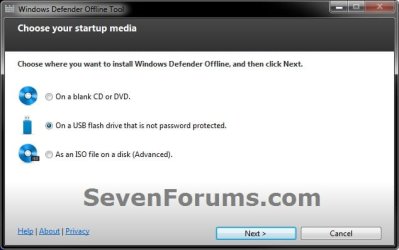
Step3.jpg
5. To Create a"Windows Defender Offline" Bootable CD or DVD
A) Insert a blank unformatted CD or DVD into the CD/DVD drive.
NOTE: If a AutoPlay window opens afterwards, close it.

B) Select (dot) Use a blank CD or a DVD, and click on Next. (see screenshot below step 4)

C) If you have more than one DC/DVD drive, then select the CD/DVD drive with the blank CD/DVD in it, and click on Next. (see screenshot below)
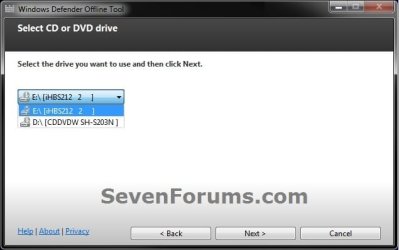
DVD-1.jpg
D) When it's finished, click on Finish. (see screenshot below)
NOTE: Be sure to label the CD/DVD as being able to only be used on a 32-bit or 64-bit Windows computer at boot.
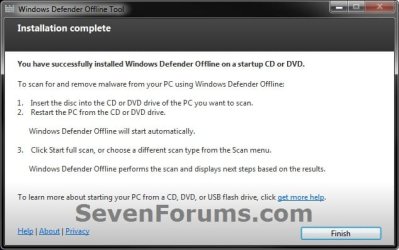
DVD-2.jpg
E) Go to step 8.
6. To Create a "Windows Defender Offline" Bootable USB Flash Drive


   Note
If you run the Windows Defender Offline Tool again on the same USB flash drive, and if the following conditions below are met, the tool will only download new updated malware definitions (approx. 69.48 MB) and update the USB drive without reformatting it.
  • The USB flash drive has Windows Defender Offline previously installed on it.
  • The Windows Defender Offline Tool version that was used to create the bootable USB flash drive the first run is the same as the one being used for the second run.
  • Files on the USB flash drive are not damaged or missing (the tool will verify that).
A) Connect a USB flash drive that is not password protected to your computer.
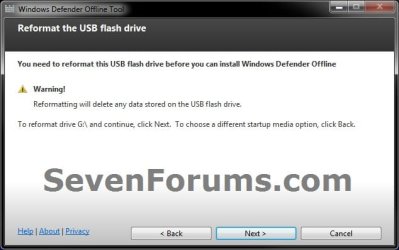
WARNING: This USB drive will be formated during this process, so be sure to backup anything that you do not want to lose to another location first.

B) Select (dot) On a USB flash drive that is not password protected, and click on Next. (see screenshot below step 4)

C) If you have more than one USB drives connected, then select the one that you want to use, and click on Next. (see screenshot below)
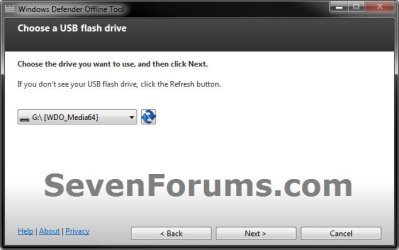
USB-1B.jpg
D) When it's finished, click on Finish. (see screenshot below)
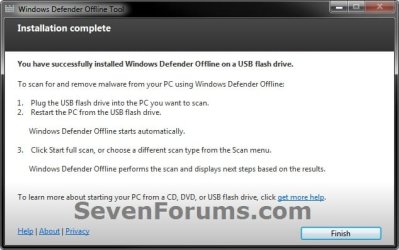
USB-2.jpg
E) Go to step 8.
7. To Create a "Windows Defender Offline" Bootable ISO File
A) Select (dot) Create Standalone System Sweeper on an ISO File, and click on Next. (see screenshot below step 4)

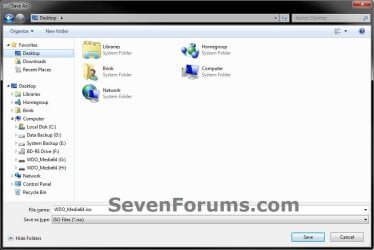
B) Select (browse) where you would like to save the ISO file to, and click on Next. (see screenshots below)
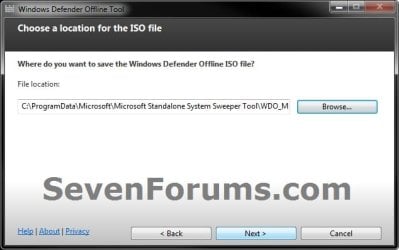
ISO-1.jpg

ISO-2.jpg

C) When it's finished, click on Finish. (see screenshot below)
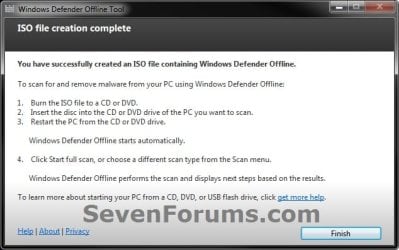
ISO-3.jpg
D) You can now use the ISO file to boot with in a virtual machine (ex: Windows Virtual PC), or use the free Windows 7 USB/DVD Download Tool to burn the ISO to a DVD or USB flash drive.

E) Continue on to step 8.
8. You will now be able to boot from the 32-bit or 64-bit CD/DVD, USB, or ISO that you created to run Windows Defender Offline on the same 32-bit or 64-bit computer as in the STEP TWO section below when you like.


STEP TWO

To Scan a Computer with the Bootable CD/DVD or USB Flash Drive


1. Insert or connect the same 32-bit or 64-bit Windows Defender Offline bootable CD/DVD or USB flash drive to the same type of 32-bit or 64-bit Windows computer that you want to scan at boot.
NOTE: For example, you can only use a created 32-bit USB on a 32-bit computer at boot, and you can only use a created 64-bit USB on a 64-bit computer at boot.

2. In your BIOS/UEFI Boot Menu (ex: F11) of the computer that you want to scan, select to temporarily boot from the CD/DVD or USB flash drive created in the STEP ONE section above, and boot from it.

   Note
Please consult your computer's or motherboard's manual for exact details on how to do this.

You do not need to change the boot priority order in the BIOS/UEFI settings for this. Use the Boot Menu instead to select to only temporarily boot from the DVD/USB instead.


3. This is what you will see while it's booting from the CD/DVD or USB flash drive.
restart-1.jpg

restart-2.jpg

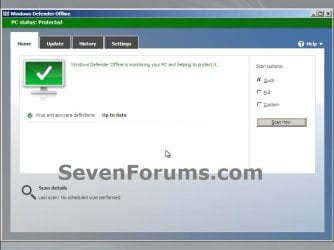
4. When Windows Defender Offline has booted, you will be able to update the definitions and select what type of scan you would like to run on the computer. A Full Scan is recommended, and could take several hours to complete.
NOTE: You will only be able to update the definitions at boot if you are using a bootable USB flash drive with a internet connection, and not with a bootable CD/DVD.
Update.jpg

Scan.jpg

5. When finished, close Windows Defender Offline to restart the computer back into Windows.
That's it,
Shawn


Attachments

  • USB-1.jpg
    USB-1.jpg
    28.4 KB · Views: 109
Last edited:
I think it may be beta because it is the first time it is on it's own, using it's own dedicated shell. Also the exe that creates it is new.
 

My Computers

System One System Two

  • Computer type
    PC/Desktop
    OS
    7 X64
    CPU
    i5 8400
    Motherboard
    gigabyte b365m ds3h
    Memory
    2x8gb 3200mhz
    Hard Drives
    various
    PSU
    pure power 11 400w cm
    Case
    Coolermaster
    Cooling
    cryorig m9i
  • Computer type
    PC/Desktop
    OS
    7x64
    CPU
    g5400
    Motherboard
    ga b365m ds3h
    Memory
    8gb ddr4 2400
    PSU
    xfx pro 450w
Theo,

I assume you can use the create iso option.

Then use another burner - imgburn , or whatever - may be easier.

I expect MS will add this as another option in system recovery.
 

My Computers

System One System Two

  • Computer type
    PC/Desktop
    OS
    7 X64
    CPU
    i5 8400
    Motherboard
    gigabyte b365m ds3h
    Memory
    2x8gb 3200mhz
    Hard Drives
    various
    PSU
    pure power 11 400w cm
    Case
    Coolermaster
    Cooling
    cryorig m9i
  • Computer type
    PC/Desktop
    OS
    7x64
    CPU
    g5400
    Motherboard
    ga b365m ds3h
    Memory
    8gb ddr4 2400
    PSU
    xfx pro 450w
karlsnooks, thanks for taking the time testing out our new Microsoft Standalone System Sweeper Beta!

As for the update scenario - the rational was that if you opt to run the tool again on a recently created USB you are interested in updating it. Hence, the definitions are downloaded regardless of the date they were created. Do you think that given that rational the behavior should be different?

Yes

As for the manual update you performed - why did you do that?

Need current definitions.

I mean, when you boot from a USB drive created by the tool (without modifying it), when the Standalone System Sweeper start in the offline environment, the definitions should be updated. Did you have a different experience?

Yes.

Regarding the directions you unsuccessfully followed - what directions exactly were you trying to follow? and what exactly were you trying to do?

Help | update |
Suggest you try following your directions on a single standalone laptop with only wireless internet connectivity.


Thanks,
Guy Arad.

In addition, I think that after a product has been out in the enterprise environment for more that a year, a part of MSDart, then it is time to drop the word BETA.

Heck, Win 7 is a BETA by those criteria. (Now I know that there are many who will agree on that one.)

Why am I so hard? Because I'm in the pits. I help the poor souls who sometimes have trouble finding the on/off button. For a product to be usable by an IT person is one thing. To be usable by Joe OrdinaryUser is a different matter.
 

My Computer

Computer Manufacturer/Model Number
Toshiba Satellite S875D-S7239 laptop
OS
MS Windows 7 Ultimate SP1 64-bit
CPU
AMD A10-4600M
Motherboard
AMD Pumori (Socket FT1)
Memory
6.00 GB Dual-Channel DDR3 @ 798MHz (11-11-12-28)
Graphics Card(s)
AMD Radeon HD 7660G
Sound Card
High Definition Audio Device
Monitor(s) Displays
Generic PnP Monitor (1600x900@60Hz)
Screen Resolution
1600x900@60Hz
Hard Drives
SSD 119GB Corsair CSSD-V128GB2 ATA Device
Keyboard
Standard PS/2 Keyboard
Mouse
HP Wireless Optical Mobile Mouse Model FHA-3410
Internet Speed
What the local pub, local coffee shop offers.
Other Info
Optical Drive:MATSHITA BD-CMB UJ160B ATA Device


Also have an Asus ha1002xp netbook with Win 7 Ultimate installed.

My Computer

OS
Windows 7 & Windows Vista Ultimate
Personally, I am rather confused as to why the Standalone System Sweeper is still labeled Beta since the tool has long been a part of the Microsoft Diagnostics and Recovery Toolset (DaRT) for Microsoft Enterprise customers.
Well that's interesting.
Not much on the MSSSTool in TechNet: Overview of Microsoft Diagnostics and Recovery Toolset.

I ahve not used it yet, so making assumtions,,, I assume this is not like a regular PE where you can add drivers and such, or manipulate it in anyway.

If MSSS is available in DaRT, then a corporation would use that as they may have license to use it through Microsoft Desktop Optimization Pack (MDOP). That is what I would use in that environment.

MSSS appears will be available to all, like WAIK is. Assuming it will be anyway.

However, I am also wondering, is the MSSS build a universal build?
If so, how does it have the multitude of drivers needed to boot from USB on any PC and have network access? Unless it attempts to use the drivers on the system, which I suppose it could attempt to detect, but if they are corrupt, then it would corrupt the boot process, so it's not a good idea.

Otherwise, no network connectivity, no updates once booted.
Will it still run if it can not update once booted?

it's a bit confusing.
 

My Computer

Computer Manufacturer/Model Number
Self Built
OS
Win 7 Ultimate 32bit
CPU
C2D E6600 2.4Ghz
Motherboard
Intel D965WH
Memory
4G Kingston KHX5400D2
Graphics Card(s)
EVGA GTX 570 HD SC (012-P3-1573-KR)
Sound Card
On-Board
Monitor(s) Displays
Samsung 226BW
Screen Resolution
1680 x 1050
Hard Drives
2 x 250 Seagate Barracuda
2 x 500 Seagate Barracuda (Raid1)
PSU
Corsair TX750W
Case
In-Win C589
Cooling
Stock Intel Cooling
Hi Tepid,

Yes, the d/l is an exe which creates an iso . It contains pe and the system sweeper.

Here's a file list View attachment MSS.zip

Same drivers that are in winre.wim. Wired connection support by default wpeinit.

You build your own pe - so you can just stick system sweeper into your own build.
 

My Computers

System One System Two

  • Computer type
    PC/Desktop
    OS
    7 X64
    CPU
    i5 8400
    Motherboard
    gigabyte b365m ds3h
    Memory
    2x8gb 3200mhz
    Hard Drives
    various
    PSU
    pure power 11 400w cm
    Case
    Coolermaster
    Cooling
    cryorig m9i
  • Computer type
    PC/Desktop
    OS
    7x64
    CPU
    g5400
    Motherboard
    ga b365m ds3h
    Memory
    8gb ddr4 2400
    PSU
    xfx pro 450w
@brink
excellent tutorial brink very handy to have.this is a must for everyone's toolbox :thumbsup:
 

My Computer

Computer Manufacturer/Model Number
packard bell IXTREME M5722
OS
Operating System : Windows 7 Home Premium Edition 6.01.7600 SP1 (x64)
CPU
Processor : Intel Core 2 Quad Q8300 @ 2500 MHz
Motherboard
Mainboard : Packard Bell (Acer EG43M )
Memory
Physical Memory :8GB Corsair4x 2GB 800MHz C5 DDR2
Graphics Card(s)
Video Card : XFX 6700 AMD
Monitor(s) Displays
Maestro 234DL - BenQ V2220 - BenQ VW2420H
Screen Resolution
Current Display :1920x1080p pixels at 60 Hz in HD LED
Hard Drives
Hard Disks : WDC (1000 GB)
Drive C: (Hard Disk) : 428 GB available on 491 GB
Drive D: (Hard Disk) : 426 GB available on 492 GB
SAMSUNG spinpoint HD103SJ 1000.2 GB
(X 2) KINGSTON SSD NOW V 30GB
PSU
XFX ProSeries 550W PSU
Case
PACKARD BELL IXTREME
Cooling
System Blower Current: 150mA Air Flow16CFM ;Akasa 90mm rear
Keyboard
Gigabyte Aivia K8100
Mouse
TRUST-Wireless Laser Mouse - Carbon edition MI-7770C
Internet Speed
TP-LINK > TL-WN951N / AV500 Gigabit Powerline Adapters
Browser
chrome dev
Other Info
EXTRA COOLING>(FAN CONTROLLER) PC Bay Cooler 3 x 40mm fans; Akasa AK-HD-BL Blue hard drive cooler 2 x 40 mm fan 4500 rpm 29.7 dBA
Bios> American Megatrends Inc.
Version : P01-A1
Date : 08/31/2009
TY Shawn. A fine tutorial that I can use for myself as well as helping others.
 

My Computer

Computer type
PC/Desktop
Computer Manufacturer/Model Number
Dell XPS 420
OS
Windows 10, Home Clean Install
CPU
Intel Core2 processsor Q8200(2.33Ghz 1333FSB) Quad Core Tech
Motherboard
Dell
Memory
6 gb
Graphics Card(s)
ATI Radeon 256MB HD3650
Sound Card
Intergrated 7.1 Channel Audio
Monitor(s) Displays
Dell SP2009W 20"
Hard Drives
640 GB Serial ATA Hard drive
Cooling
Fan
Keyboard
Dell USB Keyboard
Mouse
Dell Premium Optical USB
Internet Speed
DSL 2.85
Hi Dave,

Pretty sure it will be fine to boot mms iso from your menu, just like any other .iso

Tried MSSS ISO version on my Multi tool boot USB drive, it opened to the choose the drive to scan screen, then gave the 0X8004cc04 - definitions error.

Installed the USB version, it formatted the USB but got the same error message.
Neither of these methods gave the opening screen in the Step Two #4 in this tutorial.

Checked the USB drive and it's not usable for Readyboost, which might mean it's not acceptable for a bootable device also.
The second boot of both versions gave a device not recognize error. Unplug/plug-in did recognize it.

Will try on a different USB drive.
 

My Computer

Computer type
PC/Desktop
Computer Manufacturer/Model Number
76~2.0
OS
Windows 7 Ult x64 - SP1/ Windows 8 Pro x64
CPU
Intel Core i5-3570K 4.6GHz
Motherboard
Gigabyte GA-Z77X UD3H, f18
Memory
8GB (2X4GB) DDR3 1600 Corsair Vengeance CL8 1.5v
Graphics Card(s)
Sapphire HD 7770 Vapor-X OC 1GB DDR5
Sound Card
Onboard VIA VT2021
Monitor(s) Displays
22" LCD Dell
Screen Resolution
1680x1050
Hard Drives
Samsung 840Pro 128GB SSD,
Seagate Barracuda 500GB SATA2 7200rpm 32MB cache, Seagate Barracuda 1TB SATA2 7200rpm 32MB cache,
PSU
Corsair HX650W
Case
Cooler Master Storm Scout
Cooling
Corsair H80 2x12cm Noctua NF P12 , 2x14cm case fans
Keyboard
Logitech Wave
Mouse
CM Sentinel
Internet Speed
Dismal
Antivirus
Avast
Browser
Opera Next
Other Info
Haswell laptop: HP Envy 17t-j, i7-4700MQ, GeForce 740M 2GB DDR3, 17.3" Full HD 1920x1080, 16GB RAM, Samsung 840 Pro 128GB, 1TB Hitachi 7200 HDD,
Desktop: eSATA ports,
External eSATA Seagate 500GB SATA2 7200rpm,
External WD USB 500GB
Dave,
On the USB that doesn't work, try:
run Diskpart from an elevated command prompt
issue following commands:
List disk which will list the disks detected
Select Disk 2 ( or whatever number is the number of your USB stick)
Detail Disk (to verify that you got the correct disk)
CLEAN ALL ( this will write zeros to each and every byte of the usb stick)
Format FS=ntfs ( this will format the usb stick)
EXIT ( to exit from DiskPart)
Exit ( to exit from the command shell)

Now if that usb stick doesn't work it is defective.
 

My Computer

Computer Manufacturer/Model Number
Toshiba Satellite S875D-S7239 laptop
OS
MS Windows 7 Ultimate SP1 64-bit
CPU
AMD A10-4600M
Motherboard
AMD Pumori (Socket FT1)
Memory
6.00 GB Dual-Channel DDR3 @ 798MHz (11-11-12-28)
Graphics Card(s)
AMD Radeon HD 7660G
Sound Card
High Definition Audio Device
Monitor(s) Displays
Generic PnP Monitor (1600x900@60Hz)
Screen Resolution
1600x900@60Hz
Hard Drives
SSD 119GB Corsair CSSD-V128GB2 ATA Device
Keyboard
Standard PS/2 Keyboard
Mouse
HP Wireless Optical Mobile Mouse Model FHA-3410
Internet Speed
What the local pub, local coffee shop offers.
Other Info
Optical Drive:MATSHITA BD-CMB UJ160B ATA Device


Also have an Asus ha1002xp netbook with Win 7 Ultimate installed.
Forgot to mention this was on two different USB drives.

The ISO MSSS on my multi tool drive with Pendrivelinux for boot files/GUI, all the other ISO apps run fine, just not the ISO MSSS.

Will run Diskpart on the other MSSS USB drive and see if that helps, thanks.

Strange that the two versions on two different drives have the exact same error, might be due to slow memory on both USB drives.

USB drives are Transcend 4GB and SanDisk Cruzer Blade 4GB, both are fairly new.
 
Last edited:

My Computer

Computer type
PC/Desktop
Computer Manufacturer/Model Number
76~2.0
OS
Windows 7 Ult x64 - SP1/ Windows 8 Pro x64
CPU
Intel Core i5-3570K 4.6GHz
Motherboard
Gigabyte GA-Z77X UD3H, f18
Memory
8GB (2X4GB) DDR3 1600 Corsair Vengeance CL8 1.5v
Graphics Card(s)
Sapphire HD 7770 Vapor-X OC 1GB DDR5
Sound Card
Onboard VIA VT2021
Monitor(s) Displays
22" LCD Dell
Screen Resolution
1680x1050
Hard Drives
Samsung 840Pro 128GB SSD,
Seagate Barracuda 500GB SATA2 7200rpm 32MB cache, Seagate Barracuda 1TB SATA2 7200rpm 32MB cache,
PSU
Corsair HX650W
Case
Cooler Master Storm Scout
Cooling
Corsair H80 2x12cm Noctua NF P12 , 2x14cm case fans
Keyboard
Logitech Wave
Mouse
CM Sentinel
Internet Speed
Dismal
Antivirus
Avast
Browser
Opera Next
Other Info
Haswell laptop: HP Envy 17t-j, i7-4700MQ, GeForce 740M 2GB DDR3, 17.3" Full HD 1920x1080, 16GB RAM, Samsung 840 Pro 128GB, 1TB Hitachi 7200 HDD,
Desktop: eSATA ports,
External eSATA Seagate 500GB SATA2 7200rpm,
External WD USB 500GB
Downloaded the latest Microsoft Security Essentials virus definition files and placed them on the root of the USB memory stick with the multi tool grub.
It worked and is running now.

MSE Get the latest definitions, D/L the MSE 32bit or 64bit definitions.

This will make updating the definitions very easy.

Tried the same with the USB installed version, deleted the old mpam-fex64.exe file from the root of the USB memory stick and copied the new one there, still doesn't work.

Will try Diskpart on it.
 
Last edited:

My Computer

Computer type
PC/Desktop
Computer Manufacturer/Model Number
76~2.0
OS
Windows 7 Ult x64 - SP1/ Windows 8 Pro x64
CPU
Intel Core i5-3570K 4.6GHz
Motherboard
Gigabyte GA-Z77X UD3H, f18
Memory
8GB (2X4GB) DDR3 1600 Corsair Vengeance CL8 1.5v
Graphics Card(s)
Sapphire HD 7770 Vapor-X OC 1GB DDR5
Sound Card
Onboard VIA VT2021
Monitor(s) Displays
22" LCD Dell
Screen Resolution
1680x1050
Hard Drives
Samsung 840Pro 128GB SSD,
Seagate Barracuda 500GB SATA2 7200rpm 32MB cache, Seagate Barracuda 1TB SATA2 7200rpm 32MB cache,
PSU
Corsair HX650W
Case
Cooler Master Storm Scout
Cooling
Corsair H80 2x12cm Noctua NF P12 , 2x14cm case fans
Keyboard
Logitech Wave
Mouse
CM Sentinel
Internet Speed
Dismal
Antivirus
Avast
Browser
Opera Next
Other Info
Haswell laptop: HP Envy 17t-j, i7-4700MQ, GeForce 740M 2GB DDR3, 17.3" Full HD 1920x1080, 16GB RAM, Samsung 840 Pro 128GB, 1TB Hitachi 7200 HDD,
Desktop: eSATA ports,
External eSATA Seagate 500GB SATA2 7200rpm,
External WD USB 500GB
Great information!!

Is there an option to create and save a report of what the MSSS finds?

Thanks for your help.
 

My Computer

Computer type
PC/Desktop
Computer Manufacturer/Model Number
An ol' eMachines
OS
Windows 7 Home Premium
Internet Speed
Fine for me...I'm retired!
Last edited:

My Computer

Computer type
PC/Desktop
Computer Manufacturer/Model Number
Self built custom
OS
64-bit Windows 11 Pro for Workstations
CPU
Intel i7-8700K OC'd to 5 GHz
Motherboard
ASUS ROG Maximus XI Formula Z390
Memory
64 GB (4x16GB) G.SKILL TridentZ RGB DDR4 3600 MHz
Graphics Card(s)
ASUS ROG-STRIX-GTX1080TI-O11G-GAMING
Sound Card
Integrated
Monitor(s) Displays
2 x Samsung Odyssey G7 27"
Screen Resolution
2560x1440
Hard Drives
1TB Samsung 990 PRO M.2,
4TB Samsung 990 PRO PRO M.2,
TerraMaster F8 SSD Plus NAS
PSU
Seasonic Prime Titanium 850W
Case
Thermaltake Core P3
Cooling
Corsair Hydro H115i
Keyboard
Logitech wireless K800
Mouse
Logitech MX Master 4
Internet Speed
2 Gb/s Download and 100 Mb/s Upload
Antivirus
Malwarebyte Anti-Malware Premium
Browser
Google Chrome
Other Info
Logitech Z625 speaker system,
Logitech BRIO 4K Pro webcam,
HP Color LaserJet Pro MFP M477fdn,
APC SMART-UPS RT 1000 XL - SURT1000XLI,
Galaxy S23 Plus phone
Thanks, Brink!

Also, thank you for the great tutorial at the start fo this thread. It is valuable help.


In this thread (Post 4):
http://www.sevenforums.com/system-security/169370-going-earth-malware.html

The poster said:
...got some screens about resolving boot problems... i follwed the instructions given by that thing. it allowed me to do a system restore...

Is there a thread where we can see the screens mentioned about resolving boot problems...?

Thanks again for your help.
 

My Computer

Computer type
PC/Desktop
Computer Manufacturer/Model Number
An ol' eMachines
OS
Windows 7 Home Premium
Internet Speed
Fine for me...I'm retired!
I have not seen any so far. :(
 

My Computer

Computer type
PC/Desktop
Computer Manufacturer/Model Number
Self built custom
OS
64-bit Windows 11 Pro for Workstations
CPU
Intel i7-8700K OC'd to 5 GHz
Motherboard
ASUS ROG Maximus XI Formula Z390
Memory
64 GB (4x16GB) G.SKILL TridentZ RGB DDR4 3600 MHz
Graphics Card(s)
ASUS ROG-STRIX-GTX1080TI-O11G-GAMING
Sound Card
Integrated
Monitor(s) Displays
2 x Samsung Odyssey G7 27"
Screen Resolution
2560x1440
Hard Drives
1TB Samsung 990 PRO M.2,
4TB Samsung 990 PRO PRO M.2,
TerraMaster F8 SSD Plus NAS
PSU
Seasonic Prime Titanium 850W
Case
Thermaltake Core P3
Cooling
Corsair Hydro H115i
Keyboard
Logitech wireless K800
Mouse
Logitech MX Master 4
Internet Speed
2 Gb/s Download and 100 Mb/s Upload
Antivirus
Malwarebyte Anti-Malware Premium
Browser
Google Chrome
Other Info
Logitech Z625 speaker system,
Logitech BRIO 4K Pro webcam,
HP Color LaserJet Pro MFP M477fdn,
APC SMART-UPS RT 1000 XL - SURT1000XLI,
Galaxy S23 Plus phone
Shawn,
Although I ran it once for familiarization, I don't remember, but do you recall if the Microsoft System Scanner generates a log?

I know that the System Scanner is for those lucky people with an on-line connection and where a stand-alone solution isn't required.

thanks,
karl
 

My Computer

Computer Manufacturer/Model Number
Toshiba Satellite S875D-S7239 laptop
OS
MS Windows 7 Ultimate SP1 64-bit
CPU
AMD A10-4600M
Motherboard
AMD Pumori (Socket FT1)
Memory
6.00 GB Dual-Channel DDR3 @ 798MHz (11-11-12-28)
Graphics Card(s)
AMD Radeon HD 7660G
Sound Card
High Definition Audio Device
Monitor(s) Displays
Generic PnP Monitor (1600x900@60Hz)
Screen Resolution
1600x900@60Hz
Hard Drives
SSD 119GB Corsair CSSD-V128GB2 ATA Device
Keyboard
Standard PS/2 Keyboard
Mouse
HP Wireless Optical Mobile Mouse Model FHA-3410
Internet Speed
What the local pub, local coffee shop offers.
Other Info
Optical Drive:MATSHITA BD-CMB UJ160B ATA Device


Also have an Asus ha1002xp netbook with Win 7 Ultimate installed.
Hello Karl,

It produces an event report if the scan finds anything, and is displayed in the results. It also has a History option in the toolbar that might show history of last scan results. However, I have not seen a log file yet, but I have not had anything to be found either.
 

My Computer

Computer type
PC/Desktop
Computer Manufacturer/Model Number
Self built custom
OS
64-bit Windows 11 Pro for Workstations
CPU
Intel i7-8700K OC'd to 5 GHz
Motherboard
ASUS ROG Maximus XI Formula Z390
Memory
64 GB (4x16GB) G.SKILL TridentZ RGB DDR4 3600 MHz
Graphics Card(s)
ASUS ROG-STRIX-GTX1080TI-O11G-GAMING
Sound Card
Integrated
Monitor(s) Displays
2 x Samsung Odyssey G7 27"
Screen Resolution
2560x1440
Hard Drives
1TB Samsung 990 PRO M.2,
4TB Samsung 990 PRO PRO M.2,
TerraMaster F8 SSD Plus NAS
PSU
Seasonic Prime Titanium 850W
Case
Thermaltake Core P3
Cooling
Corsair Hydro H115i
Keyboard
Logitech wireless K800
Mouse
Logitech MX Master 4
Internet Speed
2 Gb/s Download and 100 Mb/s Upload
Antivirus
Malwarebyte Anti-Malware Premium
Browser
Google Chrome
Other Info
Logitech Z625 speaker system,
Logitech BRIO 4K Pro webcam,
HP Color LaserJet Pro MFP M477fdn,
APC SMART-UPS RT 1000 XL - SURT1000XLI,
Galaxy S23 Plus phone
I believe any logs would be available in %systemdrive%\standalone system sweeper\support.
 

My Computer

OS
Windows 7 & Windows Vista Ultimate
Back
Top