Windows Defender Offline

How to Use Windows Defender Offline

   Information
The former Microsoft Standalone System Sweeper (MSSS) BETA has been rebranded and available as Windows Defender Offline now.

Windows Defender Offline is a free standalone, bootable malware and virus remover from Microsoft that performs an offline scan of an infected PC to remove viruses, rootkits and other advanced malware.

This tutorial will show you how to update and use the Windows Defender Offline Tool to create a 32-bit or 64-bit Windows Defender Offline bootable CD/DVD, USB flash drive, or ISO file on any computer to help you start an infected 32-bit or 64-bit PC and perform an offline scan at boot to help identify and remove rootkits and other malicious malware. In addition, Windows Defender Offline can be used if you cannot install or start an antivirus program on your computer, or if the installed AV program can’t detect or remove malware on your computer.

The log files for Windows Defender Offline are stored in a MPLog-MM/DD/YYYY-HH/MM/SS .txt file in the folder below on the computer that was scanned at boot.
C:\Windows\Windows Defender Offline\Support
For Windows Defender Offline FAQ's, see: Windows Defender Offline: frequently asked questions

   Note
Minimum System Requirements:

For both the PC infected with a virus or malware, and the PC that you are creating the bootable media on, you'll need PCs with the following minimum requirements.
  • Operating system:
    • Windows XP (Service Pack 3)
    • Windows Vista (RTM, Service Pack 1, or Service Pack 2, or higher)
    • Windows 7 (RTM, Service Pack 1, or higher)
    • Windows 8
  • Processor:
    • Windows XP: 500 MHz or higher
    • Windows Vista, Windows 7, and Windows 8: 1.0 GHz or higher
  • Memory:
    • Windows XP: 768 MB RAM or higher
    • Windows Vista, Windows 7, and Windows 8: 1 GB RAM or higher
  • Video resolution: 800 × 600 or higher
  • Available hard disk space: 500 MB
For the PC infected by a virus or malware:
  • The PC must have the same Windows operating system (OS) architecture 32-bit or 64-bit as Windows Defender Offline. Bootable media created on any version of Windows can be run on any other version of Windows. The only thing that needs to match is the architecture of Windows Defender Offline and the OS of the infected machine.
  • Internet connection: Only required to update the latest malware definitions for a Windows Defender Offline bootable USB flash drive.
  • In addition, BitLocker must be disabled to use Windows Defender Offline Beta.
For the PC on which you create the bootable media:
  • Administrator account: A user account with administrator privileges to create the bootable media.
  • Internet connection: An Internet connection to install and download the latest virus and spyware definitions for Windows Defender Offline.
  • Internet browser: Windows Internet Explorer 7.0 or higher, or Mozilla Firefox 3.0 or higher.
  • Media: A CD, DVD, or USB flash drive with at least 250 MB of free space.
   Tip
If you get a Error Code 0x8004cc04, Error Code 0x8004cc05, or Error Code 0x8050800c while using Windows Defender Offline, then please see the same suggested solutions here for MSSS.

If you have UEFI, then Windows Defender Offline is now able to boot with Secure Boot ENABLED.

   Warning
For obvious reasons, the "Windows Defender Offline" bootable CD/DVD, USB flash drive, or ISO should be created on a different computer other than the one that you suspect may be infected with malware.


STEP ONE

To Create a "Windows Defender Offline" Bootable CD/DVD, USB Flash Drive, or ISO File


1. If you have not already, you will need to download the same 32-bit or 64-bit version of Windows Defender Offline Tool at the download link below for the same 32-bit or 64-bit Windows that is installed on the computer that you will be scanning at boot, and save the exe file to your desktop.

Download


2. Run the downloaded mssstool64.exe (64-bit) or mssstool32.exe (32-bit) file, and click on Next. (see screenshot below)
Step1.jpg
3. Click on the I accept button. (see screenshot below)
NOTE: You will only be prompted for this the first time that you run the Windows Defender Offline Tool.
Step2.jpg
4. Do step 5, 6, or 7 below for what type of bootable "Windows Defender Offline" CD/DVD, USB, or ISO that you would like to create to scan with. (see screenshot below)
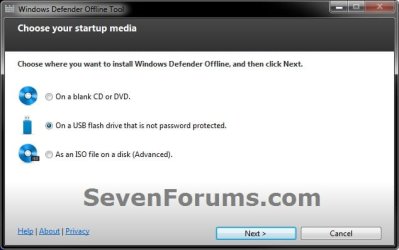
Step3.jpg
5. To Create a"Windows Defender Offline" Bootable CD or DVD
A) Insert a blank unformatted CD or DVD into the CD/DVD drive.
NOTE: If a AutoPlay window opens afterwards, close it.

B) Select (dot) Use a blank CD or a DVD, and click on Next. (see screenshot below step 4)

C) If you have more than one DC/DVD drive, then select the CD/DVD drive with the blank CD/DVD in it, and click on Next. (see screenshot below)
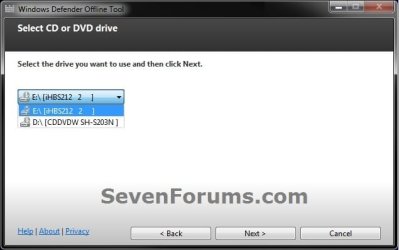
DVD-1.jpg
D) When it's finished, click on Finish. (see screenshot below)
NOTE: Be sure to label the CD/DVD as being able to only be used on a 32-bit or 64-bit Windows computer at boot.
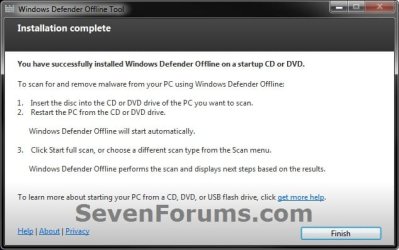
DVD-2.jpg
E) Go to step 8.
6. To Create a "Windows Defender Offline" Bootable USB Flash Drive


   Note
If you run the Windows Defender Offline Tool again on the same USB flash drive, and if the following conditions below are met, the tool will only download new updated malware definitions (approx. 69.48 MB) and update the USB drive without reformatting it.
  • The USB flash drive has Windows Defender Offline previously installed on it.
  • The Windows Defender Offline Tool version that was used to create the bootable USB flash drive the first run is the same as the one being used for the second run.
  • Files on the USB flash drive are not damaged or missing (the tool will verify that).
A) Connect a USB flash drive that is not password protected to your computer.
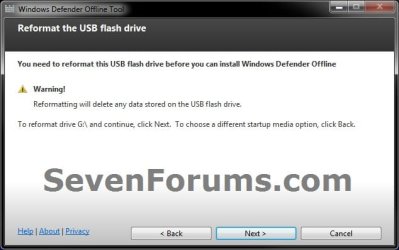
WARNING: This USB drive will be formated during this process, so be sure to backup anything that you do not want to lose to another location first.

B) Select (dot) On a USB flash drive that is not password protected, and click on Next. (see screenshot below step 4)

C) If you have more than one USB drives connected, then select the one that you want to use, and click on Next. (see screenshot below)
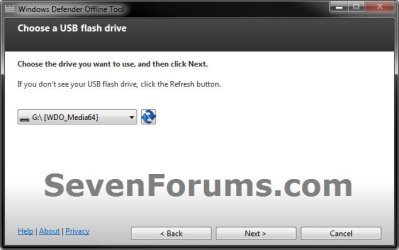
USB-1B.jpg
D) When it's finished, click on Finish. (see screenshot below)
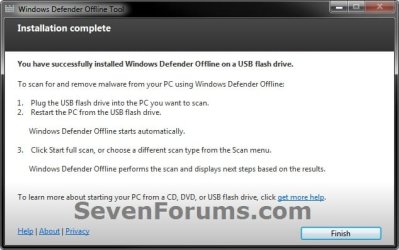
USB-2.jpg
E) Go to step 8.
7. To Create a "Windows Defender Offline" Bootable ISO File
A) Select (dot) Create Standalone System Sweeper on an ISO File, and click on Next. (see screenshot below step 4)

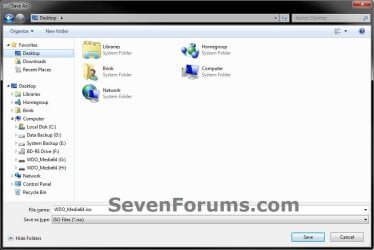
B) Select (browse) where you would like to save the ISO file to, and click on Next. (see screenshots below)
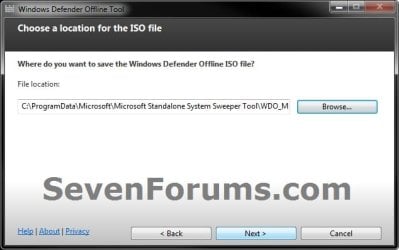
ISO-1.jpg

ISO-2.jpg

C) When it's finished, click on Finish. (see screenshot below)
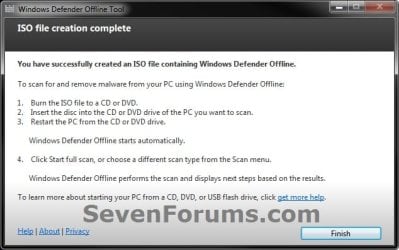
ISO-3.jpg
D) You can now use the ISO file to boot with in a virtual machine (ex: Windows Virtual PC), or use the free Windows 7 USB/DVD Download Tool to burn the ISO to a DVD or USB flash drive.

E) Continue on to step 8.
8. You will now be able to boot from the 32-bit or 64-bit CD/DVD, USB, or ISO that you created to run Windows Defender Offline on the same 32-bit or 64-bit computer as in the STEP TWO section below when you like.


STEP TWO

To Scan a Computer with the Bootable CD/DVD or USB Flash Drive


1. Insert or connect the same 32-bit or 64-bit Windows Defender Offline bootable CD/DVD or USB flash drive to the same type of 32-bit or 64-bit Windows computer that you want to scan at boot.
NOTE: For example, you can only use a created 32-bit USB on a 32-bit computer at boot, and you can only use a created 64-bit USB on a 64-bit computer at boot.

2. In your BIOS/UEFI Boot Menu (ex: F11) of the computer that you want to scan, select to temporarily boot from the CD/DVD or USB flash drive created in the STEP ONE section above, and boot from it.

   Note
Please consult your computer's or motherboard's manual for exact details on how to do this.

You do not need to change the boot priority order in the BIOS/UEFI settings for this. Use the Boot Menu instead to select to only temporarily boot from the DVD/USB instead.


3. This is what you will see while it's booting from the CD/DVD or USB flash drive.
restart-1.jpg

restart-2.jpg

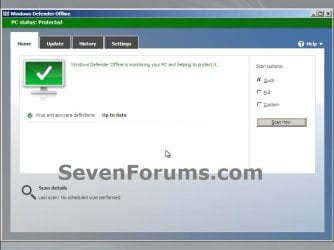
4. When Windows Defender Offline has booted, you will be able to update the definitions and select what type of scan you would like to run on the computer. A Full Scan is recommended, and could take several hours to complete.
NOTE: You will only be able to update the definitions at boot if you are using a bootable USB flash drive with a internet connection, and not with a bootable CD/DVD.
Update.jpg

Scan.jpg

5. When finished, close Windows Defender Offline to restart the computer back into Windows.
That's it,
Shawn


Attachments

  • USB-1.jpg
    USB-1.jpg
    28.4 KB · Views: 109
Last edited:
I believe any logs would be available in %systemdrive%\standalone system sweeper\support.

Thank you Corrine. I'll check there while testing more. :)
 
Last edited:

My Computer

Computer type
PC/Desktop
Computer Manufacturer/Model Number
Self built custom
OS
64-bit Windows 11 Pro for Workstations
CPU
Intel i7-8700K OC'd to 5 GHz
Motherboard
ASUS ROG Maximus XI Formula Z390
Memory
64 GB (4x16GB) G.SKILL TridentZ RGB DDR4 3600 MHz
Graphics Card(s)
ASUS ROG-STRIX-GTX1080TI-O11G-GAMING
Sound Card
Integrated
Monitor(s) Displays
2 x Samsung Odyssey G7 27"
Screen Resolution
2560x1440
Hard Drives
1TB Samsung 990 PRO M.2,
4TB Samsung 990 PRO PRO M.2,
TerraMaster F8 SSD Plus NAS
PSU
Seasonic Prime Titanium 850W
Case
Thermaltake Core P3
Cooling
Corsair Hydro H115i
Keyboard
Logitech wireless K800
Mouse
Logitech MX Master 4
Internet Speed
2 Gb/s Download and 100 Mb/s Upload
Antivirus
Malwarebyte Anti-Malware Premium
Browser
Google Chrome
Other Info
Logitech Z625 speaker system,
Logitech BRIO 4K Pro webcam,
HP Color LaserJet Pro MFP M477fdn,
APC SMART-UPS RT 1000 XL - SURT1000XLI,
Galaxy S23 Plus phone
Shawn,
thanks looks like I need to run the online scanner again and pay attention. I have the same good fortune that nothing is ever found.

Corrine:
Didn't even know that existed. I'm awaiting Shawn's report. That would be useful info.
 

My Computer

Computer Manufacturer/Model Number
Toshiba Satellite S875D-S7239 laptop
OS
MS Windows 7 Ultimate SP1 64-bit
CPU
AMD A10-4600M
Motherboard
AMD Pumori (Socket FT1)
Memory
6.00 GB Dual-Channel DDR3 @ 798MHz (11-11-12-28)
Graphics Card(s)
AMD Radeon HD 7660G
Sound Card
High Definition Audio Device
Monitor(s) Displays
Generic PnP Monitor (1600x900@60Hz)
Screen Resolution
1600x900@60Hz
Hard Drives
SSD 119GB Corsair CSSD-V128GB2 ATA Device
Keyboard
Standard PS/2 Keyboard
Mouse
HP Wireless Optical Mobile Mouse Model FHA-3410
Internet Speed
What the local pub, local coffee shop offers.
Other Info
Optical Drive:MATSHITA BD-CMB UJ160B ATA Device


Also have an Asus ha1002xp netbook with Win 7 Ultimate installed.
I believe any logs would be available in %systemdrive%\standalone system sweeper\support.

Thank you Corrine. I'll check there while testing more. :)

You were correct Corrine. It will create a log at that location on the computer that was scanned. :)

I updated the tutorial by adding a NOTE box at the bottom of the tutorial for this with an example of the log file.

I also tested with a AV test file that would trigger an alert to show what you would see if something was found.
 

My Computer

Computer type
PC/Desktop
Computer Manufacturer/Model Number
Self built custom
OS
64-bit Windows 11 Pro for Workstations
CPU
Intel i7-8700K OC'd to 5 GHz
Motherboard
ASUS ROG Maximus XI Formula Z390
Memory
64 GB (4x16GB) G.SKILL TridentZ RGB DDR4 3600 MHz
Graphics Card(s)
ASUS ROG-STRIX-GTX1080TI-O11G-GAMING
Sound Card
Integrated
Monitor(s) Displays
2 x Samsung Odyssey G7 27"
Screen Resolution
2560x1440
Hard Drives
1TB Samsung 990 PRO M.2,
4TB Samsung 990 PRO PRO M.2,
TerraMaster F8 SSD Plus NAS
PSU
Seasonic Prime Titanium 850W
Case
Thermaltake Core P3
Cooling
Corsair Hydro H115i
Keyboard
Logitech wireless K800
Mouse
Logitech MX Master 4
Internet Speed
2 Gb/s Download and 100 Mb/s Upload
Antivirus
Malwarebyte Anti-Malware Premium
Browser
Google Chrome
Other Info
Logitech Z625 speaker system,
Logitech BRIO 4K Pro webcam,
HP Color LaserJet Pro MFP M477fdn,
APC SMART-UPS RT 1000 XL - SURT1000XLI,
Galaxy S23 Plus phone
Shawn,
If you want to see a different log, run System Sweeper:
1. without any viruses,
2. with .iso files being on the drive being scanned.

karl
 

My Computer

Computer Manufacturer/Model Number
Toshiba Satellite S875D-S7239 laptop
OS
MS Windows 7 Ultimate SP1 64-bit
CPU
AMD A10-4600M
Motherboard
AMD Pumori (Socket FT1)
Memory
6.00 GB Dual-Channel DDR3 @ 798MHz (11-11-12-28)
Graphics Card(s)
AMD Radeon HD 7660G
Sound Card
High Definition Audio Device
Monitor(s) Displays
Generic PnP Monitor (1600x900@60Hz)
Screen Resolution
1600x900@60Hz
Hard Drives
SSD 119GB Corsair CSSD-V128GB2 ATA Device
Keyboard
Standard PS/2 Keyboard
Mouse
HP Wireless Optical Mobile Mouse Model FHA-3410
Internet Speed
What the local pub, local coffee shop offers.
Other Info
Optical Drive:MATSHITA BD-CMB UJ160B ATA Device


Also have an Asus ha1002xp netbook with Win 7 Ultimate installed.
Karl,

What log files does it show for you with those?

Are they in the same location as well?
 

My Computer

Computer type
PC/Desktop
Computer Manufacturer/Model Number
Self built custom
OS
64-bit Windows 11 Pro for Workstations
CPU
Intel i7-8700K OC'd to 5 GHz
Motherboard
ASUS ROG Maximus XI Formula Z390
Memory
64 GB (4x16GB) G.SKILL TridentZ RGB DDR4 3600 MHz
Graphics Card(s)
ASUS ROG-STRIX-GTX1080TI-O11G-GAMING
Sound Card
Integrated
Monitor(s) Displays
2 x Samsung Odyssey G7 27"
Screen Resolution
2560x1440
Hard Drives
1TB Samsung 990 PRO M.2,
4TB Samsung 990 PRO PRO M.2,
TerraMaster F8 SSD Plus NAS
PSU
Seasonic Prime Titanium 850W
Case
Thermaltake Core P3
Cooling
Corsair Hydro H115i
Keyboard
Logitech wireless K800
Mouse
Logitech MX Master 4
Internet Speed
2 Gb/s Download and 100 Mb/s Upload
Antivirus
Malwarebyte Anti-Malware Premium
Browser
Google Chrome
Other Info
Logitech Z625 speaker system,
Logitech BRIO 4K Pro webcam,
HP Color LaserJet Pro MFP M477fdn,
APC SMART-UPS RT 1000 XL - SURT1000XLI,
Galaxy S23 Plus phone
Shawn,
Here's what presently on the laptop. I'll also bite the bullet and run a system sweeper quick scan, just got to make sure that I still have an iso on this laptop because I moved a bunch off recently.

Code:
--------------------------------------------------------------------------------
Standalone System Sweeper Log, (c) 2006
Started On Tue Jun 21 2011 04:17:30
************************************************************
Product Version: 2.0.213.0
Engine Version: 1.1.2803.0
AS Signature Version: 1.0.0.0
AV Signature Version: 1.0.0.0
************************************************************
Signature updated on Tue Jun 21 2011 04:17:46
Product Version: 2.0.213.0
Engine Version: 1.1.7000.0
AS Signature Version: 1.107.49.0
AV Signature Version: 1.107.49.0
************************************************************
!WARNING
Expensive file
File Name:D:\Documents\Software\Win7\Application Compatibility Toolkit\KB3AIK_EN.iso->\WinPE.cab
File Size:446438585
Time:128732
Container:Yes
Metric:CPU
CRC4:2647967881
CRC8:1678234027
CRC16:2939862372
CRCHeader:3746459159
CRCFooter:1831545747
!WARNING
Expensive file
File Name:D:\Documents\Software\Win7\Application Compatibility Toolkit\KB3AIK_EN.iso
File Size:1789542400
Time:1046797
Container:Yes
Metric:CPU
CRC4:3736805603
CRC8:2598183062
CRC16:323269802
CRCHeader:954466286
CRCFooter:1283721789
!WARNING
Expensive file
File Name:D:\Documents\Win7\ANTIVIRUS_MALWARE\AV Software\unetbootin-windows-494.exe->(UPX)
File Size:14123520
Time:16068
Container:No
Metric:CPU
CRC4:2813297023
CRC8:2687760638
CRC16:2876155061
CRCHeader:1465522499
CRCFooter:3601698550
!WARNING
Expensive file
File Name:D:\IsoFiles\en_office_professional_plus_2010_x64_515489.exe->(CABSfx)
File Size:753036928
Time:222254
Container:Yes
Metric:CPU
CRC4:2647967881
CRC8:1678234027
CRC16:942585010
CRCHeader:2646265340
CRCFooter:3273724934
!WARNING
Expensive file
File Name:D:\IsoFiles\en_office_professional_plus_2010_x64_515489.exe
File Size:753387136
Time:222379
Container:Yes
Metric:CPU
CRC4:2813297023
CRC8:2687760638
CRC16:2876155061
CRCHeader:3176342634
CRCFooter:3273724934
!WARNING
Expensive file
File Name:D:\IsoFiles\en_windows_7_ultimate_with_sp1_x64_dvd_u_677332.iso->\sources\install.wim
File Size:2954401643
Time:822265
Container:Yes
Metric:CPU
CRC4:600113741
CRC8:393119255
CRC16:1784157772
CRCHeader:148145523
CRCFooter:4197769112
!WARNING
Expensive file
File Name:D:\IsoFiles\en_windows_7_ultimate_with_sp1_x64_dvd_u_677332.iso->\sources\msdelta.dll
File Size:451584
Time:9313
Container:No
Metric:CPU
CRC4:2813297023
CRC8:2687760638
CRC16:2876155061
CRCHeader:3467451231
CRCFooter:2904687968
!WARNING
Expensive file
File Name:D:\IsoFiles\en_windows_7_ultimate_with_sp1_x64_dvd_u_677332.iso
File Size:3320903680
Time:956769
Container:Yes
Metric:CPU
CRC4:3736805603
CRC8:2598183062
CRC16:323269802
CRCHeader:954466286
CRCFooter:211045400
!WARNING
Expensive file
File Name:D:\IsoFiles\KB3AIK_EN.iso->\WinPE.cab
File Size:446438585
Time:128903
Container:Yes
Metric:CPU
CRC4:2647967881
CRC8:1678234027
CRC16:2939862372
CRCHeader:3746459159
CRCFooter:1831545747
!WARNING
Expensive file
File Name:D:\IsoFiles\KB3AIK_EN.iso
File Size:1789542400
Time:1064332
Container:Yes
Metric:CPU
CRC4:3736805603
CRC8:2598183062
CRC16:323269802
CRCHeader:954466286
CRCFooter:1283721789
!WARNING
Expensive file
File Name:D:\IsoFiles\Office Pro Plus 2010 x86.exe->(CABSfx)
File Size:681515272
Time:209025
Container:Yes
Metric:CPU
CRC4:2647967881
CRC8:1678234027
CRC16:3133755023
CRCHeader:3061802310
CRCFooter:608641113
!WARNING
Expensive file
File Name:D:\IsoFiles\Office Pro Plus 2010 x86.exe
File Size:681867016
Time:209134
Container:Yes
Metric:CPU
CRC4:2813297023
CRC8:2687760638
CRC16:2876155061
CRCHeader:198258295
CRCFooter:608641113
!WARNING
Expensive file
File Name:D:\IsoFiles\Win 7 Ultimate with SP1 x86.iso->\sources\install.wim
File Size:2247580674
Time:582679
Container:Yes
Metric:CPU
CRC4:600113741
CRC8:393119255
CRC16:1784157772
CRCHeader:203499402
CRCFooter:2497180435
!WARNING
Expensive file
File Name:D:\IsoFiles\Win 7 Ultimate with SP1 x86.iso
File Size:2563039232
Time:689540
Container:Yes
Metric:CPU
CRC4:3736805603
CRC8:2598183062
CRC16:323269802
CRCHeader:954466286
CRCFooter:4093742561
!WARNING
Expensive file
File Name:D:\IsoFiles\XP SP3 x86.iso->WINDOWSXP-KB936929-SP3-X86-ENU.EXE->(SfxCab_ab7ba1b2)
File Size:331760948
Time:192130
Container:Yes
Metric:CPU
CRC4:2647967881
CRC8:1678234027
CRC16:1571825857
CRCHeader:1678117498
CRCFooter:2871736259
!WARNING
Expensive file
File Name:D:\IsoFiles\XP SP3 x86.iso->WINDOWSXP-KB936929-SP3-X86-ENU.EXE
File Size:331805736
Time:192208
Container:Yes
Metric:CPU
CRC4:2813297023
CRC8:2687760638
CRC16:2876155061
CRCHeader:1524327129
CRCFooter:1064449786
!WARNING
Expensive file
File Name:D:\IsoFiles\XP SP3 x86.iso
File Size:571322368
Time:228681
Container:Yes
Metric:CPU
CRC4:3736805603
CRC8:2598183062
CRC16:323269802
CRCHeader:954466286
CRCFooter:1270282708
!WARNING
Expensive file
File Name:D:\IsoFiles\XP with SP3 x86.iso
File Size:617756672
Time:243813
Container:Yes
Metric:CPU
CRC4:3736805603
CRC8:2598183062
CRC16:323269802
CRCHeader:954466286
CRCFooter:666669067
************************************************************

Standalone System Sweeper Log, (c) 2006
Stopped On Tue Jun 21 2011 06:32:48 (Exit Code = 0x0)
************************************************************
 

My Computer

Computer Manufacturer/Model Number
Toshiba Satellite S875D-S7239 laptop
OS
MS Windows 7 Ultimate SP1 64-bit
CPU
AMD A10-4600M
Motherboard
AMD Pumori (Socket FT1)
Memory
6.00 GB Dual-Channel DDR3 @ 798MHz (11-11-12-28)
Graphics Card(s)
AMD Radeon HD 7660G
Sound Card
High Definition Audio Device
Monitor(s) Displays
Generic PnP Monitor (1600x900@60Hz)
Screen Resolution
1600x900@60Hz
Hard Drives
SSD 119GB Corsair CSSD-V128GB2 ATA Device
Keyboard
Standard PS/2 Keyboard
Mouse
HP Wireless Optical Mobile Mouse Model FHA-3410
Internet Speed
What the local pub, local coffee shop offers.
Other Info
Optical Drive:MATSHITA BD-CMB UJ160B ATA Device


Also have an Asus ha1002xp netbook with Win 7 Ultimate installed.
Ah, ok. Same location then. :)
 

My Computer

Computer type
PC/Desktop
Computer Manufacturer/Model Number
Self built custom
OS
64-bit Windows 11 Pro for Workstations
CPU
Intel i7-8700K OC'd to 5 GHz
Motherboard
ASUS ROG Maximus XI Formula Z390
Memory
64 GB (4x16GB) G.SKILL TridentZ RGB DDR4 3600 MHz
Graphics Card(s)
ASUS ROG-STRIX-GTX1080TI-O11G-GAMING
Sound Card
Integrated
Monitor(s) Displays
2 x Samsung Odyssey G7 27"
Screen Resolution
2560x1440
Hard Drives
1TB Samsung 990 PRO M.2,
4TB Samsung 990 PRO PRO M.2,
TerraMaster F8 SSD Plus NAS
PSU
Seasonic Prime Titanium 850W
Case
Thermaltake Core P3
Cooling
Corsair Hydro H115i
Keyboard
Logitech wireless K800
Mouse
Logitech MX Master 4
Internet Speed
2 Gb/s Download and 100 Mb/s Upload
Antivirus
Malwarebyte Anti-Malware Premium
Browser
Google Chrome
Other Info
Logitech Z625 speaker system,
Logitech BRIO 4K Pro webcam,
HP Color LaserJet Pro MFP M477fdn,
APC SMART-UPS RT 1000 XL - SURT1000XLI,
Galaxy S23 Plus phone
Thank's Shawn. Great tutorial as usual. I don't think the full scan is something you want to do unless you need to. My estimate after running for an hour is that it would take 6 or seven hours to scan all my disks. It seems to do a deeper scan than MBAM. However I will keep it in my toolbox just in case.
 

My Computer

Computer type
Laptop
Computer Manufacturer/Model Number
Hewlett-Packard/G62-107SA Notebook
OS
Microsoft Windows 7 Home Premium 64-bit Service Pack 1
CPU
Intel(R) Core(TM) i3 CPU M 330 @ 2.13GHz
Motherboard
Hewlett-Packard 1425
Memory
8 GB DDR3
Graphics Card(s)
Intel(R) HD Graphics
Sound Card
Realtek High Definition Audio
Monitor(s) Displays
Builtin
Screen Resolution
1366 x 768 x 32 bits (4294967296 colors) @ 60 Hz
Hard Drives
250 GB SATA Hard Disk Drive 7200 rpm
2TB Seagate GoFlex USB 2 Drive
1TB Iomega Prestige USB 2 Drive
1.5TB Iomega Prestige USB 2 Drive (Samsung)
2TB WD MyBook Live NAS.
Mouse
Logitech Anywhere MX
Internet Speed
152 Mbs download 10 Mbs upload
Antivirus
Norton 360
Browser
Chrome
Thank you Keith. Yeah, doing a custom scan to only scan your system drives should be enough.
 

My Computer

Computer type
PC/Desktop
Computer Manufacturer/Model Number
Self built custom
OS
64-bit Windows 11 Pro for Workstations
CPU
Intel i7-8700K OC'd to 5 GHz
Motherboard
ASUS ROG Maximus XI Formula Z390
Memory
64 GB (4x16GB) G.SKILL TridentZ RGB DDR4 3600 MHz
Graphics Card(s)
ASUS ROG-STRIX-GTX1080TI-O11G-GAMING
Sound Card
Integrated
Monitor(s) Displays
2 x Samsung Odyssey G7 27"
Screen Resolution
2560x1440
Hard Drives
1TB Samsung 990 PRO M.2,
4TB Samsung 990 PRO PRO M.2,
TerraMaster F8 SSD Plus NAS
PSU
Seasonic Prime Titanium 850W
Case
Thermaltake Core P3
Cooling
Corsair Hydro H115i
Keyboard
Logitech wireless K800
Mouse
Logitech MX Master 4
Internet Speed
2 Gb/s Download and 100 Mb/s Upload
Antivirus
Malwarebyte Anti-Malware Premium
Browser
Google Chrome
Other Info
Logitech Z625 speaker system,
Logitech BRIO 4K Pro webcam,
HP Color LaserJet Pro MFP M477fdn,
APC SMART-UPS RT 1000 XL - SURT1000XLI,
Galaxy S23 Plus phone
Thank you Keith. Yeah, doing a custom scan to only scan your system drives should be enough.

Even doing the system drive, which on my system contains installed programs and a small amount of data would take a couple of hours.
 

My Computer

Computer type
Laptop
Computer Manufacturer/Model Number
Hewlett-Packard/G62-107SA Notebook
OS
Microsoft Windows 7 Home Premium 64-bit Service Pack 1
CPU
Intel(R) Core(TM) i3 CPU M 330 @ 2.13GHz
Motherboard
Hewlett-Packard 1425
Memory
8 GB DDR3
Graphics Card(s)
Intel(R) HD Graphics
Sound Card
Realtek High Definition Audio
Monitor(s) Displays
Builtin
Screen Resolution
1366 x 768 x 32 bits (4294967296 colors) @ 60 Hz
Hard Drives
250 GB SATA Hard Disk Drive 7200 rpm
2TB Seagate GoFlex USB 2 Drive
1TB Iomega Prestige USB 2 Drive
1.5TB Iomega Prestige USB 2 Drive (Samsung)
2TB WD MyBook Live NAS.
Mouse
Logitech Anywhere MX
Internet Speed
152 Mbs download 10 Mbs upload
Antivirus
Norton 360
Browser
Chrome
Great Tutorial!

I created a 32-bit USB stick, and it booted up fine on my Windows 7 64 bit system, but could not run the scan due to it being 64-bit.... fair enough.

So I went ahead and created a 64-bit USB stick, and tried it on my Windows 7 64 bit system... and the PC won't boot up from the stick. So any ideas? The PC is a Gateway DX4720-03 with a dual core processor and 4 Gigs of ram.

Thanks!!
 

My Computer

Computer Manufacturer/Model Number
Gateway DX4720-03
OS
Windows 7 64bit
CPU
Pentium dual-core E5200(2.50GHz) 2MB L2 Cache 2MB FSB 800MHz
Memory
4 GB of DDR2 667/800 MHz SDRAM
Graphics Card(s)
NVIDIA GeForce 7100 Integrated Graphics
Sound Card
8-Channel (7.1) High Definition Audio
Monitor(s) Displays
Gateway 19'' flat-screen monitor
Screen Resolution
1024 X 768
Hard Drives
640GB SATA II, 16MB Cache 7200 RPM
500GB Parallel ATA hard disk 5400 RPM
Case
16.34" x 7.09" x 11.22" 24.25 lbs
Keyboard
Premium Multimedia Keyboard
Mouse
USB Optical 2-Button Wheel Mouse
Internet Speed
Cable Internet Road Runner
Other Info
18X DVD+/-R/RW SuperMulti Drive featuring Labelflash Technology

10/100/1000 Mbps Ethernet LAN

300W

Card Reader - 15-in-1 High Speed Digital Media Card Reader w/Smart Copy Button
Compact Flash I & II, IBM Microdrive, Secure Digital (SD & Mini SD), Multi Media Card (MMC, MMC Plus, RS-MMC, and MMC Mobile), Memory Stick (MS, MS Duo, MS Pro, and MS Pro Duo), xD-Picture Card, SmartMedia Card
Tinkerdog,
To play safe, I always prepare the USB stick first. This works for me in all cases and for 32 bit and 64 bit.

PREPARE A UFD FOR USE (USB FLASH DRIVE)


Run CMD.EXE as administrator

Type following commands and hit ENTER key after each command.
· DISKPART starts the DiskPart program
· LIST DISK shows numeral assigned to disks
note the numeral assigned to your usb stick
The numeral 2 will be used in this example
· SELECT DISK 2
· DETAIL DISK the info shown will confirm the correctness of your selection
· CLEAN ALL the entire usb stick will be overwritten with zeros
· CREATE PARTITION PRIMARY create a primary partition on the USB stick
· FORMAT FS=NTFS format the partition
· ACTIVE the partition can contain operating system startup files
· ASSIGN the next available letter is assigned to the USB stick
· EXIT exit from the DISKPART program
· EXIT exit from the command shell
 

My Computer

Computer Manufacturer/Model Number
Toshiba Satellite S875D-S7239 laptop
OS
MS Windows 7 Ultimate SP1 64-bit
CPU
AMD A10-4600M
Motherboard
AMD Pumori (Socket FT1)
Memory
6.00 GB Dual-Channel DDR3 @ 798MHz (11-11-12-28)
Graphics Card(s)
AMD Radeon HD 7660G
Sound Card
High Definition Audio Device
Monitor(s) Displays
Generic PnP Monitor (1600x900@60Hz)
Screen Resolution
1600x900@60Hz
Hard Drives
SSD 119GB Corsair CSSD-V128GB2 ATA Device
Keyboard
Standard PS/2 Keyboard
Mouse
HP Wireless Optical Mobile Mouse Model FHA-3410
Internet Speed
What the local pub, local coffee shop offers.
Other Info
Optical Drive:MATSHITA BD-CMB UJ160B ATA Device


Also have an Asus ha1002xp netbook with Win 7 Ultimate installed.
Tinkerdog,
To play safe, I always prepare the USB stick first. This works for me in all cases and for 32 bit and 64 bit.

PREPARE A UFD FOR USE (USB FLASH DRIVE)


Run CMD.EXE as administrator

Type following commands and hit ENTER key after each command.
· DISKPART starts the DiskPart program
· LIST DISK shows numeral assigned to disks
note the numeral assigned to your usb stick
The numeral 2 will be used in this example
· SELECT DISK 2
· DETAIL DISK the info shown will confirm the correctness of your selection
· CLEAN ALL the entire usb stick will be overwritten with zeros
· CREATE PARTITION PRIMARY create a primary partition on the USB stick
· FORMAT FS=NTFS format the partition
· ACTIVE the partition can contain operating system startup files
· ASSIGN the next available letter is assigned to the USB stick
· EXIT exit from the DISKPART program
· EXIT exit from the command shell

I'll try that later this evening..... just on a lark, I created the 64 bit DVD version of Sweeper...

THAT booted up fine on my 64 bit PC and worked great..... sigh... so my problem probably has something to do with my PC and how the USB stick was formatted....

so... will give your advice a go this evening! Wish me luck!
 

My Computer

Computer Manufacturer/Model Number
Gateway DX4720-03
OS
Windows 7 64bit
CPU
Pentium dual-core E5200(2.50GHz) 2MB L2 Cache 2MB FSB 800MHz
Memory
4 GB of DDR2 667/800 MHz SDRAM
Graphics Card(s)
NVIDIA GeForce 7100 Integrated Graphics
Sound Card
8-Channel (7.1) High Definition Audio
Monitor(s) Displays
Gateway 19'' flat-screen monitor
Screen Resolution
1024 X 768
Hard Drives
640GB SATA II, 16MB Cache 7200 RPM
500GB Parallel ATA hard disk 5400 RPM
Case
16.34" x 7.09" x 11.22" 24.25 lbs
Keyboard
Premium Multimedia Keyboard
Mouse
USB Optical 2-Button Wheel Mouse
Internet Speed
Cable Internet Road Runner
Other Info
18X DVD+/-R/RW SuperMulti Drive featuring Labelflash Technology

10/100/1000 Mbps Ethernet LAN

300W

Card Reader - 15-in-1 High Speed Digital Media Card Reader w/Smart Copy Button
Compact Flash I & II, IBM Microdrive, Secure Digital (SD & Mini SD), Multi Media Card (MMC, MMC Plus, RS-MMC, and MMC Mobile), Memory Stick (MS, MS Duo, MS Pro, and MS Pro Duo), xD-Picture Card, SmartMedia Card
You use the 64 bit Standalone System Sweeper on a 64 bit operating system.

You use the 32 bit Standaloe System Sweeper on a 32 bit operating system.
 

My Computer

Computer Manufacturer/Model Number
Toshiba Satellite S875D-S7239 laptop
OS
MS Windows 7 Ultimate SP1 64-bit
CPU
AMD A10-4600M
Motherboard
AMD Pumori (Socket FT1)
Memory
6.00 GB Dual-Channel DDR3 @ 798MHz (11-11-12-28)
Graphics Card(s)
AMD Radeon HD 7660G
Sound Card
High Definition Audio Device
Monitor(s) Displays
Generic PnP Monitor (1600x900@60Hz)
Screen Resolution
1600x900@60Hz
Hard Drives
SSD 119GB Corsair CSSD-V128GB2 ATA Device
Keyboard
Standard PS/2 Keyboard
Mouse
HP Wireless Optical Mobile Mouse Model FHA-3410
Internet Speed
What the local pub, local coffee shop offers.
Other Info
Optical Drive:MATSHITA BD-CMB UJ160B ATA Device


Also have an Asus ha1002xp netbook with Win 7 Ultimate installed.
But you can create both x86 and x64 on either Windows size.
 

My Computer

Computer type
Laptop
Computer Manufacturer/Model Number
Hewlett-Packard/G62-107SA Notebook
OS
Microsoft Windows 7 Home Premium 64-bit Service Pack 1
CPU
Intel(R) Core(TM) i3 CPU M 330 @ 2.13GHz
Motherboard
Hewlett-Packard 1425
Memory
8 GB DDR3
Graphics Card(s)
Intel(R) HD Graphics
Sound Card
Realtek High Definition Audio
Monitor(s) Displays
Builtin
Screen Resolution
1366 x 768 x 32 bits (4294967296 colors) @ 60 Hz
Hard Drives
250 GB SATA Hard Disk Drive 7200 rpm
2TB Seagate GoFlex USB 2 Drive
1TB Iomega Prestige USB 2 Drive
1.5TB Iomega Prestige USB 2 Drive (Samsung)
2TB WD MyBook Live NAS.
Mouse
Logitech Anywhere MX
Internet Speed
152 Mbs download 10 Mbs upload
Antivirus
Norton 360
Browser
Chrome
Tinkerdog,
To play safe, I always prepare the USB stick first. This works for me in all cases and for 32 bit and 64 bit.

PREPARE A UFD FOR USE (USB FLASH DRIVE)


Run CMD.EXE as administrator

Type following commands and hit ENTER key after each command.
· DISKPART starts the DiskPart program
· LIST DISK shows numeral assigned to disks
note the numeral assigned to your usb stick
The numeral 2 will be used in this example
· SELECT DISK 2
· DETAIL DISK the info shown will confirm the correctness of your selection
· CLEAN ALL the entire usb stick will be overwritten with zeros
· CREATE PARTITION PRIMARY create a primary partition on the USB stick
· FORMAT FS=NTFS format the partition
· ACTIVE the partition can contain operating system startup files
· ASSIGN the next available letter is assigned to the USB stick
· EXIT exit from the DISKPART program
· EXIT exit from the command shell

I'll try that later this evening..... just on a lark, I created the 64 bit DVD version of Sweeper...

THAT booted up fine on my 64 bit PC and worked great..... sigh... so my problem probably has something to do with my PC and how the USB stick was formatted....

so... will give your advice a go this evening! Wish me luck!

I tried doing this for my 64 bit and 32 bit USB's - FORMATTING them both using the above instructions (which worked great) - then I ran the 64 bit installer and the 32 bit installer of SSS - both times it wanted to FORMAT the USB's (I thought it just installed the software if already formatted - but no... it wants to FORMAT and install the software irregardless...).

Both times, the USB sticks failed to boot.... sigh... so I think it is a problem with my PC not allowing the boot from USB, when it appears it should.

Boots fine, both 64 and 32 bit, from DVD install though... they got that part down!!
 

My Computer

Computer Manufacturer/Model Number
Gateway DX4720-03
OS
Windows 7 64bit
CPU
Pentium dual-core E5200(2.50GHz) 2MB L2 Cache 2MB FSB 800MHz
Memory
4 GB of DDR2 667/800 MHz SDRAM
Graphics Card(s)
NVIDIA GeForce 7100 Integrated Graphics
Sound Card
8-Channel (7.1) High Definition Audio
Monitor(s) Displays
Gateway 19'' flat-screen monitor
Screen Resolution
1024 X 768
Hard Drives
640GB SATA II, 16MB Cache 7200 RPM
500GB Parallel ATA hard disk 5400 RPM
Case
16.34" x 7.09" x 11.22" 24.25 lbs
Keyboard
Premium Multimedia Keyboard
Mouse
USB Optical 2-Button Wheel Mouse
Internet Speed
Cable Internet Road Runner
Other Info
18X DVD+/-R/RW SuperMulti Drive featuring Labelflash Technology

10/100/1000 Mbps Ethernet LAN

300W

Card Reader - 15-in-1 High Speed Digital Media Card Reader w/Smart Copy Button
Compact Flash I & II, IBM Microdrive, Secure Digital (SD & Mini SD), Multi Media Card (MMC, MMC Plus, RS-MMC, and MMC Mobile), Memory Stick (MS, MS Duo, MS Pro, and MS Pro Duo), xD-Picture Card, SmartMedia Card
Interesting. If you get a chance, try the usb sticks out on a computer that will boot from a usb.
 

My Computer

Computer Manufacturer/Model Number
Toshiba Satellite S875D-S7239 laptop
OS
MS Windows 7 Ultimate SP1 64-bit
CPU
AMD A10-4600M
Motherboard
AMD Pumori (Socket FT1)
Memory
6.00 GB Dual-Channel DDR3 @ 798MHz (11-11-12-28)
Graphics Card(s)
AMD Radeon HD 7660G
Sound Card
High Definition Audio Device
Monitor(s) Displays
Generic PnP Monitor (1600x900@60Hz)
Screen Resolution
1600x900@60Hz
Hard Drives
SSD 119GB Corsair CSSD-V128GB2 ATA Device
Keyboard
Standard PS/2 Keyboard
Mouse
HP Wireless Optical Mobile Mouse Model FHA-3410
Internet Speed
What the local pub, local coffee shop offers.
Other Info
Optical Drive:MATSHITA BD-CMB UJ160B ATA Device


Also have an Asus ha1002xp netbook with Win 7 Ultimate installed.

My Computer

Computer Manufacturer/Model Number
Gateway DX4720-03
OS
Windows 7 64bit
CPU
Pentium dual-core E5200(2.50GHz) 2MB L2 Cache 2MB FSB 800MHz
Memory
4 GB of DDR2 667/800 MHz SDRAM
Graphics Card(s)
NVIDIA GeForce 7100 Integrated Graphics
Sound Card
8-Channel (7.1) High Definition Audio
Monitor(s) Displays
Gateway 19'' flat-screen monitor
Screen Resolution
1024 X 768
Hard Drives
640GB SATA II, 16MB Cache 7200 RPM
500GB Parallel ATA hard disk 5400 RPM
Case
16.34" x 7.09" x 11.22" 24.25 lbs
Keyboard
Premium Multimedia Keyboard
Mouse
USB Optical 2-Button Wheel Mouse
Internet Speed
Cable Internet Road Runner
Other Info
18X DVD+/-R/RW SuperMulti Drive featuring Labelflash Technology

10/100/1000 Mbps Ethernet LAN

300W

Card Reader - 15-in-1 High Speed Digital Media Card Reader w/Smart Copy Button
Compact Flash I & II, IBM Microdrive, Secure Digital (SD & Mini SD), Multi Media Card (MMC, MMC Plus, RS-MMC, and MMC Mobile), Memory Stick (MS, MS Duo, MS Pro, and MS Pro Duo), xD-Picture Card, SmartMedia Card
MS sYSTEM SWEEPER FREEZES

w-7 lots of disck space and speed.

Once I complete the scan I find 8 "severe" threats. When I try to fix any one of them -- or all of them -- The progress bar runs to abour 70% complete and then freezes. The system also freezes and the only way I can shut down is to power the computer off. I have tried this 3 times on two diffrent computers and leftmy system on forseveral hours to see if it will complete the fix. The same thing happens each time. :cool:

Any ideas?
 

My Computer

Computer Manufacturer/Model Number
dell
OS
w7 23 bit

My Computer

Computer type
Laptop
Computer Manufacturer/Model Number
Hewlett-Packard/G62-107SA Notebook
OS
Microsoft Windows 7 Home Premium 64-bit Service Pack 1
CPU
Intel(R) Core(TM) i3 CPU M 330 @ 2.13GHz
Motherboard
Hewlett-Packard 1425
Memory
8 GB DDR3
Graphics Card(s)
Intel(R) HD Graphics
Sound Card
Realtek High Definition Audio
Monitor(s) Displays
Builtin
Screen Resolution
1366 x 768 x 32 bits (4294967296 colors) @ 60 Hz
Hard Drives
250 GB SATA Hard Disk Drive 7200 rpm
2TB Seagate GoFlex USB 2 Drive
1TB Iomega Prestige USB 2 Drive
1.5TB Iomega Prestige USB 2 Drive (Samsung)
2TB WD MyBook Live NAS.
Mouse
Logitech Anywhere MX
Internet Speed
152 Mbs download 10 Mbs upload
Antivirus
Norton 360
Browser
Chrome
Back
Top