Windows Defender Offline

How to Use Windows Defender Offline

   Information
The former Microsoft Standalone System Sweeper (MSSS) BETA has been rebranded and available as Windows Defender Offline now.

Windows Defender Offline is a free standalone, bootable malware and virus remover from Microsoft that performs an offline scan of an infected PC to remove viruses, rootkits and other advanced malware.

This tutorial will show you how to update and use the Windows Defender Offline Tool to create a 32-bit or 64-bit Windows Defender Offline bootable CD/DVD, USB flash drive, or ISO file on any computer to help you start an infected 32-bit or 64-bit PC and perform an offline scan at boot to help identify and remove rootkits and other malicious malware. In addition, Windows Defender Offline can be used if you cannot install or start an antivirus program on your computer, or if the installed AV program can’t detect or remove malware on your computer.

The log files for Windows Defender Offline are stored in a MPLog-MM/DD/YYYY-HH/MM/SS .txt file in the folder below on the computer that was scanned at boot.
C:\Windows\Windows Defender Offline\Support
For Windows Defender Offline FAQ's, see: Windows Defender Offline: frequently asked questions

   Note
Minimum System Requirements:

For both the PC infected with a virus or malware, and the PC that you are creating the bootable media on, you'll need PCs with the following minimum requirements.
  • Operating system:
    • Windows XP (Service Pack 3)
    • Windows Vista (RTM, Service Pack 1, or Service Pack 2, or higher)
    • Windows 7 (RTM, Service Pack 1, or higher)
    • Windows 8
  • Processor:
    • Windows XP: 500 MHz or higher
    • Windows Vista, Windows 7, and Windows 8: 1.0 GHz or higher
  • Memory:
    • Windows XP: 768 MB RAM or higher
    • Windows Vista, Windows 7, and Windows 8: 1 GB RAM or higher
  • Video resolution: 800 × 600 or higher
  • Available hard disk space: 500 MB
For the PC infected by a virus or malware:
  • The PC must have the same Windows operating system (OS) architecture 32-bit or 64-bit as Windows Defender Offline. Bootable media created on any version of Windows can be run on any other version of Windows. The only thing that needs to match is the architecture of Windows Defender Offline and the OS of the infected machine.
  • Internet connection: Only required to update the latest malware definitions for a Windows Defender Offline bootable USB flash drive.
  • In addition, BitLocker must be disabled to use Windows Defender Offline Beta.
For the PC on which you create the bootable media:
  • Administrator account: A user account with administrator privileges to create the bootable media.
  • Internet connection: An Internet connection to install and download the latest virus and spyware definitions for Windows Defender Offline.
  • Internet browser: Windows Internet Explorer 7.0 or higher, or Mozilla Firefox 3.0 or higher.
  • Media: A CD, DVD, or USB flash drive with at least 250 MB of free space.
   Tip
If you get a Error Code 0x8004cc04, Error Code 0x8004cc05, or Error Code 0x8050800c while using Windows Defender Offline, then please see the same suggested solutions here for MSSS.

If you have UEFI, then Windows Defender Offline is now able to boot with Secure Boot ENABLED.

   Warning
For obvious reasons, the "Windows Defender Offline" bootable CD/DVD, USB flash drive, or ISO should be created on a different computer other than the one that you suspect may be infected with malware.


STEP ONE

To Create a "Windows Defender Offline" Bootable CD/DVD, USB Flash Drive, or ISO File


1. If you have not already, you will need to download the same 32-bit or 64-bit version of Windows Defender Offline Tool at the download link below for the same 32-bit or 64-bit Windows that is installed on the computer that you will be scanning at boot, and save the exe file to your desktop.

Download


2. Run the downloaded mssstool64.exe (64-bit) or mssstool32.exe (32-bit) file, and click on Next. (see screenshot below)
Step1.jpg
3. Click on the I accept button. (see screenshot below)
NOTE: You will only be prompted for this the first time that you run the Windows Defender Offline Tool.
Step2.jpg
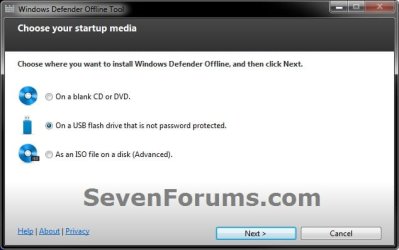
4. Do step 5, 6, or 7 below for what type of bootable "Windows Defender Offline" CD/DVD, USB, or ISO that you would like to create to scan with. (see screenshot below)
Step3.jpg
5. To Create a"Windows Defender Offline" Bootable CD or DVD
A) Insert a blank unformatted CD or DVD into the CD/DVD drive.
NOTE: If a AutoPlay window opens afterwards, close it.

B) Select (dot) Use a blank CD or a DVD, and click on Next. (see screenshot below step 4)

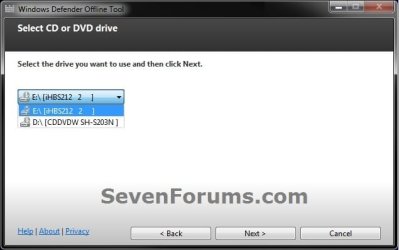
C) If you have more than one DC/DVD drive, then select the CD/DVD drive with the blank CD/DVD in it, and click on Next. (see screenshot below)
DVD-1.jpg
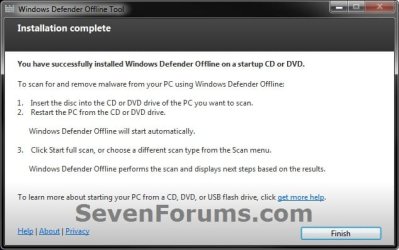
D) When it's finished, click on Finish. (see screenshot below)
NOTE: Be sure to label the CD/DVD as being able to only be used on a 32-bit or 64-bit Windows computer at boot.
DVD-2.jpg
E) Go to step 8.
6. To Create a "Windows Defender Offline" Bootable USB Flash Drive


   Note
If you run the Windows Defender Offline Tool again on the same USB flash drive, and if the following conditions below are met, the tool will only download new updated malware definitions (approx. 69.48 MB) and update the USB drive without reformatting it.
  • The USB flash drive has Windows Defender Offline previously installed on it.
  • The Windows Defender Offline Tool version that was used to create the bootable USB flash drive the first run is the same as the one being used for the second run.
  • Files on the USB flash drive are not damaged or missing (the tool will verify that).
A) Connect a USB flash drive that is not password protected to your computer.
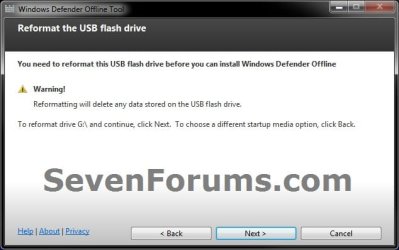
WARNING: This USB drive will be formated during this process, so be sure to backup anything that you do not want to lose to another location first.

B) Select (dot) On a USB flash drive that is not password protected, and click on Next. (see screenshot below step 4)

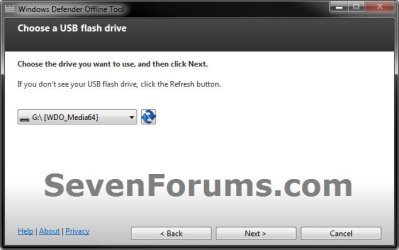
C) If you have more than one USB drives connected, then select the one that you want to use, and click on Next. (see screenshot below)
USB-1B.jpg
D) When it's finished, click on Finish. (see screenshot below)
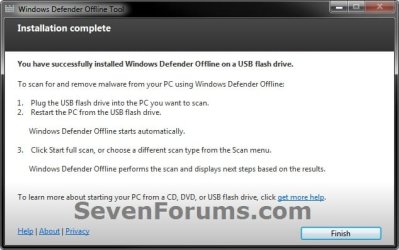
USB-2.jpg
E) Go to step 8.
7. To Create a "Windows Defender Offline" Bootable ISO File
A) Select (dot) Create Standalone System Sweeper on an ISO File, and click on Next. (see screenshot below step 4)

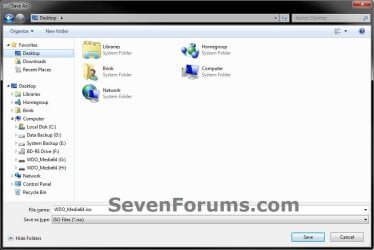
B) Select (browse) where you would like to save the ISO file to, and click on Next. (see screenshots below)
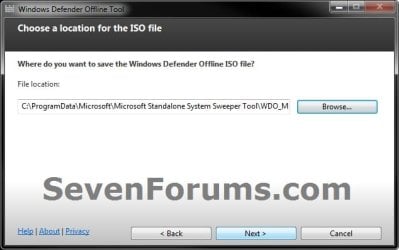
ISO-1.jpg

ISO-2.jpg

C) When it's finished, click on Finish. (see screenshot below)
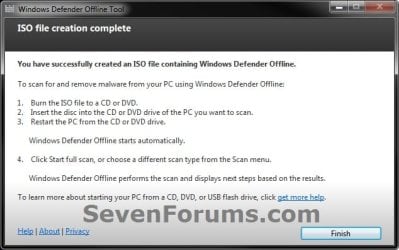
ISO-3.jpg
D) You can now use the ISO file to boot with in a virtual machine (ex: Windows Virtual PC), or use the free Windows 7 USB/DVD Download Tool to burn the ISO to a DVD or USB flash drive.

E) Continue on to step 8.
8. You will now be able to boot from the 32-bit or 64-bit CD/DVD, USB, or ISO that you created to run Windows Defender Offline on the same 32-bit or 64-bit computer as in the STEP TWO section below when you like.


STEP TWO

To Scan a Computer with the Bootable CD/DVD or USB Flash Drive


1. Insert or connect the same 32-bit or 64-bit Windows Defender Offline bootable CD/DVD or USB flash drive to the same type of 32-bit or 64-bit Windows computer that you want to scan at boot.
NOTE: For example, you can only use a created 32-bit USB on a 32-bit computer at boot, and you can only use a created 64-bit USB on a 64-bit computer at boot.

2. In your BIOS/UEFI Boot Menu (ex: F11) of the computer that you want to scan, select to temporarily boot from the CD/DVD or USB flash drive created in the STEP ONE section above, and boot from it.

   Note
Please consult your computer's or motherboard's manual for exact details on how to do this.

You do not need to change the boot priority order in the BIOS/UEFI settings for this. Use the Boot Menu instead to select to only temporarily boot from the DVD/USB instead.


3. This is what you will see while it's booting from the CD/DVD or USB flash drive.
restart-1.jpg

restart-2.jpg

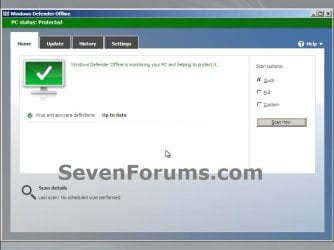
4. When Windows Defender Offline has booted, you will be able to update the definitions and select what type of scan you would like to run on the computer. A Full Scan is recommended, and could take several hours to complete.
NOTE: You will only be able to update the definitions at boot if you are using a bootable USB flash drive with a internet connection, and not with a bootable CD/DVD.
Update.jpg

Scan.jpg

5. When finished, close Windows Defender Offline to restart the computer back into Windows.
That's it,
Shawn


Attachments

  • USB-1.jpg
    USB-1.jpg
    28.4 KB · Views: 109
Last edited:
Error Code: 0x8004cc04

I d/l'd the MSSS x64 ISO and burned the CD today.
I loaded the CD and restarted my PC.
MSSS began to load.
It stated that it could not start and gave the Error Code: 0x8004cc04.
I cannot find an explanation for the error code.

Does anyone know what's going on?
 

My Computer

Computer type
PC/Desktop
Computer Manufacturer/Model Number
Voyager's PC Foundry - VPCF07
OS
Windows 7 Ultimate x64
CPU
i7-3770k OC to 4.5GHz
Motherboard
ASUS P8Z77-V
Memory
4x4GB Kingston HyperX 1600
Graphics Card(s)
XFX Radeon R7 260X
Sound Card
Onboard HD sound
Monitor(s) Displays
2X Dell U2412M
Screen Resolution
1920 x 1200 [3840 X 1200]
Hard Drives
1X Crucial MX300 750 GB SATA-III SSD;
1x Seagate 2TB ST2000DM001 SATA-III;
2x Hitachi 2TB Ultrastar HUA723020ALA641 SATA III
PSU
Corsair RM Series 850W
Case
Corsair Graphite T600
Cooling
Noctua NH-U12P SE2
Keyboard
Azio KB505U Large Print Backlit - wired
Mouse
Cheapest I can find - wired
Internet Speed
50mbps
Antivirus
Bit Defender Free
Browser
Palemoon
Other Info
Epson SureColor 400;
Brother MFC L2740DW;
Nikon Super CoolScan 4000ED;
TCC 750LC PreAmp;
MCS [Technics] 6603 Turntable;
Hauppauge WinTV-HVR 1850 TV tuner card;
Syba SD-SA2PEX-2IR SATA RAID card
Hello Voyager, and welcome to Seven Forums.

You might try using a bootable USB instead to see if you may get better results.

Currently this program is still a beta, so there may still be a few unressolved issues with it still that will hopefully be resolved in the next release.
 

My Computer

Computer type
PC/Desktop
Computer Manufacturer/Model Number
Self built custom
OS
64-bit Windows 11 Pro for Workstations
CPU
Intel i7-8700K OC'd to 5 GHz
Motherboard
ASUS ROG Maximus XI Formula Z390
Memory
64 GB (4x16GB) G.SKILL TridentZ RGB DDR4 3600 MHz
Graphics Card(s)
ASUS ROG-STRIX-GTX1080TI-O11G-GAMING
Sound Card
Integrated
Monitor(s) Displays
2 x Samsung Odyssey G7 27"
Screen Resolution
2560x1440
Hard Drives
1TB Samsung 990 PRO M.2,
4TB Samsung 990 PRO PRO M.2,
TerraMaster F8 SSD Plus NAS
PSU
Seasonic Prime Titanium 850W
Case
Thermaltake Core P3
Cooling
Corsair Hydro H115i
Keyboard
Logitech wireless K800
Mouse
Logitech MX Master 4
Internet Speed
2 Gb/s Download and 100 Mb/s Upload
Antivirus
Malwarebyte Anti-Malware Premium
Browser
Google Chrome
Other Info
Logitech Z625 speaker system,
Logitech BRIO 4K Pro webcam,
HP Color LaserJet Pro MFP M477fdn,
APC SMART-UPS RT 1000 XL - SURT1000XLI,
Galaxy S23 Plus phone
Hi Brink thanks for the welcome.
I am given no option in the BIOS for Booting from USB.
Nor am I given a USB option in an F8 boot.
I guess MSSS is not an option for me.
 

My Computer

Computer type
PC/Desktop
Computer Manufacturer/Model Number
Voyager's PC Foundry - VPCF07
OS
Windows 7 Ultimate x64
CPU
i7-3770k OC to 4.5GHz
Motherboard
ASUS P8Z77-V
Memory
4x4GB Kingston HyperX 1600
Graphics Card(s)
XFX Radeon R7 260X
Sound Card
Onboard HD sound
Monitor(s) Displays
2X Dell U2412M
Screen Resolution
1920 x 1200 [3840 X 1200]
Hard Drives
1X Crucial MX300 750 GB SATA-III SSD;
1x Seagate 2TB ST2000DM001 SATA-III;
2x Hitachi 2TB Ultrastar HUA723020ALA641 SATA III
PSU
Corsair RM Series 850W
Case
Corsair Graphite T600
Cooling
Noctua NH-U12P SE2
Keyboard
Azio KB505U Large Print Backlit - wired
Mouse
Cheapest I can find - wired
Internet Speed
50mbps
Antivirus
Bit Defender Free
Browser
Palemoon
Other Info
Epson SureColor 400;
Brother MFC L2740DW;
Nikon Super CoolScan 4000ED;
TCC 750LC PreAmp;
MCS [Technics] 6603 Turntable;
Hauppauge WinTV-HVR 1850 TV tuner card;
Syba SD-SA2PEX-2IR SATA RAID card
Please update your system specs for what motherboard or brand and model of computer you have to see if we may be able to help with that.
 
Last edited:

My Computer

Computer type
PC/Desktop
Computer Manufacturer/Model Number
Self built custom
OS
64-bit Windows 11 Pro for Workstations
CPU
Intel i7-8700K OC'd to 5 GHz
Motherboard
ASUS ROG Maximus XI Formula Z390
Memory
64 GB (4x16GB) G.SKILL TridentZ RGB DDR4 3600 MHz
Graphics Card(s)
ASUS ROG-STRIX-GTX1080TI-O11G-GAMING
Sound Card
Integrated
Monitor(s) Displays
2 x Samsung Odyssey G7 27"
Screen Resolution
2560x1440
Hard Drives
1TB Samsung 990 PRO M.2,
4TB Samsung 990 PRO PRO M.2,
TerraMaster F8 SSD Plus NAS
PSU
Seasonic Prime Titanium 850W
Case
Thermaltake Core P3
Cooling
Corsair Hydro H115i
Keyboard
Logitech wireless K800
Mouse
Logitech MX Master 4
Internet Speed
2 Gb/s Download and 100 Mb/s Upload
Antivirus
Malwarebyte Anti-Malware Premium
Browser
Google Chrome
Other Info
Logitech Z625 speaker system,
Logitech BRIO 4K Pro webcam,
HP Color LaserJet Pro MFP M477fdn,
APC SMART-UPS RT 1000 XL - SURT1000XLI,
Galaxy S23 Plus phone
The BIOS boot menu is F9 for me. F8 gives the Windows recovery options.
 

My Computer

Computer type
Laptop
Computer Manufacturer/Model Number
Hewlett-Packard/G62-107SA Notebook
OS
Microsoft Windows 7 Home Premium 64-bit Service Pack 1
CPU
Intel(R) Core(TM) i3 CPU M 330 @ 2.13GHz
Motherboard
Hewlett-Packard 1425
Memory
8 GB DDR3
Graphics Card(s)
Intel(R) HD Graphics
Sound Card
Realtek High Definition Audio
Monitor(s) Displays
Builtin
Screen Resolution
1366 x 768 x 32 bits (4294967296 colors) @ 60 Hz
Hard Drives
250 GB SATA Hard Disk Drive 7200 rpm
2TB Seagate GoFlex USB 2 Drive
1TB Iomega Prestige USB 2 Drive
1.5TB Iomega Prestige USB 2 Drive (Samsung)
2TB WD MyBook Live NAS.
Mouse
Logitech Anywhere MX
Internet Speed
152 Mbs download 10 Mbs upload
Antivirus
Norton 360
Browser
Chrome
Mine is F12. You need to check your manual to find out which key (or key combination) to press in order to access the one-time boot menu. This should also be displayed on the screen during POST unless disabled in the BIOS (the key display, not the functionality).
 

My Computer

Computer type
PC/Desktop
Computer Manufacturer/Model Number
Dwarf Dwf/11/2012 r09/2013
OS
Windows 8.1 Pro RTM x64
CPU
Intel Core-i5-3570K 4-core @ 3.4GHz (Ivy Bridge) (OC 4.4GHz)
Motherboard
ASRock Z77 Extreme4-M
Memory
4 x 4GB DDR3-1600 Corsair Vengeance CMZ8GX3M2A1600C9B (16GB)
Graphics Card(s)
MSI GeForce GTX770 Gaming OC 2GB
Sound Card
Realtek High Definition on board solution (ALC 898)
Monitor(s) Displays
ViewSonic VA1912w Widescreen (VGA)
Screen Resolution
1440x900
Hard Drives
OCZ Agility 3 SSD 120GB SATA III x2 (RAID 0)
Samsung HD501LJ 500GB SATA II x2
Hitachi HDS721010CLA332 1TB SATA II
Iomega 1.5TB Ext USB 2.0
WD 2.0TB Ext USB 3.0
PSU
XFX Pro Series 850W Semi-Modular
Case
Gigabyte IF233
Cooling
1 x 120mm Front Inlet 1 x 120mm Rear Exhaust
Keyboard
Microsoft Comfort Curve Keyboard 3000 (USB)
Mouse
Microsoft Comfort Mouse 3000 for Business (USB)
Internet Speed
NetGear DG834Gv3 ADSL Modem/Router (Ethernet) ~4.0 Mb/s (O2)
Antivirus
Avast! 8.0.1497
Browser
IE 11
Other Info
Optical Drive: HL-DT-ST BD-RE BH10LS30 SATA Bluray
Lexmark S305 Printer/Scanner/Copier (USB)
WEI Score: 8.1/8.1/8.5/8.5/8.25
Asus Eee PC 1011PX Netbook (Windows 7 x86 Starter)

My Computer

Computer type
PC/Desktop
Computer Manufacturer/Model Number
Voyager's PC Foundry - VPCF07
OS
Windows 7 Ultimate x64
CPU
i7-3770k OC to 4.5GHz
Motherboard
ASUS P8Z77-V
Memory
4x4GB Kingston HyperX 1600
Graphics Card(s)
XFX Radeon R7 260X
Sound Card
Onboard HD sound
Monitor(s) Displays
2X Dell U2412M
Screen Resolution
1920 x 1200 [3840 X 1200]
Hard Drives
1X Crucial MX300 750 GB SATA-III SSD;
1x Seagate 2TB ST2000DM001 SATA-III;
2x Hitachi 2TB Ultrastar HUA723020ALA641 SATA III
PSU
Corsair RM Series 850W
Case
Corsair Graphite T600
Cooling
Noctua NH-U12P SE2
Keyboard
Azio KB505U Large Print Backlit - wired
Mouse
Cheapest I can find - wired
Internet Speed
50mbps
Antivirus
Bit Defender Free
Browser
Palemoon
Other Info
Epson SureColor 400;
Brother MFC L2740DW;
Nikon Super CoolScan 4000ED;
TCC 750LC PreAmp;
MCS [Technics] 6603 Turntable;
Hauppauge WinTV-HVR 1850 TV tuner card;
Syba SD-SA2PEX-2IR SATA RAID card
Hello Voyager,

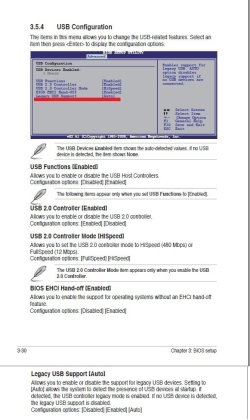
In your Advanced BIOS settings from your motherboard's manual, double check to make sure that you have Legacy USB Support set to Enabled.
Advanced-1.jpg
For my ASUS motherboard once the above is enabled, I have to tap F8 as soon as it boots to open the BBS POPUP (boot menu).
F8.jpgBoot-Menu.jpg
 

My Computer

Computer type
PC/Desktop
Computer Manufacturer/Model Number
Self built custom
OS
64-bit Windows 11 Pro for Workstations
CPU
Intel i7-8700K OC'd to 5 GHz
Motherboard
ASUS ROG Maximus XI Formula Z390
Memory
64 GB (4x16GB) G.SKILL TridentZ RGB DDR4 3600 MHz
Graphics Card(s)
ASUS ROG-STRIX-GTX1080TI-O11G-GAMING
Sound Card
Integrated
Monitor(s) Displays
2 x Samsung Odyssey G7 27"
Screen Resolution
2560x1440
Hard Drives
1TB Samsung 990 PRO M.2,
4TB Samsung 990 PRO PRO M.2,
TerraMaster F8 SSD Plus NAS
PSU
Seasonic Prime Titanium 850W
Case
Thermaltake Core P3
Cooling
Corsair Hydro H115i
Keyboard
Logitech wireless K800
Mouse
Logitech MX Master 4
Internet Speed
2 Gb/s Download and 100 Mb/s Upload
Antivirus
Malwarebyte Anti-Malware Premium
Browser
Google Chrome
Other Info
Logitech Z625 speaker system,
Logitech BRIO 4K Pro webcam,
HP Color LaserJet Pro MFP M477fdn,
APC SMART-UPS RT 1000 XL - SURT1000XLI,
Galaxy S23 Plus phone
After seeing several recurring errors, I documented the suggested solutions for Error Code 0x8004cc04, Error Code 0x8004cc05, and Error Code 0x8050800c here.
 

My Computer

OS
Windows 7 & Windows Vista Ultimate
Thank you Corrine. I added this in a TIP box at the top of the tutorial to help others with these errors. :)
 

My Computer

Computer type
PC/Desktop
Computer Manufacturer/Model Number
Self built custom
OS
64-bit Windows 11 Pro for Workstations
CPU
Intel i7-8700K OC'd to 5 GHz
Motherboard
ASUS ROG Maximus XI Formula Z390
Memory
64 GB (4x16GB) G.SKILL TridentZ RGB DDR4 3600 MHz
Graphics Card(s)
ASUS ROG-STRIX-GTX1080TI-O11G-GAMING
Sound Card
Integrated
Monitor(s) Displays
2 x Samsung Odyssey G7 27"
Screen Resolution
2560x1440
Hard Drives
1TB Samsung 990 PRO M.2,
4TB Samsung 990 PRO PRO M.2,
TerraMaster F8 SSD Plus NAS
PSU
Seasonic Prime Titanium 850W
Case
Thermaltake Core P3
Cooling
Corsair Hydro H115i
Keyboard
Logitech wireless K800
Mouse
Logitech MX Master 4
Internet Speed
2 Gb/s Download and 100 Mb/s Upload
Antivirus
Malwarebyte Anti-Malware Premium
Browser
Google Chrome
Other Info
Logitech Z625 speaker system,
Logitech BRIO 4K Pro webcam,
HP Color LaserJet Pro MFP M477fdn,
APC SMART-UPS RT 1000 XL - SURT1000XLI,
Galaxy S23 Plus phone
You're welcome, Brink, and thanks for adding the TIP.
 

My Computer

OS
Windows 7 & Windows Vista Ultimate
Standalone System Sweeper as xen-vm / Error code: 0x8004cc01 (solved)

Hi,

being a big fan of Desinfec’t (formally known as Knoppicillin, a Linux based virus scanner that runs from CD) I thought I should give the System Sweeper a try.

What makes my case a little special is that the “PC” to scan is a xen-vm.

I downloaded the iso-file, created a xen-vm to boot it, mounted the disk-image of the PC to scan (read-only) and started the vm. The result was pretty disappointing: Windows PE booted but displayed an error very soon:

---------------------
Microsoft Standalone System Sweeper cannot be started. Please contact support.

Error code: 0x8004cc01
---------------------

Searching the net for this error did not bring up much info except for this thread so I started playing around. I finally got it running and those are the things I had to fix:
- the system you are scanning needs to be supported by the tool (e.g. I tried to scan a Windows Server 2008 R2 hd which did not work)
- the tool needs write-access to the disk you are scanning (I first tried to scan a read-only drive since Desinfec’t can do that)
- the PC that boots the tool needs at least 750 MB RAM and 500 MB disk space
- if you want to update virus definition online you need a DHCP server that assigns IP / DNS / GW to the Windows PE during booting.

This way I was able to boot a xen-vm from the Sweeper-Iso, update the virus definitions online and scanned the “hard disk” of another xen-vm (Windows 7 64-bit).

My resume: a nice tool but I would really like the option to just scan a hard drive no matter of the OS it contains and with only read access.

Hope this helps those who encounter the same error.
 
Last edited by a moderator:

My Computer

OS
Windows 7 Ultimate x64 / Different Servers
I was able to get the CD to work.
It wasn't easy.
I had to fix another problem first.
I apparently had some kind of conflict going on.
I had run out of SATA RAID ports. So I added a SATA RAID card.
Lazily, I connected my 2 SATA DVDROMs instead of a RAID drive pairm to the card.
The PC did not like this.
It did not become apparent until I tried to boot from a USB drive.
Then the PC began to misfire and belch black smoke.
After fixing this in a long complicated process, it is humming along smoothly again.
The MSSS CD will boot and run.
And, I can also boot from a USB drive now if I want to.
Life is good!
 

My Computer

Computer type
PC/Desktop
Computer Manufacturer/Model Number
Voyager's PC Foundry - VPCF07
OS
Windows 7 Ultimate x64
CPU
i7-3770k OC to 4.5GHz
Motherboard
ASUS P8Z77-V
Memory
4x4GB Kingston HyperX 1600
Graphics Card(s)
XFX Radeon R7 260X
Sound Card
Onboard HD sound
Monitor(s) Displays
2X Dell U2412M
Screen Resolution
1920 x 1200 [3840 X 1200]
Hard Drives
1X Crucial MX300 750 GB SATA-III SSD;
1x Seagate 2TB ST2000DM001 SATA-III;
2x Hitachi 2TB Ultrastar HUA723020ALA641 SATA III
PSU
Corsair RM Series 850W
Case
Corsair Graphite T600
Cooling
Noctua NH-U12P SE2
Keyboard
Azio KB505U Large Print Backlit - wired
Mouse
Cheapest I can find - wired
Internet Speed
50mbps
Antivirus
Bit Defender Free
Browser
Palemoon
Other Info
Epson SureColor 400;
Brother MFC L2740DW;
Nikon Super CoolScan 4000ED;
TCC 750LC PreAmp;
MCS [Technics] 6603 Turntable;
Hauppauge WinTV-HVR 1850 TV tuner card;
Syba SD-SA2PEX-2IR SATA RAID card
That's great news Voyager. Thank you for posting back with your results. :)

Olly,

Welcome to Seven Forums, and thank you for posting your solution. :)
 

My Computer

Computer type
PC/Desktop
Computer Manufacturer/Model Number
Self built custom
OS
64-bit Windows 11 Pro for Workstations
CPU
Intel i7-8700K OC'd to 5 GHz
Motherboard
ASUS ROG Maximus XI Formula Z390
Memory
64 GB (4x16GB) G.SKILL TridentZ RGB DDR4 3600 MHz
Graphics Card(s)
ASUS ROG-STRIX-GTX1080TI-O11G-GAMING
Sound Card
Integrated
Monitor(s) Displays
2 x Samsung Odyssey G7 27"
Screen Resolution
2560x1440
Hard Drives
1TB Samsung 990 PRO M.2,
4TB Samsung 990 PRO PRO M.2,
TerraMaster F8 SSD Plus NAS
PSU
Seasonic Prime Titanium 850W
Case
Thermaltake Core P3
Cooling
Corsair Hydro H115i
Keyboard
Logitech wireless K800
Mouse
Logitech MX Master 4
Internet Speed
2 Gb/s Download and 100 Mb/s Upload
Antivirus
Malwarebyte Anti-Malware Premium
Browser
Google Chrome
Other Info
Logitech Z625 speaker system,
Logitech BRIO 4K Pro webcam,
HP Color LaserJet Pro MFP M477fdn,
APC SMART-UPS RT 1000 XL - SURT1000XLI,
Galaxy S23 Plus phone
Nice Tutorial ...! Thanks :)
 

My Computer

Computer Manufacturer/Model Number
Samsung NP550P5C-S02IN
OS
Windows 7 Ultimate - 64-bit | Windows 8 Pro - 64-bit
CPU
Intel® Core™ i7 Processor 3,610QM (2.30Hz, 6MB L3 Cach
Memory
8 GB
Graphics Card(s)
NVIDIA® GeForce® GT 650M 2GB Graphics, Optimus™ techno
Sound Card
SoundAlive™ JBL 3 Speakers (With sub-Woofer)
Monitor(s) Displays
39.62cm (15.6) SuperBright 300nit HD+ LED Display
Screen Resolution
1,600 x 900, Anti-Reflective
Hard Drives
1TB S-ATA II Hard Drive (5,400RPM)
One noobish question: Will MSSS delete my data?
 

My Computer

Computer Manufacturer/Model Number
Acer Aspire 5738G
OS
32-bit Windows 7 Home Premium & Windows 8 Release Preview
CPU
Intel(R) Core(TM)2 Duo
Motherboard
Acer JV50
Memory
4 GB RAM DDR3
Graphics Card(s)
NVIDIA GeForce G 105M
Sound Card
Realtek High Definition
Monitor(s) Displays
1x Generic PnP Monitor
Screen Resolution
1366 x 768 - 32 bit
Hard Drives
C: (263 GB)
K: (24.3 GB)
Keyboard
Acer Inbuilt
Mouse
5 Button Wheel Laser Mouse
Internet Speed
3 MBPS Download and 2 MBPS Upload
Hello Abhishek,

Only if your data is malware. ;)
 

My Computer

Computer type
PC/Desktop
Computer Manufacturer/Model Number
Self built custom
OS
64-bit Windows 11 Pro for Workstations
CPU
Intel i7-8700K OC'd to 5 GHz
Motherboard
ASUS ROG Maximus XI Formula Z390
Memory
64 GB (4x16GB) G.SKILL TridentZ RGB DDR4 3600 MHz
Graphics Card(s)
ASUS ROG-STRIX-GTX1080TI-O11G-GAMING
Sound Card
Integrated
Monitor(s) Displays
2 x Samsung Odyssey G7 27"
Screen Resolution
2560x1440
Hard Drives
1TB Samsung 990 PRO M.2,
4TB Samsung 990 PRO PRO M.2,
TerraMaster F8 SSD Plus NAS
PSU
Seasonic Prime Titanium 850W
Case
Thermaltake Core P3
Cooling
Corsair Hydro H115i
Keyboard
Logitech wireless K800
Mouse
Logitech MX Master 4
Internet Speed
2 Gb/s Download and 100 Mb/s Upload
Antivirus
Malwarebyte Anti-Malware Premium
Browser
Google Chrome
Other Info
Logitech Z625 speaker system,
Logitech BRIO 4K Pro webcam,
HP Color LaserJet Pro MFP M477fdn,
APC SMART-UPS RT 1000 XL - SURT1000XLI,
Galaxy S23 Plus phone
I meant normal data like pictures, music, videos and office files. They will be safe I guess.
 

My Computer

Computer Manufacturer/Model Number
Acer Aspire 5738G
OS
32-bit Windows 7 Home Premium & Windows 8 Release Preview
CPU
Intel(R) Core(TM)2 Duo
Motherboard
Acer JV50
Memory
4 GB RAM DDR3
Graphics Card(s)
NVIDIA GeForce G 105M
Sound Card
Realtek High Definition
Monitor(s) Displays
1x Generic PnP Monitor
Screen Resolution
1366 x 768 - 32 bit
Hard Drives
C: (263 GB)
K: (24.3 GB)
Keyboard
Acer Inbuilt
Mouse
5 Button Wheel Laser Mouse
Internet Speed
3 MBPS Download and 2 MBPS Upload

My Computer

Computer type
PC/Desktop
Computer Manufacturer/Model Number
Custom Build
OS
Windows 10 Pro x64
CPU
Intel Core i5 4440 @Stock
Motherboard
Gigabyte Z97 D3H
Memory
4 x 4GB HyperX Fury DDR3
Graphics Card(s)
Gigabyte GTX 1050Ti O4G
Sound Card
Integrated
Monitor(s) Displays
Dell P2417H
Screen Resolution
1920 x 1080
Hard Drives
Samsung EVO 850 120GB / Toshiba DT01ACA050 1TB 7200prm 32MB
PSU
Riotoro Onyx 750W
Case
NZXT H500 Black-Red
Cooling
Stock CPU + NZXT 120mm + 2x120mm red fans
Keyboard
Modecom Volcano Lanparty
Mouse
Asus ROG Gladius / DeepCool E-Pad Plus
Internet Speed
DOCSIS 50/3 Mbit
Browser
Google Chrome
Other Info
Asus K55VJ(i5 3210M, GT635M / 2GB, 8GB DDR3, 500GB HDD)
:ditto:
 

My Computer

Computer type
PC/Desktop
Computer Manufacturer/Model Number
Self built custom
OS
64-bit Windows 11 Pro for Workstations
CPU
Intel i7-8700K OC'd to 5 GHz
Motherboard
ASUS ROG Maximus XI Formula Z390
Memory
64 GB (4x16GB) G.SKILL TridentZ RGB DDR4 3600 MHz
Graphics Card(s)
ASUS ROG-STRIX-GTX1080TI-O11G-GAMING
Sound Card
Integrated
Monitor(s) Displays
2 x Samsung Odyssey G7 27"
Screen Resolution
2560x1440
Hard Drives
1TB Samsung 990 PRO M.2,
4TB Samsung 990 PRO PRO M.2,
TerraMaster F8 SSD Plus NAS
PSU
Seasonic Prime Titanium 850W
Case
Thermaltake Core P3
Cooling
Corsair Hydro H115i
Keyboard
Logitech wireless K800
Mouse
Logitech MX Master 4
Internet Speed
2 Gb/s Download and 100 Mb/s Upload
Antivirus
Malwarebyte Anti-Malware Premium
Browser
Google Chrome
Other Info
Logitech Z625 speaker system,
Logitech BRIO 4K Pro webcam,
HP Color LaserJet Pro MFP M477fdn,
APC SMART-UPS RT 1000 XL - SURT1000XLI,
Galaxy S23 Plus phone
Back
Top