Windows Defender Offline

How to Use Windows Defender Offline

   Information
The former Microsoft Standalone System Sweeper (MSSS) BETA has been rebranded and available as Windows Defender Offline now.

Windows Defender Offline is a free standalone, bootable malware and virus remover from Microsoft that performs an offline scan of an infected PC to remove viruses, rootkits and other advanced malware.

This tutorial will show you how to update and use the Windows Defender Offline Tool to create a 32-bit or 64-bit Windows Defender Offline bootable CD/DVD, USB flash drive, or ISO file on any computer to help you start an infected 32-bit or 64-bit PC and perform an offline scan at boot to help identify and remove rootkits and other malicious malware. In addition, Windows Defender Offline can be used if you cannot install or start an antivirus program on your computer, or if the installed AV program can’t detect or remove malware on your computer.

The log files for Windows Defender Offline are stored in a MPLog-MM/DD/YYYY-HH/MM/SS .txt file in the folder below on the computer that was scanned at boot.
C:\Windows\Windows Defender Offline\Support
For Windows Defender Offline FAQ's, see: Windows Defender Offline: frequently asked questions

   Note
Minimum System Requirements:

For both the PC infected with a virus or malware, and the PC that you are creating the bootable media on, you'll need PCs with the following minimum requirements.
  • Operating system:
    • Windows XP (Service Pack 3)
    • Windows Vista (RTM, Service Pack 1, or Service Pack 2, or higher)
    • Windows 7 (RTM, Service Pack 1, or higher)
    • Windows 8
  • Processor:
    • Windows XP: 500 MHz or higher
    • Windows Vista, Windows 7, and Windows 8: 1.0 GHz or higher
  • Memory:
    • Windows XP: 768 MB RAM or higher
    • Windows Vista, Windows 7, and Windows 8: 1 GB RAM or higher
  • Video resolution: 800 × 600 or higher
  • Available hard disk space: 500 MB
For the PC infected by a virus or malware:
  • The PC must have the same Windows operating system (OS) architecture 32-bit or 64-bit as Windows Defender Offline. Bootable media created on any version of Windows can be run on any other version of Windows. The only thing that needs to match is the architecture of Windows Defender Offline and the OS of the infected machine.
  • Internet connection: Only required to update the latest malware definitions for a Windows Defender Offline bootable USB flash drive.
  • In addition, BitLocker must be disabled to use Windows Defender Offline Beta.
For the PC on which you create the bootable media:
  • Administrator account: A user account with administrator privileges to create the bootable media.
  • Internet connection: An Internet connection to install and download the latest virus and spyware definitions for Windows Defender Offline.
  • Internet browser: Windows Internet Explorer 7.0 or higher, or Mozilla Firefox 3.0 or higher.
  • Media: A CD, DVD, or USB flash drive with at least 250 MB of free space.
   Tip
If you get a Error Code 0x8004cc04, Error Code 0x8004cc05, or Error Code 0x8050800c while using Windows Defender Offline, then please see the same suggested solutions here for MSSS.

If you have UEFI, then Windows Defender Offline is now able to boot with Secure Boot ENABLED.

   Warning
For obvious reasons, the "Windows Defender Offline" bootable CD/DVD, USB flash drive, or ISO should be created on a different computer other than the one that you suspect may be infected with malware.


STEP ONE

To Create a "Windows Defender Offline" Bootable CD/DVD, USB Flash Drive, or ISO File


1. If you have not already, you will need to download the same 32-bit or 64-bit version of Windows Defender Offline Tool at the download link below for the same 32-bit or 64-bit Windows that is installed on the computer that you will be scanning at boot, and save the exe file to your desktop.

Download


2. Run the downloaded mssstool64.exe (64-bit) or mssstool32.exe (32-bit) file, and click on Next. (see screenshot below)
Step1.jpg
3. Click on the I accept button. (see screenshot below)
NOTE: You will only be prompted for this the first time that you run the Windows Defender Offline Tool.
Step2.jpg
4. Do step 5, 6, or 7 below for what type of bootable "Windows Defender Offline" CD/DVD, USB, or ISO that you would like to create to scan with. (see screenshot below)
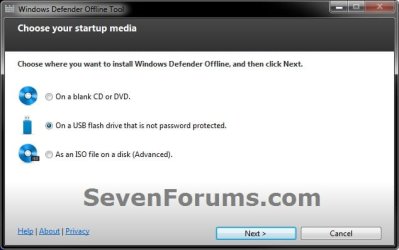
Step3.jpg
5. To Create a"Windows Defender Offline" Bootable CD or DVD
A) Insert a blank unformatted CD or DVD into the CD/DVD drive.
NOTE: If a AutoPlay window opens afterwards, close it.

B) Select (dot) Use a blank CD or a DVD, and click on Next. (see screenshot below step 4)

C) If you have more than one DC/DVD drive, then select the CD/DVD drive with the blank CD/DVD in it, and click on Next. (see screenshot below)
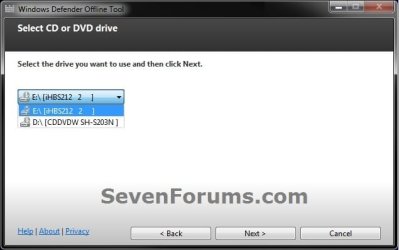
DVD-1.jpg
D) When it's finished, click on Finish. (see screenshot below)
NOTE: Be sure to label the CD/DVD as being able to only be used on a 32-bit or 64-bit Windows computer at boot.
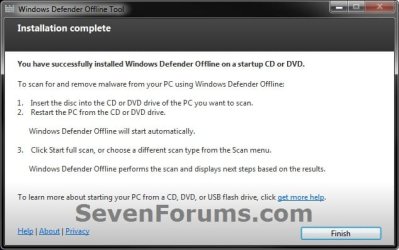
DVD-2.jpg
E) Go to step 8.
6. To Create a "Windows Defender Offline" Bootable USB Flash Drive


   Note
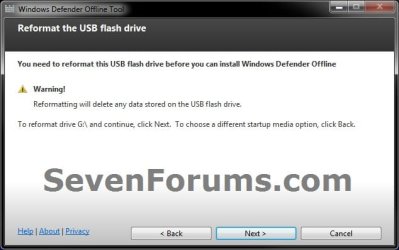
If you run the Windows Defender Offline Tool again on the same USB flash drive, and if the following conditions below are met, the tool will only download new updated malware definitions (approx. 69.48 MB) and update the USB drive without reformatting it.
  • The USB flash drive has Windows Defender Offline previously installed on it.
  • The Windows Defender Offline Tool version that was used to create the bootable USB flash drive the first run is the same as the one being used for the second run.
  • Files on the USB flash drive are not damaged or missing (the tool will verify that).
A) Connect a USB flash drive that is not password protected to your computer.
WARNING: This USB drive will be formated during this process, so be sure to backup anything that you do not want to lose to another location first.

B) Select (dot) On a USB flash drive that is not password protected, and click on Next. (see screenshot below step 4)

C) If you have more than one USB drives connected, then select the one that you want to use, and click on Next. (see screenshot below)
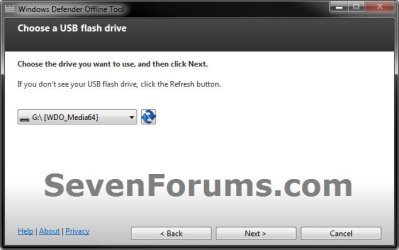
USB-1B.jpg
D) When it's finished, click on Finish. (see screenshot below)
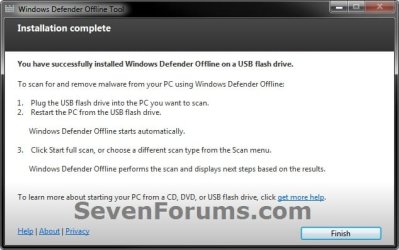
USB-2.jpg
E) Go to step 8.
7. To Create a "Windows Defender Offline" Bootable ISO File
A) Select (dot) Create Standalone System Sweeper on an ISO File, and click on Next. (see screenshot below step 4)

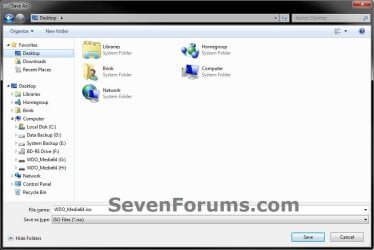
B) Select (browse) where you would like to save the ISO file to, and click on Next. (see screenshots below)
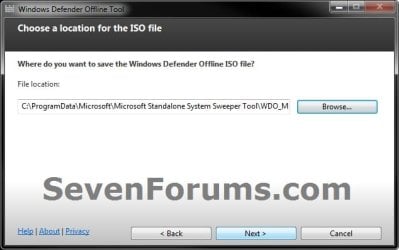
ISO-1.jpg

ISO-2.jpg

C) When it's finished, click on Finish. (see screenshot below)
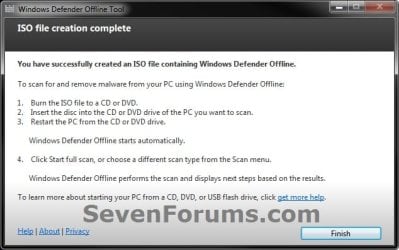
ISO-3.jpg
D) You can now use the ISO file to boot with in a virtual machine (ex: Windows Virtual PC), or use the free Windows 7 USB/DVD Download Tool to burn the ISO to a DVD or USB flash drive.

E) Continue on to step 8.
8. You will now be able to boot from the 32-bit or 64-bit CD/DVD, USB, or ISO that you created to run Windows Defender Offline on the same 32-bit or 64-bit computer as in the STEP TWO section below when you like.


STEP TWO

To Scan a Computer with the Bootable CD/DVD or USB Flash Drive


1. Insert or connect the same 32-bit or 64-bit Windows Defender Offline bootable CD/DVD or USB flash drive to the same type of 32-bit or 64-bit Windows computer that you want to scan at boot.
NOTE: For example, you can only use a created 32-bit USB on a 32-bit computer at boot, and you can only use a created 64-bit USB on a 64-bit computer at boot.

2. In your BIOS/UEFI Boot Menu (ex: F11) of the computer that you want to scan, select to temporarily boot from the CD/DVD or USB flash drive created in the STEP ONE section above, and boot from it.

   Note
Please consult your computer's or motherboard's manual for exact details on how to do this.

You do not need to change the boot priority order in the BIOS/UEFI settings for this. Use the Boot Menu instead to select to only temporarily boot from the DVD/USB instead.


3. This is what you will see while it's booting from the CD/DVD or USB flash drive.
restart-1.jpg

restart-2.jpg

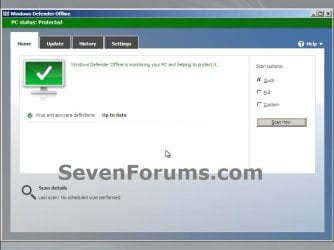
4. When Windows Defender Offline has booted, you will be able to update the definitions and select what type of scan you would like to run on the computer. A Full Scan is recommended, and could take several hours to complete.
NOTE: You will only be able to update the definitions at boot if you are using a bootable USB flash drive with a internet connection, and not with a bootable CD/DVD.
Update.jpg

Scan.jpg

5. When finished, close Windows Defender Offline to restart the computer back into Windows.
That's it,
Shawn


Attachments

  • USB-1.jpg
    USB-1.jpg
    28.4 KB · Views: 109
Last edited:
I ran the DVD I made some months ago and when I selected download definitions I got the following error
Error 0x880072ee7
Server name or address could not be found.

I'm not sure what definitions to manually download.
Can you help?

Edit: Got it I think - download the latest mpam-fex64.exe
 
Last edited:

My Computer

Computer type
PC/Desktop
Computer Manufacturer/Model Number
Own build
OS
Windows 7x64 Home Premium SP1
CPU
Intel i7 2600k
Motherboard
ASUS P8Z68 Deluxe
Memory
G.Skill Ripjaws (DDR3-1600) 2x4GB
Graphics Card(s)
Nvidia GeForce GTS 450; Intel HD Graphics 3000(GT2+)
Monitor(s) Displays
Dell Ultrasharp IPS panel U2311H, Samsung SyncMaster P2350
Screen Resolution
1920x1080
Hard Drives
Samsung 850 Pro SSD 256GB, Samsung SSD 840 120GB, Seagates 1TB Barracuda ST31000528AS x2
PSU
Seasonic M12II 520W
Case
Lian Li Lancool PC-K60
Cooling
Case: 1x120mm, 3x140mm CPU: Hyper 212+
Keyboard
Logitech MK520 (wireless)
Mouse
Logitech MK520
Internet Speed
6-7 Mbps
Antivirus
Norton Security Premium, Malwarebytes on 2 (MSE on 3rd PC)
Browser
FireFox
Other Info
Audio: Logitech Z523 2.1
I did create a cd and it works perfect. Thanks Brink. Now, I am going to do my wife's laptop.
 

My Computer

Computer Manufacturer/Model Number
Asus N53v-DH 72
OS
windows 7 home premium 64bit
CPU
Intel(R) Core(TM) i7-2670QM CPU @ 2.20GHz
Motherboard
ASUSTeK Computer Inc
Memory
6049 MB
Graphics Card(s)
NVIDIA GeForce GT 540M (1024 MB)
Monitor(s) Displays
15.6
Screen Resolution
1920-1080
Hard Drives
ST9750420AS (698 GB, IDE)

C: (NTFS) 293.0 GB (229.9 GB free)
D: (NTFS) 380.6 GB (380.5 GB free)
Total Size 673.6 GB (610.4 GB free)
Keyboard
Standard
Mouse
Optical
Internet Speed
D-12877kbps U-370kbps
You're most welcome Barbarossa. I'm happy to hear that it's working just fine for you. :)
 

My Computer

Computer type
PC/Desktop
Computer Manufacturer/Model Number
Self built custom
OS
64-bit Windows 11 Pro for Workstations
CPU
Intel i7-8700K OC'd to 5 GHz
Motherboard
ASUS ROG Maximus XI Formula Z390
Memory
64 GB (4x16GB) G.SKILL TridentZ RGB DDR4 3600 MHz
Graphics Card(s)
ASUS ROG-STRIX-GTX1080TI-O11G-GAMING
Sound Card
Integrated
Monitor(s) Displays
2 x Samsung Odyssey G7 27"
Screen Resolution
2560x1440
Hard Drives
1TB Samsung 990 PRO M.2,
4TB Samsung 990 PRO PRO M.2,
TerraMaster F8 SSD Plus NAS
PSU
Seasonic Prime Titanium 850W
Case
Thermaltake Core P3
Cooling
Corsair Hydro H115i
Keyboard
Logitech wireless K800
Mouse
Logitech MX Master 4
Internet Speed
2 Gb/s Download and 100 Mb/s Upload
Antivirus
Malwarebyte Anti-Malware Premium
Browser
Google Chrome
Other Info
Logitech Z625 speaker system,
Logitech BRIO 4K Pro webcam,
HP Color LaserJet Pro MFP M477fdn,
APC SMART-UPS RT 1000 XL - SURT1000XLI,
Galaxy S23 Plus phone
Thank you Corrine.

It looks like it's time to redo the tutorial for the renamed Windows Defender Offline Tool now. :)
 
Last edited:

My Computer

Computer type
PC/Desktop
Computer Manufacturer/Model Number
Self built custom
OS
64-bit Windows 11 Pro for Workstations
CPU
Intel i7-8700K OC'd to 5 GHz
Motherboard
ASUS ROG Maximus XI Formula Z390
Memory
64 GB (4x16GB) G.SKILL TridentZ RGB DDR4 3600 MHz
Graphics Card(s)
ASUS ROG-STRIX-GTX1080TI-O11G-GAMING
Sound Card
Integrated
Monitor(s) Displays
2 x Samsung Odyssey G7 27"
Screen Resolution
2560x1440
Hard Drives
1TB Samsung 990 PRO M.2,
4TB Samsung 990 PRO PRO M.2,
TerraMaster F8 SSD Plus NAS
PSU
Seasonic Prime Titanium 850W
Case
Thermaltake Core P3
Cooling
Corsair Hydro H115i
Keyboard
Logitech wireless K800
Mouse
Logitech MX Master 4
Internet Speed
2 Gb/s Download and 100 Mb/s Upload
Antivirus
Malwarebyte Anti-Malware Premium
Browser
Google Chrome
Other Info
Logitech Z625 speaker system,
Logitech BRIO 4K Pro webcam,
HP Color LaserJet Pro MFP M477fdn,
APC SMART-UPS RT 1000 XL - SURT1000XLI,
Galaxy S23 Plus phone
Hi -

I've just been looking into Windows Defender Offline (WDO) and I have these updates I'd like to suggest for the Tutorial.

I did this research because, like many home users, I have a new Windows 7 64-bit machine and an old Windows XP SP3 machine. I wanted to be sure that Windows Defender Offline would work for me when the time comes.

I didn't read the 5 pages of comments, so this may be repeating some other suggestions. I just read the Tutorial, then the WDO FAQs and instructions, and then posted some questions to MS. So to the best of my ability, this is a summary of the updates needed to the Tutorial to bring it up to date.

1. The tutorial kind of implies the WDO boot media must be created on the computer that it will later be run on. That is not true, or at least no longer true. Note the repeated use of "same" at the top of Step Two:
"Insert or connect the same 32-bit or 64-bit Windows Defender Offline bootable CD/DVD or USB flash drive to the same 32-bit or 64-bit Windows computer that you want to scan with at boot."
I suggest a wording something like:"Insert or connect a Windows Defender Offline bootable CD/DVD or USB flash drive into the computer that you want to scan. Be sure that the version of Windows Defender Offline is 32-bit or 64-bit, whatever the computer being scanned has installed."
"Has installed" or "normally uses".

Windows Defender Offline can create a bootable disk on Windows XP SP3 32-bit system that will run on Windows 7 64-bit system, and vice versa.

The creation and destination computers can run different versions of Windows, can be a mix of AMD and Intel processors, can have different make DVD or CD drives.

These scenarios are test cases that the WDO specs say it should pass.

So a good thing to do in advance preparation is to use your nice new Windows 7 64-bit computer to (1) create a bootable USB stick with the 64-bit version of WDO, and (2) create a bootable USB stick with the 32-bit verision of WDO for any 32 bit computer you have that can boot from USB.

If you have a 32 bit computer that gets infected, but its BIOS does not support booting from USB, use your Windows 7 64-bit computer to create a fresh bootable WDO 32-bit boot CD at the time of infection, when you need it.

2. The Tutorial states an internet connection as a requirement for the destination computer to run Windows Defender Offline. That is not true, or at least no longer true.

An internet connection is not required to run WDO, WDO is intended to run offline, hence the name.

An internet connection is required to update the malware definitions, but if the infected computer does not have internet access the updates can be done after booting the WDO memory USB memory stick on a second computer of the same 32-bit or 64-bit architecture.

If a second computer with the same 32-bit or 64-bit architecture is not available to boot the memory stick, of if the destination computer cannot boot from a USB device (common for older computers) one can create new fresh bootable CD by going to the WDO download page and then downloading and running the current bootable media creation program on an uninfected computer that is still connected to the internet.

So in the requirements at the top of the Tutorial, where it says:
The following additional requirements apply only to the computer infected by a virus or malware:
  • The computer infected with a virus or malware must have the same Windows operating system architecture as Windows Defender Offline Beta, either 32-bit or 64-bit.
  • Internet connection: Required for installation and download of the latest virus and spyware definitions for Windows Defender Offline.
  • Internet Browser: Windows Internet Explorer 6.0 or higher or Mozilla Firefox 2.0 or higher.
  • In addition, BitLocker must be disabled to use Windows Defender Offline Beta.
  • If your computer has Data Execution Protection (DEP) turned on, you'll need to turn it off before booting your PC from the CD, DVD, or USB flash drive."
It should probably say something like:
The following requirements apply to the computer infected by a virus or malware:
  • The computer being scanned must run a supported version of Windows (Windows XP SP3, Windows Vista, or Windows 7).
  • The scanned computer does not have to run the same version of Windows as the computer that created the bootable media.
  • The computer infected with a virus or malware must have the same 32-bit or 64-bit architecture as Windows Defender Offline Beta, either 32-bit or 64-bit.
  • In addition, BitLocker must be disabled to use Windows Defender Offline Beta.
The following optional requirements maybe necessary:

  • Internet connection: Required to download the latest virus and spyware definitions for Windows Defender Offline, if another computer is not available to do this.
I'm not sure where the part about DEP requirement comes from. I can't find it now, but it may have been a requirement before. I tested WDO on a Windows 7 64-bit computer with DEP active and didn't get any error messages, which makes sense since the DEP is going to monitor what WDO is telling it to monitor and WDO is not going to tell DEP to not let it run.

Finally, Windows Defender runs from the bootable media. It doesn't use, know or care if you've got Internet Explorer, Firefox or Chrome installed on the destination computer. You need a web browser on the creation computer so you can do the download, but the programs WDO needs on the destination computer are all contained on the bootable media.

- Keith
 
Last edited:

My Computer

Computer Manufacturer/Model Number
Dell Studio XPS 435T (aka Dell 9000)
OS
Windows Home Premium 64-bit
CPU
Core i7-960
Motherboard
Dell 0x501h (a03) BIOS A16
Memory
12 GB triple channel DDR3 PC3-8500F (7-7-7-20)
Graphics Card(s)
MSI N460GTX Hawk (nVidia 460GTX)
Sound Card
Integrated Realtek HD Audio
Monitor(s) Displays
LG E2350 digital
Screen Resolution
1920 X 1028 (DPI Medium - 125%)
Hard Drives
Intel SSD 520 with 240 GB
Samsung HD745JJ - 700 GB
WDC Caviar Black WD1502FAEX
Case
Dell full desktop
Cooling
Fan and air
Keyboard
Microsoft Natural Ergonomic Keyboard 4000
Mouse
Logitech Performance Mouse MX
Internet Speed
10 Gbps
Other Info
I also have an old Dell Dimension 8200.
Hello Keith, and welcome to Seven Forums.

I've updated the tutorial to help make it clearer.

I read it somewhere on the Microsoft site about DEP, but I can no longer find it either so I removed it. :)
 

My Computer

Computer type
PC/Desktop
Computer Manufacturer/Model Number
Self built custom
OS
64-bit Windows 11 Pro for Workstations
CPU
Intel i7-8700K OC'd to 5 GHz
Motherboard
ASUS ROG Maximus XI Formula Z390
Memory
64 GB (4x16GB) G.SKILL TridentZ RGB DDR4 3600 MHz
Graphics Card(s)
ASUS ROG-STRIX-GTX1080TI-O11G-GAMING
Sound Card
Integrated
Monitor(s) Displays
2 x Samsung Odyssey G7 27"
Screen Resolution
2560x1440
Hard Drives
1TB Samsung 990 PRO M.2,
4TB Samsung 990 PRO PRO M.2,
TerraMaster F8 SSD Plus NAS
PSU
Seasonic Prime Titanium 850W
Case
Thermaltake Core P3
Cooling
Corsair Hydro H115i
Keyboard
Logitech wireless K800
Mouse
Logitech MX Master 4
Internet Speed
2 Gb/s Download and 100 Mb/s Upload
Antivirus
Malwarebyte Anti-Malware Premium
Browser
Google Chrome
Other Info
Logitech Z625 speaker system,
Logitech BRIO 4K Pro webcam,
HP Color LaserJet Pro MFP M477fdn,
APC SMART-UPS RT 1000 XL - SURT1000XLI,
Galaxy S23 Plus phone
Shawn,
Where have I gone astray?

The only log file being generated is:
C:\Windows\Windows Defender Offline\Support\msssWrapper.log

Under the standalone system sweeper, I had dated log files.

What have I done wrong?

Win 7 Ultimate X64 Sp1 on laptop and got same result for both my system partition and for my data partition (two separate runs).
 

My Computer

Computer Manufacturer/Model Number
Toshiba Satellite S875D-S7239 laptop
OS
MS Windows 7 Ultimate SP1 64-bit
CPU
AMD A10-4600M
Motherboard
AMD Pumori (Socket FT1)
Memory
6.00 GB Dual-Channel DDR3 @ 798MHz (11-11-12-28)
Graphics Card(s)
AMD Radeon HD 7660G
Sound Card
High Definition Audio Device
Monitor(s) Displays
Generic PnP Monitor (1600x900@60Hz)
Screen Resolution
1600x900@60Hz
Hard Drives
SSD 119GB Corsair CSSD-V128GB2 ATA Device
Keyboard
Standard PS/2 Keyboard
Mouse
HP Wireless Optical Mobile Mouse Model FHA-3410
Internet Speed
What the local pub, local coffee shop offers.
Other Info
Optical Drive:MATSHITA BD-CMB UJ160B ATA Device


Also have an Asus ha1002xp netbook with Win 7 Ultimate installed.
Hello Karl,

Looks like a beta bug. :(
 

My Computer

Computer type
PC/Desktop
Computer Manufacturer/Model Number
Self built custom
OS
64-bit Windows 11 Pro for Workstations
CPU
Intel i7-8700K OC'd to 5 GHz
Motherboard
ASUS ROG Maximus XI Formula Z390
Memory
64 GB (4x16GB) G.SKILL TridentZ RGB DDR4 3600 MHz
Graphics Card(s)
ASUS ROG-STRIX-GTX1080TI-O11G-GAMING
Sound Card
Integrated
Monitor(s) Displays
2 x Samsung Odyssey G7 27"
Screen Resolution
2560x1440
Hard Drives
1TB Samsung 990 PRO M.2,
4TB Samsung 990 PRO PRO M.2,
TerraMaster F8 SSD Plus NAS
PSU
Seasonic Prime Titanium 850W
Case
Thermaltake Core P3
Cooling
Corsair Hydro H115i
Keyboard
Logitech wireless K800
Mouse
Logitech MX Master 4
Internet Speed
2 Gb/s Download and 100 Mb/s Upload
Antivirus
Malwarebyte Anti-Malware Premium
Browser
Google Chrome
Other Info
Logitech Z625 speaker system,
Logitech BRIO 4K Pro webcam,
HP Color LaserJet Pro MFP M477fdn,
APC SMART-UPS RT 1000 XL - SURT1000XLI,
Galaxy S23 Plus phone
It is extremely complicated .

No idea why MS is doing it that way.

I have a copy of Esetsmartinstaller on my boot media.

The app. is 32 bit coded - so chuck it into any type of 32 bit pe , bartpe , pe2, pe3, pe4 doesn't matter - it just works.

It will scan any windows o/s you have installed - 32 or 64 bit doesn't matter.

That is all . It is only 2mb.

It is free.

You can give it a go if you like.

View attachment ESETSmartInstaller.zip

If you have made the 32 MS bootable usb - just chuck esetsmartinstaller on there - anywhere you like - windows\system32 is probably easiest to point at.

You need to point at it in some way.

Here's a very simple way to do that:

Change the Windows\System32\winpeshl.ini to start command prompt instead of the MS scanner.

Type esestsmartinstaller at cmd prompt and off it goes.

Change winpeshl.ini

From

Code:
[LaunchApp] 
AppPath = "%ProgramFiles%\OfflineScannerShell\OfflineScannerShell.exe"

To

Code:
[LaunchApp[B]s[/B]] 
wpeinit
cmd.exe

Because you have now launched cmd as the shell - you can of course use it to fire up The MS scanner instead - just type the path to it , or start notepad, or regedit, or anything else you have in there.
 
Last edited by a moderator:

My Computers

System One System Two

  • Computer type
    PC/Desktop
    OS
    7 X64
    CPU
    i5 8400
    Motherboard
    gigabyte b365m ds3h
    Memory
    2x8gb 3200mhz
    Hard Drives
    various
    PSU
    pure power 11 400w cm
    Case
    Coolermaster
    Cooling
    cryorig m9i
  • Computer type
    PC/Desktop
    OS
    7x64
    CPU
    g5400
    Motherboard
    ga b365m ds3h
    Memory
    8gb ddr4 2400
    PSU
    xfx pro 450w
Hello Karl,

Looks like a beta bug. :(

Thanks shawn,

Really don't understand how they could have missed this. In fact, the log was one of the parts of the Sweeper that I had hoped that they improved.

Any idea how one is to obtain the results of the scan after having closed WDO?

I don't have an infected system to test if case of an infection there is an entry in to log.

That log was a big help when assisting a person because I could have them attach the log to see what was found.

This is a serious bug.
 

My Computer

Computer Manufacturer/Model Number
Toshiba Satellite S875D-S7239 laptop
OS
MS Windows 7 Ultimate SP1 64-bit
CPU
AMD A10-4600M
Motherboard
AMD Pumori (Socket FT1)
Memory
6.00 GB Dual-Channel DDR3 @ 798MHz (11-11-12-28)
Graphics Card(s)
AMD Radeon HD 7660G
Sound Card
High Definition Audio Device
Monitor(s) Displays
Generic PnP Monitor (1600x900@60Hz)
Screen Resolution
1600x900@60Hz
Hard Drives
SSD 119GB Corsair CSSD-V128GB2 ATA Device
Keyboard
Standard PS/2 Keyboard
Mouse
HP Wireless Optical Mobile Mouse Model FHA-3410
Internet Speed
What the local pub, local coffee shop offers.
Other Info
Optical Drive:MATSHITA BD-CMB UJ160B ATA Device


Also have an Asus ha1002xp netbook with Win 7 Ultimate installed.
It is extremely complicated .

No idea why MS is doing it that way.

I have a copy of Esetsmartinstaller on my boot media.

The app. is 32 bit coded - so chuck it into any type of 32 bit pe , bartpe , pe2, pe3, pe4 doesn't matter - it just works.

It will scan any windows o/s you have installed - 32 or 64 bit doesn't matter.

That is all . It is only 2mb.

It is free.

You can give it a go if you like.

View attachment 192135

If you have made the 32 MS bootable usb - just chuck esetsmartinstaller on there - anywhere you like - windows\system32 is probably easiest to point at.

You need to point at it in some way.

Here's a very simple way to do that:

Change the Windows\System32\winpeshl.ini to start command prompt instead of the MS scanner.

Type esestsmartinstaller at cmd prompt and off it goes.

Change winpeshl.ini

From

Code:
[LaunchApp] 
AppPath = "%ProgramFiles%\OfflineScannerShell\OfflineScannerShell.exe"
To

Code:
[LaunchApp[B]s[/B]] 
wpeinit
cmd.exe
Because you have now launched cmd as the shell - you can of course use it to fire up The MS scanner instead - just type the path to it , or start notepad, or regedit, or anything else you have in there.

Many thanks for the info.
Soon I'll be downloadinig and making changes to my WDO stick.
karl
 

My Computer

Computer Manufacturer/Model Number
Toshiba Satellite S875D-S7239 laptop
OS
MS Windows 7 Ultimate SP1 64-bit
CPU
AMD A10-4600M
Motherboard
AMD Pumori (Socket FT1)
Memory
6.00 GB Dual-Channel DDR3 @ 798MHz (11-11-12-28)
Graphics Card(s)
AMD Radeon HD 7660G
Sound Card
High Definition Audio Device
Monitor(s) Displays
Generic PnP Monitor (1600x900@60Hz)
Screen Resolution
1600x900@60Hz
Hard Drives
SSD 119GB Corsair CSSD-V128GB2 ATA Device
Keyboard
Standard PS/2 Keyboard
Mouse
HP Wireless Optical Mobile Mouse Model FHA-3410
Internet Speed
What the local pub, local coffee shop offers.
Other Info
Optical Drive:MATSHITA BD-CMB UJ160B ATA Device


Also have an Asus ha1002xp netbook with Win 7 Ultimate installed.
Hello Karl,

Looks like a beta bug. :(

Hi Shawn,
Also the Standalone System Sweeper link now results in a download of the new WDO.

This bug makes the program useless for me because the only feedback I can get is one where the only useful info for me is the start time, stop time and where the definitions were found (essentially the drive letter of the usb stick).

Hope we get a fix soon.
Karl
 

My Computer

Computer Manufacturer/Model Number
Toshiba Satellite S875D-S7239 laptop
OS
MS Windows 7 Ultimate SP1 64-bit
CPU
AMD A10-4600M
Motherboard
AMD Pumori (Socket FT1)
Memory
6.00 GB Dual-Channel DDR3 @ 798MHz (11-11-12-28)
Graphics Card(s)
AMD Radeon HD 7660G
Sound Card
High Definition Audio Device
Monitor(s) Displays
Generic PnP Monitor (1600x900@60Hz)
Screen Resolution
1600x900@60Hz
Hard Drives
SSD 119GB Corsair CSSD-V128GB2 ATA Device
Keyboard
Standard PS/2 Keyboard
Mouse
HP Wireless Optical Mobile Mouse Model FHA-3410
Internet Speed
What the local pub, local coffee shop offers.
Other Info
Optical Drive:MATSHITA BD-CMB UJ160B ATA Device


Also have an Asus ha1002xp netbook with Win 7 Ultimate installed.
That stinks. I hope the next release will address this.
 

My Computer

Computer type
PC/Desktop
Computer Manufacturer/Model Number
Self built custom
OS
64-bit Windows 11 Pro for Workstations
CPU
Intel i7-8700K OC'd to 5 GHz
Motherboard
ASUS ROG Maximus XI Formula Z390
Memory
64 GB (4x16GB) G.SKILL TridentZ RGB DDR4 3600 MHz
Graphics Card(s)
ASUS ROG-STRIX-GTX1080TI-O11G-GAMING
Sound Card
Integrated
Monitor(s) Displays
2 x Samsung Odyssey G7 27"
Screen Resolution
2560x1440
Hard Drives
1TB Samsung 990 PRO M.2,
4TB Samsung 990 PRO PRO M.2,
TerraMaster F8 SSD Plus NAS
PSU
Seasonic Prime Titanium 850W
Case
Thermaltake Core P3
Cooling
Corsair Hydro H115i
Keyboard
Logitech wireless K800
Mouse
Logitech MX Master 4
Internet Speed
2 Gb/s Download and 100 Mb/s Upload
Antivirus
Malwarebyte Anti-Malware Premium
Browser
Google Chrome
Other Info
Logitech Z625 speaker system,
Logitech BRIO 4K Pro webcam,
HP Color LaserJet Pro MFP M477fdn,
APC SMART-UPS RT 1000 XL - SURT1000XLI,
Galaxy S23 Plus phone
I am glad to see other people testing this out.

One of the aspect of home users (the target audience) going around inserting a USB memory stick in a bunch of computers, some of which are infected, is the possibility of accidentally booting from the C: instead of the USB stick, and the USB stick getting infected.

Because of that I think it is safer to stick with generally re-formating the memory stick when possible, and then doing a clean install.

The target audience is home users, so keep it simple, keep it easy, make it as fool resistant as possible, and widely publicize it.

That is my feeling anyway.
 

My Computer

Computer Manufacturer/Model Number
Dell Studio XPS 435T (aka Dell 9000)
OS
Windows Home Premium 64-bit
CPU
Core i7-960
Motherboard
Dell 0x501h (a03) BIOS A16
Memory
12 GB triple channel DDR3 PC3-8500F (7-7-7-20)
Graphics Card(s)
MSI N460GTX Hawk (nVidia 460GTX)
Sound Card
Integrated Realtek HD Audio
Monitor(s) Displays
LG E2350 digital
Screen Resolution
1920 X 1028 (DPI Medium - 125%)
Hard Drives
Intel SSD 520 with 240 GB
Samsung HD745JJ - 700 GB
WDC Caviar Black WD1502FAEX
Case
Dell full desktop
Cooling
Fan and air
Keyboard
Microsoft Natural Ergonomic Keyboard 4000
Mouse
Logitech Performance Mouse MX
Internet Speed
10 Gbps
Other Info
I also have an old Dell Dimension 8200.
Don't know if this is the right thread. Please direct elsewhere if not the right place.

A dialog saying that Windows Defender is turned off, and the computer won't be protected shows up every time the computer is started.

Microsoft Security Essentials is installed on this Seven Home Premium , so, Windows Defender should be automatically turned off by it.

Disabled the WD service settings, but the dialog mentioned above still shows up. Also, uninstalled and reinstalled MSE, but, the dialog box still shows.

How can the dialog be stopped from showing?

Thanks for your help.

Please remove...posted in the Vista forum.
 
Last edited:

My Computer

Computer type
PC/Desktop
Computer Manufacturer/Model Number
An ol' eMachines
OS
Windows 7 Home Premium
Internet Speed
Fine for me...I'm retired!

My Computer

Computer type
PC/Desktop
Computer Manufacturer/Model Number
Self built custom
OS
64-bit Windows 11 Pro for Workstations
CPU
Intel i7-8700K OC'd to 5 GHz
Motherboard
ASUS ROG Maximus XI Formula Z390
Memory
64 GB (4x16GB) G.SKILL TridentZ RGB DDR4 3600 MHz
Graphics Card(s)
ASUS ROG-STRIX-GTX1080TI-O11G-GAMING
Sound Card
Integrated
Monitor(s) Displays
2 x Samsung Odyssey G7 27"
Screen Resolution
2560x1440
Hard Drives
1TB Samsung 990 PRO M.2,
4TB Samsung 990 PRO PRO M.2,
TerraMaster F8 SSD Plus NAS
PSU
Seasonic Prime Titanium 850W
Case
Thermaltake Core P3
Cooling
Corsair Hydro H115i
Keyboard
Logitech wireless K800
Mouse
Logitech MX Master 4
Internet Speed
2 Gb/s Download and 100 Mb/s Upload
Antivirus
Malwarebyte Anti-Malware Premium
Browser
Google Chrome
Other Info
Logitech Z625 speaker system,
Logitech BRIO 4K Pro webcam,
HP Color LaserJet Pro MFP M477fdn,
APC SMART-UPS RT 1000 XL - SURT1000XLI,
Galaxy S23 Plus phone
Well, my bad...it is Vista!!

Clicked on “Change the way Security Center alerts me
and the option: “Don’t notify me, but display the icon

Need to move this to the Vista forum...

Please remove my two posts. Thanks!
 
Last edited:

My Computer

Computer type
PC/Desktop
Computer Manufacturer/Model Number
An ol' eMachines
OS
Windows 7 Home Premium
Internet Speed
Fine for me...I'm retired!

My Computer

Computer type
PC/Desktop
Computer Manufacturer/Model Number
Self built custom
OS
64-bit Windows 11 Pro for Workstations
CPU
Intel i7-8700K OC'd to 5 GHz
Motherboard
ASUS ROG Maximus XI Formula Z390
Memory
64 GB (4x16GB) G.SKILL TridentZ RGB DDR4 3600 MHz
Graphics Card(s)
ASUS ROG-STRIX-GTX1080TI-O11G-GAMING
Sound Card
Integrated
Monitor(s) Displays
2 x Samsung Odyssey G7 27"
Screen Resolution
2560x1440
Hard Drives
1TB Samsung 990 PRO M.2,
4TB Samsung 990 PRO PRO M.2,
TerraMaster F8 SSD Plus NAS
PSU
Seasonic Prime Titanium 850W
Case
Thermaltake Core P3
Cooling
Corsair Hydro H115i
Keyboard
Logitech wireless K800
Mouse
Logitech MX Master 4
Internet Speed
2 Gb/s Download and 100 Mb/s Upload
Antivirus
Malwarebyte Anti-Malware Premium
Browser
Google Chrome
Other Info
Logitech Z625 speaker system,
Logitech BRIO 4K Pro webcam,
HP Color LaserJet Pro MFP M477fdn,
APC SMART-UPS RT 1000 XL - SURT1000XLI,
Galaxy S23 Plus phone

My Computer

Computer type
PC/Desktop
Computer Manufacturer/Model Number
Dell XPS 9100
OS
Windows 10 Pro 64-bit
CPU
Intel I7 920 @ 2.67 GHz
Motherboard
Dell
Memory
24 Gig
Graphics Card(s)
ATI 5670
Sound Card
Internal
Monitor(s) Displays
23" Wide Flat LED HDMI
Screen Resolution
1366 X 768
Hard Drives
Samsung 250 GB SSD
WD 1TB internal
Seagate 1TB internal
WD 2TB external USB 3
PSU
550 W
Case
Mid
Cooling
Fan
Keyboard
US USB
Mouse
USB
Internet Speed
3.84 Mbps down .44 Mbps up
Antivirus
MS Defener
Browser
IE 11
Other Info
1 Liteon DVD wrighter
1 Liteon BD drive
Back
Top